This article explains how to launch Hermes Agent with zero configuration in Huawei Developer Space, compares the design differences between OpenClaw and Hermes, and addresses the pain points of complex local deployment and cumbersome model integration. Keywords: Hermes Agent, Huawei Developer Space, MaaS.
Technical Specifications at a Glance
| Parameter | Description |
|---|---|
| Runtime environment | Huawei Developer Space cloud desktop |
| Primary languages | Python / Shell |
| Model integration protocol | OpenAI-compatible API |
| Target frameworks | Hermes Agent, OpenClaw |
| Example model | DeepSeek-V3.2 |
| Context length | At least 64,000 tokens |
| Core dependencies | MaaS API key, API Base URL, preinstalled cloud desktop environment |
| Community traction | No explicit GitHub star count provided in the source |
OpenClaw and Hermes follow two different AI agent framework paths
OpenClaw and Hermes are not standalone large language models. Both are agent frameworks that enable LLMs to execute tasks. OpenClaw focuses more on tool integration and broad coverage, while Hermes emphasizes task accumulation, active memory, and continuous optimization.
OpenClaw is closer to a tool-centric execution framework
OpenClaw’s main advantage is its mature ecosystem and broad integration surface. It can connect to terminals, browsers, and communication tools, which makes it well suited for information aggregation, office automation, and multi-platform task distribution. Its memory system is more file-oriented, and long-term information often depends on explicitly maintained files such as MEMORY.md.
Hermes is closer to a learnable autonomous agent
Hermes Agent’s core value proposition is that it improves with use. It emphasizes extracting experience from task execution results, distilling that experience into reusable skills, and proactively updating behavior strategies through a multi-layer memory mechanism. That makes it better suited for complex, long-running workflows that benefit from accumulated experience.
agent_compare = {
    "OpenClaw": "Emphasizes tool integration and reliable execution",  # Suitable for out-of-the-box scenarios
    "Hermes": "Emphasizes active learning and skill accumulation"      # Suitable for long-term complex tasks
}

for name, feature in agent_compare.items():
    print(f"{name}: {feature}")  # Output the positioning of the two agent types
This code snippet uses the smallest possible structure to express how the two agent types divide responsibilities.
Deploying Hermes in Huawei Developer Space reduces setup cost
The key value in the original workflow is not manual installation, but the preinstalled environment. With Huawei Developer Space, developers do not need to configure Python, dependencies, a desktop environment, or a GUI locally. They can simply create a cloud development desktop and start working immediately.
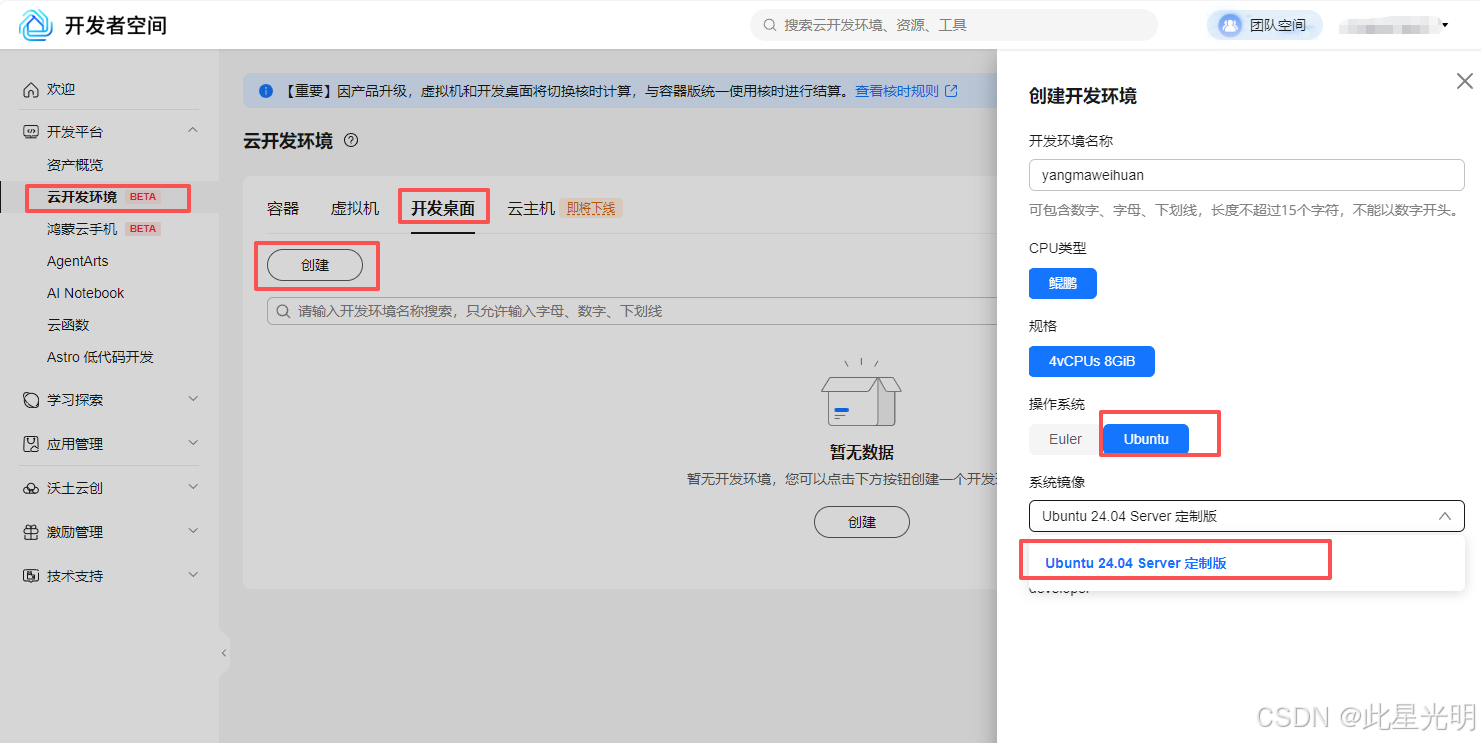 AI Visual Insight: This image shows the entry point for creating a cloud development environment in Huawei Developer Space. The focus is the environment type selector on the left and the cloud desktop creation flow, which illustrates how the platform abstracts development resources into a visual workspace and lowers the barrier to running agents.
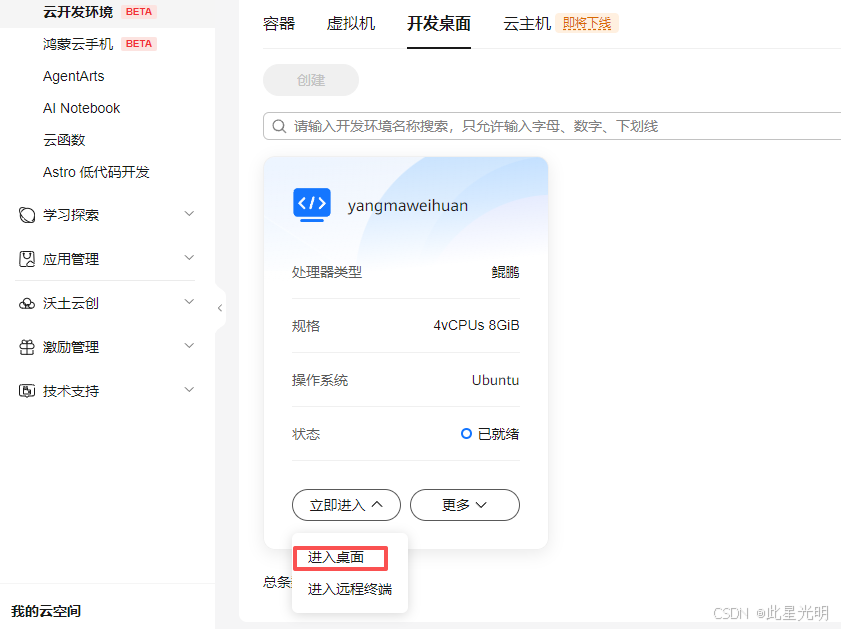 AI Visual Insight: This image reflects the initialization state of a cloud desktop instance. It typically involves image startup, network allocation, and remote desktop session preparation, which indicates that the underlying OS and preinstalled applications are fully managed by the platform.
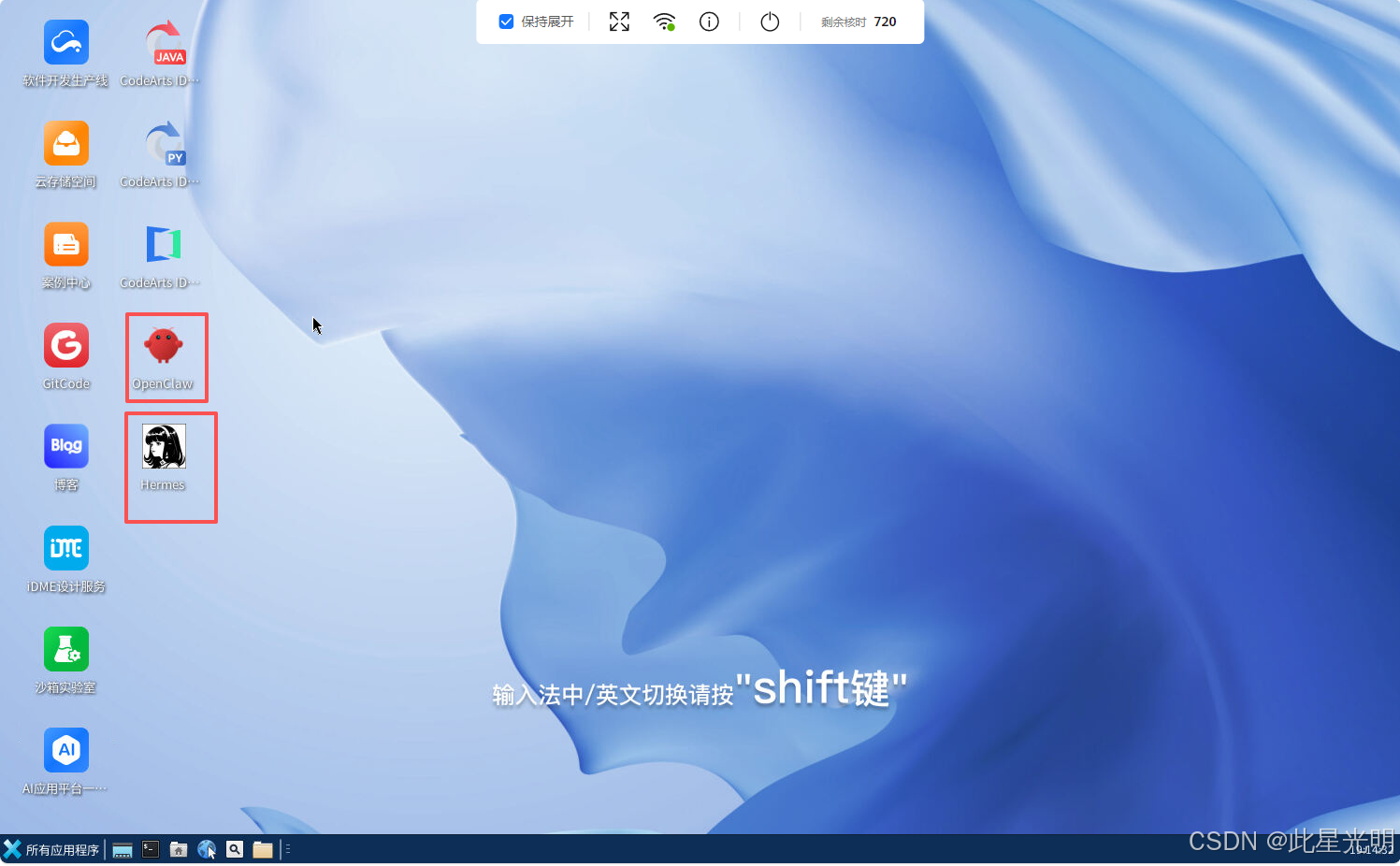 AI Visual Insight: This image shows that multiple agent launchers are already available inside the cloud desktop. Users do not need to clone repositories or install dependencies manually. They can launch frameworks directly through graphical icons, which demonstrates the platform’s zero-configuration design.
The practical workflow can be reduced to four steps
- Sign in to Huawei Developer Space and create a cloud desktop.
- Claim a voucher or token package on the MaaS platform.
- Enable the model service and obtain an OpenAI-compatible endpoint.
- Launch Hermes and enter the API address, key, and model name.
# After launch, select a custom endpoint
Custom endpoint
# Enter the API Base URL, API Key, model name, and context length in sequence
# Use a context length of at least 64000
This flow maps directly to the key configuration items shown during the first Hermes startup.
The key to Huawei MaaS is obtaining an OpenAI-compatible endpoint
The easiest point to overlook in the article is not claiming the voucher, but selecting the correct interface type. Hermes needs an inference endpoint that is directly compatible with the OpenAI request format. On the model inference page, you should select Online Inference and Preset Service, then enable the corresponding model service.
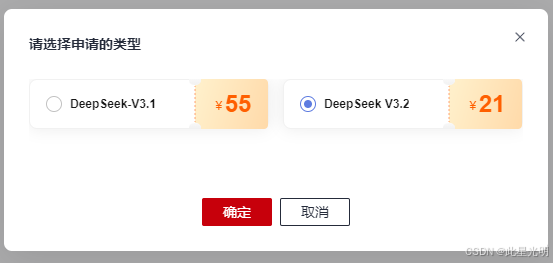 AI Visual Insight: This image shows the MaaS entry point for claiming model vouchers or purchasing model access. It indicates that model invocation cost has been productized further, allowing developers to claim benefits first and then bind them to a specific inference service.
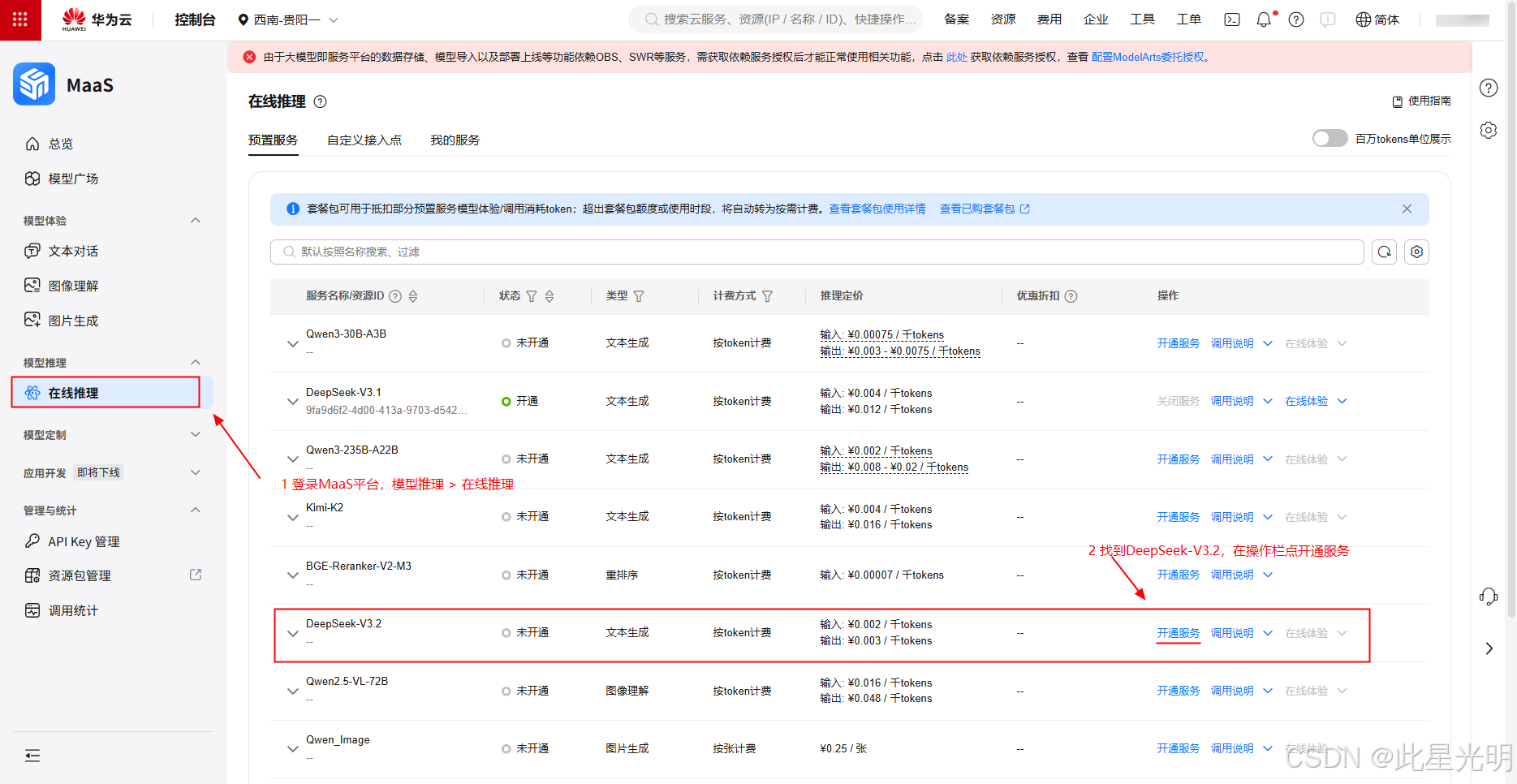 AI Visual Insight: This image highlights the service activation path inside the model inference console, especially navigation items such as Online Inference and Preset Service. These options determine the final interface form and invocation method exposed to external agents.
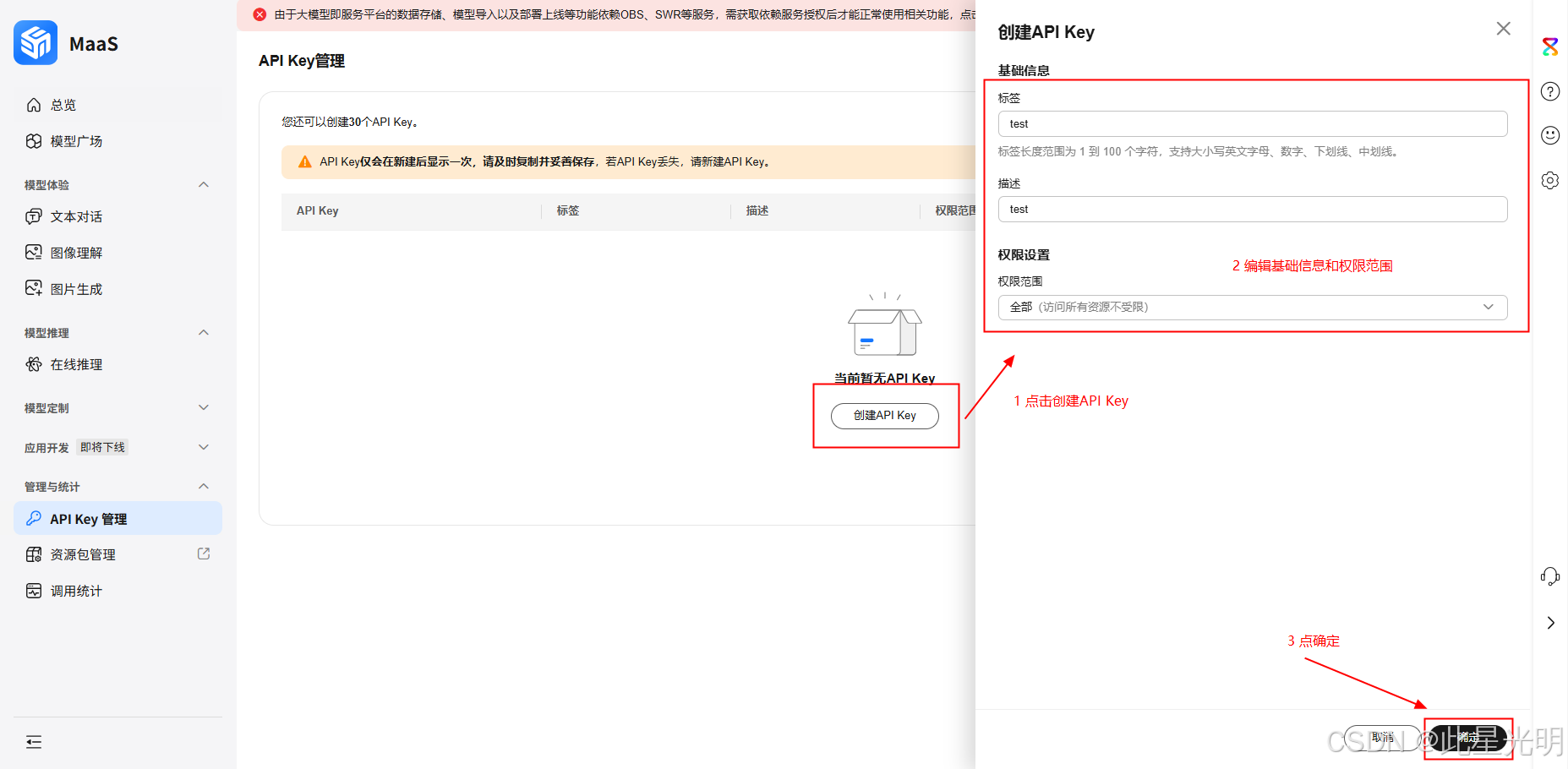 AI Visual Insight: This image shows the inference access details on the service details page, usually including the Base URL, authentication key, and model identifier. These are the minimum required settings for connecting Hermes to a third-party model.
Fill in Hermes first-run settings with fixed parameters
- API base URL: Enter the OpenAI-compatible endpoint URL.
- API key: Enter the key generated in the MaaS console.
- Model: Select the enabled
deepseek-v3.2model. - Context length: At least 64,000.
- Display name: Save it with an easily recognizable name for reuse.
config = {
    "base_url": "https://your-maas-endpoint/v1",  # OpenAI-compatible endpoint URL
    "api_key": "sk-xxxx",                         # Key generated in the console
    "model": "deepseek-v3.2",                    # Enabled model name
    "context_length": 64000                        # The context length should not be too low
}
print("Hermes configuration is ready")
This configuration example represents the minimum parameter set required to connect Hermes to a MaaS model.
Hermes is better suited for deliverable-oriented tasks after startup succeeds
In the example, Hermes is asked to collect the day’s major national events, limit the result to no more than five items, and generate a local .doc document with both text and images. This task involves retrieval, filtering, formatting, and file output at the same time, which makes it a typical composite agent workflow.
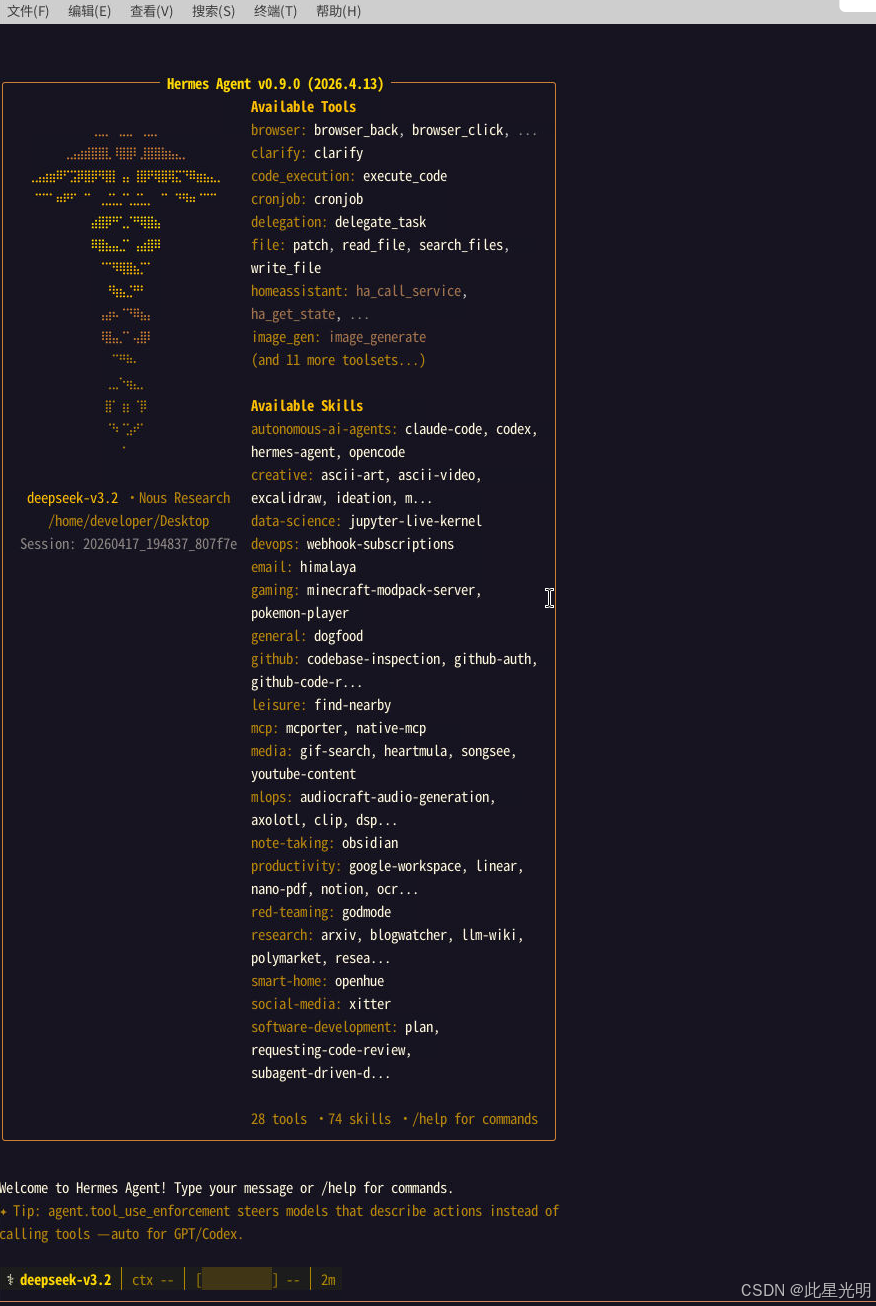 AI Visual Insight: This image shows the agent-ready state in a command-line or terminal environment. It indicates that model connectivity, basic configuration, and session initialization have completed successfully, and the system is ready to receive tasks.
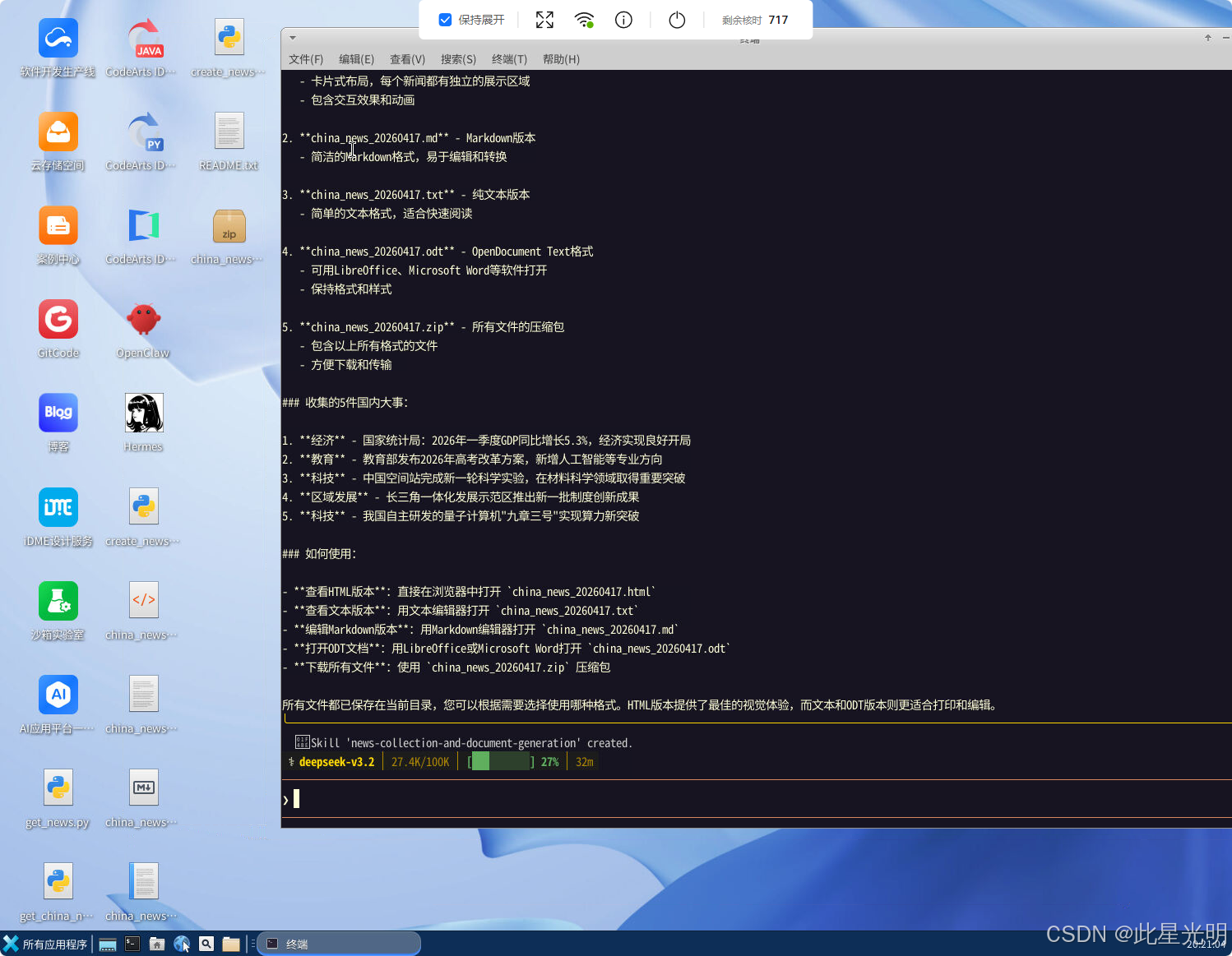 AI Visual Insight: This image shows the working directory after task execution, including Python scripts, HTML files, or document artifacts. It suggests that Hermes persists both intermediate steps and final outputs to disk, which gives it auditable and reusable engineering characteristics.
This case reveals a practical issue in agent deployment
Directly relying on web link scraping does not always produce stable results. In practice, a more reliable approach is often to have the agent generate Python code first, then let that code perform data collection, content organization, and document export. This shows that a high-quality agent does not replace code. Instead, it acts as a higher-level task orchestrator.
from pathlib import Path

report = "Today's major national events summary..."  # Main body summarized by the agent
output = Path("daily_report.doc")
output.write_text(report, encoding="utf-8")  # Write the local document content
print(f"Generated: {output}")
This snippet demonstrates the minimal implementation idea for persisting the final agent result as a local document.
Huawei Developer Space is a good fit for low-barrier agent experimentation
If you want a mature ecosystem and rich tool integration, OpenClaw is the better fit. If you care more about long-running tasks, autonomous learning, and skill accumulation, Hermes is worth trying. The real advantage of Huawei Developer Space is that it standardizes the system environment, desktop entry point, and model integration path, which significantly lowers the barrier to a first successful experience.
FAQ
Q1: What is the fundamental difference between Hermes and OpenClaw?
A: OpenClaw focuses on tool integration and reliable execution, while Hermes focuses on active learning, skill accumulation, and long-term memory. Their best-fit scenarios lean more toward out-of-the-box execution and continuous evolution, respectively.
Q2: Why must I choose an OpenAI-compatible endpoint?
A: Hermes custom endpoint configuration usually assumes the OpenAI protocol for model access. If the endpoint is not compatible, the Base URL, authentication flow, and model invocation format may not match directly.
Q3: Why does Hermes still generate Python scripts while executing tasks?
A: This shows that the agent is converting natural language tasks into executable steps. For deterministic workflows such as data collection, organization, and export, generating and running scripts is often more stable and reproducible than relying entirely on browser interactions.
[AI Readability Summary]
This article reconstructs the full zero-configuration workflow for running Hermes Agent in Huawei Developer Space, including the capability differences between OpenClaw and Hermes, Huawei cloud desktop creation, MaaS token acquisition and OpenAI-compatible endpoint retrieval, Hermes custom endpoint configuration, and a practical automation case study. It is a good fit for developers who want to try AI agents with a low setup barrier.