Linux signals are an asynchronous notification mechanism that the kernel uses to notify processes about termination, interruption, exceptions, and timer events. This article focuses on how signals are generated, caught, blocked, and preserved, answering three core questions: Where do signals come from, when are they handled, and how are they blocked? Keywords: Linux signals, sigprocmask, pending.
Technical Specification Snapshot
| Parameter | Description |
|---|---|
| Domain | Linux Systems Programming |
| Primary Languages | C / C++ / Bash |
| Related Standard | POSIX Signals |
| Article Type | Principles + Experiments |
| Original Popularity | 609 views, 39 likes, 37 saves |
| Core Dependencies | signal.h, unistd.h, kill, alarm, sigprocmask |
Linux Signals Are Essentially a Process-Level Asynchronous Event Notification Mechanism
You can think of a signal as a type of “soft interrupt event” that the kernel delivers to a process. A process does not need to poll for it actively. Instead, the signal arrives asynchronously when a specific event occurs, notifying the process to interrupt execution, exit, handle an exception, or run custom logic.
Common scenarios are familiar: Ctrl + C terminates a foreground program, kill -9 forcefully ends a process, and closing the read end of a pipe can cause the writer to exit. At their core, all of these behaviors are signal-driven.
Use kill -l to View Signal Numbers on the System
kill -l # List the signals supported by the current system and their numbersThis command helps you quickly build a mapping between signal numbers and their meanings, making it a practical entry point for learning the Linux signal model.
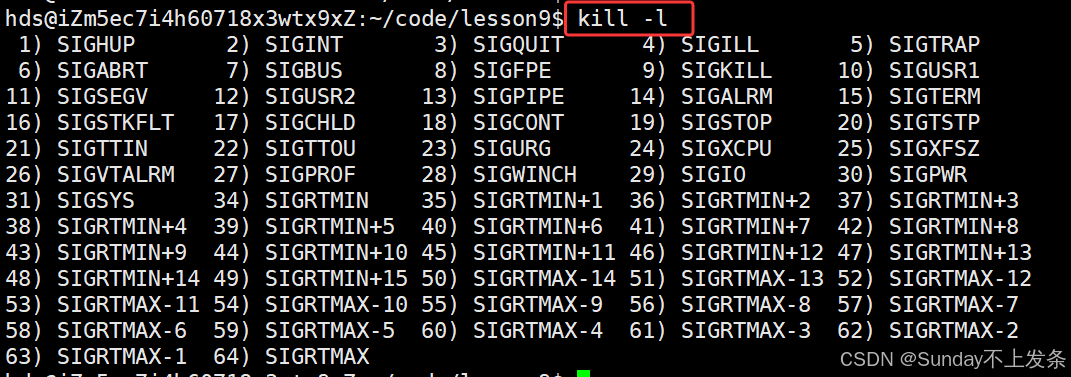 AI Visual Insight: This figure shows the numbering layout of standard Linux signals and real-time signals. Signals 1–31 are non-real-time signals with fixed semantics, while signals 34–64 are real-time signals that support queuing behavior. It is useful for understanding signal categories and the behavioral differences of related APIs.
The signal API Lets a Process Register a Custom Handler
The signal function installs a handling action for a specific signal. Handling typically falls into three categories: default handling, ignoring the signal, or custom catching. Not all signals can be caught. For example, SIGKILL(9) and SIGSTOP(19) cannot be intercepted.
#include
<iostream>
#include
<csignal>
#include <unistd.h>

void handler(int signum)
{
    std::cout << "Caught signal: " << signum << std::endl; // Print the received signal number
}

int main()
{
    signal(SIGINT, handler); // Register a handler for signal 2
    while (true)
    {
        std::cout << "pid: " << getpid() << std::endl; // Continuously print the process ID for observation
        sleep(1);
    }
    return 0;
}
This program shows that once a signal arrives, the process can transfer control to a user-defined function instead of executing the default termination action.
Signals Can Originate from the Keyboard, Commands, System Calls, Software Conditions, and Hardware Exceptions
The keyboard is the most intuitive source. Ctrl + C sends SIGINT to the foreground process, and Ctrl + \ typically triggers SIGQUIT. The key point is not the keystroke itself, but that the terminal driver interprets the input as a signal and delivers it to the foreground job.
Background processes usually do not receive keyboard-generated signals because a terminal serves only one foreground process group at a time. Commands such as jobs, fg, bg, and Ctrl + Z are fundamentally tied to job control and signal delivery.
Use Commands and System Calls to Send Signals Explicitly
#include
<iostream>
#include <signal.h>

int main(int argc, char** argv)
{
    pid_t pid = std::stoi(argv[1]);
    int sig = std::stoi(argv[2]);
    int ret = kill(pid, sig); // Send the specified signal to the specified process
    if (ret == 0)
    {
        std::cout << "send " << sig << " to " << pid << std::endl; // Indicate successful delivery
    }
    return 0;
}
This example demonstrates how the kill system call performs process-to-process signal delivery.
alarm and pause Demonstrate a Typical Pattern for Software-Generated Signals
alarm sends SIGALRM to the current process after the configured number of seconds. If you do not catch it, the default action terminates the process. It is commonly used for timeout control, scheduled triggering, and experimental verification.
#include
<iostream>
#include <signal.h>
#include <unistd.h>

void handler(int signum)
{
    std::cout << "Received alarm signal: " << signum << std::endl; // Handle SIGALRM
}

int main()
{
    signal(SIGALRM, handler); // Register the alarm signal handler
    alarm(3); // Trigger SIGALRM after 3 seconds
    while (true) {}
    return 0;
}
This program shows that timed events do not require an extra thread. The kernel can drive the process directly through signals.
A Periodic Alarm Can Simulate an Event-Driven Execution Framework
#include
<iostream>
#include
<vector>
#include
<functional>
#include <signal.h>
#include <unistd.h>

using func_t = std::function<void()>;
std::vector
<func_t> tasks;

void Sched() { std::cout << "Run scheduling task" << std::endl; }
void MemManager() { std::cout << "Run memory inspection" << std::endl; }

void handler(int sig)
{
    for (auto &task : tasks)
    {
        task(); // Execute event handling logic in sequence after receiving the signal
    }
    alarm(1); // Reset the alarm to create periodic scheduling
}

int main()
{
    tasks.push_back(Sched);
    tasks.push_back(MemManager);
    signal(SIGALRM, handler);
    alarm(1);
    while (true)
    {
        pause(); // Suspend and wait for the next signal
    }
}
This example reveals a classic kernel-style execution model: wait for an event, receive a signal, run the handler, and wait again.
The Operating System Ultimately Converts Hardware Exceptions into Signals
Errors such as division by zero and invalid memory access do not originate as “language-level errors” by nature. Instead, the CPU or MMU detects the exception, and the kernel converts it into the corresponding signal. For example, division by zero commonly maps to SIGFPE, while invalid pointer access commonly maps to SIGSEGV.
This explains why many program crashes do not simply “exit mysteriously.” They typically follow a chain like this: hardware exception → kernel recognition → signal delivery → default termination.
The Kernel Stores Signals as a Pending Set, a Blocked Set, and a Handler Table
To understand signals, you need to know not only how they are sent, but also where they go after arrival. The process control block maintains at least three core categories of signal state: the blocked signal set block, the pending signal set pending, and the handling action table handler.
pending means the signal has arrived but has not yet been delivered. block means the signal is currently not allowed to be delivered. handler determines whether the process should perform the default action, ignore the signal, or run custom logic once the signal is actually delivered.
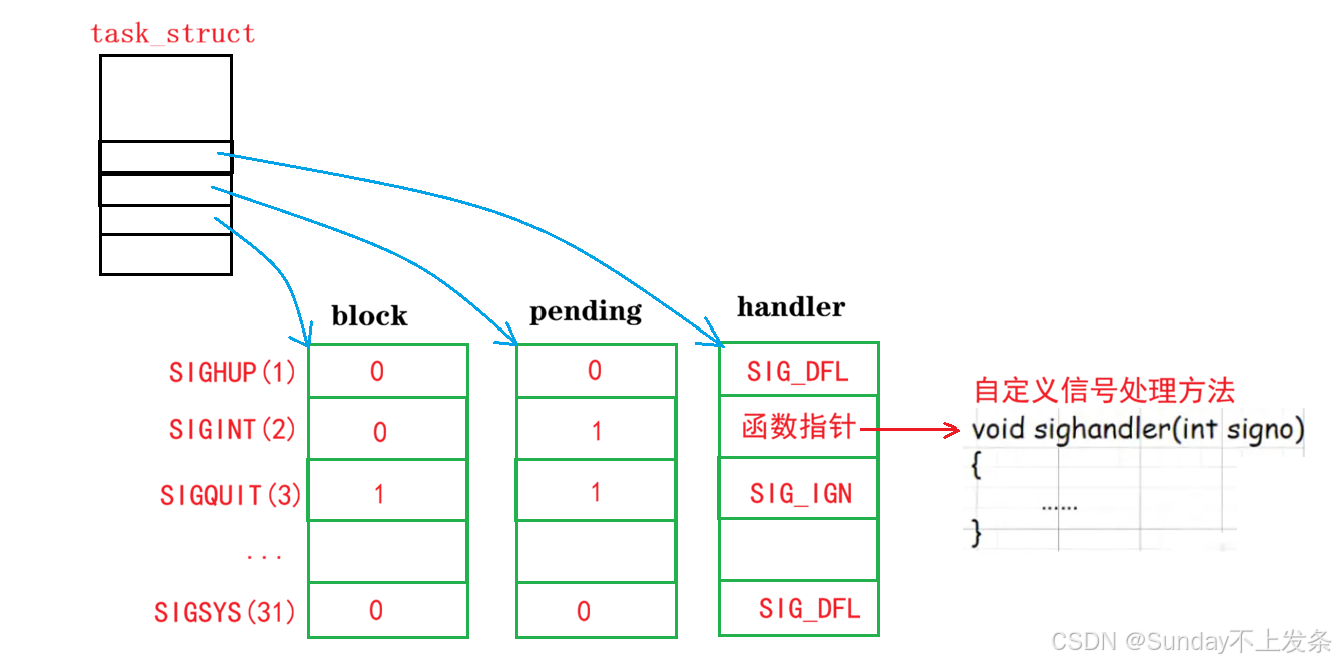 AI Visual Insight: This figure connects
 task_struct to three logical tables—block, pending, and handler—to show how the Linux kernel separately stores blocking state, undelivered state, and action entry points. It is a key structural diagram for understanding the “record first, deliver later” signal model.
sigset_t and sigprocmask Are the Fundamental Interfaces for Signal Sets
sigset_t is a bitmap container that describes only “a set of signals.” By itself, it does not modify kernel state directly. The interface that actually changes the current process blocked set is sigprocmask, while inspection of the pending set depends on sigpending.
#include
<iostream>
#include <signal.h>
#include <unistd.h>

void handler(int sig)
{
    std::cout << "Signal delivered: " << sig << std::endl; // Control reaches here after unblocking
}

int main()
{
    signal(SIGINT, handler);

    sigset_t block;
    sigemptyset(&block); // Initialize as an empty set
    sigaddset(&block, SIGINT); // Add SIGINT to the blocked set
    sigprocmask(SIG_BLOCK, &block, nullptr); // Modify the kernel blocked signal set

    for (int i = 0; i < 5; ++i)
    {
        sigset_t pending;
        sigpending(&pending); // Get the current pending signal set
        std::cout << "SIGINT pending: " << sigismember(&pending, SIGINT) << std::endl; // Check whether signal 2 is pending
        sleep(1);
    }

    sigprocmask(SIG_UNBLOCK, &block, nullptr); // Unblock the signal and trigger delivery
    while (true) pause();
}
This program clearly verifies that a blocked signal is not lost. Instead, it enters pending and is delivered after you remove the block.
Core Dumps Are Critical Debugging Artifacts After Abnormal Process Termination
Among the default handling actions, both Core and Term terminate the process, but Core additionally generates a core dump file. That file preserves a memory image of the process at the time of the crash, making it possible to investigate the problem afterward with gdb.
On cloud servers, core dumps are often disabled by default because large memory images can fill disks and overwhelm I/O resources. During debugging, you can adjust the limit with ulimit -c and then load the core file into gdb for analysis.
FAQ
1. Why can’t SIGKILL and SIGSTOP be caught?
Because the kernel reserves these two signals as strong control mechanisms. The system must be able to terminate or suspend a process unconditionally in any situation. Otherwise, a process could become uncontrollable.
2. Are blocked signals lost?
Usually not immediately. During the blocked period, standard signals are recorded in pending. However, multiple arrivals of the same standard signal typically do not queue; the kernel usually preserves only one pending state for that signal.
3. What do signal, sigprocmask, and sigpending do respectively?
signal registers a handling action, sigprocmask modifies the process blocked signal set, and sigpending reads the current pending signal set. Together, they map to handling, masking, and observation.
AI Readability Summary
This article systematically explains the core mechanics of Linux process signals, covering signal concepts, signal sources, APIs such as signal, kill, and alarm, the difference between foreground and background processes, hardware exception triggers, the pending and block sets, and practical usage of sigprocmask and sigpending.