This article focuses on building a DNS server lab with BIND on Linux. It covers three core capabilities: forward lookup, reverse lookup, and master-slave replication. It is designed to help beginners understand the named configuration chain, zone file relationships, and validation methods. Keywords: BIND, DNS resolution, master-slave replication.
Technical Specifications at a Glance
| Parameter | Description |
|---|---|
| Runtime Environment | Linux / openEuler / CentOS-like distributions |
| Core Software | BIND (named) |
| Key Protocols | DNS, UDP/TCP 53 |
| Core Files | /etc/named.conf, /etc/named.rfc1912.zones, /var/named |
| Deployment Roles | Primary DNS, Secondary DNS, Client |
| Required Tools | dnf, systemctl, nmcli, nslookup |
| Stars | Not provided in the source material |
This lab breaks the goal into three verifiable capabilities
DNS fundamentally maintains two mapping relationships: “domain name to IP” and “IP to domain name.” In practice, the most confusing part is not the commands themselves, but the reference chain across the main configuration file, zone configuration file, and zone data files.
To reduce the learning curve, think of BIND as a three-layer structure: named.conf defines how the service runs, named.rfc1912.zones defines which zones are hosted, and the data files under /var/named define the actual DNS records.
Install BIND first and handle common dependency conflicts
dnf install bind -y # Install the BIND serviceThis command installs the named service and serves as the starting point for the entire lab.
If a newer system reports file conflicts related to OpenSSL, clear the cache first and then perform a package replacement.
dnf clean packages  # Clear the package cache
dnf swap openssl-fips-provider-so openssl-fips-provider -y  # Replace the conflicting component
These commands resolve dependency conflicts that may appear on some newer systems.
The main configuration file must allow listening and query access first
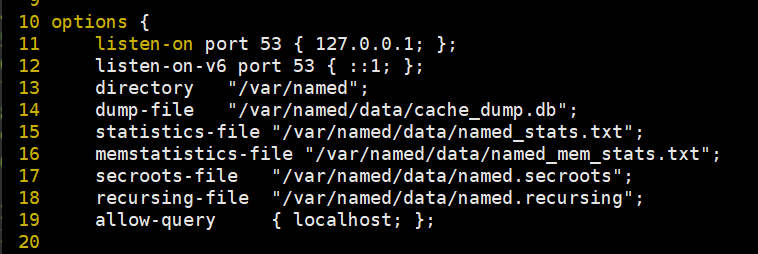
The default configuration usually listens only on local addresses, which is not suitable for LAN-based lab testing. If the host needs to provide DNS resolution for clients, it must allow external queries and can optionally enable forwarding.
vim /etc/named.confThis step opens the main configuration file so you can modify the global behavior of named.
At minimum, adjust the following core parameters:
options {
    listen-on port 53 { any; };        // Listen on all IPv4 addresses
    listen-on-v6 port 53 { any; };     // Listen on all IPv6 addresses
    allow-query { any; };              // Allow queries from any client
    forward only;                      // Use forwarding mode only
    forwarders { 8.8.8.8; };           // Forward to the upstream DNS server
};
This configuration determines whether clients can access the service and is a prerequisite for a successful lab.
The zone configuration file determines which namespaces are hosted
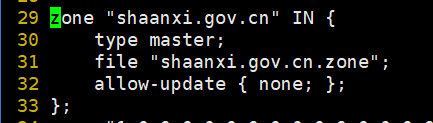
/etc/named.rfc1912.zones does not store DNS records directly. Instead, it declares which server manages a zone and where the data file is located. In a forward lookup lab, you typically add a primary zone such as shaanxi.gov.cn.
zone "shaanxi.gov.cn" IN {
    type master;                       // This server acts as the primary DNS
    file "shaanxi.gov.cn.zone";       // Points to the forward zone data file
    allow-update { none; };            // Disable dynamic updates
};
This configuration binds the domain namespace to a specific data file.
Forward lookup depends on writing correct A records
Forward lookup means “domain name → IP.” A common approach is to copy named.localhost as a template and then modify the SOA, NS, and A records.
cp -a /var/named/named.localhost /var/named/shaanxi.gov.cn.zone  # Copy the template to create the zone file
vim /var/named/shaanxi.gov.cn.zone                               # Edit the forward lookup data file
These commands quickly create and open the forward zone file for editing.
Use a structure like this:
$TTL 1D
@   IN SOA ns.shaanxi.gov.cn. admin.shaanxi.gov.cn. (
        2026050301  ; Serial number; increment it after each change
        1D          ; Refresh interval
        1H          ; Retry interval
        1W          ; Expiration interval
        3H )        ; Negative cache TTL
    IN NS  ns.shaanxi.gov.cn.
ns  IN A   192.168.236.135     ; DNS server address
www IN A   192.168.236.135     ; Web host address
This configuration defines the authoritative information for the zone and allows www.shaanxi.gov.cn to resolve to the specified IP address.
Client-side validation matters more than a successful service restart
A successful service restart does not guarantee that DNS resolution works. The client must explicitly point its DNS server to the lab server.
systemctl restart named                          # Restart the DNS service
nmcli connection modify ens160 ipv4.dns 192.168.236.135  # Set the DNS server
nmcli connection up ens160                       # Reactivate the NIC
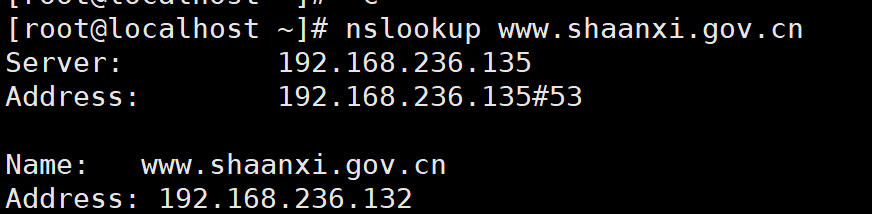
nslookup www.shaanxi.gov.cn                      # Verify the forward lookup result
These commands apply the service changes, switch the client DNS settings, and validate the final lookup result.
Reverse lookup requires mapping the IP subnet to a PTR zone
Reverse lookup means “IP → domain name.” If the subnet is 192.168.236.0/24, the standard zone name is 236.168.192.in-addr.arpa. The original material used a simplified naming style, but in production-like scenarios you should use the full reverse domain name.
zone "236.168.192.in-addr.arpa" IN {
    type master;                               // This server manages the reverse zone
    file "192.168.236.arpa";                 // Reverse lookup data file
    allow-update { none; };
};
This configuration declares the reverse hosting relationship for the IP subnet.
Next, copy the loopback template and add a PTR record.
cp -a /var/named/named.loopback /var/named/192.168.236.arpa  # Copy the reverse template
vim /var/named/192.168.236.arpa                               # Edit the PTR data
These commands create the reverse lookup zone file.
$TTL 1D
@   IN SOA ns.shaanxi.gov.cn. admin.shaanxi.gov.cn. (
        2026050302  ; The serial number must increase
        1D
        1H
        1W
        3H )
    IN NS  ns.shaanxi.gov.cn.
135 IN PTR www.shaanxi.gov.cn.   ; 192.168.236.135 maps to the domain name
This configuration allows the specified IP address to resolve back to the target host name.
Master-slave DNS replication depends on zone transfer permissions
The key to a primary-secondary deployment is not manually recreating all records on the secondary server. Instead, the secondary server should automatically synchronize data from the primary server through zone transfers. The primary server must explicitly allow transfers with allow-transfer.
zone "shaanxi.gov.cn" IN {
    type master;                            // Primary server role
    file "shaanxi.gov.cn.zone";
    allow-transfer { 192.168.236.136; };   // Allow the secondary server to pull zone data
};
This configuration determines whether the secondary server has permission to replicate the primary zone records.
The zone definition on the secondary server must use slave and declare the primary server address.
zone "shaanxi.gov.cn" IN {
    type slave;                            // Secondary server role
    masters { 192.168.236.135; };          // Specify the primary server
    file "slaves/shaanxi.gov.cn.zone";    // Local cache file after synchronization
};
This configuration allows the secondary server to automatically pull zone data from the primary server after startup.
After replication finishes, validate resolution directly from the secondary node
systemctl restart named  # Restart named on both the primary and secondary servers
nmcli con modify ens160 ipv4.dns 192.168.236.136  # Point the client to the secondary DNS server
nmcli con up ens160
nslookup www.shaanxi.gov.cn                        # Verify that the secondary server can resolve independently
These commands confirm that the secondary node can resolve queries on its own rather than relying on a temporary cache from the primary node.
The images contain useful troubleshooting signals for configuration issues
 AI Visual Insight: This screenshot shows a dependency or file conflict error during software installation. It usually appears during the package replacement stage before or after BIND installation. It indicates that the system has a version mismatch involving OpenSSL FIPS-related components, which should be resolved with
 dnf clean and dnf swap.
 AI Visual Insight: This screenshot focuses on the
 options block in named.conf. The key details are the listen addresses, query permissions, and forwarder configuration. These settings directly determine whether external clients can access the DNS service and whether unknown domains will continue recursive lookup through an upstream DNS server.
 AI Visual Insight: This image shows the newly added forward zone definition in
 named.rfc1912.zones. The critical point is the combination of type master and the file field, which determines whether the server has authoritative control over a given domain.
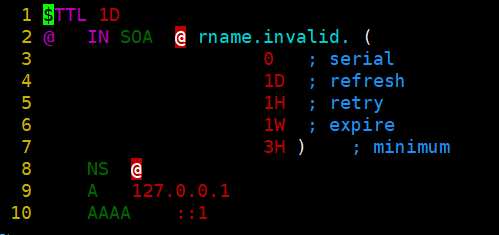 AI Visual Insight: This screenshot shows the original template structure of a forward zone file, including SOA, NS, A, and AAAA record types. It is a core example for understanding TTL values, serial numbers, and authoritative record syntax, and it serves as the foundation for replacing the template with a business domain.
 AI Visual Insight: This image shows the
 nslookup verification result. It confirms that the client has pointed its DNS server to the lab server and successfully received the IPv4 address for the www host. This is direct evidence that the forward lookup configuration is working end to end.
 AI Visual Insight: This screenshot shows the reverse lookup query result, indicating that the PTR record is active. The client can resolve an IP address back to a fully qualified domain name, which is important for mail systems, auditing, and network asset identification.
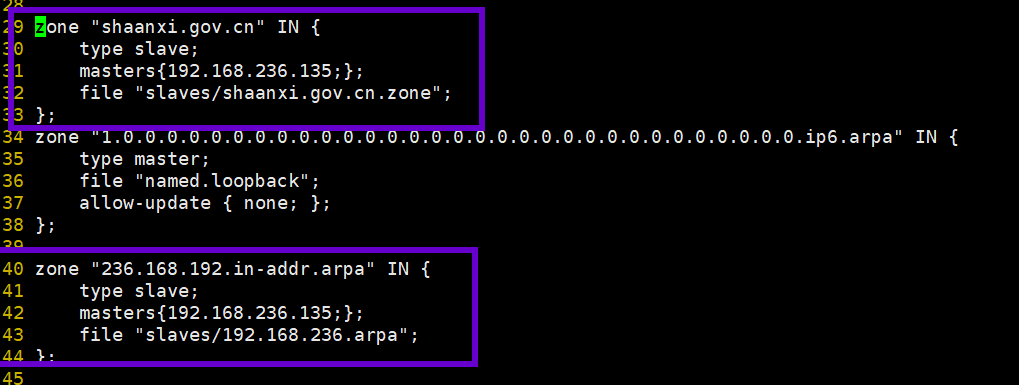 AI Visual Insight: This image shows the zone configuration interface on the secondary server. The key details are
 type slave, masters, and the local cache file directory. Together, these settings define how the secondary node pulls and persists zone data from the primary node.
This lab is really about understanding configuration relationships, not memorizing commands
Beginners usually fail for one of four reasons: the service is not listening on external interfaces, the zone file path is incorrect, the SOA or record syntax is invalid, or the client is still using an old DNS server. If you troubleshoot in the order of “global configuration → zone declaration → record file → client validation,” you can usually locate the issue quickly.
In a production environment, you should also add access controls, recursion limits, logging and auditing, DNSSEC, and cache optimization. For a teaching lab, however, successfully completing forward lookup, reverse lookup, and master-slave replication already covers the core structure of DNS administration.
FAQ
1. Why does systemctl restart named succeed, but nslookup still fails?
The most common reason is that the client DNS server was not changed to the lab server, or named.conf is still listening only on 127.0.0.1. Next, check the firewall, port 53 listeners, and zone file syntax.
2. What is the core difference between forward lookup and reverse lookup?
Forward lookup maps a domain name to an IP address and primarily depends on A/AAAA records. Reverse lookup maps an IP address to a domain name and primarily depends on PTR records. They belong to different zone files and must be declared separately.
3. Why did the secondary server fail to synchronize data in a master-slave DNS setup?
Usually, the primary server did not configure allow-transfer, the masters address on the secondary server is incorrect, or the serial number of the primary zone was not incremented. For synchronization issues, first check the zone definitions and network connectivity.
Core Summary: Based on Linux and BIND, this article reconstructs the DNS configuration lab workflow. It covers named.conf, zone files, forward lookup, reverse lookup, and master-slave replication, and provides validation commands, key configurations, and common troubleshooting points. It is well suited for quickly completing a teaching lab or an entry-level deployment.