[AI Readability Summary] Claude Opus 4.7 is Anthropic’s latest flagship model, with major improvements in coding, visual understanding, long-horizon task execution, and instruction following. For users in China, where registration, payment, and access are often difficult, the DeepSider browser extension provides a practical way to use it directly. Keywords: Claude Opus 4.7, DeepSider, AI coding.
Technical Specifications Snapshot
| Parameter | Details |
|---|---|
| Model / Tool | Claude Opus 4.7 / DeepSider |
| Language | Primarily English, with multilingual interaction |
| Access Method | Browser extension, sidebar chat |
| Protocol / Form Factor | SaaS service, Web plugin integration |
| Release Date | 2026-04-16 |
| GitHub Stars | Not provided in the source |
| Core Dependencies | Edge browser, DeepSider extension |
| Key Capabilities | Coding, visual analysis, document reasoning, task automation |
Claude Opus 4.7 has become a flagship upgrade for production workloads
Claude Opus 4.7 is Anthropic’s new default flagship model in the Claude 4 series. Compared with 4.6, this is not a minor patch. It is a systematic upgrade focused on end-to-end execution for complex tasks, code generation quality, visual input accuracy, and reliability in knowledge work.
According to the original information, the official pricing remains the same as 4.6. However, the new tokenizer may increase effective input token usage by 0% to 35%. Combined with stronger reasoning intensity, the real-world cost is often higher than the previous generation.
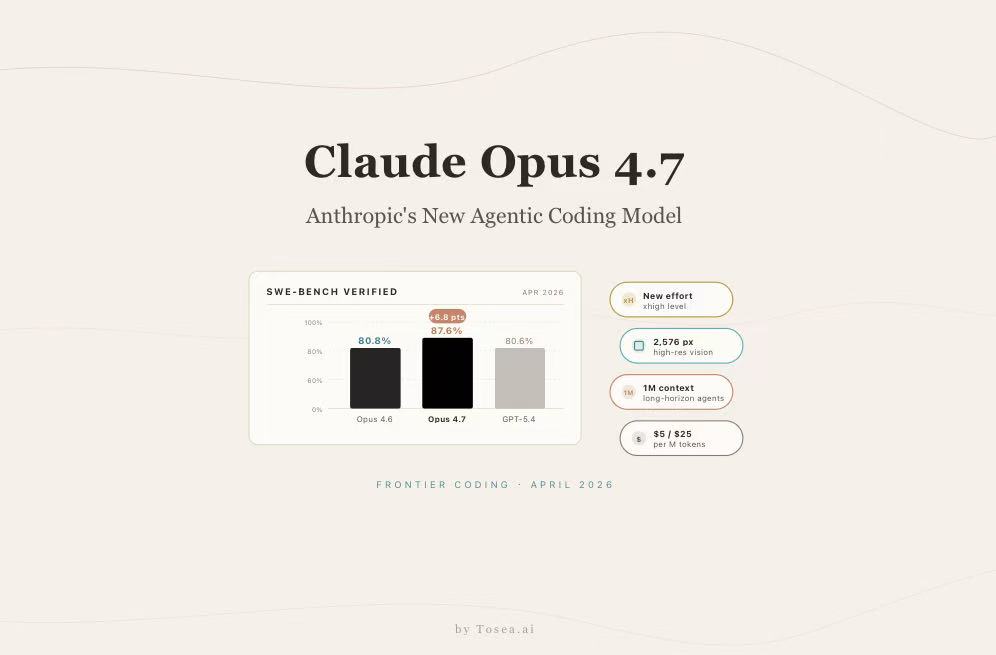 AI Visual Insight: This image highlights the launch context of Claude Opus 4.7 and the themes behind the version update. The main message is that the new version is officially available and that readers should focus on upgraded model capabilities and access paths rather than on branding alone.
The version upgrade can be summarized across six technical dimensions
First, it is stronger at long-horizon, complex tasks. The model is better suited for work that requires sustained planning, execution, and self-checking, especially in multi-step software engineering and document workflows.
Second, its coding capabilities continue to improve. The source notes that, on top of an already strong previous generation, programming- and agent-related benchmarks improved by roughly 10% to 12%. That makes it better suited for refactoring, code completion, testing, and debugging loops.
# Use pseudocode to describe the engineering workflow that Opus 4.7 handles well
workflow = [
    "Read requirements",      # The model first understands the task context
    "Plan implementation steps",  # Then breaks the work into executable subtasks
    "Generate code",      # Produces the core implementation
    "Self-check results",      # Verifies output before returning
    "Fix issues"       # Iteratively corrects problems when it finds them
]

for step in workflow:
    print(step)
This code snippet captures the kind of plan-execute-validate loop that Opus 4.7 handles more effectively.
Claude Opus 4.7 deserves even more attention for visual and knowledge work improvements
Visual capability is one of the strongest signals in this release. The source states that Opus 4.7 supports image inputs up to 3.75 megapixels, with visual performance improving by more than 3x. That is highly relevant for screenshot analysis, design review, and understanding scanned contracts.
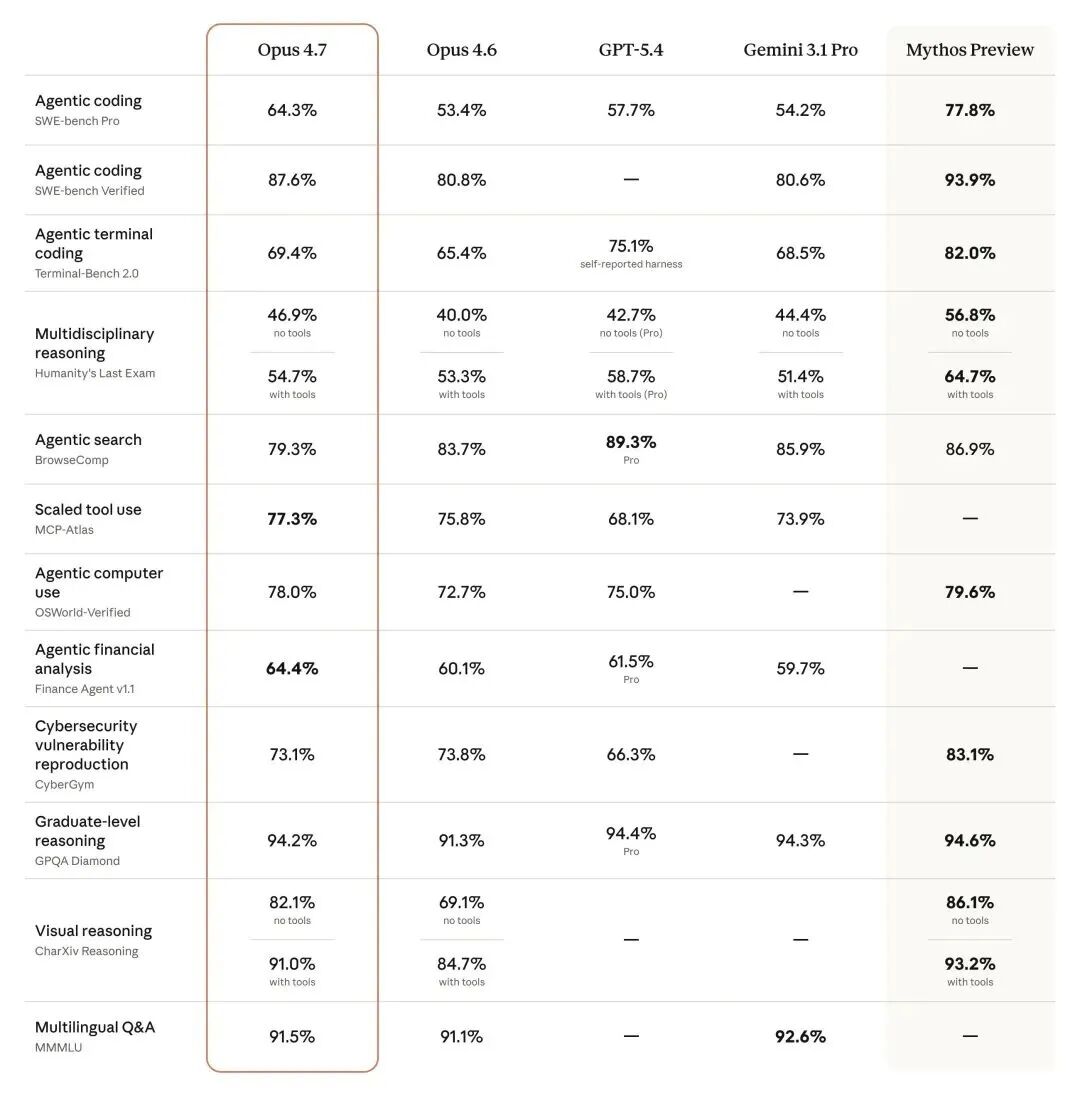 AI Visual Insight: This image compares Claude Opus 4.7 with GPT-5.4 and Gemini 3.1 Pro on coding and agent benchmarks. It emphasizes that Opus 4.7 achieves higher scores across multiple evaluations, showing its competitive advantage for engineering workloads.
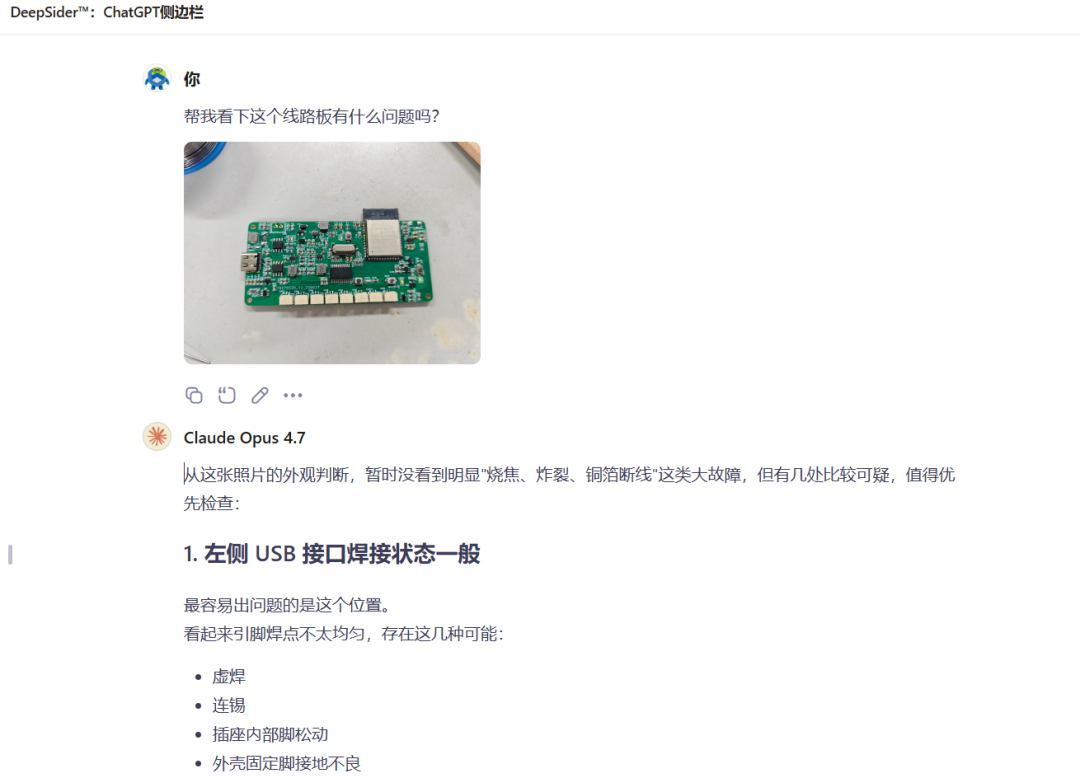 AI Visual Insight: This image explains the improvement in high-resolution visual input processing. The key point is that the model can handle more complex interfaces, documents, and image structures, enabling design review, OCR-style understanding, and UI automation scenarios.
 AI Visual Insight: This image further illustrates visual understanding scenarios, typically involving charts, document pages, or complex screenshots. It shows that the model does not just recognize image content but also understands layout, text blocks, and semantic relationships.
At the same time, instruction following has become more literal. That means older prompts cannot always be moved directly into 4.7. Developers should reduce ambiguity and define input boundaries, output formats, and constraints more explicitly.
High-value knowledge work is becoming a core application direction
Opus 4.7 also performs strongly in financial agents and third-party legal and finance evaluations. These scenarios require more than simple question answering. They demand stable reasoning over clauses, tables, context, and logical relationships.
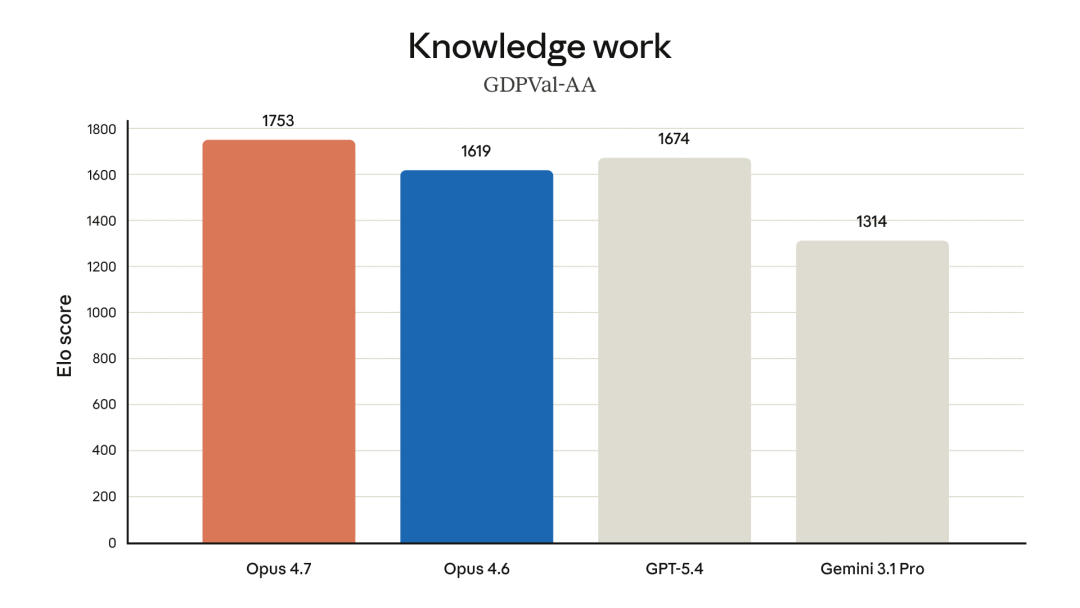 AI Visual Insight: This image presents benchmark results for high-economic-value tasks such as finance and law. It highlights the improved reliability of Claude Opus 4.7 in real knowledge work rather than optimization only for general chat tasks.
// Design a prompt structure that fits Opus 4.7 more effectively
const prompt = {
  role: "system",
  goal: "Extract payment terms from the contract and identify risks", // Define the task objective clearly
  constraints: ["Preserve supporting source text", "Output as a Markdown table"], // Specify output constraints
  input: "Full contract text or screenshot content" // Specify the input source
};

console.log(prompt);
This snippet shows that structured prompts are more effective for taking advantage of 4.7’s stronger instruction-following behavior.
Claude Opus 4.7 is a better fit for document-heavy teams and automation product teams
Based on the source material, three user groups are the best fit.
The first group is teams with document-heavy workflows, such as financial disclosures, contracts, academic papers, and research reports. The model can do more than read text. It can also understand structure and contextual relationships.
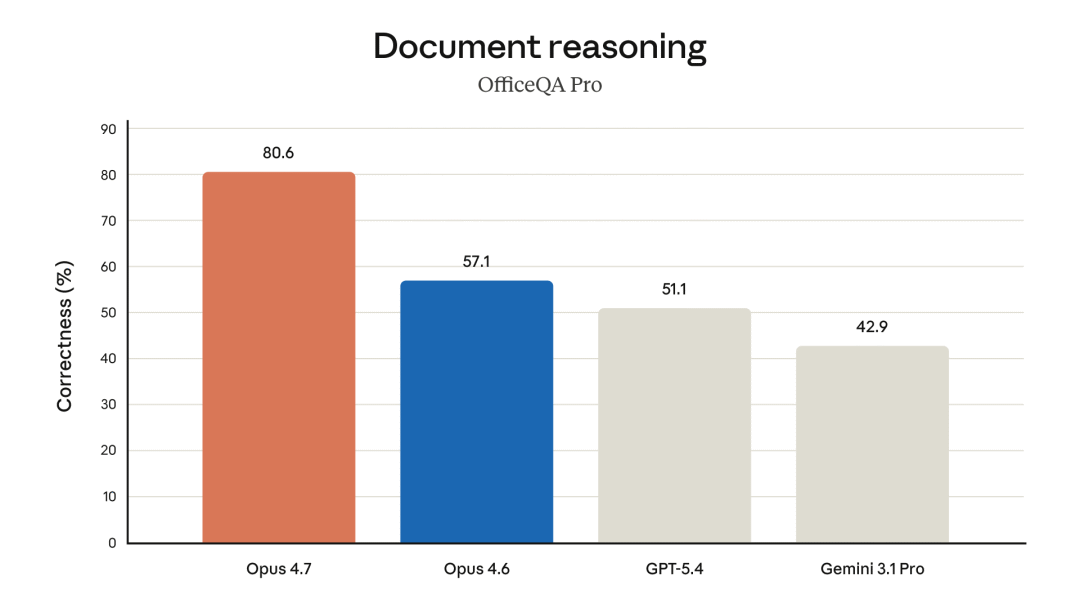 AI Visual Insight: This image emphasizes the value of document reasoning scenarios, usually involving multi-page documents, tables, or clause extraction tasks. It shows that the model is well suited for extracting information from complex materials, locating evidence, and supporting decisions.
The second group is engineering teams already using Opus 4.6 in production. Because the upgrade is meaningful, migration validation offers a favorable cost-benefit tradeoff, especially for code generation, unit test completion, and complex bug-fixing workflows.
The third group is teams building automation products. Stronger visual input, combined with browser or desktop operation capabilities, allows the model to recognize, click, fill, and validate steps directly at the interface layer.
Users in China can access Claude Opus 4.7 through DeepSider with lower friction
For developers in China, the real pain point is not understanding the model. It is usability: account registration restrictions, complicated payment flows, and limited regional support from the official service. The solution provided in the source is direct access through the DeepSider browser extension.
 AI Visual Insight: This image shows DeepSider’s multi-model interface inside the plugin. It demonstrates that users can access Claude, Gemini, and other models from one entry point, with emphasis on unified access and model switching.
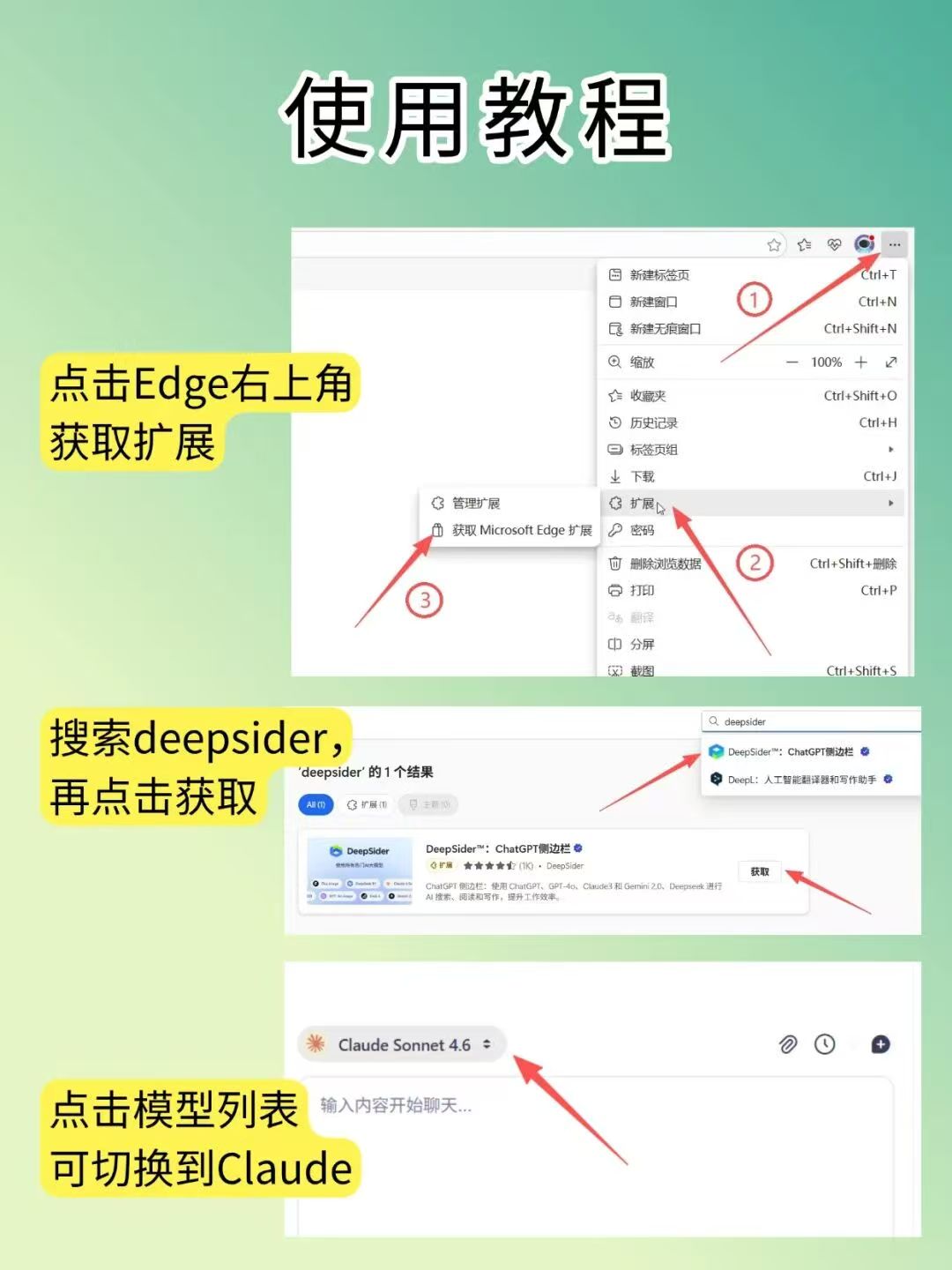 AI Visual Insight: This image shows where to find DeepSider in the Edge Add-ons store. The key detail is that the plugin is distributed through the browser extension ecosystem, so users can install it through the standard extension workflow.
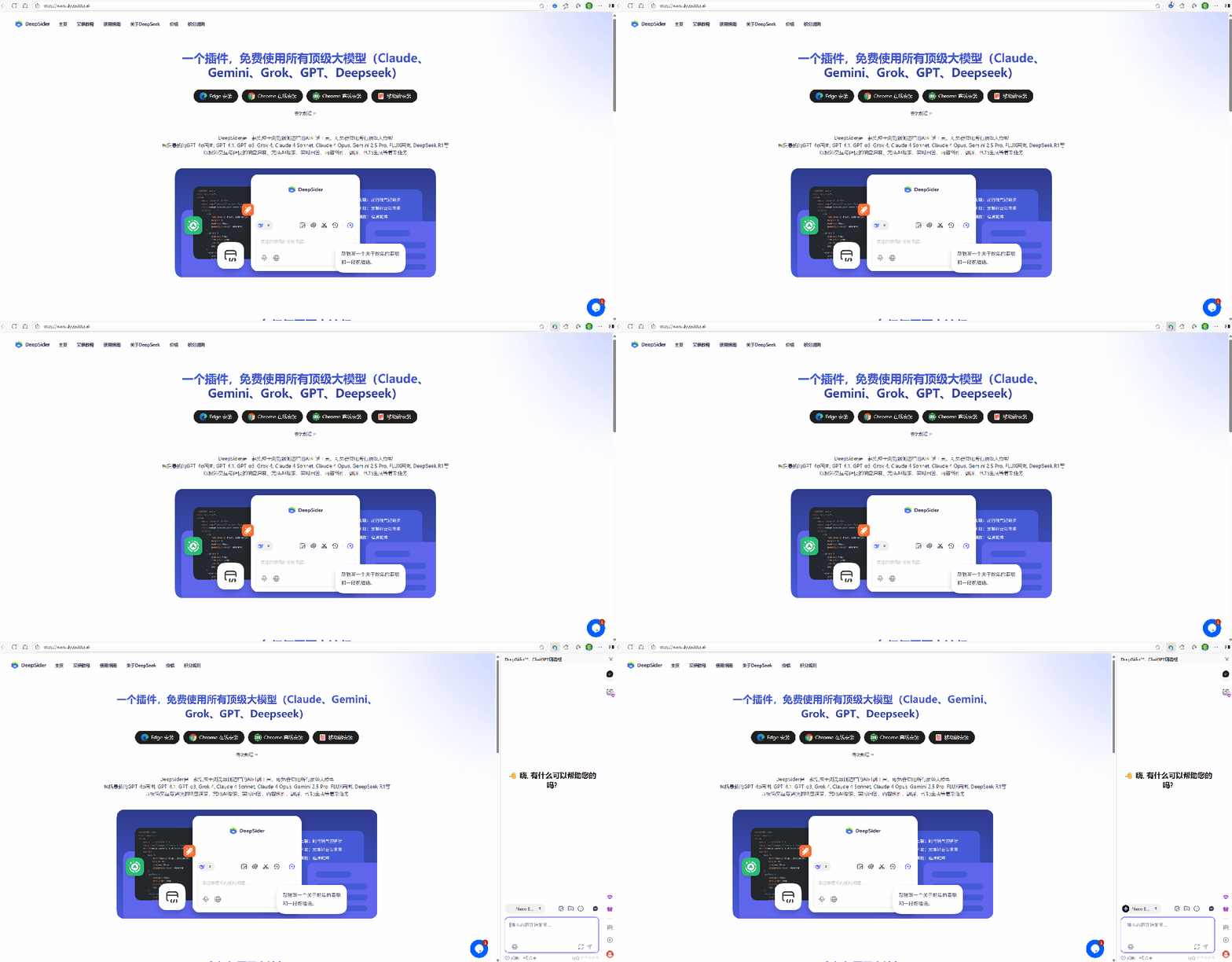 AI Visual Insight: This animated image demonstrates the activation flow after installation. It emphasizes the sidebar AI chat format and shows that users can launch tasks, read page content, and interact without switching tabs.
 AI Visual Insight: This animated image shows DeepSider in a real conversation flow. It demonstrates that the extension is not just a model entry point but also acts as a workflow assistant, supporting continuous follow-up questions and companion-style interaction alongside the page.
The installation path is straightforward
# Example installation workflow
1. Open the Edge Add-ons store   # Go to the official extension installation page
2. Search for DeepSider          # Locate the extension
3. Click Get and install         # Complete extension deployment
4. Open the browser sidebar      # Enable the AI chat interface
5. Select Claude Opus 4.7        # Start using the model
This command-style checklist summarizes the shortest path to using Claude Opus 4.7 in China.
In addition, DeepSider supports parsing documents in PDF, Word, and TXT formats, along with AI image generation and web page generation. That makes it useful for non-API users who want a fast way to get started.
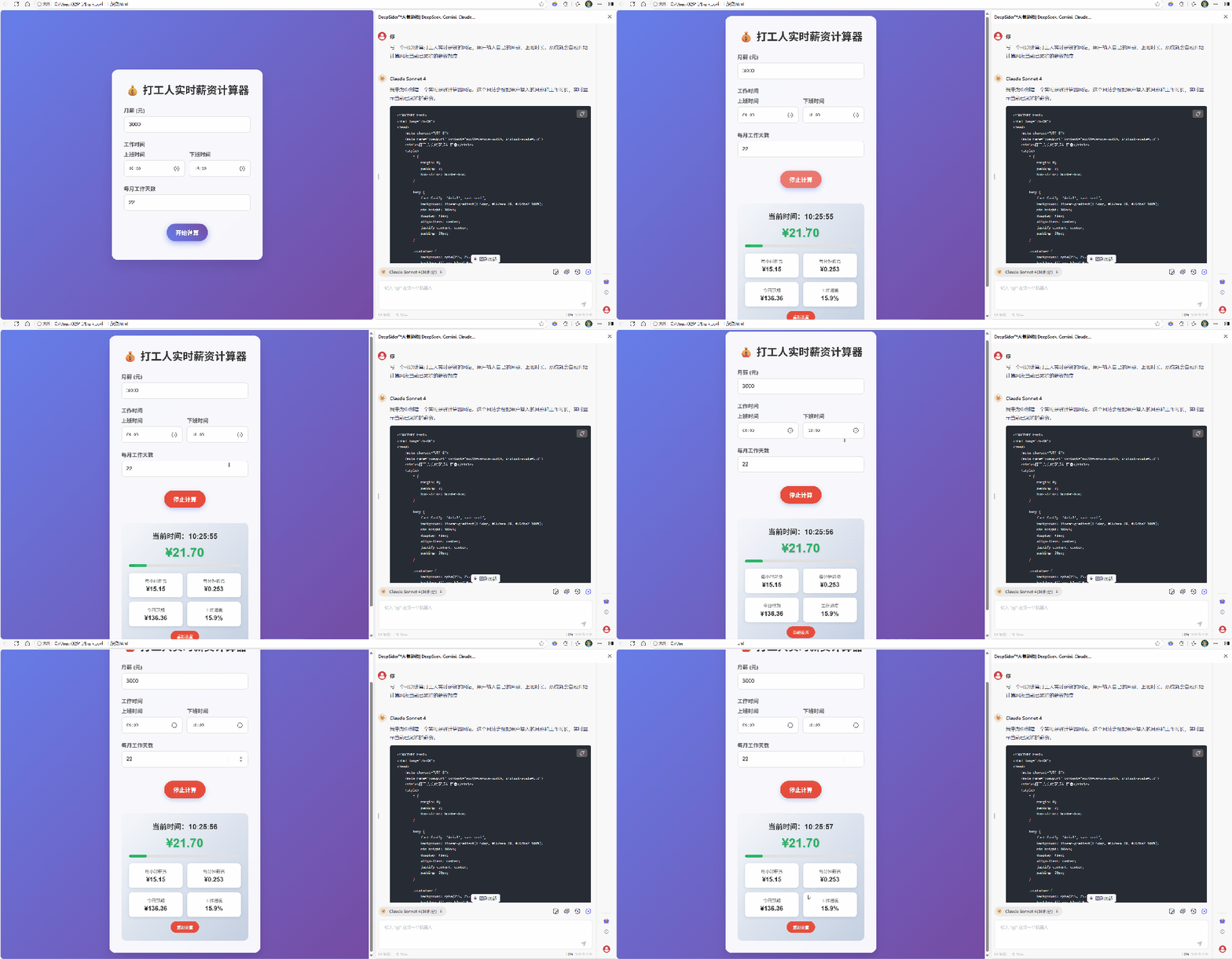 AI Visual Insight: This animated image shows the process of generating an interactive web page from natural language. It highlights the model’s value for front-end generation, page layout, and rapid prototyping.
 AI Visual Insight: This animated image shows how an image-generation model is used inside the plugin. It demonstrates that DeepSider supports not only text models but also image generation, making it suitable for multimodal creative workflows.
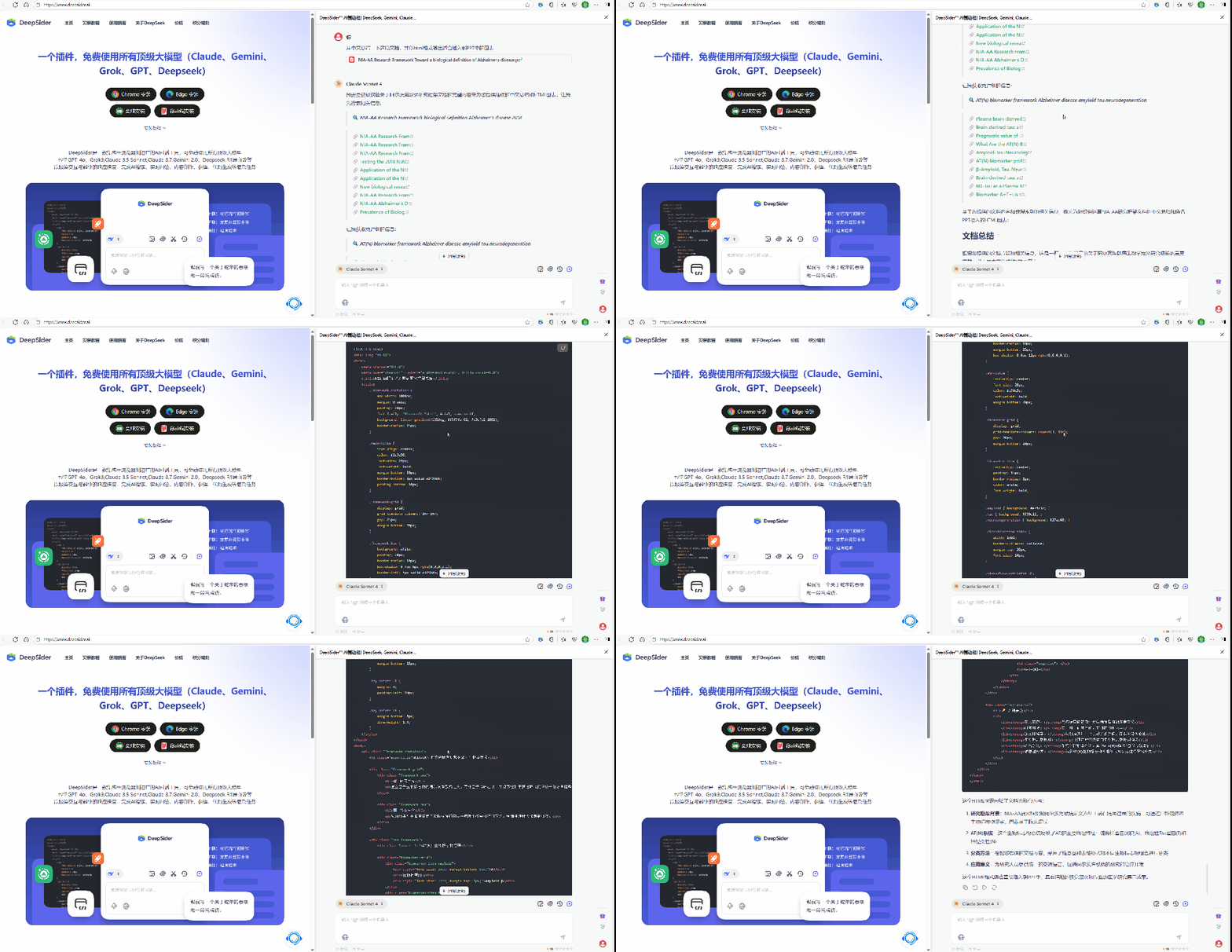 AI Visual Insight: This animated image shows multi-document upload and intelligent parsing. It emphasizes the plugin’s ability to process materials in batches, extract key information, and answer questions across files, which is especially useful for legal, research, and consulting scenarios.
For developers, whether it is worth switching depends on task complexity and cost tolerance
If your primary workload is simple question answering, the advantages of 4.7 may not be fully realized. But if you care about complex code, long-chain task execution, document reasoning, and UI-level visual understanding, then it already offers a clear generational advantage.
It is also important to note that upgrading does not mean zero migration cost. Prompts need to be rewritten, and budgets need to be reevaluated. In production, you should validate high-value workflows first through staged rollout.
FAQ
1. What is the most important improvement in Claude Opus 4.7 compared with 4.6?
Answer: The most important change is stronger end-to-end execution for complex tasks, including better coding, self-checking execution, high-resolution visual understanding, and more reliable document reasoning. That makes it a better fit for production-grade workflows.
2. Why is DeepSider a better option for users in China?
Answer: Because it lowers the barriers around registration, payment, and access. Users can access Claude Opus 4.7 through a browser extension while also getting document parsing, multi-model switching, and sidebar-based workflow support.
3. What should teams adjust after upgrading to Claude Opus 4.7?
Answer: Start by revising prompt structure and cost estimates. Claude Opus 4.7 follows instructions more literally, so prompts should define goals, formats, and constraints clearly. Teams should also account for higher token usage and longer outputs when planning cost.
Core Summary: This article reconstructs the key upgrades, best-fit scenarios, and practical access path for Claude Opus 4.7 in China. It focuses on improvements in coding, visual understanding, long-horizon tasks, and document reasoning, and explains how the DeepSider extension provides a lower-friction way to use it.