SPMamba-YOLO is an enhanced detection network for underwater object detection that combines multi-scale feature enhancement with global context modeling. This guide provides an executable workflow from Ubuntu environment setup and Mamba-YOLO installation to training and architectural modification, helping you avoid common reproduction pitfalls such as complex dependencies and scattered configuration. Keywords: Mamba-YOLO, object detection, paper reproduction
Technical Specifications at a Glance
| Parameter | Details |
|---|---|
| Paper model | SPMamba-YOLO |
| Task type | Underwater object detection |
| Runtime environment | Ubuntu 22.04 / WSL2 |
| Programming language | Python 3.12 |
| Deep learning framework | PyTorch 2.3.0 + CUDA 12.1 |
| Core repository | HZAI-ZJNU/Mamba-YOLO |
| Key dependencies | ultralytics, selective_scan, timm, einops, thop, seaborn |
| Data organization | Standard YOLO images/labels structure |
| Paper source | School of Electronic and Information Engineering, University of Science and Technology Liaoning |
| GitHub stars | Not provided in the source input; refer to the live GitHub repository page |
This guide compresses the paper reproduction workflow into executable engineering steps
The original material is valuable because it moves SPMamba-YOLO from a paper concept toward a deployable implementation, but it also includes page noise, inconsistent command formatting, and scattered key modifications. The goal of this reconstructed guide is to help developers complete five stages in order: environment setup, framework installation, data preparation, training, and architectural modification.
The paper is titled SPMamba-YOLO: An underwater object detection network based on multi-scale feature enhancement and global context modeling and was published in February 2026. Its core objective is to improve detection quality for small objects, low-contrast targets, and complex backgrounds in underwater scenes.
Aligning the base environment first prevents later compilation failures
Before deployment, prepare Ubuntu 22.04 on either native Linux or WSL2. Because Mamba-based implementations typically depend on CUDA and specific PyTorch versions, environment mismatch can directly trigger errors in selective_scan or during training.
conda create -n mambayolo python=3.12 -y
conda activate mambayolo

# Install the PyTorch build for CUDA 12.1
pip3 install torch==2.3.0+cu121 torchvision==0.18.0+cu121 torchaudio==2.3.0 --index-url https://download.pytorch.org/whl/cu121

# Install common dependencies
pip install seaborn thop timm einops
These commands create a Python and PyTorch runtime consistent with the original workflow.
Installing Mamba-YOLO depends on having selective_scan available and working correctly
selective_scan is a critical operator in this class of state space model implementations and also the most common failure point. The original material provides a prebuilt wheel, which is suitable for getting the pipeline running quickly. If you later need cross-platform deployment, you should also prepare a source-build path.
# Install the prebuilt selective_scan package
pip install selective_scan-0.0.2-cp312-cp312-linux_x86_64.whl

# Clone and install Mamba-YOLO
git clone https://github.com/HZAI-ZJNU/Mamba-YOLO.git
cd Mamba-YOLO
pip install -v -e .
The goal of this step is to install the repository in editable mode so you can modify YAML files and training scripts later.
The dataset must strictly follow the YOLO directory convention
Create a datasets directory under the repository root, then split images and labels into train, validation, and test sets. This structure directly determines whether Ultralytics can parse data.yaml correctly.
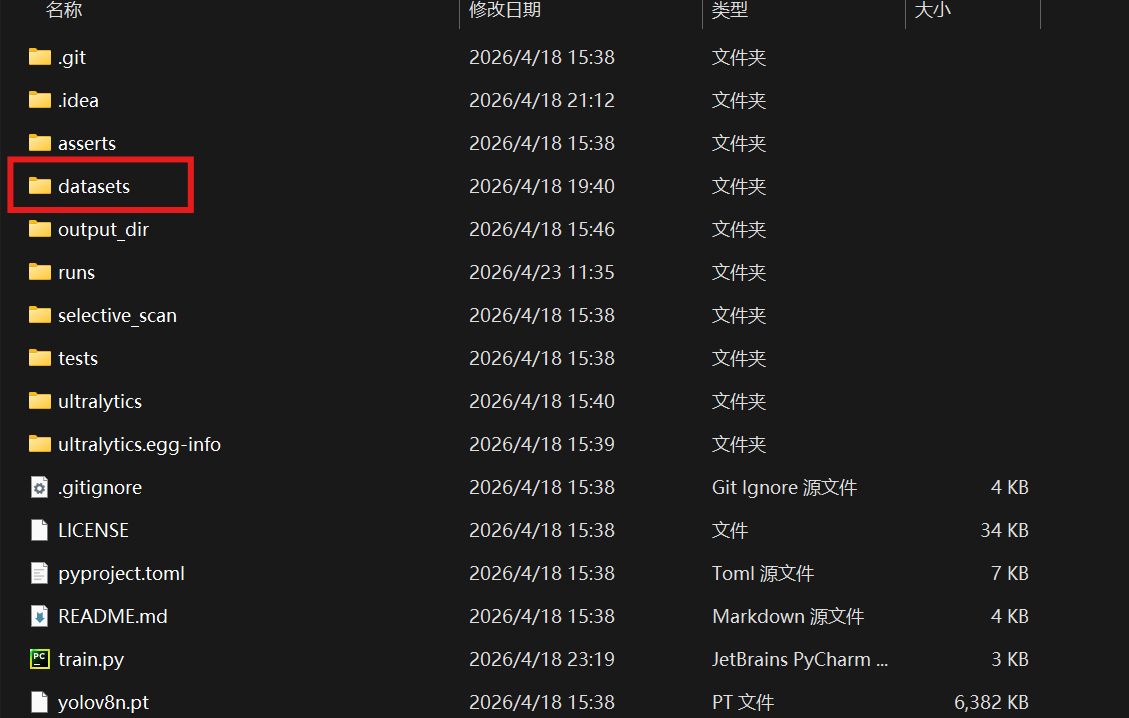 AI Visual Insight: The image shows the actual location of the newly added
 datasets folder under the project root, where the standard YOLO data structure is stored. It emphasizes that the data directory must remain consistent with the relative paths used by the training script. Otherwise, paths such as images/train and labels/train in data.yaml will fail to resolve.
mkdir -p datasets/images/{train,val,test}
mkdir -p datasets/labels/{train,val,test}
These commands quickly generate a dataset skeleton that satisfies YOLO training requirements.
Then create datasets/data.yaml:
train: images/train
val: images/val
test: images/test

# Number of classes
nc: 4

# Class names
names: ['holothurian', 'echinus', 'scallop', 'starflish']
This configuration file defines data paths and class mapping. It is the minimum required input for training.
The training script should explicitly bind the model configuration and dataset configuration
The original train.py is built around ultralytics.YOLO and wraps training, validation, and testing entry points. During reconstruction, keep the parameterized design so you do not hardcode paths and hyperparameters into shell commands.
from ultralytics import YOLO
import argparse
import os

ROOT = os.path.abspath('.')  # Get the project root directory

def parse_opt():
    parser = argparse.ArgumentParser()
    parser.add_argument('--data', type=str,
                        default=os.path.join(ROOT, 'datasets/data.yaml'),  # Dataset configuration
                        help='dataset yaml path')
    parser.add_argument('--config', type=str,
                        default=os.path.join(ROOT, 'ultralytics/cfg/models/mamba-yolo/Mamba-YOLO-T.yaml'),  # Model configuration
                        help='model yaml path')
    parser.add_argument('--epochs', type=int, default=100)
    parser.add_argument('--batch_size', type=int, default=1)
    parser.add_argument('--imgsz', type=int, default=640)
    parser.add_argument('--device', default='0')  # Specify the GPU device
    return parser.parse_args()

if __name__ == '__main__':
    opt = parse_opt()
    model = YOLO(opt.config)  # Load the model architecture configuration
    model.train(
        data=opt.data,
        epochs=opt.epochs,
        batch=opt.batch_size,
        imgsz=opt.imgsz,
        device=opt.device
    )
This script provides a minimal working training entry point and decouples the dataset, model, and device configuration.
Run it as follows:
python train.pyThis command starts model training based on the custom YAML configuration.
Integrating SPPELAN essentially replaces the high-level pooling aggregation module
The original material notes that the Mamba-YOLO framework already includes the SPPELAN module, so you do not need to implement a new operator manually. You only need to replace the existing SPPF configuration in Mamba-YOLO-T.yaml.
# Original configuration
- [-1, 1, SPPF, [1024, 5]]

# Modified configuration
- [-1, 1, SPPELAN, [1024, 256]]
This modification strengthens feature aggregation and is typically more effective for complex backgrounds and multi-scale targets.
Adding PSA strengthens global attention modeling
Likewise, the PSA module already exists in the framework. The minimal-change approach is to append PSA after SPPELAN. This approach is more stable than heavily rewriting the backbone or head, making it better suited for paper reproduction.
- [-1, 1, SPPELAN, [1024, 256]]
- [-1, 1, PSA, [1024]]
This change introduces attention enhancement on high-level features and improves the efficiency of global context utilization.
If you also need to adjust the detection head, you can keep the original three-scale outputs for P3, P4, and P5 without changing the basic form of Detect[nc]. The key requirement is to ensure that channel dimensions remain consistent before and after the new modules.
The training results indicate that this workflow is practically reproducible
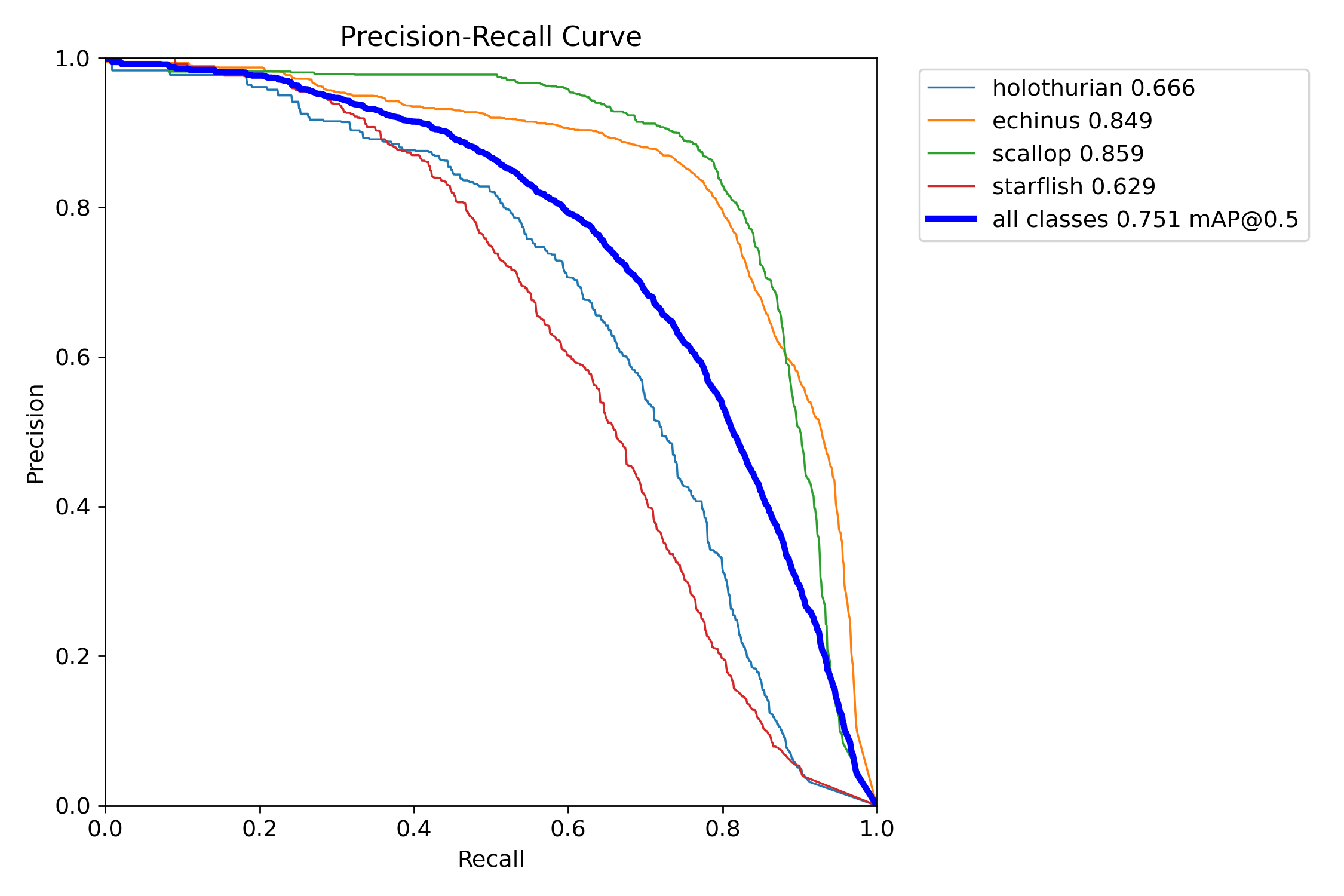
The original material includes a dataset directory screenshot and multiple training result figures, indicating that the workflow was at least validated in the author’s environment. Its engineering value does not lie in delivering the best benchmark numbers, but in connecting the full chain of paper architecture, code repository, environment dependencies, and training execution.
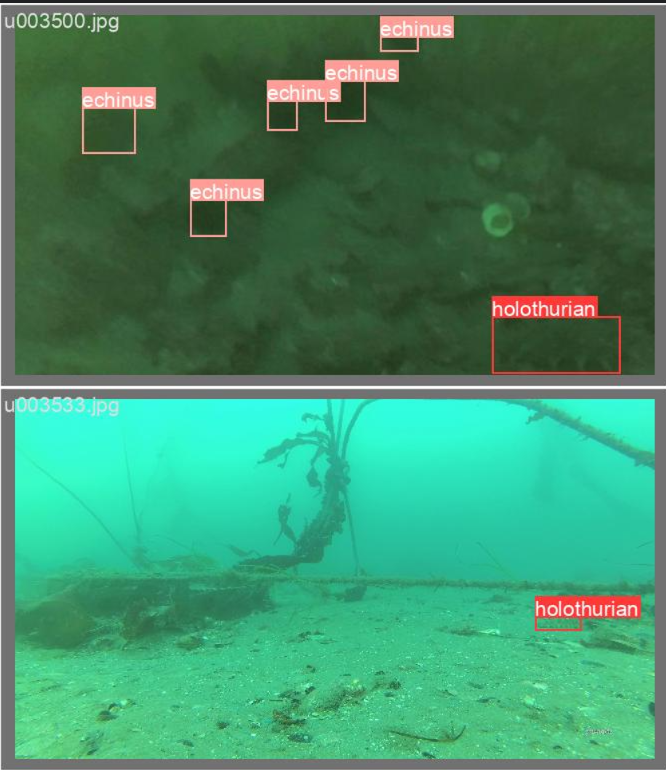 AI Visual Insight: This figure is part of the training result visualization and typically reflects changes in loss, precision, or recall during object detection training. You can use it to determine whether the model is converging normally and whether early-stage issues such as an excessive learning rate, abnormal labels, or overfitting are present.
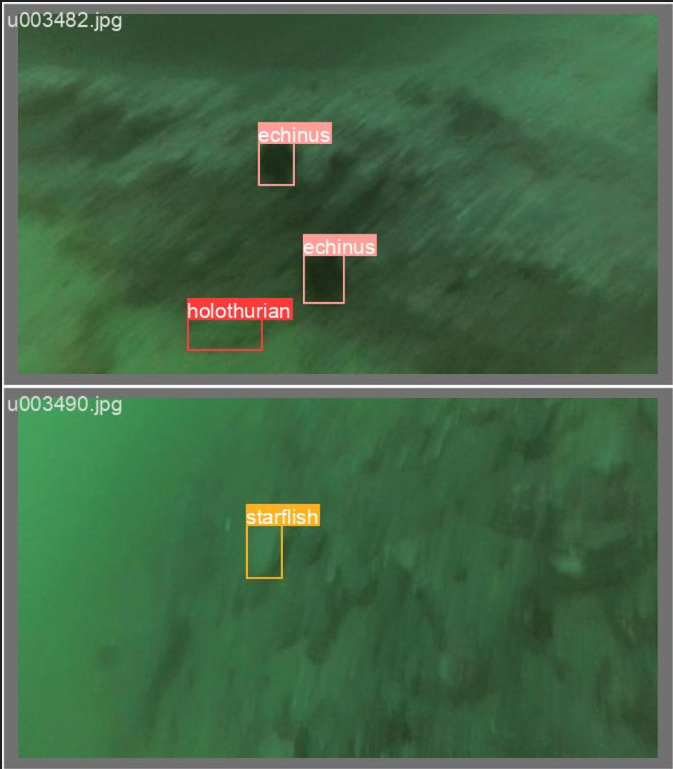 AI Visual Insight: This figure shows another class of training evaluation output, commonly a PR curve, F1 curve, or confusion-matrix-related visualization. It helps analyze the balance between classification and detection performance across different thresholds, especially when checking whether small-object classes suffer from obvious missed detections.
 AI Visual Insight: This image is likely a prediction visualization on validation samples, focusing on bounding box localization, class recognition, and confidence behavior. For engineering deployment, this kind of visualization often reveals false positives, missed detections, and box offset issues in complex underwater backgrounds more directly than a single metric can.
FAQ
Q1: Why does Mamba-YOLO reproduction most often fail during installation?
A1: The core issue is usually not the Python script itself, but a version mismatch among CUDA, PyTorch, and selective_scan. Lock Python to 3.12 and PyTorch to 2.3.0+cu121 first, then handle wheel installation or source compilation.
Q2: Do I have to add both SPPELAN and PSA at the same time?
A2: No. SPPELAN focuses on feature aggregation, while PSA focuses on attention enhancement. A practical strategy is to replace SPPELAN first to establish a baseline, then add PSA as an incremental comparison so you can clearly attribute performance changes.
Q3: If training starts successfully but the results are poor, what should I check first?
A3: First check the data.yaml paths, label format, and whether nc matches names. Then review input image size, batch size, and the pretrained weight strategy. In most cases, the problem comes from data annotation rather than the model architecture itself.
Core Summary: This guide reconstructs the full SPMamba-YOLO reproduction workflow, including paper background, Ubuntu 22.04 environment setup, Mamba-YOLO installation, dataset organization, training script implementation, and SPPELAN/PSA integration methods. It is well suited for object detection paper reproduction and engineering deployment.