This article focuses on the full Kali Linux initial setup workflow: virtual machine networking, APT repository management, environment script automation, and Chinese localization. It addresses four common beginner issues: no internet access, failed updates, confusing privilege usage, and missing Chinese language support. Keywords: Kali Linux setup, APT repositories, virtual machine networking.
Technical Specifications Snapshot
| Parameter | Description |
|---|---|
| System | Kali Linux |
| Runtime Environment | VMware virtual machine |
| Network Modes | Bridged / NAT / Host-Only |
| Package Management Protocol | APT / HTTP |
| Primary Commands | ifconfig, apt, passwd, su, dpkg-reconfigure |
| Automation Dependency | LinuxEnvConfig.sh |
| Repository Source | Gitee |
| Star Count | Not provided in the original article |
Kali network connectivity determines whether all later configuration steps succeed
After installing Kali, the first task is not installing tools. It is confirming the network model. The selected network mode directly affects apt updates, script downloads, browser access, and communication with the host machine. In a security learning environment, the wrong mode can break every step that follows.
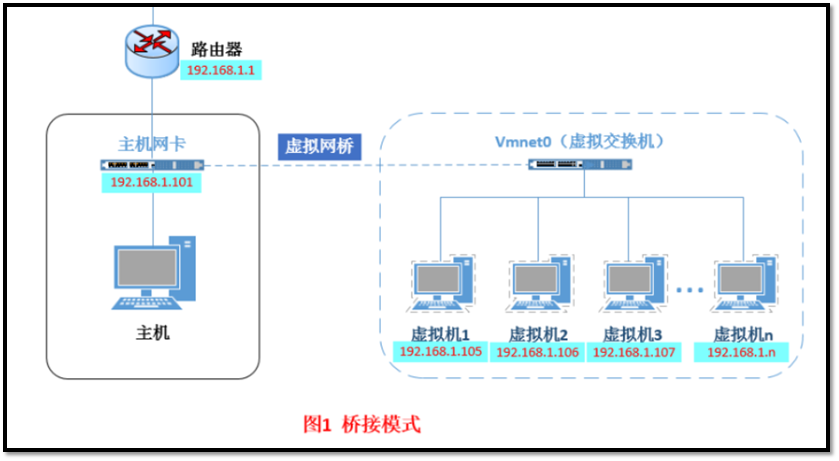 AI Visual Insight: The image shows the topology between the virtual machine and the physical network. Its key point is that in Bridged mode, the virtual machine joins the LAN as an independent node. That means it receives an IP address from the same subnet as the host and follows the LAN’s routing, DHCP, and access control policies.
Bridged mode works well when the VM needs to join the LAN directly
Bridged mode treats the virtual machine as an independent device on the local network. Its advantage is straightforward addressing and easier access from other devices. Its drawback is dependence on external network policies. On campus networks or networks that require authentication, Bridged mode often fails because authentication applies to devices rather than sessions inside the VM.
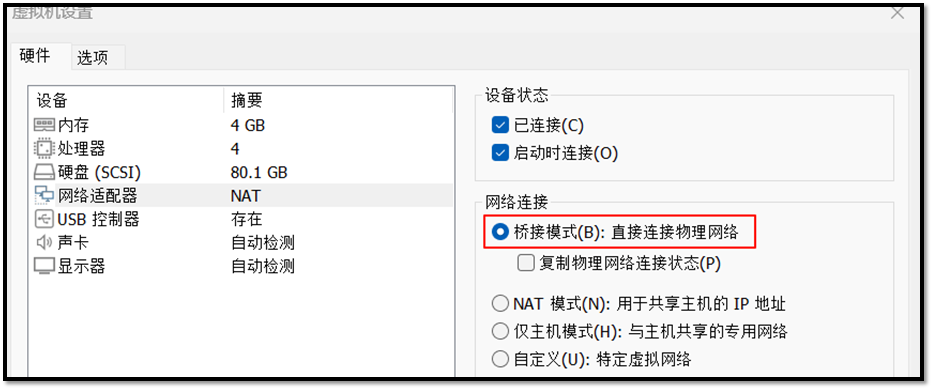 AI Visual Insight: The image shows the VMware network adapter settings entry point. The core action is switching the adapter to Bridged mode. This interface is also tied to physical NIC binding behavior. If the host has both wired and wireless adapters, selecting the wrong bridge target can also prevent internet access.
NAT mode is usually the most stable default choice for Kali
In NAT mode, the virtual machine uses a private IP address, and the host performs network address translation. External networks only see the host, not the VM directly. For campus networks, mobile hotspots, and everyday security labs, NAT is more stable and requires less troubleshooting.
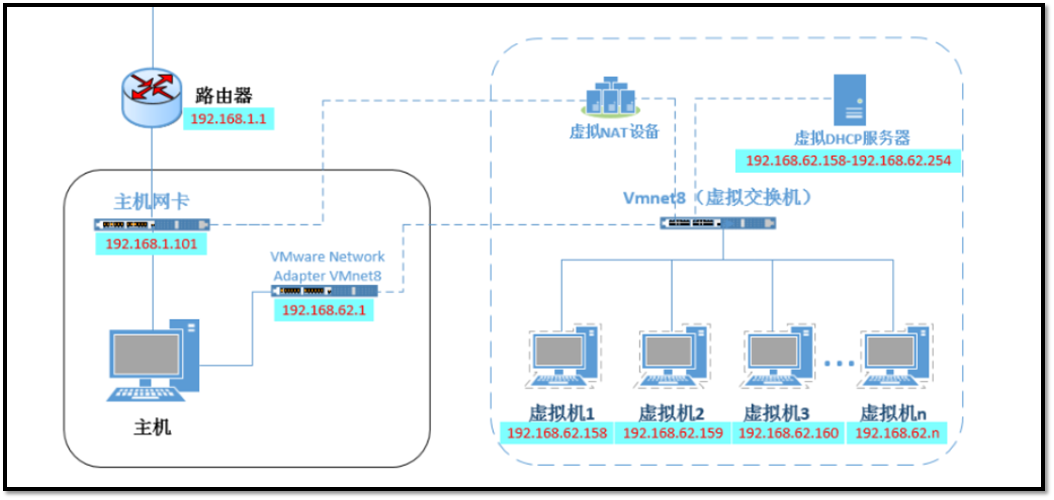 AI Visual Insight: The image highlights the core NAT path: the virtual machine first obtains an internal private IP, then accesses the internet through network address translation performed by the host. This model balances internet access with a degree of isolation, which makes it suitable for most Kali learning, updating, and tool download scenarios.
# View network interfaces and IP information
ifconfig  # Key command: confirm whether the system has obtained an IP address

# Check whether the default route and DNS are working correctly
ip route  # Key command: confirm that a default gateway exists
ping -c 4 www.baidu.com  # Key command: verify external network connectivity
This command set helps you quickly determine whether Kali truly has a network that can update packages, reach external services, and resolve domain names.
Host-Only mode is suitable for isolated labs rather than everyday internet access
Host-Only mode allows communication between the virtual machine and the host, but it does not provide direct internet access. It works well for malware analysis, isolated targets, and offline exercises, but it is not a good choice for day-one Kali installation and update workflows.
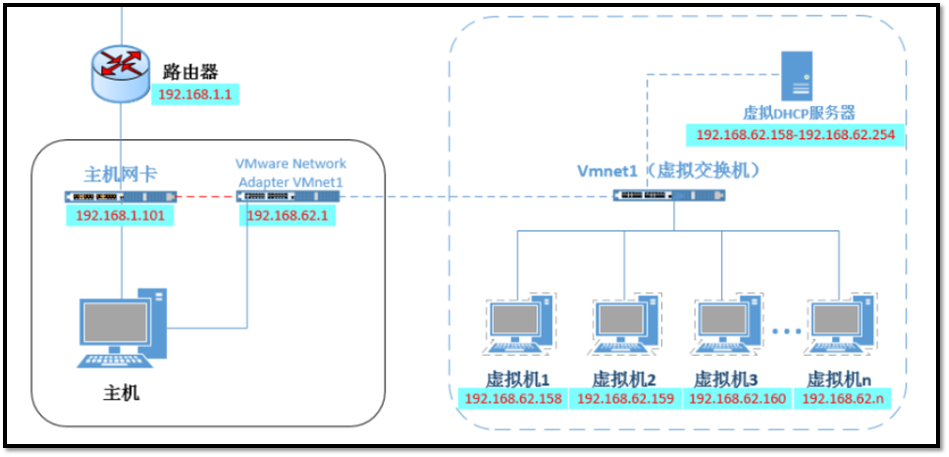 AI Visual Insight: The image shows the closed network structure of Host-Only mode: virtual machines can communicate with each other and with the host, but there is no external gateway. In offensive and defensive lab environments, this design reduces the risk of accidental outbound traffic while making local target ranges easier to build.
The LinuxEnvConfig script can consolidate repetitive initialization tasks into an automated workflow
The most practical part of the original workflow is using the LinuxEnvConfig script to handle initialization steps such as repository configuration and root account setup. For beginners, this approach is usually more stable than changing each item manually, and it is faster to apply in practice.
# Download the environment configuration script
git clone https://gitee.com/yijingsec/LinuxEnvConfig.git  # Key logic: download the automation script
cd LinuxEnvConfig  # Enter the script directory
sudo bash LinuxEnvConfig.sh  # Run the script with administrative privileges
These commands download and run the Kali environment initialization script, reducing manual configuration errors.
APT repository management is a foundational skill for system maintainability
Kali is built on the Debian ecosystem, and software installation depends on APT. A repository is essentially a software package source. If the repository is reachable, the system can index, download, and upgrade software. If it is not, installation, updates, and dependency resolution will fail.
The official rolling repository should usually remain your baseline
The default repository in the original article is kali-rolling, which means the system tracks rolling updates continuously. Unless the network is actually unreachable, you should avoid switching mirrors too often, because doing so can introduce synchronization delays, component version mismatches, or script compatibility issues.
# Example of the default Kali rolling repository
deb http://http.kali.org/kali kali-rolling main contrib non-free non-free-firmware
This line defines Kali’s primary software repository and the available component categories.
You must verify network and repository reachability before running updates
Many users blame the repository itself when apt update fails, but the real cause is often a DNS issue, gateway problem, proxy misconfiguration, or a broken virtual NIC setup. Verifying the network first and updating packages second is the lower-cost troubleshooting path.
sudo apt update   # Key logic: refresh the local package index
sudo apt upgrade  # Key logic: upgrade installed packages
sudo apt -y install vim  # Example: install a common editor
These commands refresh package indexes, upgrade the system, and install a basic utility. They represent the most common entry point for Kali maintenance.
Privilege and account configuration should follow the principle of least privilege by default
Kali does not encourage direct long-term graphical usage as root by default. For daily work, use a standard account first and elevate with sudo only when you need to perform administrative actions. This approach preserves control and reduces the risk of mistakes.
passwd kali   # Key logic: change the password of the kali user
su root       # Switch to the root user
These two commands are used to change the default account password and switch to the root identity.
Enabling root should support administrative needs, not permanent daily usage
If you truly need the root account, you can set its password through a script or manually. However, running browsers, editors, or download tools as root on a penetration testing workstation is unsafe over the long term. It increases the impact of accidental deletions and malicious code execution.
Chinese localization can improve usability for beginners but may affect path and workflow habits
Kali mainly enables Chinese through locale reconfiguration. After the change, the interface becomes easier for Chinese-speaking beginners to use. However, some directory names, terminal output, and script compatibility can also be affected. For that reason, it is best to finish your core development and security tool setup first, then decide whether to apply full localization.
sudo dpkg-reconfigure locales  # Key logic: reconfigure system locales
sudo reboot  # Restart the system so the changes take effect
These commands enable a Chinese locale and allow the system to load the new localization settings after reboot.
 AI Visual Insight: The image shows the interactive terminal interface of
 dpkg-reconfigure locales. The important step is selecting zh_CN from the locale list and setting it as the default locale. This change affects terminal encoding, application language, and parts of the system prompt text.
A safer Kali initialization sequence can significantly reduce rework
A recommended order is: first choose NAT for connectivity, then verify the network with ifconfig and ping; next pull LinuxEnvConfig; after confirming that the official repository is reachable, run apt update; finally configure root access and localization. This order connects networking, privileges, and package management into a stable workflow.
FAQ
Q1: Which network mode should I choose first on a fresh Kali installation?
A: Choose NAT first. It offers the best compatibility across campus networks, mobile hotspots, and home networks. If the host has internet access, the VM can usually get online reliably as well.
Q2: When apt update fails, should I switch repositories first or check the network first?
A: Check the network first. Verify the IP address, gateway, DNS, and external connectivity before deciding whether you need a different mirror.
Q3: Why is long-term direct use of root not recommended?
A: Because mistakes made as root are far more costly. If you run high-risk tools or scripts directly as root, the scope of system-level damage becomes much larger. A standard user account with sudo is the better practice.
[AI Readability Summary]
This article restructures the critical post-installation setup flow for Kali Linux. It covers virtual machine network mode selection, connectivity verification, LinuxEnvConfig script usage, APT repository management, root privilege enablement, and Chinese localization. It is especially useful for beginners in web security and penetration testing who want to build a stable lab environment quickly.