[AI Readability Summary] MimiClaw is an embedded AI agent that runs on the ESP32-S3 and connects to cloud LLMs and IM channels over Wi-Fi to support conversation, memory, and closed-loop motor and lighting control. It addresses the high cost, power draw, and deployment complexity of traditional dual-controller robot architectures. Keywords: ESP32-S3, MimiClaw, Embedded AI Agent.
The technical specification snapshot outlines the deployment baseline
| Parameter | Details |
|---|---|
| Core Language | C |
| Development Framework | ESP-IDF v5.5+ |
| Main Controller | ESP32-S3 N16R8 |
| Communication Protocols | Wi-Fi, HTTP API, Telegram/Feishu Bot |
| Repository | github.com/memovai/mimiclaw |
| GitHub Stars | Not provided in the source article; use live repository data |
| Core Dependencies | ESP-IDF, PSRAM, cloud LLM API, Bot credentials |
This architecture redefines low-cost robot control
Traditional robots often use a “Linux host + MCU coprocessor” model. The host handles vision, planning, and AI, while the MCU handles real-time control. This design is powerful, but it also increases cost, power consumption, and integration complexity.
MimiClaw compresses the full “perception-decision-execution” loop into a single ESP32-S3. With dual cores, PSRAM, Wi-Fi, and cloud model APIs, developers can build an interactive, executable, and extensible agent robot car with a very low BOM.
 AI Visual Insight: This animation shows the project’s dynamic form factor and interaction behavior. It highlights that MimiClaw is not just a software agent, but an embedded agent capable of driving a physical chassis. Its defining characteristic is the combination of physical actuation and conversational ability.
The hardware platform should prioritize power delivery, I/O, and expandability
The reference build uses a 4WD aluminum chassis, TT differential motors, an L9110 dual-channel driver, a 2S lithium battery, a WS2812 light strip, and a 44-pin ESP32-S3 expansion board. This combination is inexpensive, easy to source, and convenient for secondary development.
The most important requirement is not the chassis, but the main controller variant: it must be the N16R8 model. The 16 MB Flash and 8 MB PSRAM directly determine whether the firmware can boot reliably. Otherwise, a common symptom is successful flashing followed by repeated reboot loops.
 AI Visual Insight: This image presents the full hardware ecosystem entry point. It shows that the project includes not only a code repository, but also an official website, documentation, and actual device form factors, making it suitable for teaching, prototyping, and edge AI experiments.
Hardware selection must optimize for stable deployment rather than overbuilding
The recommended minimum viable hardware stack includes an ESP32-S3 N16R8, a data-capable USB cable, a 7.4 V battery, an L9110 driver, dual motors, and optional WS2812 LEDs. To enable natural language control, you also need a DeepSeek or Anthropic API key, plus Feishu or Telegram Bot credentials.
For deployments in mainland China, DeepSeek is the better choice. It is lower cost and can be integrated through an OpenAI-compatible API. If you use Feishu, you can avoid Telegram network accessibility issues and reduce integration friction.
git clone https://github.com/memovai/mimiclaw.git
cd mimiclaw
idf.py set-target esp32s3  # Set the target chip to ESP32-S3
These commands clone the project and bind the correct target chip so that subsequent build parameters remain accurate.
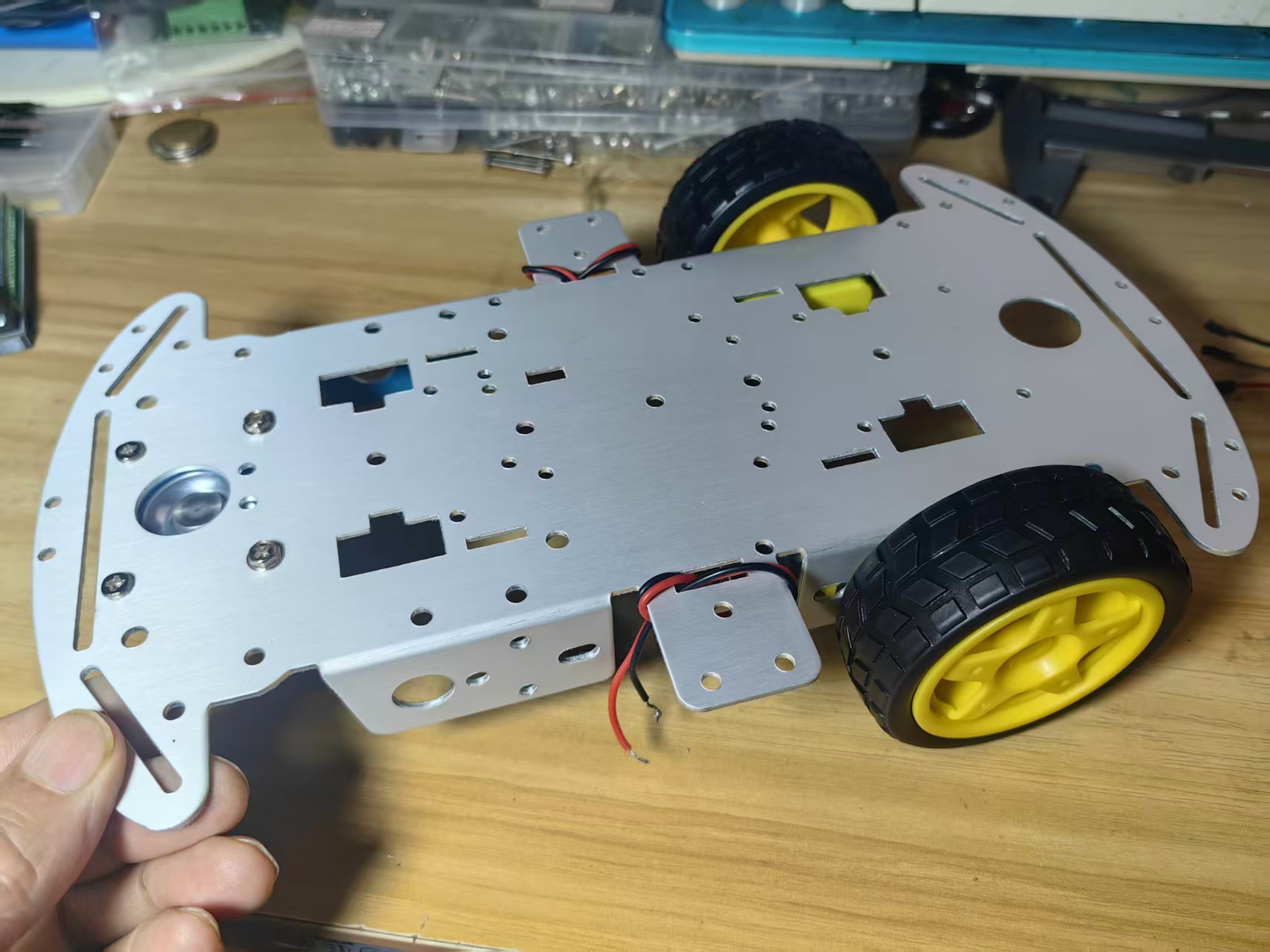 AI Visual Insight: This image shows the real assembly relationship among the chassis, power system, controller board, and driver board. It makes clear that the project evolved quickly from a standard 4WD robot platform, with emphasis on validating the control loop rather than building a complex mechanical structure.
The development environment must be built on ESP-IDF 5.5 or later
MimiClaw is developed on the official ESP-IDF framework. Version 5.5.3 is recommended to reduce component compatibility risks. After installation, you must run the export script every time you open a new terminal session; otherwise, idf.py will not be available.
git clone https://gitee.com/EspressifSystems/esp-gitee-tools.git
cd esp-gitee-tools
./install.sh  # Install ESP-IDF and the toolchain as prompted
. $HOME/esp/esp-idf/export.sh  # Activate the current terminal environment
These commands install and activate ESP-IDF, which is a prerequisite for the entire build toolchain.
Secret configuration determines whether the agent is actually usable
The project injects Wi-Fi, model, Bot, and search service settings through main/mimi_secrets.h. The three most critical groups of settings are network, LLM API, and communication channel. The model and provider must be configured as a matching pair; otherwise, the request pipeline will fail.
// main/mimi_secrets.h
#define MIMI_SECRET_WIFI_SSID "Your Wi-Fi SSID"      // Configure the wireless network name
#define MIMI_SECRET_WIFI_PASS "Your Wi-Fi password"      // Configure the wireless network password
#define MIMI_SECRET_API_KEY "sk-your-DeepSeek-key" // Configure the LLM API key
#define MIMI_SECRET_MODEL "deepseek-chat"        // Specify the model name
#define MIMI_SECRET_MODEL_PROVIDER "openai"      // Use an OpenAI-compatible API
#define MIMI_SECRET_FEISHU_APP_ID "Your Feishu App ID" // Configure the Feishu application ID
#define MIMI_SECRET_FEISHU_APP_SECRET "Your Feishu secret" // Configure the Feishu application secret
This configuration defines the key entry points for device connectivity, model invocation, and receiving external commands.
During build and flashing, validate the serial port and storage capacity first
After configuration is complete, run idf.py build first. If the build succeeds, connect the development board and flash over the serial port. On Windows, use COMx; on Linux, /dev/ttyUSB0 is common; on macOS, /dev/cu.* is common.
idf.py build
idf.py -p /dev/ttyUSB0 flash  # Replace the serial port with the actual port on your machine
These commands compile and flash the firmware, which directly brings the device into a runnable state.
If the device keeps rebooting, check three things first: whether the board is really N16R8, whether the USB cable supports data transfer, and whether you accidentally used GPIOs that conflict with the USB serial interface. Many apparent “software issues” are actually caused by unmet hardware requirements.
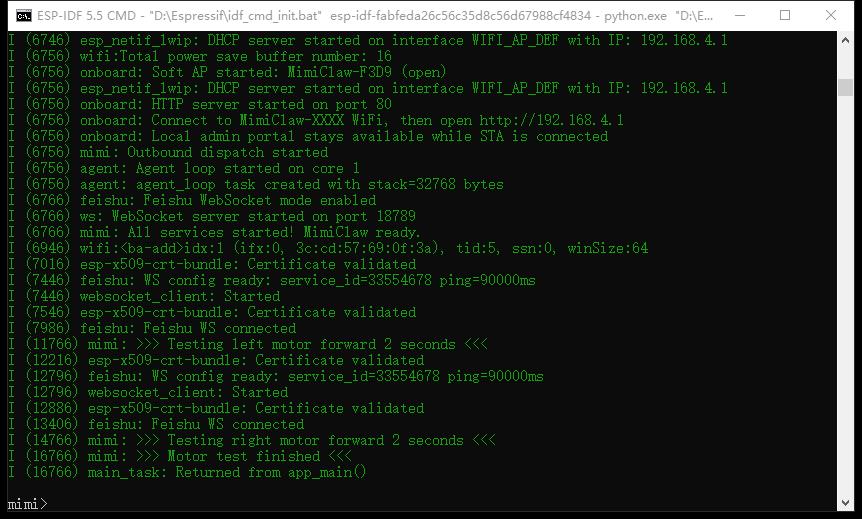 AI Visual Insight: This image shows a successful startup state in the serial log. Developers can use it to confirm that firmware initialization has completed, network settings have loaded, and the system has entered an interactive command-line phase.
Runtime validation should focus on CLI state and persisted configuration
After the device boots, you can access the mimi> prompt in the serial terminal. Start with help and config_show. The key point is not how many commands are available, but whether the model, provider, Wi-Fi, and channel configuration are actually in effect.
If the logs show Model: deepseek-chat [NVS], the model selection has been written to NVS persistent storage. Even after a power cycle, the system will still boot with the current model configuration, which is critical for long-term deployment.
help         # List all available commands
config_show  # Show the current configuration and persistence status
These commands verify that the device has entered an operable state, not just that it can power on.
This class of embedded AI agent is better suited to teaching prototypes and low-power execution nodes
MimiClaw does not attempt to replace Jetson-class platforms. Instead, it pushes agent capabilities down to MCU-class hardware. It is especially well suited for educational robots, desktop interactive devices, natural-language-controlled robot cars, and lightweight inspection nodes.
Its engineering lesson is clear: let the cloud handle high-cost inference, let the edge handle low-latency execution, and decouple the two through standard APIs and messaging channels. This is a practical cloud-edge collaboration architecture.
FAQ
1. Why must I use the ESP32-S3 N16R8?
Because MimiClaw has explicit Flash and PSRAM requirements. If capacity is insufficient, a common result is that the project builds successfully but reboots abnormally after flashing, or some modules fail during initialization.
2. For users in mainland China, should I choose DeepSeek or Anthropic first?
Choose DeepSeek first. It is lower cost, has a shorter integration path, and can be configured through an OpenAI-compatible API, which significantly reduces deployment friction.
3. What should I do if the serial port shows output but I still cannot control the device through the Bot?
First, check the Bot token or Feishu credentials in mimi_secrets.h. Then verify that Wi-Fi is working, the API key is valid, and the model provider matches the endpoint configuration. Most issues come from inconsistent configuration.
Core summary
This article reconstructs the MimiClaw deployment workflow on ESP32-S3, covering hardware selection, ESP-IDF environment setup, secret configuration, build and flashing, and serial validation. It also explains how MimiClaw achieves a full perception-decision-execution loop on a single chip.