Automatically inject method execution time tracking logic during the Android build process with ASM, solving the high invasiveness and low coverage of manual logging. This guide focuses on three key pieces: AGP 7+, ClassVisitor, and AdviceAdapter. Keywords: ASM instrumentation, Android performance monitoring, bytecode enhancement.
Technical Specifications at a Glance
| Parameter | Description |
|---|---|
| Languages | Kotlin, Java |
| Build Environment | Android Gradle Plugin 7.x+ |
| Bytecode Framework | ASM 7.2 / ASM9-style API |
| Instrumentation Entry Point | AsmClassVisitorFactory |
| Core Protocol/Mechanism | JVM class bytecode visitor model |
| Core Dependencies | org.ow2.asm:asm, asm-commons, asm-util |
| Typical Use Cases | Method execution time tracking, non-intrusive analytics, hotfix pre-hooks, security interception |
| GitHub Stars | Not provided in the source |
ASM operates on a bytecode event stream for inspection and transformation
ASM is not a reflection tool. It is infrastructure for processing .class bytecode at build time or load time. It parses class structures into a sequence of visitation events, and visitors decide whether to keep, modify, or add content.
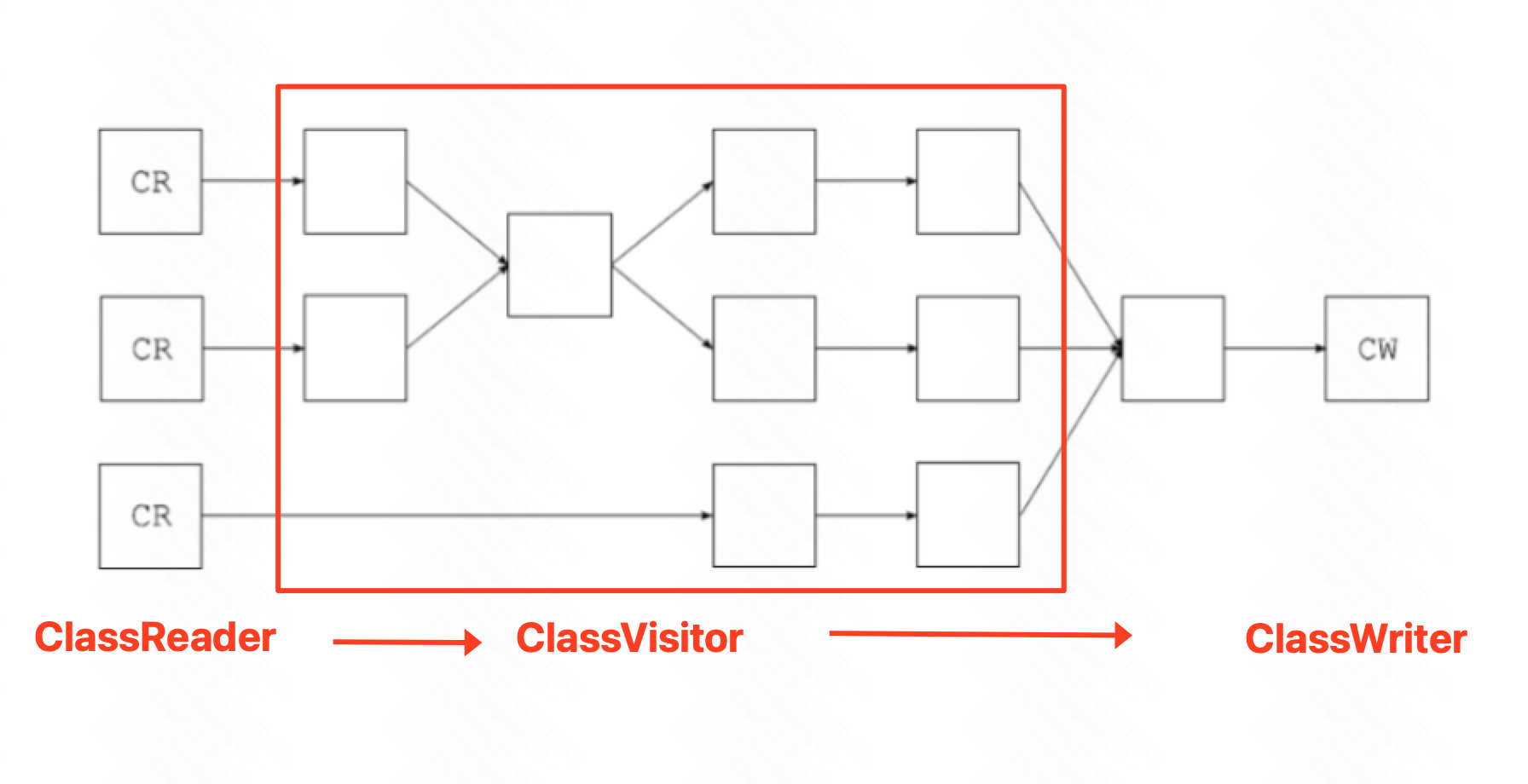 AI Visual Insight: This diagram shows ASM’s three-stage processing pipeline:
 ClassReader reads raw bytecode and dispatches structural events, ClassVisitor acts as the intermediate interception layer that processes classes, fields, and methods in order, and ClassWriter regenerates the modified byte array at the end. This streaming model works well for low-overhead, composable build-time enhancement.
ASM components have clearly defined responsibilities
ClassReader parses the input class, ClassVisitor defines interception points, and ClassWriter outputs the new class. Together, they form the most common processing pipeline: read -> modify -> write.
ClassReader cr = new ClassReader(originBytes); // Read the original class
ClassWriter cw = new ClassWriter(cr, 0); // Reuse reader metadata to improve copy efficiency
ClassVisitor cv = new ClassVisitor(Opcodes.ASM9, cw) {
    // Override visit/visitMethod here as needed
};
cr.accept(cv, 0); // Trigger the visitation event stream
byte[] result = cw.toByteArray(); // Output the enhanced bytecode
This snippet demonstrates the classic ASM processing skeleton.
ASM organizes transformation logic with the Visitor pattern and Chain of Responsibility
ASM defines a strict visitation order. At the class level, it visits metadata, annotations, fields, and methods before finally calling visitEnd. At the method level, the lifecycle runs from visitCode to visitMaxs.
This means instrumentation must follow the visitor lifecycle exactly. Otherwise, it is easy to generate invalid bytecode. In production projects, engineers often chain CheckClassAdapter and TraceClassVisitor into the pipeline so they can validate output and print debugging results at the same time.
override fun createClassVisitor(
    classContext: ClassContext,
    nextClassVisitor: ClassVisitor
): ClassVisitor {
    val checker = CheckClassAdapter(nextClassVisitor) // Validate whether the output bytecode is legal first
    val tracer = TraceClassVisitor(checker, PrintWriter(System.out)) // Print the transformed bytecode
    return MethodTimeCostClassVisitor(tracer) // The outermost visitor performs the actual instrumentation
}
This factory method wires validation, tracing, and instrumentation into a stable visitor chain.
ASM instrumentation works especially well for performance monitoring and non-intrusive analytics
Method execution time tracking is the most direct use case. You can instrument lifecycle callbacks, page rendering, and IO calls in bulk without modifying business code. Compared with manual Log statements, this approach delivers broader coverage and reduces the risk of missing instrumentation points.
The same mechanism also applies to automated analytics, reserved hotfix entry points, sensitive API interception, and generic try-catch protection. At its core, every one of these scenarios inserts extra control logic at the bytecode level.
AGP 7 and later should use the newer ASM integration model
Starting with Android Gradle Plugin 7.x, the recommended way to register instrumentation logic is through AsmClassVisitorFactory. The legacy Transform API is no longer the mainstream path. The newer integration model fits more naturally into the Variant lifecycle.
class AsmPlugin : Plugin
<Project> {
    override fun apply(project: Project) {
        val androidComponents =
            project.extensions.getByType(AndroidComponentsExtension::class.java)

        androidComponents.onVariants { variant ->
            variant.instrumentation.transformClassesWith(
                AsmClassVisitorFactoryImpl::class.java,
                InstrumentationScope.PROJECT
            ) { }

            variant.instrumentation.setAsmFramesComputationMode(
                FramesComputationMode.COMPUTE_FRAMES_FOR_INSTRUMENTED_METHODS
            )
        }
    }
}
This plugin registers ASM class transformation for each Variant and automatically computes stack frames for affected methods.
AdviceAdapter minimizes the cost of injecting logic at method entry and exit
For execution time tracking, AdviceAdapter is usually the best insertion point. It hides many of the complexities around local variable slots and differing exit opcodes, making it ideal for injecting logic inside onMethodEnter and onMethodExit.
private class MethodTimeCostMethodVisitor(
    mv: MethodVisitor,
    access: Int,
    name: String?,
    descriptor: String?
) : AdviceAdapter(Opcodes.ASM9, mv, access, name, descriptor) {

    private var timeVarIndex = -1

    override fun onMethodEnter() {
        visitMethodInsn(INVOKESTATIC, "java/lang/System", "currentTimeMillis", "()J", false)
        timeVarIndex = newLocal(Type.LONG_TYPE) // Allocate a local variable slot for a long value
        storeLocal(timeVarIndex) // Store the start time
    }

    override fun onMethodExit(opcode: Int) {
        if (timeVarIndex == -1) return
        visitMethodInsn(INVOKESTATIC, "java/lang/System", "currentTimeMillis", "()J", false)
        loadLocal(timeVarIndex) // Load the start time recorded at method entry
        visitInsn(LSUB) // Subtract the start time from the end time to get the duration
        visitLdcInsn(name ?: "method")
        visitInsn(SWAP)
        visitMethodInsn(
            INVOKESTATIC,
            "com/example/TraceLogger",
            "logCost",
            "(Ljava/lang/String;J)V",
            false
        )
    }
}
This visitor records the start time when a method begins and reports the execution duration when the method exits.
Visitor chain order and filtering strategy determine instrumentation stability
Not every class should be instrumented. A common practice is to filter by package name, annotation, or class type to avoid touching R classes, BuildConfig, third-party libraries, or generated code.
At the same time, CheckClassAdapter should remain enabled during development. It can expose stack map frame issues, local variable table errors, or invalid instruction sequences early in the build process instead of letting them surface at runtime.
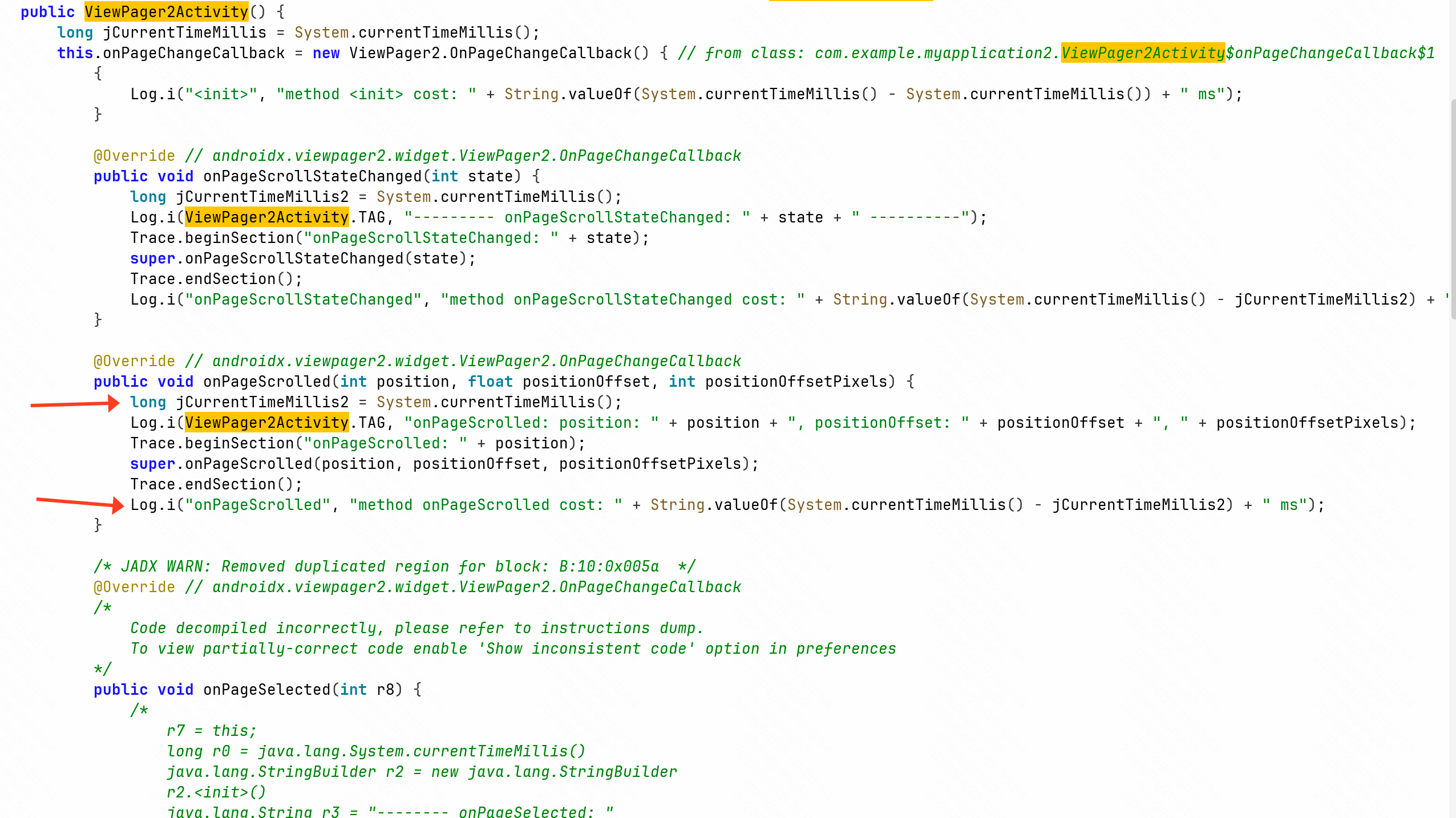 AI Visual Insight: This diagram shows the runtime effect after instrumentation: once method execution completes, the logging system outputs both the method name and execution time, proving that the enhancement logic has been woven into the target method. When applied across many methods and screens, these logs can be aggregated into startup timing, jank hotspots, or page performance profiles.
How you combine ClassReader and ClassWriter affects build performance
If you pass a ClassReader into ClassWriter during creation, ASM can directly copy method attributes for unchanged methods instead of fully parsing and rebuilding them. This is a practical optimization for large-scale instrumentation.
ClassReader cr = new ClassReader(bytes);
ClassWriter cw = new ClassWriter(cr, 0); // Pass the reader into the writer to enable copy optimization
ClassVisitor cv = new MyClassVisitor(cw);
cr.accept(cv, 0);
byte[] out = cw.toByteArray();
This optimized pattern reduces the parsing cost for unchanged methods and lowers build-time instrumentation overhead.
Understanding class structure is a prerequisite for writing reliable ASM rules
ASM does not work with source-level semantic abstractions. It operates on class metadata, the constant pool, fields, methods, annotations, and compiled instructions. That means you must understand metadata such as access, name, descriptor, and signature.
For example, decisions about whether to skip constructors, abstract methods, or native methods usually depend on access flags and descriptors. The more explicit your rules are, the more stable your instrumentation becomes.
FAQ
1. Why choose ASM over manual logging?
Because ASM can inject logic in bulk during the build process, it reduces business-code intrusion, covers more methods, and works well for performance monitoring, non-intrusive analytics, and unified security hardening.
2. Why is AdviceAdapter recommended for method instrumentation?
Because it encapsulates method entry, method exit, and local variable management. It significantly reduces the complexity of assembling bytecode instructions manually, especially for execution time tracking.
3. What is the key entry point for Android instrumentation under AGP 7+?
The key entry point is AsmClassVisitorFactory. It registers class visitors through Variant instrumentation and is the standard ASM integration model in the current Android build system.
Reference guidance should focus on version compatibility and documentation sources
The article references org.ow2.asm:asm:7.2 as an example dependency version, while the implementation uses an ASM9-style API. In real projects, you should align with the AGP compatibility matrix and your team’s build toolchain versions.
It is also worth keeping both the official documentation and source-code reading habits. Pay special attention to the behavioral boundaries of ClassReader, ClassWriter, AdviceAdapter, and CheckClassAdapter.
AI Readability Summary
This guide reconstructs an ASM-based Android method execution time instrumentation solution. It covers ASM core components, AGP 7+ plugin integration, the ClassVisitor chain of responsibility, method entry and exit instrumentation with AdviceAdapter, and performance optimization ideas for ClassReader and ClassWriter. It is well suited for performance monitoring, non-intrusive analytics, and security hardening.