This article focuses on self-hosting n8n, connecting AI nodes, and exposing public webhooks. It addresses three common pain points: scripts that are hard to maintain, workflows that are hard to collaborate on, and private network services that are hard to reach. Core keywords: n8n, Docker, cpolar.
Technical Specifications at a Glance
| Parameter | Description |
|---|---|
| Core Project | n8n |
| Positioning | Open-source, self-hosted, low-code workflow engine |
| Deployment Method | Docker container deployment |
| Runtime Port | 5678 |
| AI Integration | DeepSeek API |
| Public Access | cpolar tunnel exposure |
| Protocol/License | MIT License |
| Language Ecosystem | TypeScript / Node.js |
| Native Integrations | 300+ services and nodes |
| Core Dependencies | Docker, n8n image, DeepSeek API key, cpolar |
| Popularity Reference | Original article shows 11k+ views |
The Core Value of n8n Is Turning Automation from Script Maintenance into Workflow Maintenance
n8n is a strong fit for teams that frequently connect APIs, databases, messaging systems, and AI services. It uses nodes and connections to represent execution logic, which makes workflows readable, traceable, and reusable.
Compared with SaaS tools such as Zapier and Make, n8n offers several key advantages: self-hosting, no extra per-task billing, and support for custom code. This matters especially to development teams that care about data sovereignty and extensibility.
 AI Visual Insight: This image presents n8n in an automation-focused brand context, highlighting how node orchestration can reduce API costs and manual operational complexity. It is commonly used to introduce the idea of replacing scripts with workflows.
n8n Is Best Applied to Two Task Categories First
The first category is scheduled jobs, such as daily report generation, database synchronization, and batch notifications. The second category is event-driven jobs, such as form submissions, webhook callbacks, email alerts, or AI conversation routing.
docker pull n8nio/n8n:latest  # Pull the latest n8n image
mkdir -p ~/.n8n               # Create the persistent data directory
chmod -R 777 ~/.n8n           # Grant the container read and write permissions
These commands prepare the n8n image and the persistent data directory.
Deploying n8n with Docker Is the Most Reliable Starting Path
In CentOS or a compatible environment, first remove older Docker versions, then install dependencies and configure an image source. The original material does not focus on complex tuning. Its priority is to make sure the image can be pulled and the service can start successfully.
yum remove -y docker docker-client docker-client-latest docker-common docker-latest docker-engine  # Remove older Docker versions
yum install -y yum-utils device-mapper-persistent-data lvm2                                           # Install base dependencies
yum-config-manager --add-repo https://mirrors.aliyun.com/docker-ce/linux/centos/docker-ce.repo      # Configure a regional Docker repository mirror
These commands clean up the Docker environment, install dependencies, and configure the repository.
Docker Image Pull Success Depends on Registry Mirror Configuration
If a direct image pull fails, the issue is usually not n8n itself. In most cases, access to the image registry is restricted. In that case, configure /etc/docker/daemon.json first, then restart the Docker service.
{
  "registry-mirrors": [
    "https://docker.xuanyuan.me",
    "https://docker.m.daocloud.io",
    "https://docker.imgdb.de",
    "https://docker-0.unsee.tech"
  ]
}
This configuration assigns multiple registry mirror endpoints to Docker.
systemctl daemon-reload   # Reload the systemd configuration
systemctl restart docker  # Restart the Docker service
systemctl enable docker   # Enable Docker at boot
These commands apply the registry mirror configuration and ensure Docker stays available after reboot.
You Should Configure Authentication and Persistence When Starting the n8n Container
The default n8n web interface should have basic authentication enabled immediately. Otherwise, exposing it to the public internet creates significant risk. The original setup also configures the time zone, cookie settings, and automatic restart, which together form a minimal production-ready baseline that you can reuse directly.
docker run -d \
  --name n8n \
  -p 5678:5678 \
  -v ~/.n8n:/home/node/.n8n \
  -e N8N_BASIC_AUTH_ACTIVE=true \
  -e N8N_BASIC_AUTH_USER=admin \
  -e N8N_BASIC_AUTH_PASSWORD=root@1234 \
  -e TZ=Asia/Shanghai \
  -e N8N_COOKIE_SECURE=false \
  -e N8N_SECURE_COOKIE=false \
  --restart always \
  n8nio/n8n:latest
This command starts an n8n container with authentication, persistence, and automatic restart enabled.
You Can Move into Visual Workflow Design Immediately After Initialization
After you open http://server-ip:5678, complete the admin account setup, fill in the basic information, and activate the license to enter the console. For personal learning, a free key is usually sufficient for a standard hands-on experience.
n8n Only Becomes a Real AI Workflow Platform After You Connect DeepSeek
In the first workflow, the key is not advanced prompt engineering. The real goal is to complete the chain from trigger to AI agent to model credentials to conversation testing. If you can produce one valid response on the canvas, your environment is functionally complete.
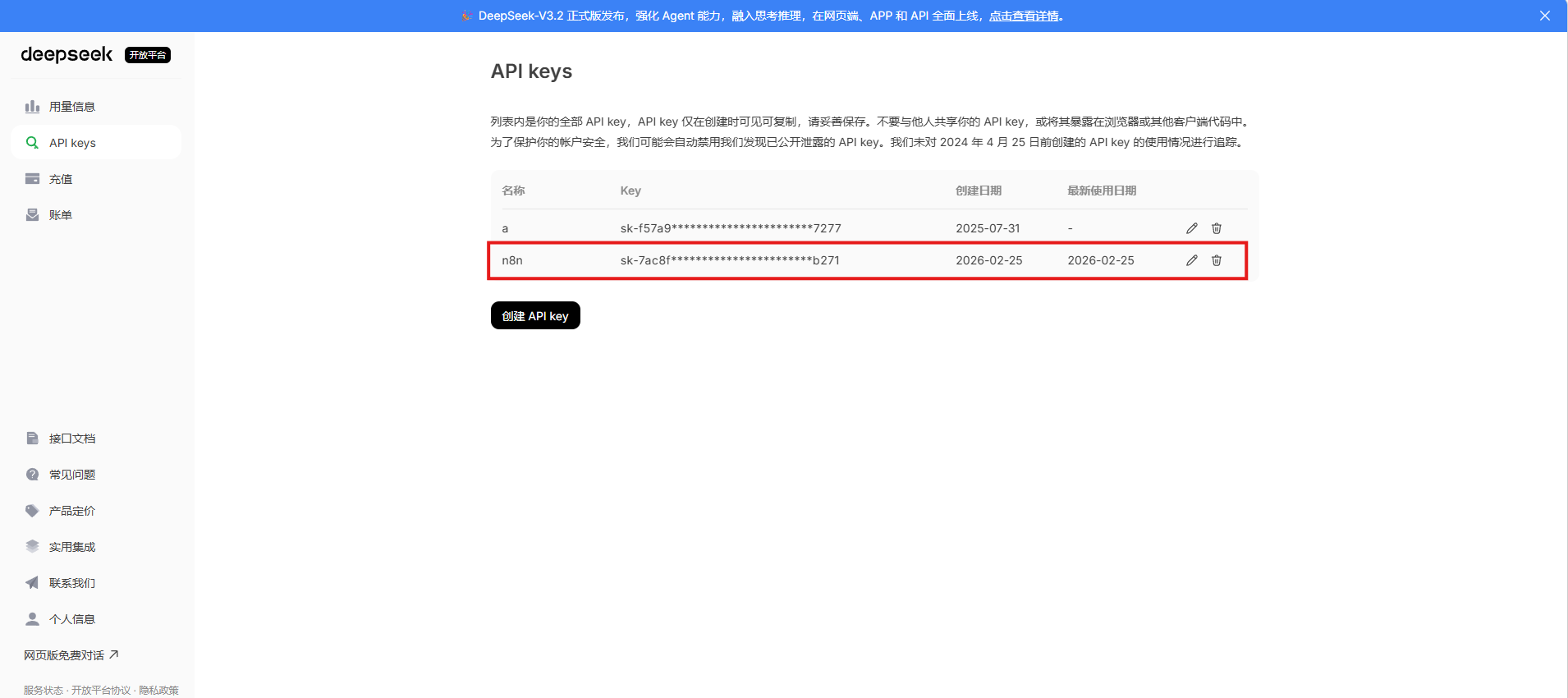 AI Visual Insight: This image corresponds to the entry point for creating a new workflow. It shows the starting interface in the n8n console, where you move from the dashboard into a blank workflow editor. It emphasizes that all automation logic is organized around the canvas.
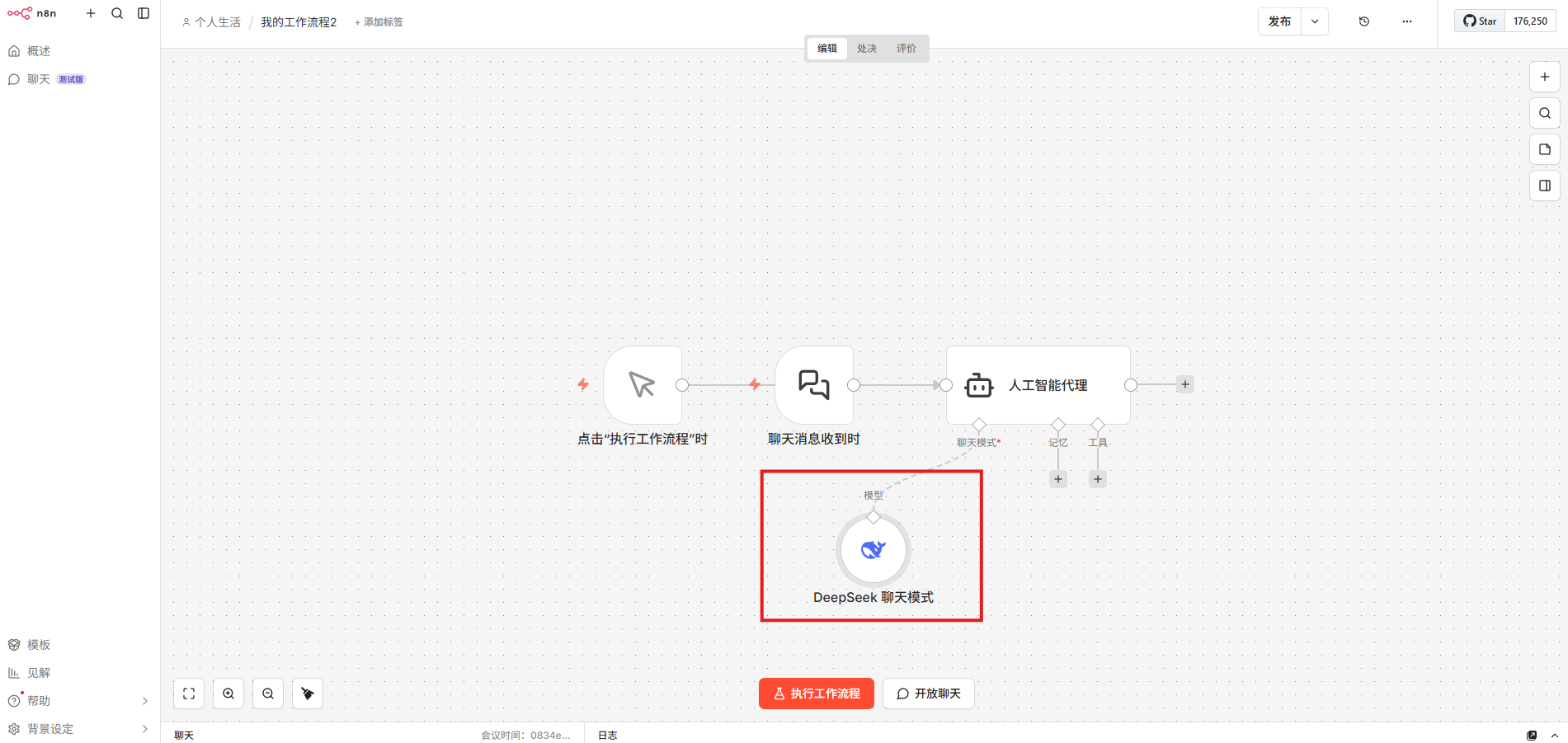 AI Visual Insight: This image shows the conversation testing stage, which is typically used to verify whether the AI Agent node and the model service are connected correctly. The focus is on input messages, execution results, and the structure of the returned content.
Workflow structure:
Chat Trigger -> AI Agent -> DeepSeek Model -> Open Chat Test
This structure shows the minimum viable node chain for an AI workflow.
DeepSeek Credential Management Determines Long-Term Reusability
Configure the DeepSeek API key as a standalone credential object instead of scattering it across individual nodes. This approach significantly reduces maintenance overhead when you copy workflows, switch models, or migrate environments later.
You Can Build Web Scraping Workflows Quickly with HTTP and HTML Nodes
The second practical scenario is web scraping. Its core path is: manual trigger, HTTP request, HTML extraction, and result validation. This pattern works well for collecting public web pages, validating page structure, or preprocessing content for downstream AI summarization.
# Example target site
https://scrapeme.live/shop/
This target URL demonstrates how the HTTP node can fetch public web content.
Workflow structure:
Manual Trigger -> HTTP Request(GET) -> HTML Extract -> Execute Workflow
This structure shows the node relationships in a basic web scraping workflow.
The Main Bottleneck in This Type of Scraping Workflow Is Usually Page Structure Changes
If HTML extraction fails, first check whether the target site has changed its layout. Then verify whether the returned page is dynamically rendered. The n8n combination of HTTP and HTML nodes is better suited to static content or pages already rendered on the server side.
cpolar Solves the Problem of Local n8n Instances Not Being Able to Receive External Webhooks
Many automation flows work locally but fail as soon as they depend on third-party callbacks, because services inside a private network are not publicly reachable by default. cpolar solves this by securely mapping local port 5678 to a public URL.
sudo curl https://get.cpolar.sh | sh   # Install cpolar with one command
sudo systemctl status cpolar           # Check the service status
These commands install cpolar and verify that the service has started successfully.
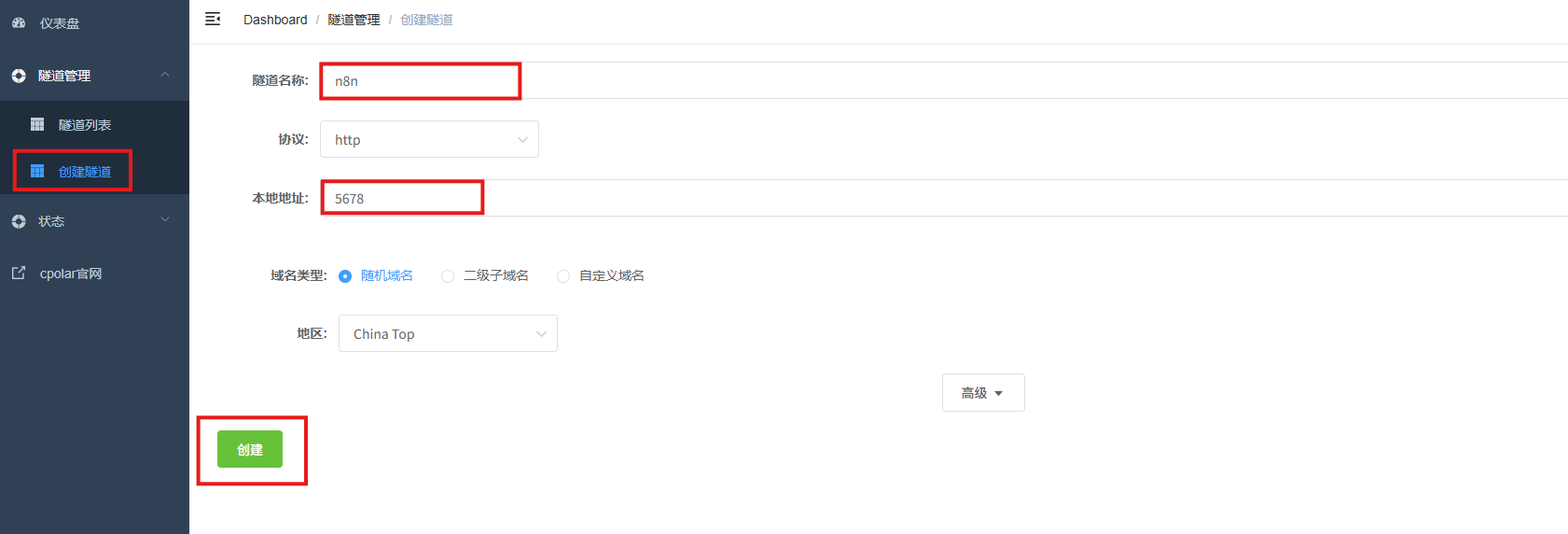 AI Visual Insight: This image shows the tunnel creation form in the cpolar web UI. Key fields include protocol type, local port, domain type, and region selection. These settings determine how the public entry point maps to the n8n service.
A Fixed Domain Is Better Than a Random URL for Production Webhook Testing
A random domain works for quick validation. However, once you use it in a third-party platform webhook, any address change will break the callback configuration. Reserving a stable subdomain allows the n8n webhook URL to remain usable over time.
This Setup Works Because the Workflow Is Visible, the Nodes Are Testable, and External Systems Can Trigger It
n8n upgrades automation from the question of whether code still runs to whether the workflow still remains understandable. Docker provides deployment stability, DeepSeek brings AI capability into the workflow, and cpolar fills the gap for public triggering.
If your goal is to complete your first automation loop within 30 minutes, this combination is already enough: local self-hosting, node-based orchestration, conversational AI, and external webhook access in one practical stack.
FAQ
FAQ 1: Why Is n8n Better Than Writing Scripts Directly for Team Collaboration?
Because n8n expresses logic as a visual node graph, the workflow itself becomes documentation. Whoever takes over does not need to understand a large codebase first. They can inspect node inputs, outputs, and connections to identify issues quickly.
FAQ 2: What Is the Minimum Requirement for Connecting DeepSeek to n8n?
You need a valid DeepSeek API key and permission in n8n to create an AI Agent or model node. After you configure the credentials, a successful reply from a chat trigger test is enough to confirm that the chain is working.
FAQ 3: Why Do You Still Need cpolar? Why Not Just Open a Server Port Directly?
If n8n runs on a local computer, virtual machine, or in an environment without a public IP address, third-party services cannot access it directly. cpolar can quickly provide a public HTTPS endpoint, which is especially useful for webhook debugging, mobile access, and remote integration testing.
Core summary: This article reconstructs the full path from deploying n8n with Docker and completing basic initialization, to connecting DeepSeek for AI workflows, and finally exposing public webhooks through cpolar. It helps developers implement automation orchestration quickly through a low-code approach.