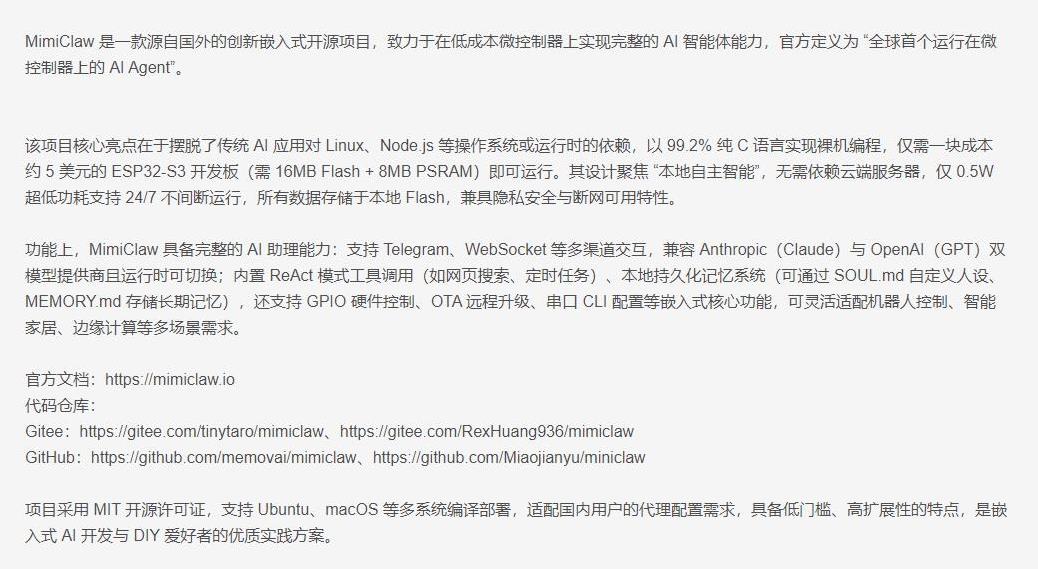
MimiClaw is a lightweight embedded AI agent robot base that runs on the ESP32-S3. Its core value lies in using pure C and FreeRTOS to build a closed loop for message passing, memory storage, LLM invocation, and hardware execution. It addresses a common challenge on small controllers: balancing intelligence, real-time behavior, and offline availability. Keywords: ESP32-S3, AI Agent, FreeRTOS.
The technical specification snapshot highlights a compact but capable embedded stack
| Parameter | Details |
|---|---|
| Core language | C |
| Runtime environment | ESP-IDF + FreeRTOS |
| Processor | ESP32-S3 dual-core MCU |
| Communication protocols | Wi-Fi, WebSocket, Telegram, HTTP, TLS |
| Storage stack | SPIFFS, NVS, 16MB Flash |
| Core dependencies | mbedTLS, LWIP, FreeRTOS, ESP Event Loop |
| Tooling capability | About 25 tool functions |
| Code size | About 5,000 lines of pure C |
| GitHub stars | Not provided in the source |
 AI Visual Insight: This animation shows the physical form of a desktop-class embedded robot platform. The focus is on the compact carrier board, mobile chassis, and front-facing interaction structure. It makes clear that MimiClaw is not just a software framework, but an integrated robotic platform designed for sensors, actuators, and multimodal input and output.
MimiClaw’s system design prioritizes surviving first and becoming smarter second
MimiClaw does not start by optimizing for cloud capability. It first ensures that the device remains operable, debuggable, and recoverable when the network is down, certificates are invalid, or external APIs fail. This design philosophy makes it better suited to real-world robotics than many lightweight projects that only work when connected.
The source material makes one central judgment explicit: the architecture is not a presentation diagram, but a debugging map. TLS handshake failures, motor control, Feishu reachability, or model invocation crashes can all be mapped back to clear module boundaries.
The four-layer architecture forms a complete robotic control loop
 AI Visual Insight: This image works more like a system overview or physical deployment view. It emphasizes the relationship between the robot hardware, development board, and peripheral modules. That means any architectural analysis must cover the physical device, firmware entry points, and cloud services together, rather than focusing on a single source file.
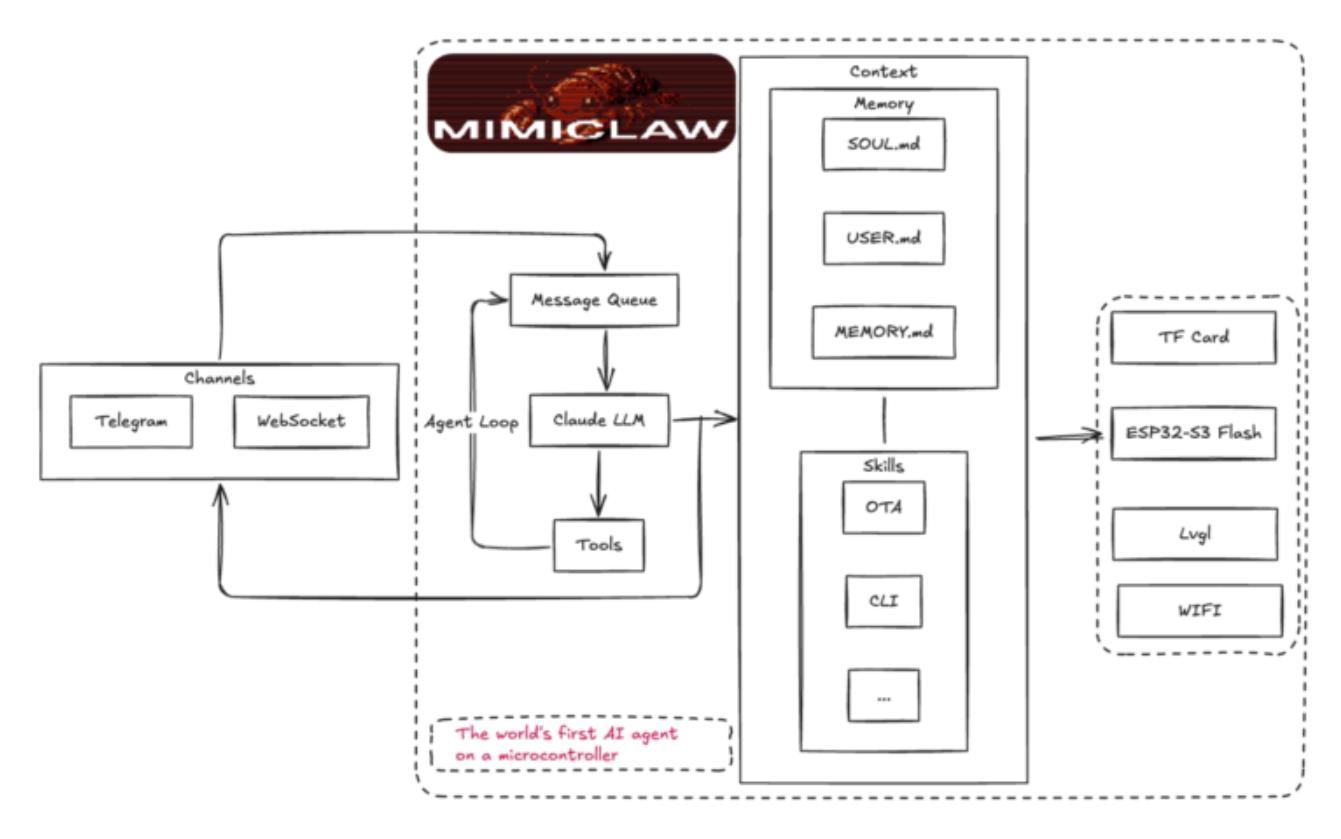 AI Visual Insight: This is a hand-drawn system architecture diagram that shows the dependencies between the message ingress layer, agent decision core, tool registry, storage layer, and hardware perception layer. The layered connections indicate a bus-driven, decoupled design that makes it easier to isolate bottlenecks across networking, memory, and execution paths.
The channel layer receives external input from Telegram, WebSocket, and similar interfaces, then pushes messages onto the bus. It acts as the robot’s ears and mouth, standardizing all external interaction entry points so that business logic does not couple directly to any specific platform.
The agent core consists of the Agent Loop, memory system, LLM proxy, and tool registry. It pulls tasks from the message bus, combines them with SOUL.md, MEMORY.md, and session context, then decides whether to respond directly or invoke a cloud model.
The storage and perception layers give the system a persistent sense of presence
The enhancement modules connect the IMU, RGB LED, buttons, and display. These are not decorative add-ons. They are critical interfaces for status signaling and local interaction. For example, a red startup light, shake-to-toggle configuration pages, and physical button interrupts all provide low-latency local feedback.
The storage layer combines SPIFFS and NVS. SPIFFS stores text assets such as persona definitions, memory, and skill scripts. NVS stores Wi-Fi credentials and dynamic configuration. This layered design gives long-term semantic memory and runtime parameters their own clear homes.
// Route outbound messages to different channels based on msg.channel
if (strcmp(msg.channel, MIMI_CHAN_TELEGRAM) == 0) {
    telegram_send_message(msg.chat_id, msg.content); // Send to Telegram
} else if (strcmp(msg.channel, MIMI_CHAN_WEBSOCKET) == 0) {
    ws_server_send(msg.chat_id, msg.content); // Send to the WebSocket client
} else {
    ESP_LOGW(TAG, "Unknown channel: %s", msg.channel); // Warn on an unknown channel
}
This code demonstrates a key advantage of decoupling the message bus from channel implementations: business responses are generated once, while the delivery path is selected dynamically by channel.
The main program is not a pile of initialization calls but a five-stage startup orchestration
The value of mimi.c is that it linearizes the architecture diagram. It does not simply list every init call in order. Instead, it encodes principles such as perception first, infrastructure first, delayed network startup, and task isolation directly into the boot sequence.
The system starts the display, RGB LED, buttons, and IMU first. In other words, before Wi-Fi is even available, the robot already has basic perception and feedback capability. That reflects product thinking rather than demo-driven thinking.
The first stage brings up sensing and local interaction first
ESP_ERROR_CHECK(display_init());
display_show_banner();              // Show the startup banner on the display
ESP_ERROR_CHECK(rgb_init());
rgb_set(255, 0, 0);                 // Red light indicates the system is booting
button_Init();                      // Initialize the physical button
imu_manager_init();                 // Initialize the IMU sensor
imu_manager_set_shake_callback(config_screen_toggle); // Toggle the config page on shake
This code shows that MimiClaw establishes a sense of device presence through display, lighting, and motion feedback even before it connects to the network.
The second stage initializes core infrastructure: NVS, the event loop, and SPIFFS. This stage determines whether configuration can persist, asynchronous events can function, and persona and memory files can mount successfully. It is the system skeleton.
ESP_ERROR_CHECK(init_nvs());                 // Store configuration and credentials
ESP_ERROR_CHECK(esp_event_loop_create_default()); // Create the system event bus
ESP_ERROR_CHECK(init_spiffs());              // Mount the file system
These three steps form the minimum persistence and event layer required for long-term robot operation.
The third stage assembles the brain without starting network services yet
The system then initializes subsystems such as message_bus, memory_store, skill_loader, session_mgr, wifi_manager, http_proxy, telegram_bot, llm_proxy, tool_registry, and agent_loop. The key point is that at this stage it only calls init, not start.
This init/start separation reflects strong engineering discipline. It allows the device to load most components while offline, then start Telegram, WebSocket, and the main Agent loop only after network conditions are ready. That reduces blocking and failure propagation.
ESP_ERROR_CHECK(message_bus_init());   // Initialize the message bus
ESP_ERROR_CHECK(memory_store_init());  // Load memory storage
ESP_ERROR_CHECK(llm_proxy_init());     // Initialize the large language model proxy
ESP_ERROR_CHECK(tool_registry_init()); // Register the tool set
ESP_ERROR_CHECK(agent_loop_init());    // Initialize the Agent decision loop
This code reflects a simple strategy: assemble the brain first, then wait for external connectivity.
The offline-first base is the core prerequisite for MimiClaw’s robustness
The serial CLI starts before Wi-Fi. That means even if network configuration is wrong, the router is unreachable, or TLS validation fails, developers can still access the device over USB serial, run diagnostics, change configuration, or continue development.
Once Wi-Fi is connected, the system starts the Telegram Bot, Agent Loop, Cron, Heartbeat, WebSocket Server, and outbound dispatch task in sequence. This startup boundary is very clear, making it easier to determine whether a problem occurs during the initialization phase or the connected phase.
Network services are strictly gated behind successful Wi-Fi connectivity
ESP_ERROR_CHECK(serial_cli_init()); // Prioritize serial debugging so offline access still works
if (wifi_manager_wait_connected(30000) == ESP_OK) {
    ESP_ERROR_CHECK(telegram_bot_start()); // Start the Bot after the network is ready
    ESP_ERROR_CHECK(agent_loop_start());   // Start the main Agent loop
    ESP_ERROR_CHECK(ws_server_start());    // Start the WebSocket service
}
The core value of this code is that it decouples debuggability from network state.
Under dual-core scheduling, Core 0 mainly handles Wi-Fi, the network stack, and the CLI, while Core 1 focuses more on Agent decisions and message dispatch. This prevents network jitter from directly slowing down motion execution and conversational response.
Debugging symptoms can be mapped directly back to module boundaries
The TLS error mentioned in the source is highly typical: esp-tls-mbedtls: Failed to set client configurations. This indicates that the issue is not in the message bus or tool layer, but in the configuration path between the LLM Proxy and mbedTLS.
Once you understand the relationship between llm_proxy_init() and certificate validation switches, troubleshooting moves from searching error strings to tracing dependencies. That is one of the biggest benefits of a high-quality embedded architecture: errors have a defined landing zone instead of spreading everywhere.
E (...) esp-tls-mbedtls: Failed to set client configurations
Guru Meditation Error: Core 1 panic'ed (IllegalInstruction)
This log indicates direct coupling between the cloud model path and TLS configuration. The most effective first checks are certificate validation and menu configuration.
Secondary development should begin with small, verifiable closed loops
The most practical starting paths are fourfold: intentionally leave Wi-Fi unconfigured to validate offline mode, test shake-to-toggle configuration switching through the IMU, add a new lighting tool modeled on an existing skill, or modify SOUL.md to tune persona output.
If you want to extend the edge-side control loop further, create a FreeRTOS task that periodically reads a temperature sensor and drives a fan directly when a threshold is exceeded, without involving the cloud. This kind of design can reduce response latency to the millisecond level, which is the real strength of an embedded agent.
 AI Visual Insight: This image shows the assembled combination of the development board, robot body, or related modules, emphasizing that the project has a hardware foundation that is buildable, testable, and extensible. For developers, that means skill expansion is not only about adding software functions, but also about allocating GPIO, sensor, and actuator resources.
The FAQ provides structured answers for architecture, resilience, and extensibility
1. Why is MimiClaw a good foundation for an embedded AI agent?
Because it separates the message bus, memory, LLM integration, tool execution, and hardware perception into clear modules, while supporting offline debugging and online enhancement. That makes it well suited for continuous iteration on low-cost MCU platforms.
2. Why does MimiClaw not fail completely when the network or TLS breaks?
Because the serial CLI, local display, RGB LED, button input, and parts of the configuration logic all start before network services. The system retains an offline operational base, so developers can still access the device and troubleshoot it.
3. What part should developers modify first during secondary development?
Start with a skill or tool extension. Its boundary is clear, the risk is low, and feedback is fast. After that, you can modify SOUL.md, adjust message routing, or add local sensing tasks as a gradual path into the core logic.
[AI Readability Summary]
This article reconstructs and explains MimiClaw’s four-layer architecture and the
mimi.cstartup flow. It focuses on the ESP32-S3, FreeRTOS, the message bus, the LLM proxy, and the tool registry, showing how the project delivers an embedded AI agent on low-cost hardware that remains debuggable offline and extensible online.