blbl is a third-party Bilibili client built for Android 5.0+ legacy devices, large-screen TV experiences, and in-car infotainment scenarios. It delivers a unified native playback and browsing experience, addressing the official client’s bloat, weak backward compatibility, and poor remote-control usability. Keywords: Android TV, ExoPlayer, in-car Android adaptation.
The technical specification snapshot highlights its platform focus
| Parameter | Details |
|---|---|
| Runtime Platform | Android 5.0+ |
| Primary Scenarios | Phone, tablet, TV, in-car system |
| Playback Framework | Media3 / ExoPlayer |
| Interaction Methods | Touch, D-pad, remote focus navigation |
| Protocol Support | DASH, HLS, and other streaming protocols |
| Content Modules | Recommendations, categories, feed, live streaming, search, profile |
| Repository Popularity | Star count not provided in the source |
| Core Dependencies | Native Android components, Media3, ExoPlayer |
blbl has a very clear product position
The official Bilibili client is feature-complete, but its experience is not consistent across older devices, TVs, and in-car systems. blbl does not try to be “more comprehensive.” Instead, it tries to be “more precise” by using one package to cover multiple Android form factors.
It targets three common pain points: low-version Android systems that struggle to run smoothly, fragmented interaction patterns between TV and mobile, and the lack of a usable native client for in-car environments. For users who still rely on older tablets or TV boxes, this positioning has clear practical value.
The project screenshot reflects its large-screen-first design
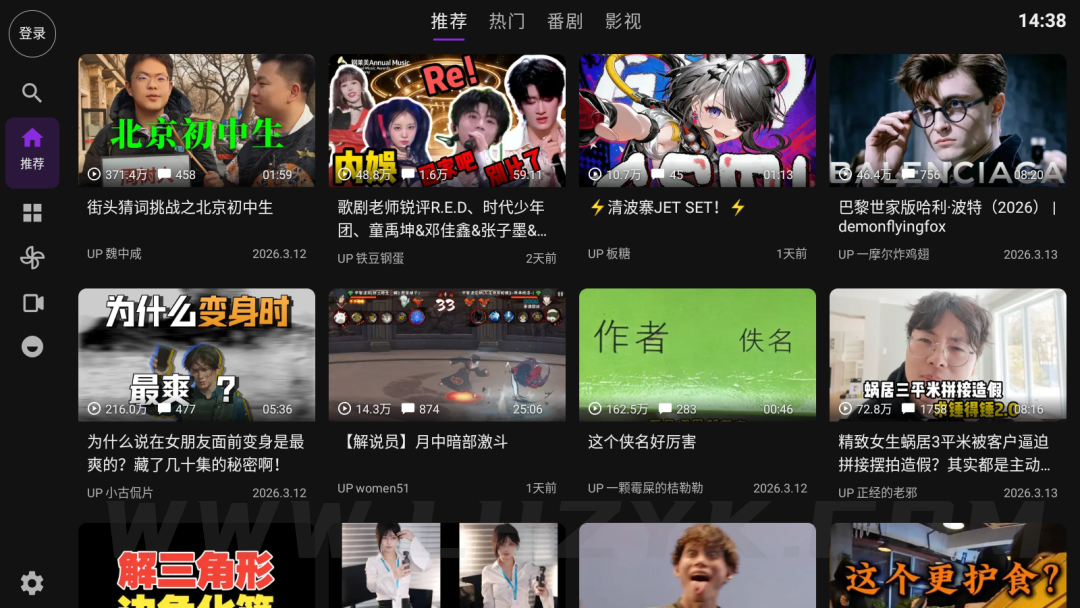
AI Visual Insight: The image shows blbl’s main interface on a large-screen device. The left side uses a highly accessible vertical navigation area, while the right side presents a waterfall-style or card-based content layout. This structure helps users switch focus quickly with a remote control D-pad, which strongly suggests that the product has been optimized for TVs, set-top boxes, and landscape tablets.
The client uses unified interaction patterns across multiple device types
blbl follows a classic sidebar navigation model, with six primary entry points: Recommendations, Categories, Feed, Live, Search, and Profile. This shallow information architecture works well for both remote-control navigation and touch input.
In large-screen scenarios, a navigation drawer or persistent sidebar is more suitable for focus movement than a bottom tab bar. It reduces horizontal travel distance and avoids the accidental input and deep navigation stacks that are common on TV interfaces.
val sections = listOf("推荐", "分类", "动态", "直播", "搜索", "我的")

fun moveFocus(current: Int, direction: Int): Int {
    // Core logic: move focus based on D-pad direction
    val next = current + direction
    // Core logic: keep the focus index within bounds
    return next.coerceIn(0, sections.lastIndex)
}
This code shows that TV and in-car apps typically need explicit focus management instead of relying entirely on touch events.
Media3 and ExoPlayer define the strength of its playback stack
The source notes that blbl uses Media3 (ExoPlayer) as its playback engine. This is an important technical signal because it directly affects format compatibility, streaming support, and long-term maintainability.
Compared with the traditional MediaPlayer, ExoPlayer is more mature in DASH, HLS, custom buffering strategies, and subtitle support. For mixed Bilibili scenarios that include long-form video, anime episodes, and live streams, a unified playback framework can significantly reduce compatibility issues.
The player supports fine-grained viewing controls
The app supports switching video quality and encoding formats, as well as playback speeds from 0.5x to 3.0x, subtitle position adjustment, and danmaku controls. These capabilities show that it is not just a thin shell that “can play video,” but a client that aims to deliver a complete viewing experience.
val player = ExoPlayer.Builder(context).build()

fun applyPlayback(speed: Float) {
    // Core logic: set the playback speed
    player.setPlaybackSpeed(speed)
}

fun setMedia(url: String) {
    // Core logic: load the stream URL and prepare playback
    player.setMediaItem(MediaItem.fromUri(url))
    player.prepare()
}
This snippet summarizes the standard ExoPlayer integration path in a client app: build an instance, set the media source, prepare the player, and control playback.
Its lightweight native implementation drives its performance advantage
blbl emphasizes that it does not rely on unnecessary web wrappers. As a result, list scrolling, page transitions, and player startup can maintain lower latency. For limited-performance devices running Android 5.0 through 7.0, a native rendering path is especially important.
This design also brings two additional benefits: more predictable memory usage and a simpler remote-control event chain. On terminals such as TV boxes and in-car systems, where input methods are more complex, lighter event dispatch usually means better stability.
Its target users and deployment scenarios are easy to identify
If you use an old phone, old tablet, TV box, or Android in-car system, blbl may provide more value than the official client. It is especially suitable for users who want to turn a device into a dedicated content-consumption terminal rather than a full-featured community app.
On the other hand, if you depend heavily on content publishing, complex social interactions, subscription systems, or the latest official event entry points, a third-party client is usually not the best primary option. A more practical approach is to use blbl as a complementary client for large screens and low-spec devices.
# Install the APK on an Android device
adb install blbl.apk

# Core logic: list connected devices and verify that the TV or in-car unit is recognized
adb devices
These commands are useful for quickly deploying the APK to a TV, set-top box, or in-car test environment.
The project’s core value is scenario unification rather than feature accumulation
Overall, blbl’s competitiveness does not come from surpassing the official client in every capability. It comes from rebuilding the Bilibili content-consumption experience with a lower system requirement, interaction patterns that fit large screens better, and a more reliable player.
From a technical product perspective, it captures three scarce advantages: Android 5.0+ compatibility, TV and in-car focus-based interaction, and a modern ExoPlayer-powered playback core. For teams or users who value a “small but sharp” client design, this is a very stable direction.
FAQ
1. What is the biggest difference between blbl and the official Bilibili client?
The biggest difference is scenario strategy. The official client aims for complete functionality, while blbl focuses on lightweight design, low-version Android compatibility, and TV/in-car usability. That gives it a clear advantage on large screens and older devices.
2. Why is ExoPlayer so important for this type of client?
Because it determines streaming protocol support, quality switching, subtitle control, and playback stability. For mixed scenarios involving anime, live streaming, and long-form video, ExoPlayer is better suited than traditional players as a unified playback core.
3. Is blbl suitable as a user’s only client?
If your main usage scenario is a TV, set-top box, tablet, or older device, it can serve as a primary playback client. If you rely on the official ecosystem for complete interaction and operational features, it is better used as a complementary client.
AI Readability Summary
blbl is a third-party Bilibili client for Android 5.0 and above, designed to provide a unified experience across phones, tablets, TVs, and in-car systems. Its core strengths are a lightweight native architecture, strong compatibility with older devices, and stable playback powered by Media3/ExoPlayer.