GPUStack can centrally manage vLLM and deploy DeepSeek-V4-Pro in an H200/H20 141GB environment, addressing the core challenges of serving ultra-large MoE models: complex installation, difficult performance tuning, and hard-to-guarantee stability. Keywords: GPUStack, DeepSeek-V4-Pro, vLLM.
The technical specification snapshot provides the deployment baseline
| Parameter | Description |
|---|---|
| Platform | GPUStack |
| Model | DeepSeek-V4-Pro 1.6T (MoE) |
| Deployment Environment | Single node with 8× NVIDIA H200/H20 141GB |
| Inference Backend | vLLM 0.20.0-cu130 |
| Container Runtime | Docker |
| Access Protocol | OpenAI-compatible API / HTTP |
| Driver Requirement | NVIDIA Driver ≥ 580 |
| Core Dependencies | Docker, NVIDIA Container Toolkit, vLLM |
| Reference Source | Adapted from a GPUStack technical practice article |
GPUStack serves as the cluster control plane for large-model inference
The value of GPUStack is not just that it can start a model. Its real value is that it can turn model execution into an operable service. It centrally manages heterogeneous GPUs, orchestrates inference engines, exposes APIs, and provides fault recovery, monitoring, and access control.
For ultra-large MoE models such as DeepSeek-V4-Pro, the real challenge is not a single inference request. The challenge is maintaining availability under long contexts, high concurrency, and heavy VRAM pressure. GPUStack moves these concerns into the platform layer and reduces deployment complexity.
 AI Visual Insight: The image presents the article cover and highlights the core themes: deployment in an H200/H20 141GB environment, DeepSeek-V4-Pro setup, performance benchmarking, and stability tuning. It emphasizes a complete engineering workflow from deployment to production optimization.
Validate the container and GPU foundation first
Before deployment, confirm that Docker is available, then verify the GPU driver and container runtime. The goal here is not simply that the commands execute, but that the inference containers can reliably access GPU resources later.
docker info
nvidia-smi
sudo docker info 2>/dev/null | grep -q "Runtime.*nvidia" \
  && echo "Nvidia Container Toolkit OK" \
  || (echo "Nvidia Container Toolkit not configured"; exit 1)
These commands verify that Docker, the driver version, and the NVIDIA Container Toolkit are ready.
Installing the control plane and joining workers forms the first deployment track
GPUStack Server can run on a CPU node or directly on a GPU node. The test environment uses a single machine with 8 H200 141GB GPUs. In this setup, starting the control plane container on that node is sufficient to complete initialization.
sudo docker run -d --name gpustack \
  --restart unless-stopped \
  -p 80:80 \
  --volume gpustack-data:/var/lib/gpustack \
  swr.cn-south-1.myhuaweicloud.com/gpustack/gpustack:v2.1.2 \
  --debug --bootstrap-password GPUStack@123

docker logs -f gpustack
This command starts the GPUStack Server and uses logs to confirm that the service is healthy.
After signing in to the console, create a Docker-based cluster and then add worker nodes. A worker is the execution unit registered with the control plane. It pulls images, allocates GPUs, and runs vLLM instances.
After worker onboarding, focus on the Ready state and whether monitoring metrics report correctly, including VRAM usage, temperature, utilization, and device information. This directly determines whether later scheduling decisions are trustworthy.
Using a custom vLLM version is the key step for supporting DeepSeek-V4-Pro
DeepSeek-V4-Pro depends on a newer vLLM release. This setup uses vllm/vllm-openai:v0.20.0-cu130 and registers it through GPUStack’s pluggable backend mechanism.
Recommended configuration items include the image name, the entry command vllm serve, and the execution template {{model_path}} --host {{worker_ip}} --port {{port}} --served-model-name {{model_name}}. You must preserve the template variables exactly, or the platform will not inject runtime parameters correctly.
backend_name: vLLM
version_configs:
  0.20.0-cu130-custom:
    image_name: vllm/vllm-openai:v0.20.0-cu130
    entrypoint: vllm serve
    run_command: >-
      {{model_path}} --host {{worker_ip}} --port {{port}} --served-model-name {{model_name}}
    env: {}
    custom_framework: cuda
This YAML registers a custom vLLM version in GPUStack that can deploy DeepSeek-V4-Pro directly.
Model deployment is fundamentally a joint design of parallelism and memory strategy
In an online environment, you can search for and deploy deepseek-ai/DeepSeek-V4-Pro directly from Hugging Face or ModelScope. In an offline environment, you must distribute the weights in advance and register the model files in the console using a local path.
The most critical step during deployment is not simply selecting the model. It is choosing the correct parallelism and cache parameters. The article clearly distinguishes TP from DP: TP favors single-request speed, while DP favors total throughput.
--trust-remote-code
--kv-cache-dtype fp8
--block-size 256
--enable-expert-parallel
--data-parallel-size 8
--tensor-parallel-size 8
--max-num-seqs 512
--max-num-batched-tokens 512
--gpu-memory-utilization 0.95
--max-model-len auto
--tokenizer-mode deepseek_v4
--tool-call-parser deepseek_v4
--enable-auto-tool-choice
--reasoning-parser deepseek_v4
--speculative_config '{"method":"mtp","num_speculative_tokens":1}'
These parameters define the DeepSeek-V4-Pro parallelism model, KV cache strategy, and tool-calling capabilities in vLLM.
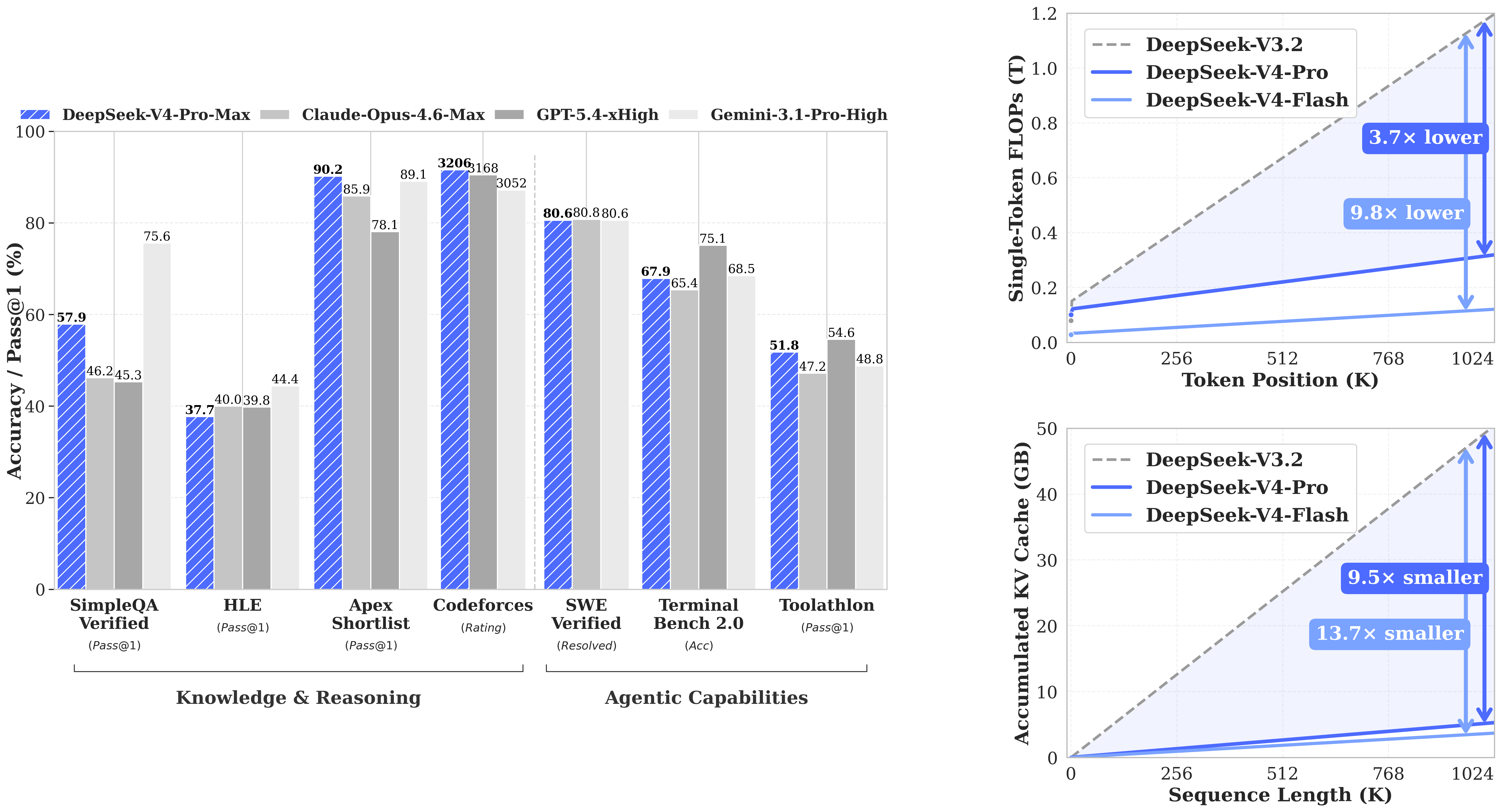 AI Visual Insight: The image appears to show DeepSeek-V4-related performance trends or architecture-level gains. The key message is the engineering benefit of the model under long-context workloads, complex reasoning, and inference efficiency, while also implying the importance of hardware and engine compatibility.
Why max-num-batched-tokens becomes a stability switch
Test data shows that when max-num-batched-tokens increases from 512 to 8192, total throughput in TP mode rises from 2483.19 Tokens/s to 6936.57 Tokens/s. However, DP 8 + EP runs directly into OOM at 8192.
This shows that the bottleneck is not pure compute. It is KV cache consumption. Long contexts, large batch sizes, and high concurrency all compete for VRAM, so amplifying any one factor amplifies instability.
Benchmark results show that TP and DP target different production goals
For single-request performance, TP 8 + EP delivers about 68 Tokens/s, while DP 8 + EP delivers about 43 Tokens/s. In terms of latency, TP achieves TTFT 240.86 and TPOT 21.89, both better than DP at 273.45 and 33.21.
But for total throughput, DP 8 + EP with max-num-batched-tokens 512 reaches 10289.27 Tokens/s, significantly exceeding TP. The conclusion is straightforward: choose TP for low latency, choose DP for high throughput, but DP is more sensitive to VRAM safety margins.
The OpenAI-compatible API integrates directly with tool calling
GPUStack exposes a unified authenticated endpoint, and the invocation pattern is compatible with the OpenAI SDK. Developers only need to replace base_url, api_key, and the model name to integrate tool calling.
from openai import OpenAI
import json

# Initialize the client: replace with your actual gateway and key
client = OpenAI(
    base_url="http://your-gpustack-endpoint/v1",
    api_key="your_api_key"
)

# Define tools: declare the function schema the model can call
tools = [{
    "type": "function",
    "function": {
        "name": "get_weather",
        "description": "Get weather information",
        "parameters": {
            "type": "object",
            "properties": {
                "location": {"type": "string", "description": "City name"}
            },
            "required": ["location"]
        }
    }
}]

# Create a conversation: let the model decide whether to trigger the tool
resp = client.chat.completions.create(
    model="DeepSeek-V4-Pro",
    messages=[{"role": "user", "content": "What is the weather like in Tokyo today?"}],
    tools=tools,
    max_tokens=512
)

print(resp.choices[0].message)
This example shows that DeepSeek-V4-Pro on GPUStack can integrate tool calling through an OpenAI-compatible interface.
Production tuning should prioritize stability over raw throughput
In an H200/H20 141GB environment, DeepSeek-V4-Pro is deployable in practice, but resources are not abundant. In particular, under a 1M-context scenario, the available KV cache can rarely sustain both high concurrency and large batch sizes at the same time.
A more realistic production strategy is to limit --max-model-len to 131072, 262144, or 524288, while also reducing max-num-seqs and max-num-batched-tokens. This is a classic multidimensional pressure reduction strategy, not a local optimization of a single parameter.
If you need even more stability, consider extended KV cache mechanisms such as LMCache or HiCache to offload part of the cache pressure from primary VRAM. This is especially important for long-context services.
The FAQ provides structured answers to common deployment questions
1. Why does DeepSeek-V4-Pro still OOM on H200/H20?
Because the main pressure comes from KV cache rather than raw compute alone. Long contexts, DP parallelism, and large batched-token settings all increase VRAM usage simultaneously and can ultimately trigger OOM.
2. How should you choose between TP and DP in production?
Choose TP first for interactive applications, low concurrency, and low-latency requirements. Choose DP first for batch workloads, high concurrency, and throughput-oriented scenarios, but pair it with more conservative VRAM parameters.
3. What is the core value of GPUStack?
It combines model deployment, engine version management, GPU scheduling, monitoring, authenticated APIs, and operational capabilities into one control plane. That makes it suitable for moving large models from “it runs” to “it is operable in production.”
The core summary reconstructs the complete deployment path and trade-offs
This article reconstructs the full workflow for deploying DeepSeek-V4-Pro with GPUStack in an NVIDIA H200/H20 141GB environment. It covers container preparation, worker onboarding, custom vLLM registration, model publishing, benchmark results, and production tuning recommendations. The main focus is the trade-off among TP/DP, KV cache, long context windows, and OOM risk.