Technical Specifications at a Glance
| Parameter | Details |
|---|---|
| Core Languages | Python, Java |
| Compute Engine | Apache Spark / PySpark |
| Runtime Protocols | Py4J, JVM, Local File System API |
| Article Tags | Python, Artificial Intelligence, Data Platform |
| Reference Versions | PySpark 4.1.1, JDK 17, Hadoop 3.3.6 |
| Deliverables | CSV ingestion, aggregated metrics, Parquet output, data quality report, execution lineage |
| Core Dependencies | pyspark, JDK 17, winutils.exe, hadoop.dll |
| Source Popularity | 511 views, 10 likes, 4 saves |
The Goal of This Debugging Session Was Not Just to Make It Run, but to Build a Reusable Data Pipeline
The original task was straightforward: read a mock sales CSV file, aggregate by region and product, write the result to Parquet, and produce both a data quality report and an execution plan. It looks like a beginner script, but in practice it touches the three most common layers of data engineering problems: environment dependencies, runtime compatibility, and data trustworthiness.
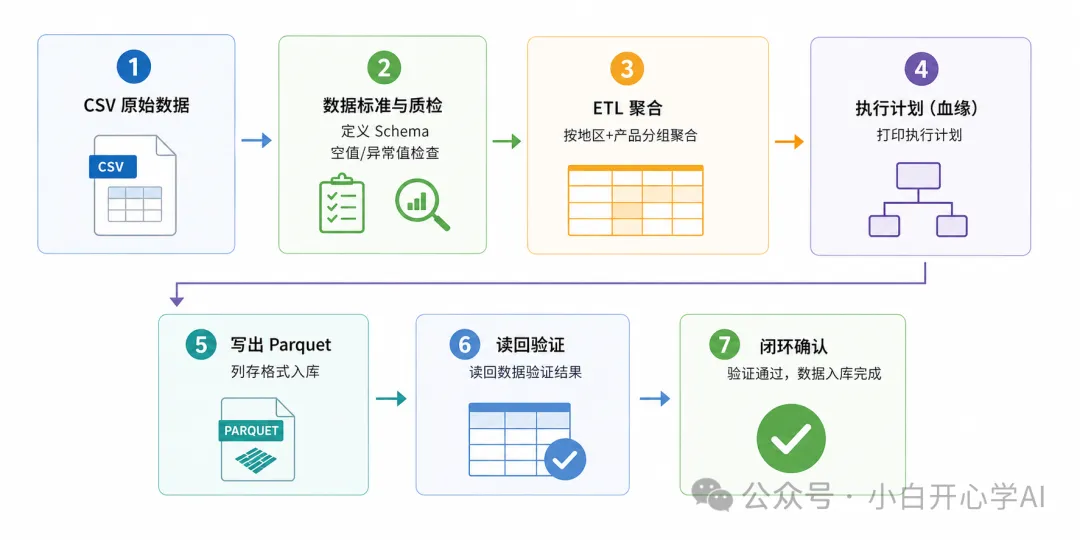 AI Visual Insight: This image serves as the article cover and highlights the PySpark debugging and environment troubleshooting scenario. Its core message points to the complete local data pipeline lifecycle, from ingestion and processing to final output.
If you only check whether SparkSession starts successfully, you can easily miss the parts that actually determine delivery quality: whether dependency sources are stable, whether the JVM is fully configured, whether the Windows file system bridge works, and whether data quality rules have been validated against dirty data.
A Minimal Runnable Skeleton Helps You Isolate the Failure Layer Quickly
from pyspark.sql import SparkSession

# Create a local Spark session to verify that the Python-to-JVM bridge works
spark = SparkSession.builder \
    .appName("debug-demo") \
    .master("local[*]") \
    .getOrCreate()

# Read a CSV file to validate basic I/O and DataFrame parsing
_df = spark.read.option("header", True).csv("sales.csv")

# Print the first few rows to confirm the data entered the Spark execution context
_df.show(5)
This snippet narrows the problem down to three observable checkpoints: the installation layer, the startup layer, and the file read layer.
Installation Failures and Slow Downloads Are Usually a Mirror Sync Problem, Not a Package Problem
Bug A typically appears as pip install pyspark failing to find the package, or downloading the 455 MB package extremely slowly from the official index. The root cause is usually not an incorrect command, but delayed synchronization on some regional package mirrors after a new PySpark release.
The correct engineering response is not to retry the same command repeatedly, but to switch to a mirror with faster synchronization, such as the Alibaba Cloud mirror. This is fundamentally a dependency supply chain issue and should be documented as part of a team-wide package installation strategy.
# Install PySpark from a mirror with faster synchronization
pip install pyspark -i https://mirrors.aliyun.com/pypi/simple/
This command helps you bypass mirror lag and complete the installation of large dependencies more quickly.
PySpark Is Not a Pure Python Library, but a Dual-Process System Across Python and the JVM
Bug B exposes a common misunderstanding: a successful pip install pyspark does not mean the Spark runtime is fully ready. If SparkSession creation fails with Java gateway process exited, the Python glue layer is present, but the JVM runtime is missing.
You should install JDK 17 and configure both JAVA_HOME and PATH. This step does more than fix the current error. It clarifies PySpark’s actual architecture: Python orchestrates the workflow, while Spark Core, the optimizer, and scheduling logic all run inside the JVM.
Environment Variables Must Be Verified Explicitly, or the Problem Will Grow Downstream
# Check whether Java is available
java -version

# Verify that the environment variable points to the JDK
echo $env:JAVA_HOME
These commands confirm that the Java runtime is recognized by both the operating system and PySpark.
Parquet Write Failures on Windows Usually Happen Because the Hadoop Compatibility Layer Is Missing
Bug C and Bug D form a chain of related failures. One reports HADOOP_HOME and hadoop.home.dir are unset, while the other raises UnsatisfiedLinkError. Together, they indicate that the compatibility bridge between Windows local file permissions and the Hadoop FileSystem API is missing.
 AI Visual Insight: This image shows an exception screenshot during the Parquet write stage. The key signal is a failure in the Hadoop directory setup or local permission bridge, which means Spark completed the computation but the filesystem commit phase was interrupted.
The fix is to provide both winutils.exe and hadoop.dll, place them in the same bin directory, and then configure HADOOP_HOME. These are not optional utilities. In local Windows development, they are required runtime components for Spark file output.
# Set the Hadoop directory so Spark can use the local compatibility layer when writing files
$env:HADOOP_HOME="D:\PySpark\hadoop"
$env:PATH="$env:HADOOP_HOME\bin;" + $env:PATH
This configuration establishes the permission and dynamic library path between Spark and the Windows local file system.
Encoding and Namespace Pollution Look Trivial, but They Often Break Scripts at the Final Stage
Bug E is unusual because the business logic may already be complete, yet the script still crashes because PowerShell defaults to GBK and cannot print emoji characters. For logs, prefer ASCII output so presentation-layer characters do not affect core pipeline stability.
Bug F is more subtle: from pyspark.sql.functions import sum overrides Python’s built-in sum(), so when the script calculates file sizes at the end, it may incorrectly treat a generator as a Spark column object. This is a namespace governance problem, not a Spark problem.
import os
from pyspark.sql import functions as F

total_size = 0
for root, _, files in os.walk("output"):
    for name in files:
        # Accumulate file sizes explicitly to avoid name collisions with Spark aggregation functions
        total_size += os.path.getsize(os.path.join(root, name))

# Route Spark aggregation functions through the F namespace to avoid polluting built-in functions
agg_df = _df.groupBy("region", "product").agg(F.sum("amount").alias("total_amount"))
This code separates Python built-in semantics from Spark SQL function semantics and reduces runtime ambiguity.
Real Data Governance Ultimately Depends on Adversarial Testing with Dirty Data
Bug G carries the most engineering significance. A fully passing data quality report is not always good news. It may simply mean your test sample is too clean. If nulls, negative amounts, and duplicate order IDs are all zero, that only proves the rules do not generate false positives. It does not prove they can catch bad data.
 AI Visual Insight: This image corresponds to a data quality result or rule validation scenario. The key message is that all rules appear to pass, but without replaying abnormal samples, you cannot prove the detection coverage is sufficiently complete.
The right approach is to inject dirty data deliberately: negative amounts, duplicate primary keys, and missing region values, while making thresholds configurable. Only when rules fire on abnormal samples can the quality framework be trusted in production.
A Minimal Data Quality Example Should Cover Nulls, Outliers, and Duplicates
from pyspark.sql import functions as F

# Null check: detect missing values in key fields
null_cnt = _df.filter(F.col("region").isNull()).count()

# Invalid amount check: amount below 0 or above the threshold
bad_amount_cnt = _df.filter((F.col("amount") < 0) | (F.col("amount") > 100000)).count()

# Duplicate order check: group by order ID and keep only duplicates
dup_cnt = _df.groupBy("order_id").count().filter(F.col("count") > 1).count()
This code shifts data quality checks ahead of the write step so dirty data does not enter downstream training or analytics workflows.
These Seven Problems Can Be Reduced to Three Engineering Failure Models
The first category is dependency-layer issues, including package mirrors, JDK, and local Hadoop components. The second category is runtime-layer issues, including encoding and dynamic library linking. The third category is semantic-layer issues, including namespace pollution and insufficient data quality coverage.
For that reason, PySpark local debugging best practices should not focus on memorizing isolated errors. Instead, build a layered troubleshooting sequence: check installation first, then the JVM, then the file system, and finally data rules. That is how you move from a temporary fix to stable delivery.
FAQ
1. Why can SparkSession still fail to initialize after pip install pyspark succeeds?
Because PySpark only installs the Python interface layer. The actual Spark execution core still depends on the JVM. If JDK is not installed or JAVA_HOME is configured incorrectly, the Java gateway startup will fail.
2. Why can Spark complete the computation on Windows but still fail to write Parquet?
Because Spark calls the Hadoop FileSystem API during output. If Windows does not have the native permission simulation layer, you must provide winutils.exe and hadoop.dll; otherwise, the write directory and permission validation steps will fail.
3. How can I verify that data quality rules are actually effective instead of only appearing to pass?
You must inject dirty data for adversarial testing, such as negative amounts, duplicate orders, and null fields, and parameterize the thresholds. Only when abnormal samples trigger the rules can you prove the quality checks are capable of detection.
Core Summary
This article reconstructs a full troubleshooting workflow for a local PySpark data governance pipeline. It focuses on seven categories of issues in a Windows environment, including installation, JVM dependencies, Hadoop compatibility, encoding conflicts, namespace pollution, and blind spots in data quality validation, and provides root causes, fixes, and engineering takeaways.