The core value of IP address lookup is to translate a public IP into actionable intelligence such as country, city, ISP, and coordinates. This supports security risk control, traffic analysis, and localized operations. This article breaks down four mainstream lookup approaches, their accuracy limits, and practical engineering patterns. Keywords: IP address lookup, geolocation, API.
Technical Specification Snapshot
| Parameter | Description |
|---|---|
| Content Language | Chinese |
| Code Languages | Python / Shell |
| Common Protocols | HTTP, DNS |
| Intended Audience | Operations, Backend, Security, Data Analysis |
| Star Count | Not provided in the source content |
| Core Dependencies | requests, nslookup, dig, host |
IP address lookup is fundamentally a mapping from a network identifier to geographic intelligence.
IP address lookup is the process of mapping a public IP to information such as its country of origin, city, carrier, latitude and longitude, and time zone. At its core, it relies on global IP range databases and registration records maintained by regional Internet registries.
In most cases, the result does not represent a “real street address.” Instead, it usually points to the approximate geography of the network egress. For organizations, this data can feed directly into fraud detection, recommendation systems, log analysis, and access policy engines.
A single lookup usually returns a common set of fields
Typical fields include country, region, province and city, ISP, coordinates, time zone, and postal code. Some providers also return organization, ASN, or proxy-related attributes. These fields determine whether the lookup result is suitable for traffic routing and security decisions.
sample_fields = {
    "ip": "180.124.68.28",  # Target public IP
    "country": "中国",       # Country information
    "city": "徐州",          # City information
    "isp": "电信",           # ISP information
    "longitude": "117.169163",  # Longitude
    "latitude": "34.214855"     # Latitude
}
print(sample_fields)
This code shows the most commonly used core field structure in an IP lookup result.
IP address lookup mainly supports security, operations, and location-based decision-making.
In website operations, IP lookup helps you observe user geographic distribution and supports content localization and ad targeting. In security scenarios, it helps identify unusual login sources, proxy access, and traffic from high-risk regions.
For operations and technical support teams, IP geolocation can also help troubleshoot region-specific access failures, such as carrier routing issues or elevated DNS latency in a given city.
Four mainstream methods cover the full path from manual lookup to system integration
Online lookup tools are best for low-frequency, fast, zero-integration scenarios.
The main advantage of online tools is that they work out of the box. They are ideal for manual troubleshooting or temporary verification. Most platforms display your current public IP directly and also let you query a target IP.
| Tool | Features | Best For |
|---|---|---|
| IP66 | Chinese interface, easy to use | Routine manual lookup |
| IP Data Cloud | Global IP database | International business geolocation |
| IPnews | More detailed ISP data | Network analysis |
Command-line tools are better for fast DNS-related reverse lookups.
Note that nslookup, dig -x, and host are primarily designed for DNS reverse resolution. They do not always return full geolocation data directly, but they are useful for confirming domains, PTR records, and basic network metadata.
# Windows: run reverse lookup
nslookup 8.8.8.8

# Linux/macOS: run a PTR query
dig -x 8.8.8.8

# Linux/macOS: a shorter alternative
host 8.8.8.8
This command set is useful for quickly checking the DNS reverse resolution data of an IP address.
Python-based lookups are better suited for automation and business integration
Python scripts can embed lookup capability directly into business workflows.
If you need batch processing, risk checks, or log enrichment, Python is the most practical integration option. The source example demonstrates location object fields such as coordinates, province, city, district, and postal code, which are well suited for storage as a structured model.
import requests

API = "https://api.ipdatacloud.com/v2/query"
params = {
    "ip": "180.124.68.28",   # IP to query
    "key": "YOUR_API_KEY"     # Access credential
}

resp = requests.get(API, params=params, timeout=5)
result = resp.json()

# Extract key location fields
location = result.get("data", {}).get("location", {})
print(location.get("country"), location.get("city"), location.get("isp"))
This code shows how to retrieve geolocation and ISP data for an IP address through an HTTP API.
Commercial API solutions are better for high concurrency, batch workloads, and enterprise use.
Once query volume reaches day-to-day business scale, online web tools and standalone scripts are no longer stable enough. At that point, you should prioritize API services and evaluate SLA, throughput, IPv6 support, update frequency, proxy detection, and compliance boundaries.
curl "https://api.ipdatacloud.com/v2/query?ip=180.124.68.28&key=YOUR_API_KEY"This command is useful for quickly validating API availability and checking whether the returned fields meet your requirements.
IP geolocation has accuracy limits and should not be mistaken for real-time physical tracking.
Country-level geolocation usually delivers the highest accuracy, and city-level results are relatively stable as well. However, district-level and street-level precision drops significantly. This is especially true on mobile networks, enterprise leased lines, NAT egress, and cloud environments, where the result may point to a shared egress node.
| Lookup Level | Typical Accuracy | Notes |
|---|---|---|
| Country | About 99% | Most stable result |
| City | About 98% | Commonly used for traffic routing |
| District | About 95% | May include noticeable deviation |
| Street | Below 80% | Only indicates a rough area |
VPNs, proxies, and data lag directly affect lookup results
When a user accesses the network through a VPN, proxy, or Tor, the system sees the egress node IP rather than the device’s real geographic location. As a result, it is normal for the lookup to show the proxy server’s location, and this should not be treated as a data error.
In addition, IP databases are not synchronized in real time. Newly allocated IP ranges, carrier adjustments, or cloud resource migrations often introduce update delays of one to four weeks. In engineering practice, this means your system must tolerate short-term inaccuracies.
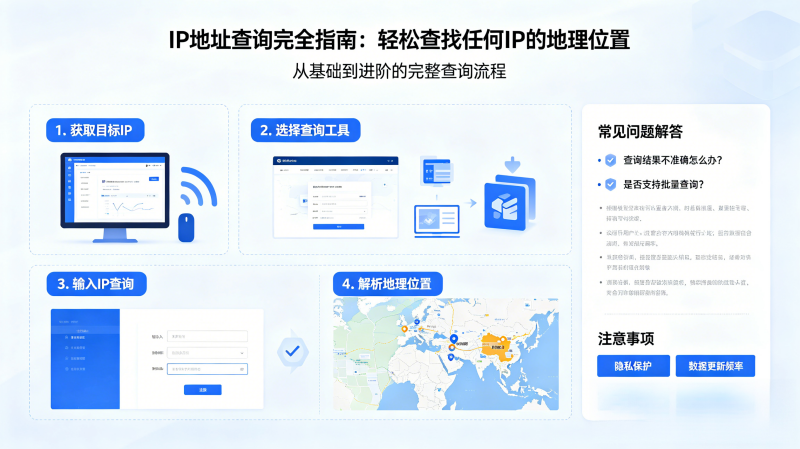 AI Visual Insight: This image functions more like a visual separator or thematic illustration for the article, emphasizing the entry point of the “IP lookup” topic rather than presenting a concrete network topology, interface schema, or geolocation workflow. Its informational density is relatively low, and it mainly serves as a section-level visual cue.
Building reliable IP lookup capabilities requires designing both tool selection and business boundaries.
If you only need manual troubleshooting, online tools are sufficient. If you need to integrate lookup into a production system, choose an API first. If you care more about low latency and private deployment, you should further evaluate offline IP databases and localized services.
In development, the most important goal is not to “retrieve more fields,” but to define field confidence, update cadence, and the scope of decisions each field can support. This helps you avoid using city-level geolocation incorrectly for high-risk identity decisions.
FAQ
Q1: Can IP lookup identify a precise street address?
A: No. Standard IP lookup can usually identify only the country, city, ISP, or an approximate coordinate range. It cannot directly resolve a house-number-level address.
Q2: Is IP lookup different for IPv4 and IPv6?
A: The calling pattern is largely the same, but IPv6 database coverage and tool support may still be weaker than IPv4. You should confirm provider capability during evaluation.
Q3: What is the best approach for batch lookup of multiple IPs?
A: For low-frequency batch processing, a script that calls the service serially is often enough. For high-frequency batch workloads, use a commercial API or an offline database, and add caching, rate limiting, and retry logic.
Core Summary
This article systematically reconstructs the methods for IP address lookup, covering online tools, nslookup/dig, Python programming, and commercial API integration. It also explains geolocation accuracy, VPN impact, and data update lag, making it a practical guide for developers who need a production-ready IP geolocation solution.