This article focuses on AI-assisted STM32 IoT development. Its core capabilities include natural-language hardware configuration generation, intelligent protocol stack integration, automated cloud adaptation, and fault diagnosis. It addresses three common pain points: tedious embedded configuration, long debugging cycles, and complex cloud onboarding. Keywords: STM32, IoT, AI-assisted development.
Technical Specifications Snapshot
| Parameter | Description |
|---|---|
| Primary Languages | C, Python, YAML |
| Target Platforms | STM32H7, STM32U5 |
| Communication Protocols | UART, MQTT, LwM2M, TLS 1.2 |
| Cloud Platform | Azure IoT Hub |
| Core Tools | STM32CubeIDE 1.12, STM32CubeAI 4.0.2 |
| Core Dependencies | HAL, DMA, cJSON, Azure IoT SDK |
| Repository Stars | Not provided in the source content |
AI-assisted STM32 development is reshaping the end-to-end IoT delivery workflow
The value of AI-assisted STM32 IoT development is not in replacing engineers. It lies in turning repetitive work scattered across CubeMX, protocol stacks, cloud consoles, and debuggers into a verifiable pipeline.
The source material makes the trend clear: device code volume, protocol complexity, and cloud integration points are all increasing, while traditional manual configuration is most likely to introduce hidden errors in pins, clock trees, DMA, and certificate management.
A four-layer architecture defines where AI fits into embedded development
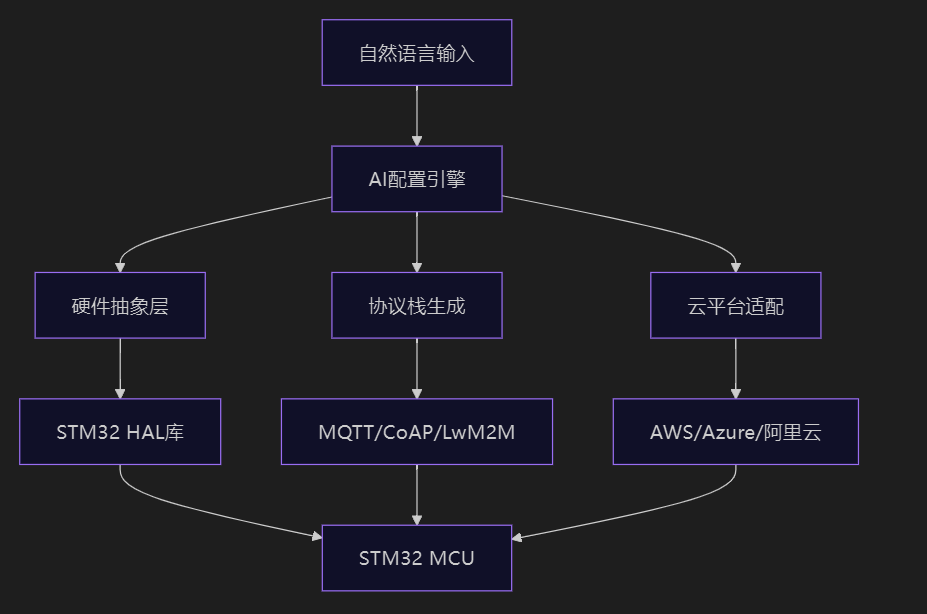 AI Visual Insight: This diagram shows the layered architecture of AI-assisted STM32 IoT development, typically including four layers: hardware configuration, protocol stack generation, cloud adaptation, and operations optimization. It emphasizes that the data flow extends from MCU peripheral initialization all the way to cloud connectivity and closed-loop fault handling, showing that AI contributes not only to code generation, but also to validation, tuning, and runtime decision-making.
The first layer is the intelligent configuration engine, which converts natural-language requests such as “configure USART2 for 115200 baud, PA2/PA3, DMA double buffering” into HAL initialization code.
The second layer is intelligent protocol stack generation, which automatically creates parameter templates for protocols such as MQTT and LwM2M, then adjusts communication strategies based on packet loss rate, power consumption, and CPU load.
from stm32_ai import Configurator

config = Configurator()
# Parse natural-language requirements into peripheral configuration
config.parse("配置USART2为115200波特率,PA2/PA3引脚,DMA双缓冲模式")
This code demonstrates the entry point where AI maps requirement text to low-level peripheral configuration.
The shortest path from UART to the cloud can be divided into three steps
The first step is to establish stable UART and DMA integration. The source example uses USART2 and enables idle-line interrupt detection to identify frame boundaries, which is highly practical for AT commands, sensor reporting, and transparent module passthrough.
The second step is to connect locally collected data to MQTT and map it to Azure IoT Hub authentication and message routing.
AI-generated hardware initialization reduces clock-tree and pin-conflict risks
void MX_USART2_UART_Init(void) {
    /* Configure GPIO alternate functions for USART2 TX/RX */
    __HAL_RCC_GPIOA_CLK_ENABLE();
    GPIO_InitStruct.Pin = GPIO_PIN_2 | GPIO_PIN_3;
    GPIO_InitStruct.Mode = GPIO_MODE_AF_PP;
    GPIO_InitStruct.Alternate = GPIO_AF7_USART2;
    HAL_GPIO_Init(GPIOA, &GPIO_InitStruct);

    /* Initialize UART baud rate and TX/RX mode */
    huart2.Instance = USART2;
    huart2.Init.BaudRate = 115200;
    huart2.Init.Mode = UART_MODE_TX_RX;
    HAL_UART_Init(&huart2);

    /* Enable idle interrupt to detect the end of a data frame */
    __HAL_UART_ENABLE_IT(&huart2, UART_IT_IDLE);
}
This code reflects how AI-generated initialization code unifies GPIO configuration, baud rate setup, and frame-end detection.
The accompanying validation command is just as important. AI does not only generate configuration. It also reports suboptimal setups such as undersized DMA buffers or unreasonable clock division, which is more efficient than manually inspecting CubeMX pages.
stm32cubeai verify --config .ai-stm32/hardware.yaml
# Validate pins, clock tree, DMA buffers, and interrupt configuration
This command helps detect structural hardware configuration errors before flashing.
Successful MQTT and Azure integration depends on designing security and recovery together
In the source material, MQTT onboarding does not stop at configuring the broker and QoS. It also includes SAS tokens, the TLS transport layer, and predictive reconnection strategies in the generation logic. That is a critical distinction for production systems.
If the device operates on unreliable networks or battery power, the AI strategy prioritizes keepalive settings, buffer sizes, and reconnect backoff parameters instead of simply increasing the send frequency.
Data serialization and connection recovery should be optimized together
void serialize_sensor_data(mqtt_message_t* msg) {
    cJSON* root = cJSON_CreateObject();
    /* Collect environmental data and write it into the JSON payload */
    cJSON_AddNumberToObject(root, "temperature", bme688_read_temp());
    cJSON_AddNumberToObject(root, "humidity", bme688_read_humidity());

    /* Only append the field when gas resistance is abnormal to reduce redundant traffic */
    if (bme688_gas_resistance() < 10000) {
        cJSON_AddNumberToObject(root, "gas", bme688_gas_resistance());
    }

    msg->payload = (uint8_t*)cJSON_PrintUnformatted(root);
    msg->len = strlen((char*)msg->payload);
    cJSON_Delete(root);
}
This code reduces MQTT payload size and transmission cost by trimming fields conditionally.
iot_hub:
  name: "smart-sensor-hub-2026"
  device_provisioning:
    type: "symmetric_key"
  edge_optimization:
    telemetry_compression: "lz4"
    batch_interval: 5s
    fallback_strategy: "store_and_forward"
This configuration shows that, on the Azure side, you need to define not only identity provisioning, but also compression, batching, and offline buffering strategies.
Highly available IoT systems must treat diagnostics, power consumption, and security as the same problem
In embedded projects, garbled UART output, TLS timeouts, and failure to wake from STOP2 may appear to belong to three different modules, but they all fundamentally relate to verifiable configuration.
For example, garbled UART data often results from clock-source division distortion, TLS handshake timeouts commonly stem from expiring certificates or missing session reuse, and low-power wake-up failures usually come from incomplete RTC and backup-domain configuration.
AI-driven diagnostics work well for cross-layer problems
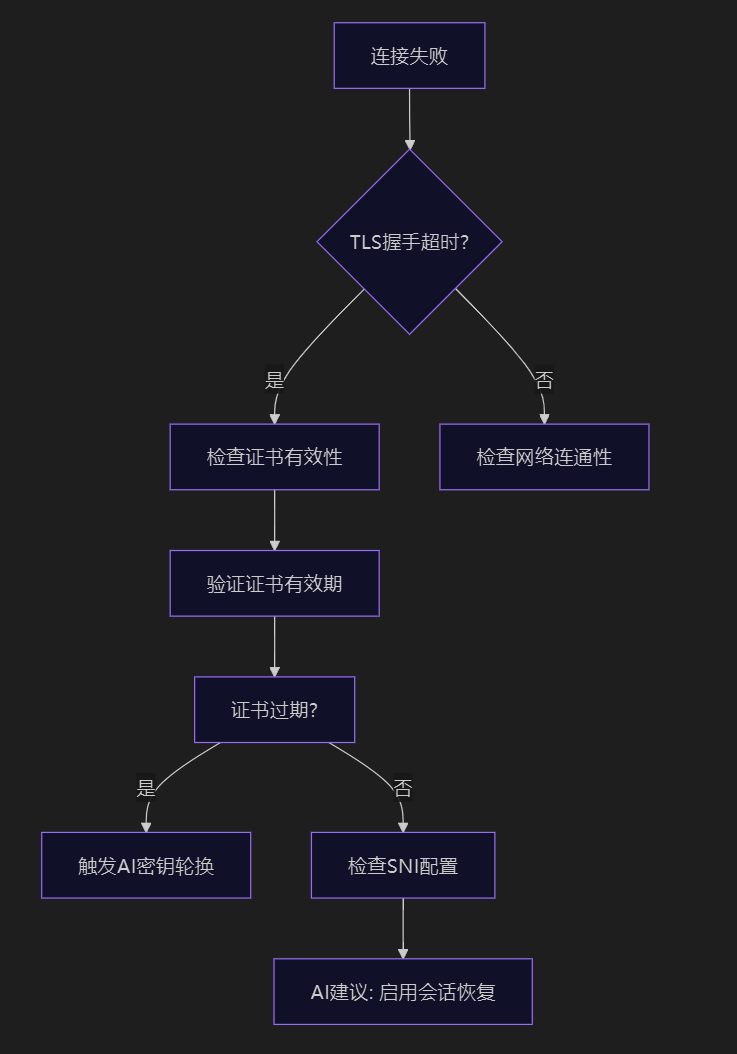 AI Visual Insight: This diagram shows a troubleshooting path for cloud connectivity failures, typically drilling down layer by layer through DNS, TCP, TLS, certificates, and device credentials. It shows that the AI diagnostic engine does not perform isolated checks. Instead, it provides path-based localization across the network stack, making it well suited for identifying timeouts and authentication failures between MQTT and Azure IoT Hub.
stm32cubeai diagnose uart --signal
azure-iot-cli cert status --device my-device
stm32cubeai diagnose power --mode stop2
These three commands cover signal quality, certificate status, and the low-power wake-up path, making them representative cross-layer diagnostic entry points.
For STOP2 issues, the fix is not to simply re-enter low-power mode. The focus is to complete backup-domain access, RTC wake-up sources, and the post-wake clock restoration chain.
void enter_stop2_mode() {
    __HAL_RCC_PWR_CLK_ENABLE();
    HAL_PWR_EnableBkUpAccess(); /* Enable write access to the backup domain */
    HAL_RTCEx_SetWakeUpTimer(&hrtc, 5, RTC_WAKEUPCLOCK_CK_SPRE_16BITS);
    HAL_PWREx_EnterSTOP2Mode(PWR_STOPENTRY_WFI); /* Enter low-power mode */
    SystemClock_Config(); /* Restore the system clock after wake-up */
    MX_RTC_Init();
}
This code provides the key supplementary steps required to make STOP2 mode wake correctly.
The emerging trend for 2026 is to shift edge AI and security policies forward together
The significance of the STM32U5 AI coprocessor is that it enables lightweight inference such as filtering, prediction, and anomaly detection to run at the edge, reducing uploads and accelerating response times at lower power cost.
At the same time, security strategy no longer stops at toggling TLS. It is moving toward secure boot, firmware signing, key rotation, and threat-triggered policy updates.
Intelligent memory management and edge inference are the two main levers for resource optimization
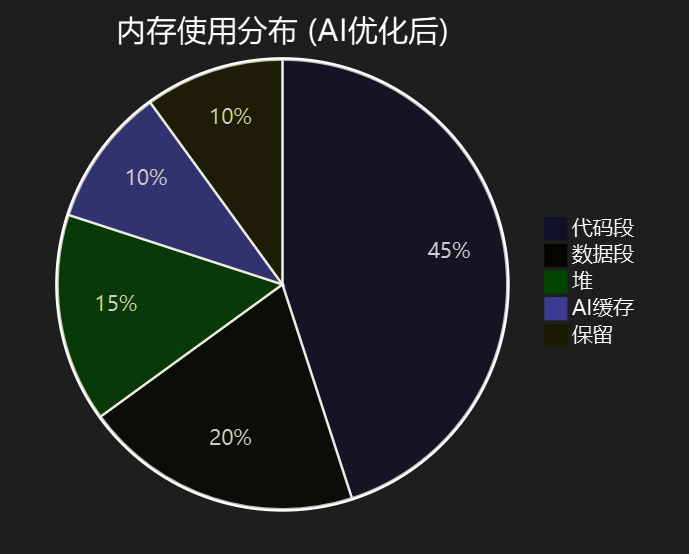 AI Visual Insight: This diagram shows an AI-driven memory analysis interface, typically highlighting stack usage, constant-section migration, leak hotspots, and function-pruning recommendations. It shows that AI does not merely report peak memory usage. It correlates RAM and Flash usage with code paths and protocol stack load to drive optimization.
def predict_transmission_need(sensor_data):
    # Determine whether to transmit based on trend, variance, and anomaly score
    features = {
        'trend': calculate_trend(sensor_data),
        'variance': np.var(sensor_data),
        'anomaly_score': detect_anomaly(sensor_data)
    }
    return load_edge_model('transmission_predictor').predict(features) > 0.7
This code shows how an edge device can trigger uploads only when data changes significantly, reducing traffic and power consumption.
FAQ
Q1: Where should AI-assisted STM32 development be implemented first?
A: Start with peripheral configuration validation and fault diagnosis. Issues involving UART, DMA, clock trees, and RTC consume the most time and are the best candidates for rule-based automation and validation.
Q2: What is most commonly overlooked when connecting MQTT to Azure IoT Hub?
A: The most commonly overlooked areas are certificate or SAS token lifecycles, TLS session resumption, and offline caching strategy. Establishing connectivity alone does not mean the system is production-ready.
Q3: Will adding AI to STM32 significantly increase resource pressure?
A: Yes, but it is manageable. The key is to use AI for configuration generation, diagnostics, and lightweight edge inference instead of trying to run large-model logic directly on the MCU.
Core Summary: This article reconstructs the AI-assisted STM32 IoT development workflow, covering natural-language HAL configuration generation, MQTT/Azure protocol stack integration, low-power and security auditing, fault diagnosis, and cloud-edge collaborative optimization, helping developers complete end-to-end delivery from UART to the cloud more efficiently.