This AI automation tool is built for software copyright application workflows. It generates registration forms, source code documentation, user manuals, and design specifications, solving common problems such as complex formatting, incomplete materials, and the high time cost of manual compilation. Keywords: software copyright application, AI automation, open-source tool.
The technical specification snapshot provides a quick overview
| Parameter | Details |
|---|---|
| Project Name | chinese-copyright-application-skill |
| Primary Purpose | Automatically generate a complete set of software copyright application materials |
| Main Language | Python |
| Interaction Model | Command line, Trae IDE Skill |
| Code Hosting | GitHub |
| License | Not explicitly stated in the source text; verify against the repository |
| GitHub Stars | Not provided in the source text; check GitHub for live data |
| Core Dependencies | Python 3.8+, requirements.txt, Pandoc (optional for output conversion) |
Tools like this are reshaping software copyright application delivery workflows
The most time-consuming part of a software copyright application is usually not writing code. It is preparing the submission materials. Typical pain points include selecting source code pages, controlling line counts, normalizing comments, preparing manual templates, structuring design specifications, and handling regional differences in filing details.
The value of chinese-copyright-application-skill lies in handing this repetitive, low-creativity work to AI and a template system. Developers only need to provide the project name, tech stack, feature description, author details, and organization information to automatically generate the main application documents.
 AI Visual Insight: This image shows the typical components of software copyright filing materials and the burden of manual compilation. It highlights source code extraction, explanatory documents, and format validation as the most error-prone review stages, which also explains where automation tools provide the most value.
The core capability of this tool is not writing documents but assembling them according to rules
This is not a general-purpose content generator. It automates document orchestration around the fixed structure of software copyright materials. Compared with manual preparation, it works more like a document pipeline designed specifically for the filing process.
| Comparison | Manual Preparation | AI Automation |
|---|---|---|
| Time Cost | 2–3 days | About 5 minutes |
| Format Consistency | Rework is common | Template-driven and more stable |
| Source Code Extraction | Manual selection | Automatically extracts front and back pages |
| Document Completeness | Depends on experience | Batch generation based on a checklist |
| Multi-Stack Adaptation | Requires manual rewriting | Supports Java, Python, Go, and more |
The project covers the four core documents required for software copyright filing
The materials this tool can generate typically include the software copyright registration form, source code documentation, user manual, and design specification. These four document types map directly to the most common deliverables in the review process.
The document checklist and adaptation scope are already fairly complete
It supports WeChat Mini Programs, Web/Node.js projects, mobile apps, desktop software, and other standard project types. Its automatic detection of configuration files reduces manual data entry across different project categories.
config = {
    "project_name": "XX在线笔记平台",  # Project name
    "tech_stack": "Python+Flask+MySQL",  # Tech stack description
    "function_desc": "支持注册登录、笔记编辑、分类管理、全文搜索、数据导出",  # The more detailed the feature description, the better
    "author": "张三",  # Author information
    "company": "个人开发者"  # Organization or individual entity
}
This configuration defines the minimum input set required for AI-generated application materials.
The command-line mode fits batch processing and auditable workflows
If you want to integrate software copyright material generation into your engineering workflow, the command-line mode is more stable. It works well for local execution, CI invocation, version archiving, and team-wide template management.
The shortest path is to clone the repository, install dependencies, fill in the configuration, and run it
git clone https://github.com/na57/chinese-copyright-application-skill.git
cd chinese-copyright-application-skill
pip install -r requirements.txt  # Install runtime dependencies
python3 scripts/generate_copyright_docs.py <你的项目路径> output  # Generate software copyright materials
These commands complete repository checkout, dependency installation, and material generation.
You can also pass project information directly through CLI arguments, which is useful for one-off generation or scripted execution.
python main.py \
  --project_name "XX在线笔记平台" \
  --tech_stack "Python+Flask+MySQL" \
  --function_desc "支持用户注册登录、笔记编辑、分类管理、全文搜索、数据导出等功能" \
  --author "张三" \
  --company "个人开发者"
This command avoids manual edits to the configuration file and is ideal for a quick trial run.
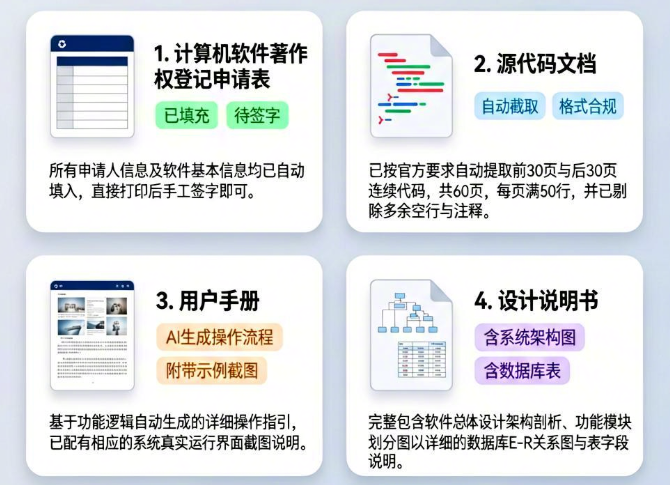 AI Visual Insight: This image shows the generated output view, which usually means the tool has produced multiple Markdown documents in batches by directory. That makes it easier to review them, add screenshots, convert them to DOCX or PDF, and archive them for submission.
The output is Markdown, but final submission usually requires Word or PDF
pandoc 软件著作权登记申请表.md -o 申请表.docx  # Convert a single file
for file in output/*.md; do
  pandoc "$file" -o "${file%.md}.docx"  # Batch convert to Word
done
This script converts generated output into office document formats suitable for submission.
The visual workflow lowers the barrier for non-command-line users
The Trae IDE workflow is more like installing a Skill into the IDE. Users add the corresponding Skill from the marketplace, fill in the project name, tech stack, feature description, author, and organization, and then wait for the system to generate a compressed output package.
The advantage of this model is not stronger capability. It reduces environment setup, command memorization, and local dependency issues. That makes it a practical option for solo developers, product managers, or team members filing for software copyright for the first time.
Input quality and compliance awareness still have the biggest impact on approval outcomes
Automation improves efficiency, not legal certainty. The more specific the feature description is, the closer the generated content aligns with reviewer expectations. Keys, private addresses, and sensitive configuration values in the codebase must be cleaned before generation.
API_KEY = "
<YOUR_API_KEY_HERE>"  # Replace the real key with a placeholder
DB_HOST = "127.0.0.1"  # Keep a sample environment and do not expose production addresses
This example shows why sensitive information should be sanitized before exporting source code materials.
The tool is ideal for solo developers, but manual review is still required before delivery
It is best to review four areas carefully: whether the feature description is specific enough, whether the source code has been sanitized, whether the user manual screenshots are authentic, and whether the format complies with local copyright bureau rules. The tool handles 80% of the repetitive work, but the final 20% still requires human validation.
From an engineering perspective, the significance of this kind of project goes beyond helping you write filing materials. It turns software copyright application work from a one-time manual task into a reusable, standardized, and batch-executable document production pipeline.
 AI Visual Insight: This image appears at the end as a result preview or process wrap-up screen. It conveys the final delivery state after generation and reinforces the sense that the material set is complete and ready for review and submission.
The FAQ section answers the most common implementation questions
1. Can this tool directly guarantee approval of a software copyright application?
No. It can significantly improve document completeness and format consistency, but it cannot replace final human review or cover every local variation across copyright bureaus.
2. What types of projects is it best suited for?
It is a good fit for software projects with a clear code repository and feature description, including mini programs, web applications, mobile apps, desktop applications, and common technology stacks such as Java, Python, and Go.
3. What should users pay the most attention to before using it?
The most important steps are sanitization and review: remove real keys, private addresses, and sensitive data; add authentic screenshots; and verify formatting against local templates before submission.
The core summary explains the tool’s value and boundaries
This article reconstructs and analyzes the core capabilities, usage patterns, and compliance boundaries of chinese-copyright-application-skill. It shows how the tool uses AI to automatically generate software copyright registration forms, source code documentation, user manuals, and design specifications, helping solo developers compress several days of manual preparation into just minutes.