This article breaks down a drone object detection system built on YOLOv5–YOLOv12. It covers dataset construction, model training, accuracy/speed comparisons, PySide6-based visual deployment, and SQLite persistence. The system focuses on three core challenges: small aerial targets, complex backgrounds, and real-time inference. Keywords: drone detection, YOLOv12, PySide6.
The technical specification snapshot provides a quick system overview
| Parameter | Description |
|---|---|
| Primary Language | Python |
| UI Framework | PySide6 / Qt |
| Data Storage | SQLite |
| Model Protocol / Ecosystem | Ultralytics YOLO |
| Supported Versions | YOLOv5 to YOLOv12 |
| Dataset Size | 6,988 images |
| Detection Classes | 1 class (drone) |
| Input Size | 640×640 |
| Training Hardware | RTX 4090 / RTX 3070 Laptop GPU |
| Article Popularity Snapshot | 217 views, 5 likes, 5 saves |
| Core Dependencies | ultralytics, PySide6, OpenCV, SQLite |
The system delivers an end-to-end pipeline for drone detection from training to deployment
The challenge in drone object detection is not whether the model can identify a drone at all. The real difficulty lies in long-range small targets, dramatic scale variation under top-down viewpoints, and controlling false positives in large sky or ocean backgrounds. This project addresses those issues by building a complete system that is trainable, comparable, deployable, and interactive.
The system supports image, video, and camera inputs. It can switch between YOLOv5 and YOLOv12 weights, and it outputs bounding boxes, classes, confidence scores, and summary statistics. It also includes practical engineering features such as threshold adjustment, result saving, history tracking, and theme configuration.
The system interface reflects an industrial workflow
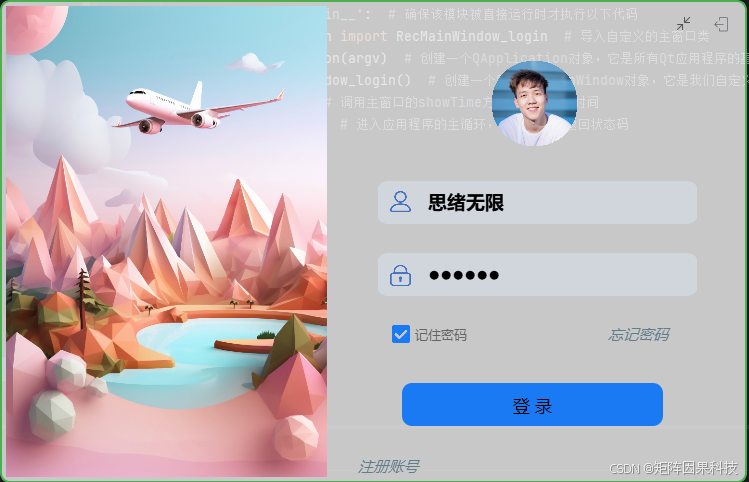 AI Visual Insight: This image shows the system’s user access entry point, including registration, login, and local persistence configuration. It demonstrates that the project is more than a model demo: it supports multi-user isolation, parameter recovery, and record traceability.
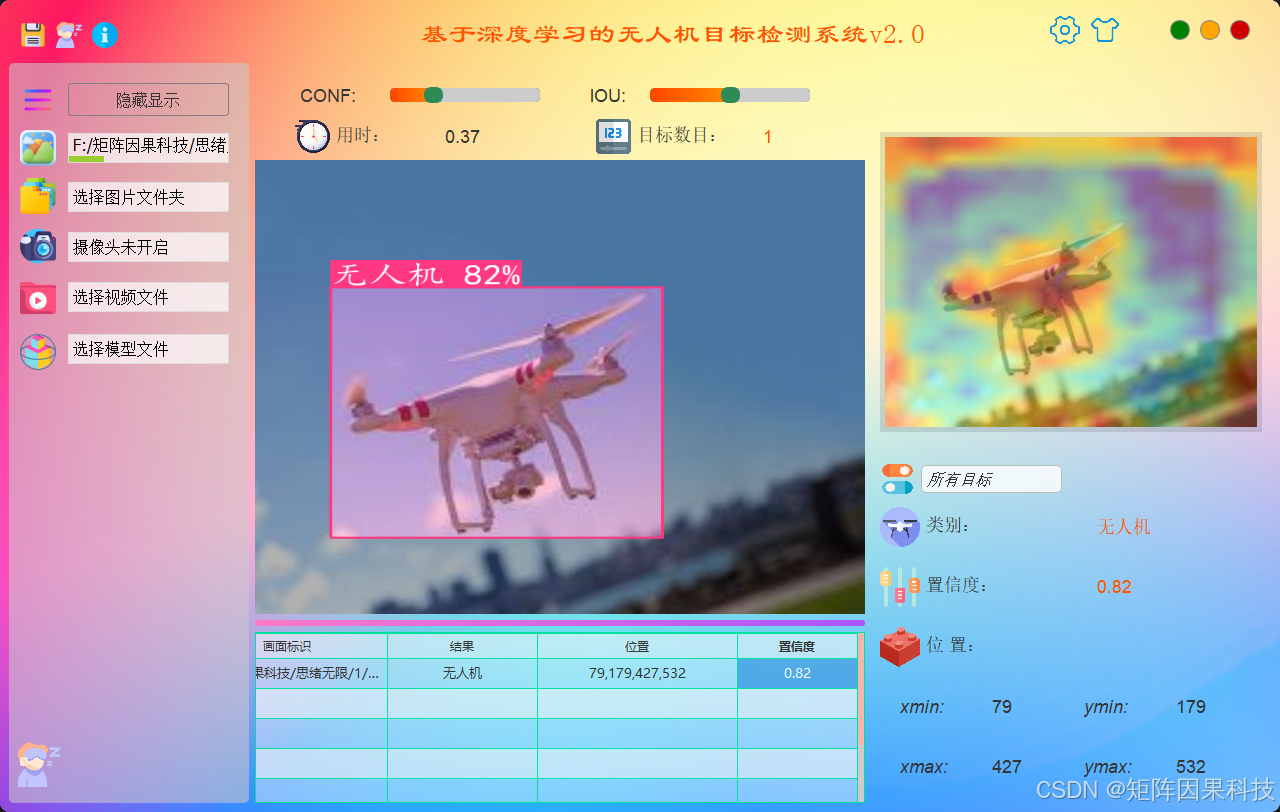 AI Visual Insight: This interface is organized around the flow of input source → inference control → parameter tuning → result display → statistics table. The center area overlays detection boxes in real time, while the side panels retain class statistics and detection logs, which aligns with the high-frequency workflow of online inspection scenarios.
from ultralytics import YOLO

# Load weights for a specific version; you can replace them with yolo8n.pt, yolo12n.pt, and so on
model = YOLO("yolo12n.pt")

# Run inference on a single image
results = model.predict(source="demo.jpg", conf=0.4, iou=0.5)

# Read detection results
for r in results:
    boxes = r.boxes  # Core bounding box output
    print(len(boxes))
This code snippet shows the minimal inference entry point used by the system backend to invoke YOLO models in a unified way.
Dataset design sets the upper bound for small drone target detection
The dataset in this project contains 6,988 images with single-class annotations for “drone.” The training, validation, and test splits contain 4,988, 1,000, and 1,000 images respectively. The data distribution covers both long-range small targets and near-field large targets, producing a typical long-tail scale distribution.
All annotations are converted into normalized YOLO TXT format. The input size is fixed at 640×640, and letterboxing preserves the aspect ratio to avoid localization errors caused by direct resizing. This preprocessing step is especially important for maintaining stable bounding boxes on distant drones.
The augmentation strategy targets small objects rather than generic augmentation stacking
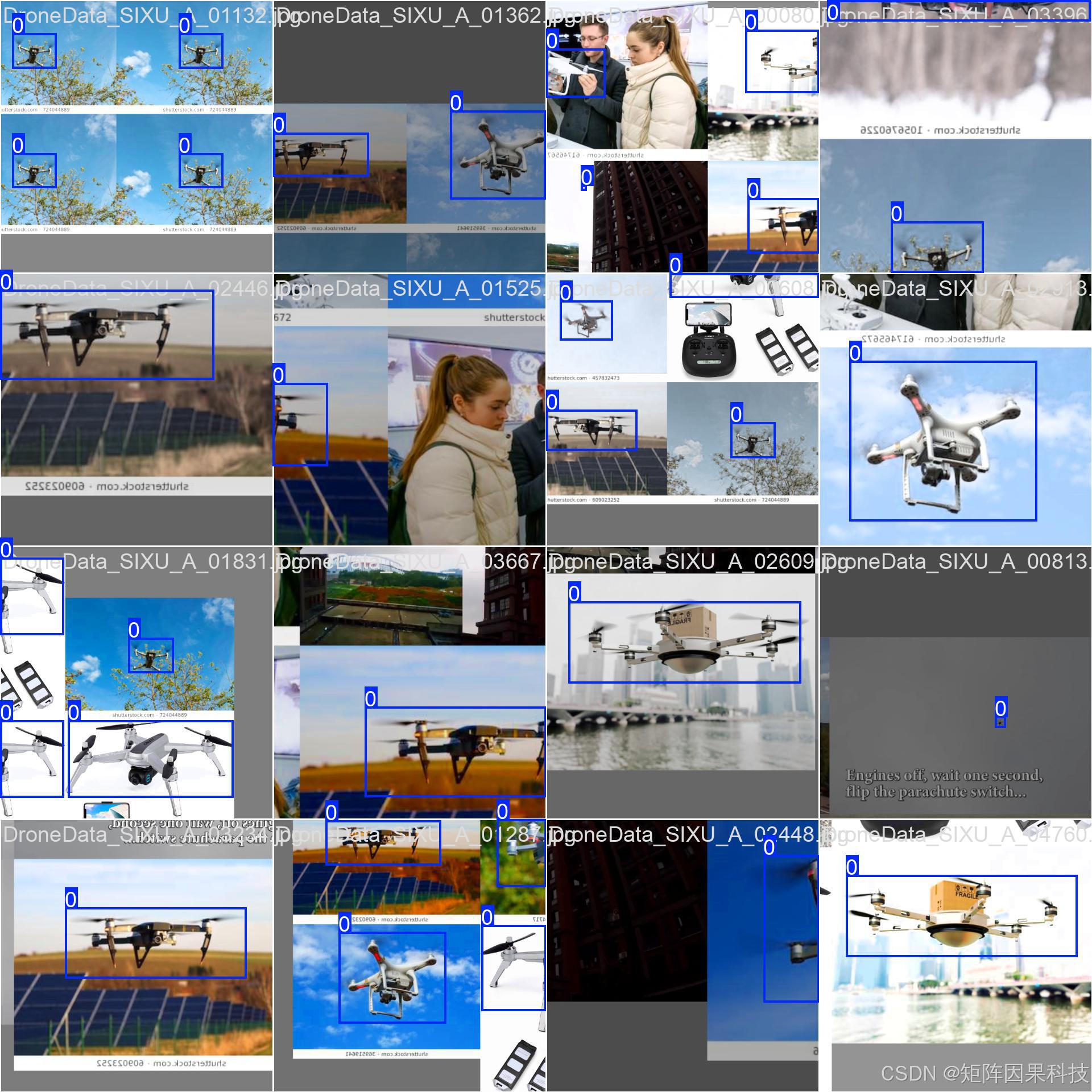
 AI Visual Insight: The image shows that targets occupy only a tiny portion of large sky or ocean backgrounds. This means the model must rely on high-resolution feature maps and multi-scale fusion to improve recall, rather than depending only on deep semantic features.
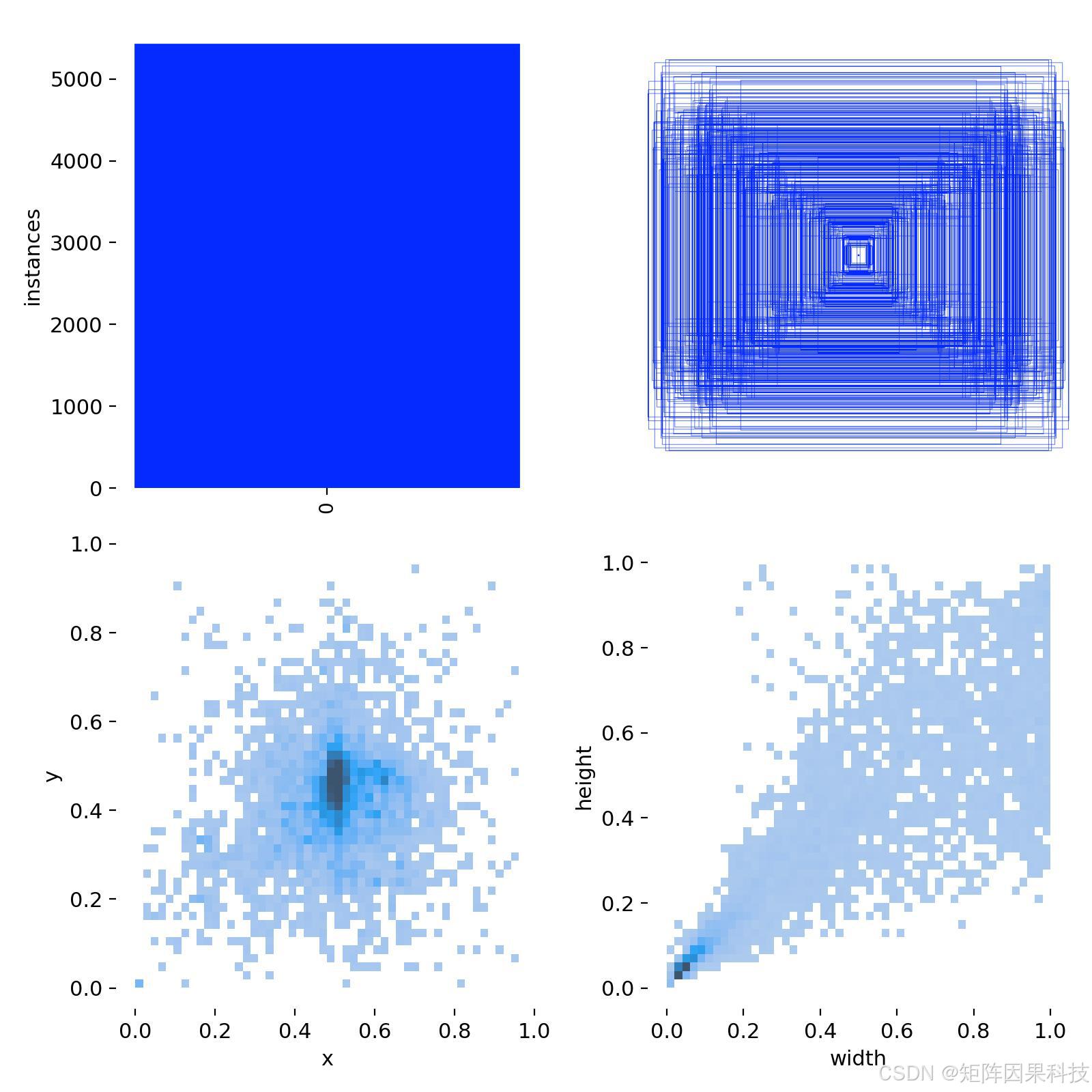
 AI Visual Insight: This figure shows that bounding box sizes are concentrated in the small-scale range, while object centers are denser in the middle area. That pattern matches common monitoring and aerial framing behavior, and it implies that training should account for positive/negative sample imbalance caused by the dominance of small boxes.
# YOLO label format: class x_center y_center width height
# All coordinates are normalized to the range 0~1
label = "0 0.512 0.438 0.071 0.054"

# Core idea: use a unified format to stay compatible with YOLOv5~YOLOv12 training scripts
with open("labels/demo.txt", "w", encoding="utf-8") as f:
    f.write(label)
This code snippet shows how the project achieves cross-version training compatibility through the standard YOLO annotation format.
Model selection should jointly optimize real-time performance and small-object recall
The project uses YOLOv12n as the default baseline model, but it does not assume that the newest version is automatically the best. Instead, it runs a unified comparison across YOLOv5nu, YOLOv6n, YOLOv7-tiny, YOLOv8n, YOLOv9t, YOLOv10n, YOLOv11n, and YOLOv12n, which better reflects real-world engineering decisions.
The YOLO family can be abstracted into a three-stage structure: Backbone, Neck, and Head. For drone detection, the real performance drivers are multi-scale fusion quality, post-processing efficiency, and small-object localization quality—not just parameter count.
Multi-model switching is a system capability rather than an experimental convenience
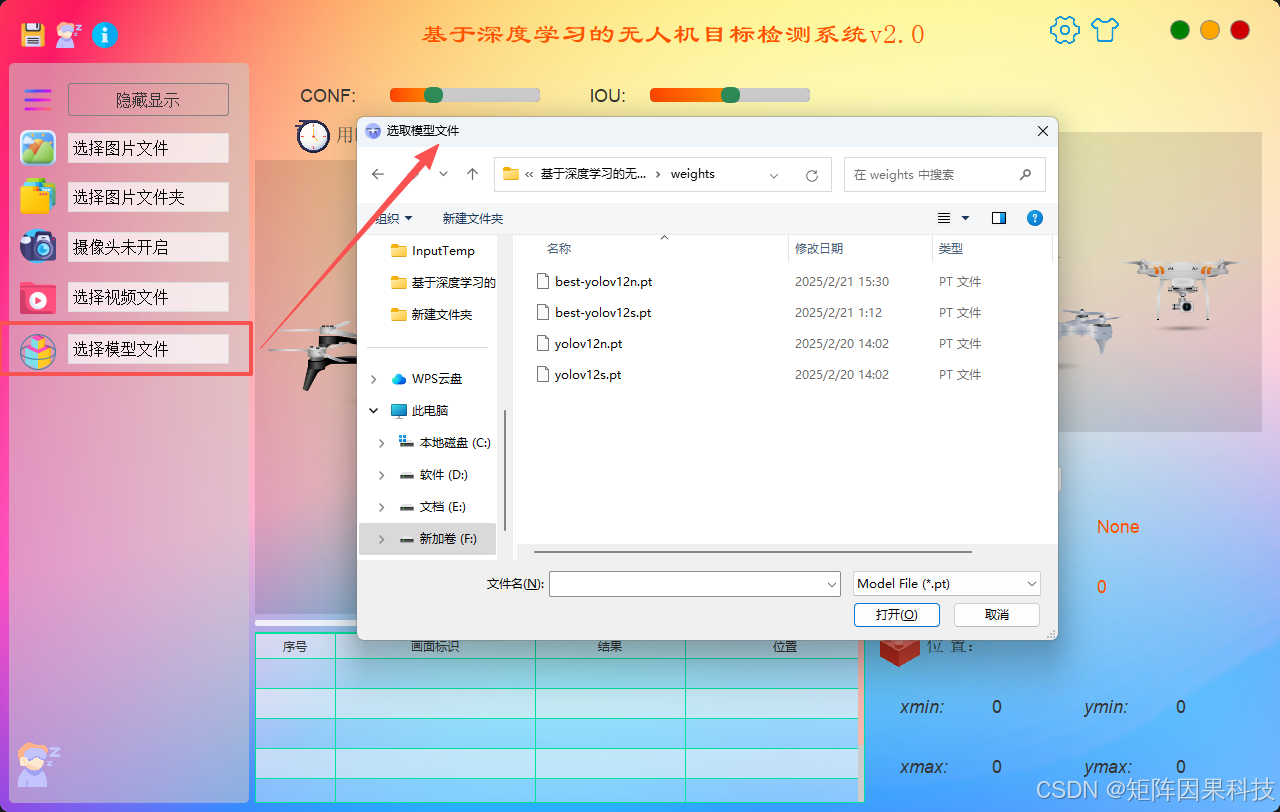 AI Visual Insight: This interface shows model drop-down switching and hot-loading of weights. It indicates that the frontend UI and backend inference are decoupled through a unified result structure, making it easy to run rapid speed-versus-accuracy trade-off tests on the same dataset.
yolo detect train \
  model=yolo12n.pt \
  data=drone.yaml \
  imgsz=640 batch=16 epochs=120 patience=50 \
  lr0=0.01 lrf=0.01 momentum=0.937 weight_decay=0.0005 \
  warmup_epochs=3.0 mosaic=1.0 close_mosaic=10 pretrained=True
This command reproduces the core training configuration used in the article, with an emphasis on pretrained transfer learning, disabling Mosaic in late training, and fixing the input size.
The training strategy prioritizes stable convergence and deployment consistency
This project does not blindly optimize for offline mAP. Instead, it emphasizes model stability in video streams. The training strategy uses pretrained weights, warmup, cosine decay, AMP, and EMA, and it disables Mosaic during the later stages of training to reduce the gap between training distribution and real-world inputs.
For a single-class task, the classification branch is not the bottleneck. The real challenge lies in small-object box regression and confidence calibration. That is why the Conf and IoU thresholds are exposed in the system UI for dynamic adjustment instead of being hard-coded during training.
Experimental results show that mAP50 is close to saturation, while differences mainly appear in latency and localization quality
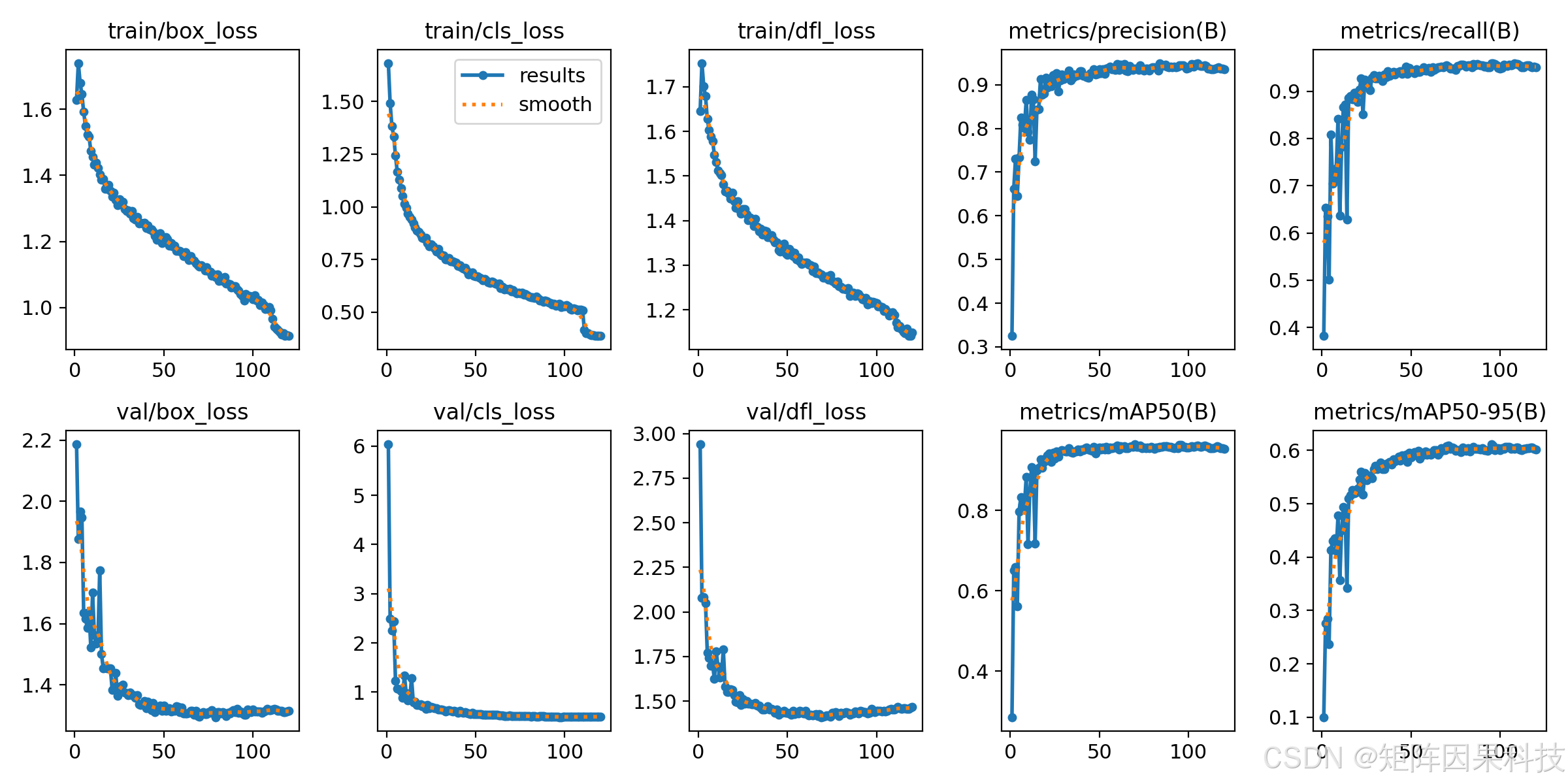 AI Visual Insight: The box/cls/dfl losses continue to decrease while validation metrics reach a plateau relatively early. This suggests that single-class drone detection converges easily under transfer learning, but precise localization at high-IoU ranges remains the main area for improvement.
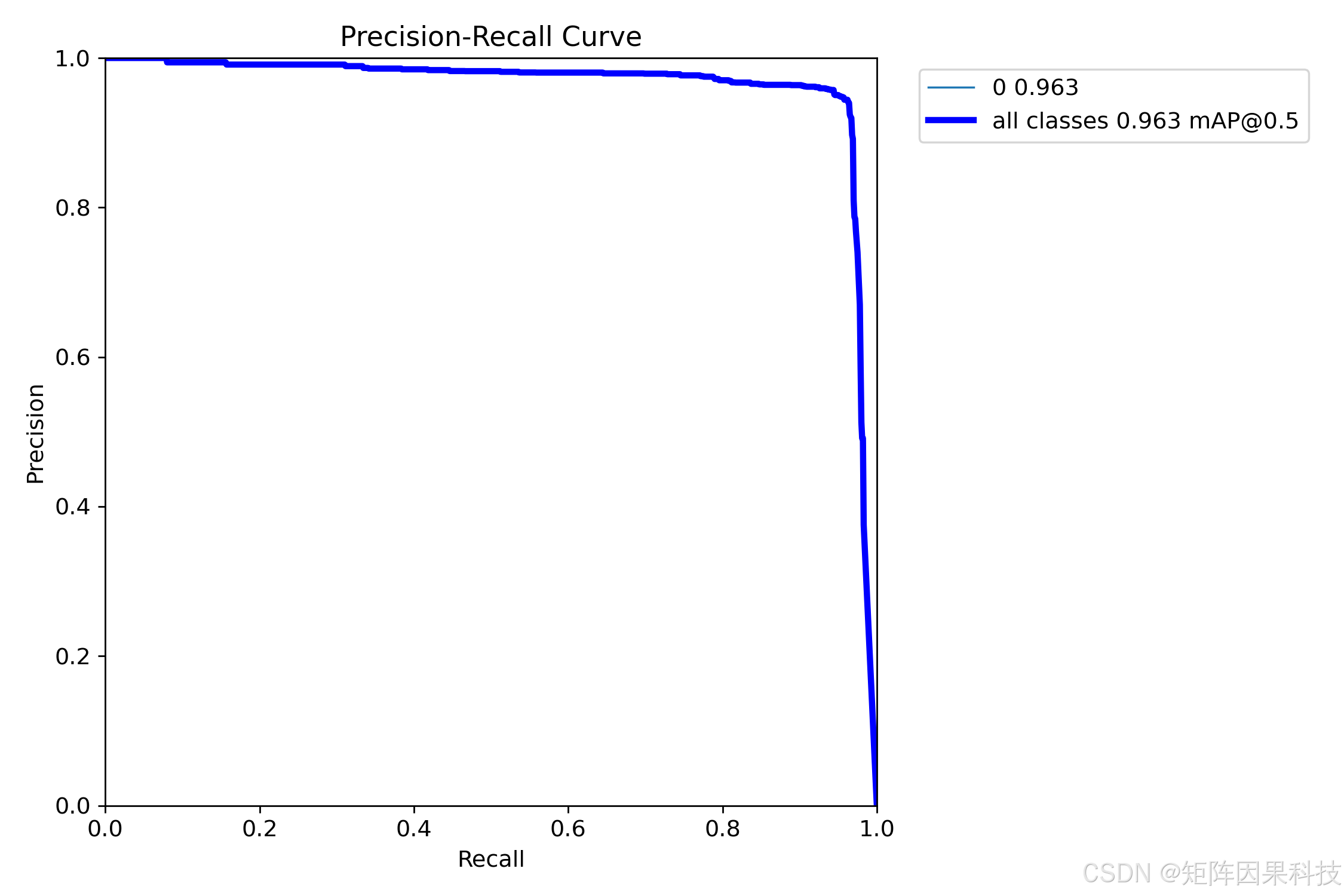 AI Visual Insight: The PR curve maintains high precision even at high recall levels, which indicates strong detection capability. The steep drop in the tail shows that background false positives increase quickly when the threshold becomes too low.
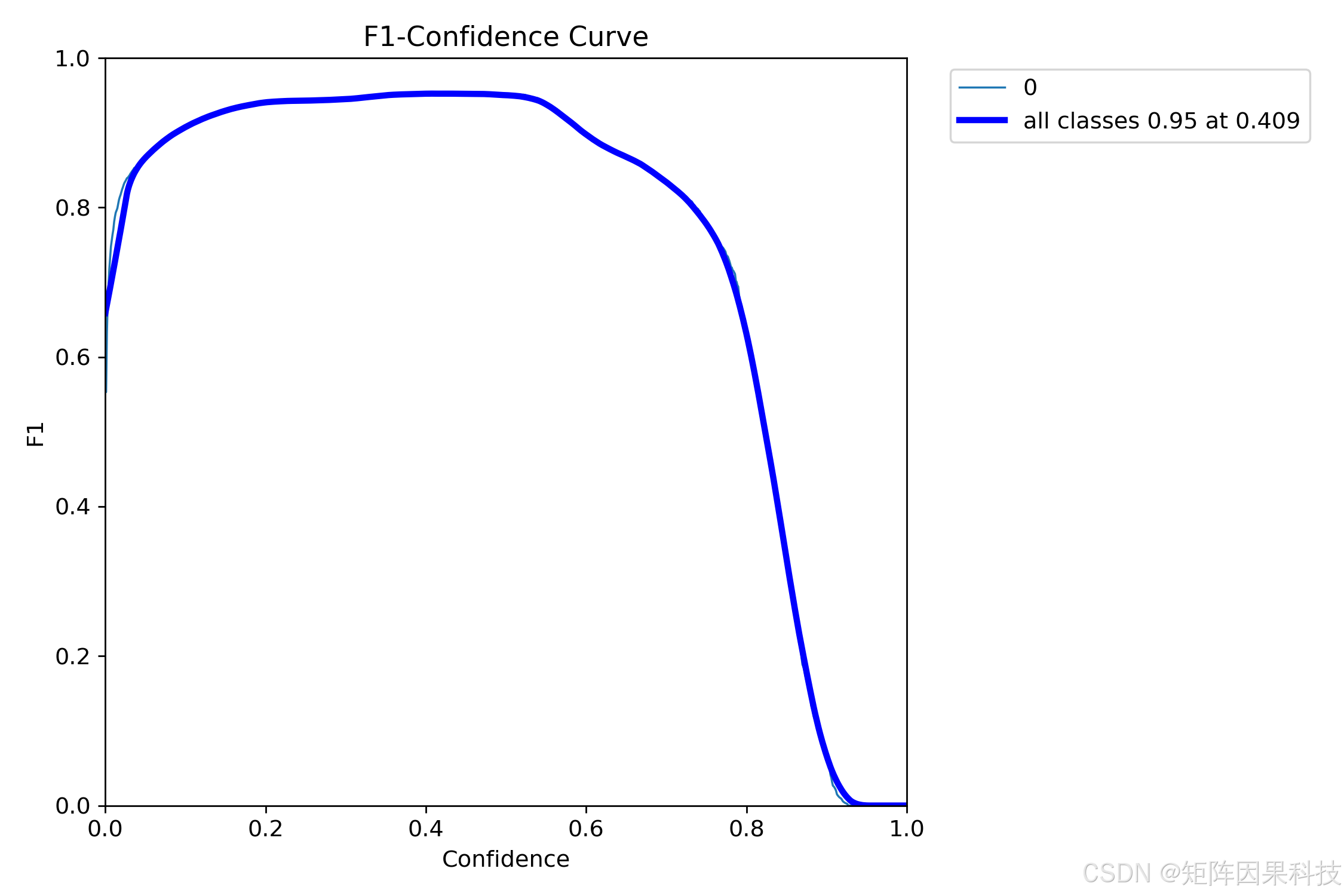 AI Visual Insight: The peak appears around Conf = 0.4, indicating that this threshold provides the best balance between false-positive control and recall, making it a strong default operating point for the system.
From the results, YOLOv8n and YOLOv6n provide a more balanced inference latency profile, which makes them suitable as default online models. YOLOv9t and YOLOv10s perform better on mAP50-95, making them more appropriate for scenarios that demand tighter box fitting but can tolerate lower frame rates.
The system architecture enables maintainable deployment through PySide6 and SQLite
At the engineering level, the project uses a three-layer decoupled architecture. The UI layer handles interaction and visualization, the control layer manages threads and the state machine, and the processing layer handles inference and post-processing. With Qt’s signal-slot mechanism, the inference thread does not block the main interface, which makes the design suitable for real-time video stream detection.
SQLite stores user accounts, parameters, themes, history records, and detection results. As a result, the system does not merely run—it also supports multi-user configuration recovery, historical traceability, and result auditing, which gives it real deployment value.
The flowcharts demonstrate a complete business loop
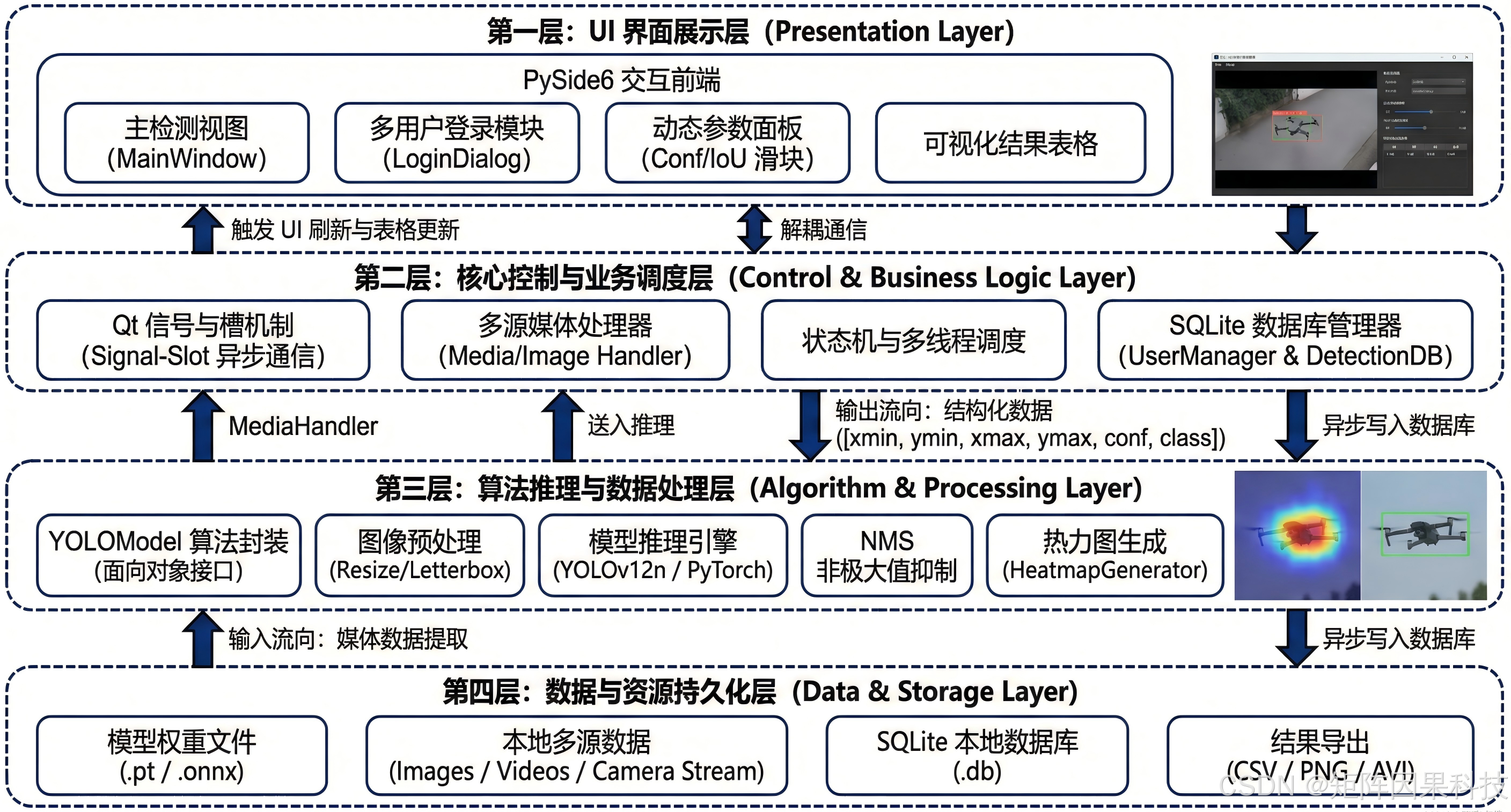 AI Visual Insight: The chart clearly separates input source management, preprocessing, model inference, result return, and UI updates. This shows that the system follows a modular pipeline design, which makes it easier to replace the inference backend with ONNX or TensorRT later.
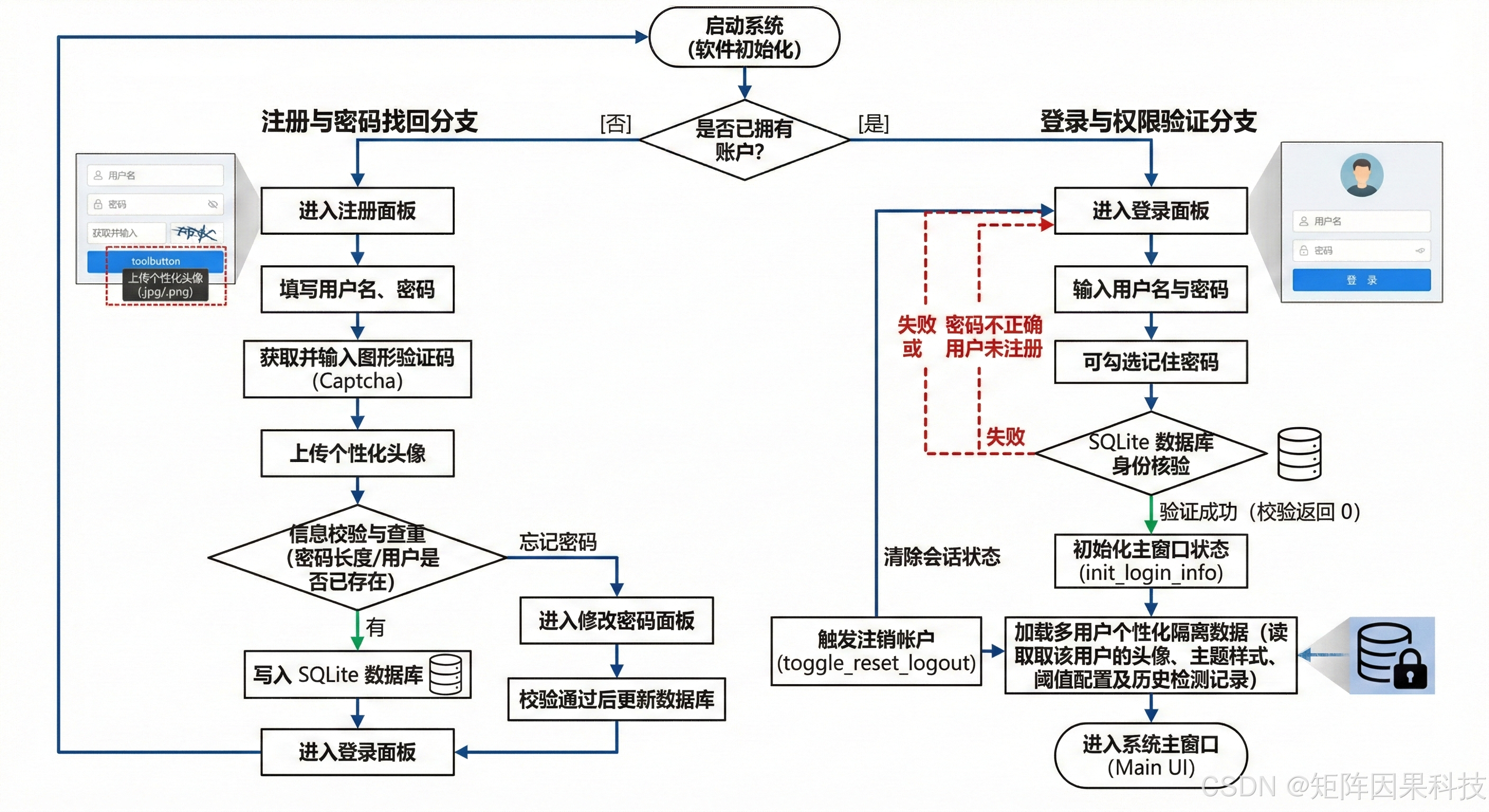 AI Visual Insight: This flowchart covers registration, authentication, configuration loading, password changes, and logout cleanup. It shows that the project has gone beyond pure algorithm validation and entered the scope of traceable application systems.
import sqlite3

conn = sqlite3.connect("app.db")
cur = conn.cursor()

# Create a user configuration table to store model and threshold preferences
cur.execute("""
CREATE TABLE IF NOT EXISTS user_config (
    username TEXT PRIMARY KEY,
    model_name TEXT,
    conf REAL,
    iou REAL
)
""")

# Write the default configuration
cur.execute("INSERT OR REPLACE INTO user_config VALUES (?, ?, ?, ?)",
            ("admin", "yolo8n.pt", 0.4, 0.5))
conn.commit()
conn.close()
This code snippet shows how the system persists user model and threshold configurations through SQLite.
The project’s core value lies in reproducibility, comparability, and extensibility
If your goal is to quickly deliver a drone detection system, the value of this project is not limited to providing a codebase. It provides a complete engineering path: standardized data, a unified training entry point, cross-version model comparison, visual interaction, user management, and deployment interfaces.
From an AIO perspective, this type of content has high reference value because it answers five key questions at once: which model to use, how to train it, why the system is designed this way, how to deploy it, and how to interpret the experimental results. Its information density is far higher than that of a typical project showcase.
The FAQ section answers the most practical deployment questions
1. Why not automatically choose the latest YOLOv12 for drone detection?
Because the core constraint of this task is balancing small-object recall and real-time performance. The experiments show that YOLOv8n and YOLOv6n are more stable in latency, while YOLOv9t and YOLOv10s are stronger on mAP50-95. Model selection should depend on the deployment scenario, not on version recency alone.
2. Why does a single-class drone dataset still require complex data augmentation?
A single class does not make the task simple. Drone targets are often extremely small, backgrounds are complex, and scale changes are severe. You still need random scaling, HSV perturbation, Mosaic, and cropping augmentation to improve robustness for long-range and weak-texture targets.
3. How can this system be further optimized for edge deployment?
You can export the best weights to ONNX and then use TensorRT for FP16 acceleration. You should also fix the input size, optimize NMS, and reduce variable shapes. Because the UI layer and model layer are already decoupled, replacing the inference backend will not break the interface logic.
Core Summary: This article reconstructs an object detection system for drone scenarios, covering YOLOv5 to YOLOv12 model selection, a 6,988-image single-class dataset, training and inference optimization, experimental comparison, and PySide6 + SQLite engineering deployment. The content highlights three core values: small-object detection, real-time inference, and multi-model switching.