This article breaks down an SMS management app built with Flutter for OpenHarmony. It covers conversation management, message sending, templates and spam filtering, settings persistence, and the engineering decisions required to take a HarmonyOS cross-platform app from model design to production-ready screens. Keywords: Flutter, OpenHarmony, SMS management.
Technical specifications at a glance
| Parameter | Details |
|---|---|
| Programming Language | Dart |
| UI Framework | Flutter for OpenHarmony |
| State Management | Provider / ChangeNotifier |
| Local Storage | shared_preferences + JSON serialization |
| Spam Filtering | Keyword matching + RegExp rule engine |
| Repository | https://atomgit.com/maaath/flutter_sms_manager |
| License | Marked in the original source as CC 4.0 BY-SA |
| Stars | Not provided in the original source |
| Core Dependencies | provider, shared_preferences, dart:convert |
This project proves Flutter can ship on OpenHarmony
This project is not a single-page demo. It is a complete SMS management app template. It includes a conversation list, message sending and receiving, template management, spam blocking, analytics, and backup export, forming the core loop of a typical mobile messaging utility.
More importantly, it validates a key value proposition of Flutter for OpenHarmony: one Dart-based UI and business codebase can be migrated to OpenHarmony devices at relatively low cost while preserving interaction consistency. That matters especially for cross-platform teams that need to iterate quickly.
Simulated capabilities can unblock feature validation early
In the current implementation, message sending and part of the data flow are driven by mock logic. This design works well for early OpenHarmony validation: first verify conversations, state, storage, and UI feedback end to end, then gradually replace mocks with real system capabilities or native plugins.
class SmsConversation {
  final String id;
  final String contactName;
  final String contactPhone;
  final String lastMessage;
  final int lastMessageTime;
  final int unreadCount;

  const SmsConversation({
    required this.id,
    required this.contactName,
    required this.contactPhone,
    required this.lastMessage,
    required this.lastMessageTime,
    this.unreadCount = 0,
  });
}
This model defines the minimum viable conversation object and becomes the foundation for list rendering, sorting, and persistence.
Data model design determines future extension cost
The original implementation separates conversations, message status, and message type into independent structures. The benefit is straightforward: the conversation layer handles aggregated presentation, the message layer handles state transitions, and the enum layer constrains business semantics.
Compared with loosely typed Map-based data passing, Dart classes are better suited for continuous iteration. If you later add favorites, pinned conversations, blacklists, template references, or send-failure retries, the model can grow naturally without polluting UI logic.
State enums make the message pipeline more reliable
enum MessageStatus {
  sending,   // Sending
  sent,      // Sent
  delivered, // Delivered
  failed,    // Failed to send
}

enum MessageType {
  text,      // Plain text
  template,  // Template message
  spam,      // Spam message
}
These enums make message state transitions explicit and make it easier for the UI to represent different delivery outcomes.
The Provider approach decouples business logic from the UI
The project uses ChangeNotifier + Provider. In Flutter, this is a lightweight approach that fits small to medium-sized business modules well. Its real strength is not that it is simple, but that it consolidates state sources, async loading, sending flows, and UI updates inside the ViewModel.
When loading data, the app first reads JSON from shared_preferences. If nothing is found, it falls back to mock data. This dual-path mechanism ensures the app is usable on first launch and that later data can still be restored.
class SmsViewModel extends ChangeNotifier {
  List
<SmsConversation> _conversations = [];

  List
<SmsConversation> get conversations => _conversations;

  Future
<void> loadConversations() async {
    // Try to restore data from local storage first
    final prefs = await SharedPreferences.getInstance();
    final jsonStr = prefs.getString('conversations');

    if (jsonStr == null) {
      // Fall back to mock data when no saved data exists
      _conversations = [];
    }

    notifyListeners(); // Notify the UI to refresh
  }
}
This code reflects the ViewModel boundary clearly: read data, mutate state, and notify the view.
A staged state transition model fits sending workflows well
In the original implementation, the send logic first inserts a local message, then updates it later to sent and delivered. Although this is simulated, it maps well to real-world asynchronous messaging pipelines because it naturally supports optimistic updates, failure prompts, and retry entry points.
The conversation list page highlights Flutter’s composable UI strengths
The conversation page uses ListView.builder, which is the right choice for long lists. The key advantage is not just that it renders items, but that pinned and regular conversations can be grouped and rendered through one consistent flow, keeping sorting and presentation logic clean.
Each list item combines an avatar, unread count, pinned marker, last message preview, and formatted timestamp. That shows how Flutter widget composition works especially well for dense communication interfaces.
ListView.builder(
  itemCount: conversations.length,
  itemBuilder: (context, index) {
    final item = conversations[index];
    return ListTile(
      title: Text(item.contactName), // Display the contact name
      subtitle: Text(item.lastMessage), // Display the last message
      onTap: () {},
    );
  },
)
This snippet demonstrates the basic rendering pattern for an SMS conversation screen and can be extended with unread badges and pinned states.
A rule engine makes spam SMS filtering easier to maintain
The project does not hardcode spam filtering into page logic. Instead, it extracts the logic into SpamFilterService. That is the correct boundary: filtering rules belong to a domain service, not the presentation layer.
The rules support both keyword matching and regular expressions, and the implementation degrades gracefully when it encounters an invalid regex. That means users can define custom rules without allowing one malformed rule to break the entire app.
bool checkSpam(String content) {
  for (final rule in rules) {
    if (!rule.isEnabled) continue; // Skip disabled rules
    final matched = content.contains(rule.keyword); // Keyword match
    if (matched) return true;
  }
  return false;
}
This logic implements a minimum viable spam-detection flow and can later be upgraded with regex matching, scoring, or model-based classification.
The settings and persistence strategy fits lightweight business scenarios
The settings page is essentially a state map of multiple toggles, including delivery reports, backup reminders, and spam filtering. Flutter is highly productive for this kind of form-oriented page. Combined with ListView and custom sections, it can organize information architecture quickly.
The project uses shared_preferences for persistence, which is suitable for user settings, conversation cache, and lightweight configuration. For structured SMS-like data, JSON serialization is sufficient at this stage. If the dataset grows later, migrating to a database becomes the more reasonable step.
The runtime screenshots confirm the core UI loop is complete
Figure 1: Conversation list page
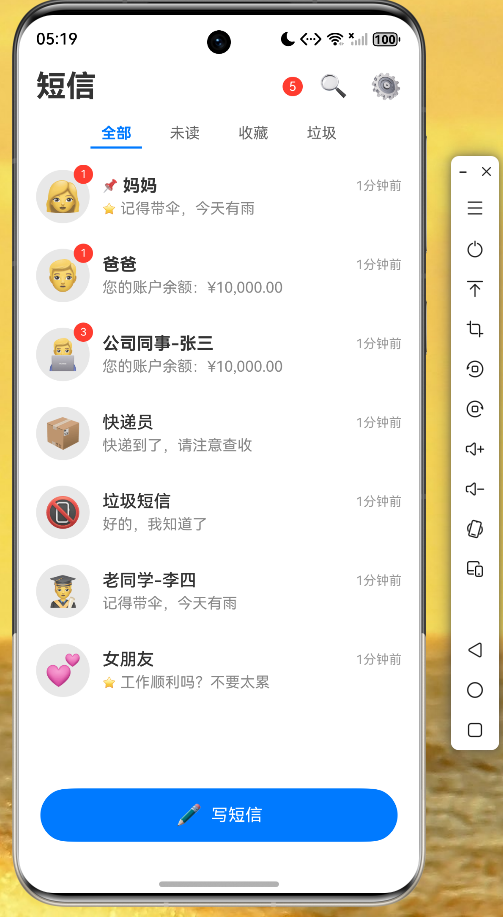 AI Visual Insight: This screenshot shows the main conversation screen of the SMS app. The bottom navigation is split into conversations, templates, analytics, and settings. The top list displays contact avatars, unread counts, timestamps, and last-message previews, indicating that information hierarchy, navigation structure, and message entry points have been fully connected.
Figure 2: SMS detail page
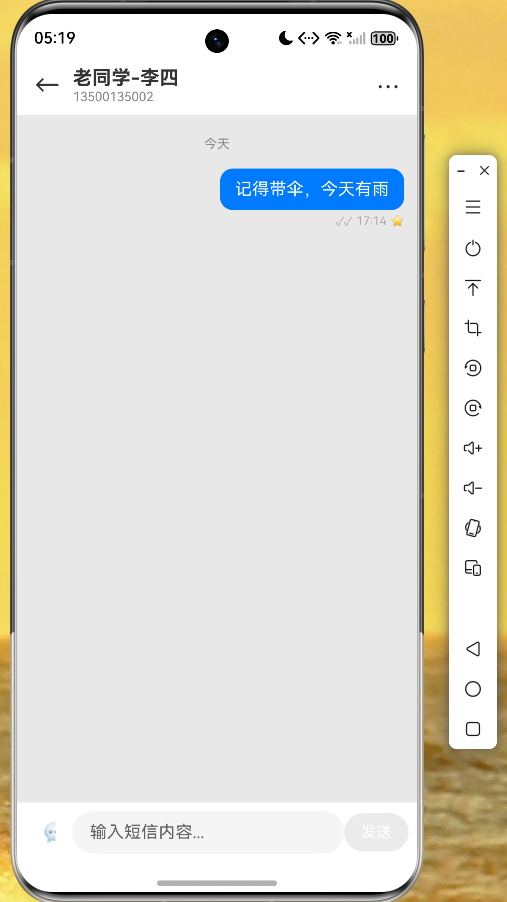 AI Visual Insight: This screenshot shows the message bubble layout on the conversation detail screen. The left-aligned received messages and right-aligned sent messages are clearly separated. The contact area at the top and the input box at the bottom form a complete interaction loop, making the screen well suited for adding send status, template insertion, and quick reply capabilities.
Figure 3: Settings page
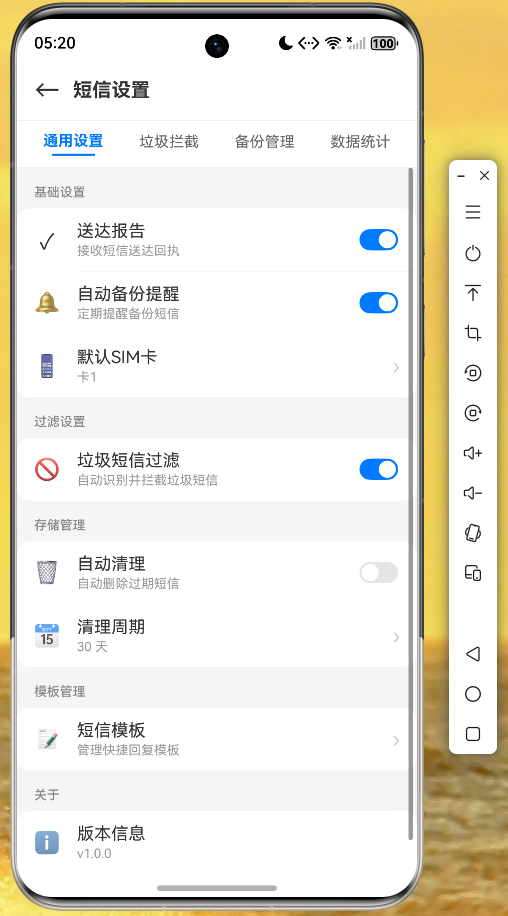 AI Visual Insight: This screenshot shows a grouped-toggle design on the settings page. Basic settings, filtering options, and backup and restore are split into multiple sections, demonstrating strong extensibility for configuration items and confirming stable form-style UI rendering with Flutter on OpenHarmony.
This case shows cross-platform development should prioritize engineering abstractions
This project makes one point very clear: migration efficiency is determined less by any single page and more by model design, state boundaries, persistence strategy, and platform-difference handling. Once those abstractions are stable, replacing lower-level implementations does not have to disrupt the upper UI.
For Flutter for OpenHarmony, the most valuable investment areas remain native plugin coverage, unified permission adaptation, and standardized wrappers for local platform capabilities. This SMS management case provides a reusable engineering skeleton for exactly that purpose.
FAQ
1. Is Flutter for OpenHarmony suitable for full business applications?
Yes. It is a good fit for small to medium-sized apps and moderately complex products, especially for prototype validation, business MVPs, and unified multi-platform UI scenarios. The main prerequisite is to reserve a plugin adaptation layer for modules that rely heavily on native capabilities.
2. Why does this project use Provider instead of GetX or Bloc?
Because the state complexity of an SMS management app is moderate, Provider is sufficient to support lists, settings, templates, and sending workflows. It also has a lower learning curve and is easier for teams to maintain quickly.
3. Is shared_preferences enough to store SMS data?
It is sufficient for demo-level or lightweight applications. But if conversation volume, search requirements, and historical message size continue to grow, you should migrate to SQLite, Hive, or a more complete local database solution.
Core summary
This article reconstructs the core implementation path of Flutter for OpenHarmony through an SMS management app case study. It covers data models, Provider-based state management, conversation list rendering, a spam SMS rule engine, the settings page, and shared_preferences persistence, then uses runtime screenshots to summarize practical cross-platform engineering takeaways.