This article explains how to build a sustainable memory system for AI agents. The core components include short-term context management, long-term semantic retrieval, importance filtering, and forgetting decay, solving the problem of agents “losing memory” on every conversation turn. Keywords: AI Agent, Memory System, Vector Database.
Technical Specifications at a Glance
| Parameter | Description |
|---|---|
| Language | Python |
| Web/API Style | Integrates with FastAPI / OpenAI SDK |
| Storage Protocol | Local persistence + vector retrieval |
| GitHub Stars | Not provided in the original article |
| Core Dependencies | chromadb, openai, collections, datetime |
| Memory Layers | Short-term memory, summary memory, long-term memory, decay management |
 AI Visual Insight: This image illustrates the layered entry points of an agent memory architecture. It is typically used to explain the call relationships among conversational context, summary cache, vector database, and control logic, emphasizing the parallel collaboration between current conversation handling and historical experience recall.
AI agents must support layered memory capabilities.
No matter how large the model context window becomes, it cannot replace stable memory. Pure context concatenation increases cost, slows response time, and prevents an agent from carrying user preferences, decisions, and facts across sessions.
The goal of multi-layer memory is not to preserve every conversation in full. Instead, it organizes information by value: recent messages stay in raw form, older content is compressed into summaries, key facts move into long-term memory, and low-value information gradually fades away.
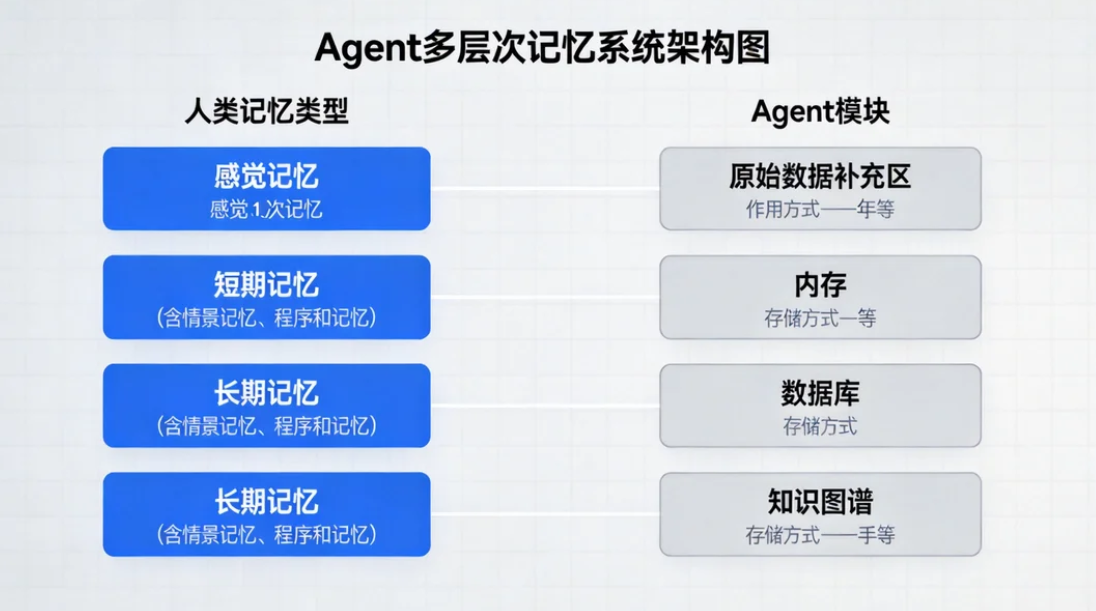
Human memory and agent memory can be mapped directly.
| Human Memory | Agent Equivalent | Purpose | Storage Method |
|---|---|---|---|
| Sensory Memory | Input Buffer | Temporarily hold input | In-memory queue |
| Short-Term Memory | Working Memory | Maintain current context | Conversation list |
| Long-Term Memory | Semantic Memory | Persist knowledge and preferences | ChromaDB / Pinecone |
| Episodic Memory | Event Log | Record specific experiences | JSON / SQLite |
| Procedural Memory | Tool Capability | Remember what the agent can do | Tool registry |
Short-term memory is best managed with a sliding window to control cost.
A sliding window is the lowest-cost implementation strategy. The core idea is to keep only the most recent N messages, then apply a token limit check when retrieving context so the request payload does not grow without bound.
from collections import deque

class ShortTermMemory:
    """Short-term memory based on a sliding window"""
    def __init__(self, max_messages: int = 20):
        self.messages = deque(maxlen=max_messages)  # Keep only the most recent N messages

    def add(self, role: str, content: str):
        self.messages.append({
            "role": role,
            "content": content,
            "token_count": len(content) // 4  # Rough token estimate for Chinese text
        })

    def get_context(self, max_tokens: int = 4000):
        result, current = [], 0
        for msg in reversed(self.messages):
            if current + msg["token_count"] > max_tokens:  # Stop backfilling when the limit is reached
                break
            result.insert(0, {"role": msg["role"], "content": msg["content"]})
            current += msg["token_count"]
        return result
This code implements short-term memory trimming with a recent-messages-first strategy.
Summary memory can significantly extend the usable context window.
A window alone will eventually discard important early information. A more reliable approach is to compress older messages into a summary once the token limit is exceeded, while preserving only the latest few raw messages. This is a common pattern in production-grade agents.
class SummarizingMemory:
    """Context manager with automatic summarization"""
    def __init__(self, llm, max_tokens: int = 6000):
        self.llm = llm
        self.max_tokens = max_tokens
        self.summary = ""
        self.recent_messages = []

    def add_message(self, role: str, content: str):
        self.recent_messages.append({"role": role, "content": content})
        total = sum(len(m["content"]) // 4 for m in self.recent_messages)
        if total > self.max_tokens:
            self._create_summary()  # Compress older messages into a summary after exceeding the limit

    def _create_summary(self):
        history = "\n".join(
            f"{m['role']}: {m['content']}" for m in self.recent_messages[:-5]
        )
        prompt = f"Please compress the following conversation and preserve facts, decisions, and preferences:\n{history}"
        self.summary = self.llm.invoke(prompt).content
        self.recent_messages = self.recent_messages[-5:]  # Keep only the latest raw messages
This code compresses earlier conversation history into a summary in exchange for longer continuous session capacity.
Long-term memory should rely on a vector database for semantic retrieval.
Long-term memory solves two problems: remembering users across sessions and recalling historical experience by meaning. Compared with keyword search, vector retrieval is better suited to natural-language question answering because it operates on semantic similarity rather than literal term overlap.
import uuid
from datetime import datetime
import chromadb

class LongTermMemory:
    """Long-term semantic memory powered by ChromaDB"""
    def __init__(self, collection_name: str = "agent_memory"):
        self.client = chromadb.PersistentClient(path="./memory_db")
        self.collection = self.client.get_or_create_collection(name=collection_name)

    def store(self, content: str, metadata: dict = None):
        mem_id = str(uuid.uuid4())
        meta = {"timestamp": datetime.now().isoformat(), "type": "fact"}
        if metadata:
            meta.update(metadata)  # Merge application metadata
        self.collection.add(documents=[content], metadatas=[meta], ids=[mem_id])
        return mem_id

    def recall(self, query: str, n_results: int = 5):
        return self.collection.query(query_texts=[query], n_results=n_results)
This code provides long-term memory write and semantic recall capabilities.
 AI Visual Insight: This image shows the technical flow of vector-database-backed memory retrieval. It typically includes four stages: text embedding, vector ingestion, similarity search, and result backfilling. It highlights that long-term memory is not a raw text scan, but a semantic-neighbor retrieval process.
Long-term memory must include importance scoring.
Not every user input deserves permanent storage. High-quality systems evaluate uniqueness, practical utility, emotional weight, and factuality before deciding whether to write an item into long-term memory.
import json

class MemoryImportanceFilter:
    def __init__(self, llm):
        self.llm = llm

    def evaluate(self, content: str):
        prompt = f"Evaluate whether this information is worth storing in long-term memory: {content}"
        raw = self.llm.invoke(prompt).content
        try:
            data = json.loads(raw)
            data["importance_score"] = (
                data["uniqueness"] * 0.3 +  # Uniqueness
                data["utility"] * 0.3 +     # Utility
                data["emotional"] * 0.2 +   # Emotional weight
                data["factual"] * 0.2       # Factuality
            )
            return data
        except Exception:
            return {"should_remember": False, "importance_score": 0}
This code controls what should be remembered and prevents the vector database from being flooded with noise.
A complete memory-augmented agent must connect retrieval, conversation, and storage.
The minimum closed loop works like this: first recall long-term memory using the current question, then combine short-term context and call the model, and finally extract new memory from the response and write it back to the vector database. This creates a retrieve-answer-learn cycle for the agent.
class MemoryAgent:
    def __init__(self, short_term, long_term, importance_filter, llm):
        self.short_term = short_term
        self.long_term = long_term
        self.importance_filter = importance_filter
        self.llm = llm

    def chat(self, user_input: str):
        memories = self.long_term.recall(user_input, n_results=3)  # Recall relevant history first
        self.short_term.add("user", user_input)
        context = self.short_term.get_context(max_tokens=6000)
        answer = self.llm.chat(context, memories)  # Send both short-term context and long-term memory to the model
        self.short_term.add("assistant", answer)
        return answer
This code demonstrates the basic collaboration flow of multi-layer memory during a single conversation turn.
The memory decay mechanism determines whether the system remains stable over time.
More long-term memory is not always better. Without decay and forgetting, historical noise will continuously amplify retrieval bias. A practical approach is to follow the Ebbinghaus forgetting curve and down-rank or delete memories that have not been accessed for a long time and carry low importance.
import math

def calculate_retention(days_since_creation: float, access_count: int, importance: float):
    base_decay = math.exp(-0.1 * days_since_creation)  # The older the memory, the stronger the decay
    access_boost = min(1.0, 0.1 * access_count)        # Frequent access increases retention
    importance_factor = 0.5 + (importance / 10) * 0.5 # High-importance memories are more stable
    return min(1.0, base_decay + access_boost + importance_factor * 0.3)
This code provides a practical way to calculate memory retention.
Vector database selection should depend on stage, not hype.
During the validation and prototyping phase, prioritize ChromaDB because it is easy to deploy and works well for local experiments. In production, if you need managed infrastructure, high availability, and scalability, consider Pinecone, Qdrant, or Milvus. In research settings, FAISS is often used for pure retrieval experiments.
| Database | Characteristics | Best For | Performance | Ease of Use |
|---|---|---|---|---|
| ChromaDB | Lightweight, embedded | Prototypes and small projects | ⭐⭐⭐ | ⭐⭐⭐⭐⭐ |
| Pinecone | Fully managed | Production environments | ⭐⭐⭐⭐⭐ | ⭐⭐⭐⭐ |
| Qdrant | High performance, modern architecture | High-concurrency services | ⭐⭐⭐⭐⭐ | ⭐⭐⭐⭐ |
| Weaviate | Feature-rich | Enterprise knowledge bases | ⭐⭐⭐⭐ | ⭐⭐⭐ |
| Milvus | Strong distributed capabilities | Large-scale clusters | ⭐⭐⭐⭐⭐ | ⭐⭐⭐ |
| FAISS | Flexible retrieval library | Research experiments | ⭐⭐⭐⭐⭐ | ⭐⭐ |
The conclusion is that multi-layer memory upgrades an agent from a one-shot tool to a continuously learning system.
The core value of this architecture is not merely storing history, but selectively forming experience. Short-term memory preserves conversational coherence, summary memory controls cost, long-term memory accumulates facts and preferences, and decay keeps the system maintainable over time.
FAQ
Q: How should I define the boundary between short-term and long-term memory?
A: Short-term memory handles the context required for the current task and prioritizes raw-message precision. Long-term memory preserves facts, preferences, and decisions across sessions and prioritizes semantic recall. In practice, the boundary is usually whether the information needs to be reused across sessions.
Q: Why not put the entire conversation history directly into the context window?
A: Doing so causes token costs to spiral, increases latency, and introduces a large amount of irrelevant noise. A better approach is to keep recent messages in a window, summarize older content, and store only key facts in the vector database.
Q: What problems appear most often after a memory system goes live?
A: The most common issues are incorrect memories, accumulation of low-quality memories, and retrieval contamination. That is why you should add importance scoring, memory deduplication, manual audit interfaces, and decay and deletion mechanisms.
Core Summary
This article reconstructs a multi-layer memory architecture for AI agents, covering sliding-window short-term memory, summary compression, long-term semantic memory with ChromaDB, importance scoring, and forgetting mechanisms, along with Python implementation patterns and database selection guidance.