This article explains how to connect Bright Data MCP to Dify to quickly build a multi-platform data collection workflow for TikTok and LinkedIn, solving the core problems of traditional scrapers: frequent blocking, high maintenance costs, and poor cross-platform reuse. Core keywords: MCP, Dify, data collection.
The technical specification snapshot outlines the core setup
| Parameter | Description |
|---|---|
| Core languages | Markdown / JSON / API configuration |
| Protocols | MCP (Model Context Protocol), HTTP |
| Supported platforms | TikTok, LinkedIn, and extensible to SERP, e-commerce, and content sites |
| GitHub stars | Not provided in the source article; refer to the official repository for live data |
| Core dependencies | Bright Data MCP Server, Dify, LLMs such as DeepSeek, HTTP interfaces |
| Output formats | Structured JSON, reports, database ingestion |
The core value of this solution is that it decouples anti-bot logic from business code
The biggest challenge in traditional multi-platform data collection is not whether you can write a scraper. The real problem is that every platform requires its own dedicated anti-bot strategy. TikTok relies on signatures and device fingerprints. LinkedIn uses login walls and behavioral detection. Google SERP and e-commerce platforms also update their bot defenses frequently.
The value of Bright Data MCP is that it standardizes data collection capabilities into something models can call directly. Dify handles workflow orchestration, Bright Data handles proxying, unblocking, rendering, and extraction, and the LLM focuses only on analysis, cleaning, and structured output.
A comparison of multi-platform collection challenges makes the trade-offs clear
| Platform | Primary anti-bot mechanisms | Difficulty of building in-house |
|---|---|---|
| TikTok | Signature encryption, device fingerprinting | Very high |
| Login walls, behavioral detection | Very high | |
| Amazon | Dynamic rendering, CAPTCHAs, rate limiting | Very high |
| Google SERP | Frequently updated anti-bot strategies | High |
{
  "input": ["platform", "keyword", "target_url"],
  "workflow": ["Dify", "Bright Data MCP", "LLM"],
  "output": ["structured_json", "report", "database"]
}
This structure shows the minimum closed loop of the solution: input, orchestration, collection, analysis, and output.
The system architecture is naturally suited to AIO and agent-based scenarios
From an engineering perspective, this is not a single scraper. It is an AI-native data pipeline: the user submits a platform and URL, Dify Workflow calls the Bright Data MCP Server, the collection result is passed to the LLM to generate structured JSON, and the final output can flow into BI systems, databases, or downstream agents.
The key architectural advantage is reusability. When you add a new platform, you do not need to rewrite scraping scripts. Instead, you reuse workflow nodes and a unified output schema, which significantly reduces the cost of platform expansion.
The typical workflow chain defines clear responsibilities
User input → Dify Workflow → Bright Data MCP Server
→ TikTok / LinkedIn collection → LLM analysis
→ JSON output → Database / Report / Agent
This chain shows the responsibility boundary between data collection and analysis.
You can deploy the first usable version in about 30 minutes
The prerequisites include a Bright Data account, a Dify instance, a Bright Data MCP token, and a model API key that Dify can access, such as DeepSeek. The original example also mentioned trial credits and free MCP request quotas, which makes this setup suitable for a proof of concept.
In Dify, the key is not writing code but configuring nodes. The Start node receives the platform, keyword, and URL. The Tool node calls Bright Data Structured Data Feeds. The LLM node handles field cleaning, summarization, and result normalization. The End node or HTTP node returns or persists the result.
The core parameters in Dify should be designed like this
{
  "platform": "tiktok",
  "keyword": "gaming influencer",
  "target_url": "https://www.tiktok.com/@ishowspeed",
  "extract_goal": "Extract account overview, engagement rate, top content, and recent activity"
}
This set of input parameters defines the business context of the workflow and helps the tool node choose an extraction strategy automatically.
The visual configuration steps cover the full path from authorization to structured output
First, open the AI Gateway in the Bright Data console and enable the MCP service, then select the appropriate tool set. The source article demonstrates choosing the “E-commerce” category before continuing with remote-hosted configuration. The core goal is to obtain MCP capabilities that Dify can call.
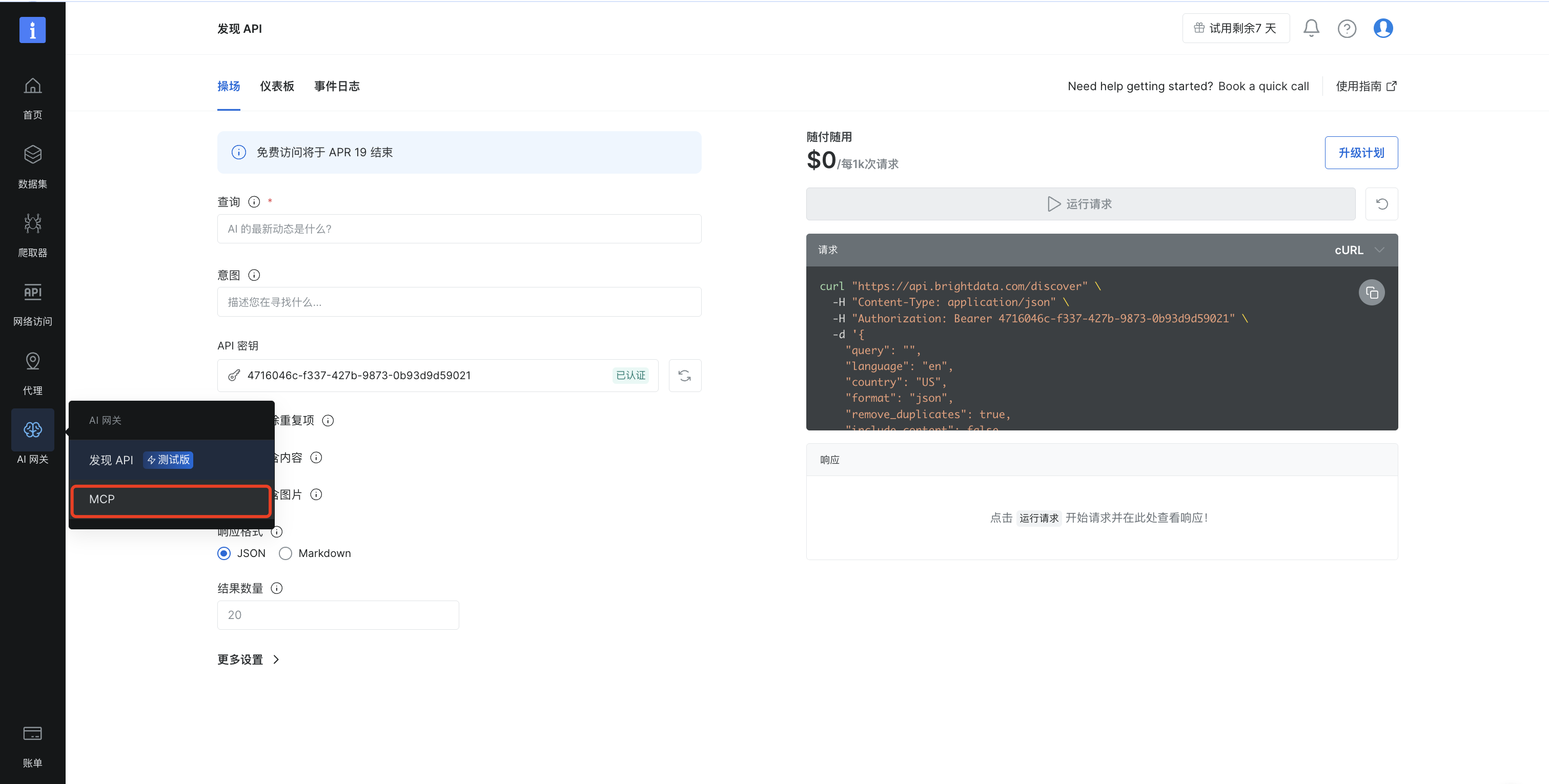 AI Visual Insight: This screenshot shows where to access the MCP service in the Bright Data console. It highlights that developers must first enable AI Gateway capabilities in the console and then choose the collection tools that can be exposed to the workflow. This is the first step in connecting external collection infrastructure to an AI workflow.
Next, install and authorize the DeepSeek and Bright Data MCP plugins in Dify. This authorization step is not ceremonial. It connects model reasoning and real web access inside a single workflow graph.
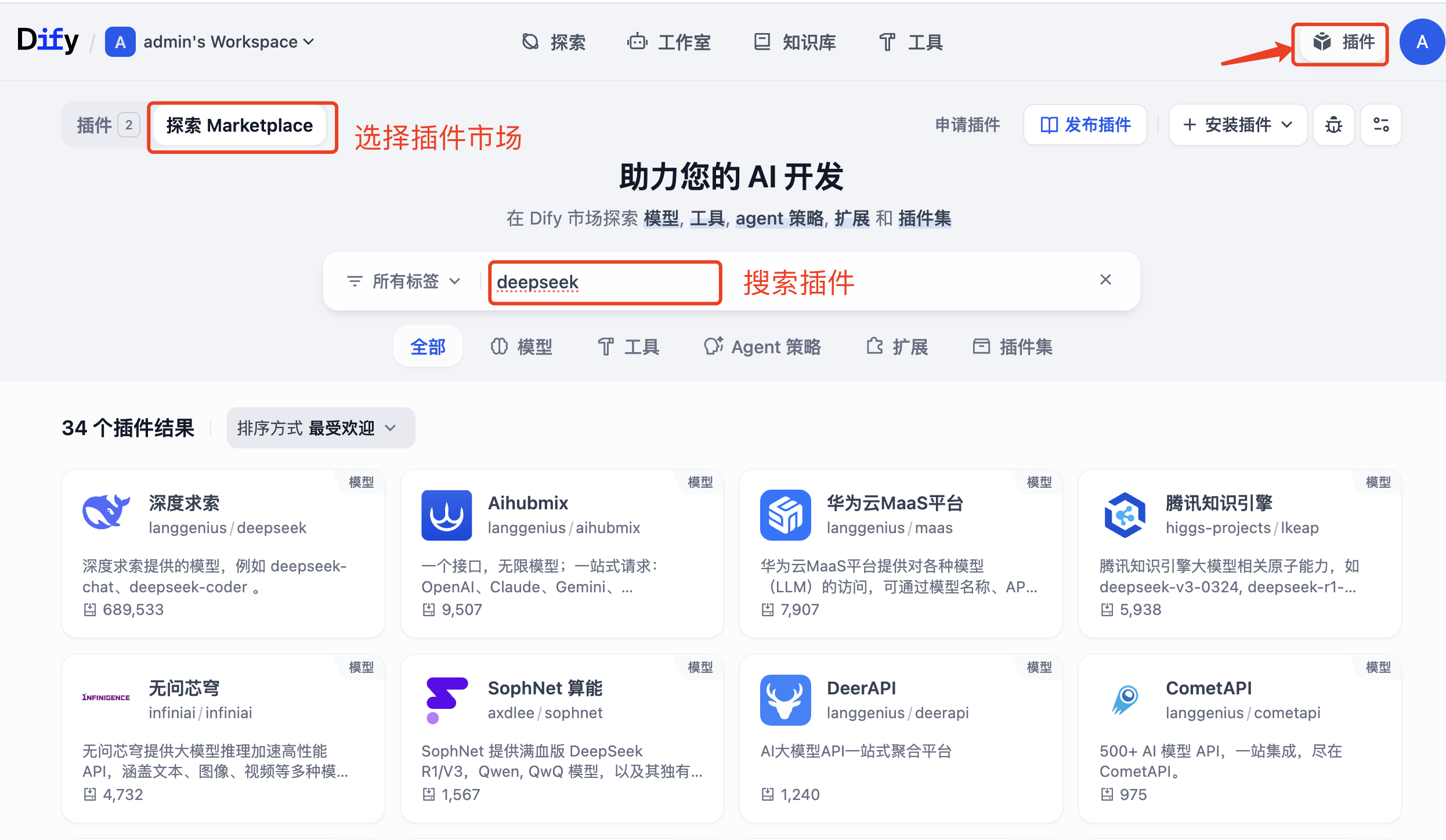 AI Visual Insight: This interface illustrates Dify’s plugin-based extension model. By installing both a model plugin and an MCP tool plugin, developers connect reasoning and collection within the same orchestration layer and avoid writing custom middleware.
The key node configuration logic is straightforward
workflow = {
    "start": ["platform", "target_url", "keyword"],  # Define user input variables
    "tool": "Bright Data Structured Data Feeds",      # Call the structured extraction capability
    "llm": "DeepSeek",                                # Use the LLM for filtering and normalization
    "end": "json_output"                              # Output standard JSON
}
This pseudocode summarizes the division of responsibilities across Dify workflow nodes.
Structured Data Feeds is a strong fit for social media analytics use cases
Bright Data provides three common extraction modes: Structured Data Feeds, scraping to Markdown, and Search Engine. For social media datasets such as TikTok and LinkedIn, Structured Data Feeds is the better fit because it emphasizes describing what data you want instead of hand-writing selectors.
That means developers can focus on metric design, such as account overview, follower count, engagement rate, top content, and posting-time distribution, rather than dealing with proxy pools, CAPTCHAs, and dynamic rendering.
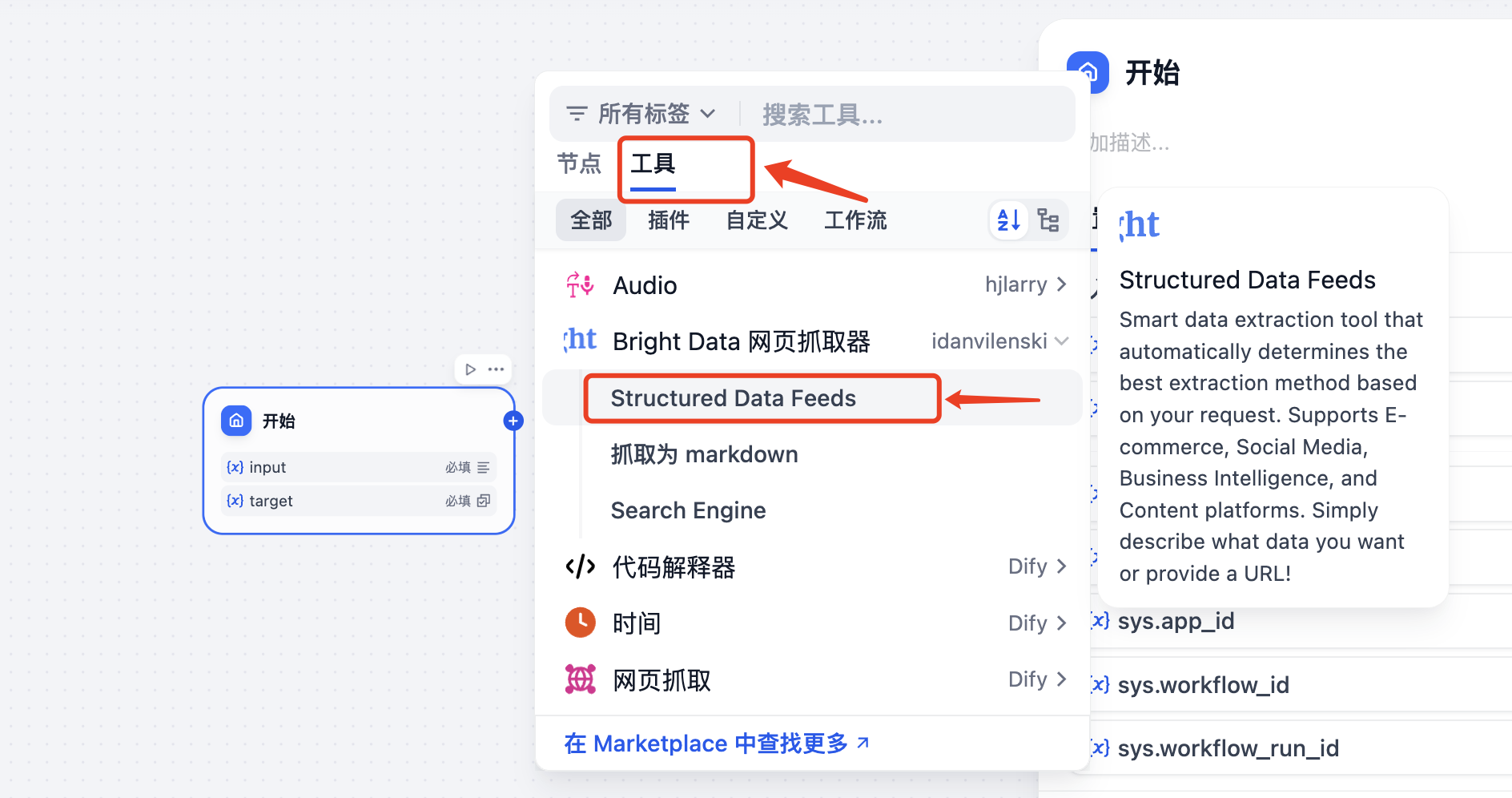 AI Visual Insight: This screenshot shows the Bright Data web scraper tool hierarchy. It makes clear that Structured Data Feeds targets structured extraction, Search Engine targets SERP use cases, and Markdown extraction is designed to return raw page content. Developers should choose the tool based on the job to be done.
A structured output example shows why this workflow is production-friendly
{
  "profile_summary": {
    "username": "ishowspeed",
    "followers": 51000000,
    "is_verified": true
  },
  "engagement_metrics": {
    "average_engagement_rate": 26.24
  }
}
This example shows that the workflow output can move directly into a database, dashboard, or downstream analysis pipeline.
The real gains show up in stability and maintenance cost
The comparison in the source article is direct: custom scrapers see a block rate above 60%, while Bright Data MCP + Dify stays below 1%. Onboarding a new platform drops from one to two weeks to under 30 minutes. Average monthly maintenance time falls from more than 20 hours to less than 2 hours.
These gains matter especially for teams. In data collection systems, the most expensive cost is often not the per-request fee. It is the engineering time spent continuously repairing broken rules, proxy failures, and schema drift.
The cost and outcome comparison is significant
| Metric | In-house scraper | Bright Data MCP + Dify |
|---|---|---|
| Block rate | Above 60% | Below 1% |
| Data success rate | Around 40% | Above 99% |
| New platform onboarding | 1–2 weeks | Under 30 minutes |
| Average monthly maintenance | More than 20 hours | Under 2 hours |
This workflow is especially well-suited for marketing analytics and agent data foundations
If your goal is influencer discovery, competitor monitoring, trend tracking, content analysis, or sales lead discovery, this “collection-as-structured-data” workflow works well as a unified entry point. Once upstream collection is standardized, downstream systems can connect seamlessly to BI, RAG, automated reporting, and multi-agent collaboration.
For enterprises, the real challenge is no longer scraping pages. It is turning highly volatile external data into stable internal data assets that other systems can consume. The combination of Bright Data MCP and Dify maps directly to that need.
FAQ provides structured answers to common implementation questions
1. Why not use a traditional Python scraper to collect data from TikTok and LinkedIn directly?
Because the hard part is not HTML parsing. The real challenge is blocking, login walls, dynamic rendering, signatures, and fingerprint detection. An in-house solution is possible, but the maintenance cost is extremely high and cross-platform reuse is weak.
2. What is the difference between Structured Data Feeds and scraping to Markdown?
Structured Data Feeds is designed for directly extracting structured fields, which makes it ideal for account analysis, product information, and social media metrics. Scraping to Markdown is better when you want to preserve the original page content and let an LLM summarize it later.
3. Is this solution suitable for production environments?
Yes. The prerequisite is that you design input parameters, field schemas, retry logic, and persistence strategy carefully. This solution behaves more like enterprise-grade collection infrastructure than a one-off script.
Core Summary: This article reconstructs the Bright Data MCP and Dify social media data collection approach with a focus on TikTok and LinkedIn. It explains how MCP, visual workflow orchestration, and structured output can replace high-maintenance traditional scrapers, and it includes setup steps, example code, cost comparisons, and an FAQ for developers.