OpenClaw is an AI agent framework designed for local-first workflows and task automation. It supports natural language interaction, file processing, and multi-model integration. This guide focuses on two deployment paths—one-click deployment on Alibaba Cloud and local installation on Windows and Mac—while addressing the most common beginner pitfalls around image selection, API key configuration, and port access. Keywords: OpenClaw, Hermes Agent, Alibaba Cloud Bailian.
Technical Specifications at a Glance
| Parameter | Details |
|---|---|
| Language | Node.js 22.x, Python 3.9+ |
| Protocol / Access Method | Web UI, SSH, HTTP port access |
| GitHub Stars | Not provided in the source |
| Core Dependencies | Git, Homebrew (Mac), Alibaba Cloud Bailian API key, OpenClaw dedicated image |
| Default Port | 18789 |
| Recommended Cloud Instance | 2 vCPU + 4 GiB RAM + 40 GiB ESSD |
This guide focuses on making OpenClaw and Hermes Agent easy to deploy
OpenClaw works well for individuals and small teams that need 24/7 uptime, automated task handling, and access to multiple models. Unlike a traditional chatbot, it behaves more like an executable agent that can generate files, coordinate schedules, and call external tools.
In the context of this article, Hermes Agent appears alongside OpenClaw, but the focus is not on framework internals. Instead, this guide covers Alibaba Cloud image-based deployment and the integration workflow for Bailian models. For most developers, the real barrier is not installation itself, but whether the configuration chain is complete from end to end.
 AI Visual Insight: This image shows OpenClaw’s core brand visual and product entry point, emphasizing its unified identity as an AI agent solution. It is typically used as a deployment tutorial cover image or product navigation entry rather than as a detailed functional dashboard.
Confirm your use case and resource boundaries before deployment
If your goal is long-term uptime, remote access, or team-wide sharing, choose an Alibaba Cloud Lightweight Application Server first. If you only need short-term validation or a local experiment, local deployment costs less, but it requires your machine to stay online.
Resource limits are critical to success. The source material clearly states that memory below 2 GiB can cause service startup failures. In the cloud, the minimum recommendation is 2 vCPU + 2 GiB RAM, while 4 GiB RAM is better for long-term personal usage to avoid resource pressure after skills are installed.
# Log in to the cloud server and run an environment precheck
ssh root@your-public-ip
curl -fsSL https://gitee.com/openclaw-team/script/raw/main/2026/aliyun_precheck.sh | bash
This command validates the OS version, port usage, outbound network connectivity, and API region alignment before formal configuration.
The Alibaba Cloud deployment path is already packaged as an image
The core value of the Alibaba Cloud approach is the prebuilt OpenClaw image. It packages Node.js, runtime dependencies, and the main application into a ready-to-use image, removing the need for manual installation. This approach is ideal for users who do not want to deal with environment differences.
The recommended setup is to choose the dedicated OpenClaw image, use an instance with at least 2 GiB of memory, and prioritize Hong Kong or overseas regions to avoid restrictions on internet-enabled search capabilities. If your use case has stronger localization and compliance requirements, you should also consider filing and public network access restrictions.
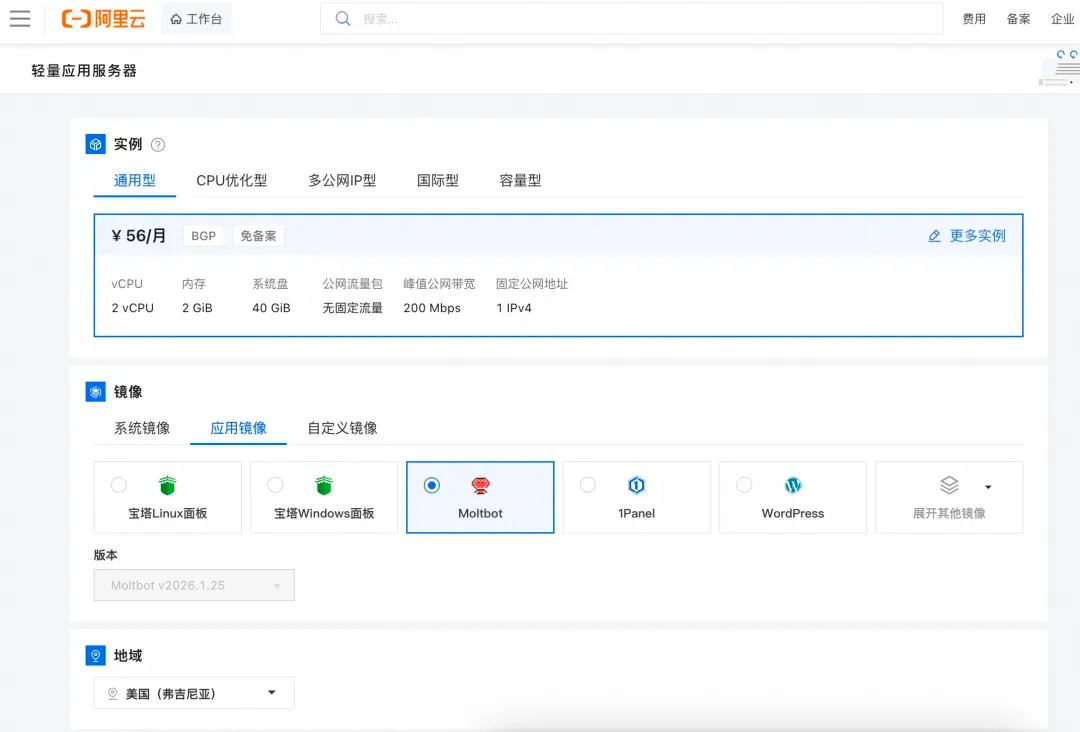 AI Visual Insight: This image shows the Lightweight Application Server selection interface, with emphasis on the image selection area. From a technical perspective, it demonstrates that OpenClaw has been packaged as an application image that can be instantiated directly, allowing users to complete the base delivery without manually installing the runtime.
API key and port access determine whether the service is actually usable
Deployment completion does not guarantee accessibility. A complete working setup includes three steps: opening port 18789, writing the Bailian API key, and generating an access token. If any step is missing, the Web UI may be unreachable or unable to call models.
The Bailian API key is the core authentication mechanism for model access. The source emphasizes that this key is often displayed only once, so you should save it immediately. Ideally, the API region should match the server region to reduce latency and lower the chance of request timeouts.
# Generate a new access token
openclaw token generate

# Check service status
openclaw status
These commands help you restore console access and quickly confirm whether the service is running correctly.
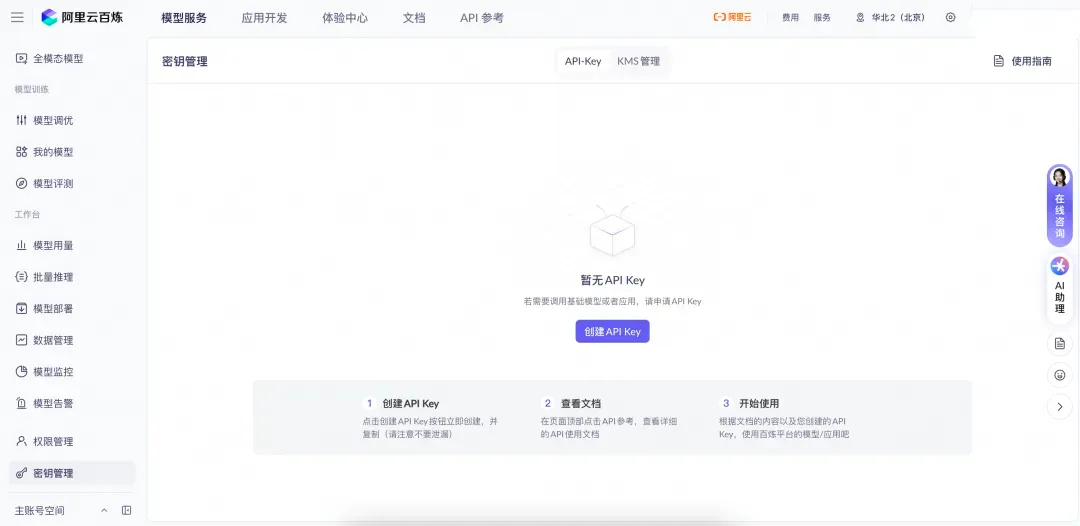 AI Visual Insight: This image presents the key management interface in the Bailian console, showing that the integration point between OpenClaw and the model platform is API key injection rather than direct local model access. For developers, this step determines whether natural language understanding and task execution capabilities are activated.
Local deployment works better as a validation environment than a production environment
A Windows environment depends on Node.js 22.x, Python 3.9+, and Git. A Mac environment also depends on Homebrew. Unlike the cloud image approach, local deployment is more sensitive to PATH issues, permissions, and port conflicts.
Windows users should run the installation script in an elevated PowerShell session. Mac users should install dependencies through Homebrew first, then run the official installation script. In both cases, you still need to write the Bailian API key.
# Install OpenClaw locally on Windows
node --version   # Confirm that the Node.js version is at least 22
python --version # Confirm that the Python version is at least 3.9
git --version    # Confirm that Git is installed correctly
iwr -useb https://openclaw.ai/install-local-2026.ps1 | iex
openclaw config set models.providers.bailian.apiKey "sk-xxxxxxxxxxxxxxxx"
openclaw gateway
These commands validate Windows dependencies, install OpenClaw, write the Bailian key, and start the local gateway.
# Install OpenClaw locally on Mac
brew install node@22 git [email protected]
curl -fsSL https://openclaw.ai/install-local-2026.sh | bash
openclaw config set models.providers.bailian.apiKey "sk-xxxxxxxxxxxxxxxx"  # Write the Bailian API key
nohup openclaw gateway > ~/.openclaw/logs/local-start.log 2>&1 &
These commands install dependencies on Mac, write the model key, and start the service in the background.
Functional validation should cover interaction, model access, and automation
After deployment, do not verify only that the page opens. A more effective approach is to test natural language responses, file creation, and model invocation separately. This helps you quickly determine whether the issue is related to frontend access, model authentication, or agent execution.
You should test three prompt categories in order: a greeting, a command to create a test file, and a request to list supported capabilities. If all three succeed, the gateway, model layer, and execution pipeline are basically connected.
Advanced configuration improves long-term operational stability
For cloud instances, enable automatic startup so the service does not disappear after a reboot. If you plan to expand into office automation, you can also install the ClawHub CLI to manage the skill ecosystem and integrate IM channels such as DingTalk or Feishu.
# Enable auto-start and install the skill management tool
systemctl enable openclaw-gateway   # Automatically start the service after a server reboot
npm install -g clawhub              # Install the skill management CLI
clawhub search basic-utils
clawhub install basic-utils
These commands improve service availability and add extensible skill management capabilities.
Most common failures come from insufficient resources, invalid keys, and port conflicts
Frequent cloud-side issues include insufficient memory, API key region mismatch, port 18789 not being opened, and expired tokens. Frequent local issues include missing administrator privileges, occupied ports, and environment variables that have not taken effect.
If the console does not open, first check whether the service started, then check whether the port is listening, and finally verify whether the token was regenerated. If the model does not respond, check first whether the API key was fully written into the configuration.
# Check whether port 18789 is already in use
lsof -i:18789
# Or view logs on Linux
openclaw logs --follow
These commands help you quickly identify port conflicts and runtime error logs.
Post-deployment management should focus on skill restraint, config backups, and key security
OpenClaw supports skill extensions, but you should not install too many plugins at the beginning. Prioritize skills with high installation counts, recent maintenance activity, and strong ratings to avoid dependency conflicts and performance instability.
Back up configuration files regularly, especially after changes to models, channels, or skills. API keys, server passwords, and public endpoints are all highly sensitive assets and should never be shared in plaintext in team chat.
# Back up the configuration file
cp ~/.openclaw/openclaw.json ~/.openclaw/openclaw.json.bak  # Keep a rollback-ready copy of the configuration
Use this command to preserve the current working configuration before upgrades, reconfiguration, or troubleshooting.
FAQ: The three questions developers care about most
1. Why is the Alibaba Cloud option better for beginners?
Because the image already includes the main application and dependencies. The remaining tasks are instance selection, opening the port, writing the API key, and obtaining the token, which significantly reduces environment-related issues.
2. Why must I pay attention to the region of the Bailian API key?
A region mismatch increases network latency and can even cause connection timeouts. For an agent that needs to call models frequently, this directly affects response stability.
3. Can local deployment replace long-term cloud operation?
Not recommended. It works well for development validation and short-term trials, but it depends on your local machine staying online, network stability, and exclusive port availability. Its production reliability is clearly weaker than that of a cloud instance.
Core Summary
This article reconstructs the deployment workflow for OpenClaw and Hermes Agent across Alibaba Cloud and local environments. It covers image selection, Bailian API key configuration, port access, token generation, local installation on Windows and Mac, common troubleshooting, and skill management. It is well suited for developers who want to operationalize an AI agent quickly.