This article focuses on Docker-based deployment for microservice projects, covering installation, image pulling, container runtime basics, volumes, networking, custom images, and Docker Compose orchestration. The core challenges are inconsistent environments, long deployment chains, and complex service dependencies. Keywords: microservices deployment, Docker Compose, container orchestration.
Technical Specification Snapshot
| Parameter | Description |
|---|---|
| Language | Bash, YAML, Dockerfile, Java |
| Runtime Environment | CentOS / Linux |
| Protocols / Ecosystem | OCI container standard, Docker Hub, Bridge Network |
| Typical Services | MySQL, Nginx, Java backend |
| Core Dependencies | docker-ce, containerd.io, Docker Compose plugin |
| Repository Popularity | The original article did not provide a star count; this is a hands-on deployment note |
This article walks through the complete Docker path for microservices deployment
At its core, the original content is a from-zero-to-one Docker learning and deployment record. Its emphasis is not on theory, but on putting MySQL, Nginx, and Java services into containers, then solving real deployment problems such as image pulls, directory mounts, network connectivity, and one-command startup.
For microservice teams, Docker provides value by packaging code, dependencies, and the runtime environment into an image, which prevents inconsistencies across development, testing, and production. Combined with Compose, it turns multi-container projects into declarative deployments.
The key Docker installation steps start with runtime and repository setup
In a CentOS environment, the recommended approach is to remove older Docker versions first, then install the official repository and the latest components. After installation, if docker images returns an error, the issue is usually not a failed install. In most cases, the Docker service has not started yet.
# Remove the old version to avoid conflicts with new components
sudo yum remove docker

# Install repository management tools
sudo yum install -y yum-utils

# Add the official Docker repository
sudo yum-config-manager --add-repo https://download.docker.com/linux/centos/docker-ce.repo

# Install Docker Engine and the Compose plugin
sudo yum install -y docker-ce docker-ce-cli containerd.io docker-buildx-plugin docker-compose-plugin

# Start Docker and enable it at boot
sudo systemctl start docker  # Start the Docker service
sudo systemctl enable docker # Enable Docker on startup
These commands complete the Docker base installation and service initialization, which are prerequisites for all subsequent container operations.
 AI Visual Insight: This screenshot shows the verification step after starting the Docker service in a Linux terminal. The key signal is that after running
 systemctl start docker, Docker CLI commands respond normally, which indicates that the daemon is running and the host is ready for image and container management.
Registry mirror configuration is a critical prerequisite for pulling images reliably in mainland China
The original notes repeatedly showed MySQL and Nginx pull failures. This is not a command issue. The real cause is unstable access to Docker Hub in domestic network environments. The solution is to configure a registry mirror for the Docker daemon and then reload the service.
# Create the Docker configuration directory
sudo mkdir -p /etc/docker

# Write the registry mirror configuration
sudo tee /etc/docker/daemon.json <<-'EOF'
{
  "registry-mirrors": ["https://docker.m.daocloud.io"]
}
EOF

# Reload the configuration and restart Docker
sudo systemctl daemon-reload
sudo systemctl restart docker

# Verify that the registry mirror is active
docker info | grep -A 3 "Registry Mirrors"
This configuration addresses one high-priority deployment concern: whether images can be pulled reliably in the first place.
 AI Visual Insight: This screenshot shows the
 Registry Mirrors field in the output of docker info, which confirms that the Docker daemon has loaded the mirror configuration. Technically, this means image pull traffic will be routed to the configured mirror first, reducing timeouts and connection failures.
Docker revolves around three core objects: images, containers, and registries
An image is the runtime template, a container is a running instance of that image, and a registry is the storage and distribution system for images. Once you understand these three concepts, docker pull, docker run, and docker ps form the minimum viable workflow.
# Pull an image
docker pull nginx

# List local images
docker images

# Run a container and map a port
docker run -d --name nginx -p 8080:80 nginx

# List running containers
docker ps
This command set forms the Docker beginner loop: pull an image, start a container, and check its state.
Correct environment variables and port mappings are essential for MySQL container deployment
When deploying MySQL, the most important settings are the root password, time zone, and port mapping. For temporary learning or testing, you can run the official image directly. For persistent data, however, you must add a bind mount or a Docker volume.
docker run -d \
  --name mysql \
  -p 3306:3306 \
  -e TZ=Asia/Shanghai \
  -e MYSQL_ROOT_PASSWORD=123 \
  mysql
Here, -e MYSQL_ROOT_PASSWORD=123 is the critical parameter that allows the official image to initialize the database. Without it, the container cannot complete its first startup successfully.
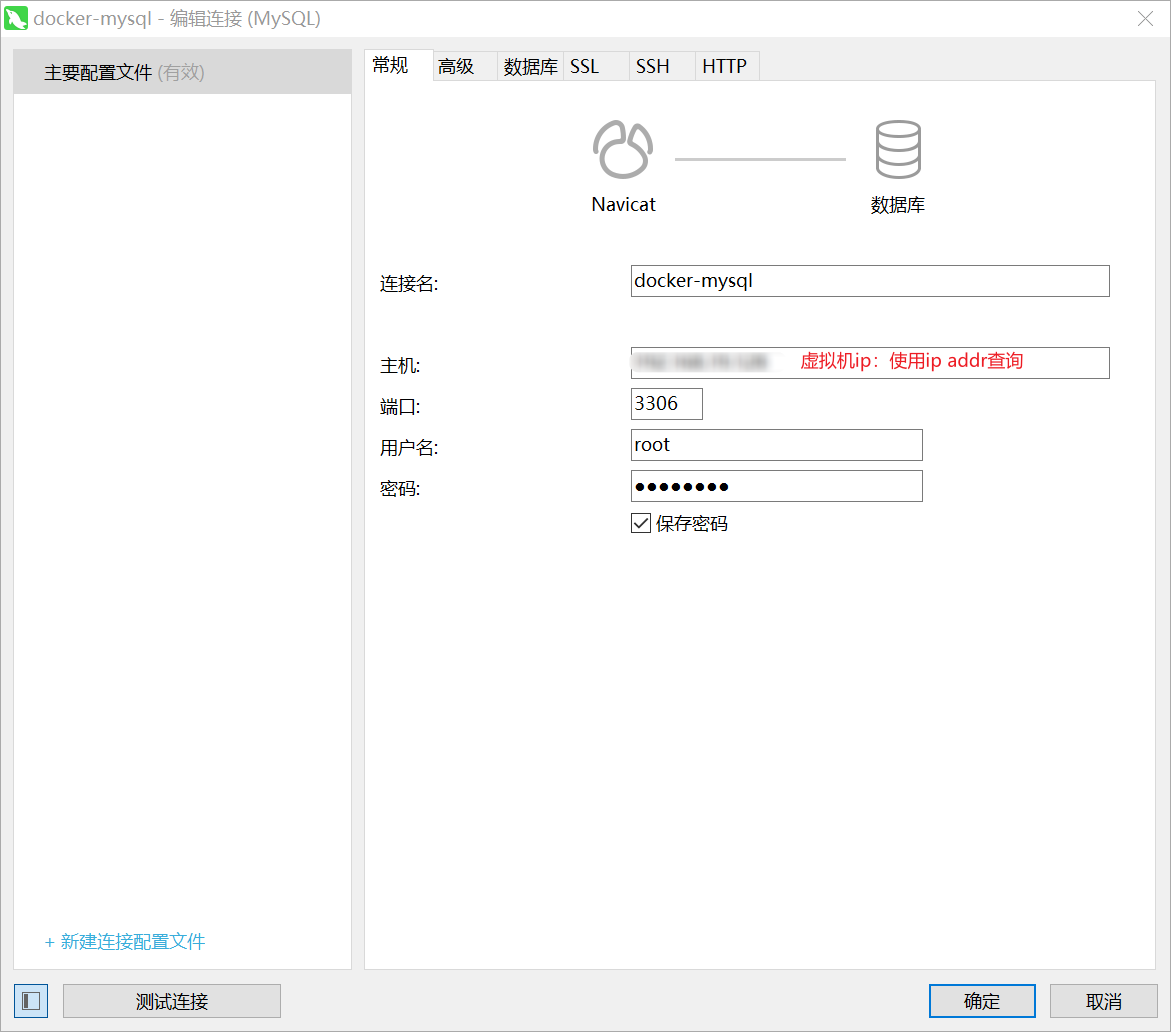 AI Visual Insight: This image shows the result of connecting a database client to the containerized MySQL instance. Technically, it confirms that the host’s port
 3306 is mapped correctly to the container’s internal service port and that database initialization completed successfully, allowing external management tools to connect.
Volumes and bind mounts determine whether containers are maintainable
If data is not persisted, it will be lost when the container is removed. For that reason, Nginx static assets, MySQL data files, initialization scripts, and configuration files usually need to be mounted to the host or attached to Docker volumes.
# Mount an Nginx static directory with a Docker volume
docker run -d \
  --name nginx \
  -p 8080:80 \
  -v html:/usr/share/nginx/html \
  nginx

# List volumes
docker volume ls

# Inspect volume details
docker volume inspect html
These commands demonstrate the role of volumes: they decouple container content from host storage, making updates and backups easier.
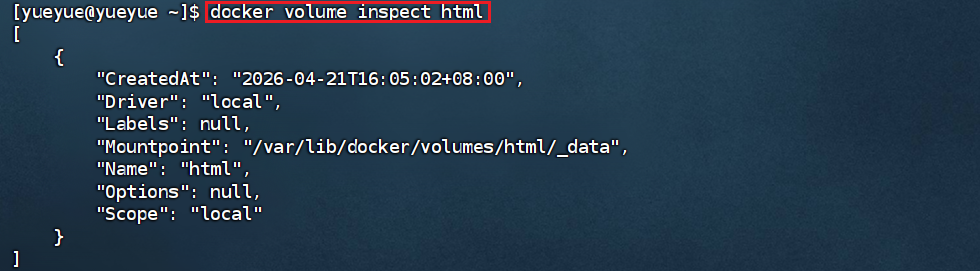 AI Visual Insight: This screenshot shows the output of
 docker volume inspect, with emphasis on the Mountpoint, Name, and Driver fields. It confirms that Docker created a real storage path on the host and established the mount relationship between the volume and the container.
Custom images give Java microservices a reproducible delivery format
After a project is packaged as a JAR, the best practice is not to copy that JAR onto a server and run it manually. Instead, build a standard image with a Dockerfile. This upgrades the delivery artifact from “scripts + files” to a directly runnable image.
FROM openjdk:17-jdk-alpine

# Copy the build artifact into the image
COPY target/*.jar app.jar

# Expose the service port
EXPOSE 8080

# Start the Java application
ENTRYPOINT ["java", "-jar", "/app.jar"]
This Dockerfile standardizes how the Java application is packaged, which makes it well suited for CI/CD and multi-environment distribution.
A custom network allows containers to communicate by service name
By default, containers usually connect to a bridge network, and containers on the same subnet can communicate. In project deployments, however, a custom network is the better choice. It allows the frontend, backend, and database to resolve each other by container name instead of hard-coded IP addresses.
# Create a custom network
docker network create hmall-network

# Start MySQL and attach it to the network
docker run -d --name mysql --network hmall-network -e MYSQL_ROOT_PASSWORD=123 mysql:8.0

# Start the backend and attach it to the same network
docker run -d --name hmall-backend --network hmall-network -p 8081:8080 hmall
This solves one of the most common communication problems in microservices deployment: service address drift.
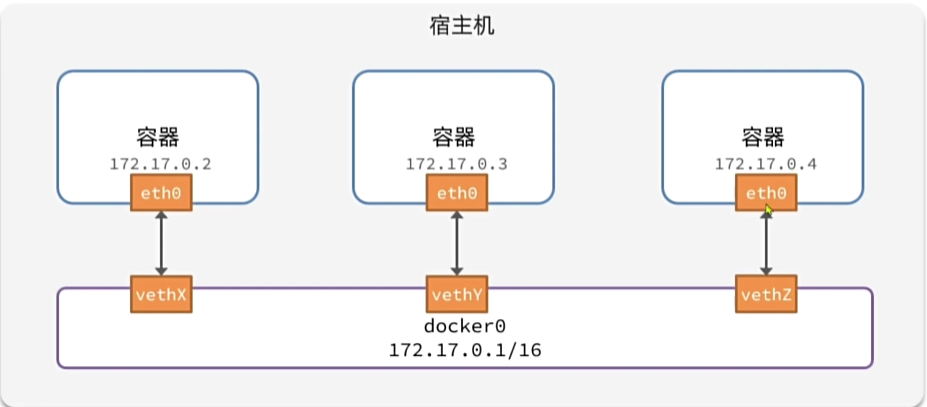 AI Visual Insight: This image shows the connection relationship between the Docker bridge network and multiple containers, highlighting the virtual bridge as the intermediate layer that carries inter-container communication. Technically, this means containers have independent IP addresses and can use the network driver for isolation, discovery, and port forwarding.
Docker Compose upgrades multi-service deployment from command sprawl to declarative orchestration
Running MySQL, a backend service, and Nginx individually is not inherently difficult. What becomes difficult is standardizing versions, startup order, network settings, and volume management. Compose centralizes that information in a single YAML file and significantly reduces deployment complexity.
name: hmall
services:
  mysql:
    image: mysql:8.0
    container_name: mysql
    environment:
      MYSQL_ROOT_PASSWORD: 123
      TZ: Asia/Shanghai
    ports:
      - "3306:3306"
    volumes:
      - mysql_data:/var/lib/mysql
    networks:
      - hmall-network

  backend:
    build: ./hmall
    container_name: hmall-backend
    depends_on:
      - mysql
    ports:
      - "8081:8080"
    networks:
      - hmall-network

  frontend:
    image: nginx:alpine
    container_name: hmall-nginx
    ports:
      - "18080:18080"
    volumes:
      - ./nginx/html:/usr/share/nginx/html
      - ./nginx/nginx.conf:/etc/nginx/nginx.conf:ro
    networks:
      - hmall-network

networks:
  hmall-network:
    driver: bridge

volumes:
  mysql_data:
This configuration orchestrates the database, backend, and frontend in a unified way. It is the minimum viable template for one-command deployment of a microservices project.
# Start the full service stack with one command
docker compose up -d

# Check service status
docker compose ps

# View logs to troubleshoot startup issues
docker compose logs -f

# Stop and remove containers and networks
docker compose down
These commands show the core advantage of Compose: one lifecycle command set manages the entire service group.
A standardized deployment workflow should revolve around build, orchestration, verification, and maintenance
In practice, the recommended deployment workflow has four steps: package the Java project, build the image, orchestrate dependent services with Compose, and verify the result through logs, API checks, and container status. For later updates, you only need to rebuild the target image and restart the affected service.
FAQ
1. Why do docker images or docker ps return errors?
Usually because the Docker daemon is not running. Run systemctl start docker first, then use systemctl status docker to verify the service state.
2. Why does docker pull nginx keep timing out?
Most likely because Docker Hub is unreachable from the current network environment. Configure registry-mirrors in daemon.json first, then run systemctl daemon-reload && systemctl restart docker.
3. Why is Docker Compose recommended for microservices projects instead of writing multiple docker run commands manually?
Because Compose can define ports, networks, volumes, environment variables, and service dependencies in one place. This improves version control, team collaboration, and one-command deployment, especially for frontend-backend-database stacks.
AI Readability Summary: This article restructures the original notes into a practical Docker deployment guide for microservices. It covers installing Docker on CentOS, configuring registry mirrors, running MySQL and Nginx containers, mounting volumes, building custom images, creating container networks, and orchestrating services with Docker Compose. It is especially useful for fast deployment of Java microservice projects.