This article focuses on integrating and adapting Flutter third-party libraries for OpenHarmony. The core goal is to connect the Flutter UI layer, the ArkTS native shell, and the Harmony build pipeline, while resolving common issues such as missing SDKs, hvigor build failures, plugin compatibility gaps, and animation glitches. Keywords: Flutter, OpenHarmony, HarmonyOS adaptation.
The technical specification snapshot outlines the stack and runtime requirements
| Parameter | Description |
|---|---|
| Development Languages | Dart, ArkTS, Bash |
| Target Platform | OpenHarmony / HarmonyOS API 9+ |
| Core Protocols | Flutter Plugin, MethodChannel, Hvigor build pipeline |
| Flutter Version | 3.8.1+ |
| DevEco Studio | 5.0+ |
| Node.js | 18+ |
| Stars | Not provided in the original article |
| Core Dependencies | flutter_ohos, shared_preferences_harmonyos, hvigor |
This approach enables a Flutter project to gain a native OpenHarmony entry point and plugin runtime support
Running Flutter on OpenHarmony is not just a matter of executing flutter create. The real work is to add the ohos/ native shell, configure the Ability lifecycle, register OpenHarmony-compatible plugins, and ensure hvigor can locate Flutter build artifacts.
When a third-party library directly reuses its Android implementation, the most common issues are API incompatibility, unregistered plugins, and missing storage implementations. These typically surface as compilation failures, blank screens, or missing runtime capabilities.
The environment initialization commands must connect the Flutter and OpenHarmony toolchains first
# Add Flutter to PATH after installing the Flutter SDK
cd ~/Development
wget https://storage.googleapis.com/flutter_infra_release/releases/stable/flutter/flutter_linux_3.19.6-stable.tar.xz
tar xf flutter_linux_3.19.6-stable.tar.xz
export PATH="$PATH:$HOME/Development/flutter/bin"

# Enable OpenHarmony support
flutter config --enable-ohos
These commands establish the base environment required for Flutter CLI support on the OpenHarmony platform.
The project structure must include both the Flutter layer and the ohos native layer
A typical layout includes lib/, pubspec.yaml, and ohos/entry/src/main/ets/. The first part handles business pages and state management, while the second handles the ArkTS page container, Ability lifecycle, and plugin bridging.
my_ohos_app/
├── lib/                     # Flutter business logic
├── ohos/
│   ├── entry/src/main/ets/  # ArkTS entry point and pages
│   └── oh_modules/          # OpenHarmony dependencies
├── pubspec.yaml             # Flutter dependency manifest
└── flutter_project.yml      # Flutter project configuration
This structure shows that a cross-platform project is not a single-source repository, but a coordinated dual-runtime architecture.
The native entry Ability must explicitly host the Flutter engine lifecycle
EntryAbility is the application entry point on the OpenHarmony side. By extending FlutterAbility, it can reuse engine initialization, window creation, and page hosting capabilities, then load the Flutter container page during the window stage.
import FlutterAbility from '@ohos/flutter_ohos/src/main/ets/Ability'
import hilog from '@ohos.hilog'

const TAG = 'EntryAbility'

export default class EntryAbility extends FlutterAbility {
  onCreate(want, launchParam) {
    hilog.info(0, TAG, 'EntryAbility onCreate') // Log startup events
    super.onCreate(want, launchParam) // Call the parent class to initialize the engine
  }

  onWindowStageCreate(windowStage) {
    super.onWindowStageCreate(windowStage)
    this.loadContent('pages/Index') // Load the ArkTS container page that hosts FlutterView
  }
}
At its core, this code mounts the Flutter engine into the OpenHarmony application lifecycle.
FlutterAbility is responsible for creating the engine and registering plugins
Without plugin registration, many third-party libraries may compile successfully but still fail to access platform capabilities at runtime. This is especially true for storage, sharing, and notification plugins, which must be registered on the native side.
import FlutterEngine from '@ohos/flutter_ohos/src/main/ets/Engine'
import { registerWith } from '../plugin/GeneratedPluginRegistrant'

export default class FlutterAbility extends Ability {
  private flutterEngine: FlutterEngine | null = null

  getFlutterEngine(): FlutterEngine {
    if (this.flutterEngine == null) {
      this.flutterEngine = this.createFlutterEngine(this.context) // Lazily initialize the engine
    }
    return this.flutterEngine
  }

  configureFlutterEngine(engine: FlutterEngine) {
    registerWith(engine) // Register OpenHarmony-compatible plugins
  }
}
This code completes two critical tasks: Flutter engine reuse and plugin wiring.
The ArkTS container page must provide a rendering host for FlutterView
On OpenHarmony, the page layer typically uses Index.ets to host FlutterView. This is the key point where the Flutter interface actually appears on the device screen.
@Entry
@Component
struct Index {
  build() {
    Column() {
      FlutterView({ entryAbility: this.context }) // Mount Flutter content into the native view
    }
    .width('100%')
    .height('100%')
  }
}
This code provides a full-screen native container for the Flutter render tree.
The core of third-party library adaptation is replacing dependencies with OpenHarmony-compatible implementations
Not every Flutter plugin can run on OpenHarmony unchanged. The most reliable strategy is to first look for HarmonyOS-specific plugins or compatible forks. For example, local storage can use shared_preferences_harmonyos.
dependencies:
  flutter:
    sdk: flutter
  shared_preferences: ^2.3.5
  shared_preferences_harmonyos: ^0.0.1 # HarmonyOS-specific implementation
The purpose of this dependency declaration is to map a general Flutter API to an OpenHarmony platform implementation.
The plugin registration file determines whether platform capabilities actually take effect
import { AA } from '@ohos/share_plus'
import { BB } from '@ohos/shared_preferences'

export function registerWith(registrar: any) {
  AA.registerWith(registrar) // Register sharing capability
  BB.registerWith(registrar) // Register local storage capability
}
This code exposes platform-side plugins to the Flutter invocation chain.
Build failures usually come from an incomplete toolchain rather than Flutter business logic
One of the most common errors is No Hmos SDK found. This usually means DevEco Studio is installed, but its environment variables have not been exported into the current terminal session, so the CLI cannot locate the SDK.
export HARMONY_SDK_HOME=/Users/intmainjhy/Applications/DevEco-Studio.app/Contents/sdk
export PATH="$PATH:$HARMONY_SDK_HOME/toolchains"
This configuration allows flutter build hap and hdc to access the HarmonyOS toolchain.
Another frequent issue is an ENOENT error from hvigor. In most cases, the root cause is that Flutter build artifacts were never generated, or dependencies in the ohos directory were not synchronized.
flutter clean
flutter pub get
cd ohos
flutter build hap --debug
These commands clear caches, fetch dependencies, and regenerate the HAP build inputs.
Animation and chart libraries are more likely to hit version and performance issues on OpenHarmony
flutter_animate may stutter on OpenHarmony. The usual cause is an animation chain that is too long, or duration and easing curves that do not fit the device rendering cadence. The optimization strategy is to shorten durations, reduce layer depth, and use smoother curves.
Container()
  .animate()
  .fadeIn(
    duration: 200.ms, // Shorten animation duration to reduce stutter
    curve: Curves.easeOut, // Use a smoother easing-out curve
  )
This code improves stability on HarmonyOS devices by reducing animation complexity.
Issues with fl_chart are more often caused by version changes. After the SideTitleWidget parameter signature changed, legacy code started failing immediately.
SideTitleWidget(
  axisSide: meta.axisSide, // New versions use axisSide instead of the old parameter
  child: Text('label'),
)
This change fixes compilation errors caused by chart component API upgrades.
A minimum viable adaptation checklist must be completed before release
At a minimum, verify four items: the SDK is discoverable, plugins are registered, the HAP package builds successfully, and the app launches on a real device. If the project includes animation, charts, storage, and sharing, run device-level regression checks for each feature.
Use the following commands to complete build and installation
flutter build hap --release
hdc install app-release.hap
hdc list targets # Check device connection status
These commands cover three key release tasks: production build, device installation, and connection diagnostics.
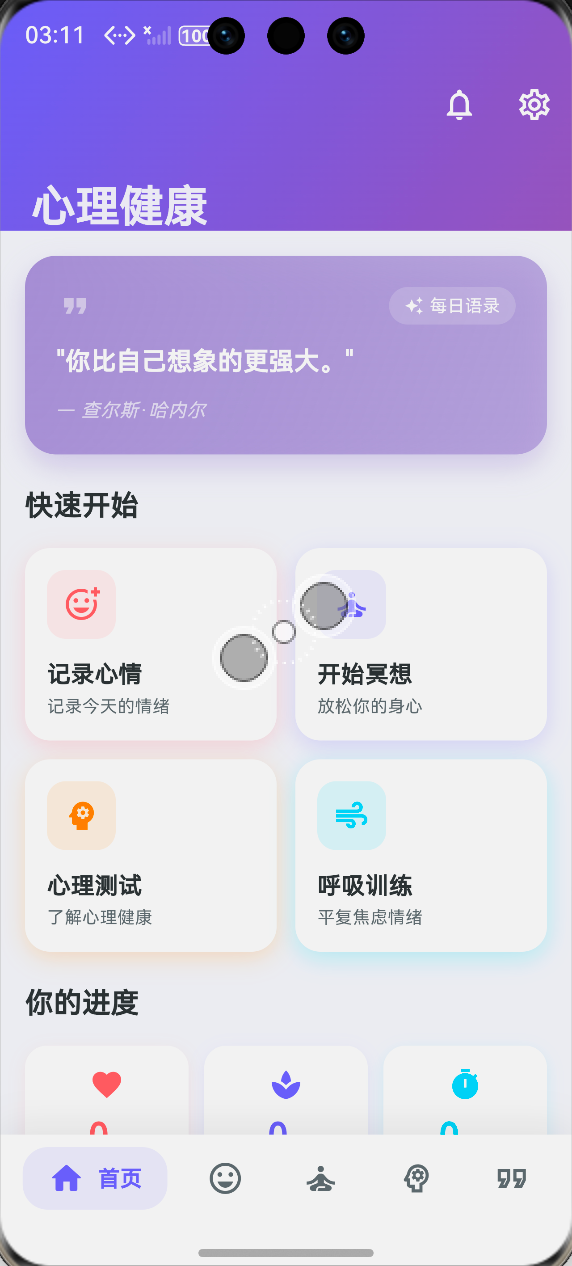 AI Visual Insight: This image shows the information architecture of a mental health app running on a device. The top area presents the app brand and core onboarding zone, the middle section uses card-based feature entry points for mood tracking, meditation training, mental health assessments, and breathing exercises, and the bottom area includes a multi-tab navigation bar. This indicates that the Flutter UI has been rendered successfully inside the OpenHarmony host and that the home screen interaction layout has been adapted correctly.
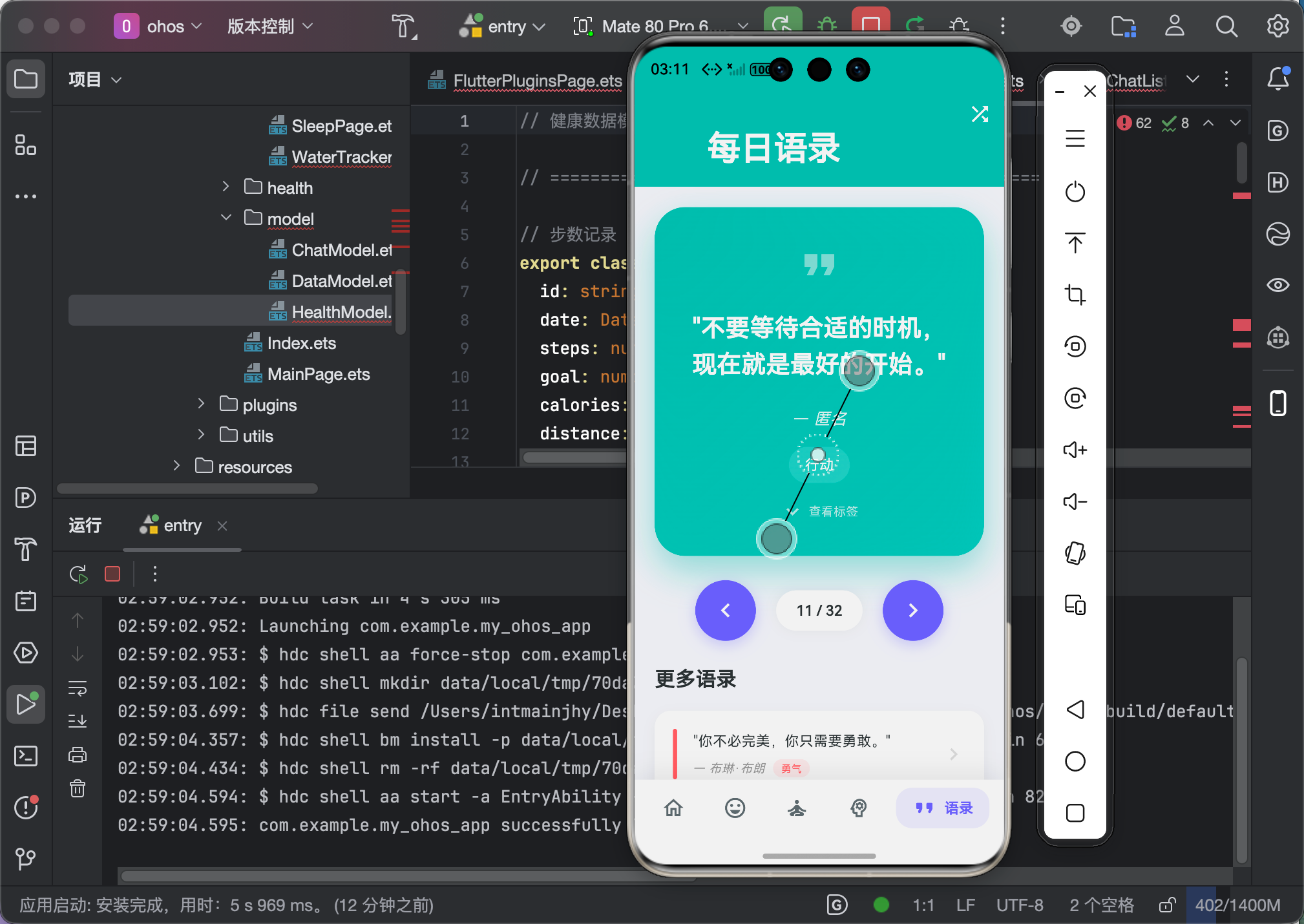 AI Visual Insight: This image further reflects the app’s visual hierarchy and component layout characteristics, likely including card spacing, semantic icon usage, selected states in the bottom navigation, and overall whitespace strategy. Screenshots like this are critical for validating whether Flutter font sizes, touch targets, responsive layouts, and animation transitions feel natural on HarmonyOS devices.
The conclusion is that OpenHarmony adaptation is fundamentally a combination of plugin ecosystem readiness and native shell engineering
The main difficulty in these projects is not the Flutter UI itself, but platform bridging, dependency replacement, build pipeline integration, and real-device validation. Once you connect the entry Ability, the FlutterView container, plugin registration, and the HAP build process, most third-party libraries can be migrated to a usable state.
For mental health applications, prioritize adapting storage, animation, charting, and navigation components first. These areas are the most likely to expose platform differences and the most likely to affect user experience directly.
FAQ provides structured answers to the most common OpenHarmony adaptation questions
Q1: Why does a Flutter plugin work on Android but fail on OpenHarmony?
A: Because a plugin depends not only on its Dart API, but also on its platform-side implementation. If the corresponding OpenHarmony native code is missing, or the plugin is not registered in GeneratedPluginRegistrant, calls from the Flutter layer cannot reach the platform.
Q2: What should I check first when flutter build hap fails?
A: Start with HARMONY_SDK_HOME, flutter doctor, hdc list targets, and flutter pub get. Most issues come from SDK paths, device connectivity, or missing build artifacts rather than business logic.
Q3: How do I decide whether a third-party library is worth adapting for OpenHarmony?
A: First determine whether it depends on platform capabilities. Pure UI libraries are usually inexpensive to adapt. Libraries involving notifications, storage, sharing, file systems, or chart rendering require you to confirm whether OpenHarmony already has a compatible implementation or an alternative plugin.
[AI Readability Summary]
This article reconstructs the full path for integrating third-party Flutter libraries on OpenHarmony, covering environment setup,
ohosproject structure,EntryAbilityandFlutterAbilityconfiguration, plugin registration, replacement with platform-specific dependencies, build and release workflows, and troubleshooting for common errors. It is well suited to cross-platform developers who need to ship real OpenHarmony adaptations.