Technical Specifications at a Glance
This article explains how to deploy DeepSeek-V4-Flash on Ascend 910B2 using GPUStack, addressing the challenges of deploying ultra-large MoE models in domestic compute environments, including operational complexity, inference engine adaptation, and benchmarking overhead. Keywords: GPUStack, Ascend 910B, DeepSeek-V4.
| Parameter | Details |
|---|---|
| Platform | GPUStack |
| Model | DeepSeek-V4-Flash 284B |
| Hardware | 8 × Ascend 910B2 64GB |
| Deployment Method | Docker containerization |
| Inference Engine | vLLM Ascend 0.13.0rc3 |
| Framework / Runtime | CANN / Ascend Docker Runtime |
| Protocol / Access | Web console + model service API |
| Typical Performance | Approximately 31 tokens/s for a single request |
| Core Dependencies | Docker, GPUStack, vLLM Ascend, ModelScope |
| Project Type | Open-source GPU cluster management and model serving platform |
The deployment value of DeepSeek-V4 lies in engineering practicality
DeepSeek-V4 uses an MoE architecture and performs strongly on long-context workloads, complex reasoning, and agent tasks. However, it also places higher demands on low-level compute scheduling, inference engine compatibility, and operations capabilities.
GPUStack does more than add another UI layer. Its value comes from integrating model deployment, node onboarding, engine orchestration, log troubleshooting, and benchmarking into a unified control plane, reducing delivery complexity for domestic compute clusters.
 AI Visual Insight: This image serves as the article’s main visual. It highlights Day 0 deployment of DeepSeek-V4 in an Ascend 910B environment. The core message is “day-one model support + rapid rollout on domestic compute,” emphasizing platform-based deployment rather than ad hoc single-node scripting.
DeepSeek-V4 architectural optimizations directly affect deployment strategy
The model’s hybrid attention, long-context optimization, and enhanced training convergence mean that inference requires careful tuning of parallelism strategy, memory utilization, and batching parameters. Without that, it is difficult to achieve stable throughput.
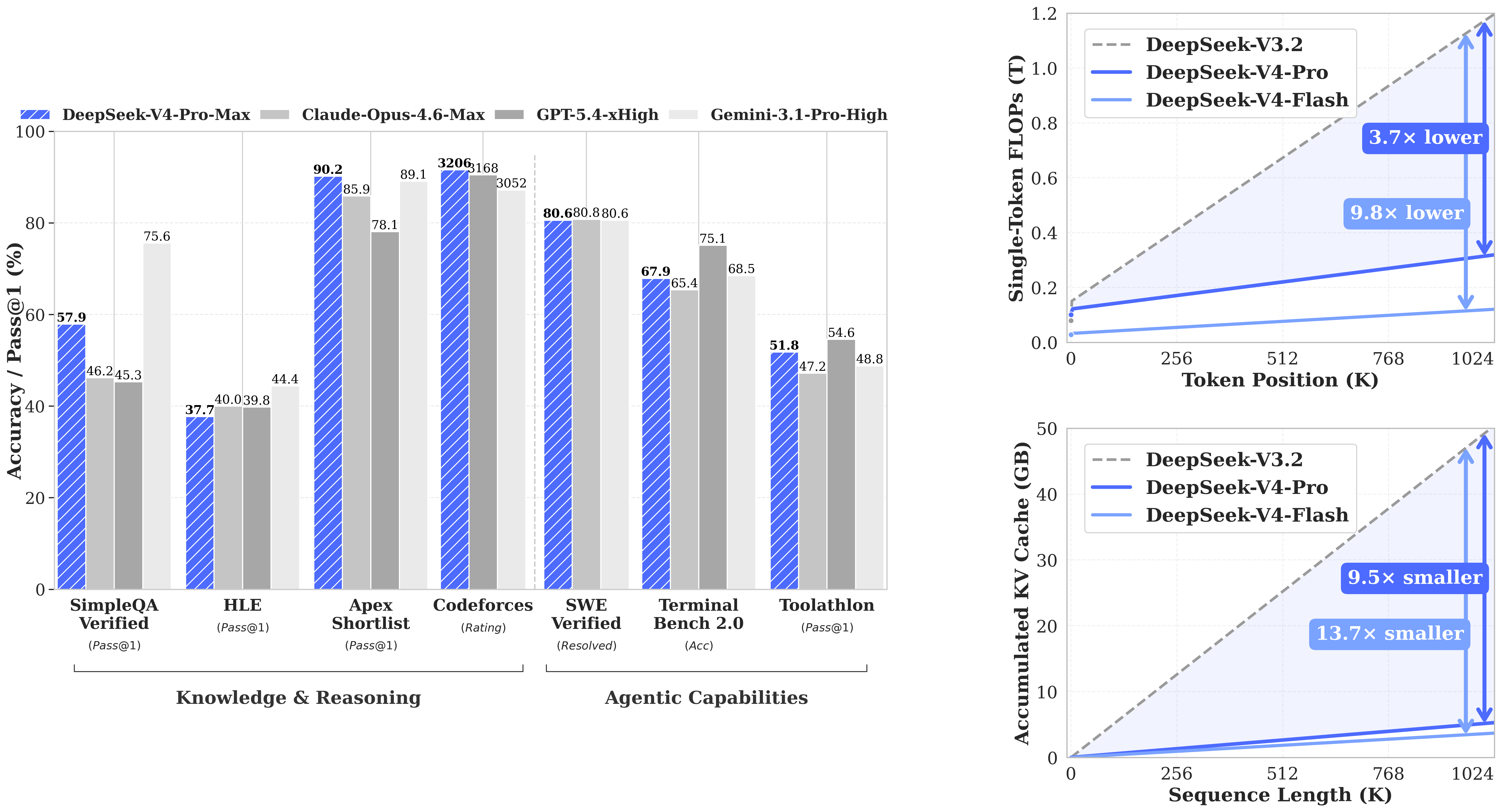 AI Visual Insight: This image shows performance or architectural comparison data for DeepSeek-V4, focusing on its advantages in long-context processing, complex reasoning, or cost efficiency. It makes clear that the deployment goal is not just to get the model running, but to achieve meaningful performance with the right parameters.
Initializing the GPUStack control plane requires container infrastructure first
GPUStack runs as a containerized platform, so the first step is not deploying the model but verifying that the Docker environment is available. You can deploy the control plane on a standard CPU node or directly on an Ascend node used for testing.
docker info # Verify that the Docker service is running correctlyUse this command to confirm that the container runtime is ready. It is a prerequisite for starting both the Server and Worker components.
The GPUStack Server startup command must define persistence and bootstrap parameters clearly
sudo docker run -d --name gpustack \
  --restart unless-stopped \
  -p 80:80 \
  --volume gpustack-data:/var/lib/gpustack \
  swr.cn-south-1.myhuaweicloud.com/gpustack/gpustack:v2.1.2 \
  --debug \
  --bootstrap-password GPUStack@123  # Initialize the administrator password
This command starts the GPUStack Server, persists platform data, and enables debug logging.
docker logs -f gpustack # Continuously view service logsUse this command to verify that the control plane has started successfully.
Ascend Worker nodes must pass driver and runtime checks before onboarding
In domestic compute environments, deployment success usually depends less on the model itself and more on drivers, container runtime configuration, and device visibility. Check the driver version first, then verify that Docker has mounted the Ascend Runtime correctly.
npu-smi info # View Ascend driver and device informationUse this command to confirm the driver version. Version 25.5 or later is recommended to ensure compatibility with DeepSeek-V4.
sudo docker info 2>/dev/null | grep -q "ascend" \
  && echo "Ascend Container Toolkit OK" \
  || (echo "Ascend Container Toolkit not configured"; exit 1)  # Check the Ascend runtime
Use this command to verify that the Ascend Docker Runtime has been configured correctly.
When onboarding a Worker, simply copy the system-generated command from the console and run it on the target node. After registration succeeds, the console should show the node status as Ready, and logs should confirm normal Worker heartbeats.
A custom vLLM Ascend version is a prerequisite for deploying DeepSeek-V4
Built-in backend versions may not always include support for the latest models, so GPUStack lets you add custom versions for vLLM, SGLang, or MindIE. This deployment uses vLLM Ascend 0.13.0rc3 for DeepSeek-V4.
The recommended custom vLLM configuration should keep template variables unchanged
| Configuration Item | Value |
|---|---|
| Backend | vLLM |
| Version | 0.13.0rc3-custom |
| Image | quay.io/ascend/vllm-ascend:v0.13.0rc3 |
| Framework | CANN |
| ENTRYPOINT | vllm serve |
| Run Command | {{model_path}} –host {{worker_ip}} –port {{port}} –served-model-name {{model_name}} |
backend_name: vLLM
version_configs:
  0.13.0rc3-custom:
    image_name: quay.io/ascend/vllm-ascend:v0.13.0rc3
    entrypoint: vllm serve
    run_command: >-
      {{model_path}} --host {{worker_ip}} --port {{port}} --served-model-name {{model_name}}
    env: {}
    custom_framework: cann  # Specify the Ascend CANN framework
This YAML file is used to import a custom vLLM Ascend version into GPUStack.
DeepSeek-V4-Flash runtime parameters determine the balance between throughput and stability
In an online environment, you can deploy directly by searching for Eco-Tech/DeepSeek-V4-Flash-w8a8-mtp in ModelScope. In an offline environment, you need to distribute the weights in advance and register the in-container path in the console.
For deployment, it is recommended to use 8 × 910B2 64GB cards with a TP=8 and DP=1 parallel strategy. This setup is well suited to full eight-card allocation and simplifies both cross-device partitioning and tuning.
--gpu-memory-utilization 0.9 \
--max-model-len 65536 \
--max-num-batched-tokens 8192 \
--max-num-seqs 16 \
--data-parallel-size 1 \
--tensor-parallel-size 8 \
--enable-expert-parallel \
--quantization ascend \
--block-size 128 \
--async-scheduling \
--chat-template /var/lib/gpustack/cache/model_scope/Eco-Tech/DeepSeek-V4-Flash-w8a8-mtp/chat_template.jinja \
--additional-config '{"enable_cpu_binding": "true", "multistream_overlap_shared_expert": true}' \
--speculative-config '{"num_speculative_tokens": 1, "method": "deepseek_mtp"}' \
--compilation-config '{"cudagraph_mode":"FULL_DECODE_ONLY"}'
These parameters control memory usage, context length, parallelism strategy, and speculative inference behavior.
Benchmark results show that this setup is already a viable production reference
In the test scenario, single-request throughput reached about 31 tokens/s. This result shows that Ascend 910B2 can already handle baseline inference workloads for DeepSeek-V4-Flash reliably, although further optimization remains possible.
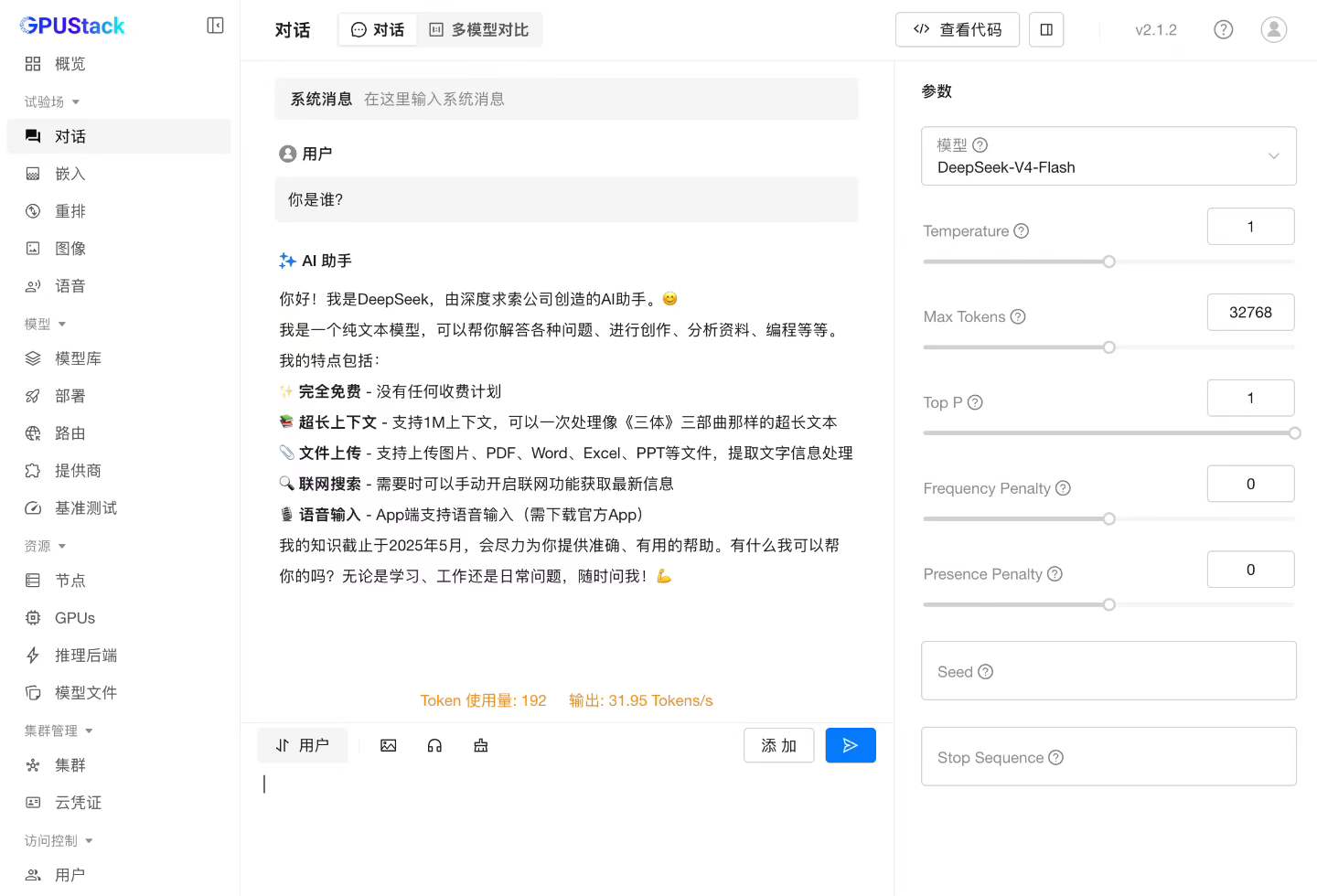 AI Visual Insight: This image shows real inference performance from the test environment, focusing on the single-request tokens/s metric. It indicates that the current version has passed usability validation, while performance still depends on parallelism settings, operator optimization, and scheduling strategy.
GPUStack also includes built-in benchmarking features, allowing you to run throughput tests directly against the model service without writing custom benchmark scripts or manual statistics logic.
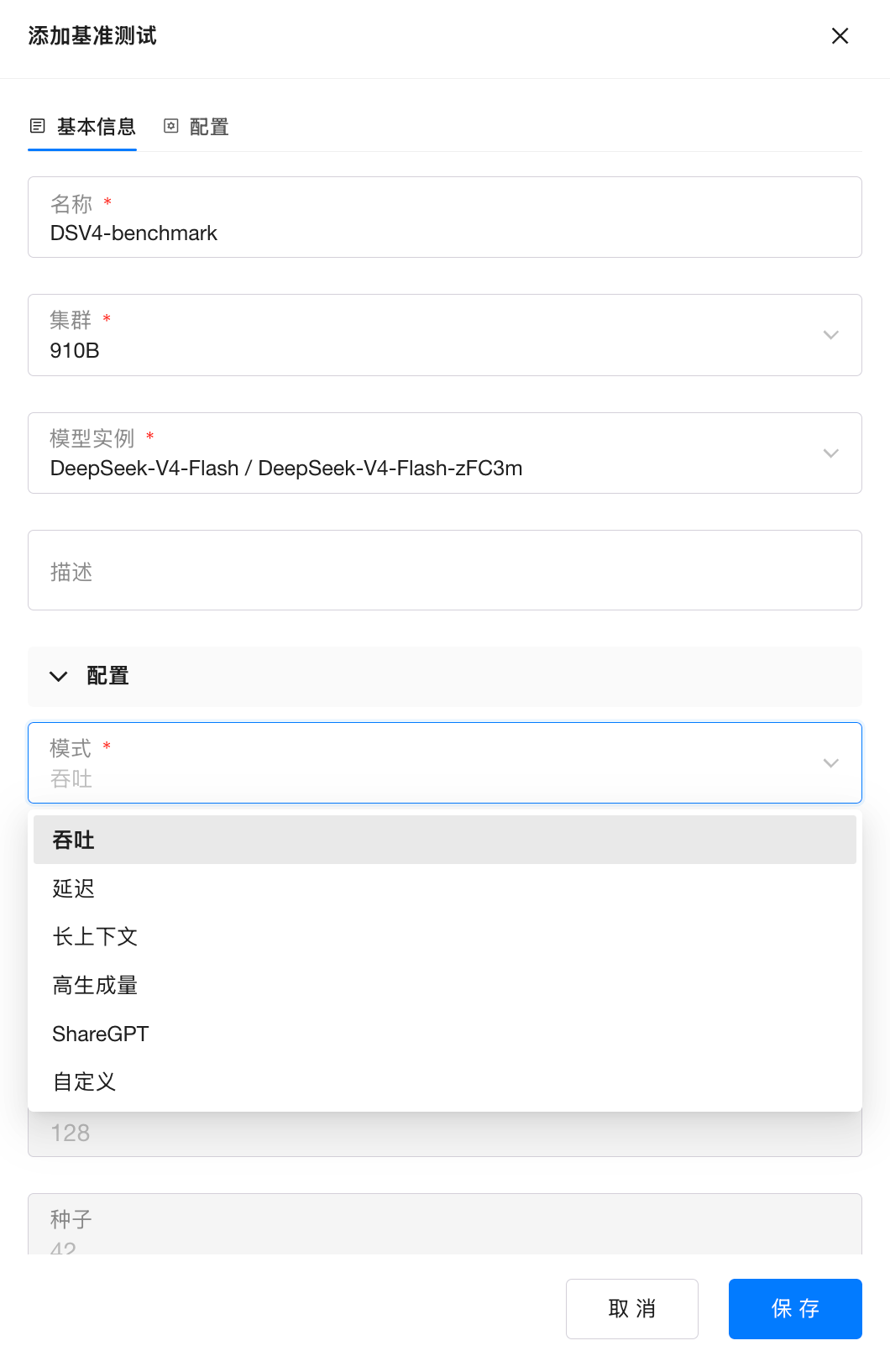 AI Visual Insight: This image shows the entry point or configuration screen for GPUStack benchmarking, illustrating that the platform supports launching throughput tests directly from the console and shortens the feedback loop from deployment to performance validation.
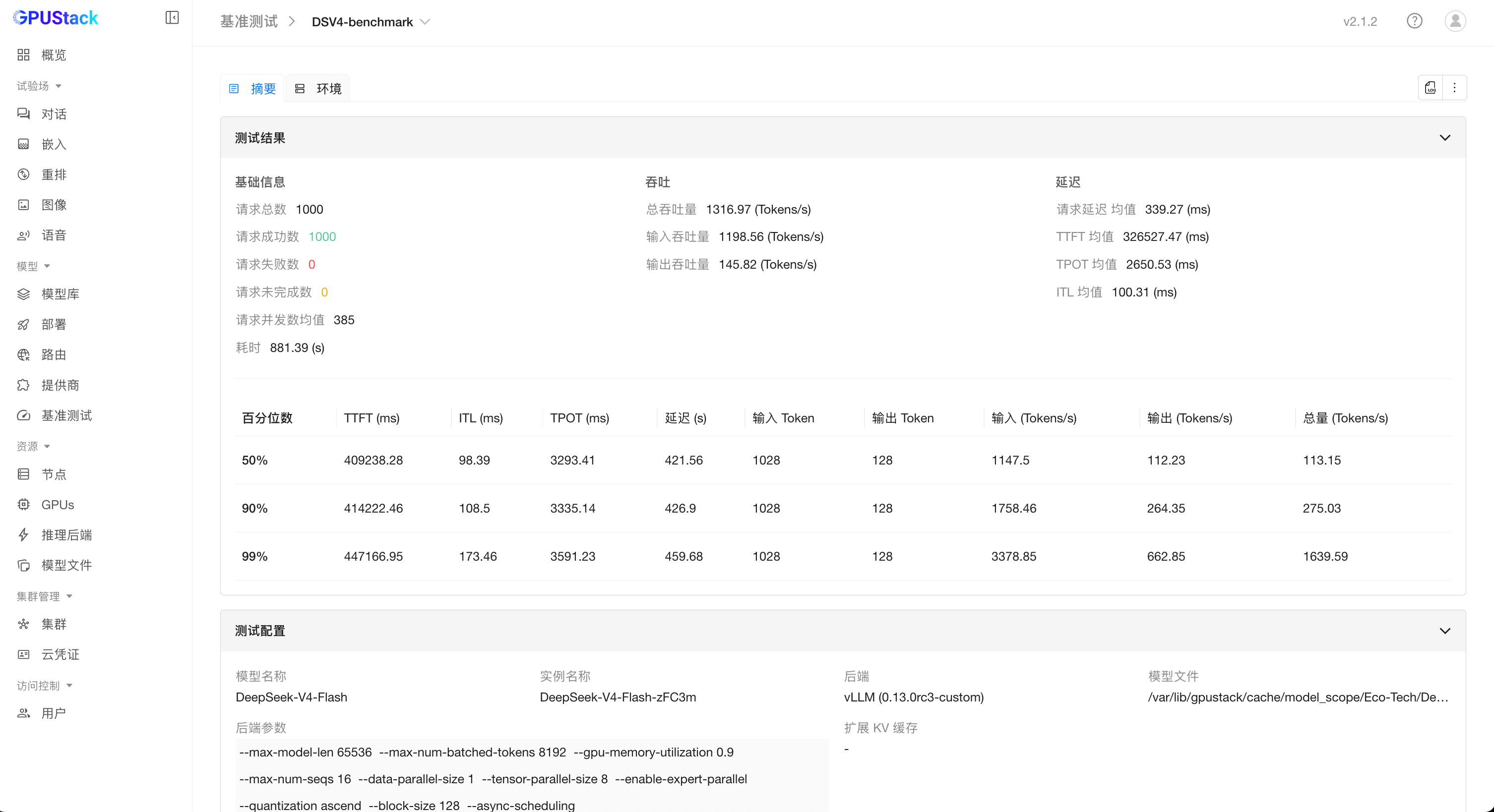 AI Visual Insight: This image shows the benchmark results panel, which typically includes aggregated data for throughput, latency, or concurrency. It helps determine whether the current model instance meets the target SLA and whether batching or parallel parameters need further adjustment.
Community resources help you keep up with domestic inference practices
The GPUStack community continuously shares updates on AI infrastructure, model inference, troubleshooting, and engine adaptation. If you need to track future optimizations for DeepSeek, vLLM Ascend, or Ascend deployment workflows, community resources provide more lasting value than a single tutorial.

FAQ
Why is GPUStack well suited for deploying ultra-large models like DeepSeek-V4?
Because it unifies node onboarding, inference engine version management, model rollout, log troubleshooting, and benchmarking under a single control plane. That makes it especially effective for engineering delivery in heterogeneous or domestic compute environments.
What is the most commonly overlooked issue before deploying DeepSeek-V4 on Ascend 910B?
The most commonly overlooked issues are the Ascend Docker Runtime and driver version. If the model fails to start, devices are not visible, or inference behaves abnormally inside the container, start troubleshooting with those two items.
Why use a custom vLLM Ascend version instead of the default one?
Because Day 0 model support often depends on the latest engine capabilities. A custom version lets you adopt official images and parameter templates faster, without waiting for the platform’s built-in version to be updated.
Core Summary: This article reconstructs the full workflow for deploying DeepSeek-V4-Flash with GPUStack in an Ascend 910B2 environment, covering Docker and Worker onboarding, custom vLLM Ascend 0.13.0rc3 configuration, model runtime parameters, performance benchmarking results, and common troubleshooting questions. It provides a practical reference for large-model inference deployment on domestic compute infrastructure.