SPMamba-YOLO is an enhanced YOLO architecture for object detection that is well suited for training and inference on GPU cloud servers. It addresses limited local compute, complex dependencies, and unstable training environments. Keywords: SPMamba-YOLO, cloud deployment, object detection.
This article provides a technical snapshot of SPMamba-YOLO cloud deployment
| Parameter | Description |
|---|---|
| Core language | Python 3.12 |
| Deep learning framework | PyTorch 2.3.0 + CUDA 12.1 |
| Model framework | Ultralytics / Mamba-YOLO |
| Access methods | SSH / Web console / HTTP file upload |
| Key dependencies | torch, torchvision, torchaudio, selective_scan |
| Training entry point | train.py |
| Recommended GPU environment | NVIDIA GPU |
| Reference engagement | The original post shows 391 views and 13 likes |
This guide focuses on smoothly migrating a local SPMamba-YOLO training workflow to the cloud
The real value of SPMamba-YOLO is not just that it runs, but that it runs reliably on stronger compute. When local devices have limited VRAM, training takes too long, or dependencies become difficult to maintain, a cloud server becomes the more practical engineering path.
The original workflow centers on three parts: first, organize the Mamba-YOLO project and training parameters locally; second, create a matching environment in the cloud; third, resolve compatibility issues involving selective_scan, OpenCV, and NumPy. This approach reduces uncertainty during migration.
You should lock key hyperparameters before training
In the original setup, the author sets batch_size to 4 and epochs to 300. These two parameters directly determine VRAM usage and training duration, making them good default values for the first validation run in the cloud.
from ultralytics import YOLO
import argparse
import os

ROOT = os.path.abspath('.')  # Get the project root directory

parser = argparse.ArgumentParser()
parser.add_argument('--data', type=str, default=os.path.join(ROOT, 'datasets/data.yaml'))
parser.add_argument('--config', type=str, default=os.path.join(ROOT, 'ultralytics/cfg/models/mamba-yolo/Mamba-YOLO-T.yaml'))
parser.add_argument('--batch_size', type=int, default=4)  # Control VRAM usage per batch
parser.add_argument('--epochs', type=int, default=300)    # Control the total number of training epochs
parser.add_argument('--device', default='0')              # Specify the GPU device
opt = parser.parse_args()

model = YOLO(opt.config)
model.train(data=opt.data, batch=opt.batch_size, epochs=opt.epochs, device=opt.device)
This code standardizes the training entry point and makes the most important training parameters explicit, which makes the workflow easier to reuse in the cloud.
The critical cloud deployment path should focus on GPU resources, environment setup, and dependencies
The original article uses a Youyun Zhisuan GPU instance, but the deployment method itself is more important because it is broadly transferable. As long as a cloud provider offers NVIDIA GPUs, file upload capabilities, and terminal access, you can reproduce this workflow.
 AI Visual Insight: The image shows the instance management interface of a cloud computing platform. The key information usually includes GPU resource entry points, an instance creation button, and billing configuration sections. This indicates that the deployment workflow starts with resource orchestration in the console rather than going straight into the command-line environment.
You should match compute capacity and budget when creating a GPU instance
During instance creation, pay close attention to the GPU model, GPU count, base image, and billing mode. For training workloads like SPMamba-YOLO, VRAM capacity is usually more important than CPU core count because batch size, input resolution, and mixed precision all directly affect memory pressure.
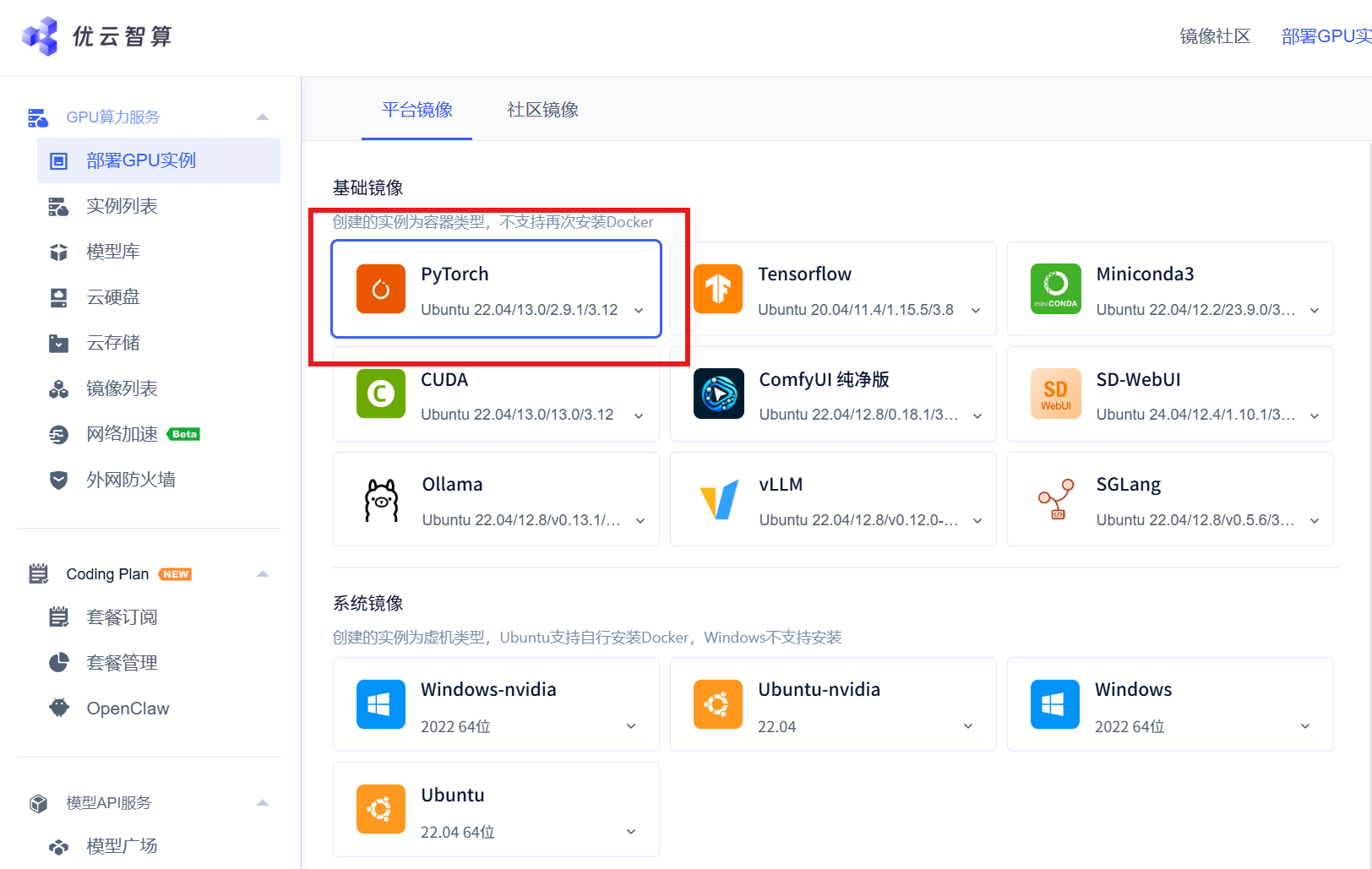 AI Visual Insight: The image shows a GPU instance deployment page, which typically includes compute specification selection, region configuration, and instance initialization options. It reflects the need to complete hardware resource planning before cloud training begins.
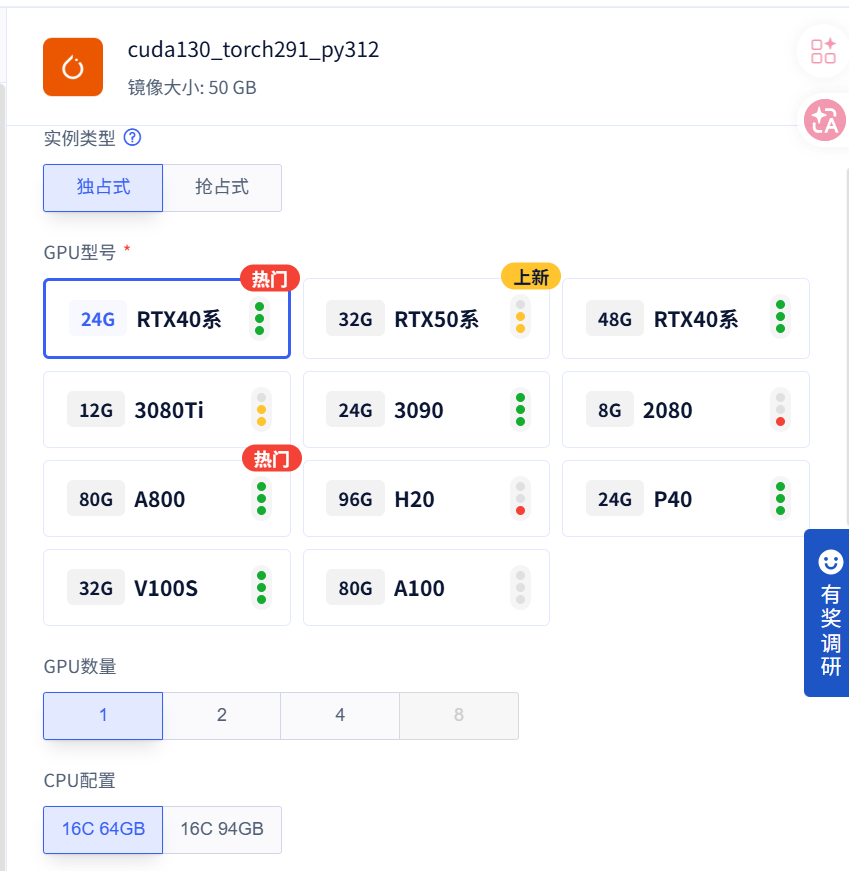 AI Visual Insight: The image highlights the GPU model or GPU count configuration area, implying that users need to choose between a single-GPU, multi-GPU, or higher-VRAM setup based on model complexity and training duration.
Uploading project files is more suitable than pulling from a repository for customized reproduction
The original article uses the file management page to upload the Mamba-YOLO project and the corresponding selective_scan wheel file directly. This approach works well for private modifications, temporary patches, and binary dependencies that have not yet been published in an official repository.
conda create -n mambayolo python=3.12 -y
conda activate mambayolo

pip3 install torch==2.3.0+cu121 torchvision==0.18.0+cu121 torchaudio==2.3.0 \
  --index-url https://download.pytorch.org/whl/cu121

pip install selective_scan-0.0.2-cp312-cp312-linux_x86_64.whl
cd Mamba-YOLO
pip install -v -e .
These commands complete virtual environment creation, CUDA-enabled PyTorch installation, selective_scan installation, and editable project installation. Together, they form the minimum viable cloud environment for training.
Matching selective_scan with the CUDA stack is the key prerequisite for a successful migration
What makes SPMamba-YOLO different is that it is not just a standard Ultralytics project. It also depends on extension packages such as selective_scan, which are tightly coupled to the Python version, system architecture, and compilation target. Because of that, identifiers such as cp312 and linux_x86_64 in the wheel filename are critical.
If the Python version does not match the wheel, installation will fail immediately. If CUDA and PyTorch versions are incompatible, training may crash at runtime. For that reason, you should pin Python 3.12 first and then install the cu121 build of the PyTorch packages.
After training starts, validate the logs before waiting for results
Once installation is complete, you can run the training script directly. However, during the first run, focus on the dataset path, GPU detection, batch configuration, and AMP status in the logs instead of only watching the progress bar.
python train.py --batch_size 4 --epochs 300 --device 0This command starts training on the specified GPU and explicitly overrides the default parameters, which makes experiment tracking easier.
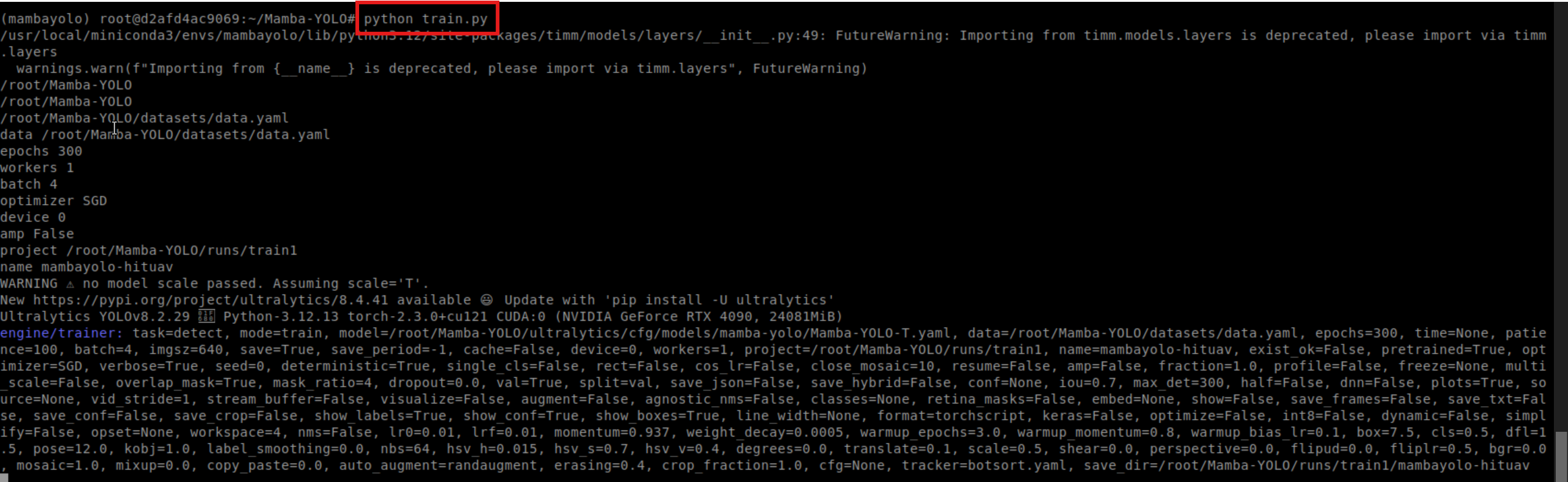 AI Visual Insight: The image shows terminal output after the training job starts. It typically includes model loading, dataset reading, GPU binding, and epoch-level logs, which provide the first direct evidence that the environment is actually usable.
Common errors usually come from missing system libraries and upstream dependency API changes
Compared with a local desktop system, a cloud environment is usually much cleaner. That also means many graphics-related libraries are not installed by default. In the original article, one of the most common errors is a missing libGL.so.1, which is very common in the OpenCV dependency chain.
pip install opencv-python-headlessThis command avoids system graphics library dependencies by using the headless OpenCV distribution, which is a better fit for pure training or server-side inference scenarios.
Another common issue is a compatibility problem with np.trapz in newer NumPy versions. The original solution is to update the function call in metrics.py directly.
# Original implementation
area = np.trapz(y, x)

# Fixed implementation
area = np.trapezoid(y, x)  # Use the interface recommended by newer NumPy versions
This change fixes area integration errors during evaluation and prevents the validation workflow from breaking because of API changes.
This deployment strategy establishes a stable baseline for reproducible training
From an engineering perspective, the most valuable part of this workflow is not any single command. It is the complete chain it establishes: tune parameters locally, build the cloud environment, upload the required wheel, install the CUDA-enabled framework, start training, and troubleshoot issues one by one. This is especially effective for reproducing experiments and migrating research models.
If you want to optimize further, you can add Docker image pinning, persistent training logs, checkpoint resume support, and TensorRT export for inference. With these additions, SPMamba-YOLO can move beyond cloud training and into a stable delivery pipeline.
FAQ
Q1: Why is SPMamba-YOLO better suited for training on a cloud server?
A: Because the model depends on GPU compute, VRAM, and specific extension packages, local machines are often limited by performance and environment compatibility. Cloud servers provide a more stable CUDA environment and higher throughput.
Q2: What is the most failure-prone part of deployment?
A: In most cases, it is a mismatch between the selective_scan wheel and the Python version, or an inconsistency between the PyTorch CUDA build and the instance driver environment. These are the first two items you should verify.
Q3: If training starts but validation fails, what should I check first?
A: First, verify compatibility between NumPy and the project scripts. Then inspect OpenCV-related system library issues. Many errors do not appear during training and only surface during metrics calculation or data processing.
AI Readability Summary: This article reconstructs the SPMamba-YOLO deployment workflow on a cloud server, covering training parameter tuning, Python 3.12 and CUDA-enabled PyTorch environment setup, selective_scan installation, training startup, and common error fixes. It is well suited for developers who need to migrate local object detection workloads to a cloud GPU environment.