Jib can build Spring Boot applications directly into container images without a Dockerfile, addressing common pain points such as slow Java image builds, Docker daemon dependency, and poor layer reuse. Keywords: Jib, Spring Boot, containerization.
Technical Specifications at a Glance
| Parameter | Description |
|---|---|
| Language | Java 21 |
| Framework | Spring Boot 3 |
| Build Tool | Maven 3.6.3+ |
| Image Format | OCI / Docker Image |
| Dockerfile | Not required |
| Docker Daemon | Usually not required for pushing to a remote registry; required for local dockerBuild |
| GitHub Stars | Not provided in the source; refer to the official GitHub repository for current data |
| Core Dependency | com.google.cloud.tools:jib-maven-plugin |
Jib Redefines the Container Build Process for Java Applications
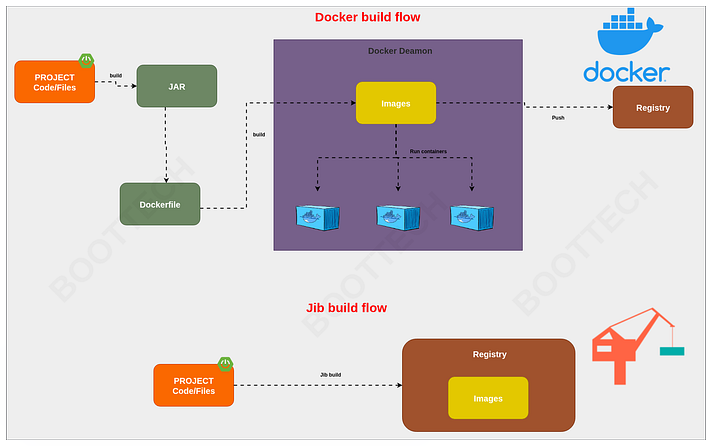
Jib is an open-source Java container image build tool from Google. It embeds image-building capabilities directly into the Maven or Gradle lifecycle, so Java developers do not need to maintain a Dockerfile or manually package artifacts before defining image layers.
Unlike the traditional approach of dropping a fat JAR into a single image layer, Jib detects dependencies, resources, and compiled outputs, then separates them into multiple stable layers. This structure is especially well suited to frequently updated applications such as Spring Boot services.
Jib Delivers Its Core Value Through Layering and Reproducibility
Layering means that when you change business logic, you often need to rebuild only the classes layer, while the dependency layers can be reused from cache. As a result, build speed improves significantly. In CI/CD environments, this directly reduces both image build time and network transfer costs.
Reproducible builds ensure that identical inputs generate byte-for-byte identical images. This is critical for supply chain auditing, version traceability, and release stability. It is also one of the main reasons many teams move from Dockerfiles to declarative image builds.
AI Visual Insight: This diagram shows Jib’s layered image model: the base image sits at the bottom, followed by layers for dependencies, resources, and application class files. The key technical insight is that the business code layer is separated from the dependency layers, so code changes do not invalidate the entire image. This significantly improves cache hit rates and incremental build efficiency.
Maven Integration with Jib Has a Very Low Barrier to Entry
If your project is already a standard Spring Boot Maven project, you only need to add the Jib plugin. The minimal configuration requires only the target image name, and Jib automatically handles packaging, layering, and image metadata generation.
<plugin>

<groupId>com.google.cloud.tools</groupId>

<artifactId>jib-maven-plugin</artifactId>

<version>3.5.1</version>

<configuration>

<to>
      <!-- Specify the target output image name -->

<image>spring-boot-jib</image>
    </to>
  </configuration>
</plugin>
This configuration integrates Jib into Maven and sets the final image name to spring-boot-jib.
Start with a Minimal Spring Boot Endpoint to Verify the Containerized Result
Before you begin, prepare a minimal runnable endpoint so you can verify that the image starts correctly later. The original example combines the application entry point and controller into a single class, which works well for a demo project.
import org.springframework.boot.SpringApplication;
import org.springframework.boot.autoconfigure.SpringBootApplication;
import org.springframework.web.bind.annotation.GetMapping;
import org.springframework.web.bind.annotation.RequestMapping;
import org.springframework.web.bind.annotation.RestController;

@RestController
@RequestMapping("/api")
@SpringBootApplication
public class SpringBootJibApplication {

    public static void main(String[] args) {
        // Start the Spring Boot application
        SpringApplication.run(SpringBootJibApplication.class, args);
    }

    @GetMapping
    public String index() {
        // Return fixed text to verify that the container is running correctly
        return "Greetings: Spring Boot Containerization Using Jib!";
    }
}
This code provides a GET /api endpoint that you can use as a functional validation entry point after the image is built.
Jib Supports Two Primary Paths: Remote Pushes and Local Builds
If your goal is to build and push an image directly to Docker Hub or GCR, run jib:build. This mode is ideal for CI environments because it does not depend on a local Docker daemon, which keeps the pipeline lighter.
mvn compile jib:buildThis command compiles the project, builds the image, and pushes it to the configured remote registry.
For Local Debugging, You Can Build Directly to the Docker Daemon
If you want to run the image immediately on your local machine instead of pushing it to a remote registry first, use jib:dockerBuild. In this case, Docker must be running locally, but you still do not need a Dockerfile.
mvn compile jib:dockerBuildThis command writes the image generated by Jib directly into the local Docker image store.
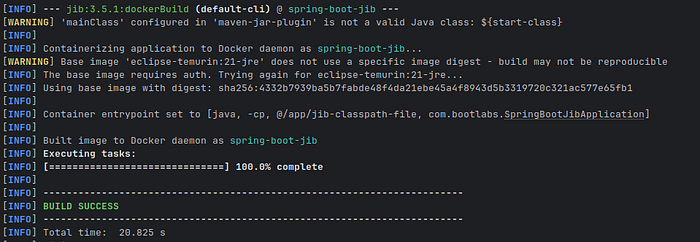
AI Visual Insight: This image reflects the local runtime result after the image build completes, typically corresponding to image or container status in Docker Desktop or the command line. Technically, it shows that the image produced by Jib is fully compatible with the standard Docker runtime and can move directly into local testing and port-mapping validation.
Then start the container with a standard Docker command:
docker run -p 8080:8080 spring-boot-jib:latestThis command maps port 8080 in the container to the host so you can access the /api endpoint directly.
Jib’s Advanced Configuration Covers Most Production Requirements
By default, Jib follows a security-oriented base image strategy that is sufficient for many common scenarios. In enterprise environments, however, you often need to standardize the JRE version, JVM parameters, environment variables, and runtime user.
A Custom Base Image Standardizes the Runtime Environment
<from>
  <!-- Specify a more explicit JRE base image version -->

<image>eclipse-temurin:17-jre</image>
</from>
This configuration replaces the default base image and helps standardize runtime environments across the organization.
JVM Parameters Can Be Written Directly into the Container Startup Configuration
<container>

<jvmFlags>
    <!-- Set the initial heap size -->

<jvmFlag>-Xms512m</jvmFlag>
    <!-- Example of enabling debug parameters -->

<jvmFlag>-Xdebug</jvmFlag>
  </jvmFlags>
</container>
This configuration embeds JVM startup parameters into the image metadata, avoiding the need to pass them repeatedly at runtime.
Ports, Environment Variables, and User Settings Determine Operational Readiness
<configuration>

<container>

<ports>
      <!-- Expose the application port -->

<port>8080</port>
    </ports>

<environment>
      <!-- Specify the production profile -->

<SPRING_PROFILES_ACTIVE>prod</SPRING_PROFILES_ACTIVE>
    </environment>
    <!-- Run the container as a non-root user -->

<user>1000</user>
  </container>
</configuration>
This configuration brings the image much closer to production readiness, especially because the non-root runtime strategy aligns better with common security baselines.
Jib Is a Better Fit for Certain Spring Boot Teams
If your team uses Maven or Gradle, ships Java services frequently, and wants to reduce the maintenance cost of Dockerfiles, Jib is an excellent choice. It shifts image building forward into the application build phase and reduces platform dependency.
It is especially well suited to internal platforms, microservices projects, and standardized delivery pipelines. For organizations that prioritize build speed, reproducibility, and security baselines, Jib is often more stable than hand-written Dockerfiles.
FAQ
Does Jib Completely Eliminate the Need for Docker?
Not entirely. When you build and push remote images, you typically do not need the Docker daemon. But if you use jib:dockerBuild to write the image to local Docker, Docker must be installed and running locally.
What Is Jib’s Biggest Advantage Over a Dockerfile?
Its biggest advantage is Java-aware layered builds. Jib automatically separates dependencies, resources, and class files, resulting in higher cache hit rates, faster incremental builds, and better reproducibility.
Is Jib Suitable for Production Environments?
Yes. It supports critical configuration options such as custom base images, JVM parameters, environment variables, ports, and runtime users, which makes it suitable for delivering most Spring Boot services into production.
Core Summary: This article systematically reconstructs containerization practices with Jib in Spring Boot, covering its underlying principles, layering model, Maven integration, image build commands, and production-grade configuration. It helps Java developers deliver faster, safer, and reproducible container images without relying on a Dockerfile.