LangChain addresses two common LLM pain points at once: outputs that are hard to parse and long waits for full responses. Structured output constrains results into objects or dictionaries, while streaming lets you display content as it is generated. Keywords: LangChain, structured output, streaming.
| Technical Item | Specification Snapshot |
|---|---|
| Core Language | Python |
| Applicable Framework | LangChain |
| Typical Protocols | HTTP, SSE, WebSocket |
| Key Capabilities | with_structured_output(), stream(), astream() |
| Common Dependencies | langchain-openai, pydantic, typing |
| Source Article Type | Reconstructed from a CSDN technical article |
| Star Count | Not provided in the original |
Structured output turns natural language responses into program-consumable data
LLMs return natural language by default. That is user-friendly for humans, but unreliable for programs. If you need to extract fields such as name, age, occupation, or interests, you often end up adding a fragile layer of string parsing.
The value of structured output is that it transforms the task from “generate text” into “generate data that conforms to a schema.” Downstream systems can then read fields directly instead of guessing the meaning of a sentence.
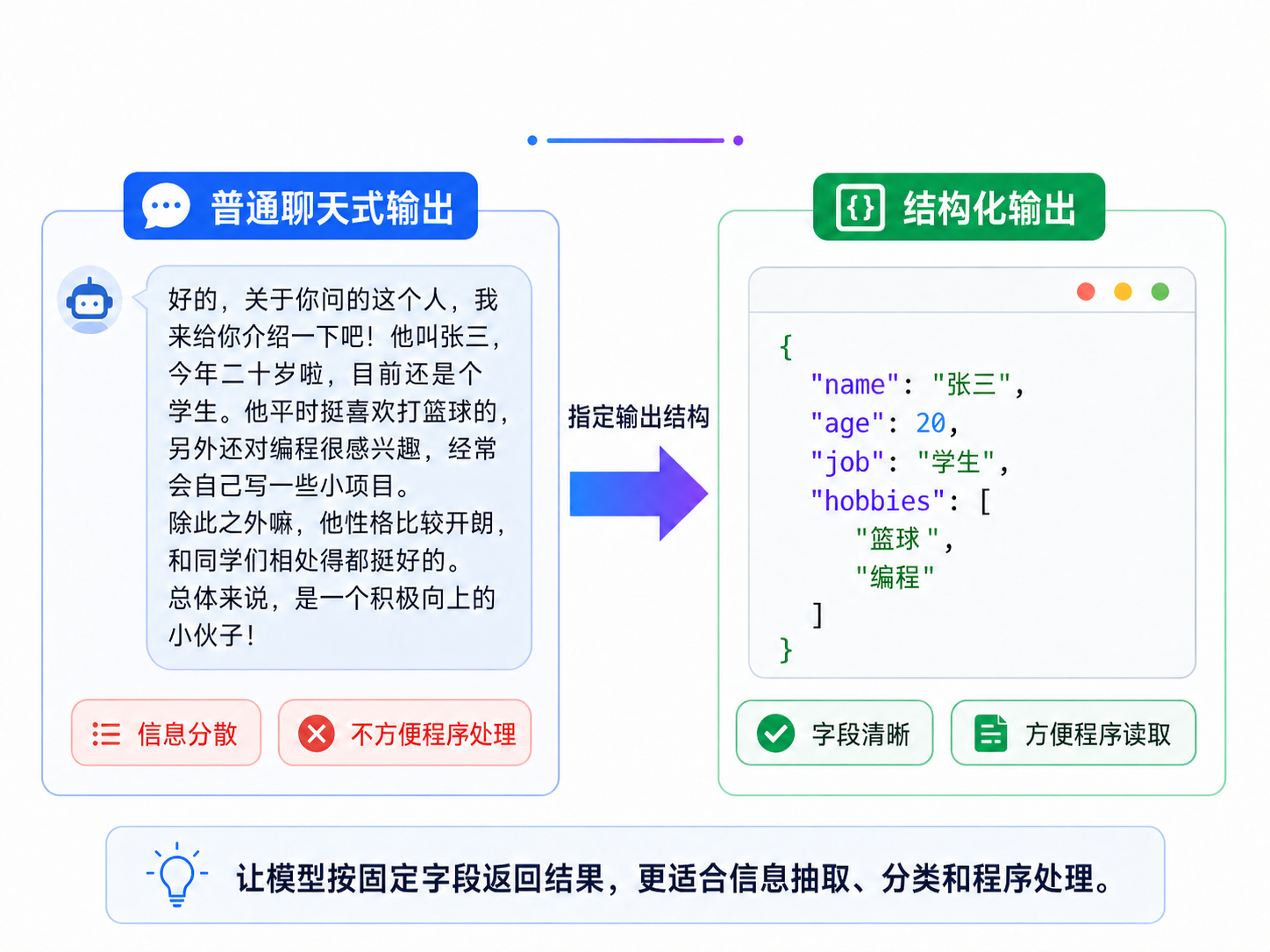 AI Visual Insight: The image highlights the difference between free-form natural language output and structured field-based output. The key idea is that model output shifts from paragraph text to key-value objects, which allows backend systems to index, validate, store, and forward data directly.
Pydantic is the best structure definition approach for production environments
Pydantic provides field types, default values, descriptions, and validation. It is well suited for complex objects, nested models, and long-lived projects. LangChain uses the model definition to constrain generation and parses the response automatically.
import os
from typing import Optional
from pydantic import BaseModel, Field
from langchain_openai import ChatOpenAI

# Initialize the chat model
model = ChatOpenAI(
    model="gpt-5.5",
    api_key=os.getenv("CHAT_API_KEY"),
    base_url=os.getenv("CHAT_BASE_URL"),
)

class Joke(BaseModel):
    # Define the joke structure
    setup: str = Field(description="The opening line of the joke")
    punchline: str = Field(description="The punchline of the joke")
    rating: Optional[int] = Field(default=None, description="A rating from 1 to 10")

# Create a new Runnable with structured output capability
structured_model = model.with_structured_output(Joke)
result = structured_model.invoke("Tell me a joke")

print(result.setup)      # Access fields directly
print(result.punchline)  # No longer message.content
This example shows how to parse the model output directly into a Pydantic object.
The key detail is this: with_structured_output() does not return the original model. It returns a new Runnable. Likewise, invoke() no longer returns an AIMessage; it returns the already parsed object.
TypedDict is a good fit for lightweight field definitions and quick scripts
If you only need a dictionary structure with type hints and do not require strong runtime validation, TypedDict is lighter. It works well for temporary tasks, lightweight extraction, and rapid prototyping.
import os
from typing import Annotated, Optional, TypedDict
from langchain_openai import ChatOpenAI

model = ChatOpenAI(
    model="gpt-5.5",
    api_key=os.getenv("CHAT_API_KEY"),
    base_url=os.getenv("CHAT_BASE_URL"),
)

class Joke(TypedDict):
    setup: Annotated[str, ..., "The opening line of the joke"]
    punchline: Annotated[str, ..., "The punchline of the joke"]
    rating: Annotated[Optional[int], ..., "A rating from 1 to 10"]

structured_model = model.with_structured_output(Joke)
result = structured_model.invoke("Tell me a joke")

print(result["setup"])  # The returned result is usually a dictionary
This example shows that the TypedDict approach is closer to declaring the shape of a dictionary, which makes it suitable for simple structured responses.
One important point: the strength of TypedDict is static type hinting. It does not mean Python performs runtime validation automatically. LangChain uses it to generate a schema, not to turn it into a full validation engine.
JSON Schema is ideal for protocol alignment and cross-system collaboration
When your backend, frontend, OpenAPI definitions, or external interfaces already revolve around JSON Schema, passing the schema directly is the most natural option. Its biggest advantage is standardization and portability.
json_schema = {
    "title": "joke",
    "description": "Tell the user a joke.",
    "type": "object",
    "properties": {
        "setup": {"type": "string", "description": "The opening line of the joke"},
        "punchline": {"type": "string", "description": "The punchline of the joke"},
        "rating": {"type": "integer", "description": "A rating from 1 to 10"}
    },
    "required": ["setup", "punchline"]
}

structured_model = model.with_structured_output(json_schema)
result = structured_model.invoke("Tell me a joke")
print(result)
This example shows that JSON Schema can enforce structure without introducing extra model classes.
If you need to troubleshoot parsing failures, use include_raw=True so you can inspect the raw output, the parsed result, and any error details at the same time. This is critical for debugging.
The right structured output choice depends on validation strength and maintenance cost
A simple rule works well: use Pydantic for complex projects, TypedDict for lightweight dictionary-based outputs, and JSON Schema for protocol-driven systems. Do not collapse model capability, LangChain abstraction, and schema definition into a single concept.
structured_model = model.with_structured_output(Joke, include_raw=True)
result = structured_model.invoke("Tell me a joke")

print(result["raw"])            # Raw AIMessage
print(result["parsed"])         # Parsed object or dictionary
print(result["parsing_error"])  # Parsing exception
This example adds observability to structured output, which makes it easier to identify missing fields or type mismatches quickly.
In real-world systems, structured output is commonly used for information extraction, intent recognition, sentiment classification, and tool-call argument formatting. In every case, the goal is the same: compress non-deterministic text into deterministic data.
Streaming reduces perceived latency and improves interaction continuity
invoke() returns the full result at once, which is fine for short responses or offline tasks. But when outputs are long, users must wait for the entire generation to finish, which makes the interface feel sluggish.
The core idea of streaming is simple: as the model generates content, the client consumes it immediately. This is the foundation of the token-by-token experience in chat products.
Synchronous streaming works well for command-line tools and simple services
from langchain_openai import ChatOpenAI

model = ChatOpenAI(model="gpt-5.5")
prompt = "Write a short essay about summer"

for chunk in model.stream(prompt):
    print(chunk.content, end="", flush=True)  # Output incremental content in real time
This example demonstrates the most direct form of synchronous streaming output.
Here, chunk is usually an AIMessageChunk. It is only a fragment, not the complete message. If you need the full text, accumulate the chunks inside the loop.
Asynchronous streaming is better suited to FastAPI and other high-concurrency scenarios
import asyncio
from langchain_openai import ChatOpenAI

model = ChatOpenAI(model="gpt-5.5")

async def main():
    async for chunk in model.astream("Write a poem about summer"):
        print(chunk.content, end="", flush=True)  # Consume streaming fragments asynchronously

asyncio.run(main())
This example shows that astream() integrates naturally with the async event loop and avoids blocking while waiting for network responses.
A simple way to remember it: a stands for async, and stream stands for streaming. So ainvoke() means asynchronous non-streaming, while astream() means asynchronous streaming.
A custom generator can transform token-level output into sentence-level output
Some products do not want highly fragmented token refreshes. Instead, they want to emit content by sentence, paragraph, or even JSON fragment. In that case, you can attach a generator to a LangChain pipeline.
from collections.abc import Iterator
from langchain_core.output_parsers import StrOutputParser
from langchain_openai import ChatOpenAI

model = ChatOpenAI(model="gpt-5.5")
parser = StrOutputParser()

def split_by_sentence(input_stream: Iterator[str]) -> Iterator[str]:
    buffer = ""
    for chunk in input_stream:
        buffer += chunk  # Accumulate text fragments returned by the model
        while "." in buffer:
            idx = buffer.index(".")
            sentence = buffer[:idx + 1].strip()
            buffer = buffer[idx + 1:]
            if sentence:
                yield sentence  # Emit one sentence at a time
    if buffer.strip():
        yield buffer.strip()

chain = model | parser | split_by_sentence
for sentence in chain.stream("Write a poem about summer"):
    print(sentence)
This example uses yield to reorganize a continuous token stream into sentence-by-sentence output, which is often easier for frontend presentation layers to consume.
Streaming is usually built on top of SSE at the transport layer
From a protocol perspective, streaming is not mysterious. After the client sends a request, the server does not wait for the full answer. Instead, it continuously pushes incremental data. In LLM APIs, the most common mechanism is SSE, or Server-Sent Events.
SSE is unidirectional, which makes it a natural fit for the pattern where the client sends a prompt and the server continuously returns tokens. WebSocket is more powerful, but in pure generation scenarios it is often unnecessary.
Content-Type: text/event-stream
Cache-Control: no-cache
Connection: keep-alive
These response headers indicate that the server will keep returning data as an event stream.
data: {"content": "You"}
data: {"content": " "}
data: {"content": "there"}
data: [DONE]
This example shows that the core of SSE is a continuous sequence of data frames, which LangChain then wraps into iterable chunk objects.
Developers should treat structured output and streaming as two separate capability paths
Structured output answers the question, “Is the result parseable?” Streaming answers the question, “Is the result visible with low latency?” These capabilities often appear together. For example, you might stream progress updates while returning final JSON, or stream content first and then persist a structured result.
From an engineering standpoint, it helps to build a three-layer mental model: the model provides the underlying capability, LangChain provides a unified interface, and your application code consumes the result. Once you understand these layers, you are much less likely to confuse schemas, message objects, and transport protocols.
FAQ: Structured output and streaming
Q1: When should I prioritize Pydantic?
Use Pydantic first when you need field validation, default values, nested objects, union types, or long-term maintainability. It is the most stable choice and the best fit for production environments.
Q2: Why can’t I read result.content after calling with_structured_output()?
Because the return value is usually no longer an AIMessage. It is a parsed object or dictionary. With Pydantic, you access values with dot notation. With TypedDict or JSON Schema, you usually access them by key.
Q3: Why is streaming output commonly paired with SSE instead of requiring WebSocket?
Because most LLM use cases only need unidirectional incremental output. SSE is enough and is easier to integrate because it is HTTP-based. WebSocket becomes more advantageous only when you need real-time bidirectional interaction.
AI Readability Summary: This article breaks down two core LangChain capabilities: structured output and streaming. It explains the differences between Pydantic, TypedDict, and JSON Schema, clarifies how with_structured_output() changes return types, and connects stream() and astream() to the underlying SSE transport model. The goal is to help developers build LLM applications that are both parseable and low-latency.