The essence of Linux process states lies in the state field of
task_struct. This article focuses on the kernel semantics ofR/S/D/T/t/X/Z, explains how blocking, suspension, zombie processes, and orphan processes arise and are handled, and connectswait/waitpid, the run queue, andlist_head. Keywords: Linux process states, zombie processes,task_struct.
Technical Specification Snapshot
| Parameter | Description |
|---|---|
| Domain | Linux Operating System / Systems Programming |
| Core Language | C |
| Key Protocols/Interfaces | POSIX fork(), wait(), waitpid(), signal mechanisms |
| Core Objects | task_struct, list_head, run queue |
| Observation Tools | ps aux, grep, gdb, kill |
| Original Content Popularity | Approximately 598 views, 14 likes, 11 saves |
| Core Dependencies | Linux kernel scheduling, process control APIs, terminal job control |
Process state is first and foremost a kernel-resolvable value
A process is not merely an executable program. It is code and data plus the PCB that the kernel uses to manage it. In Linux, the core carrier of that PCB is task_struct. The scheduler, signal subsystem, and wait queues all operate around it.
From an implementation perspective, process state is fundamentally a state field inside task_struct. The kernel uses different integer values to represent semantics such as runnable, interruptible sleep, uninterruptible sleep, stopped, and zombie, and then decides whether that process can be scheduled.
The minimal model for understanding state transitions
struct task_struct {
    long state;          // Current process state; determines whether it participates in scheduling
    pid_t pid;           // Process identifier
    struct list_head tasks;
    struct list_head run_list;
};
This code shows that process state is not an abstract concept. It is an operable field in a kernel structure.
The classic theoretical model maps to real Linux states
In theory, processes are often divided into three categories: running, blocked, and suspended. Running means the process is executing or ready to execute. Blocked means it is waiting for a resource. Suspended means it has been temporarily swapped out of memory and will not participate in scheduling for the moment.
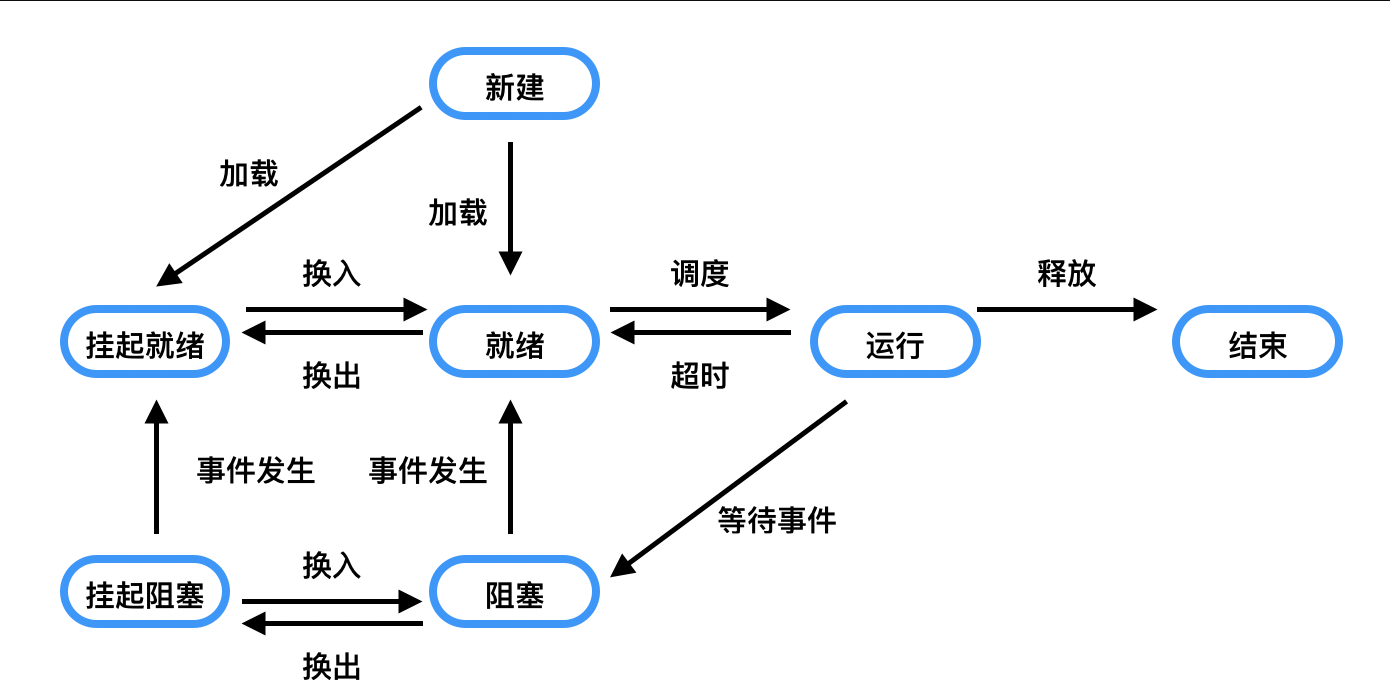 AI Visual Insight: This diagram shows the transition paths among running, blocked, and ready states. The key takeaway is that CPU scheduling and device waiting are two independent control paths, and processes migrate between the run queue and device wait queues.
The key point of blocking is not simply that a process “stops.” Its PCB is removed from the run queue and linked into a wait queue. For example, it may wait for keyboard input, a network packet, or disk I/O. In that state, the scheduler will no longer select it.
Suspension and blocking are not the same thing
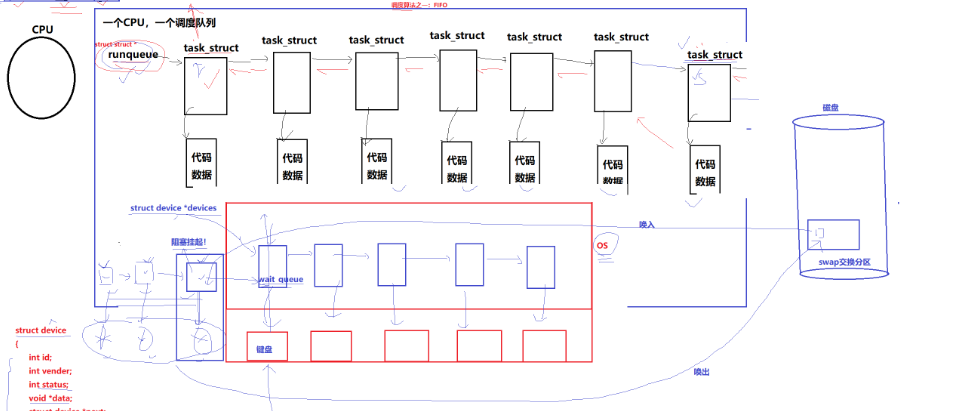 AI Visual Insight: This diagram emphasizes that suspension occurs under memory pressure. A process’s code and data can be swapped out to swap space, while only management metadata remains in memory. This reflects a kernel strategy that prioritizes resource reclamation over scheduling.
Suspension is closer to a memory management operation. A process may already be waiting for a resource, and the kernel may then swap its address space out to swap to free physical memory. For ordinary developers, ps usually does not expose suspension as a separate character state.
Linux exposes kernel scheduling semantics through character states
Common Linux process states include R, S, D, T, t, X, and Z. For most developers, the most common observation point is the STAT column of ps aux.
static const char * const task_state_array[] = {
    "R (running)",      // Runnable; on the run queue
    "S (sleeping)",     // Interruptible sleep; waiting for an event
    "D (disk sleep)",   // Uninterruptible sleep; common in critical I/O paths
    "T (stopped)",      // Stopped
    "t (tracing stop)", // Stopped by a debugger or tracer
    "X (dead)",         // Dead; usually not visible
    "Z (zombie)"        // Exited but not yet reaped
};
This state array makes it clear that Linux compresses scheduling semantics into a small character set for easier user-space diagnostics.
R and S are the two most common states
R means runnable. It does not mean the process is always using the CPU. It only means the process is on the run queue. A CPU-bound infinite loop is easier to observe in R. But as long as a program prints frequently or waits for input, it often switches quickly between S and R.
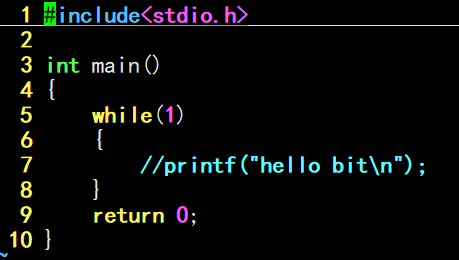 AI Visual Insight: This diagram shows the typical result where a compute-intensive process appears as
 R from the perspective of ps, indicating that it stays on the run queue and the scheduler always considers it immediately runnable.
 AI Visual Insight: This diagram complements the observation under high-frequency refresh scenarios. Technically, it shows that instantaneous state sampling can be affected by time slices and system call timing, so the observed state is not always the long-term dominant state.
S means interruptible sleep. It usually indicates that the process is waiting for an event, such as a sleep() timeout, terminal input, or completion of a socket receive. A signal can interrupt it, so a normal kill works on it.
D, T, and t correspond to I/O protection, job control, and debugging pauses
D means uninterruptible sleep and is common in critical disk I/O paths. The goal is not to be “stubborn,” but to prevent abrupt interruption of critical kernel paths and avoid inconsistent data states. If D persists, it usually indicates an underlying I/O problem.
T means stopped, such as when a foreground process receives Ctrl+Z or SIGSTOP. t is more common when gdb stops a process at a breakpoint. The former reflects job control semantics, while the latter reflects debugging and tracing semantics.
ps aux | grep myproc          # Check the process state
kill -19
<PID>               # Send SIGSTOP and move the process to T
kill -18
<PID>               # Send SIGCONT and resume execution
These commands let you quickly verify how process stopping and resuming work.
Zombie processes appear when a process has exited but has not yet been reaped
The Z state is a common topic in both Linux interviews and production troubleshooting. After a child process exits, its code segment, data segment, and most resources have already been released, but its exit code and accounting information remain in the PCB for the parent process to read.
If the parent process does not call wait() or waitpid(), the child becomes a zombie. It cannot continue executing, but it still occupies a small amount of kernel structure resources. If many of them accumulate, they can interfere with creating new processes.
Reproducing a zombie process reliably with fork
#include <stdio.h>
#include <sys/types.h>
#include <unistd.h>

int main(void)
{
    pid_t id = fork();

    if (id == 0) {
        // The child runs for 5 seconds and then exits, but the parent does not reap it
        for (int i = 5; i > 0; --i) {
            printf("child running: %d\n", i);
            sleep(1);
        }
    } else if (id > 0) {
        // The parent stays alive and intentionally never calls wait/waitpid
        while (1) {
            printf("parent alive\n");
            sleep(1);
        }
    }

    return 0;
}
This program lets the child exit first while the parent keeps running, which creates an observable zombie state.
gcc zombie.c -o zombie
./zombie &                     # Start it in the background so another terminal can observe it
ps aux | grep zombie          # Check whether the STAT column shows Z or
<defunct>
These commands compile, run, and confirm whether the zombie process has been created.
 AI Visual Insight: This diagram shows the
 Z and `