The core value of the Nebula SDK is not simply making digital humans look more lifelike. Its real strength is enabling digital humans to handle business interactions: a cloud-based understanding layer combined with real-time edge rendering reduces latency, supports interruption, and lowers deployment costs. This architecture fits high-frequency scenarios such as service guidance, reception, and inquiry desks. Keywords: digital humans, real-time interaction, edge rendering.
The technical specification snapshot highlights a lightweight real-time architecture
| Parameter | Details |
|---|---|
| Primary Languages | HTML, JavaScript, TypeScript |
| Integration Method | Include the Lite SDK through a browser script |
| Communication Model | Cloud-driven command delivery + local real-time rendering on the client |
| Typical Capabilities | Voice playback, subtitle synchronization, widget cards, state switching, interruption control |
| Response Metric | Official public information indicates driver response can be under 500ms |
| Hardware Characteristics | Can run on low-cost chips, reducing dependence on high-end GPUs |
| Core Dependencies | xmovAvatar@latest, business knowledge base, LLM/RAG/rule system |
| GitHub Stars | Not provided in the source material |
Traditional digital human solutions remain fundamentally stuck at the presentation layer
Many digital human demos look polished, but they often fail in real business environments. The root cause is not modeling quality. The problem is that the interaction pipeline is too heavy: recognition, understanding, generation, TTS, motion matching, and full-frame video delivery all add latency. If any step slows down, users immediately feel the delay.
Traditional cloud-rendering architectures also depend heavily on stable bandwidth. They work better for promo videos, welcome messages, and fixed-script presentations. They are far less suitable for service counters, front-desk inquiries, or healthcare triage, where users need continuous follow-up questions and immediate interruption.
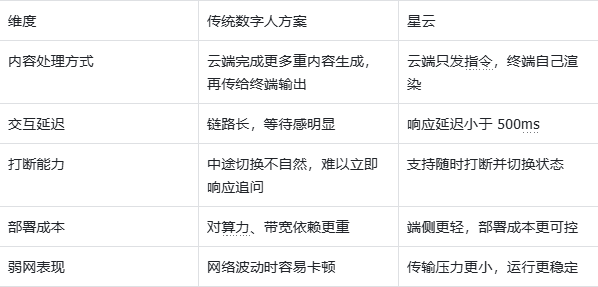 AI Visual Insight: This diagram compares two pipeline structures. Traditional architectures emphasize centralized cloud rendering and distribute complete frames to clients, concentrating network and compute pressure in the cloud. The Nebula architecture pushes the expression layer down to the client, where graphics and motion are generated locally in real time, reducing transmission overhead and interaction blocking at the architectural level.
Traditional approaches usually expose four categories of problems
- High latency: The system must wait until the entire response is prepared before playback starts.
- Poor interruptibility: After a user cuts in, the system struggles to switch turns immediately.
- High cost: Cloud GPUs, bandwidth, and endpoint hardware requirements all drive up the budget.
- Weak-network fragility: Stutter, dropped frames, and audio-video desynchronization directly damage the user experience.
function evaluateTraditionalAvatar(networkStable: boolean, canInterrupt: boolean) {
  // When the network is unstable, cloud-rendering pipelines fail first
  if (!networkStable) return 'High risk of stutter';
  // No interruption support means it only fits presentation scenarios
  if (!canInterrupt) return 'Suitable only for display scenarios';
  // Only when both conditions are met does it reach basic usability
  return 'Can enter lightweight interactive scenarios';
}
This snippet expresses, with minimal rules, the threshold traditional digital humans must cross to move from “presentation” to “service.”
Assembling isolated capabilities does not create a production-ready product
Connecting an LLM, TTS, and a rendering engine only proves that a digital human can “talk.” It does not prove that it can “work.” Real business systems care about the state machine, interruption recovery, UI synchronization, API calls, human handoff, and turn-end control.
For that reason, the factor that determines the experience ceiling is not a single model parameter. It is the middle-layer “expression runtime.” The component that decides when to Listen, when to Think, and when to Speak determines whether the product has real service capability.
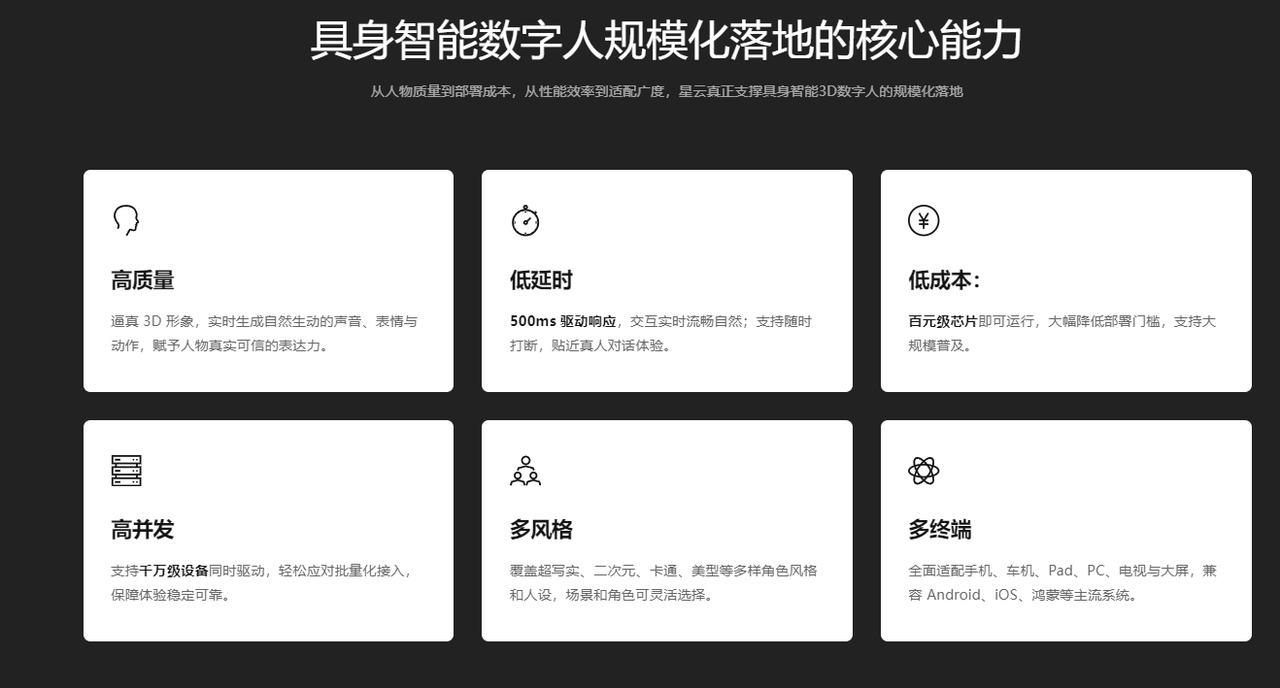 AI Visual Insight: This diagram highlights Nebula’s combination of low latency, lightweight deployment, multimodal orchestration, and business workflow composition. It shows that the platform’s value is not a single rendering effect, but a unified event-driven framework that brings voice, motion, subtitles, and business components together.
The key Nebula SDK solution is cloud-side reasoning with client-side expression
Nebula places understanding and orchestration in the cloud, while voice, facial expression, motion, and UI coordination are executed locally on the client in real time. As a result, the system sends lightweight control outputs instead of full heavy video streams, which leads to lower bandwidth usage and faster responsiveness.
For developers, this split is critical. The upper layer can still connect to large language models, RAG, workflows, and business systems, while the lower layer can cover Web, mobile apps, tablets, PCs, TVs, and large displays. The middle layer translates AI decisions into visible, audible, and interactive user-facing output.
const avatar = new XmovAvatar({
  containerId: '#sdk',
  appId: 'your_appid', // Credential obtained after creating an app on the platform
  appSecret: 'your_appsecret', // Secret assigned by the platform
  gatewayServer: 'https://nebula-agent.xingyun3d.com/user/v1/ttsa/session',
  hardwareAcceleration: 'prefer-hardware', // Prefer hardware acceleration
  onStateChange(state) {
    console.log('State changed:', state); // Listen for interaction state changes
  },
  onVoiceStateChange(status) {
    console.log('Voice status:', status); // Listen for playback start or end
  }
});
This code shows the minimal initialization skeleton of the Nebula SDK. The core elements are the container, authentication, and state listeners.
The AI service guidance screen is one of Nebula’s most representative deployment patterns
In a service guidance screen scenario, the digital human is not just an isolated page element. It acts as the service terminal itself. It must answer questions about counter locations, required documents, and route guidance, while also triggering image cards, subtitles, carousel components, or human-agent escalation when necessary.
The integration process can be reduced to three steps: first create a driver application on the platform, then save the App ID and App Secret, and finally include the SDK in the webpage and instantiate the virtual human.
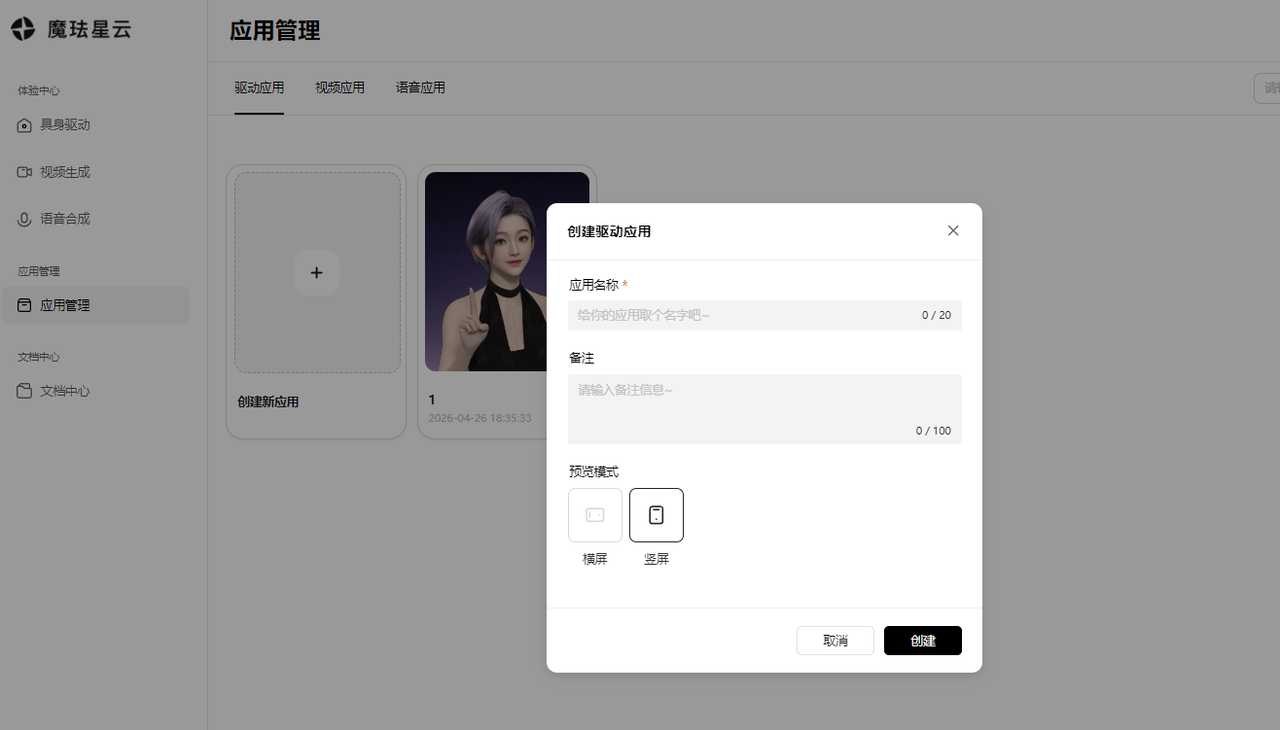 AI Visual Insight: This image shows the application management entry point on the platform side. The key takeaway is that developers must first create a real-time driver application, which makes it clear that SDK integration is not just frontend rendering but depends on a platform-generated business driver instance and authentication details.
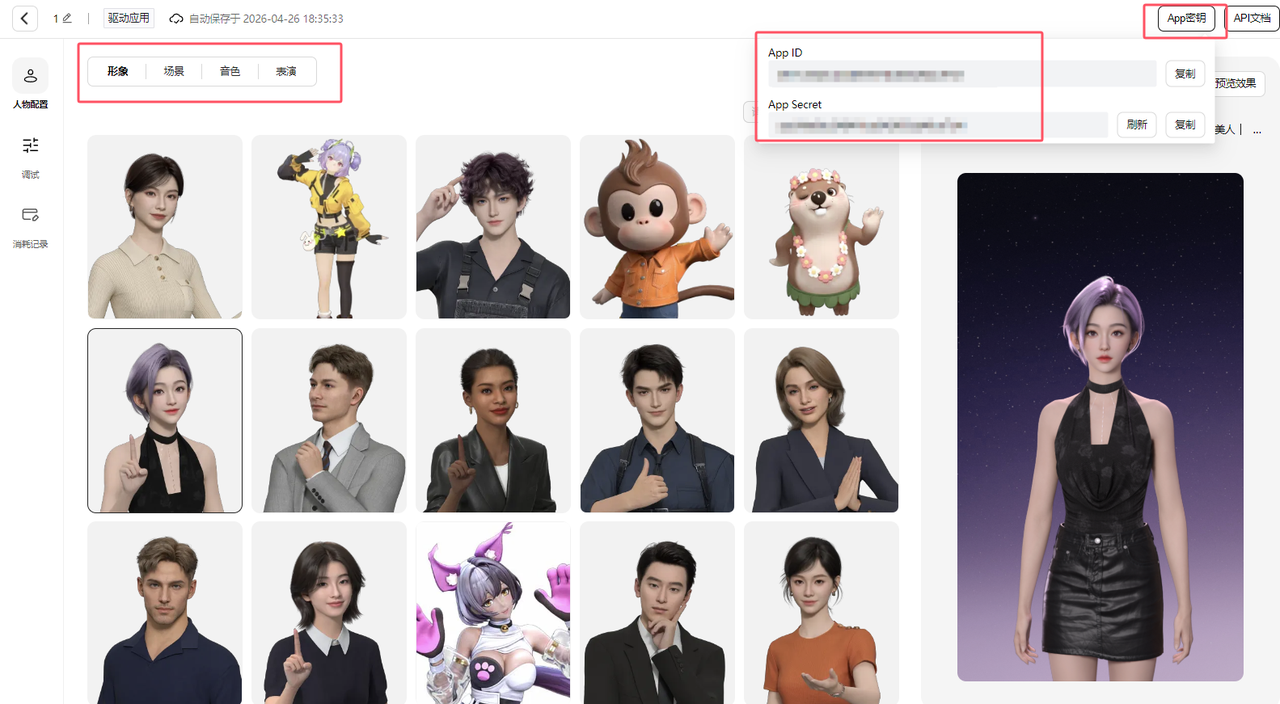 AI Visual Insight: This image presents the configuration interface for avatar, scene, role, and motion settings, while also showing where the App ID and App Secret are managed. It illustrates that the platform handles asset orchestration, and the frontend only needs to consume these configurations for rapid integration.
A minimal integration example can validate the rendering pipeline first
<!DOCTYPE html>
<html lang="zh-CN">
<body>
  <div style="width:540px;height:960px">
    <div id="sdk"></div>
  </div>
  <script src="https://media.xingyun3d.com/xingyun3d/general/litesdk/[email protected]"></script>
</body>
</html>
This code only injects the SDK script and prepares the rendering container, which makes it suitable for validating basic page rendering capacity first.
The real key in business systems is event proxying and interruption control
A service guidance screen does more than play speech. It must bind subtitles, image cards, carousel components, logs, and playback state to a unified event model to become an operable and extensible terminal application.
const sdk = new XmovAvatar({
  containerId: '#sdk',
  appId: 'your_appid',
  appSecret: 'your_appsecret',
  gatewayServer: 'https://nebula-agent.xingyun3d.com/user/v1/ttsa/session',
  proxyWidget: {
    subtitle_on(data) {
      console.log('Show subtitle:', data.text); // Sync the frontend panel when subtitles start
    },
    subtitle_off() {
      console.log('Hide subtitle'); // Clear UI state when subtitles end
    },
    widget_pic(data) {
      console.log('Display image card:', data.image); // Display linked business images
    }
  },
  onVoiceStateChange(status) {
    console.log('Playback status:', status); // Decide whether user interruption is allowed
  }
});
This example shows that the widget proxy is one of Nebula’s most valuable extension points for business frontends.
A complete system should be understood as a three-layer collaborative architecture
The frontend client layer handles avatar loading, state switching, and multimodal presentation. The middle decision layer handles speech recognition, LLM understanding, RAG retrieval, and rule orchestration. The business system layer connects to counter information, reservation APIs, routing services, queue systems, and ticketing systems.
Only when these three layers are connected does the pipeline truly become closed-loop: perceive input, understand intent, generate decisions, express results, and execute actions. At that point, the digital human evolves from “a 3D avatar that can talk” into “a working terminal agent.”
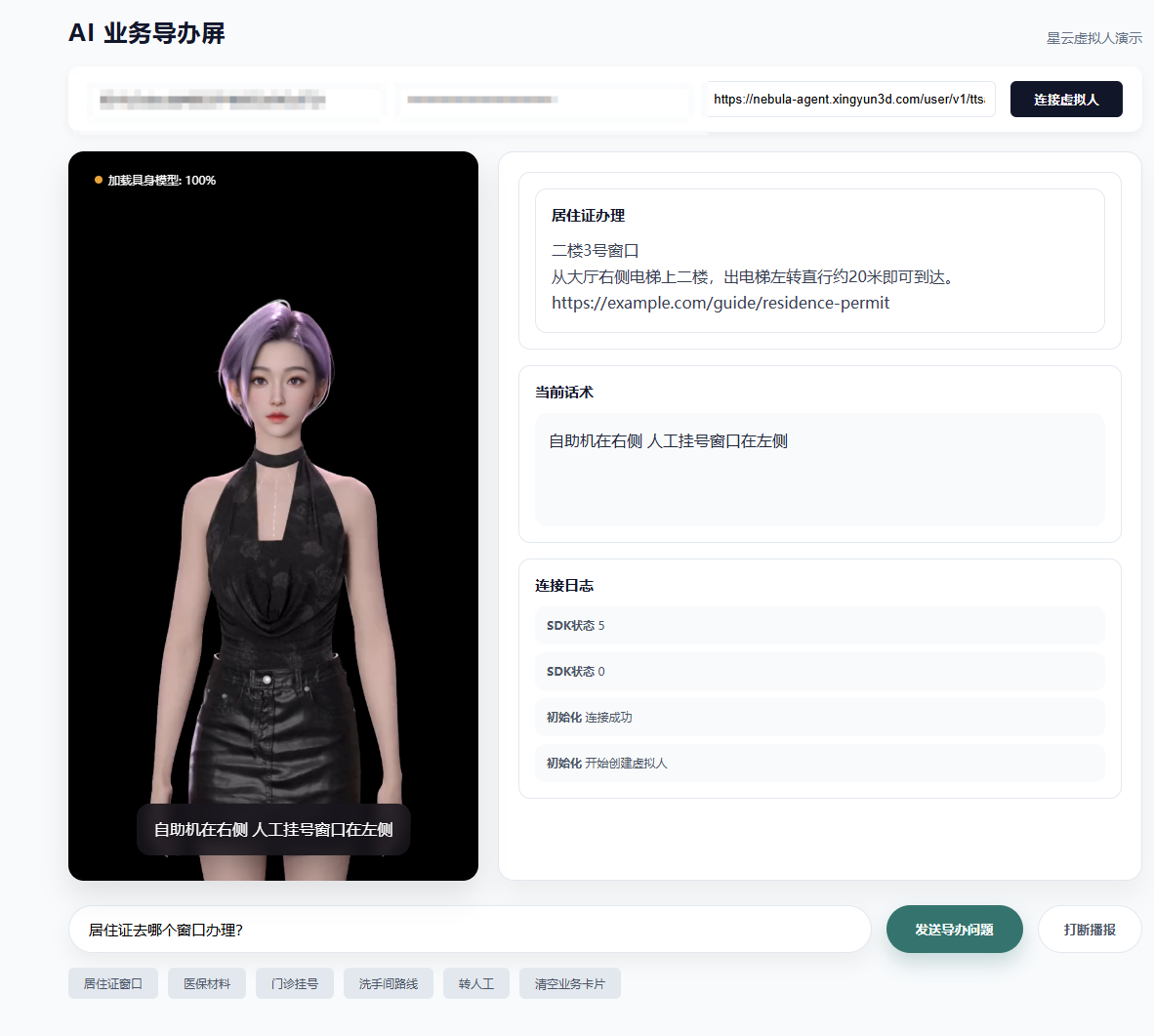 AI Visual Insight: This image shows the full runtime state of the guidance screen: the digital human stage area on the left, business cards, active script text, and connection logs on the right, and the question input and quick-action area at the bottom. Together they reflect an integrated design that combines the expression layer, business layer, and control layer.
The conclusion is that Nebula is closer to expression-layer infrastructure than a standalone SDK
If you look only at the number of APIs, Nebula appears to be a digital human component. If you look at system responsibilities, it is closer to an AI screen operating system. It supports the infrastructure layer that is easiest to overlook between AI understanding, expression, and action execution.
For digital human projects that require low latency, interruption support, and large-scale deployment, Nebula’s value is not that it looks more dazzling. Its value is that it is more usable. That is why it delivers stronger engineering certainty in service guidance, reception, medical consultation, retail inquiry, and similar business scenarios.
FAQ structured Q&A
1. What is the biggest difference between the Nebula SDK and traditional cloud-rendered digital humans?
The biggest difference is how the pipeline is split. Traditional solutions generate complete frames in the cloud, while Nebula pushes the expression layer to the client for local real-time rendering, significantly reducing latency, bandwidth pressure, and deployment cost.
2. Can I build a complete business digital human system by integrating only the SDK?
No. The SDK solves the expression and interaction runtime layer, but you still need a middle layer that integrates ASR, LLMs, RAG, rule engines, and business system APIs to form an executable service loop.
3. Which scenarios are best suited for the Nebula SDK?
It is best suited for high-frequency inquiry, guided service reception, healthcare triage, retail consultation, government services, and similar scenarios that require continuous conversation, real-time interruption, weak-network tolerance, and multi-device deployment.
Core Summary: This article explains how the Nebula SDK uses a “cloud understanding, client-side expression” edge-rendering architecture to solve the high latency, poor interruptibility, high cost, and weak-network instability found in traditional digital human systems. It also walks through the integration process, core code, and system design considerations for an AI service guidance screen.