This article analyzes the communication layer of a Qt/C++ microservices-based instant messaging client. The core design uses HTTP for active requests and WebSocket for real-time push delivery, while Protobuf and DataCenter handle authentication, message dispatch, and UI refresh. Keywords: Qt, WebSocket, Protobuf.
Technical specification snapshot
| Parameter | Value |
|---|---|
| Primary language | C++ |
| Client framework | Qt |
| Communication protocols | HTTP, WebSocket |
| Serialization protocol | Protobuf |
| Core classes | QNetworkAccessManager, QWebSocket, QProtobufSerializer |
| Data hub | DataCenter |
| Server-side dependencies | Redis, gateway microservices |
| Repository stars | Not provided in the original article |
This client communication layer uses a dual-channel architecture to balance real-time delivery and maintainability
An instant messaging client has two fundamentally different communication needs: one is for the client to actively fetch data, and the other is for the server to asynchronously push events. The former is a natural fit for HTTP because its request-response semantics are clear. The latter is a better fit for WebSocket because it maintains a low-latency persistent connection.
The original implementation converges both paths into NetClient and writes the final data into DataCenter. This allows the communication layer to focus only on networking, serialization, and dispatch, while the UI layer performs incremental refreshes through Qt signals and slots. The separation of responsibilities is clean and explicit.
class NetClient : public QObject {
    Q_OBJECT
private:
    const QString HTTP_URL = "http://106.75.144.240:8000";   // HTTP service entry point
    const QString WEBSOCKET_URL = "ws://106.75.144.240:8001/ws"; // WebSocket persistent connection entry point

    model::DataCenter* dataCenter;      // Data center that receives network results
    QNetworkAccessManager httpClient;   // HTTP client
    QWebSocket websocketClient;         // WebSocket client
    QProtobufSerializer serializer;     // Protobuf serializer
};
This code defines the minimum core of the client communication layer: a dual-protocol client plus a stateful data center.
The WebSocket path first solves identity binding after login
A successful WebSocket connection does not mean the server already knows which user owns that connection. The key detail in this implementation is that the client sends an authentication message immediately after the connection is established, instead of waiting until the first business message arrives.
The authentication payload carries only session_id. After the gateway receives it, the server queries Redis for the uid mapped to that session and then binds the current persistent connection to the user identity. This is a lightweight but effective login-state validation strategy.
void NetClient::sendAuth() {
    IMS::ClientAuthenticationReq req;
    req.setRequestId(makeRequestId());                  // Generate a unique request ID
    req.setSessionId(dataCenter->getLoginSessionId()); // Include the login session ID

    QByteArray body = req.serialize(&serializer);
    websocketClient.sendBinaryMessage(body);           // Send the authentication message in a binary frame
}
This code authenticates the connection after the WebSocket handshake and establishes a “connection-to-user” mapping.
The server gateway maintains online state around the connection lifecycle
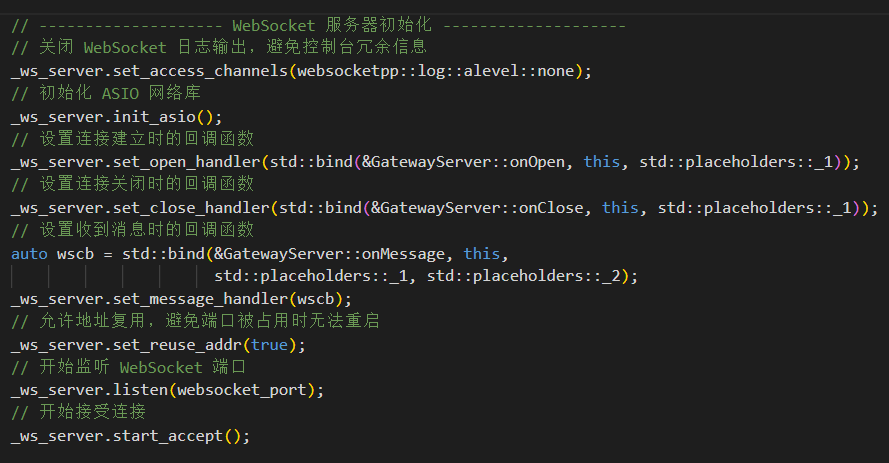
The gateway design in the original article shows that onMessage is the core entry point. It deserializes ClientAuthenticationReq, then queries Redis for the uid corresponding to session_id. If the query fails, it closes the connection immediately. If it succeeds, it registers the connection and starts keepalive.
onClose handles reverse cleanup: it removes the Redis session, online state, and connection management records. As a result, when the client goes offline, system state converges quickly and avoids stale sessions or false online presence.
 AI Visual Insight: This diagram shows the gateway-side WebSocket identity recognition and connection management flow. After the client establishes a persistent connection, it first sends an authentication message. The gateway queries Redis for the
 uid mapped to the session_id, then binds the connection handle to the user context and enters a periodic ping keepalive cycle, forming a complete loop of authentication, registration, keepalive, and disconnect cleanup.
void onMessage(websocketpp::connection_hdl hdl, server_t::message_ptr msg) {
    ClientAuthenticationReq request;
    bool ret = request.ParseFromString(msg->get_payload()); // Deserialize the authentication request
    if (!ret) return;

    std::string ssid = request.session_id();
    auto uid = _redis_session->uid(ssid);                  // Look up uid by session_id
    if (!uid) return;

    auto conn = _ws_server.get_con_from_hdl(hdl);
    _connections->insert(conn, *uid, ssid);               // Bind the connection to the user
    keepAlive(conn);                                      // Start keepalive
}
This server-side logic shows that the first WebSocket binary message is essentially authentication for the persistent connection.
WebSocket push messages use a unified notification model for event dispatch
The client receives Protobuf binary messages, so binaryMessageReceived does only two things: deserialize the payload into NotifyMessage, then dispatch it to different handlers by message type.
This layer adds significant value. It prevents the UI layer from dealing with protocol details, and it avoids maintaining a separate parsing entry point for every notification type. The notification protocol uses NotifyType + oneof, which provides strong extensibility.
connect(&websocketClient, &QWebSocket::binaryMessageReceived, this,
    [=](const QByteArray& byteArray) {
        IMS::NotifyMessage notifyMessage;
        notifyMessage.deserialize(&serializer, byteArray); // Deserialize the push message
        handleWsResponse(notifyMessage);                   // Dispatch through a unified handler
    });
This code funnels all WebSocket push messages into a single dispatch function.
Notification types drive DataCenter updates and UI refresh
The original article lists five core push event types: friend requests, friend request results, new sessions, new messages, and friend deletion. The client handles them in a consistent pattern: convert the Protobuf object into a local model, update DataCenter, and finally emit a Qt signal.
This fixed pattern of “update data + emit signal” is a very stable architectural practice in Qt desktop clients. The communication layer does not manipulate widgets directly. Instead, it drives the UI through state changes, which reduces coupling.
void NetClient::handleWsRemoveFriend(const QString &userId) {
    dataCenter->removeFriend(userId);   // Update friend data
    emit dataCenter->deleteFriendDone(); // Notify the UI to refresh
}

void NetClient::handleWsSessionCreate(const model::ChatSessionInfo& info) {
    auto* list = dataCenter->getChatSessionList();
    if (!list) return;
    list->push_front(info);             // Insert the new session at the front
    emit dataCenter->receiveSessionCreateDone(); // Trigger list refresh
}
This code demonstrates the core push-processing pattern: persist state first, then broadcast the event.
The WebSocket initialization function closes the loop between connection, errors, and message handling
Once authentication, disconnection, error handling, text messages, and binary message callbacks are defined, the initialization function becomes very concise. Its essence is to configure the required signal-slot bindings and then call open().
The benefit of this design is that the network lifecycle becomes highly observable. Whether the connection succeeds, disconnects unexpectedly, or encounters a protocol error, you can log it consistently and attach recovery strategies.
void NetClient::initWebsocket() {
    connect(&websocketClient, &QWebSocket::connected, this, [=]() {
        sendAuth(); // Authenticate immediately after the connection is established
    });

    connect(&websocketClient, &QWebSocket::binaryMessageReceived, this,
        [=](const QByteArray& byteArray) {
            IMS::NotifyMessage notifyMessage;
            notifyMessage.deserialize(&serializer, byteArray); // Decode the notification
            handleWsResponse(notifyMessage);                   // Dispatch business handling
        });

    websocketClient.open(WEBSOCKET_URL); // Start the persistent connection
}
This code fully connects the client WebSocket flow for connection setup, authentication, and message reception.
The HTTP module handles all active queries and submission operations
Unlike WebSocket, HTTP serves explicit business actions such as fetching profile data, retrieving a friend list, and submitting operation requests. The original article first abstracts two foundational capabilities: generating a unique request ID and sending a Protobuf HTTP request in a unified format.
This step is critical because it reduces repeated boilerplate and ensures that all APIs use consistent request headers, path composition, and trace fields.
QString NetClient::makeRequestId() {
    return "R" + QUuid::createUuid().toString().sliced(25, 12); // Generate a short unique ID
}

QNetworkReply* NetClient::sendHttpRequest(const QString &apiPath, const QByteArray &body) {
    QNetworkRequest httpReq;
    httpReq.setUrl(QUrl(HTTP_URL + apiPath));
    httpReq.setHeader(QNetworkRequest::ContentTypeHeader, "application/x-protobuf");
    return httpClient.post(httpReq, body); // Send a unified Protobuf POST request
}
This code provides a unified request entry point for all HTTP APIs.
HTTP response handling uses a template function to normalize both network-layer and business-layer errors
`handleHttpResponse
` is the most reusable part of the entire HTTP module. It first checks for Qt network errors, then reads the response body, deserializes the Protobuf object, and finally checks the business `success()` field before returning a smart pointer. This abstraction solves three problems at once: consistent error handling, consistent object cleanup, and shorter business code. Callers only need to care about request parameters and writing successful results into `DataCenter`, without repeatedly implementing the same parsing template. “`cpp template std::shared_ptr handleHttpResponse(QNetworkReply* httpResp, bool* ok, QString* reason) { if (httpResp->error() != QNetworkReply::NoError) { *ok = false; *reason = httpResp->errorString(); // Network-layer error reason httpResp->deleteLater(); return {}; } QByteArray respBody = httpResp->readAll(); auto respObj = std::make_shared (); respObj->deserialize(&serializer, respBody); // Deserialize the response body if (!respObj->success()) { *ok = false; *reason = respObj->errmsg(); // Business-layer failure reason httpResp->deleteLater(); return {}; } httpResp->deleteLater(); *ok = true; return respObj; } “` This template normalizes HTTP transport errors and business errors into a single handling model. ## The get-my-profile API demonstrates the full request-to-refresh loop `getMyself` is the most representative HTTP business path: construct a Protobuf request, send HTTP, bind the `finished` callback, parse the response, write the result into `DataCenter`, and finally emit a completion signal. This shows that the client does not let the network layer talk directly to the UI. Instead, it strictly uses the data center as a state intermediary. For a complex IM client, this makes it easier to support multiple windows, multiple components, and future caching strategies. “`cpp void NetClient::getMyself(const QString &loginSessionId) { IMS::GetUserInfoReq req; req.setRequestId(makeRequestId()); req.setSessionId(loginSessionId); // Bind the login state QByteArray body = req.serialize(&serializer); QNetworkReply* httpResp = sendHttpRequest(“/service/user/get_user_info”, body); connect(httpResp, &QNetworkReply::finished, this, [=]() { bool ok = false; QString reason; auto resp = handleHttpResponse(httpResp, &ok, &reason); if (!ok) return; dataCenter->resetMyself(resp); // Update local profile data emit dataCenter->getMyselfDone(); // Notify the UI to refresh }); } “` This code fully demonstrates the engineering loop of the HTTP active-fetch model. ## The engineering value of this design is that communication, state, and UI are cleanly decoupled Architecturally, `NetClient` handles only protocol interaction, `DataCenter` manages local state, and Qt signals and slots synchronize the UI. This layering makes the system naturally suited to support more HTTP APIs and more WebSocket notification types. For instant messaging scenarios, the most important point is not any single API implementation. It is whether real-time push, active fetch, and local state consistency can form a reliable closed loop. This design already provides that capability, making it a strong communication foundation for a Qt IM client. ## FAQ ### Why does an instant messaging client use both HTTP and WebSocket? HTTP is better for active requests such as login, profile retrieval, and list queries. WebSocket is better for real-time server push such as new messages, friend requests, and session changes. The two protocols have clear responsibilities and balance real-time behavior with interface clarity. ### Why send a separate authentication message after the WebSocket connection is established? Because a TCP/WebSocket connection only means the transport path is available. It does not mean the server knows which user owns the connection. After the client sends `session_id`, the gateway can query Redis for the corresponding `uid` and bind the connection to that user identity. ### What problem does DataCenter solve in the client communication architecture? It converts network results into a unified local state container and prevents the UI layer from depending directly on network protocols. This allows multiple UI components to refresh in sync through signals and slots, while also improving maintainability, testability, and extensibility. ## AI Readability Summary This article reconstructs the communication-layer design of a Qt/C++ instant messaging client. It explains how `NetClient` uses HTTP for active requests and WebSocket for server push, while Protobuf and `DataCenter` provide authentication, message dispatch, state synchronization, and real-time UI refresh.