This article explains how RuoYi Office uses Spring Boot, Vue 3, and Flowable to implement external incoming document registration, leadership instructions, department handling, and unified archiving. It solves common problems such as uploading external documents without a closed-loop workflow, untraceable status, and difficult historical retrieval. Keywords: external incoming documents, BPM workflows, archive ledger.
Technical specification snapshot
| Parameter | Description |
|---|---|
| Core languages | Java, TypeScript |
| Frontend and backend frameworks | Spring Boot, Vue 3 |
| Workflow protocol/engine | BPM / Flowable |
| UI system | Vben Admin |
| Deployment model | Monolith / Microservices |
| Code repositories | ruoyi-office, ruoyi-office-vben |
| Star count | Not provided in the original article |
| Core dependencies | Flowable, MyBatis-style Mapper, attachment service, BPM API |
External incoming documents must be modeled as workflow-backed business forms
Many OA systems implement external incoming documents as “attachment upload + ledger record.” That works for demos, but not for real enterprises. Once an external document involves leadership instructions, responsible departments, processing deadlines, and archival responsibility, it is no longer just a file storage problem. It becomes a closed-loop workflow problem.
The key design in RuoYi Office is to define an external incoming document as a business form with a BPM lifecycle. This allows the system to manage metadata, approval trails, processing results, and final archive status at the same time.
The closed-loop path for external incoming documents is clear and verifiable
External organization document -> Secretary registration -> Leadership instruction -> Responsible department processing -> Completion and archiving -> Unified ledger searchThis path shows that registration is only the entry point, while archiving is the final destination.
Three document types ultimately enter the same archive view
The system aggregates three sources: outgoing documents, internal incoming documents, and external incoming documents. Their processing actions differ, but they all need to answer the same question: which documents have become formal, traceable, and searchable enterprise records?
| Type | Source | Archive condition | Primary focus |
|---|---|---|---|
| Outgoing document | Drafted and issued internally | processStatus = APPROVE |
Formal document generation |
| Incoming document | Distributed from internal outgoing documents or manually registered | handleStatus = 3 |
Receipt acknowledgment and handling |
| External incoming document | Documents from external organizations | processStatus = APPROVE |
Instruction and processing closure |
Query-layer aggregation is better than physical archive duplication
RuoYi Office does not force all three document types into a single archive table. Instead, it builds a unified projection in the archive service. This avoids data redundancy, consistency write-back issues, and loss of historical detail, while allowing each document type to retain its original business structure.
State layering is the key to maintainability in this design
External incoming documents have two layers of state: workflow state and business handling state. The former serves the BPM engine, while the latter serves business users. By separating them, the system preserves workflow precision and gives secretaries and handlers more intuitive business semantics.
| Field | Meaning | Typical values |
|---|---|---|
processStatus |
BPM workflow status | Not started, running, approved, rejected |
handleStatus |
Business handling status | Pending registration, in progress, completed |
Backend callbacks maintain business handling status consistently
@Override
public void updateProcessStatus(String businessKey, Integer status) {
    Long id = Long.parseLong(businessKey);
    OfficeDocOutsideDO updateObj = new OfficeDocOutsideDO();
    updateObj.setId(id);
    updateObj.setProcessStatus(status); // Synchronize workflow status

    if (BpmProcessInstanceStatusEnum.APPROVE.getStatus().equals(status)) {
        updateObj.setHandleStatus(HANDLE_STATUS_COMPLETED); // Approved means completed
    } else if (BpmProcessInstanceStatusEnum.RUNNING.getStatus().equals(status)) {
        updateObj.setHandleStatus(HANDLE_STATUS_PROCESSING); // Running means in progress
    } else {
        updateObj.setHandleStatus(HANDLE_STATUS_PENDING); // Rejected, withdrawn, and similar cases return to pending registration
    }
    officeDocOutsideMapper.updateById(updateObj);
}
This code converges BPM results into a backend state machine and prevents the frontend from changing status arbitrarily.
Module boundaries are split clearly enough to stay manageable
On the backend, OfficeDocOutsideServiceImpl manages the lifecycle of external incoming document forms, while OfficeDocArchiveServiceImpl handles archive aggregation across the three document types. On the frontend, the system separates external incoming document lists, detail pages, and archive ledger pages to support registration, handling, and query scenarios respectively.
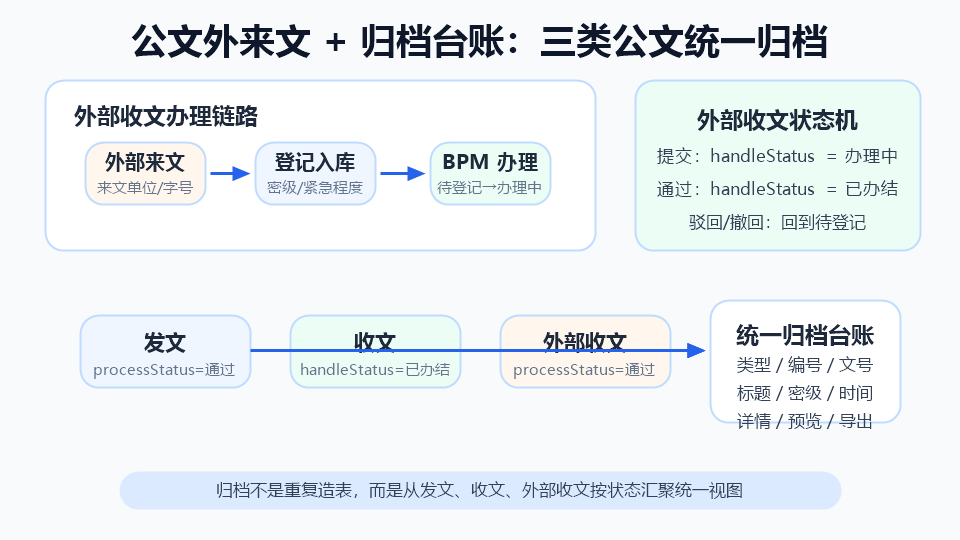 AI Visual Insight: This diagram shows how external incoming documents enter a BPM workflow after registration and then converge with outgoing and internal incoming documents into a unified archive ledger. The visual emphasis is the separation between the workflow handling layer and the archive aggregation layer, which shows that the system does not rely on a single archive table but instead uses business completion states to feed a unified query view.
Page responsibilities are split by business action
| Page/Service | Responsibility |
|---|---|
views/oa/officedoc/outside/list |
Query, create, delete, export |
views/oa/officedoc/outside/info |
Register, save, submit, withdraw, upload attachments |
views/oa/officedoc/archive/list |
Unified search, view details, PDF preview |
OfficeDocOutsideServiceImpl |
Save external documents, submit workflows, maintain attachments |
OfficeDocArchiveServiceImpl |
Aggregate archive queries and return unified responses |
The business record is persisted before BPM starts during submission
The critical part of external incoming document submission is not simply “start approval.” The business table, workflow instance, and attachment records must form a stable association. The business form ID is passed into the workflow engine as the businessKey, which becomes the anchor for later callbacks and detail tracing.
@Override
public Long submitOfficeDocOutside(OfficeDocOutsideSaveReqVO saveReqVO) {
    if (StringUtils.isBlank(saveReqVO.getBillCode())) {
        saveReqVO.setBillCode(BillCodeUtils.generateBillCode(
            SystemEnum.OA, OaBillTypeEnum.OA_OFFICE_DOC_OUTSIDE)); // Generate business document number
    }
    OfficeDocOutsideDO docOutside = BeanUtils.toBean(saveReqVO, OfficeDocOutsideDO.class)
        .setProcessStatus(BpmTaskStatusEnum.RUNNING.getStatus()) // Enter running state after submission
        .setHandleStatus(HANDLE_STATUS_PROCESSING); // Set business status to in progress
    officeDocOutsideMapper.insertOrUpdate(docOutside);
    // Start the workflow instance with the business ID to create a strong binding between the form and BPM
    return docOutside.getId();
}
This code shows that submission is essentially a transactional combination of persisting business state and starting workflow state.
The archive ledger is a unified entry point, not a static copy
The archive page must support filtering by type, title, document number, classification level, and archive time, and it must route back to the original detail page based on archiveType. It is not a copied historical snapshot. It is the entry point to a unified aggregated view.
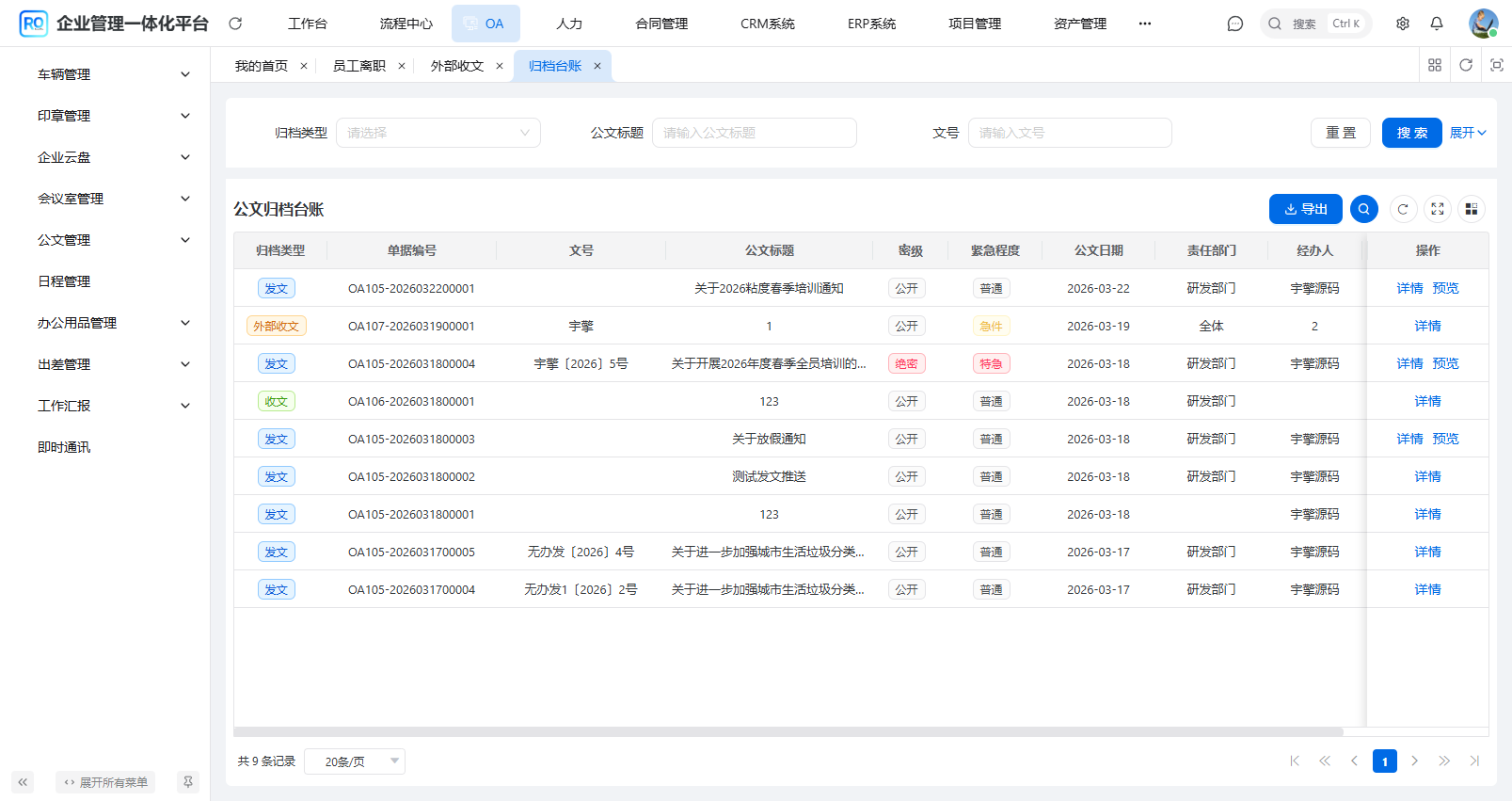 AI Visual Insight: This diagram shows the unified archive ledger presenting outgoing documents, incoming documents, and external incoming documents in a mixed list. The list includes structured fields such as type label, title, document number, department, and archive time, which indicates that the system focuses on unified retrieval and traceability of multi-source document assets rather than simple file display.
The archive service uses projection to implement unified pagination
@Override
public PageResult
<OfficeDocArchiveRespVO> getArchivePage(OfficeDocArchivePageReqVO reqVO) {
    List
<OfficeDocArchiveRespVO> allRecords = new ArrayList<>();
    allRecords.addAll(querySendArchives(reqVO));     // Aggregate outgoing documents
    allRecords.addAll(queryReceiveArchives(reqVO));  // Aggregate incoming documents
    allRecords.addAll(queryOutsideArchives(reqVO));  // Aggregate external incoming documents
    allRecords.sort(Comparator.comparing(
        OfficeDocArchiveRespVO::getArchiveTime,
        Comparator.nullsLast(Comparator.reverseOrder()))); // Sort by archive time in descending order
    return new PageResult<>(allRecords, (long) allRecords.size());
}
This code projects data from multiple tables into the same VO, so the frontend does not need to understand differences in the underlying tables.
The frontend form enables field editing by workflow node
The external incoming document detail page is not a standard CRUD form. In approval scenarios, it enables different fields based on the node name. For example, the “Leadership Instruction” node edits leaderOpinion, while the “Responsible Department Processing” node edits handleResult. This makes workflow nodes carry real business actions rather than only approval or rejection.
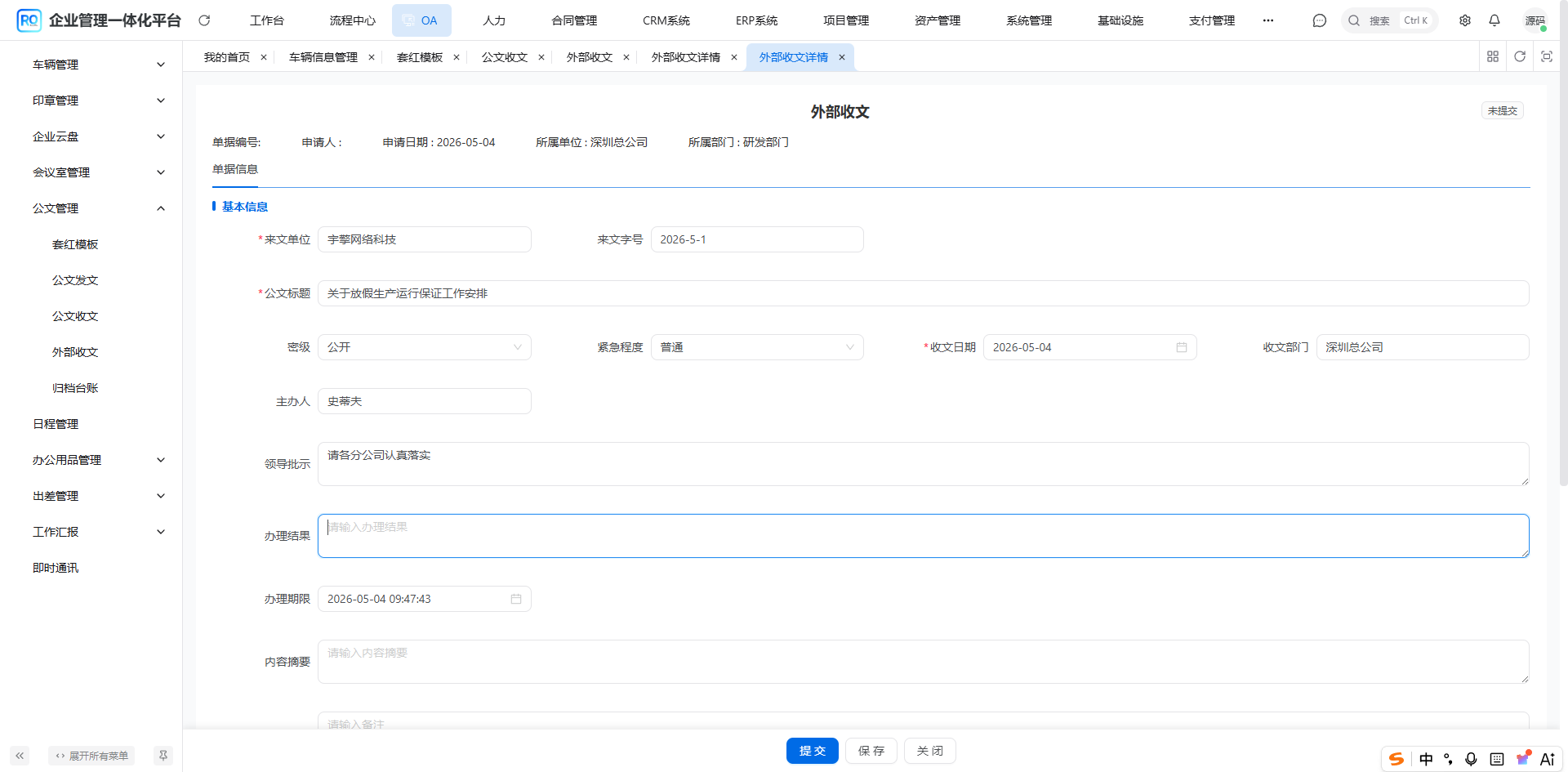 AI Visual Insight: This diagram shows that the external incoming document detail form carries structured metadata, the formal document, attachments, and workflow action buttons. The visible fields include source organization, document number, classification level, handling department, and processing result, which shows that the page is a hybrid of a workflow form and a business form rather than a simple file upload screen.
The system pre-fills default values for new forms to reduce data entry cost
const now = new Date();
formData.value = {
  companyId: userStore.userInfo?.companyId || 0, // Auto-fill the current company
  deptId: userStore.userInfo?.deptId || 0,       // Auto-fill the current department
  processStatus: BpmProcessInstanceStatus.NOT_START,
  handleStatus: 0,                               // Default to pending registration
  sourceOrg: '',
  title: '',
  receiveDate: `${now.getFullYear()}-${String(now.getMonth() + 1).padStart(2, '0')}-${String(now.getDate()).padStart(2, '0')}`,
  attachments: [],
};
This code reduces repetitive input for secretaries by defaulting organizational information and the date.
The data structure revolves around the main document, attachments, and the archive view
The oa_office_doc_outside main table stores fields such as source organization, incoming document number, title, classification level, receipt date, responsible department, principal handler, leadership instruction, processing result, and formal document URL. docFileUrl is used for the main document, while the attachment service stores supplemental materials. The two have separate responsibilities.
At the archive layer, multiple document sources are projected into OfficeDocArchiveRespVO. Unified fields include archiveType, billCode, docNumber, title, docDate, deptName, handlerName, and archiveTime. This gives the frontend a stable structure for rendering lists.
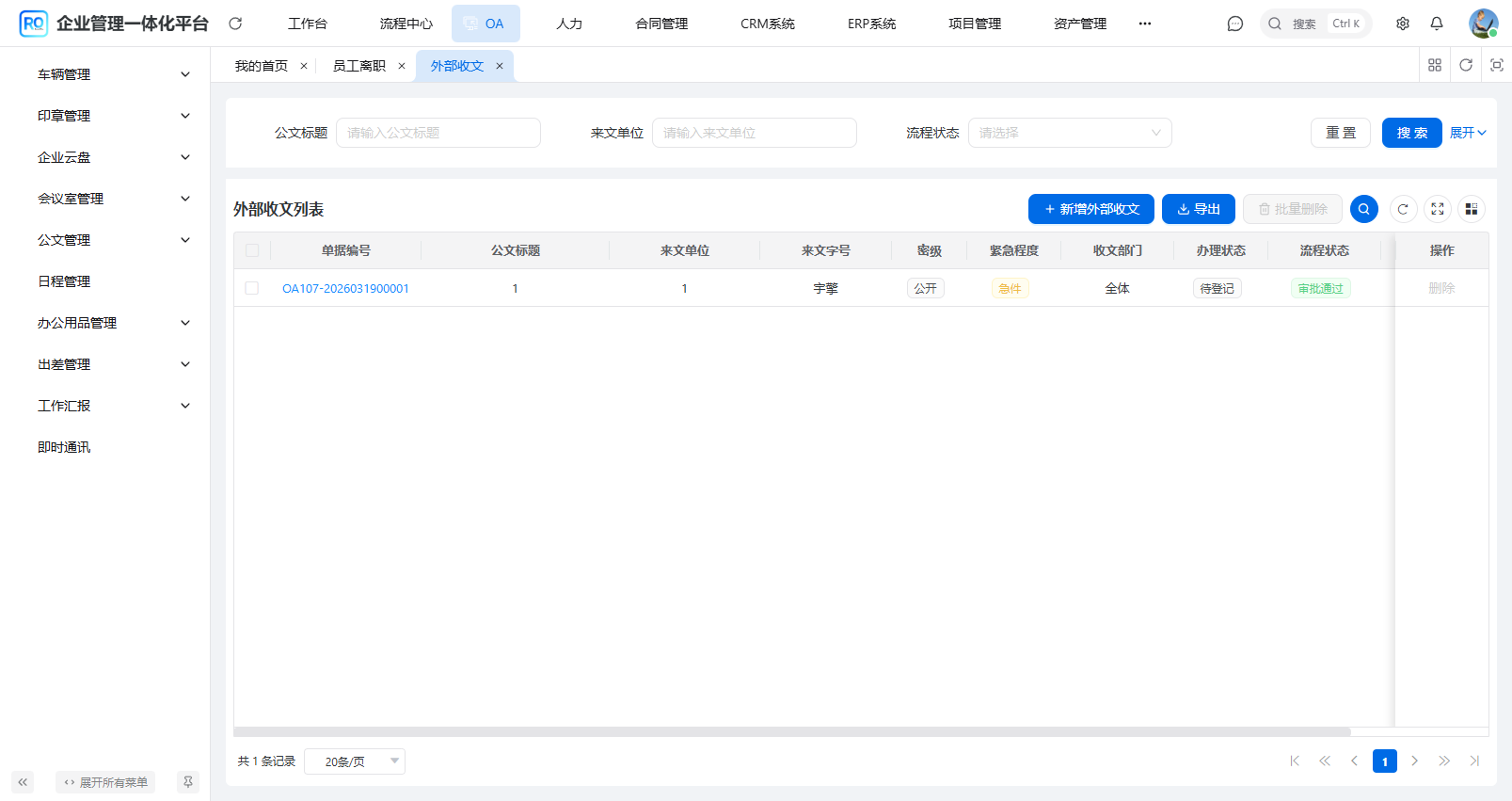 AI Visual Insight: This diagram emphasizes that the external incoming document list is designed for registration and tracking rather than pure archiving. The interface shows both business handling status and workflow status, which indicates that the system deliberately separates business readability from BPM precision so secretaries, handlers, and administrators can understand progress from different perspectives.
The engineering value of this design is very clear
- External incoming documents become auditable workflows instead of being scattered across email and network drives.
- BPM callbacks drive state changes and reduce the risk of manual tampering.
- The archive ledger supports unified queries across three document types without breaking their individual business models.
- The detail page and approval page share the same form, which reduces frontend maintenance cost.
- The main document and attachments are separated, which improves preview, search, and lifecycle cleanup.
FAQ with structured answers
1. Why can’t external incoming documents be implemented as attachment upload only?
Because external documents usually include instructions, assignment, deadlines, and archival responsibility. Attachment upload alone cannot represent workflow state, processing results, or audit trails. In practice, that leads to a situation where the file exists, but the responsibility chain does not.
2. Why not create one master archive table directly?
A master table can make queries faster, but it introduces data redundancy and consistency maintenance cost. Query-layer aggregation requires pagination optimization, but it ensures that the ledger is always based on real source data and preserves links back to the original detail pages.
3. What condition determines whether an external incoming document enters the archive?
The core condition is processStatus = APPROVE. In other words, after the BPM workflow is approved, the business status becomes “completed,” and the document enters the unified archive ledger for search, preview, and export.
AI Readability Summary: This article reconstructs the external incoming document solution in RuoYi Office and explains how Spring Boot, Vue 3, and Flowable implement document registration, leadership instructions, department processing, workflow callbacks, and unified archiving across three document types. It also breaks down the state machine, aggregation queries, attachment design, and frontend-backend page boundaries.