When the network icon disappears, Wi-Fi becomes unavailable, and Ubuntu 24.04 cannot access the internet, restarting NetworkManager may not help. In this case, the critical troubleshooting path is kernel and driver module compatibility. This article uses logs, module directories, and hardware state checks to trace the issue to a non-official 6.17 kernel missing the
iwlwifimodule. Keywords: Ubuntu 24.04,iwlwifi, kernel rollback.
The technical specification snapshot is clear
| Parameter | Value |
|---|---|
| Operating System | Ubuntu 24.04 LTS |
| Kernel Version | Problematic: 6.17.0-14-generic; Official stable: 6.8.0-55-generic |
| Wi-Fi Adapter | Intel Raptor Lake PCH CNVi WiFi |
| Device ID | 8086:51f1 |
| Network Management | NetworkManager 1.46.0 |
| Key Drivers | iwlwifi, cfg80211, mac80211 |
| Core Dependencies | linux-image, linux-modules, linux-modules-extra, linux-firmware |
| Protocols / Stack | PCIe, 802.11, systemd-resolved |
| Original Article Popularity | 383 views |
The problem is not in the network service itself
On the surface, the symptom looks like a missing network icon in the top-right corner of the desktop. In reality, the problem is more serious: the system only has the loopback interface lo, and NetworkManager cannot see any wireless device. As a result, DNS resolution, gateway access, and ping tests all fail as secondary effects.
Many users first try restarting NetworkManager or suspect a GNOME Dock extension caused an icon rendering issue. Those approaches can help with a display problem, but they do nothing when the driver never loads. Distinguishing the symptom from the root cause is the key to troubleshooting issues like this.
Start with minimal fact collection
uname -r                           # Check the current kernel version
ip a                               # Check whether any wlan/wlp interface exists
nmcli device status                # See which devices NetworkManager detects
lspci -nn | grep -i net            # Confirm whether PCI detects the wireless adapter
sudo lshw -C network               # Check whether the device is in the UNCLAIMED state
lsmod | grep -E "iwlwifi|cfg80211|mac80211"  # Check whether wireless drivers are loaded
This command set quickly confirms four things: whether the hardware exists, whether the kernel detects it, whether the driver is loaded, and whether the network manager has taken control of it.
The evidence chain points directly to a missing driver
The troubleshooting results show that the PCI layer can detect the Intel wireless adapter, which indicates the hardware itself is working. However, lshw reports the device as UNCLAIMED, which means no driver has bound to it.
At the same time, ip a only shows lo, and nmcli device status also lists only the loopback interface. That means the issue is not “cannot connect to Wi-Fi”. The real issue is that the system has no usable wireless network interface at all.
sudo lshw -C network
# Key observation: *-network UNCLAIMED

lsmod | grep -E "iwlwifi|cfg80211|mac80211"
# If there is no output, the core wireless stack modules are not loaded
This conclusion is strong: the issue is not a bad NetworkManager configuration or a DNS configuration problem. The driver modules never entered the kernel.
The actual root cause is an incomplete 6.17 kernel
Further inspection shows that the running kernel is 6.17.0-14-generic, while the official stable Ubuntu 24.04 kernel line is 6.8.x. More importantly, the module directory for 6.17 does not contain iwlwifi at all.
This means the system successfully booted into a newer kernel, but that kernel was not installed with the complete wireless module package set, especially linux-modules-extra. For Intel wireless adapters, missing that package often means Wi-Fi fails completely.
Use the module directory and modinfo for final confirmation
ls -l /lib/modules/$(uname -r)/kernel/drivers/net/wireless/intel/iwlwifi/
# If the directory does not exist, the current kernel is missing the iwlwifi module files

modinfo iwlwifi
# If it returns Module not found, the module is not installed rather than simply not loaded
These checks elevate the issue from “suspected driver abnormality” to “confirmed missing kernel module package”.
The screenshots already show the desktop-level symptoms
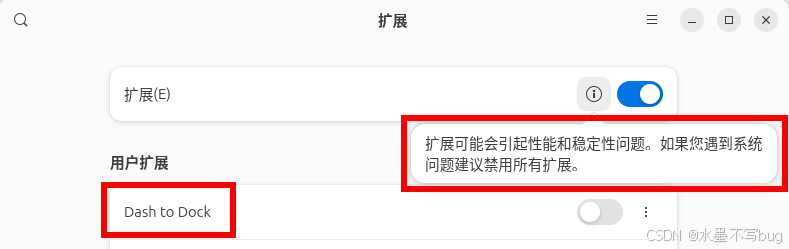
AI Visual Insight: This screenshot shows a GNOME extension warning related to system stability. It suggests that desktop extensions may affect Dock and status bar rendering, but that kind of warning can only explain an intermittently missing icon. It cannot explain kernel-level evidence such as an UNCLAIMED wireless adapter in lshw or the missing iwlwifi module.

AI Visual Insight: This screenshot shows the desktop after the issue was fixed, with the network icon restored. Technically, this usually means the system has recognized the wireless interface again, NetworkManager has successfully taken over the device, and the kernel wireless module and firmware chain are working normally.
The correct fix is to roll back to the official 6.8 kernel
Because Ubuntu 24.04 officially maintains the 6.8.x kernel line in its default repositories, and 6.17 is not the stable kernel line for this release, the safest solution is not to keep patching the broken 6.17 environment. The better approach is to roll back to the official complete kernel stack.
You need three types of .deb packages with the exact same version: linux-image, linux-modules, and linux-modules-extra. The version numbers must match exactly, or you may still end up with module mismatches.
# Keep versions consistent during offline installation; versions below are examples only
sudo dpkg -i linux-modules-6.8.0-55-generic*.deb        # Install the base modules
sudo dpkg -i linux-modules-extra-6.8.0-55-generic*.deb  # Install extra driver modules, including many NIC drivers
sudo dpkg -i linux-image-6.8.0-55-generic*.deb          # Install the matching kernel image
sudo reboot                                             # Reboot and choose this kernel in GRUB
These commands restore the official complete Ubuntu 24.04 kernel stack and bring back wireless driver modules such as iwlwifi.
Post-fix validation must close the loop
After the rollback and reboot, do not check only whether the icon has returned. You should also verify that the interface, modules, and connectivity all work at the same time.
uname -r                                  # Confirm the system is now running the official 6.8.x kernel
lsmod | grep iwlwifi                      # Confirm the driver module is loaded
nmcli device status                       # Confirm that a wifi device appears
ip a | grep -E "wlan|wlp"                # Confirm that the wireless interface has been created
ping -c 2 8.8.8.8                         # Verify public internet connectivity
This step ensures the issue is actually resolved rather than merely appearing fixed because the icon came back.
The practical takeaways from this failure are straightforward
First, UNCLAIMED has more diagnostic value than a missing icon because it directly indicates that no driver has claimed the hardware. Second, modinfo and module directory checks are more efficient than blindly reinstalling firmware. Third, in an Ubuntu LTS environment, you should avoid leaving the distribution-maintained stable kernel line unless you have a clear reason.
If the machine handles development, model training, or production workloads, keep at least one previously verified working kernel available and avoid unplanned upgrades. In many real-world scenarios, system stability matters more than new features.
FAQ provides structured answers
Q1: Why can’t the system connect even after installing linux-firmware?
Because firmware is only a binary resource that the kernel uses after the driver has loaded. If the iwlwifi module itself does not exist, the firmware will never be used. The driver module must exist before firmware loading can matter.
Q2: Does UNCLAIMED always mean the hardware is broken?
Not necessarily. UNCLAIMED more commonly means the system detected the hardware, but no suitable driver bound to it. Typical causes include missing modules, kernel version mismatch, or a disabled driver rather than physical hardware failure.
Q3: In this situation, should I reinstall the OS first or roll back the kernel?
Roll back to the official stable distribution kernel first. If a kernel upgrade introduced the problem, a rollback is usually faster, more controlled, and better for preserving your current development environment and data.
The core summary captures the root cause and the fix
This article reconstructs a real Ubuntu 24.04 troubleshooting case in which the network icon disappeared and internet access failed completely. The root cause was a mismatch between a non-official 6.17 kernel and its driver module packages, which left the Intel wireless adapter in the UNCLAIMED state. The guide provides diagnostic commands, an evidence-based reasoning path, and an offline rollback method to the official 6.8 kernel.