This is an engineering-focused breakdown of a Unity WebGL racing game. Its core objective is to run a 3D racing project in the browser without plugins, addressing common challenges in large-scale web game deployment, slow loading, and constrained performance. Keywords: Unity WebGL, WebAssembly, UnityLoader.
The technical specification snapshot outlines the delivery model
| Parameter | Value |
|---|---|
| Engine | Unity |
| Runtime Model | WebGL + WebAssembly |
| Primary Languages | C#, JavaScript, HTML, CSS |
| Asset Protocol | HTTP/HTTPS |
| Page Entry | index.html |
| Core Loader | js/UnityLoader.js |
| Asset Bundle | data.unityweb |
| Code Bundle | asmCode.unityweb |
| Framework Bundle | asmFramework.unityweb |
| Memory Image | asmMemory.unityweb |
| Repository / Popularity | Star count not provided in the original source |
| Core Dependencies | WebGL, WebAssembly, UnityLoader, gzip |
This project shows how a Unity game is delivered through the browser
“Madalin Stunt Cars 2” is not a traditional front-end game. It is a WebGL build exported from a Unity project. It converts C# gameplay logic into Wasm, packages scene assets into separate data bundles, and then loads and runs everything through a web page shell.
This approach solves two core problems. First, users do not need to install a native client. Second, developers can continue using the Unity content production pipeline and deliver 3D games directly to the browser.
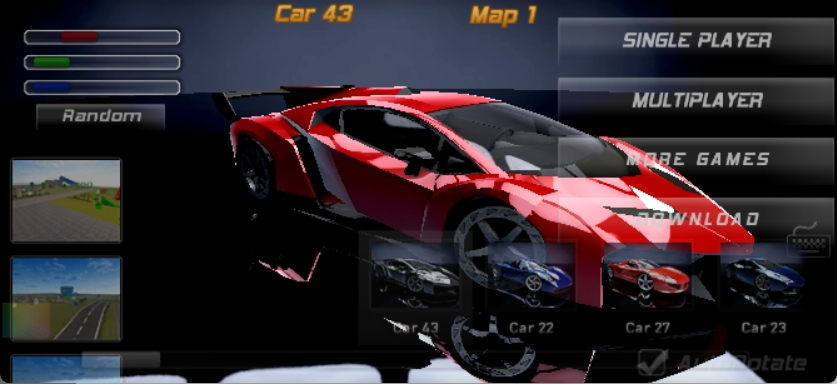 AI Visual Insight: This image shows the game running live in the browser. You can see the 3D track, vehicle models, environmental lighting, and a third-person driving camera. This indicates that the project has successfully mapped Unity scenes, materials, and interaction logic onto the WebGL rendering pipeline, validating the feasibility of running moderately complex 3D racing gameplay in the browser.
The typical output structure determines how the web runtime works
A Unity WebGL export directory usually includes a page shell, a loader, Wasm binaries, and asset bundles. The page itself only mounts the container. The real initialization, download, decompression, and instantiation are handled inside UnityLoader.
madalin-stunt-cars-2/
├── img/
├── js/
│   └── UnityLoader.js
├── asmCode.unityweb
├── asmFramework.unityweb
├── asmMemory.unityweb
├── data.unityweb
├── game.json
├── index.html
└── style.css
This structure shows that a web game is not just “a single HTML file.” It is a deployable unit composed of code, assets, a memory image, and configuration.
The core file split reflects Unity WebGL’s asset management strategy
The largest file is typically data.unityweb, which packages models, textures, audio, and scene data. asmCode.unityweb carries the compiled core logic, while asmFramework.unityweb provides the runtime bridge layer.
This split provides three benefits: it supports parallel downloads, improves cache hit rates, and reduces the amount of blocking before first render. For large web games, this is a critical design choice that directly affects the initial user experience.
The page entry is intentionally thin, while the loader is the real launcher
<script src="js/UnityLoader.js"></script><script>
  // Mount the Unity instance to the target container
  var gameInstance = UnityLoader.instantiate("gameContainer", "game.json");
  // Notify the user that the first load may take some time
  alert("Game loading may take some time. If it exceeds 5 minutes, please refresh the page");
</script>
This code reads the configuration, checks the environment, creates the canvas, and triggers the subsequent asset downloads.
From an engineering perspective, HTML is only the shell. What truly determines compatibility, decompression behavior, and instance lifecycle management is UnityLoader.instantiate().
The nested container structure supports responsiveness and instance isolation
<div class="webgl-content" style="width: 100%; height: 100%; overflow: hidden;">
  <div id="gameContainer" style="width: 100%; height: 100%; overflow: hidden;"></div>
</div>
The outer container handles layout and clipping, while the inner container serves as the direct mount point for the Unity canvas. This design improves styling control and also makes future multi-instance management easier.
UnityLoader handles configuration loading, capability detection, and asset assembly
The loader’s core workflow can be summarized as follows: read game.json, detect WebGL support, create the canvas, download .unityweb files, decompress assets, compile Wasm, and then bind the runtime to the page container.
UnityLoader.instantiate = function(containerId, configUrl) {
  // 1. Load the game configuration
  var config = this.loadConfig(configUrl);
  // 2. Check whether the browser supports WebGL
  if (!this.isWebGLAvailable()) {
    throw new Error("WebGL not supported");
  }
  // 3. Create and mount the rendering canvas
  var canvas = document.createElement("canvas");
  document.getElementById(containerId).appendChild(canvas);
  // 4. Download assets and compile the runtime
  return this.downloadAndCompile(config, canvas);
};
This logic captures the Unity WebGL startup pipeline: validate the environment first, assemble the runtime next, and then enter the main game loop.
gzip decompression and Wasm instantiation define the initial load cost
Files with the .unityweb extension are usually precompressed with gzip to reduce network transfer size. After the browser receives the data, UnityLoader decompresses it and passes the Wasm byte stream to the WebAssembly API for compilation and instantiation.
async function instantiateWasm(url, imports, successCallback) {
  // Download the Wasm binary
  const response = await fetch(url);
  const bytes = await response.arrayBuffer();
  // Compile the module into an instantiable object
  const module = await WebAssembly.compile(bytes);
  // Instantiate the module and inject host environment capabilities
  const instance = new WebAssembly.Instance(module, imports);
  // Notify the Unity runtime to continue startup
  successCallback(instance);
}
This code describes the critical step in running Unity game logic in the browser: turning downloaded binary data into an executable instance.
game.json acts as the master entry point for web runtime parameters
game.json defines asset locations, product metadata, startup theme, and cache behavior. For deployment teams, it functions as the runtime manifest for the WebGL build.
{
  "companyName": "MadalinGames",
  "productName": "Madalin Stunt Cars 2",
  "productVersion": "1.0",
  "dataUrl": "data.unityweb",
  "wasmCodeUrl": "asmCode.unityweb",
  "wasmFrameworkUrl": "asmFramework.unityweb",
  "memoryUrl": "asmMemory.unityweb",
  "splashScreenStyle": "Dark"
}
This configuration tells the loader where to fetch assets and how to initialize the runtime.
The memory image and cache strategy shape the repeat-load experience
asmMemory.unityweb provides an initial memory snapshot, which reduces preparation time during cold start. cacheControl can assign immutable to stable assets so that browsers can reuse cached files for a long time.
For large 3D games, a slow first launch is not always avoidable. However, whether the second launch feels fast usually depends on whether asset splitting is reasonable and whether cache headers are configured correctly.
var memoryLayout = {
  // Static region for known initialized data
  staticData: { start: 0x00000000, end: 0x01000000 },
  // Dynamic region for heap object allocation
  dynamicData: { start: 0x01000000, end: 0x04000000 },
  // Stack region for function call context
  stack: { start: 0x04000000, end: 0x05000000 }
};
This illustrative code shows that the Unity WebGL runtime relies on a linear memory layout to manage static data, heap space, and the stack.
Performance optimization extends beyond rendering into transport and input handling
The project’s performance advantages do not come only from WebGL rendering efficiency. They also come from a combined engineering strategy: asset precompression, file splitting, progress feedback, cache reuse, and input throttling.
The page styling layer also uses a full-screen container with overflow clipping to prevent canvas overflow from causing scrollbars and reflow. This is especially important for immersive browser-based games.
function gameLoop() {
  // Use the browser's native frame scheduler to reduce unnecessary wakeups
  requestAnimationFrame(gameLoop);
  // Drive the Unity main loop
  UnityInstance.Loop();
}

function throttleInput(callback, limit) {
  let waiting = false;
  return function(...args) {
    // Drop repeated input during the throttle window
    if (waiting) return;
    callback.apply(this, args);
    waiting = true;
    setTimeout(() => {
      waiting = false;
    }, limit);
  };
}
This code demonstrates both main-loop scheduling and input throttling. Together, they help maintain a stable frame rate in the browser.
This case study provides a complete methodology for delivering Unity projects on the web
From Unity export to browser runtime, the full pipeline can be summarized like this: C# logic is converted through IL2CPP, compiled by the toolchain into WebAssembly, static assets are packaged into data.unityweb, and the web page uses UnityLoader to bootstrap all artifacts and assemble the runtime.
This means teams can continue using Unity for content production while relying on the web for delivery, distribution, and live operations. For marketing games, playable demos, and lightweight cloud distribution scenarios, this is a mature and practical path.
FAQ
1. Why are Unity WebGL projects usually split into multiple .unityweb files?
Because code, framework files, assets, and memory images change at different rates. Splitting them enables parallel downloads, independent caching, and less blocking from oversized single-file payloads.
2. What do UnityLoader.js and game.json each do?
UnityLoader.js handles environment detection, asset downloading, decompression, and instantiation. game.json declares asset URLs, product information, and runtime configuration. One executes the process, and the other describes it.
3. Where do Unity WebGL performance bottlenecks usually appear?
Common bottlenecks include oversized initial payloads, heavy texture and model assets, insufficient mobile WebGL compatibility, frequent JS-to-Wasm interactions, and excessive memory usage that causes the browser to reclaim the page.
[AI Readability Summary]
This article reconstructs and analyzes the core delivery pipeline of the web version of “Madalin Stunt Cars 2,” including asset splitting, the UnityLoader loading flow, gzip decompression, WebAssembly instantiation, memory layout, and cache optimization. It helps developers quickly understand the engineering practices behind bringing Unity games to the browser.