This solution uses DeepSeek V4, Spring Boot 3, JDK 21, and MySQL to build an intelligent SQL generation and optimization pipeline. It helps business users who cannot write SQL and helps developers detect slow queries earlier. By injecting database metadata, validating queries through an EXPLAIN feedback loop, and generating index recommendations, it turns “natural language requirements → SQL → optimization advice” into a practical workflow. Keywords: DeepSeek V4, natural language to SQL, execution plan optimization.
The technical specification snapshot is straightforward
| Parameter | Value |
|---|---|
| Primary Languages | Java 21, SQL, HTML |
| Web Framework | Spring Boot 3.5.14 |
| AI Model | DeepSeek V4 Pro / Flash |
| Database Protocol | JDBC / MySQL 8.0+ |
| Typical Capabilities | NL2SQL, EXPLAIN analysis, index recommendation |
| Core Dependencies | Spring AI, JdbcTemplate, MySQL Driver |
| Project Form | H5 single-page app + backend API |
| Repository Popularity | Star count not provided in the original article |
This solution turns natural language queries into a verifiable SQL production pipeline
The biggest problem with traditional NL2SQL is not whether it can generate SQL. The real issue is whether the generated SQL is correct and efficient. This project closes the loop by connecting SQL generation, database execution plan analysis, and index recommendation, so the model does not rely only on semantic guessing.
The core flow works like this: the user enters a requirement in Chinese, the backend injects real table schema and index information, and DeepSeek V4 generates SQL. The system then runs EXPLAIN, sends the execution plan back to the model, and outputs optimized SQL, index DDL, and advisory text.
The core capability can be broken down into five layers
- Natural language to SQL.
- Metadata-aware augmentation.
- JDBC execution and EXPLAIN capture.
- Execution plan–based optimization analysis.
- Unified interaction through an H5 page.
public record SqlRequest(String requirement, String dialect, boolean optimize) {}
// requirement: Natural language requirement in Chinese
// dialect: Database dialect, such as mysql
// optimize: Whether to enable EXPLAIN and optimization analysis
This request model defines the minimum input set for frontend-backend interaction.
Database metadata injection is the key technique for reducing model hallucinations
By default, the model does not know which tables, columns, or indexes exist in your database. If you ask it to write SQL directly from a single natural language sentence, it may invent field names, misread relationships, or use indexes inefficiently.
This project dynamically extracts metadata through SHOW TABLES, SHOW COLUMNS, and SHOW INDEX, then appends that metadata to the prompt. That lets the model generate SQL inside a real database context. In practice, this is more reliable than static prompt engineering.
public String getSchemaContext() {
    StringBuilder sb = new StringBuilder();
    List
<String> tables = jdbcTemplate.queryForList("SHOW TABLES", String.class);
    for (String table : tables) {
        sb.append("Table ").append(table).append(":\n");
        var columns = jdbcTemplate.queryForList("SHOW COLUMNS FROM " + table);
        for (var col : columns) {
            sb.append(" Column: ").append(col.get("Field")) // Write the column name
              .append(" Type: ").append(col.get("Type")) // Write the column type
              .append(" Nullable: ").append(col.get("Null"))
              .append("\n");
        }
    }
    return sb.toString();
}
This code converts the database schema into text context that a large language model can consume directly.
Prompts must constrain both output format and dialect boundaries
The original design explicitly requires the model to output JSON only and to follow the specified database dialect. This matters a lot. If the SQL output includes explanatory text, backend parsing fails. If the dialect does not match, execution fails immediately.
A practical approach is to keep the system prompt fixed as “SQL expert role + JSON output constraint + dialect constraint,” then append metadata, business requirements, and the target database type in the user prompt.
private static final String GENERATE_SQL_SYSTEM = """
You are a senior SQL expert.
Generate SQL that matches the specified dialect based on the user's Chinese requirement.
The output format must be JSON: {"sql": "generated SQL statement"}
Output JSON only. Do not include any other explanation.
""";
This prompt template ensures that the model output can be parsed reliably by the application.
Feeding execution plans back to the model makes optimization advice verifiable
Many AI SQL tools stop at the SQL generation stage, but performance issues usually appear during execution. This design uses EXPLAIN to capture the real execution plan, then sends that plan back to the model for a second round of analysis. The result is a fact-driven optimization loop.
For example, if MySQL returns type=ALL and key=null, that usually indicates a full table scan and no matching index usage. If you see Using filesort or Using temporary, the query may be paying extra cost for sorting or aggregation.
EXPLAIN
SELECT c.name, SUM(o.amount) AS total_amount
FROM orders o
JOIN category c ON o.category_id = c.id
WHERE o.status = 0
  AND o.create_time >= DATE_SUB(NOW(), INTERVAL 30 DAY)
GROUP BY c.name
ORDER BY total_amount DESC;
This SQL verifies the real execution path of a model-generated query on MySQL.
The optimization model should read facts instead of regenerating SQL from scratch
The project uses a Pro model for the first-pass SQL generation and a Flash model for the follow-up optimization analysis. This is a strong balance between quality and cost: the generation stage prioritizes accuracy, while the analysis stage prioritizes throughput and lower cost.
The optimization output includes three parts: optimized SQL, recommended index DDL, and a natural language explanation. That structure makes it easy for developers to apply changes directly and easy for business users or DBAs to review them quickly.
{
  "optimizedSql": "SELECT ...",
  "indexDdl": "CREATE INDEX idx_status_time_category ON orders(status, create_time, category_id);",
  "advice": "The current query includes filtering, grouping, and sorting. A composite index is recommended to reduce back-to-table lookups and narrow the scan range."
}
This JSON shows the structured output format that works best for frontend consumption during the optimization stage.
A single-page frontend is enough to complete the full interaction loop
The project places the page under src/main/resources/static/index.html, so you can access it directly after starting Spring Boot. The user enters a natural language requirement, selects a dialect, chooses a model, and decides whether to enable optimization. The backend then returns the generated SQL, EXPLAIN output, and optimization advice.
This design is lightweight to deploy, fast to demo, and intuitive to evaluate. It works well for internal tools, proof-of-concept validation, or data assistant prototypes. In enterprise scenarios, you can extend it with permission control, SQL review workflows, and read-only data sources.
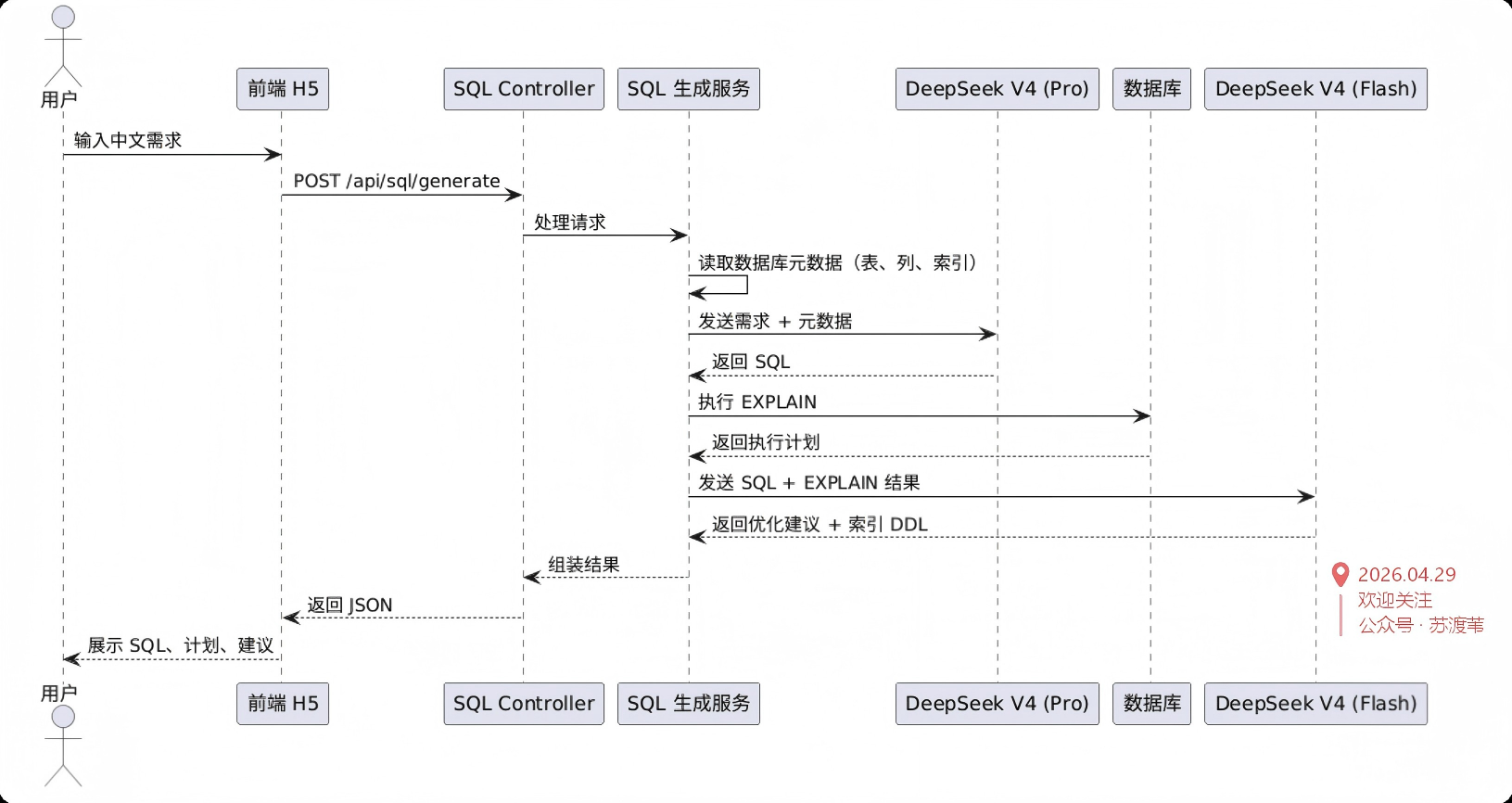 AI Visual Insight: This image shows a high-level system architecture sketch. The core path should include the frontend input layer, the Spring Boot service layer, the database metadata retrieval layer, the DeepSeek model invocation layer, and the EXPLAIN analysis loop, emphasizing an engineering design that separates generation from optimization.
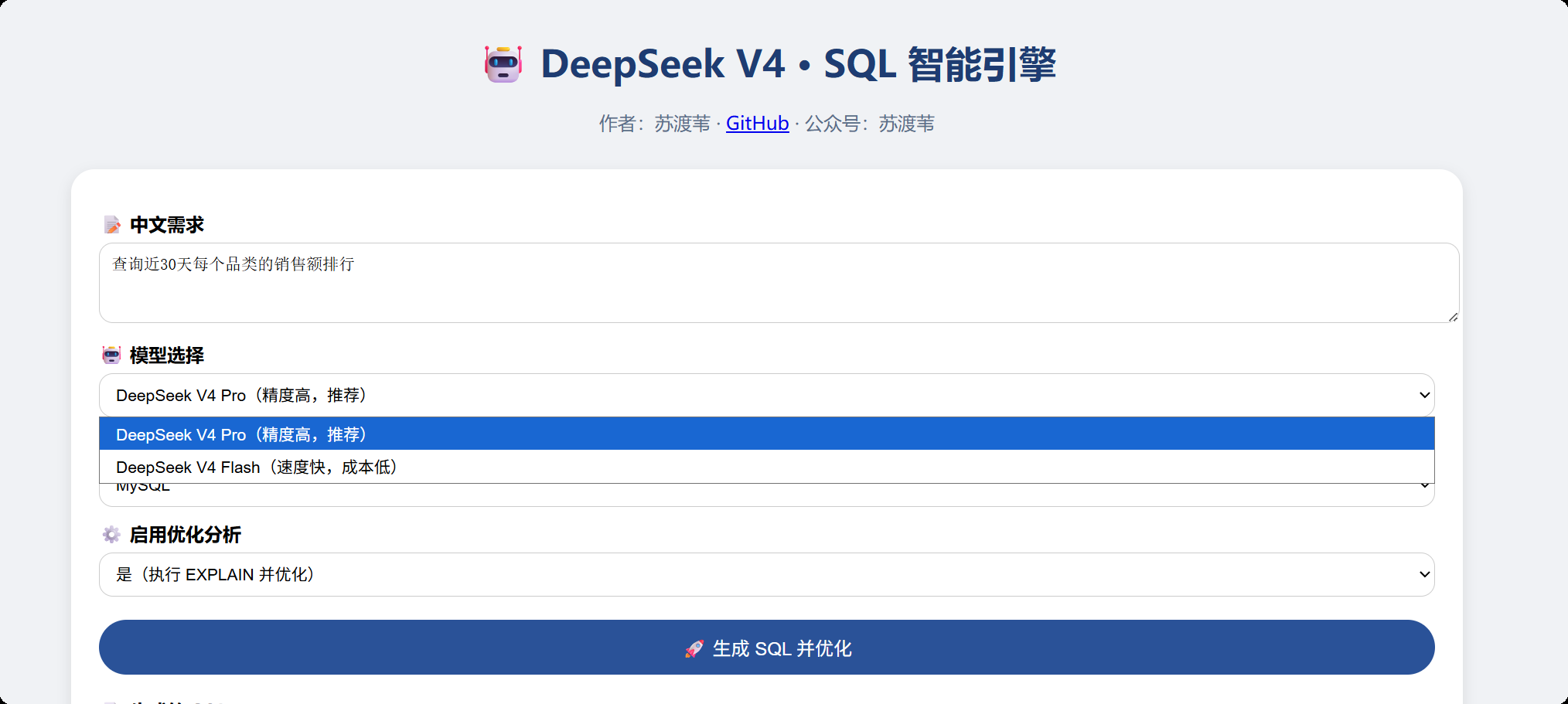 AI Visual Insight: This image shows the H5 input interface. It typically includes a natural language requirement input box, a model selector, a database dialect dropdown, and a generate button, illustrating how the system compresses a complex SQL workflow into a low-barrier form-based interaction.
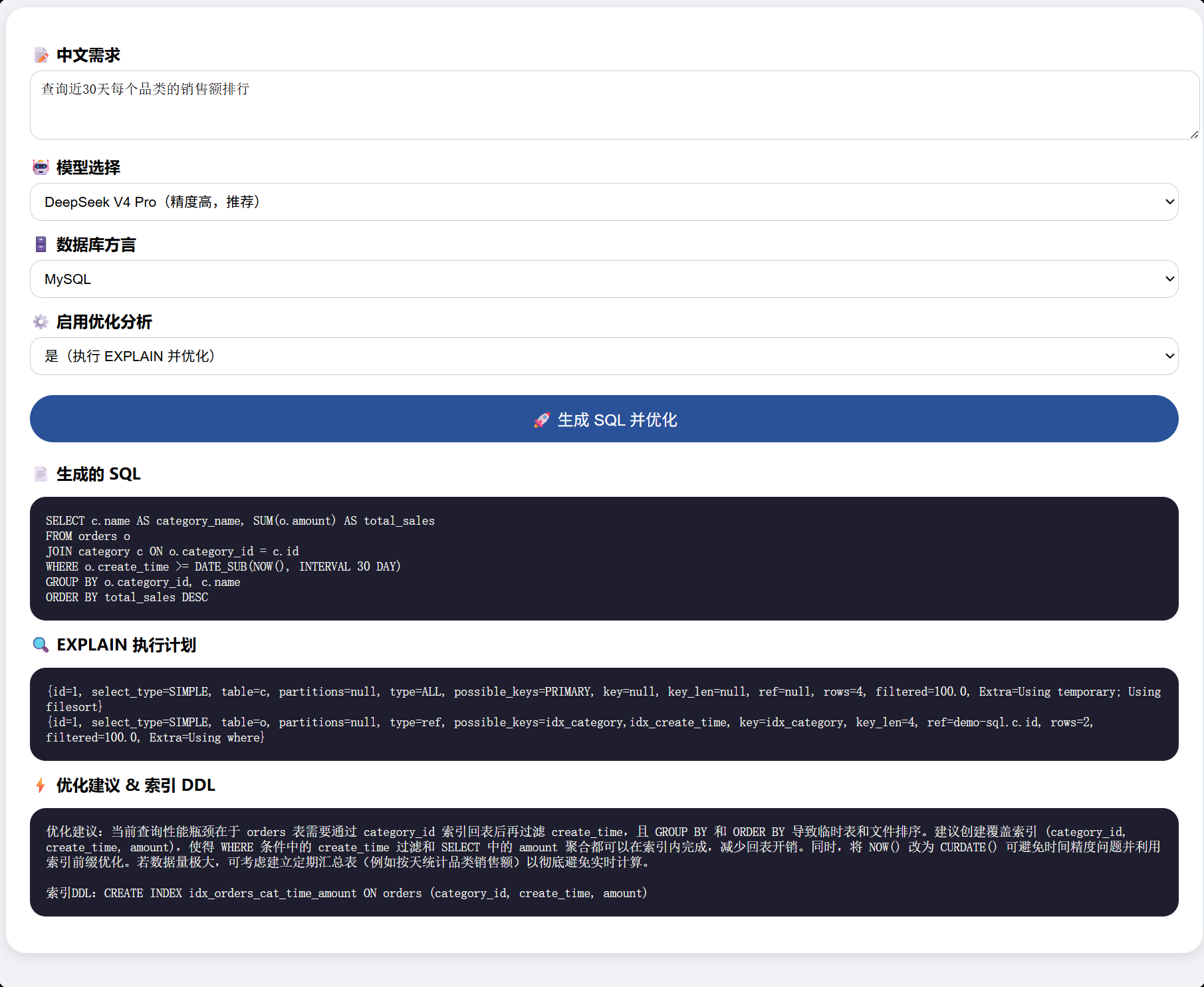 AI Visual Insight: This image shows the generated result page. The interface should present the SQL statement, EXPLAIN output, and optimization advice together, indicating that the backend has combined model generation, database validation, and performance diagnosis into a single visual feedback panel.
This type of system is best suited for reporting and analytical query scenarios
For reporting requirements such as “top sales rankings in the last 30 days,” “exclude returned orders,” or “aggregate by category,” NL2SQL delivers strong value. The semantics are relatively stable, and developers can constrain and validate results through metadata injection and EXPLAIN.
However, if the workflow involves high-risk write operations, cross-database transactions, or complex permission-based data isolation, you must add SQL allowlists, read-only gateways, sensitive table blocking, and manual approval. Otherwise, generated SQL can be misused in production change paths.
Production hardening should prioritize four guardrails
- Allow only
SELECTandEXPLAIN. - Parse SQL into an AST and run risk auditing.
- Use a read-only account and a sandbox database.
- Cache metadata to avoid full re-discovery on every request.
if (!sql.trim().toLowerCase().startsWith("select")) {
    throw new IllegalArgumentException("Only query statements are allowed"); // Block write operations from reaching the database
}
String explainSql = "EXPLAIN " + sql; // Rewrite consistently for execution plan analysis
This protection logic confines AI-generated output to a safe query-only execution scope.
High-quality NL2SQL depends on database facts rather than model capability alone
The most valuable part of this case is not simply that the model can write SQL. The real value is that real metadata and real execution plans constrain the model output, turning AI from a text generator into an auditable database assistant.
If you are building an enterprise-grade intelligent query system, your priorities should be: metadata injection > structured output > EXPLAIN validation > risk interception > cost layering. Only then can NL2SQL move from demo to usable product.
FAQ: The three questions developers care about most
Q1: Why should database metadata be included in the prompt?
Because the model does not know your real schema. Once you inject tables, columns, and index information, the probability of generating SQL against actual fields increases significantly, while hallucinated fields and incorrect joins decrease.
Q2: Why use two model stages for generation and optimization?
The first pass values accuracy more, so a stronger model is a better fit. EXPLAIN analysis is closer to pattern recognition and recommendation generation, so a lower-cost model can handle it effectively and improve overall cost efficiency.
Q3: What is the most important security measure before going live?
At a minimum, you should restrict execution to read-only SQL, connect to a sandbox or read-only database, add AST-based risk auditing, and define circuit breakers for sensitive tables and large queries to prevent AI-generated SQL from hitting the production database directly.
[AI Readability Summary]
This article reconstructs an intelligent SQL generation and optimization engine based on DeepSeek V4, Spring Boot 3, and MySQL. It covers metadata injection, natural language to SQL, EXPLAIN execution plan analysis, index recommendation generation, and frontend presentation, making it suitable for building an enterprise-grade AI data query assistant.