The core idea of a Linux process is simple: once a program is loaded into memory, the kernel describes it with
task_structand schedules it for execution. This article focuses on process creation, state transitions, priorities, environment variables, and address space to help beginners bridge common knowledge gaps around PCB,fork(), and zombie processes. Keywords: Linux process,task_struct, virtual address space.
Technical Specification Snapshot
| Parameter | Details |
|---|---|
| Domain | Linux Operating System / Process Management |
| Primary Languages | C, Bash |
| Related Interfaces | fork, getpid, wait/waitpid, nice, getenv, putenv |
| Related Protocols/Mechanisms | System calls, scheduling queues, Copy-on-Write (COW) |
| Original Platform Popularity | Approximately 280 views, 6 likes, 5 bookmarks |
| Core Dependencies | Linux kernel, glibc, Shell environment |
The von Neumann architecture provides the unified data flow foundation for process execution
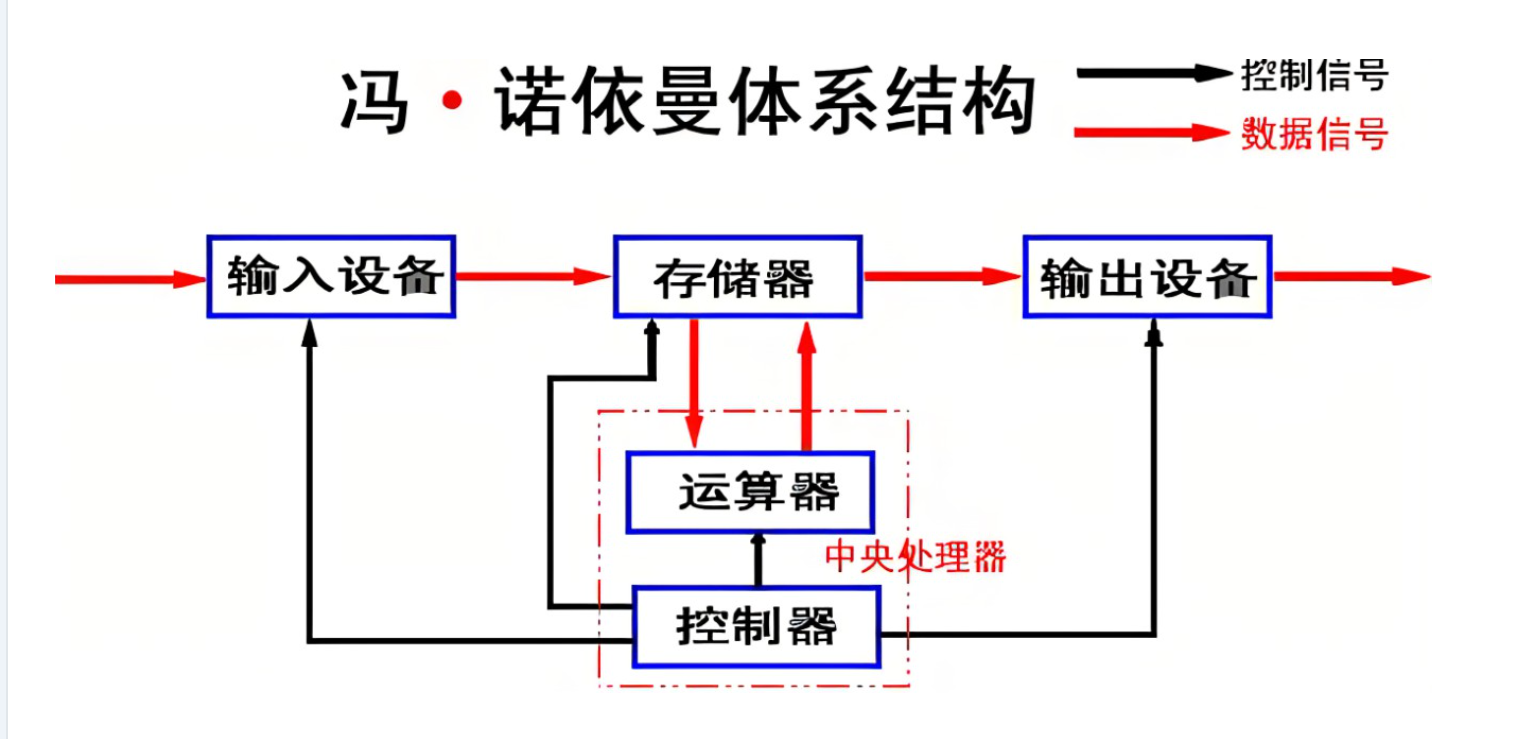 AI Visual Insight: This diagram shows how the five major components—input, output, memory, arithmetic unit, and control unit—connect to each other. The key point is that the CPU does not interact with peripherals directly. Instead, it fetches instructions, reads and writes data, and stores results through memory. This hardware model explains why a program must be loaded into memory before it can become a process.
The key to the von Neumann architecture is not the component names, but the data path design. The CPU accesses memory at high frequency, while peripherals also exchange data with memory first before the CPU processes it.
That means process execution fundamentally depends on repeated data copies. Keyboard input enters memory first, the CPU fetches data from memory for computation, and the result is written back to memory before being displayed on the screen.
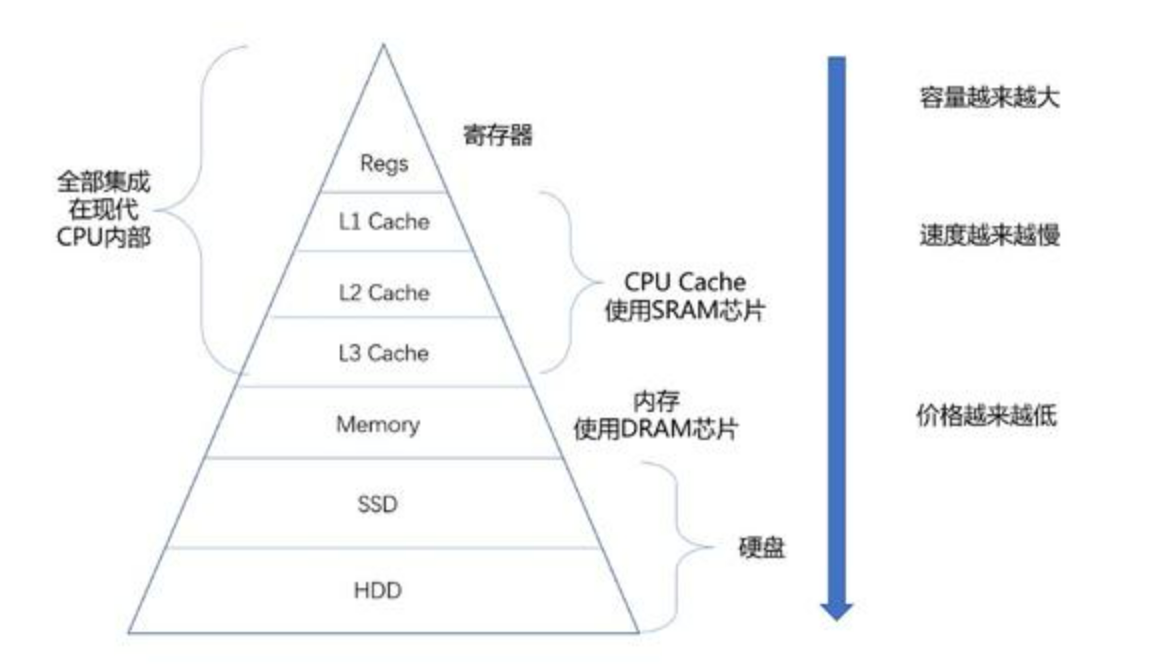 AI Visual Insight: This layered pyramid illustrates the trade-offs among registers, cache, memory, disk, and other storage media in terms of speed, capacity, and cost. It clearly shows why memory must serve as the buffer layer between the CPU and slower peripherals.
Memory is a prerequisite for turning a program into a process
Without memory as an intermediary, CPU performance would be bottlenecked by disk I/O. For that reason, the operating system must remain resident in memory, and application programs must be loaded before scheduling and execution can even begin.
The operating system manages all processes by describing them first and organizing them second
An operating system is not just a launcher. It is a unified resource manager. Upward, it provides interfaces; downward, it controls the CPU, memory, disk, and device drivers.
Its core management model can be summarized in one sentence: describe objects first, then organize them. For processes, that descriptive object is the PCB, which in Linux typically corresponds to task_struct.
struct task_struct {
    int pid;              // Unique process identifier
    long state;           // Process state
    int priority;         // Scheduling priority
    void* mm;             // Points to the process address space
    struct task_struct* next; // Links the process into a queue
};
This structure sketch shows how the kernel abstracts a running program into a manageable data object.
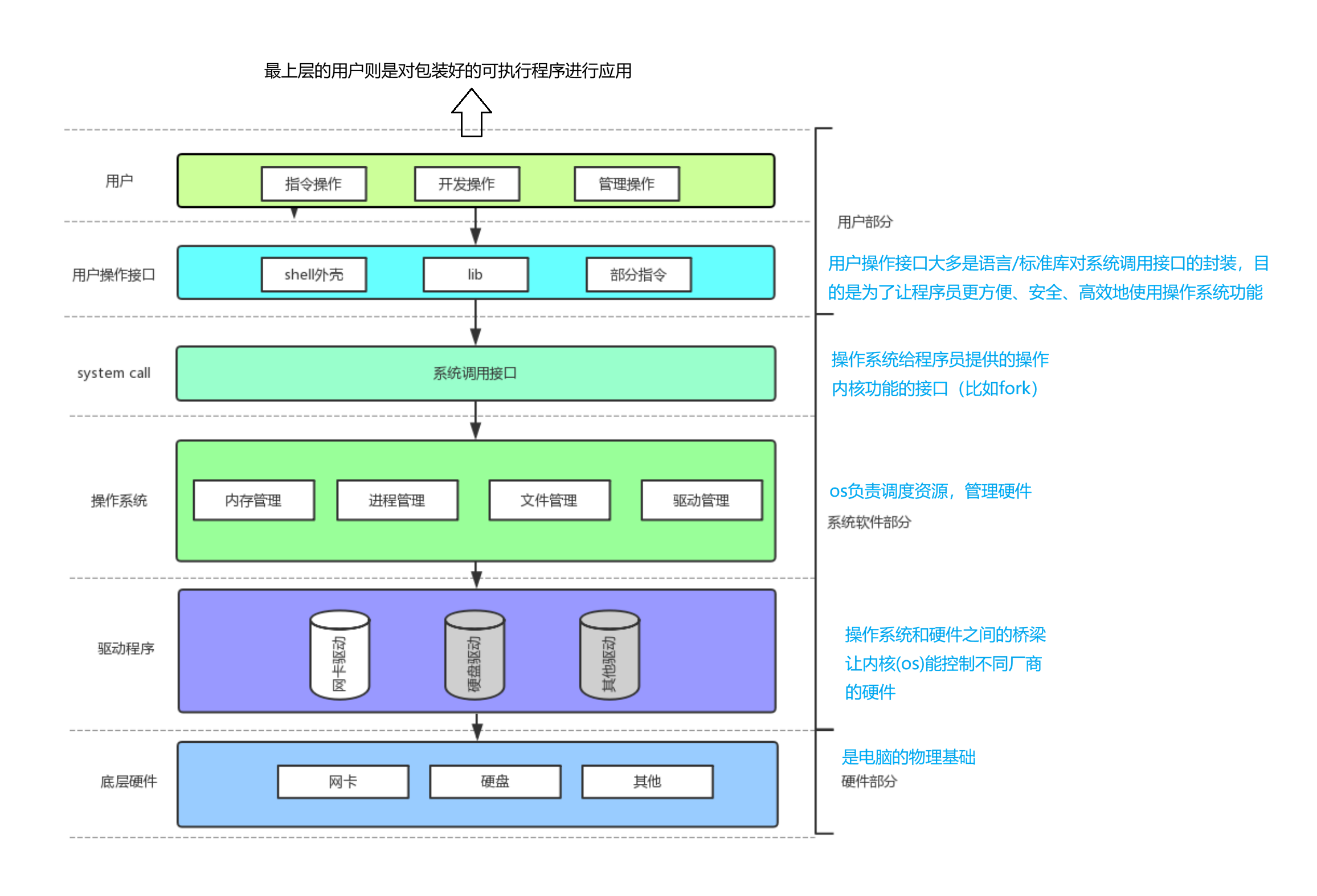 AI Visual Insight: This diagram moves upward from hardware, drivers, and the kernel to system calls, the Shell, and applications, illustrating the typical abstraction layers in Linux. A process does not operate hardware directly. It enters the kernel through system calls to request resources.
The layered architecture explains why user programs cannot operate hardware directly
Applications only see library functions and system calls. The kernel encapsulates interrupts, drivers, and device registers underneath. That isolation is also the foundation of process isolation and system stability.
A process is a program execution instance scheduled by the operating system
A program is a static file on disk. A process is the dynamic execution entity created when that program is loaded into memory together with its PCB. You must establish this distinction first.
The essence of a process can be expressed as: process = task_struct + code segment + data segment + execution context. Without any one of these parts, the kernel cannot schedule it as a complete execution unit.
#include <stdio.h>
#include <unistd.h>

int main() {
    printf("PID=%d, PPID=%d\n", getpid(), getppid()); // Print the current process ID and parent process ID
    return 0;
}
This code shows the most basic way to retrieve process identity information.
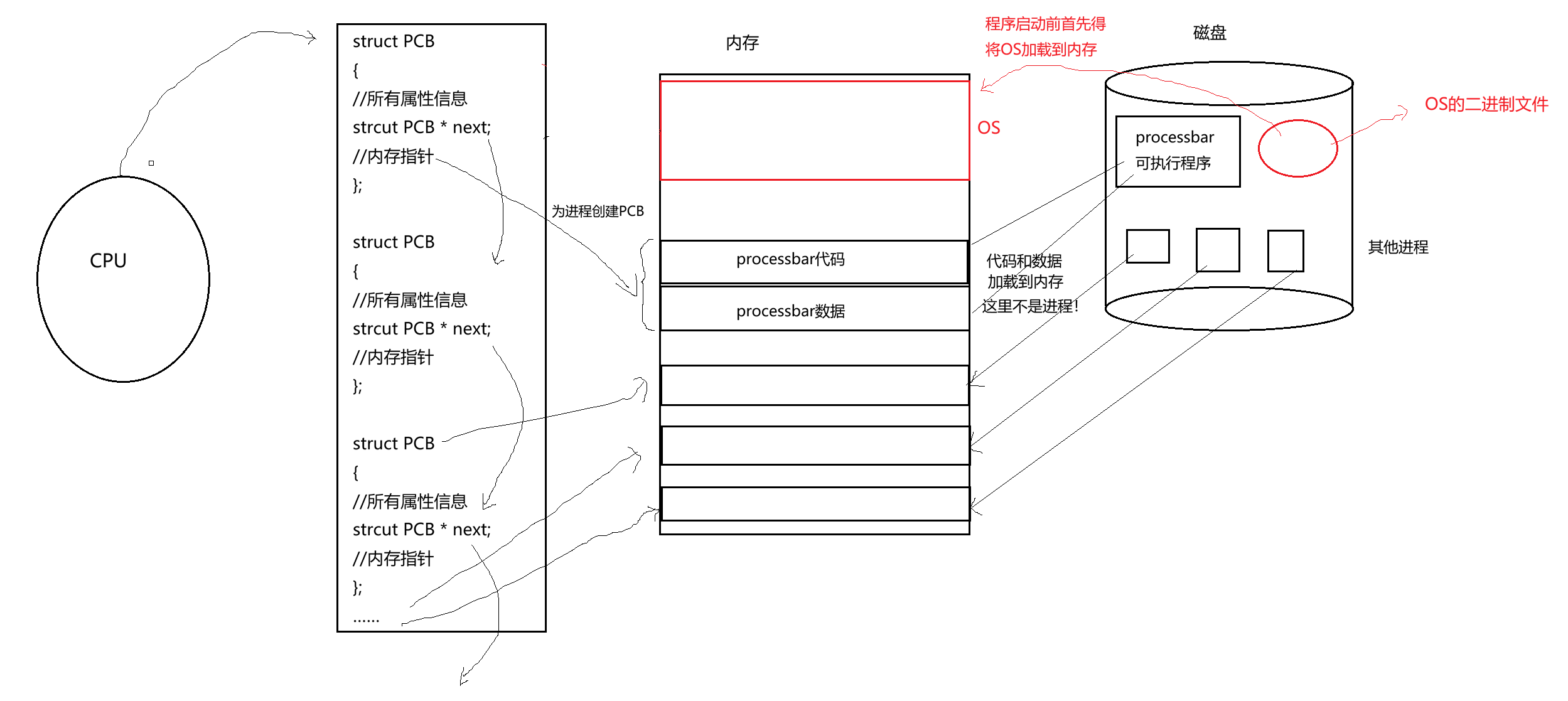 AI Visual Insight: This diagram shows how the operating system first stays resident in memory, then loads a user program from disk into memory, creates the PCB, and finally inserts it into the kernel’s management queues. It emphasizes the creation order: load first, describe second.
 AI Visual Insight: This diagram further highlights the dependency order among the program file, memory mapping, and PCB creation. Without loaded code and data segments, the address fields in the PCB would have nothing valid to reference.
fork() lets a process create a new execution flow by duplication
fork() creates a child process. The parent and child initially have similar address space views, but each has its own PCB, PID, and scheduling state.
Process state determines when a process can obtain CPU time
Common Linux process states include running R, interruptible sleep S, uninterruptible sleep D, stopped T, and zombie Z. A state is not just a label. It is an input to the scheduler’s decision-making.
The running state means the process is either executing or already in the run queue waiting for CPU time. A blocked state means the process is actively waiting for an event and therefore temporarily gives up the CPU.
static const char* state[] = {
    "R(running)",   // Running or ready
    "S(sleeping)",  // Interruptible sleep
    "D(disk sleep)",// Uninterruptible sleep
    "T(stopped)",   // Stopped
    "Z(zombie)"     // Zombie
};
This state table helps map ps output to kernel semantics.
Zombie processes and orphan processes reflect different parent-child lifecycle outcomes
A zombie process is a child process that has already exited, but whose parent has not yet reclaimed it with wait(). As a result, the PCB entry remains. An orphan process is a child whose parent exits first, after which init or systemd adopts it.
#include <stdio.h>
#include <unistd.h>
#include <sys/types.h>

int main() {
    pid_t id = fork();
    if (id > 0) {
        sleep(10); // Intentionally delay reclamation in the parent to make the zombie state observable
    } else if (id == 0) {
        printf("child exit, pid=%d\n", getpid()); // The child exits first
    }
    return 0;
}
This code constructs a short-lived but observable zombie process scenario.
 AI Visual Insight: This diagram typically shows a child process in state
 Z in the process list, indicating that its code and data have already been released while its PCB still remains, waiting for the parent to read the exit code and reclaim the kernel entry.
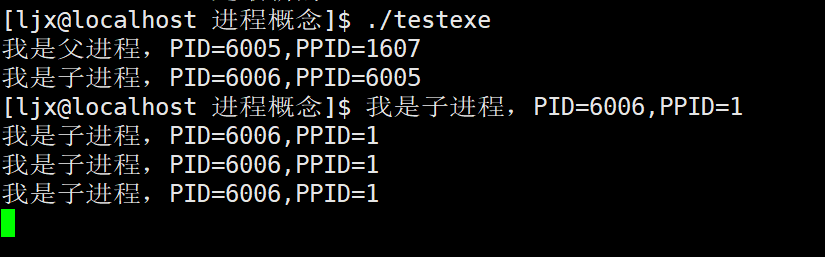 AI Visual Insight: This diagram shows that after the parent exits early, the child’s PPID becomes 1, which means
 init or systemd has adopted it. This demonstrates how Linux prevents resource leaks through ancestor-based process adoption and cleanup.
Scheduling queues and priorities jointly determine execution order
At any given moment, a CPU can execute only one thread context. What users perceive as concurrency is fundamentally the scheduler rapidly switching among different processes in the run queue.
In Linux, priority is often understood through PRI and NI. The larger the nice value, the lower the priority. Regular users can usually only reduce the preemption strength of their own processes.
ps -al                 # View the PRI and NI fields
renice 5 -p 1234       # Set the target process nice value to 5
sudo renice -5 -p 1234 # Increase priority, usually requires root privileges
These commands help you observe and modify process scheduling weight.
 AI Visual Insight: This diagram focuses on the
 PRI and NI columns. The former reflects the kernel’s scheduling priority result, while the latter is the user-adjustable nice value interface. Together, they influence the order in which a process receives CPU time slices.
The cost of process switching comes from saving and restoring context
When one process is switched out, the kernel saves its registers, program counter, and parts of its kernel stack into the PCB. When another process is switched in, the kernel restores that execution context from its PCB.
Frequent switching increases system overhead. For that reason, scheduling policy does not pursue absolute fairness. It balances throughput, responsiveness, and cost.
Environment variables are part of the runtime context the Shell passes to a process
Command-line arguments answer what you want to do. Environment variables answer the environment in which you want to do it. The parent process passes both when it creates a new process.
argc/argv come from the Shell splitting the command line, while environ/envp come from the environment variable table maintained by the current Shell. At startup, a program inherits both forms of context.
#include <stdio.h>

int main(int argc, char* argv[], char* envp[]) {
    for (int i = 0; argv[i] != NULL; i++) {
        printf("argv[%d]=%s\n", i, argv[i]); // Inspect command-line arguments
    }
    printf("PATH=%s\n", envp[0]); // Example: read one environment variable entry
    return 0;
}
This code lets you inspect both command-line arguments and the environment variable entry points.
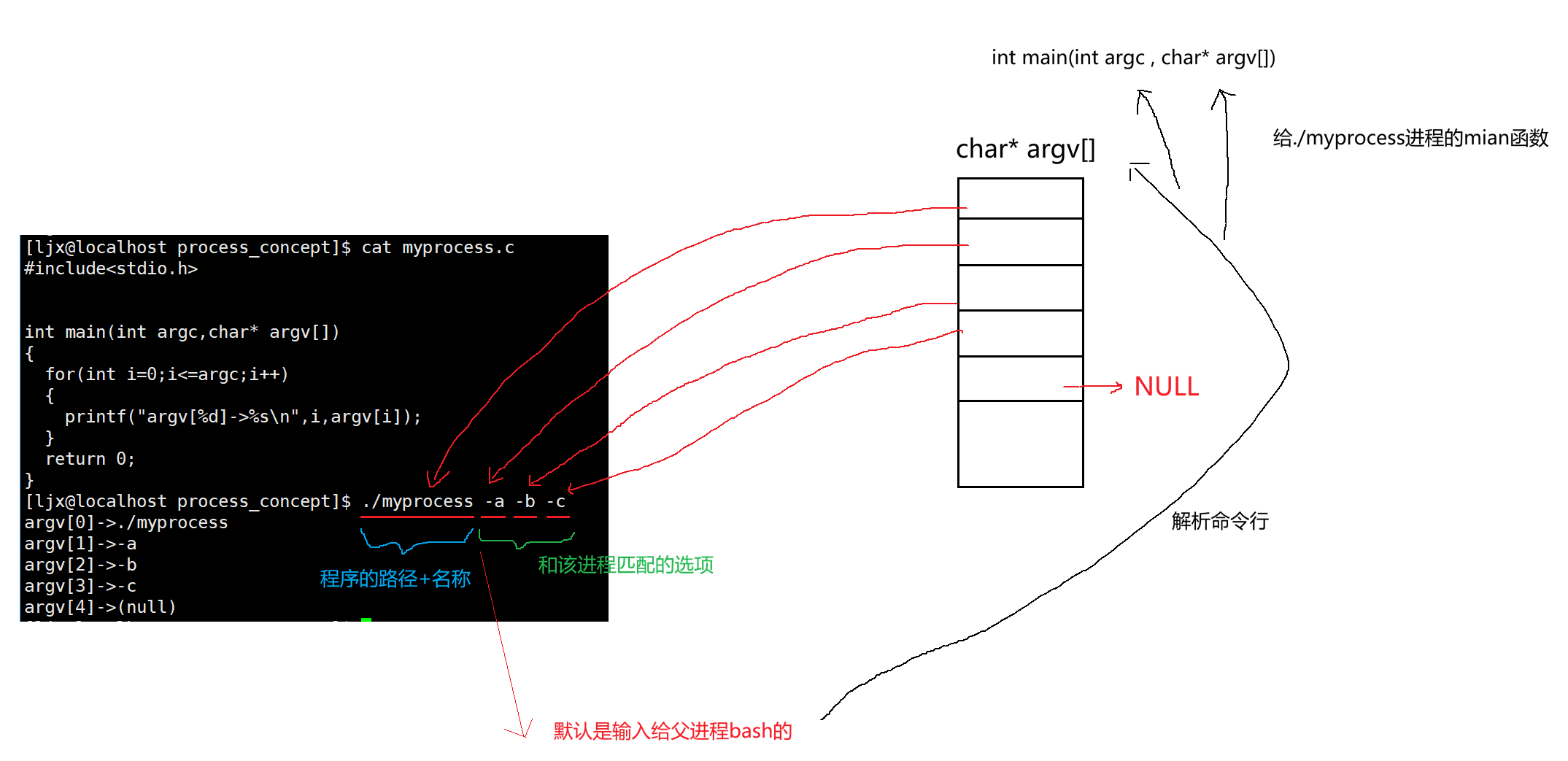 AI Visual Insight: This diagram shows how the Shell receives
 ./myprocess -a -b -c, splits it into an argv array, and passes it into the new process through exec. It makes clear that command-line arguments are not generated internally by the program; the parent process constructs and passes them.
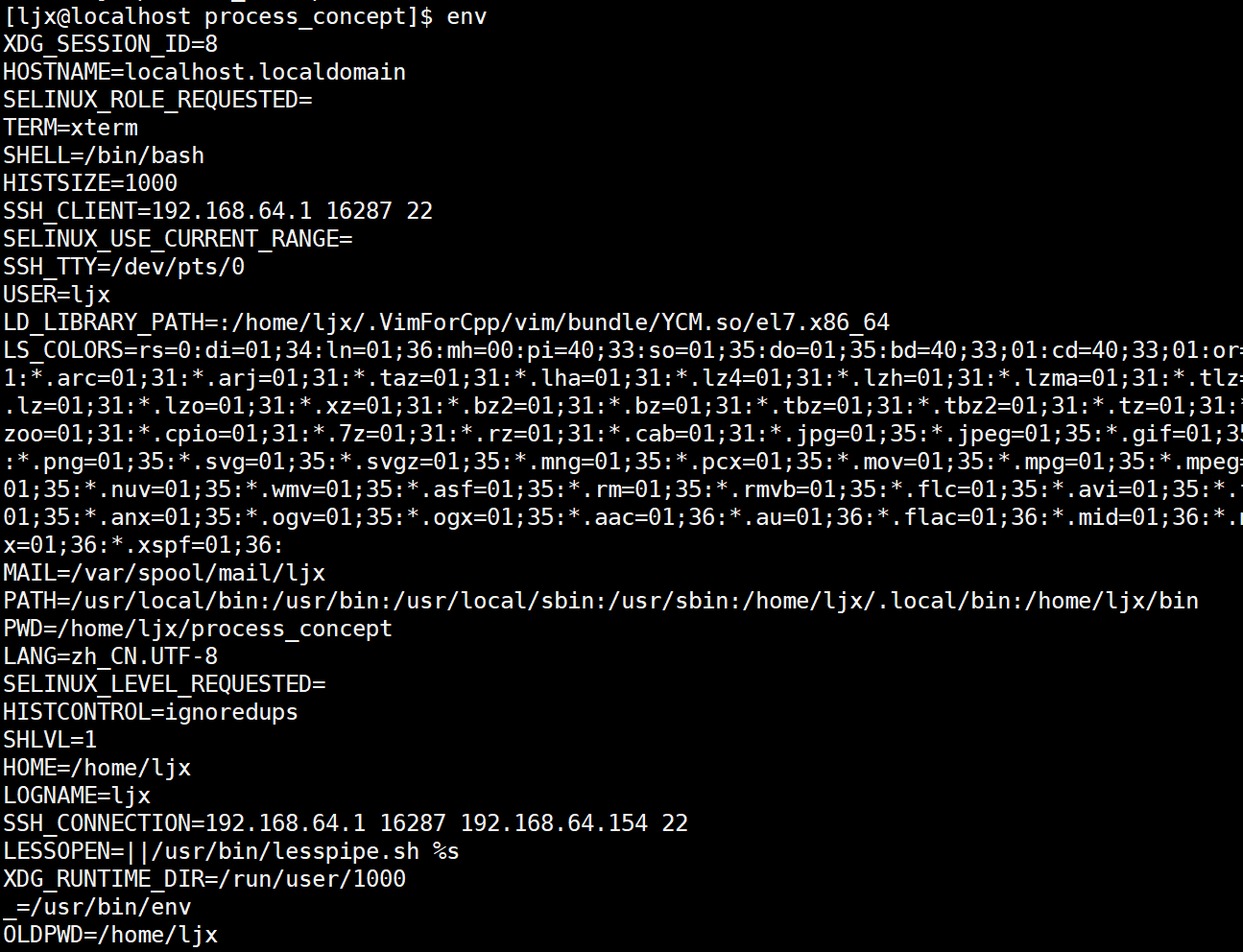 AI Visual Insight: This diagram shows the complete environment table of the current Shell, typically including key-value pairs such as
 PATH, HOME, PWD, and SHELL. It reflects the external configuration context that a process can inherit at startup.
 AI Visual Insight: This diagram uses
 echo $VARIABLE_NAME to verify the value of a single environment variable, showing that the Shell provides a convenient user-space interface for reading environment variables. At its core, this is still access to the current process’s environment table.
export HELLO=world   # Export as an environment variable so child processes can inherit it
unset HELLO          # Remove the variable from the current Shell
env | grep PATH      # Filter and view a specific environment entry
These commands demonstrate how to create, delete, and query environment variables.
Virtual address space explains why parent and child processes can show the same address but isolated data
After fork(), the parent and child often print the same variable address, yet modifying the variable in one process does not affect the other. This is not an address collision. It is the result of separating virtual addresses from physical addresses.
What a process sees is a virtual address. The actual physical pages are mapped by page tables and the MMU. Initially, the parent and child can share physical pages until one side writes, which triggers Copy-on-Write.
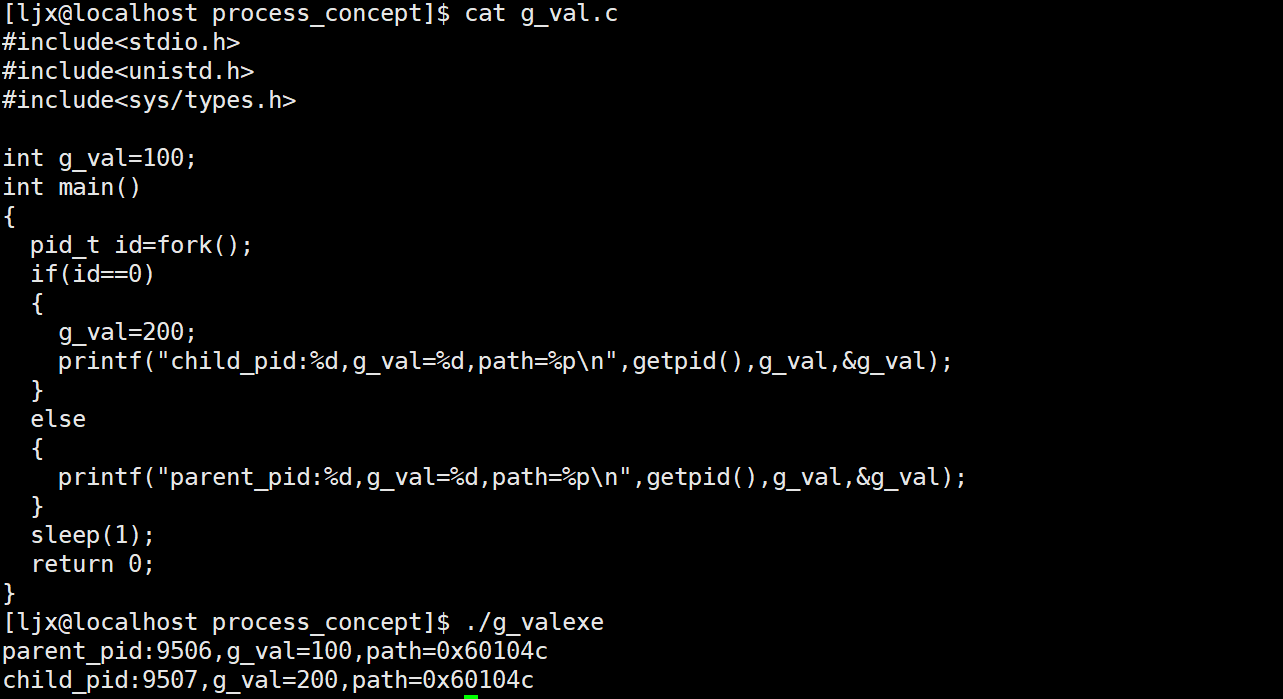 AI Visual Insight: This diagram typically shows an experiment where the same global variable has the same address in both the parent and child processes, but different values. The core explanation is page table mapping plus Copy-on-Write: virtual addresses can match even though physical pages split into separate copies after a write.
#include <stdio.h>
#include <unistd.h>

int g_val = 10;

int main() {
    pid_t id = fork();
    if (id == 0) {
        g_val = 100; // The child writes and triggers Copy-on-Write
        printf("child: %p %d\n", (void*)&g_val, g_val);
    } else {
        sleep(1); // Ensure the child prints first
        printf("parent: %p %d\n", (void*)&g_val, g_val);
    }
    return 0;
}
This code directly verifies the classic result: same virtual address, isolated data outcome.
FAQ
1. Why is a program not the same as a process?
A program is a static executable file on disk. A process is the dynamic instance created after the program is loaded into memory, a PCB is created, and the kernel schedules it.
2. Why can zombie processes not be ignored?
A zombie process no longer executes code, but it still consumes PID and PCB resources. If many zombies accumulate, they can exhaust kernel process table entries and interfere with the creation of new processes.
3. Why do parent and child processes have the same variable address after fork() but do not affect each other?
Because they see virtual addresses. The parent and child initially share mappings, but a write triggers COW. The kernel copies the physical page and updates the page table, which preserves the same address view while isolating the data.
Core Summary: This article systematically reconstructs the Linux process model by covering the von Neumann architecture, operating system management logic, PCB, process states, scheduling and priority, environment variables, and virtual address space. It helps developers build a complete mental model from program to process.