This article focuses on the shortest path to getting started with Spring Boot and Maven: first understand Maven dependency management and repository resolution, then create your first Spring Boot web project and return Hello World. It addresses three common beginner pain points: complex environment setup, dependency confusion, and startup failures. Keywords: Spring Boot, Maven, Tomcat.
Technical Specification Snapshot
| Parameter | Description |
|---|---|
| Primary Language | Java |
| Build Tool | Maven |
| Communication Protocol | HTTP |
| Default Server | Tomcat (embedded in Spring Boot) |
| Core Dependencies | spring-boot-starter-web, mysql-connector-java |
| Project Entry Point | @SpringBootApplication bootstrap class |
| Repository System | Local repository, Central repository, Private repository |
| Star Count | Not provided in the original |
Maven is the core tool for standardized builds and dependency management in Java projects
Maven is fundamentally a project management tool that organizes build configuration, dependencies, plugins, and version metadata around pom.xml. For beginners, its biggest value is not “writing XML.” Its real value is replacing the inefficient process of manually copying JAR files with a repeatable, auditable engineering workflow.
Every Maven project identifies dependencies through coordinates: groupId, artifactId, and version. Together, these three fields uniquely identify an artifact and enable Maven to automatically download, cache, and reuse dependencies.
Dependency declarations determine project maintainability
Here is a typical MySQL driver dependency configuration:
<dependencies>

<dependency>

<groupId>mysql</groupId>

<artifactId>mysql-connector-java</artifactId>

<version>8.0.33</version>
    </dependency>
</dependencies>
This configuration adds the MySQL JDBC driver to the project so the application can connect to a database.
dependencies is the container for all dependencies, while dependency represents a single dependency entry. In real-world development, the more dependencies you add, the more important it becomes to standardize versions and sources. Otherwise, build results can become unstable across environments.
Transitive dependencies and conflict resolution determine runtime stability
Maven’s transitive dependency mechanism automatically includes indirect dependencies. For example, if your project depends on A, and A depends on B and C, then B and C are automatically added to your project. This significantly reduces manual maintenance overhead.
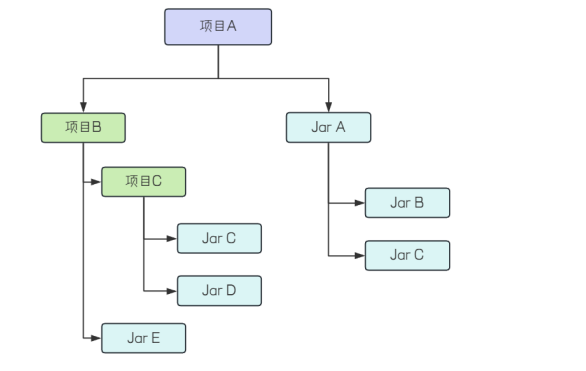 AI Visual Insight: This diagram shows the structure of a Maven dependency graph. The top-level business project brings in Jar A and Project B through direct dependencies, while Jar A and Project B continue to reference Jar C. The image clearly illustrates the hierarchy between direct and indirect dependencies, which is essential for understanding transitive dependency resolution and version conflict handling.
When the same artifact is introduced through multiple paths with different versions, Maven performs dependency mediation. Two core rules apply: the shortest path wins, and if path lengths are equal, the first declaration wins. This means you should not only make the project run, but also understand why Maven loaded a specific version.
Dependency exclusions are necessary to control classpath pollution
When a transitive dependency is not needed by the project, or when it conflicts with an existing version, you can remove it precisely with exclusions:
<dependency>

<groupId>org.springframework</groupId>

<artifactId>spring-core</artifactId>

<version>5.3.33</version>
    <!-- Exclude an unnecessary transitive dependency -->

<exclusions>

<exclusion>

<groupId>org.springframework</groupId>

<artifactId>spring-jcl</artifactId>
        </exclusion>
    </exclusions>
</dependency>
This configuration cuts off an unnecessary transitive dependency, reduces the chance of conflicts, and simplifies the runtime environment.
Maven repository resolution explains why dependencies can be downloaded automatically
Maven repositories are divided into local repositories and remote repositories. Remote repositories further include the Central Repository and private enterprise repositories. The dependency resolution order is typically: check local first, then the private repository, and finally the Central Repository.
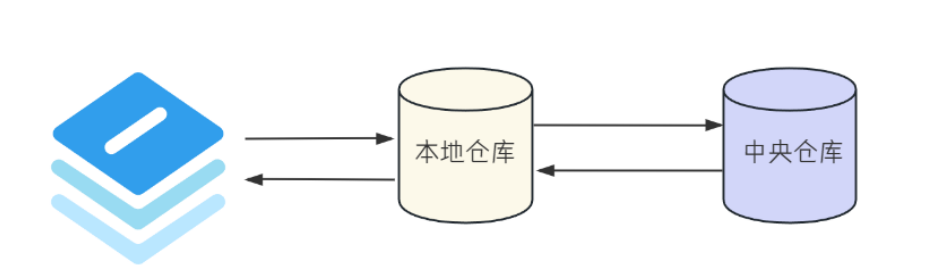 AI Visual Insight: This diagram visually explains the location and role of the local repository on a developer machine. Maven first attempts to satisfy dependencies from the disk cache, and only triggers a remote download when the artifact is missing. It highlights how local caching improves build speed and reduces repeated downloads.
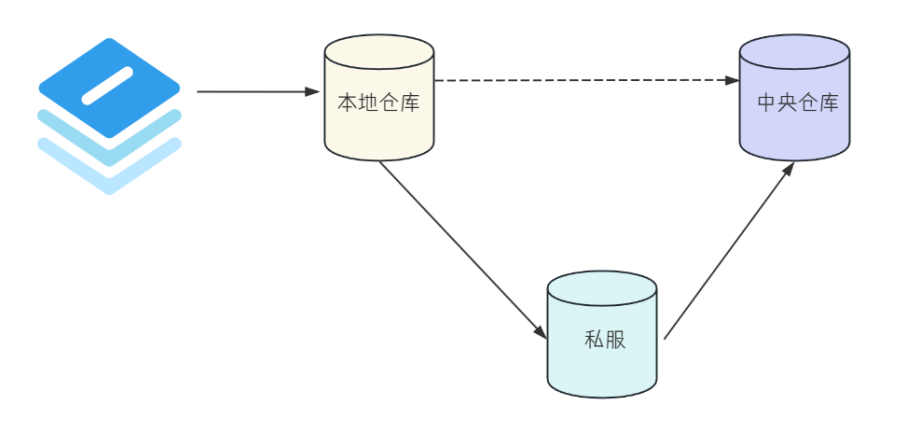 AI Visual Insight: This diagram shows the private enterprise repository acting as an intermediate layer between the local repository and the Central Repository. Requests go to the local cache first, then the private repository, and only then to the Central Repository. It reflects team-level capabilities such as dependency caching, access isolation, and artifact governance.
Understanding repository layers helps diagnose download failures
If a dependency cannot be downloaded, start by checking three common causes: a corrupted local repository, an unreachable private repository, or a missing artifact version. Many beginners blame everything on “IntelliJ IDEA being stuck,” which is a typical misdiagnosis.
Spring Boot dramatically simplifies traditional Spring project initialization
The value of Spring Boot lies in “convention over configuration.” It reduces verbose XML, component wiring, and server integration into a small set of starters and auto-configuration features, so developers can move into business logic development much faster.
When creating a project, you typically select a Spring Boot project template directly and choose the Web-related dependencies. Stable releases are preferable to SNAPSHOT versions because SNAPSHOT builds may introduce behavior changes that affect tutorial reproducibility and team collaboration.
The project directory structure reflects the default engineering conventions
A typical Spring Boot project includes the following directories:
src/main/java: application source code.src/main/resources: configuration files and static assets.src/test/java: test code.target: build output directory.pom.xml: the core Maven configuration file.
This convention-based structure allows build plugins, test frameworks, and packaging workflows to work together without requiring custom directory mapping.
The first endpoint example verifies that the project is actually runnable
Use the smallest possible example to return Hello World:
import org.springframework.web.bind.annotation.RequestMapping;
import org.springframework.web.bind.annotation.RestController;

@RestController // Declare this class as a REST controller
public class UserController {

    @RequestMapping("/hello") // Map the /hello path to this method
    public String hello() {
        return "Hello World"; // Return a plain-text response
    }
}
This code registers the simplest possible HTTP endpoint and verifies that Spring Boot, Tomcat, and request mapping are all working correctly.
After visiting http://127.0.0.1:8080/hello, if the browser returns Hello World, the project has completed the full loop from startup to request handling.
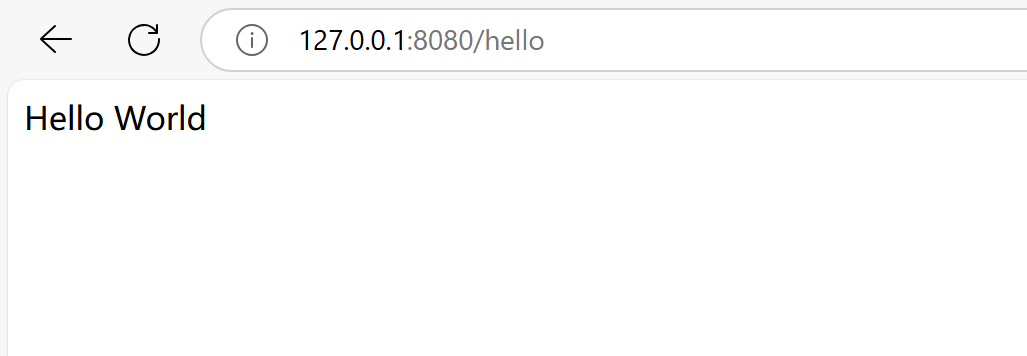 AI Visual Insight: This screenshot shows the plain-text response after directly visiting the
 /hello path on local port 8080 in the browser. It confirms that controller mapping, embedded Tomcat startup, and the HTTP request pipeline are all functioning correctly.
Spring Boot’s embedded Tomcat makes web services work out of the box
A web server receives HTTP requests, parses the protocol, routes requests to application code, and returns responses to the browser. Spring Boot integrates Tomcat by default, so you can run a web project without installing a separate application server.
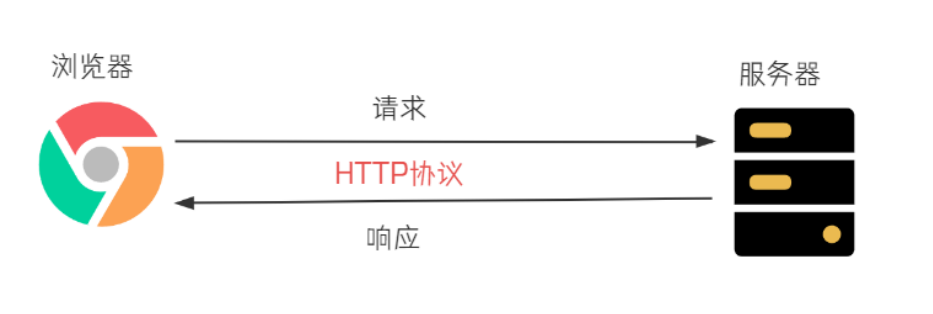 AI Visual Insight: This diagram describes the HTTP communication flow between a browser and a server. The client sends a URL request, and the server parses the request and returns resources. In Spring Boot, this corresponds to the processing model of “Browser → Tomcat → Controller → Response.”
The default port is 8080. When the browser requests 127.0.0.1:8080/hello, each part means the following: 127.0.0.1 points to the local machine, 8080 specifies the listening port, and /hello identifies the resource path.
Common HTTP error codes are the first entry point for troubleshooting startup and routing issues
4xx: Usually indicates an incorrect path, an unsupported request method, or a missing resource.5xx: Usually indicates a server-side exception and requires reviewing console logs.- Connection failure: Usually means the application did not start successfully, or the port is already in use.
# Start the Spring Boot project
mvn spring-boot:run
This command starts the Spring Boot application directly through Maven, making it convenient to verify whether the environment and dependencies are working correctly.
Running the full request path first is a more efficient learning sequence than studying internals first
For beginners, the most important thing is not to fully understand the auto-configuration source code on day one. The priority is to complete these four steps first: environment setup, dependency resolution, application startup, and endpoint access. Once you can run the full path successfully, later topics such as IoC, auto-wiring, and configuration binding will have real context.
The combination of Spring Boot and Maven essentially establishes a standardized project starting point for Java web development. It reduces boilerplate code and makes troubleshooting more structured.
FAQ
1. Why does my Spring Boot project fail to start?
The most common causes are an incompatible JDK version, failed dependency downloads, port 8080 already being occupied, or an incorrect pom.xml configuration. Start with the first exception in the console instead of looking only at the final error line.
2. Where should I look first when troubleshooting Maven dependency conflicts?
First, check whether the same groupId + artifactId appears with multiple versions. Then inspect the dependency tree for path length and declaration order. If necessary, use exclusions to remove unnecessary transitive dependencies.
3. Why does accessing /hello return 404?
This usually means the controller was not scanned by Spring, the path is incorrect, the project did not start successfully, or you are using the wrong port. Confirm that the bootstrap class and the controller are in the same package or a subpackage, then check the Tomcat startup logs.
Core Summary: This article reconstructs a practical beginner path for Maven and Spring Boot, covering dependency management, repository resolution, project creation, directory structure, the Hello World endpoint, and the principles behind embedded Tomcat, helping Java beginners quickly build a runnable backend project.