This article focuses on MySQL 5.7 accidental-deletion recovery using Binlog. It covers log enablement, event discovery, replay by position or datetime, database and table recovery, and recovery boundaries. The core challenge is how to recover after accidental deletion when no backup is available or when you need to stop the damage quickly. Keywords: MySQL, Binlog, data recovery.
The technical specification snapshot is outlined below
| Parameter | Description |
|---|---|
| Database version | MySQL 5.7 |
| Core mechanism | Binlog binary log |
| Recovery methods | Position-based replay, datetime-based replay |
| Main protocols/interfaces | MySQL Client / SQL |
| Common tools | mysql, mysqlbinlog, Navicat |
| Core dependencies | log-bin enabled, unique server-id |
| Applicable scenarios | Accidental database deletion, accidental table deletion, accidental partial data deletion |
Binlog is the prerequisite for accidental-deletion recovery in MySQL
MySQL logical recovery fundamentally depends on Binlog recording DDL and DML operations. If Binlog was not enabled in advance, you usually cannot recover through log replay after an accidental deletion. In that case, you must rely on a full backup or a physical snapshot.
First, verify whether binary logging is enabled on the instance. If the result returns OFF, the current instance does not have the foundation required for Binlog-based recovery.
SHOW VARIABLES LIKE 'log_bin%'; -- Check whether Binlog is enabledThis SQL statement confirms whether Binlog is enabled on the instance.
 AI Visual Insight: The image shows the query result of
 SHOW VARIABLES LIKE 'LOG_BIN%'. The key point is the value of the log_bin variable, which determines whether the current MySQL instance can support recovery through log replay.
Updating the configuration file is the correct way to enable Binlog
Many people try to run SET GLOBAL log_bin='ON'; dynamically, but in MySQL 5.7, log_bin is a read-only variable and cannot be changed online. The correct approach is to update the configuration file and then restart the service.
[mysqld]
log-bin=mysql-bin   # Enable binary logging and define the log prefix
server-id=1         # Assign a unique ID to the current instance; required for replication as well
This configuration permanently enables Binlog and assigns a unique identifier to the instance.
 AI Visual Insight: The image shows the error returned when trying to enable logging through
 SET GLOBAL log_bin, confirming that this parameter cannot be modified dynamically and must be configured persistently in my.cnf or my.ini.
You need to verify that log files are being generated
After the configuration takes effect, you can inspect the log list, the current primary status, and specific event contents. The key to recovery is not just having logs, but accurately identifying the event boundaries before and after the accidental operation.
SHOW BINARY LOGS;                 -- List all Binlog files
SHOW MASTER STATUS;               -- Show the current active file and position
SHOW BINLOG EVENTS;               -- Show events in the default Binlog
SHOW BINLOG EVENTS IN 'mysql-bin.000002'; -- Show events in a specific file
This command set confirms Binlog files, write positions, and the event sequence.
 AI Visual Insight: The image lists all current Binlog file names and sizes for the instance. This directly determines which log file you need to read during recovery.
 AI Visual Insight: The image shows the output of
 SHOW MASTER STATUS. The key fields are File and Position, which mark the latest write point.
 AI Visual Insight: The image shows detailed events in a specified Binlog file, including
 Pos and End_log_pos. During recovery, you usually use the end position of the previous event as the start position of the next event.
The log management strategy directly affects the recoverable window
Binlog is not something you can enable and ignore. If you run RESET MASTER, incorrectly purge historical logs, or set a retention window that is too short, you can break the recovery chain. The source material makes this clear: if the logs are incomplete, recovery is no longer possible.
FLUSH LOGS; -- Flush logs and rotate to a new log file
PURGE MASTER LOGS TO 'mysql-bin.000001'; -- Delete logs before the specified file
PURGE BINARY LOGS BEFORE '2023-05-29 23:59:59'; -- Delete old logs by time
RESET MASTER; -- Clear all Binlogs; use with extreme caution
SET GLOBAL expire_logs_days = 7; -- Set the log expiration period in days
These commands manage the log lifecycle, but misuse can directly reduce your recovery capability.
You must identify the accidental-deletion transaction range before recovery
Before recovery, confirm the target database, target table, and the point at which the accidental deletion occurred. A recommended approach is to first inspect the database and table state, then combine SHOW MASTER LOGS with SHOW BINLOG EVENTS IN ... to locate the transaction that contains the DROP DATABASE or DROP TABLE statement.
SHOW DATABASES;        -- List databases
USE text;              -- Switch to the target database
SHOW TABLES;           -- List tables
SELECT * FROM user_misjudge; -- Verify the target data
These statements confirm the deleted object and the recovery target.
 AI Visual Insight: The image shows the Binlog event list, which can help you identify the start and end positions around a
 DROP DATABASE or another destructive operation. These positions serve as direct inputs to the recovery command.
Position-based recovery is best for precise replay of a single operation range
If you already know the transaction start and end positions, you can use mysqlbinlog to extract that range and pipe it back into MySQL. This method is best suited for recovering database creation, table creation, or insert transactions that occurred before a single accidental deletion event.
mysqlbinlog --start-position=154 --stop-position=427 mysql-bin.000001 | mysql -uroot -p
# Read Binlog from the specified start position
# Stop before the accidental-deletion transaction to avoid replaying the DROP operation
This command replays the valid operation range from the Binlog by byte position.
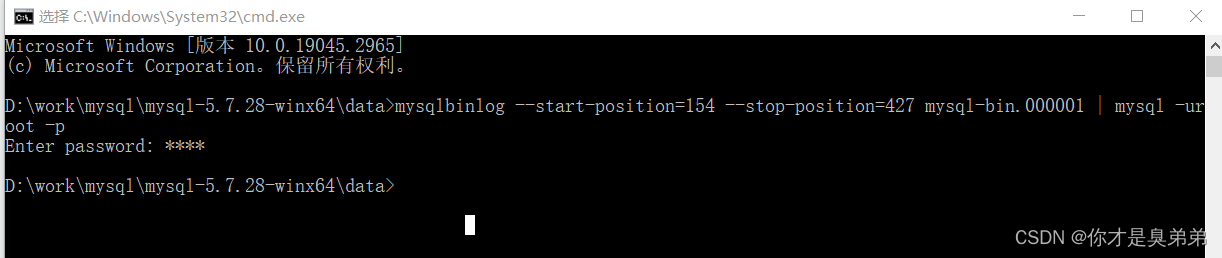 AI Visual Insight: The image shows the terminal process of restoring data through the
 mysqlbinlog | mysql pipeline. It highlights that recovery is not performed inside the interactive MySQL shell, but from the system terminal.
Time-based recovery is more suitable when you only know the approximate deletion window
If you remember when the accidental deletion happened but do not know the exact position, you can replay by time window. This approach is more flexible for recovery across multiple transactions, but it requires accurate system time and a replay window that does not include the accidental deletion statement itself.
mysqlbinlog --start-datetime="2023-06-01 11:32:34" \
  --stop-datetime="2023-06-01 11:47:46" mysql-bin.000001 | mysql -uroot -p
# Extract valid transactions by time range
# The stop time should be before the accidental deletion, not after it
This command restores database changes made before the accidental deletion by using a time window.
Restoring table structure does not mean restoring table data
A key pitfall in the original case is this: the table came back, but the data did not. The reason was not a tool failure. The stop-position was set too early, so the replay only covered the table-creation transaction and missed the later insert transactions.
When restoring a table, you should identify three critical points in the log at the same time: table creation, data insertion, and deletion. The correct strategy is to replay the complete range from “table creation + inserts” up to the moment right before the table is dropped, rather than replaying only the DDL segment.
mysqlbinlog --start-position=720 --stop-position=1579 mysql-bin.000001 | mysql -uroot -p
# If this range contains only table-creation events, it can restore only the schema
# To restore data, the stop position must include the INSERT transaction commit point
This command demonstrates why an incorrect position range can restore only the schema and not the data.
Parsing Binlog into plain text helps you validate transaction boundaries manually
When there are too many events, it is more reliable to export the Binlog into SQL text first and analyze it there. This makes it easier to locate statements such as BEGIN, COMMIT, DROP TABLE, and INSERT, and avoids guessing positions blindly.
mysqlbinlog mysql-bin.000001 > xj.sql
# Convert the binary log into readable SQL text
# Use it to manually verify transaction boundaries and the position of the accidental-deletion statement
This command converts Binlog into text so you can audit it and locate the correct recovery range.
Recovery principles in production must prioritize minimal impact
Before recovery, validate the replay result in a temporary instance or a temporary database whenever possible. Do not repeatedly test directly on the production primary. This is especially important for time-window recovery, which may introduce duplicate inserts, auto-increment conflicts, or overwrite valid data created after the incident.
At the same time, build a three-layer protection strategy: enable Binlog, perform regular full backups, and use delayed replicas or snapshots for critical services. Binlog is a remediation mechanism, not your only safety net.
The FAQ section answers the most common recovery questions
1. Can I recover accidentally deleted data if Binlog was not enabled?
Usually not through log-based recovery. In that case, you can only try a full backup, a physical snapshot, a cloud disk snapshot, or professional data recovery services. The success rate is significantly lower than Binlog replay.
2. Why did I recover only the table structure but not the data?
Because the replay range covered only the table-creation DDL and did not include the DML transactions that inserted the data. Recheck start-position, stop-position, or the replay time window.
3. Why is RESET MASTER dangerous?
It clears all Binlogs and resets their numbering. Once executed, much of the historical operation chain is permanently lost, and your ability to perform point-in-time recovery from logs disappears with it.
Core summary: This article systematically reconstructs the MySQL 5.7 accidental-deletion recovery workflow. It focuses on enabling Binlog, inspecting logs, recovering databases and table data by position or by time, and understanding log cleanup, retention settings, and common recovery boundaries. It is well suited for DBAs, backend engineers, and operations teams that need an actionable accidental-deletion response plan.