This article focuses on the first half of a two-node Oracle 19c RAC deployment on CentOS/RHEL 7/8. The core objective is to complete host standardization, network name resolution, kernel and limits tuning, ASM shared disk mapping, and Grid Infrastructure pre-installation validation to address three common pain points: inconsistent environments, drifting device names, and high installation failure rates. Keywords: Oracle RAC, CentOS 7, Grid Infrastructure.
The technical specification snapshot summarizes the deployment baseline
| Parameter | Details |
|---|---|
| Deployment target | Oracle 19c RAC 19.3 two-node cluster |
| Operating system | CentOS 7/8, RHEL 7/8 |
| Cluster components | Oracle Grid Infrastructure, ASM, Clusterware |
| Network design | Public / Private / VIP / SCAN |
| Storage access | Virtio + udev or multipath + udev |
| Installation users | grid, oracle |
| Core dependencies | binutils, gcc, libaio, ksh, nfs-utils, unixODBC |
| Protocols/services | SSH, NTP, udev, systemd |
| Original article engagement | 369 views, 11 likes, 10 bookmarks |
| Document type | Enterprise deployment walkthrough |
This guide reconstructs the critical pre-installation path for Oracle 19c RAC
Oracle RAC success usually depends less on the installation wizard and more on host consistency before installation begins. The value of the original material lies in connecting every easy-to-miss but potentially fatal detail into a single operational chain.
The goal here is not to run commands mechanically. It is to build a reusable cluster delivery template: standardize hostnames, pin down name resolution, disable interfering services, and stabilize shared disk identifiers before moving into the Grid Infrastructure installation phase.
The operating system and hostnames must be standardized first
First, verify that the distribution, kernel, and host naming conventions satisfy Oracle cluster requirements. Hostnames must not start with an underscore or a number, and mixed case is not recommended.
cat /etc/*release
hostnamectl status
hostname
hostnamectl set-hostname 'racnode01' --static  # Permanently set a compliant hostname
This command set verifies the OS version and standardizes node naming, which forms the prerequisite for later network resolution and cluster identification.
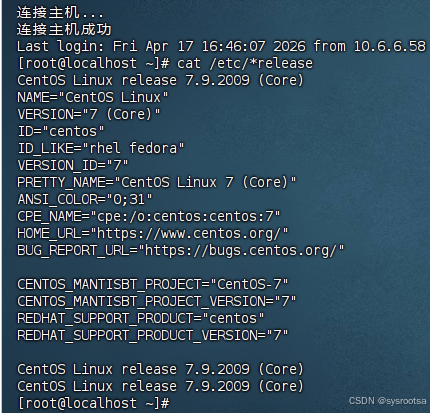 AI Visual Insight: This screenshot shows Linux distribution identification output. It is typically used to confirm the CentOS 7.x release, kernel compatibility, and whether the dependency installation path matches the Oracle 19c certification scope.
Network name resolution must be pinned locally instead of relying on DNS
RAC requires highly consistent name resolution. In practice, define all four address types in /etc/hosts on every node: public, private, VIP, and SCAN. This avoids communication issues caused by DNS jitter or inconsistent responses.
vi /etc/hosts
# public
10.16.7.232 js-mem-oracle-rac1
10.16.7.233 js-mem-oracle-rac2
# private
10.100.100.232 js-mem-rac1-priv
10.100.100.233 js-mem-rac2-priv
# vip
10.16.7.234 js-mem-rac1-vip
10.16.7.235 js-mem-rac2-vip
# scan
10.16.7.231 js-mem-oracle-scan
This configuration pins every name required for cluster communication to local resolution, which significantly reduces the risk of node eviction and name resolution drift.
Next, run ip a on each node to verify address ownership. Make sure the public and private networks are bound to the correct NICs, no addresses are duplicated, and no incorrect routes are present.
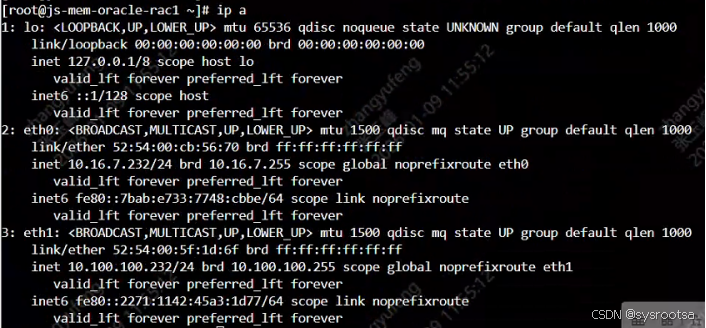 AI Visual Insight: This screenshot shows the NIC and IP binding results on node 1. Focus on whether both the public subnet and the private heartbeat subnet are present and whether the interface state is UP.
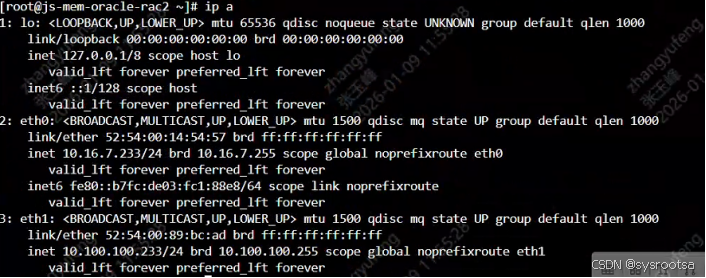 AI Visual Insight: This screenshot shows the address layout on node 2. Its purpose is to compare it against node 1 and validate network symmetry and naming consistency across the two-node RAC cluster.
System services and security policies must yield to cluster requirements
firewalld, NetworkManager, SELinux, and Transparent Huge Pages are not always unusable, but in clustered database environments they often introduce unpredictable variables. For that reason, deployment teams typically disable them or force them into a static configuration.
systemctl disable firewalld avahi-daemon bluetooth cups  # Disable nonessential system services
systemctl stop NetworkManager.service
systemctl disable NetworkManager.service
sed -i 's/SELINUX=enforcing/SELINUX=disabled/' /etc/selinux/config  # Permanently disable SELinux
setenforce 0
These settings remove interference from dynamic network management and mandatory security enforcement that can affect RAC networking, listeners, and shared storage access.
Kernel parameters and resource limits must be calculated based on memory size
Oracle 19c has explicit requirements for shared memory, asynchronous I/O, file handles, and process counts. In particular, kernel.shmall, kernel.shmmax, and vm.min_free_kbytes must be recalculated based on physical memory instead of copied blindly from a template.
cat >> /etc/sysctl.conf <<'EOF'
fs.aio-max-nr = 1048576
fs.file-max = 6815744
kernel.sem = 250 32000 100 128
net.ipv4.ip_local_port_range = 9000 65500
vm.swappiness = 10
EOF
sysctl -p  # Apply kernel parameters immediately
This configuration provides stable kernel resource boundaries for Oracle instances and GI processes, helping prevent installer check failures and runtime performance issues.
You also need to complete user-level limits, especially nofile, nproc, and memlock. Configure both grid and oracle; do not set limits for only the database user.
cat >> /etc/security/limits.conf <<'EOF'
grid hard nofile 65536
grid hard nproc 16384
oracle hard nofile 65536
oracle hard nproc 16384
oracle hard memlock unlimited
EOF
This step ensures that ASM, GI, and database instances do not hit OS-imposed soft limits during high concurrency or recovery operations.
Installation users, directory structure, and environment variables must align exactly
A RAC deployment involves at least the oinstall, dba, asmadmin, and asmdba groups, along with the two core users grid and oracle. Plan UID and GID values consistently across nodes to avoid cross-node mismatches.
groupadd -g 1001 oinstall
groupadd -g 1004 asmadmin
useradd -u 1001 -g oinstall -G dba,asmadmin,asmdba,oper oracle
useradd -u 1002 -g oinstall -G asmadmin,asmdba,asmoper,oper,dba grid
mkdir -p /u01/app/19.3.0/grid /u01/app/oracle/product/19.3.0/db_1
This step initializes installation identities and directory layout. It provides the foundation for extracting GI Home and DB Home, setting permissions, and performing the later GUI or silent installation.
The grid user usually defines ORACLE_BASE=/u01/app/grid and ORACLE_HOME=/u01/app/19.3.0/grid. The oracle user defines the database software path and instance SID. On node 2, +ASM2 and dbsid2 must differ from node 1.
Shared disks must be mapped to ASM devices with stable identifiers
The original material provides two approaches: Virtio + udev, and multipath + udev. In virtualized environments, the Virtio bus is simple and efficient. In SAN environments, multipath is the preferred option.
vi /etc/udev/rules.d/99-oracle-asmdevice.rules
SUBSYSTEM=="block",ENV{ID_SERIAL}=="4626422d-fb51-4640-8", SYMLINK+="oracleasm/vdisk1",GROUP="asmadmin",OWNER="grid",MODE="0660"
udevadm control --reload-rules  # Reload udev rules
udvadm trigger --type=devices --action=change
ls -l /dev/oracleasm/
These rules map unstable device names such as /dev/vdb to stable ASM logical devices, preventing GI or ASM detection failures after a reboot changes disk ordering.
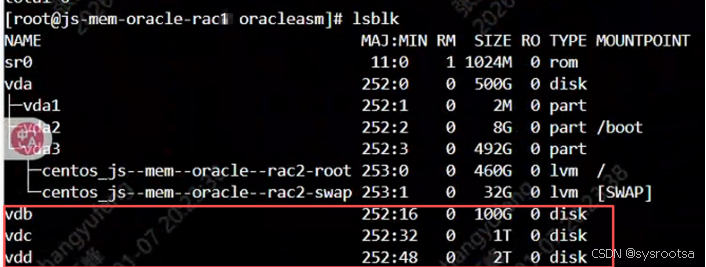 AI Visual Insight: This screenshot shows block device discovery on node 1. Use it to confirm that shared disks such as OCR, DATA, and ARCH have been attached correctly to the virtual machine and that device names and capacities match the storage plan.
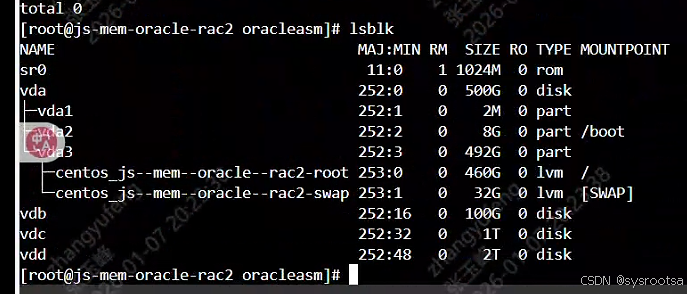 AI Visual Insight: This screenshot shows the shared disk view on node 2. The key check is whether the disk capacities, device count, and naming order match node 1, confirming that both nodes point to the same shared storage set.
Clock sources and name service settings directly affect cluster stability
In production, verify the time zone, NTP synchronization, and the virtualization clock source. For x86-64 virtual machines, Oracle documentation typically recommends evaluating the tsc clock source first, subject to platform compatibility.
The article also emphasizes removing dependency on resolv.conf and setting NOZEROCONF=yes to further reduce the impact of external name resolution and automatic link behavior on cluster networking.
timedatectl set-timezone Asia/Shanghai  # Standardize the time zone
echo "NOZEROCONF=yes" >> /etc/sysconfig/network
mv /etc/resolv.conf /etc/resolv.conf.bak  # Prevent DNS from participating in name resolution
The purpose of this step is to make time, name resolution, and routing behavior as static and deterministic as possible to satisfy RAC requirements.
GI installation begins by extracting the media as the grid user
After completing all preparation steps, reboot both nodes. Then log in as grid on node 1 and extract the Grid Infrastructure installation media. Do not extract it as root, or you will very likely create permission issues.
su - grid
unzip /tmp/LINUX.X64_193000_grid_home.zip -d /u01/app/19.3.0/grid/  # Extract the GI installation package as the grid user
This command performs the initial expansion of GI Home and prepares the environment for the subsequent GUI-based or silent installation.
The real value of this deployment checklist is that it reduces RAC installation uncertainty
From a delivery perspective, Oracle RAC is not just a software installation. It is a combined validation exercise across the operating system, networking, storage, time, and permissions model. If any layer is not standardized, the installation phase will amplify the problem.
If you plan to use this approach in enterprise delivery, convert the hostname standards, IP naming rules, sysctl calculation formulas, udev templates, and environment variable templates into scripts or Ansible roles so the deployment becomes repeatable.
FAQ
Why is /etc/hosts usually preferred over DNS in RAC environments?
Because RAC requires public, private, VIP, and SCAN names to resolve identically on every node. If DNS introduces cache drift, latency, or service outages, node communication can fail, VIP failover can behave unexpectedly, and node eviction may occur.
Why must ASM disk names be pinned with udev or multipath?
Because names such as /dev/sdX or /dev/vdX can change after a reboot or bus rescan. ASM and GI depend on stable device identifiers. If disk names drift, the result can range from installation failure to a cluster that cannot start.
Why must the Grid installation media not be extracted as root?
Because ownership of the extracted files affects whether the installer can read and execute them. If GI Home is extracted by root, the grid user may lack read or execute permissions, which can cause subtle failures during installation or patching.
Core Summary: This article reconstructs the original deployment notes into an execution-ready Oracle 19c RAC technical guide. It covers hostname planning, networking, dependency packages, kernel parameters, user groups, ASM disks, clock sources, and Grid Infrastructure pre-installation preparation on CentOS/RHEL 7/8, making it suitable for two-node cluster implementation and standardized enterprise delivery.