This article focuses on Linux TCP communication and explains three core topics: full-duplex read/write behavior, packet coalescing and fragmentation, and JsonCpp serialization. It helps developers build a complete mental model from kernel buffers to application-layer protocols. Keywords: TCP full-duplex, custom protocol, serialization.
| Technical Area | Specification Snapshot |
|---|---|
| Language | C / C++ |
| Runtime Environment | Linux |
| Transport Protocol | TCP |
| Protocol Layer Focus | Transport Layer + Application Layer |
| Core Dependencies | socket API, JsonCpp |
| Star Count | Not provided in the original article |
TCP full-duplex behavior comes from independent send and receive paths in the kernel
TCP is a protocol specification, and the Linux kernel is a concrete implementation of that specification. Applications do not manage the TCP state machine directly. Instead, they interact with the kernel networking stack through system calls such as socket(), read(), write(), send(), and recv().
Full-duplex does not simply mean communication appears to happen in both directions at the same time. It means a single TCP connection inherently maintains two independent paths inside the kernel: the send buffer handles writes, and the receive buffer handles reads. Because reads and writes operate on different memory regions, they can progress in parallel.
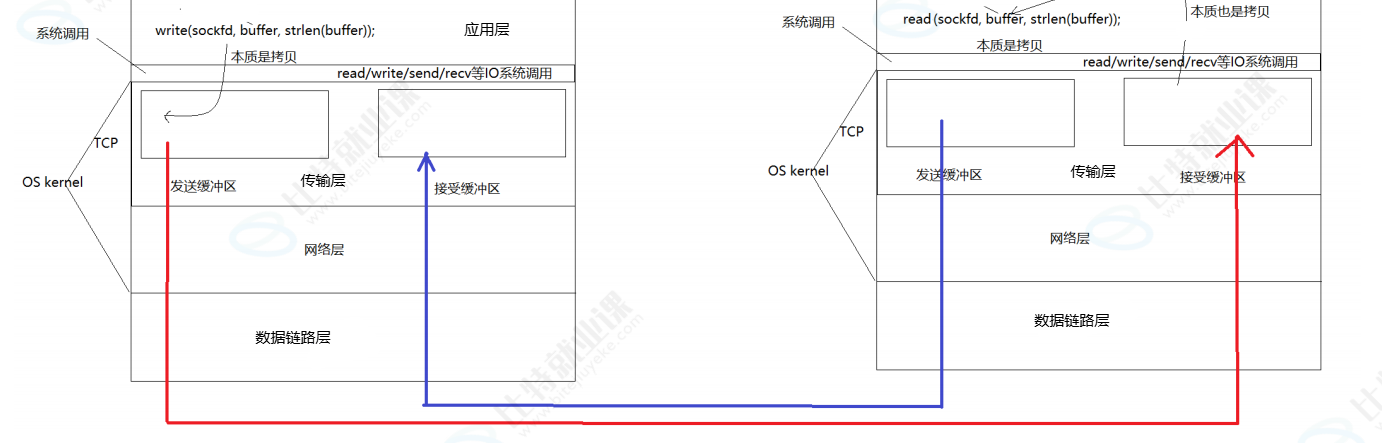 AI Visual Insight: The diagram shows the bidirectional data-flow model of a single TCP connection. At the application layer, read operations target the receive buffer and write operations target the send buffer. Both sides interact with the network through independent buffering paths, clearly illustrating the low-level structure behind full-duplex concurrency.
The path from file descriptor to TCP buffers is resolved layer by layer
A process only holds a file descriptor, fd, but the real data path lives in a chain of kernel objects: task_struct -> files_struct -> struct file -> struct socket -> struct sock. Ultimately, struct sock provides the actual TCP send and receive capabilities.
In TCP, the two most important members are sk_receive_queue and sk_write_queue. They are not simple arrays. They are packet queues organized as doubly linked lists of sk_buff structures. The receive path uses the receive queue, and the send path uses the write queue.
ssize_t n = write(sockfd, buf, len); // Write user data into the send buffer
if (n < 0) {
    perror("write"); // A write failure usually relates to connection state or buffer conditions
}

ssize_t m = read(sockfd, out, sizeof(out)); // Read data that has already arrived from the receive buffer
if (m < 0) {
    perror("read"); // On read failure, check for blocking, signals, or connection closure
}
This code shows that application-layer reads and writes simply operate on two different categories of kernel TCP buffers.
Blocking behavior is essentially a producer-consumer model on top of buffers
A blocking write() usually means the application is producing data faster than the kernel send buffer can accept it for the moment. A blocking read() usually means the application is consuming data faster than complete readable data is arriving in the kernel receive buffer.
So blocking does not mean TCP is stuck. It means send and receive rates are temporarily imbalanced at the buffer level. Once developers understand this, it becomes much easier to reason about why high-concurrency systems introduce non-blocking I/O, epoll, or outbound queue management.
The application layer must define a custom protocol because TCP has no message boundaries
TCP is byte-stream oriented. It guarantees reliable and ordered delivery, but it does not guarantee that one write() maps to one read(). As a result, business messages can reach the receiver in two common abnormal forms: multiple messages may be merged together, or one message may be split into several segments.
If you send command strings such as ls -a -l and pwd directly, the receiver might read ls -a -lpwd in one call, or it might read ls first and receive the remaining content later. The problem is not that TCP failed. The problem is that the application layer did not define message boundaries.
[4-byte length header][JSON message body]
[4-byte length header][JSON message body]
This format uses a fixed-size header to describe the message body length. It is the most common application-layer protocol skeleton used with TCP in production systems.
A length-prefixed protocol is the most reliable way to handle packet coalescing and fragmentation
There are three common strategies: fixed-length framing, delimiter-based framing, and length-prefixed framing. Fixed-length framing is simple but wastes space. Delimiter-based framing is flexible but requires the content to avoid delimiter conflicts. Length-prefixed framing provides extensibility, precision, and stability, which makes it the best fit for real-world projects.
The key to a length-prefixed protocol is not just reading 4 bytes first. The receiver must maintain buffer state and read in a loop until both the header and the message body are complete. Only then should it pass the payload to the business layer for parsing.
struct Packet {
    uint32_t len;      // Length of the message body
    std::string body;  // Serialized business data
};
This definition captures the core idea of a custom protocol: boundary information and business data must travel together.
Serialization is required to turn structured data into a network byte stream
At the application layer, you usually need to transmit more than a single string. Real payloads often include structured fields such as user IDs, names, actions, and status codes. The network only understands a continuous byte stream, so you must first convert structured objects into transferable text or binary data.
Serialization turns many fields into one transferable representation. Deserialization turns that representation back into business structures. Without this layer, a length header can solve framing, but it cannot solve data representation.
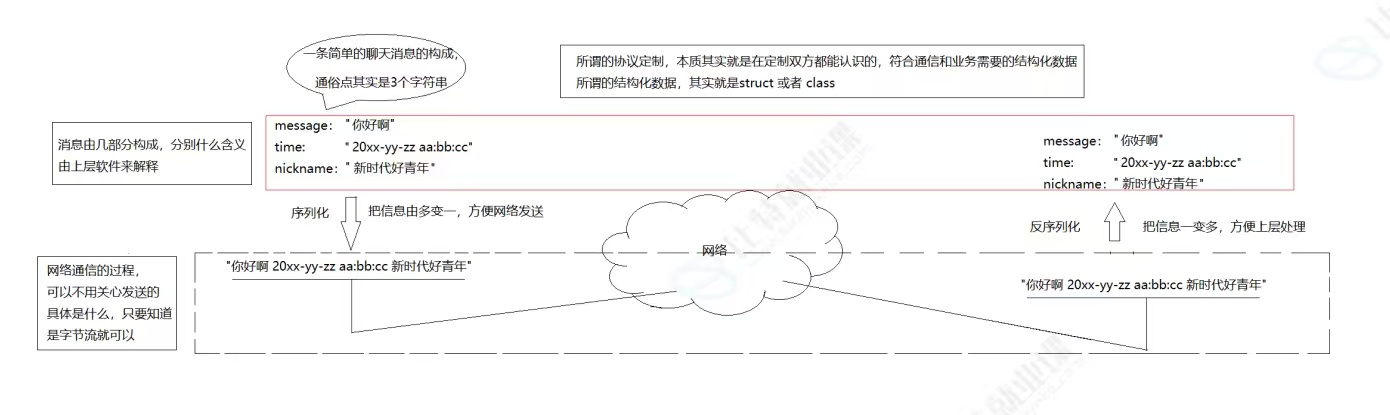 AI Visual Insight: The diagram highlights the two-way conversion between structured objects and continuous byte streams. On the left are business entities with multiple fields. On the right is transportable network data. The mapping in the middle is the core abstraction of serialization and deserialization.
JsonCpp is a practical choice for JSON encoding and decoding in C++
JsonCpp is not part of the C++ standard library, so you need to install it separately. Its value comes from three core pieces: Json::Value for representing fields, Json::FastWriter for generating compact JSON, and Json::Reader for parsing input strings.
 AI Visual Insight: The image shows the command-line installation flow for JsonCpp in a Linux environment, emphasizing that this library is a third-party dependency that must be installed explicitly rather than being available out of the box.
#include <jsoncpp/json/json.h>
#include
<string>

std::string SerializeUser() {
    Json::Value root;
    root["name"] = "zhangsan";   // Set a string field
    root["age"] = 20;             // Set an integer field
    root["city"] = "beijing";    // Set a city field

    Json::FastWriter writer;
    return writer.write(root);     // Serialize to a compact JSON string
}
This code encodes structured fields into a JSON string that can be placed directly in a TCP message body.
#include <jsoncpp/json/json.h>
#include
<string>

bool ParseUser(const std::string& json, std::string* name, int* age) {
    Json::Value root;
    Json::Reader reader;

    if (!reader.parse(json, root)) {
        return false; // Parsing failed, which means the JSON is incomplete or malformed
    }

    *name = root["name"].asString(); // Convert back to a C++ string
    *age = root["age"].asInt();      // Convert back to a C++ integer
    return true;
}
This code demonstrates that the core purpose of deserialization is to map a JSON container back into business fields.
Developers should separate transport reliability from message semantics
TCP provides reliable transport, but it does not define business message boundaries or object encoding. In engineering practice, you should separate responsibilities across three layers: kernel TCP guarantees reliable byte delivery, a custom protocol defines message framing, and a serialization library defines data representation.
Once you understand these three layers separately, many network-programming problems become much clearer: analyze read/write blocking at the buffer layer, analyze packet coalescing and fragmentation at the protocol-boundary layer, and analyze parsing failures at the serialization-format layer. That is how you build stable TCP services.
FAQ
Why do I still need a custom protocol if TCP is already reliable?
TCP reliability only guarantees that bytes are not lost and do not arrive out of order. It does not guarantee business-level message boundaries. If the application layer does not define a length header, delimiter, or fixed packet format, it cannot reliably distinguish one complete message from another.
Why is hand-written serialization usually not recommended?
Hand-written solutions often run into problems with endianness, alignment, cross-language compatibility, and boundary validation. Mature libraries such as JsonCpp and Protobuf have already been validated in production and are usually a better choice for engineering use.
Is JsonCpp suitable for every high-performance scenario?
Not necessarily. JsonCpp is easy to debug and highly readable, which makes it a good fit for teaching, business APIs, and lightweight to mid-range services. If you need better compression efficiency or stronger cross-language performance, Protobuf or FlatBuffers is usually the better choice.
Core summary
This article systematically breaks down three critical layers of Linux TCP communication: why full-duplex reads and writes can proceed in parallel, why the application layer must define a custom protocol, and how structured data can be serialized and deserialized with JsonCpp. It also includes a length-prefixed protocol pattern and practical C++ examples.