This article outlines an integration approach for six core Flutter for OpenHarmony modules and addresses common issues when reusing generic Flutter libraries on OpenHarmony, including ineffective permissions, restricted sandbox access, notifications that do not fire, and push initialization failures. Keywords: Flutter for OpenHarmony, OpenHarmony adaptation, third-party libraries.
The technical specification snapshot summarizes the integration baseline
| Parameter | Description |
|---|---|
| Development Languages | Dart, JSON5 |
| Runtime Framework | Flutter for OpenHarmony |
| Key Protocols/Mechanisms | Permission declarations, notification channels, sandbox isolation, byte stream processing |
| Source Popularity | 29 views (as shown in the source material) |
| Core Dependencies | image_picker_ohos, crop_image, image, flutter_local_notifications, flutter_secure_storage, firebase_messaging |
This solution integrates foundational Flutter capabilities specifically for OpenHarmony
Traditional Flutter tutorials usually target Android or iOS by default, but OpenHarmony differs significantly in its permission model, file access behavior, and system services. If you directly reuse generic plugins, you will often run into issues such as a black camera screen, an unresponsive gallery picker, notifications that never appear, or failed push initialization.
This solution connects six high-frequency modules into one stable workflow: image selection, cropping, compression, notifications, secure storage, and device push messaging. The goal is not just to make features run, but to make them run reliably and maintainably under OpenHarmony’s rules.
Unified dependencies are the prerequisite for project stability
The core dependency set from the source material covers media processing, notifications, secure storage, and messaging. On OpenHarmony, version stability is often more important than using the latest release, because newer plugin versions may not have completed OpenHarmony adaptation.
dependencies:
  flutter:
    sdk: flutter
  image_picker_ohos: ^1.0.4
  crop_image: ^1.0.6
  image: ^4.1.3
  flutter_local_notifications: ^16.1.0
  timezone: ^0.9.2
  flutter_secure_storage: ^9.0.0
  firebase_messaging: ^14.7.10
  firebase_core: ^2.24.2
This configuration establishes a shared dependency baseline for all six modules and helps prevent version conflicts between plugins.
flutter pub get
flutter clean
These two commands download dependencies and clear build caches, which can reduce issues caused by Hvigor compilation residue.
The six modules jointly address four core pain points in OpenHarmony development
The first pain point is media resource access. OpenHarmony enforces stricter sandbox isolation, so path-based file reads and writes often fail. As a result, image processing works more reliably when the entire pipeline uses Uint8List byte streams.
The second pain point is permission governance. Gallery access, camera access, notifications, and private data access cannot rely solely on static declarations or runtime requests alone. You must implement both.
The third pain point is system service adaptation. Notifications must bind to a valid channel, and background freeze policies can also affect scheduled reminders. The fourth pain point is ecosystem compatibility: many Flutter plugins can compile successfully but still fail to execute correctly on OpenHarmony.
The image pipeline depends on a unified data format rather than any single plugin
Modules one through three form a complete media pipeline: image_picker_ohos handles image selection, crop_image handles cropping, and image handles compression. Their most reliable integration pattern is not file-path transfer, but in-memory byte-stream transfer.
This approach delivers two direct benefits: it avoids public-directory access restrictions, and it reduces conversion overhead across modules. It is especially effective for scenarios such as avatar uploads, document cropping, and poster editing.
Future
<Uint8List> compressImage(Uint8List inputBytes) async {
  final decoded = img.decodeImage(inputBytes); // Decode the original image bytes first
  if (decoded == null) return inputBytes;

  final resized = img.copyResize(
    decoded,
    width: 1080, // Limit width to reduce memory usage
  );

  return Uint8List.fromList(
    img.encodeJpg(resized, quality: 80), // Compress and output as JPG with quality control
  );
}
This code demonstrates a more reliable image compression strategy on OpenHarmony: resize first, then compress by quality.
Notification and push modules must comply with OpenHarmony system constraints
Local notifications are not as simple as calling a plugin API. On OpenHarmony, if you do not create a notification channel in advance, the system may block both immediate and scheduled notifications.
Remote push messaging is more complex. Because some device environments do not provide full Google service support, initialization for firebase_core and firebase_messaging must include exception protection. Otherwise, the app may crash during startup.
A one-time global initialization at app startup is the recommended pattern
If you centralize initialization for notifications, secure storage, and push messaging at the application entry point, you can avoid duplicate instances, repeated resource requests, and inconsistent state. Unified initialization also provides a foundation for future logging, analytics, and fault tolerance.
Future
<void> bootstrap() async {
  WidgetsFlutterBinding.ensureInitialized(); // Ensure the Flutter runtime is initialized

  try {
    await Firebase.initializeApp(); // Initialize push capabilities with exception protection
  } catch (_) {
    // Some OpenHarmony environments may lack related services; avoid crashing at startup
  }

  await NotificationService.instance.init(); // Initialize notifications and create channels
  await SecureStore.instance.init(); // Initialize the secure storage singleton
}
This entry-point code consolidates system service initialization into a single location, reducing module coupling and startup risk.
Permission configuration must cover both declaration and runtime requests
One of the most important project-level configurations in the source material is the permission declaration in module.json5. If declarations are missing, runtime requests often fail to take effect. If runtime requests are missing, the system silently denies access.
{
  "requestPermissions": [
    {
      "name": "ohos.permission.READ_MEDIA_IMAGES",
      "reason": "Read gallery image resources for image selection and editing"
    },
    {
      "name": "ohos.permission.CAMERA",
      "reason": "Use the camera for real-time photo capture"
    },
    {
      "name": "ohos.permission.NOTIFICATION_AGENT",
      "reason": "Request system notification permission for local message alerts"
    },
    {
      "name": "ohos.permission.PRIVATE_DATA_ACCESS",
      "reason": "Ensure encrypted data can be persisted correctly"
    }
  ]
}
This configuration provides the static permission foundation for three critical capabilities: image handling, notifications, and secure storage.
Real-device results show that this solution works well as both a course and project template
The source material indicates that this integrated solution has already completed end-to-end validation for multi-image selection, camera capture, cropping, compression, immediate notifications, scheduled notifications, encrypted persistence, and token retrieval. Its value lies in module compatibility rather than isolated demos.
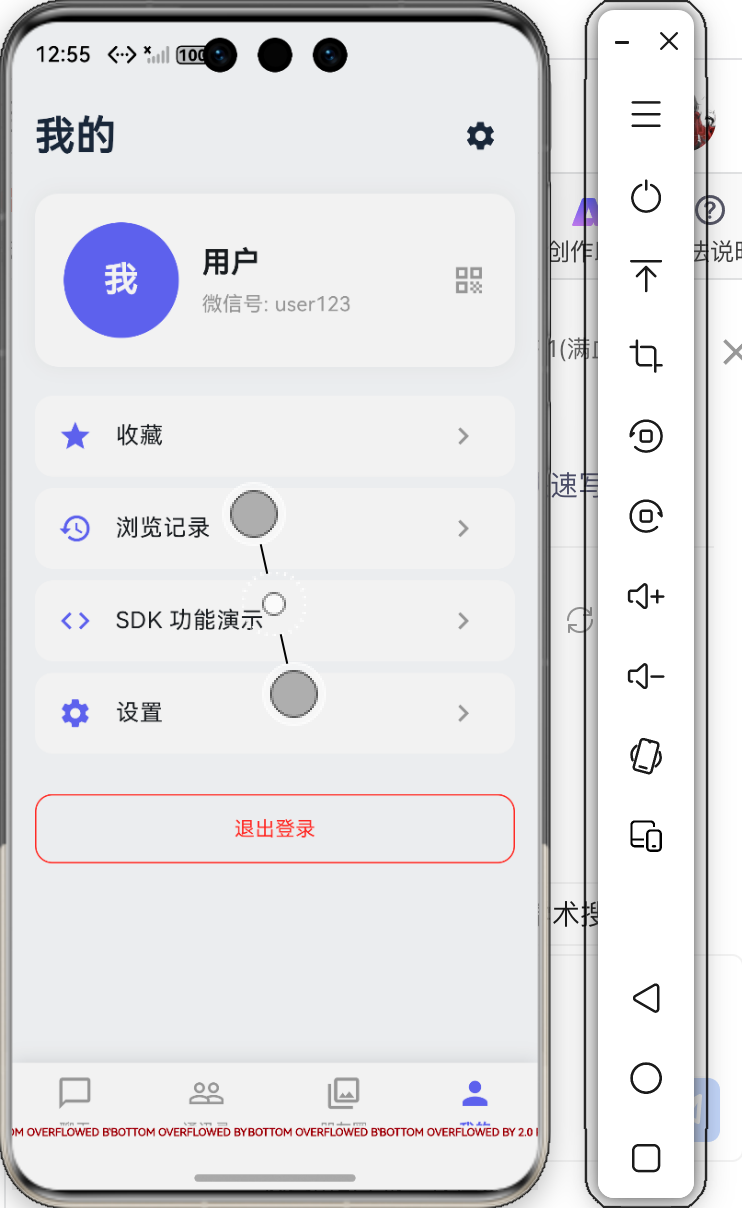 AI Visual Insight: This screenshot shows the feature validation interface on a real device. It typically includes the result page after image processing or notification triggering, and it can help verify whether UI rendering is stable on OpenHarmony, whether media resources are decoded correctly, and whether interactions remain smooth after module integration.
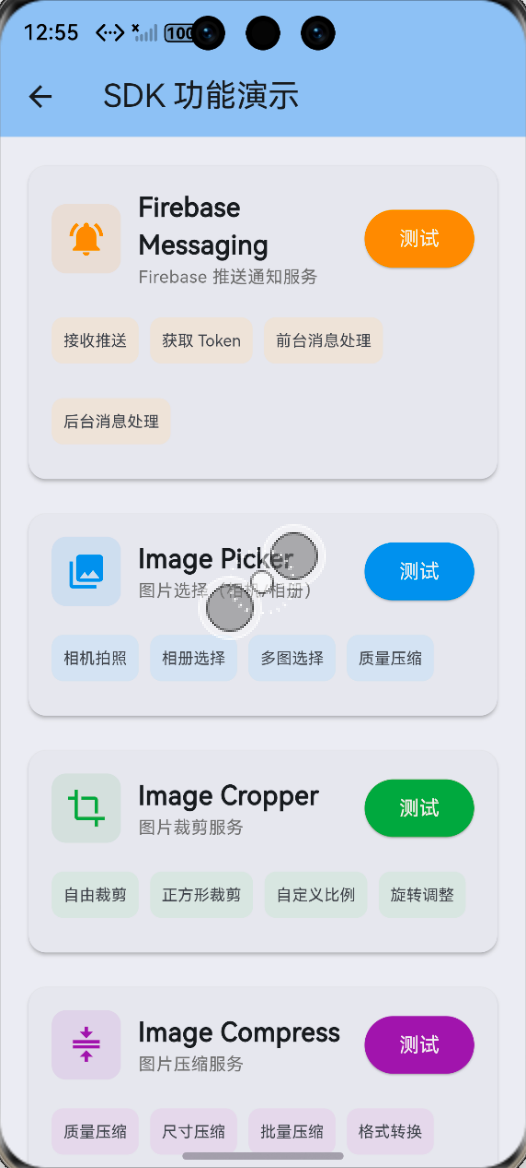 AI Visual Insight: This screenshot reflects the runtime result after multi-module integration. You can focus on notification trigger status, image editing output, or post-permission UI feedback to verify compatibility across all six modules on real devices and confirm whether fallback handling works as expected.
Common pitfalls can be reduced to five engineering principles
First, prefer adaptation libraries already validated by the OpenHarmony community instead of assuming the default official cross-platform plugin will work. Second, complete both static permission declarations and runtime permission requests. Third, pass images and files as byte streams whenever possible rather than relying on local paths.
Fourth, always resize large images before compression to reduce peak memory usage. Fifth, for system services such as notifications and push messaging, always add platform-specific checks and exception protection.
The core value of this integration approach is reusability and extensibility
If you are building a course project, final assignment, or portfolio app, this solution is more practical than fragmented tutorials. It clears the most failure-prone OpenHarmony workflows in advance and distills them into an engineering approach based on stable dependencies, unified initialization, and a consistent data format.
From there, you can extend directly on top of these six modules for avatar uploads, to-do reminders, credential storage, or device identifier binding without re-learning the adaptation layer from scratch.
FAQ
1. Why are generic Flutter plugins often unavailable on OpenHarmony?
Because many plugins are validated only on Android and iOS and are not adapted to the OpenHarmony permission model, native bridge layer, or system service rules. A plugin that compiles successfully does not necessarily run correctly, especially for camera, notifications, and file access.
2. Why is Uint8List recommended throughout the image processing pipeline?
Because OpenHarmony sandbox restrictions make path-based access unreliable. Byte streams can avoid directory permission issues and are better suited for lossless transfer between image selection, cropping, and compression.
3. Why do local notifications fail to appear even though the code is already written?
There are three common causes: the notification channel was not created, notification permission was not requested, or background freeze policies were not handled correctly. On OpenHarmony, when notification configuration is incomplete, the system blocks the notification directly instead of producing an obvious error like a standard UI component would.
The core summary captures the practical adaptation strategy
This article systematically reconstructs the implementation approach for six high-frequency Flutter for OpenHarmony capabilities, covering image selection, cropping, compression, local notifications, secure storage, and FCM token retrieval. It distills the key adaptation points around OpenHarmony permissions, sandbox behavior, notification channels, and dependency compatibility.