This developer-focused guide explains the HTTP protocol and server implementation end to end. It covers request and response messages, status codes, header semantics, and the full path of building a lightweight HTTP server in C++. It helps bridge the gap between understanding the protocol and implementing it in real code. Keywords: HTTP protocol, C++ server, network programming.
Technical Specification Snapshot
| Parameter | Description |
|---|---|
| Language | C++17 |
| Transport Protocol | TCP / HTTP/1.1 |
| Concurrency Model | Multi-process connection handling |
| Build Method | Makefile + g++ |
| Core Dependencies | POSIX Socket, pthread, filesystem, unordered_map |
| Project Type | Static file serving + dynamic routing |
| GitHub Stars | Original data not provided |
The HTTP protocol is a text-based request-response contract
HTTP operates at the application layer. At its core, it is a text-based communication convention between a client and a server built around the request line, headers, a blank line, and the body. The key to understanding HTTP is not memorizing fields, but seeing how each part of a message maps to actual server behavior.
A URL is the entry point. Its format usually includes the scheme, host, port, path, and query parameters. Characters such as /, ?, and + have special meaning inside a URL, so they must be percent-encoded when they appear in parameter values.
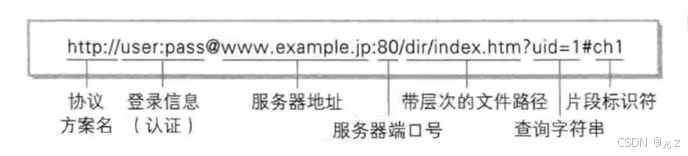 AI Visual Insight: This image shows the layered structure of a URL. It typically highlights fields such as scheme, host, port, path, and query, helping developers understand how a browser locates resources and passes parameters from a raw string.
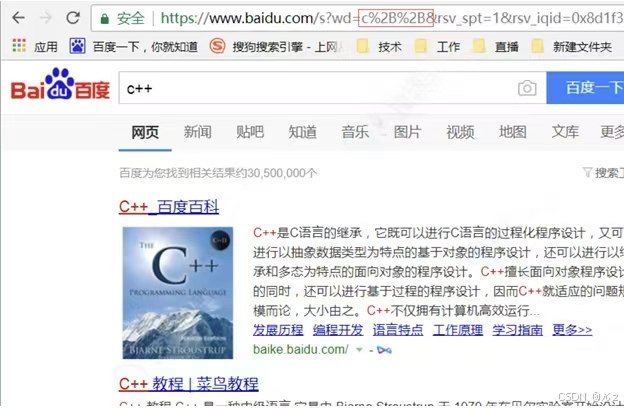 AI Visual Insight: This image focuses on URL encoding rules and shows how special characters are converted into
 %xx form. This is critical for server-side query parsing, avoiding path ambiguity, and preventing parameter truncation.
An HTTP request consists of four parts
The most important part of a request message is the request line, which follows the format METHOD URL VERSION. For example, GET /index.html HTTP/1.1. It is followed by several headers, then a blank line, and only then the body. GET usually has no body, while POST often carries form data or JSON payloads.
GET /login?user=tom HTTP/1.1

Host: localhost:8080

Connection: keep-alive
This message demonstrates the structure of a minimal valid HTTP request.
The HTTP response determines how the browser presents the result
A response message also consists of a status line, headers, a blank line, and the body. The status line follows the format VERSION STATUS_CODE REASON, such as HTTP/1.1 200 OK. Whether the browser redirects, caches, or renders a page is largely determined by the combination of the status code and response headers.
Common methods include GET, POST, PUT, DELETE, HEAD, and OPTIONS. Common status codes include 200, 301, 302, 404, and 500. In particular, 301 and 302 must be paired with the Location header to complete a redirect.
HTTP/1.1 301 Moved Permanently

Location: https://www.baidu.com/

Content-Length: 0
This response shows the actual protocol shape of a redirect, not just the idea that “the browser jumps automatically.”
These headers deserve priority attention
Content-Type defines the content type, Content-Length defines the entity length, Host allows the server to identify the target site, Connection controls persistent or short-lived connections, and Cookie carries lightweight session information. HTTP/1.1 uses persistent connections by default, while HTTP/1.0 uses short-lived connections by default.
This server project breaks protocol knowledge into seven maintainable modules
The project does not pack all logic into a single file. Instead, it separates responsibilities into modules such as common, inetaddr, mutex, log, socket, tcpserver, and http. The value of this design is that it clearly separates the boundaries between network I/O, protocol parsing, and business routing.
Among them, common.hpp defines error codes and a non-copyable base class, which is useful for managing the lifecycle of low-level resources consistently. inetaddr wraps sockaddr_in so the business layer does not need to deal directly with verbose address conversion details.
class nocopy {
public:
    nocopy() {}
    nocopy(const nocopy&) = delete;          // Disable copy to avoid double-free of resources
    const nocopy& operator=(const nocopy&) = delete; // Disable assignment
    ~nocopy() {}
};
This code constrains resource-owning classes to hold low-level objects uniquely.
Address and thread-safety wrappers are critical infrastructure
inetaddr centralizes IP handling, ports, and network byte order conversion, which reduces scattered calls to inet_pton, ntohs, and htons. mutex and lockguard use the RAII pattern to lock and unlock automatically, which is ideal for shared resources such as logging.
The logging module uses the Strategy pattern to support both console and file output. Its focus is not simply printing strings, but reliably recording timestamps, levels, PIDs, and source locations under thread-safe conditions.
void synclog(const string& message) override {
    lockguard guard(_mutex);   // Lock automatically to prevent interleaved logs across threads
    cout << message << "\r\n"; // Output a complete log line
}
This code shows that the core of logging is serialized writes, not a simple cout statement.
The Socket and TCPServer modules handle connection management
The abstract base class socket exposes interfaces such as socketordie, bindordie, listenordie, accept, recv, and send, while tcpsocket provides the concrete TCP implementation. This allows the upper-layer HTTP module to focus only on sending and receiving strings rather than low-level system call details.
tcpserver uses fork to create child processes that handle connections, and it uses a double-fork style to reclaim resources. Although this is not the highest-performance model, it is excellent for a teaching server because it clearly shows connection acceptance, task handling, and the separation of responsibilities between parent and child processes.
auto sock = _listensocketptr->accept(&client);
if (sock == nullptr) return;
pid_t id = fork();             // Create a child process to handle the connection
if (id == 0) {
    cb(sock, client);          // Run the business callback in the child process
    sock->Close();             // Close the connection after processing finishes
    exit(0);
}
This logic shows how the server decouples connection acceptance from request handling.
The HTTP module turns a byte stream into semantic objects
httprequest parses raw strings into fields such as method, url, version, and args. httpresponse assembles a valid response from the status code, headers, and body. The http class acts as the controller that dispatches both static files and dynamic routes through a unified interface.
The project supports three typical capabilities: serving static resources such as index.html, registering a /login route that returns dynamic content, and visiting redir_test to trigger a 301 redirect. Together, these paths cover the most basic web service model.
void login(httprequest& req, httpresponse& resp) {
    string text = "hello: " + req.args();      // Build the response body from query parameters
    resp.setcode(200);                         // Set the success status code
    resp.setheader("Content-Type", "text/plain"); // Return plain text
    resp.setheader("Content-Length", to_string(text.size()));
    resp.settext(text);                        // Write the response body
}
This code demonstrates the shortest path from request parameters to response construction for a dynamic endpoint.
The static resource directory gives the server a verifiable frontend surface
The wwwroot directory provides index.html, 404.html, login.html, register.html, images, and redirect test files. This makes it easy to verify whether the server supports homepage rendering, error page fallback, form interaction, and resource resolution.
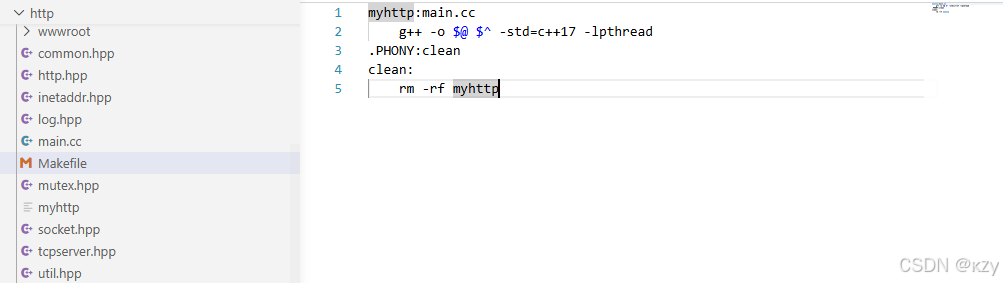 AI Visual Insight: This image shows the project directory structure, which typically includes source files, header files, a Makefile, and the
 wwwroot static directory. It clearly shows that the server separates protocol implementation from site resources, which matches a minimal web service layout.
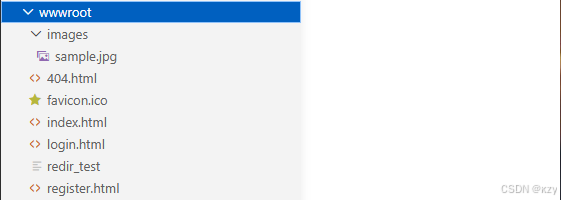 AI Visual Insight: This image shows the
 wwwroot resource tree. It demonstrates that the server returns not only plain text, but also HTML, images, a 404 page, and test routes, making it a key reference for validating MIME types and static file mapping.
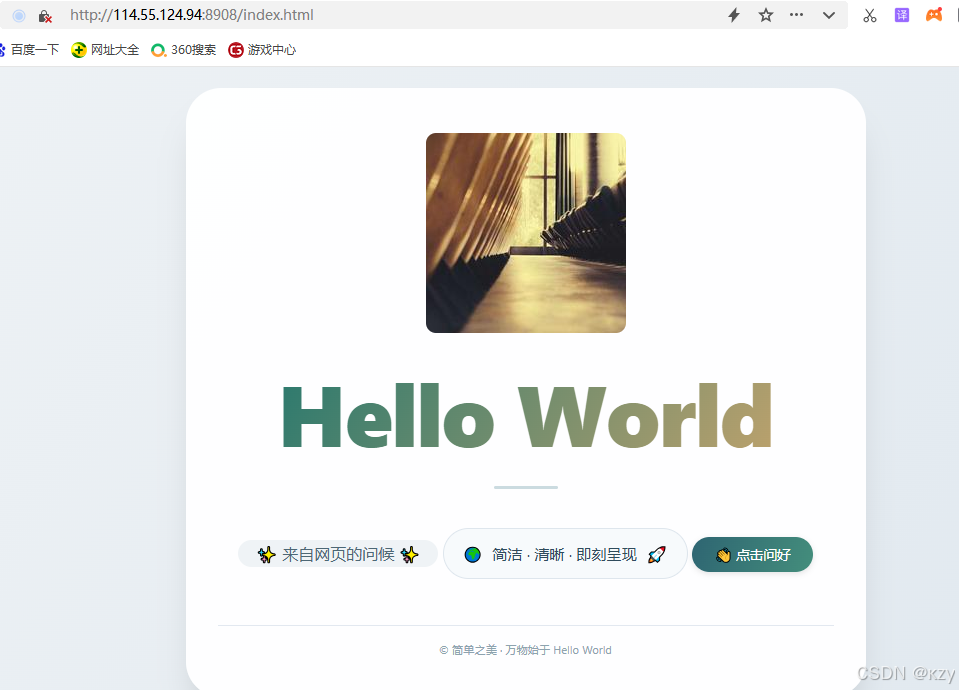 AI Visual Insight: This image shows the rendered default homepage. It confirms that the server correctly returns HTML, CSS, JavaScript, and image assets. The card-based frontend layout and button interactions also show that the browser-side loading chain is fully functional.
The implementation has more educational value than production value
This project is ideal for understanding the skeleton of HTTP/1.1: how to read a request, parse the first line, identify query parameters, set Content-Length, return a 404 page, and complete redirects through Location.
However, it is still a teaching-oriented implementation with clear room for evolution. For example, header parsing is incomplete, POST body support is limited, cookie handling is simplified, repeated Set-Cookie headers are not modeled well, and the project does not cover epoll, thread pools, non-blocking I/O, or a complete MIME table.
g++ -o myhttp main.cc -std=c++17 -lpthread
./myhttp 8908
These two commands are enough to compile and start the server.
FAQ structured Q&A
Why is this project suitable for learning HTTP fundamentals
Because it maps URLs, request lines, response headers, status codes, static files, and dynamic routes directly into code, so developers can see exactly how protocol fields drive server behavior.
What is still missing before this server is production-ready
It still needs complete header parsing, POST and file upload support, a stronger concurrency model, better exception handling, security validation, log rotation, MIME extensions, and optimized connection reuse.
What should you build next after finishing this project
A good next step is to implement an epoll-based version, improve routing and middleware, support JSON bodies, introduce a thread pool, and add full HTTP/1.1 features such as keep-alive, chunked transfer, and CGI/FastCGI.
Core summary: This article systematically explains HTTP URLs, request and response messages, methods, status codes, and headers, then uses C++ to build a lightweight HTTP server from socket handling, logging, and address wrappers to route dispatching, with support for static resources, dynamic endpoints, and redirects.