[AI Readability Summary]
OMC is a multi-agent enhancement layer for Claude Code. Through a four-stage pipeline of Hooks, Skills, Agents, and State, it upgrades a single-session assistant into a virtual engineering team that can be orchestrated, can remember context, and can execute tasks. It addresses three common problems in complex AI coding workflows: loss of control in long-running tasks, context forgetting, and the limited division of labor available to a single model. Keywords: Multi-Agent, Claude Code, Plugin Architecture.
Technical Specifications at a Glance
| Parameter | Details |
|---|---|
| Project Name | oh-my-claudecode (OMC) |
| Core Languages | TypeScript, Node.js, Markdown |
| License | CC 4.0 BY-SA (as stated in the original source) |
| GitHub Stars | Not provided in the original content |
| Core Dependencies | Claude Code, tmux, MCP, LSP, ast-grep |
| Architectural Backbone | Hooks / Skills / Agents / State |
| Extension Capabilities | MCP tools, Team multi-provider orchestration, layered configuration |
OMC uses pipeline orchestration rather than a pile of plugins
Traditional AI coding assistants usually force planning, execution, validation, and memory into a single conversation. Once a task becomes long or complex, the model tends to forget constraints, and its outputs become harder to reuse consistently.
OMC’s key innovation is that it splits a request into a sequential pipeline. Upstream layers handle detection and injection, while downstream layers handle execution and persistence. Each layer has a clearly defined responsibility, which makes the system better suited to medium and large development tasks.
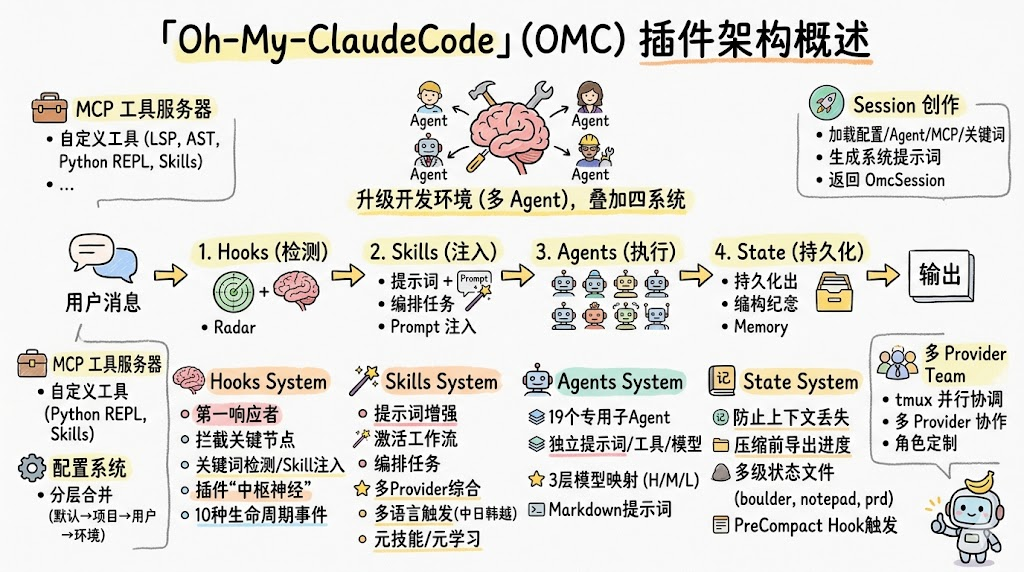 AI Visual Insight: This diagram introduces the OMC architecture and shows that the article focuses on a multi-agent plugin system built around Claude Code, rather than a standalone script-based tool.
The four-layer pipeline defines OMC’s system boundaries
- Hooks: Listen to lifecycle events and perform detection, authorization, and recovery.
- Skills: Inject workflow prompts based on keywords.
- Agents: Dispatch tasks to 19 specialized roles.
- State: Write plans, memory, and modes to local files to resist context compression.
export async function createOmcSession() {
  const config = await loadConfig(); // Load layered configuration
  const tools = await createMcpServer(config); // Start the MCP tool service
  const agents = await loadAgents(config); // Load Agent definitions
  return { config, tools, agents }; // Assemble a unified session object
}
This code summarizes OMC’s entry-point design: assemble the system first, then expose a unified session interface.
The Hooks subsystem handles event-driven control and security guardrails
Hooks are the first stop in the pipeline. They directly intercept critical moments in the Claude Code lifecycle. The original source lists 10 events, including UserPromptSubmit, PreToolUse, PostToolUse, PermissionRequest, and PreCompact.
That means OMC does not merely patch problems after the fact. It intervenes before actions occur. It can enforce permission gates, validate dangerous commands, recover from failures, and save state before context is compressed.
 AI Visual Insight: This diagram shows OMC’s sequential pipeline and emphasizes that Hooks sit at the front, capturing events, recognizing modes, and constraining behavior before user input enters the execution chain.
Hooks turn complex tasks from volatile conversations into recoverable workflows
PreCompact is especially important. Before the large model’s context is compressed, OMC writes the current plan, TODOs, and project memory into the .omc/ directory, preventing the system from losing its reasoning midway through a task.
{
  "event": "PreCompact",
  "scripts": [
    "pre-compact.mjs",
    "project-memory-precompact.mjs",
    "wiki-pre-compact.mjs"
  ]
}
This configuration shows that OMC exports multiple categories of state before compression, creating file-level backups.
The Skills subsystem packages workflows into prompt templates
Skills are essentially a collection of templates under skills/*/SKILL.md. They are not just prompt fragments. They are composable workflow definitions that include trigger terms, applicable scenarios, execution constraints, and output formats.
The original source mentions more than 30 Skills, including ultrawork, autopilot, deep-dive, remember, and team. These Skills determine whether the current session focuses on analysis, autonomous execution, or team collaboration.
Skills switch modes through a two-stage trigger process
In the first stage, keyword-detector.mjs performs keyword recognition with multilingual regular-expression support. In the second stage, skill-injector.mjs injects the matched Skill content into the system prompt and updates the current mode state.
import re

text = "请进入自动巡航并深度分析当前项目"  # User input
skills = []
if re.search(r"自动巡航|autopilot", text):
    skills.append("autopilot")  # Match the autopilot skill
if re.search(r"深度分析|deep-dive", text):
    skills.append("deep-dive")  # Match the analysis skill
print(skills)
This example demonstrates the keyword-driven logic used to select Skills.
The Agents subsystem upgrades single-model responses into role-based collaboration
OMC defines 19 specialized Agents, including architect, planner, executor, critic, and qa-tester. Its value does not come from the raw number of roles, but from clear responsibility boundaries: planning, implementation, review, and validation no longer compete inside one prompt.
The original source also defines a three-tier model hierarchy: HIGH, MEDIUM, and LOW. High-reasoning tasks go to roles such as architect and critic. Execution and debugging can go to executor and debugger. Lightweight search and writing tasks can be pushed down to lower-cost models.
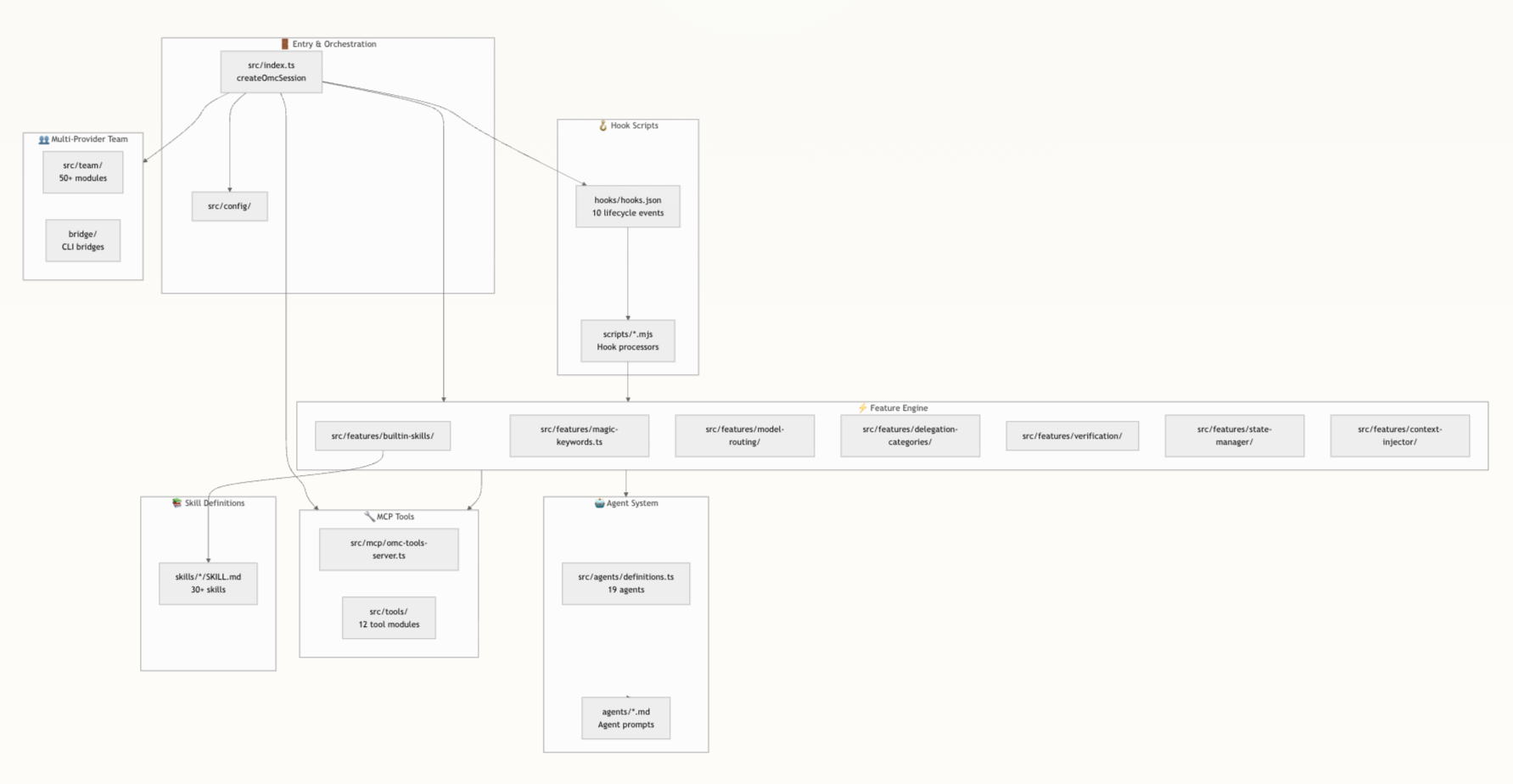 AI Visual Insight: This diagram shows the repository structure and responsibility boundaries. Skill definitions, Agent prompts, the Feature Engine, Hooks, Team, and MCP tools all occupy separate areas, reflecting OMC’s modular engineering design.
Agent prompts and tool permissions are managed explicitly
Agent prompts live in agents/*.md, and YAML front matter can declare disallowed tools. That allows a Reviewer to remain read-only while an Executor focuses on implementation, making security boundaries easier to understand and enforce.
name: reviewer
model: HIGH
DisallowedTools:
  - write_file # Do not allow direct file writes
  - bash # Do not allow command execution
This kind of metadata makes Agent behavior auditable, versionable, and routable.
The State subsystem enables long-term memory through file persistence
OMC explicitly accepts a practical reality: context will always be lost eventually. Instead of betting everything on conversation history, it writes critical information to files. The original source lists several storage targets, including .omc/boulder-state.json, .omc/notepad/, .omc/project-memory.json, and .omc/prd.json.
This design moves memory out of the model and into an external state layer. When the next session starts, the system re-injects the necessary summaries, creating a loop of conversation → file → conversation.
The layered state model spans session, plan, and project scope
- Session level: current plan, run mode, and subtask progress.
- Plan level: temporary notes, wisdom logs, and pre-compaction summaries.
- Project level: technology stack, commands, critical paths, and conventions.
const projectMemoryPath = '.omc/project-memory.json';
await fs.writeFile(
  projectMemoryPath,
  JSON.stringify(memory, null, 2) // Persist project-level memory
);
This code reflects the core principle behind OMC’s long-term memory: important information must be written to disk.
MCP tools and the Team system strengthen execution and multi-model collaboration
OMC does not want to only “talk”. It also wants to “act”. To support that goal, it integrates an in-process MCP server that exposes tools such as LSP, AST, Python REPL, Notepad, Wiki, and Trace.
Compared with exposing a raw shell directly, MCP provides structured, auditable, and disable-able capabilities. The model receives constrained power rather than unrestricted command-line access.
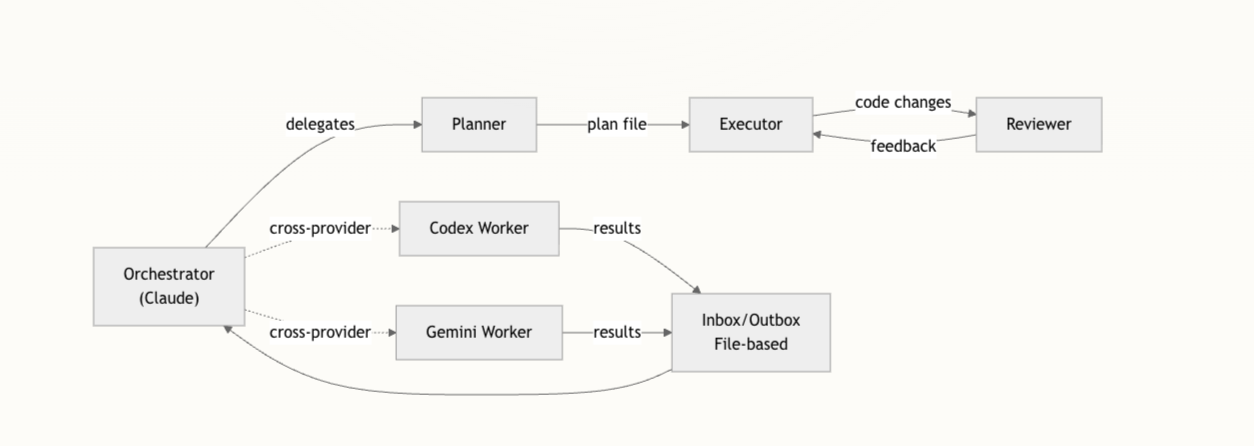 AI Visual Insight: This diagram shows the Team multi-provider architecture. Claude sits at the orchestration center, while external workers connect to execution units such as Codex and Gemini through file-based communication and role routing. It illustrates a separation between the control plane and the data plane in cross-model collaboration.
The Team mechanism turns multi-provider collaboration into a configurable topology
In Team mode, Claude acts as the Orchestrator, while Codex CLI, Gemini CLI, and others act as Workers. They communicate through Inbox and Outbox files under .omc/team/. As a result, multi-model collaboration becomes an engineered system rather than a manual model-switching process.
{
  "team": {
    "roleRouting": {
      "planner": "claude",
      "executor": "codex",
      "reviewer": "gemini"
    }
  }
}
This configuration shows how roles are routed to different providers.
OMC’s real value lies in its complete extension-point design
From a practical engineering perspective, OMC lets developers extend the system with minimal cost. If you want to change the interaction flow, write a Skill. If you want to add a new role, add an Agent. If you want to extend execution capability, register a new MCP tool. If you want to take over part of the lifecycle, attach a Hook.
This layered extension model is more stable than endlessly piling rules into a single prompt, and it is better suited to team collaboration and long-term maintenance.
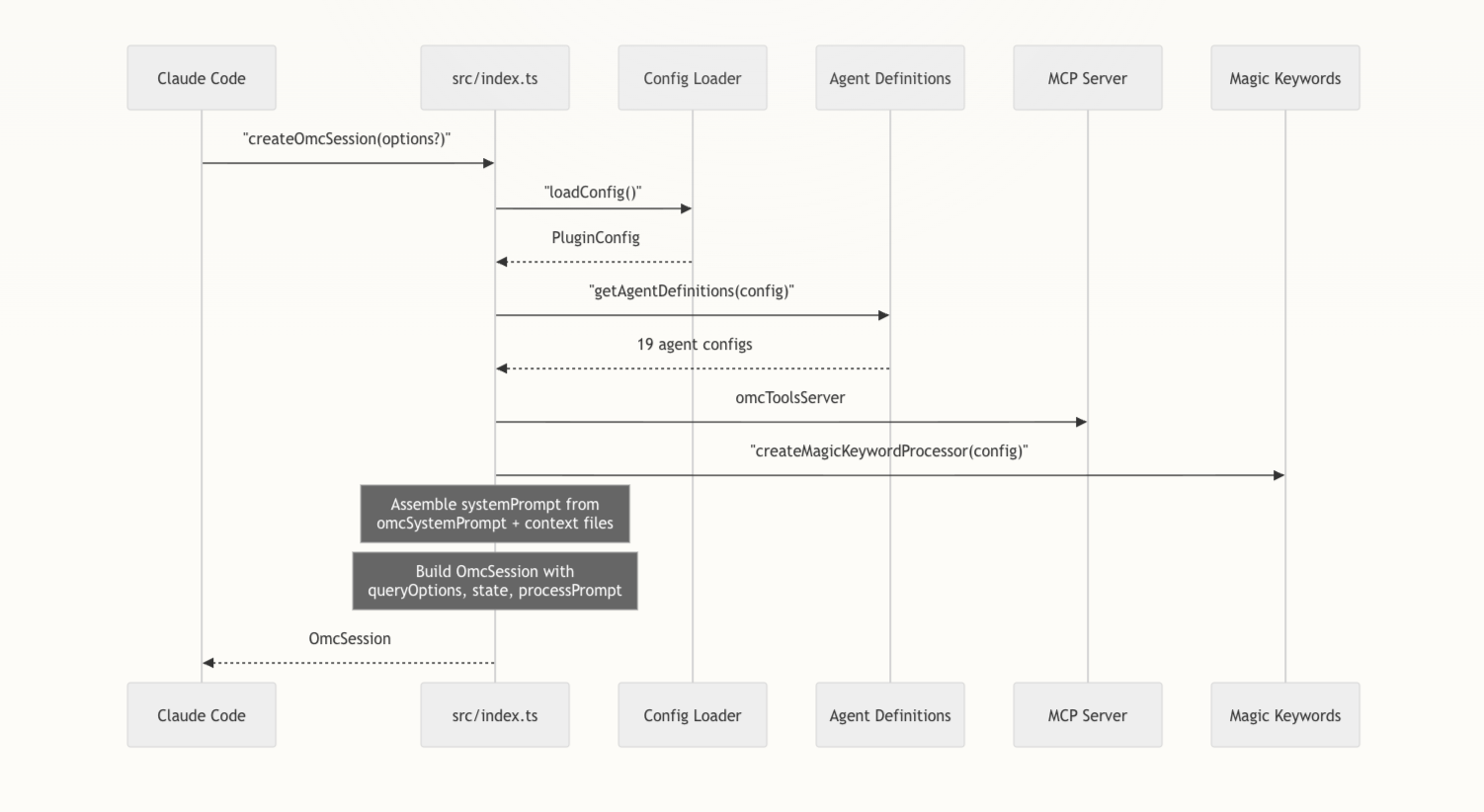 AI Visual Insight: This diagram corresponds to the session-assembly perspective and highlights
 createOmcSession() as the unified entry point that combines configuration, Agents, MCP, keyword processors, and background tasks into one callable enhanced session environment.
FAQ
What fundamentally distinguishes OMC from a typical Claude Code plugin?
Typical plugins usually enhance a single capability. OMC provides a full orchestration layer instead: event-driven control, Skill injection, role-based collaboration, state persistence, and tool execution work together as a closed loop.
Why does OMC need State instead of relying only on the context window?
Because complex tasks naturally span multiple turns, files, and stages. Context compression is inevitable. Only by writing plans, memory, and modes into .omc/ files can the system resume work reliably.
Which layer should developers customize first when extending OMC?
If your goal is to adjust workflow behavior, start with Skills. If your goal is to add a new specialized role, modify Agents. If your goal is to improve automation and operational capability, prioritize MCP tools.
Core Summary: This article reconstructs and analyzes the plugin architecture of oh-my-claudecode (OMC), focusing on the four-layer pipeline of Hooks, Skills, Agents, and State, along with MCP tools, multi-provider Team orchestration, configuration, and session assembly. It helps developers understand how OMC extends Claude Code into a collaborative, stateful, and executable multi-agent development environment.