This is a one-click Nginx deployment solution designed for domestic Linux distributions. Its core capabilities include cross-distribution detection, automated installation, firewall and SELinux integration, test page generation, and operations summary output. It solves the common problems of time-consuming manual deployment, weak compatibility, and unverifiable delivery. Keywords: Nginx, automated deployment, domestic operating systems.
This solution provides reusable automated Nginx delivery for domestic Linux environments
| Parameter | Description |
|---|---|
| Scripting Language | Bash |
| Supported Systems | Kylin V10, openEuler, Anolis 8, Rocky Linux 8, CentOS 7/8 |
| Package Manager Protocol | yum / dnf |
| Web Protocol | HTTP |
| Service Name | nginx |
| Core Dependencies | curl, wget, firewalld, SELinux toolchain |
| Log File | /tmp/nginx_install.log |
| Configuration File | /etc/nginx/nginx.conf |
| Original Article Popularity | 295 views, 4 likes, 9 bookmarks |
Domestic OS substitution is increasing the value of standardized Web service deployment
In environments such as Kylin, openEuler, and Anolis, deploying Nginx is no longer as simple as running yum install nginx. Differences in repositories, package managers, and security policies directly affect delivery efficiency.
The most common failures are not “installation failed,” but “installed successfully, yet inaccessible.” Typical issues include unopened port 80, missing SELinux adjustments, and services not enabled at boot. The value of scripted deployment lies in turning these hidden steps into explicit workflow stages.
This script is designed around five operations requirements
The solution focuses on five goals: identifying the operating system, supporting official repositories, coordinating security environment settings, generating a validation page, and preserving operations metadata. In practice, this means the operator only needs to run the script once to complete the full loop from installation to acceptance.
#!/bin/bash
set -e  # Exit immediately on error to avoid a half-configured environment

LOG_FILE="/tmp/nginx_install.log"
NGINX_CONF="/etc/nginx/nginx.conf"
HTML_DIR="/usr/share/nginx/html"
SERVICE_NAME="nginx"

log_info() {
  echo "[INFO] $1" | tee -a "$LOG_FILE"  # Output to both terminal and log file
}
This code defines the script’s basic execution constraints, log path, and core directory variables.
The operating system detection logic determines whether the script can truly run cross-platform
The script reads ID and VERSION_ID from /etc/os-release to identify the current distribution. If it detects systems such as centos, rocky, anolis, openEuler, or kylin, it enters a compatible branch. For unknown systems, it falls back to CentOS mode.
This design does not aim for absolute precision. Instead, it aims for the broadest possible compatibility. For operations teams, that approach is more robust than hard-coded version checks because it turns “unrecognized” into “attempt compatible execution.”
The package manager and repository strategy are unified into the installation phase
The script supports an option to enable the official Nginx repository. When enabled, it dynamically writes /etc/yum.repos.d/nginx.repo and attempts to import the GPG key so it can install a newer stable release.
detect_os() {
  . /etc/os-release
  OS=$ID
  VER=$VERSION_ID

  case $OS in
    centos|rhel|rocky|anolis|openEuler|kylin)
      log_info "Detected operating system: $OS $VER"  # Successfully recognized
      ;;
    *)
      log_info "Unknown system, falling back to CentOS compatibility mode"  # Compatibility fallback
      OS="centos"
      ;;
  esac
}
This code performs cross-distribution detection and compatibility fallback, which acts as the entry condition for the entire script.
Post-installation environment coordination is the key to making automated deployment work in practice
Many deployment scripts only install software and ignore the access path. After installing Nginx, this script also checks the firewalld status and automatically allows the http service when the firewall is active.
If SELinux is enabled, the script also sets the httpd_can_network_connect Boolean and corrects the security context of the Web root. This step is especially important on domestic distributions, where default security policies are often stricter.
configure_firewall_selinux() {
  if systemctl is-active --quiet firewalld; then
    firewall-cmd --permanent --add-service=http  # Permanently allow the HTTP service
    firewall-cmd --reload  # Reload rules immediately
  fi

  if command -v getenforce >/dev/null && [ "$(getenforce)" != "Disabled" ]; then
    setsebool -P httpd_can_network_connect on  # Allow the Web service to initiate network connections
    chcon -R -t httpd_sys_content_t /usr/share/nginx/html  # Correct the directory security context
  fi
}
This code upgrades the outcome from “service installed” to “service accessible,” which is the core guarantee of delivery success.
Automatically generating a test page makes deployment results visually verifiable
The script dynamically generates index.html in the site root. The page includes the deployment time, server IP, configuration file path, log path, and service management commands. As a result, opening the home page in a browser completes basic acceptance testing.
Compared with terminal logs alone, a test page is better suited for on-site delivery, team collaboration, and remote confirmation. It turns an abstract installation success into a visible result page.
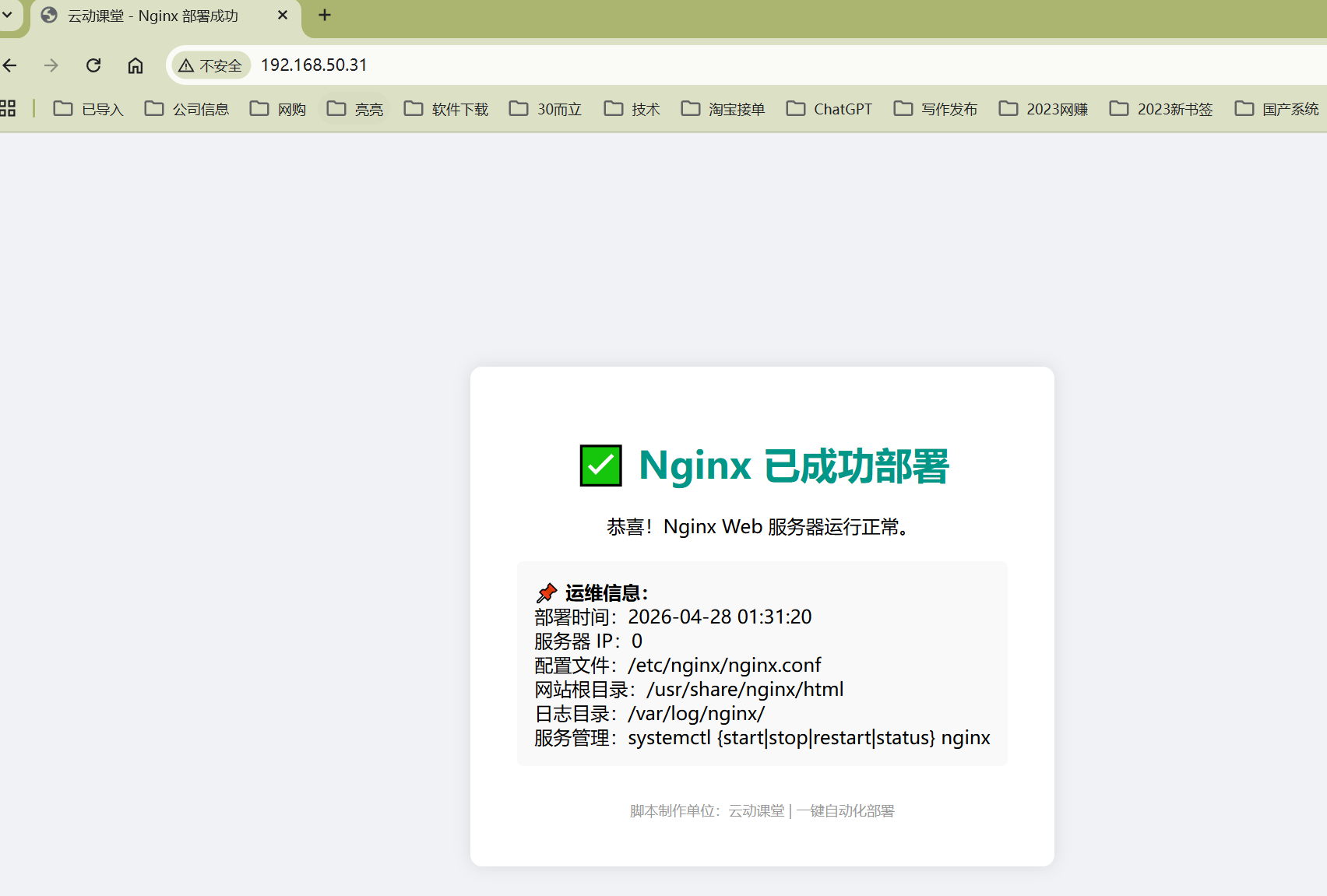 AI Visual Insight: The image shows the default validation page after deployment. It uses a light gray background with a centered white card layout. The card clearly displays the successful Nginx deployment status, deployment time, server IP, configuration file path, site root, and log directory. This indicates that the script not only completes installation, but also embeds key operations metadata into the page to simplify acceptance and initial troubleshooting.
create_test_page() {
  local host_ip
  host_ip=$(ip route get 1 | awk '{print $NF;exit}')

  cat > /usr/share/nginx/html/index.html <<EOF
<h1>✅ Nginx has been deployed successfully</h1>
<p>Server IP: ${host_ip}</p>
<p>Configuration File: /etc/nginx/nginx.conf</p>
EOF
}
This code generates a minimal validation page so the installation result can be confirmed directly in a browser.
The deployment summary output highlights the script’s observability design
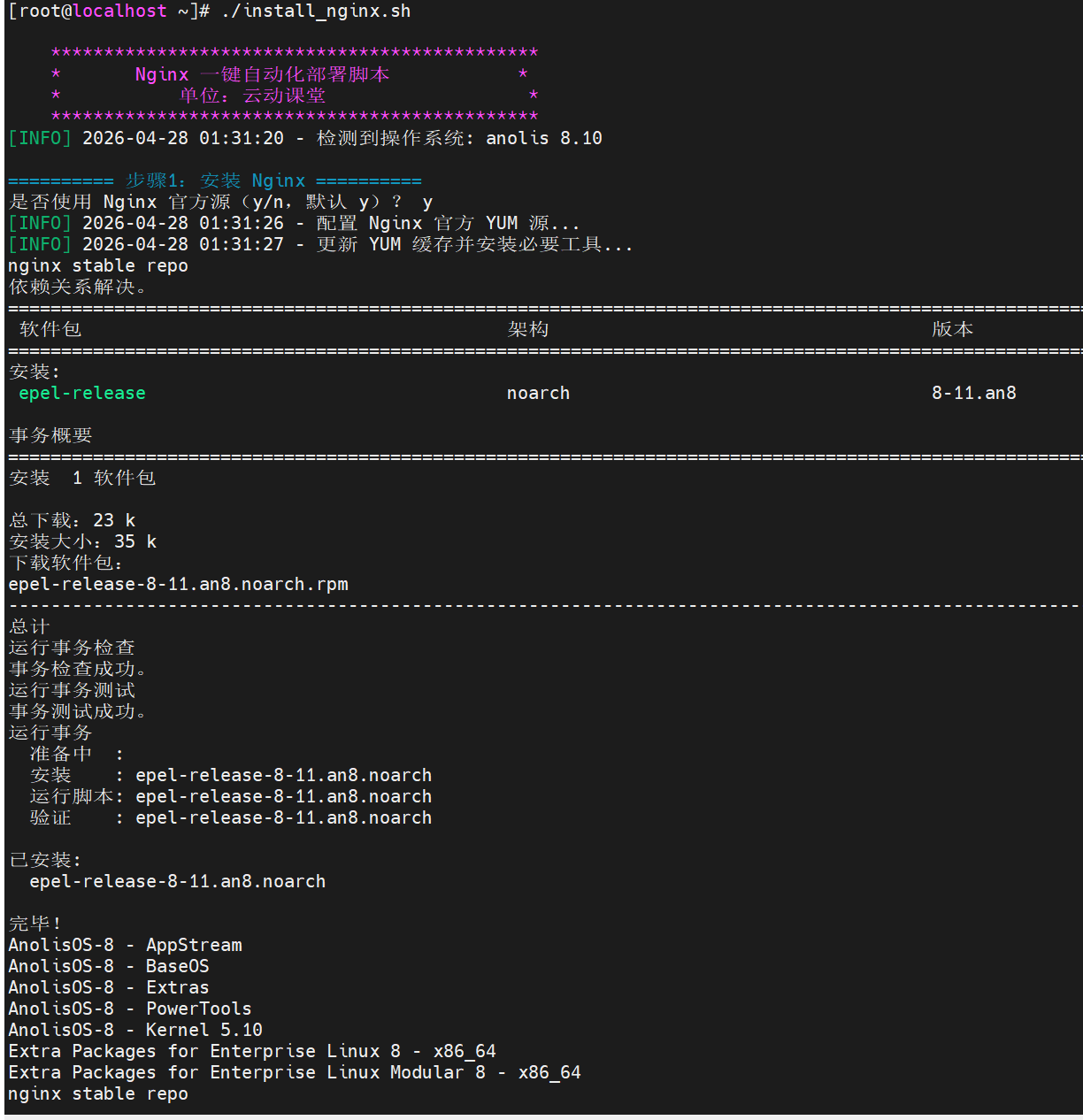
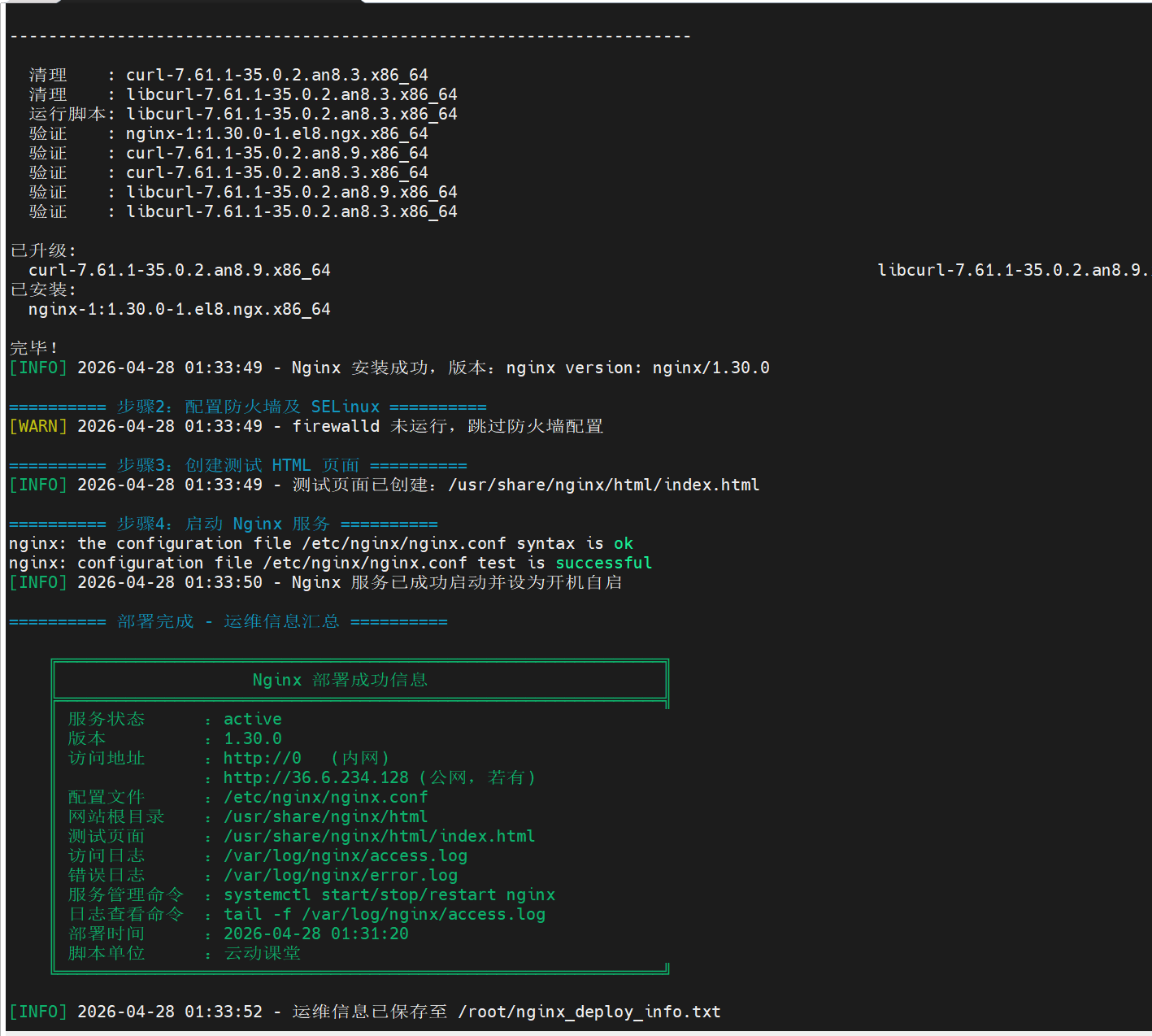
The terminal logs show staged output for installation, configuration, startup, validation, and summary generation. On success, the script displays the service status, version number, access URL, and log file path, and saves the results to /root/nginx_deploy_info.txt.
This kind of persisted result design is highly suitable for standardized operations. It allows the next operator to understand the host’s initial Nginx state quickly without tracing historical commands.
 AI Visual Insight: The image shows a successful deployment summary in the terminal, including fields such as the Nginx version, service status, access address, configuration file path, log path, and deployment time. The interface reflects strong observability and is well suited for unified acceptance and information retention after batch deployment.
 AI Visual Insight: The image further shows deployment logs and staged execution results, highlighting step boundaries, success messages, and status checks. This output structure works well in automated operations scenarios and helps teams quickly locate the failed stage, such as package installation failure, configuration validation failure, or service startup failure.
Production environments still require additional configuration governance and security hardening
This script is better used as a standardized starting point, not as the final production configuration. Before going live, you should still enable HTTPS, disable version exposure, split virtual host configurations, and integrate log rotation and monitoring systems.
If the business depends on reverse proxying or upstream forwarding, you should also add proxy_pass, health checks, and connection timeout policies. Automated installation solves “quickly usable,” not “finally optimized.”
server_tokens off; # Hide the Nginx version to reduce information exposureThis configuration line provides a basic security hardening measure and works well as a default post-deployment optimization.
FAQ
Q1: Why does the script handle both firewalld and SELinux?
A: Because Nginx availability depends not only on whether the software is installed, but also on whether the port is open, whether the directory context is correct, and whether SELinux blocks network access. All three are essential.
Q2: Is this script suitable for batch deployment across multiple servers?
A: Yes. It already includes system detection, idempotent skipping, log output, and result summarization. When combined with Ansible, SaltStack, or SSH batch execution, it can scale quickly to multi-server delivery.
Q3: Why is it recommended to keep the default Nginx configuration first?
A: The default configuration is more stable and easier to keep compatible across systems. First make sure the service installs successfully and is accessible, then add business-specific configuration incrementally under /etc/nginx/conf.d/. This approach makes troubleshooting easier and reduces first-release risk.
Core summary
This article reconstructs a one-click Nginx deployment solution for domestic Linux environments, covering Kylin V10, openEuler, Anolis, Rocky Linux, and CentOS. The solution uses a Bash script to implement system detection, repository configuration, Nginx installation, firewall and SELinux integration, test page generation, and operations metadata persistence, solving the problems of slow manual deployment, weak compatibility, and unverifiable delivery.