This article shows how to quickly build a HelloWorld AI agent endpoint in Java with Spring AI 2.0, addressing common pain points such as high integration barriers for Java developers, scattered configuration, and unclear model invocation flows. Keywords: Spring AI 2.0, Java Agent, Alibaba Cloud DashScope.
Technical specifications provide a quick implementation snapshot.
| Parameter | Description |
|---|---|
| Programming Language | Java |
| JDK | 17 |
| Framework | Spring Boot 4.0.5, Spring AI 2.0 |
| Build Tool | Maven |
| Protocol | OpenAI-Compatible API |
| Example Model | qwen3.6-plus |
| API Style | REST |
| Core Dependencies | Spring Web, OpenAI Starter |
| GitHub Stars | Not provided in the source article |
This setup is a minimal, runnable AI integration path for Java developers.
The value of Spring AI 2.0 is not simply whether it can call a model. Its real value is that it brings model access into the Spring ecosystem. Configuration, Bean management, web exposure, and future extensibility all remain consistent.
The original example takes the shortest path: create a Spring Boot project, add Web and OpenAI dependencies, and connect to Alibaba Cloud DashScope through an OpenAI-compatible protocol. This approach reuses the Spring ecosystem while reducing the cost of switching models later.
 AI Visual Insight: This image appears to show a course cover or chapter entry point. Its main purpose is to indicate that this series is built around the Spring AI 2.0 capability stack, including Prompt, Tools, RAG, MCP, and multimodal support, emphasizing that HelloWorld is only the starting point of a complete Agent engineering workflow.
The key project initialization options must be selected correctly from the start.
When creating the project with Spring Initializr in IntelliJ IDEA, choose Maven, JDK 17, and Jar packaging. Use Spring Boot version 4.0.5, and keep the initial dependency set minimal: Spring Web and OpenAI.
The logic behind this choice is straightforward: Web exposes the HTTP endpoint, and the OpenAI adapter layer standardizes model invocation. You can add more dependencies later when you introduce tool calling, RAG, or streaming responses.
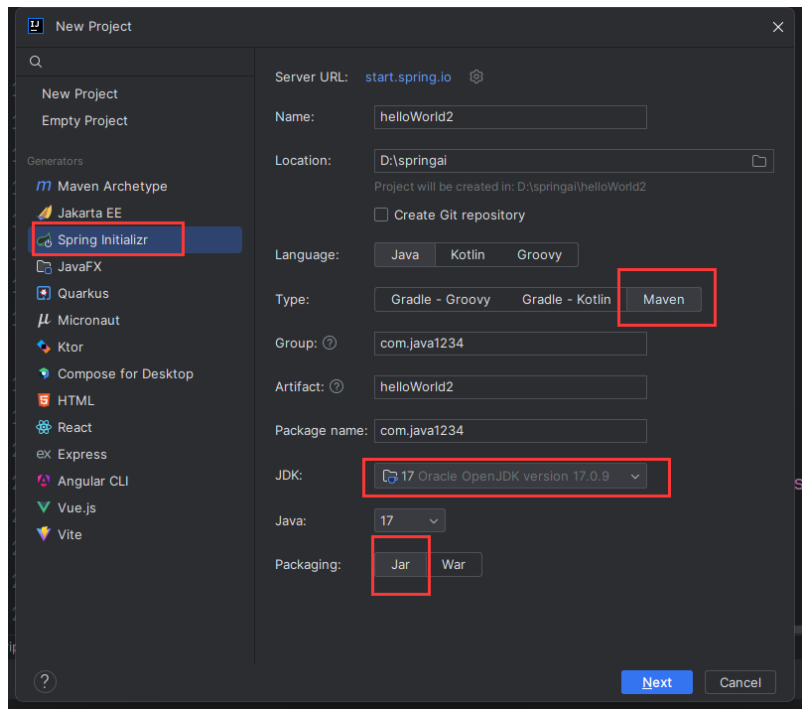 AI Visual Insight: This image likely shows the Spring Initializr project creation screen, highlighting the project type, JDK version, packaging method, and selected dependencies. The technical message is clear: Spring AI project initialization is not complex, and success mainly depends on choosing the correct Spring Boot version and a minimal dependency set.
The configuration file defines the real integration boundary for the model.
Because Alibaba Cloud DashScope supports the OpenAI-compatible specification, you can directly reuse Spring AI’s OpenAI client configuration. Developers only need to specify the API key, base URL, and model name.
Here is the cleaned-up application.yml:
spring:
  application:
    name: helloWorld
  ai:
    openai:
      api-key: ${OPENAI_API_KEY} # Read the key from an environment variable to avoid committing plaintext secrets
      base-url: https://dashscope.aliyuncs.com/compatible-mode # DashScope endpoint compatible with OpenAI
      chat:
        options:
          model: qwen3.6-plus # Specify the chat model
This configuration binds the model identity, gateway address, and default model, making it the entry point for the entire invocation flow.
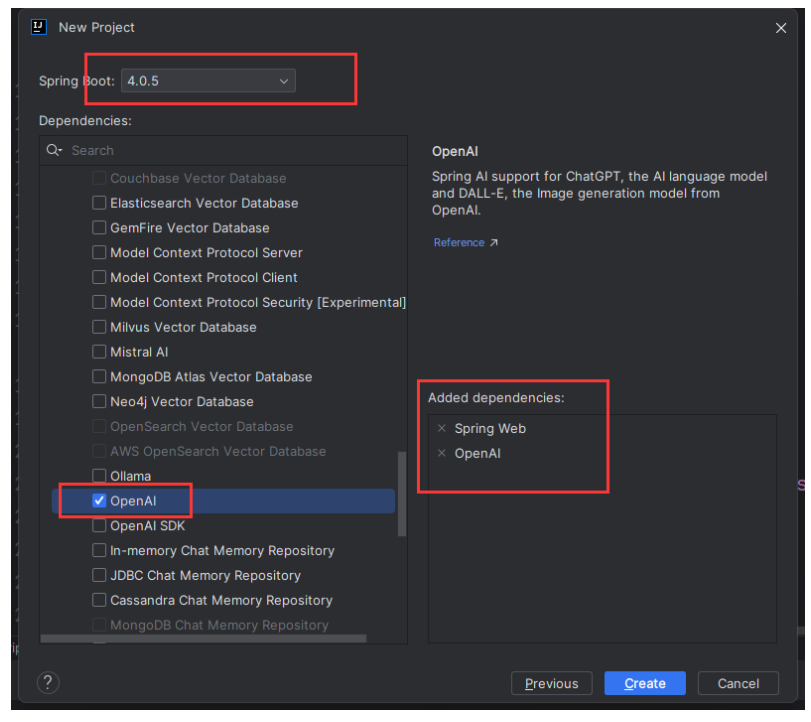 AI Visual Insight: This image shows a dependency selection or configuration screen, focusing on how OpenAI-related capabilities are enabled. Technically, it illustrates that Spring AI does not require developers to write low-level HTTP requests manually. Instead, model integration is abstracted through Starters and centralized configuration.
The ChatClient Bean is the unified entry point for future Agent extensions.
Next, define a configuration class that wraps OpenAiChatModel as a ChatClient. The benefit is that the controller layer depends only on a unified client abstraction and does not couple directly to the underlying model implementation.
package com.java1234.config;

import org.springframework.ai.chat.client.ChatClient;
import org.springframework.ai.openai.OpenAiChatModel;
import org.springframework.context.annotation.Bean;
import org.springframework.context.annotation.Configuration;

@Configuration
public class AiConfiguration {

    @Bean
    public ChatClient chatClient(OpenAiChatModel model) {
        return ChatClient.builder(model) // Build a unified client on top of the underlying chat model
                .build(); // Create an injectable ChatClient Bean
    }
}
This code registers model invocation capabilities as a Spring Bean so that controllers, service layers, and future toolchains can reuse them.
The controller layer closes the loop from user input to model output.
The minimal HelloWorld endpoint only needs to receive the question parameter, send it to the large language model as a user message, and return the generated text.
package com.java1234.controller;

import org.springframework.ai.chat.client.ChatClient;
import org.springframework.beans.factory.annotation.Autowired;
import org.springframework.web.bind.annotation.RequestMapping;
import org.springframework.web.bind.annotation.RestController;

@RestController
public class MyAiChatController {

    @Autowired
    private ChatClient chatClient;

    @RequestMapping("/ai")
    public String ai(String question) {
        return chatClient.prompt()
                .user(question) // Inject the user question and build the conversation input
                .call() // Trigger a synchronous call
                .content(); // Extract the text content returned by the model
    }
}
This code implements a minimal AI Q&A endpoint and serves as the foundational skeleton for later extensions such as Prompt templates, system roles, and tool calling.
Local validation only requires a browser request.
After you start the project, test it by opening the following URL:
http://localhost:8080/ai?question=Who are you?This step validates the complete request flow: the HTTP request enters the controller, the controller calls ChatClient, ChatClient accesses the DashScope model through the OpenAI-compatible interface, and the result returns to the browser.
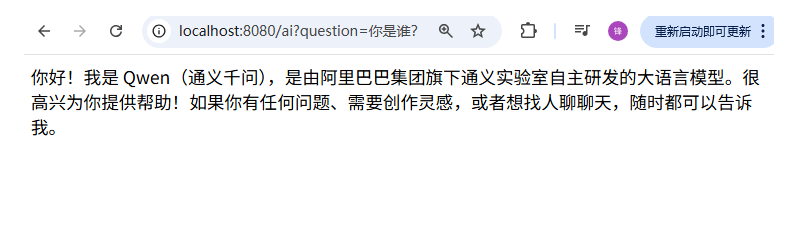 AI Visual Insight: This image shows the model response displayed in a browser or API call result, proving that the
 /ai endpoint has successfully connected to the model service. Technically, it corresponds to a full validation loop of request intake, Prompt construction, model invocation, and text output.
This HelloWorld project provides a stable foundation for future Agent capabilities.
From an engineering perspective, the most important outcome of this example is not that it returns a sentence. It is that it verifies three things: the Spring AI dependencies work, the OpenAI-compatible protocol works, and the external model platform works.
Once these three layers are connected, you can naturally add system prompts, Advisors, Function Calling, RAG-based retrieval augmentation, and MCP. In other words, HelloWorld is not the destination. It is the smallest practical starting line for Java Agent engineering.
FAQ
1. Why use OpenAI configuration when connecting to Alibaba Cloud DashScope?
Because DashScope provides an OpenAI-compatible interface. Spring AI’s OpenAI adapter can be reused directly. You only need to replace the base-url and model name, without writing an additional SDK by hand.
2. Why wrap the model with ChatClient instead of calling it directly inside the controller?
ChatClient is a higher-level unified abstraction. This keeps the controller focused on business input and output, and it minimizes future changes when you add system prompts, conversational memory, or tool calling.
3. How can this HelloWorld project evolve into a real Agent?
You can expand it in four steps: first add system prompts and Prompt templates, then introduce Advisors for interception and enhancement, then integrate Tools or Function Calling, and finally add RAG and MCP to form an executable task chain.
Core summary
This article reconstructs the minimal practical implementation of a Spring AI 2.0 HelloWorld project, covering Spring Boot 4, JDK 17, the OpenAI-compatible protocol, and Alibaba Cloud DashScope integration, while demonstrating the complete flow from configuration and ChatClient Bean creation to controller-based model invocation.