This project builds a parking space detection system for long-range surveillance views. Its core capabilities include empty-space/occupied-space recognition, multi-source inference, hot-swappable model weights, and result export. It addresses key challenges such as small objects, perspective distortion, occlusion, and engineering traceability. Keywords: YOLOv12, parking space detection, PySide6.
Technical Specifications at a Glance
| Parameter | Details |
|---|---|
| Core Language | Python |
| GUI Framework | PySide6 / Qt |
| Deep Learning Framework | PyTorch |
| Data Storage | SQLite |
| Input Sources | Local images, video files, camera streams |
| Export Formats | CSV, PNG, AVI |
| Supported Models | YOLOv5–YOLOv12 |
| GitHub Stars | Not provided in the original article |
| Core Dependencies | ultralytics, PySide6, opencv-python, sqlite3, pandas |
The system creates a complete detection loop for long-range parking lot surveillance
This solution is not just a simple object detection script. It is an engineering-oriented system with desktop interaction, model switching, result archiving, and account isolation. Its primary goal is to reliably identify empty and occupied parking spaces in high-pole camera, aerial, or long-range top-down monitoring scenarios.
Compared with research prototypes that only output detection boxes, this system places greater emphasis on usability. Users can switch between image, video, and local camera inputs, view inference results in real time, and write records into SQLite to build a reviewable data trail.
The system UI is designed around a single-view workflow
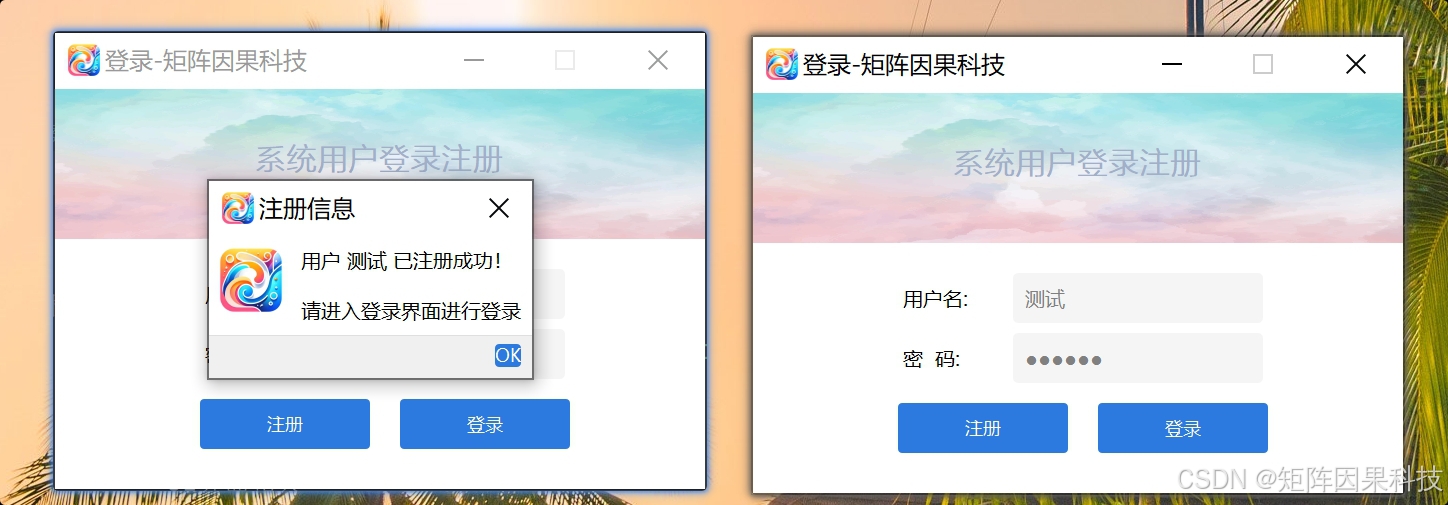 AI Visual Insight: This image shows the desktop login, registration, and skip entry points. It indicates that the system establishes session boundaries before inference begins, isolating detection records, export history, and personalized configurations across users. This reflects a localized lightweight permission-management design.
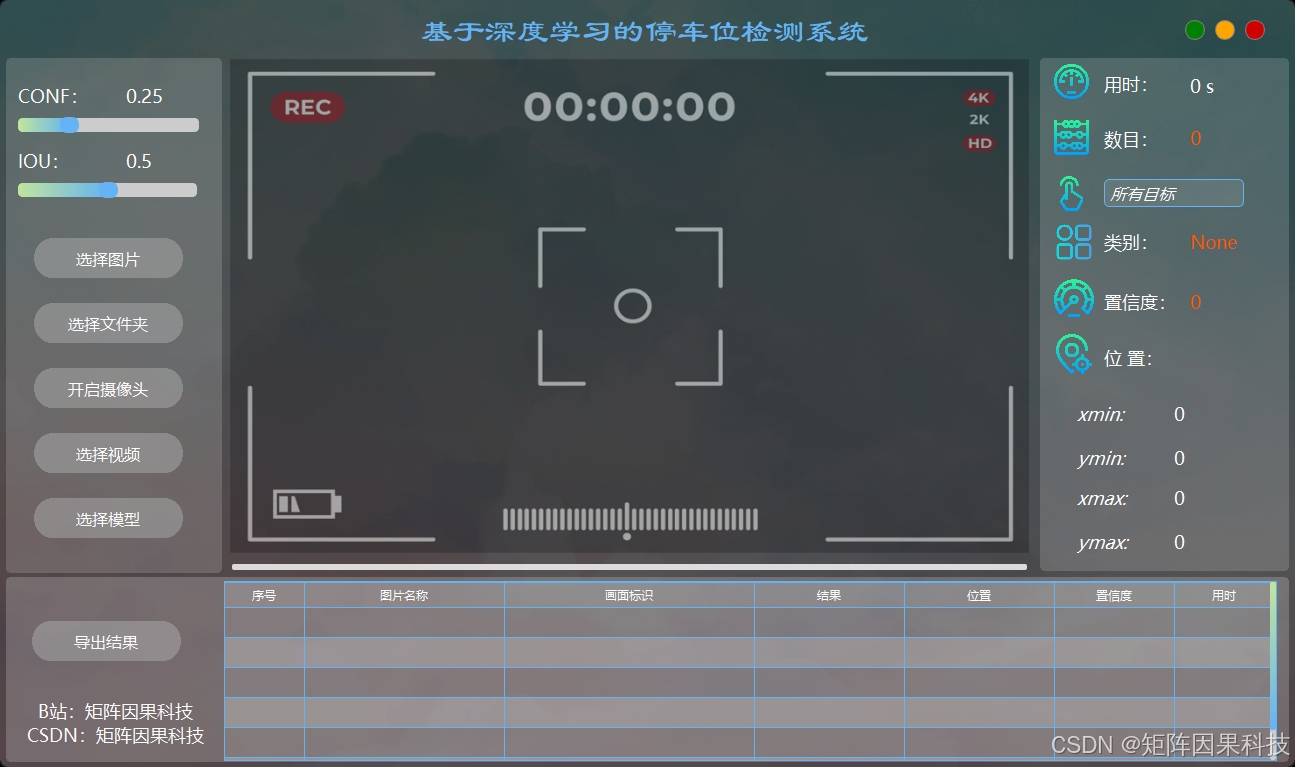 AI Visual Insight: This image shows a typical three-column layout with a status area: parameter controls on the left, image display in the center, target details on the right, and a record panel at the bottom. It reflects how the system integrates data source selection, threshold tuning, visual review, and record tracking into a single interface to reduce operational context switching.
from ultralytics import YOLO

# Load a weight file and support scenario-based hot swapping
model = YOLO("weights/yolo12n.pt")

# Run detection on the input image
results = model.predict(source="demo.jpg", conf=0.25, iou=0.45)

# Read detection results
for box in results[0].boxes:
    cls_id = int(box.cls[0])      # Class index
    score = float(box.conf[0])    # Confidence score
    xyxy = box.xyxy[0].tolist()   # Bounding box coordinates
    print(cls_id, score, xyxy)
This code demonstrates the core entry point of the system inference layer: loading YOLO weights and returning structured detection results.
Model hot swapping and multi-source inference improve deployment flexibility
The system supports switching local weight files. After a switch, it synchronizes class names and visualization color schemes to avoid review errors caused by inconsistent label mappings across models. This is especially important when benchmarking YOLOv5 through YOLOv12 side by side.
On the input side, images are suitable for offline validation, while videos and camera streams are better for real-time inspection. The system manages input sources in a mutually exclusive way to prevent multiple frame streams from occupying GPU memory and UI threads at the same time, reducing lag and mixed record writes.
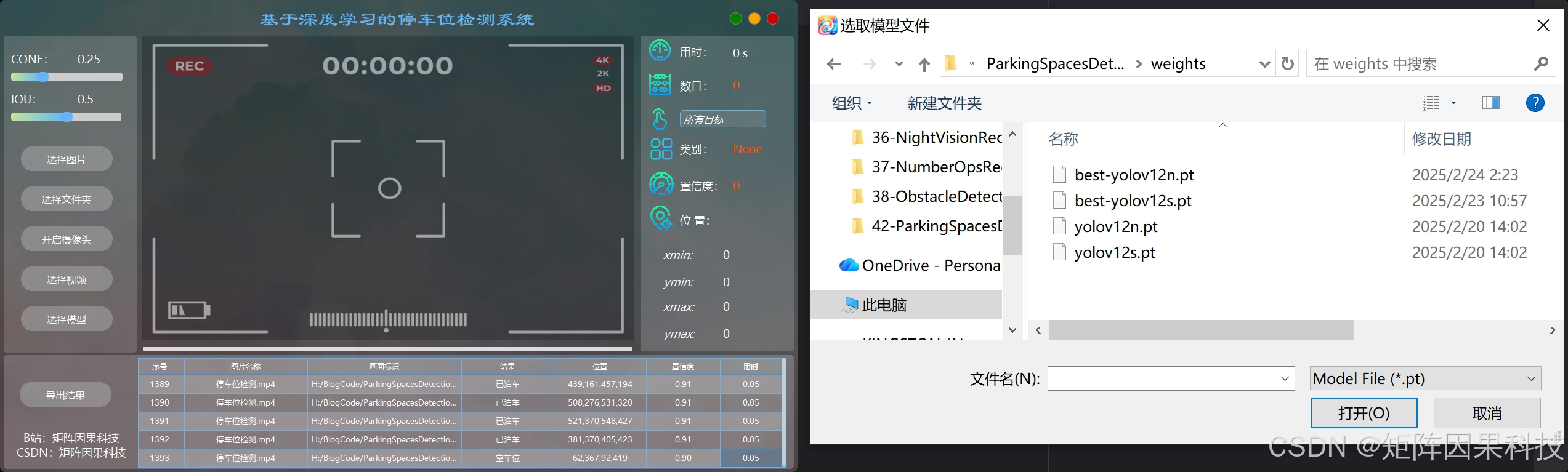 AI Visual Insight: This image highlights the model weight switching entry and synchronized class display capabilities. It shows that the system encapsulates the inference engine at the GUI layer, allowing model replacement, parameter adjustment, and result comparison without exiting the main workflow.
Image-based detection emphasizes readability for dense small objects
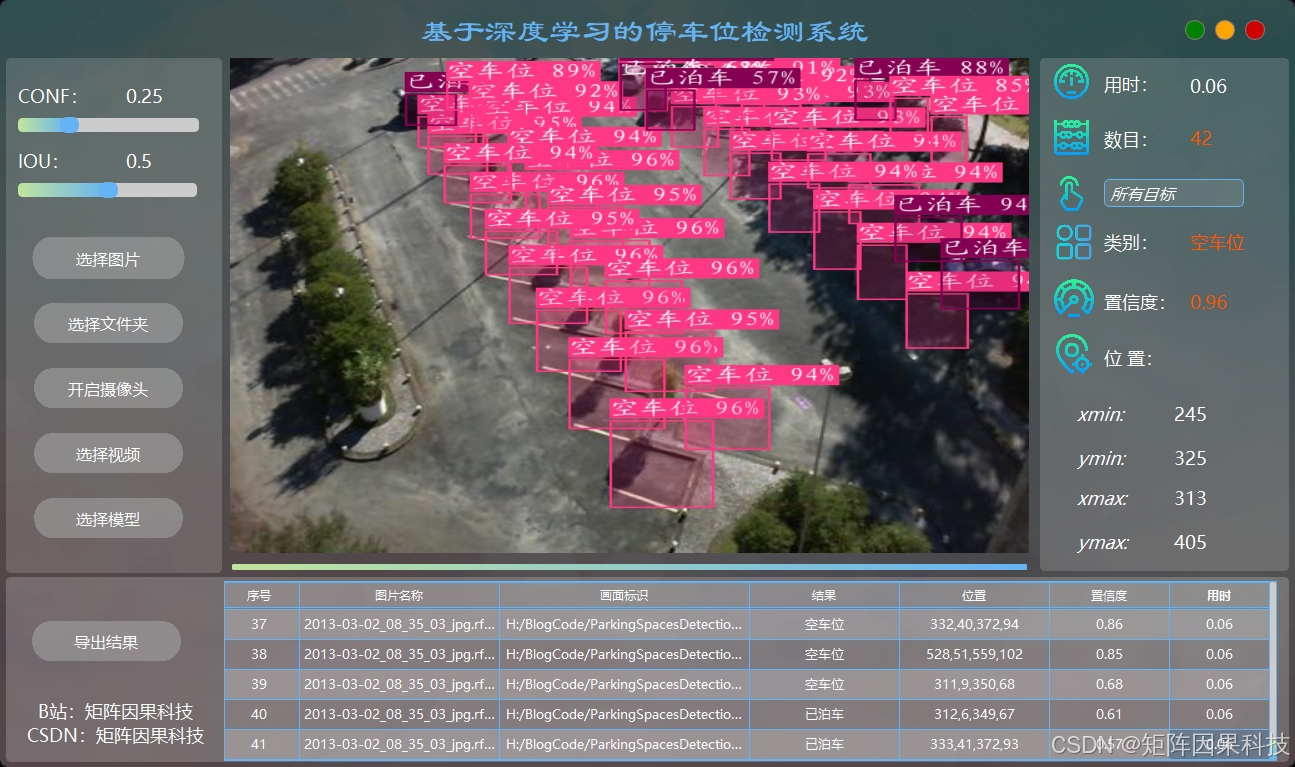 AI Visual Insight: This image shows batch detection results for empty parking spaces under a long-range top-down view. Multiple regularly arranged small objects are stably marked with bounding boxes, indicating that the model adapts well to parking line structures, scale variation, and perspective compression.
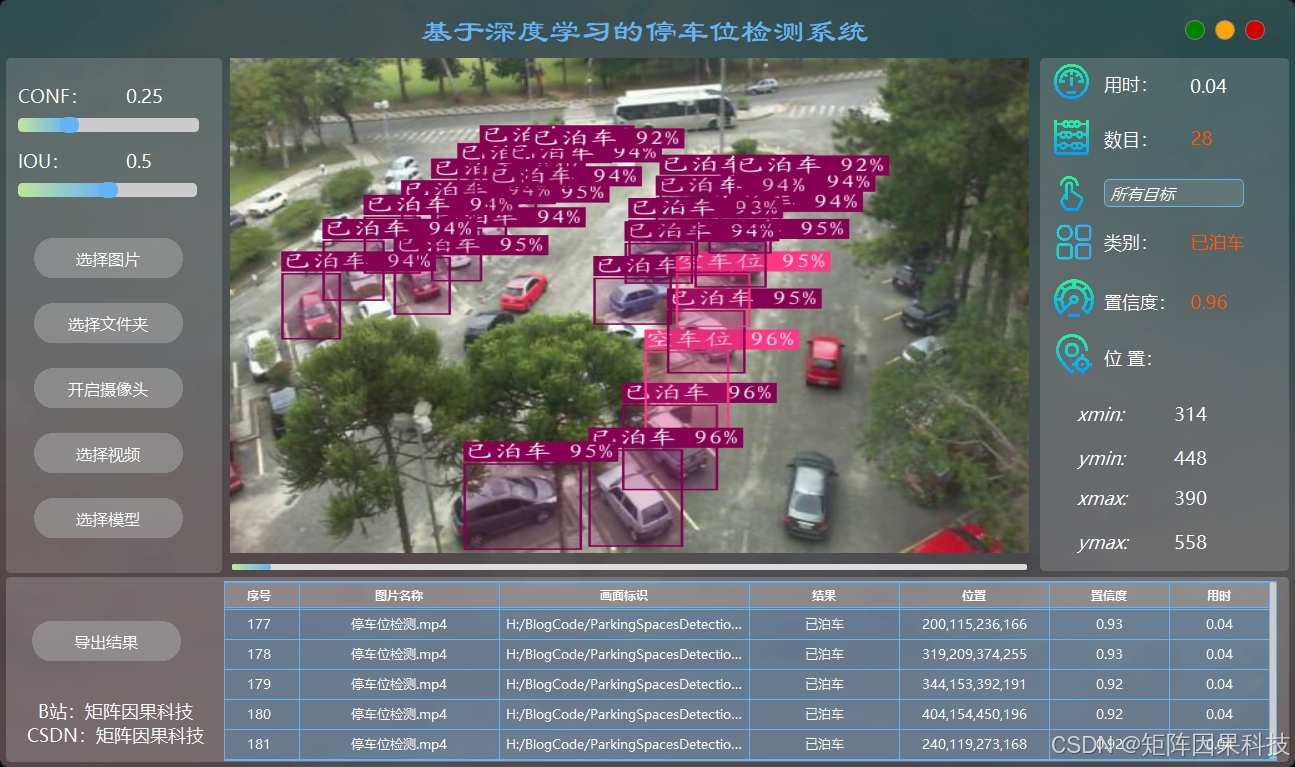 AI Visual Insight: This image shows dense detection results for occupied parking spaces. The model must distinguish vehicle occlusion, adjacent parking space boundaries, and local texture interference at the same time, reflecting the task’s demand for high-IoU localization and false positive suppression.
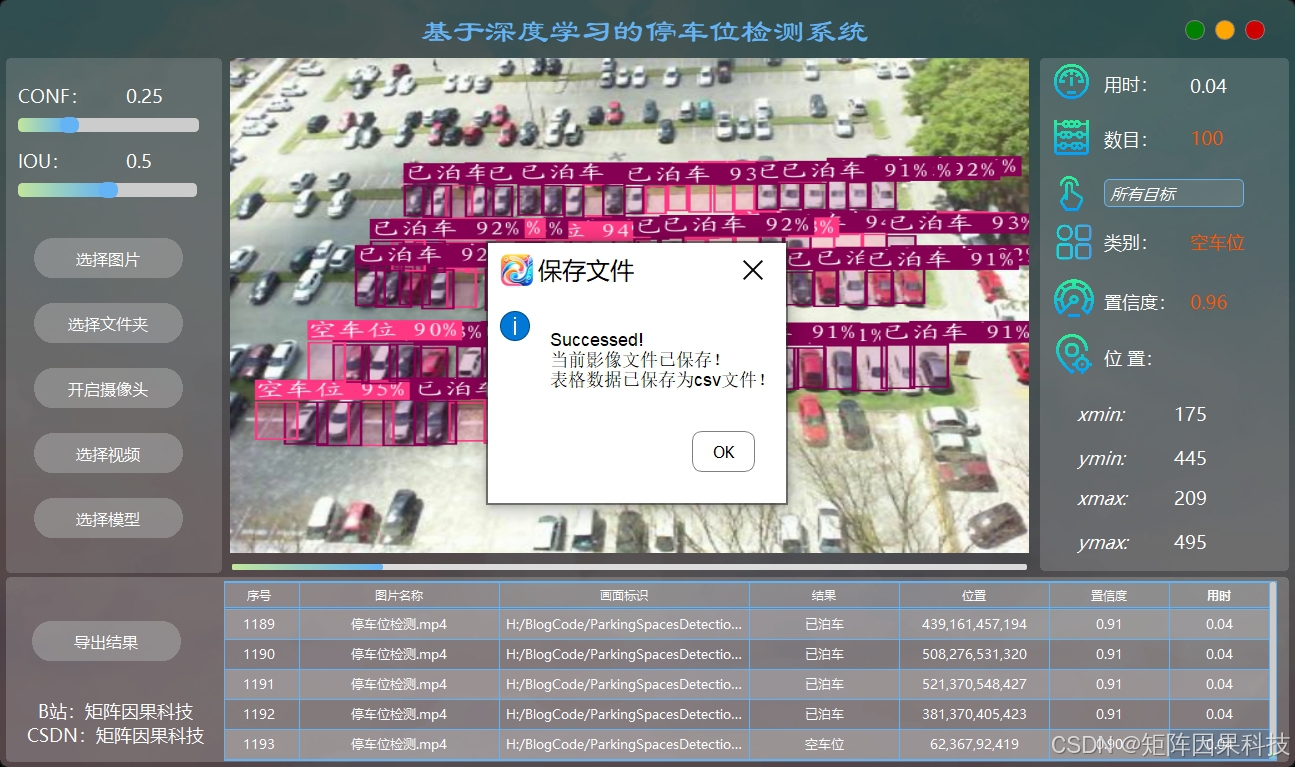 AI Visual Insight: This image reveals the presence of an export and archiving module. It shows that the system not only outputs visual results, but also incorporates PNG, AVI, and structured records into a unified archival workflow to support later review, auditing, and reporting.
import pandas as pd

# Organize detection results into a table for export and statistics
rows = [
    {"label": "space-empty", "conf": 0.98, "xmin": 12, "ymin": 30, "xmax": 88, "ymax": 66},
    {"label": "space-occupied", "conf": 0.95, "xmin": 95, "ymin": 28, "xmax": 166, "ymax": 70},
]

df = pd.DataFrame(rows)
df.to_csv("outputs/result.csv", index=False, encoding="utf-8-sig")  # Export a CSV ledger
This code shows how the system converts inference outputs into a traceable structured ledger.
Dataset processing determines the upper bound of long-range small object detection
The original dataset contains 12,415 high-resolution aerial or elevated-view images. Its classes include space-empty and space-occupied. The split is approximately 70% for training, 20% for validation, and 10% for testing, which supports stable hyperparameter selection and generalization evaluation.
The main difficulties in this scenario are small targets, dense distributions, and frequent occlusion. If you resize images too aggressively, many parking spaces lose critical detail during downsampling. A more reasonable strategy is aspect-ratio-preserving scaling with optional tiling, combined with light perspective perturbation, exposure jitter, blur, and noise simulation during augmentation.
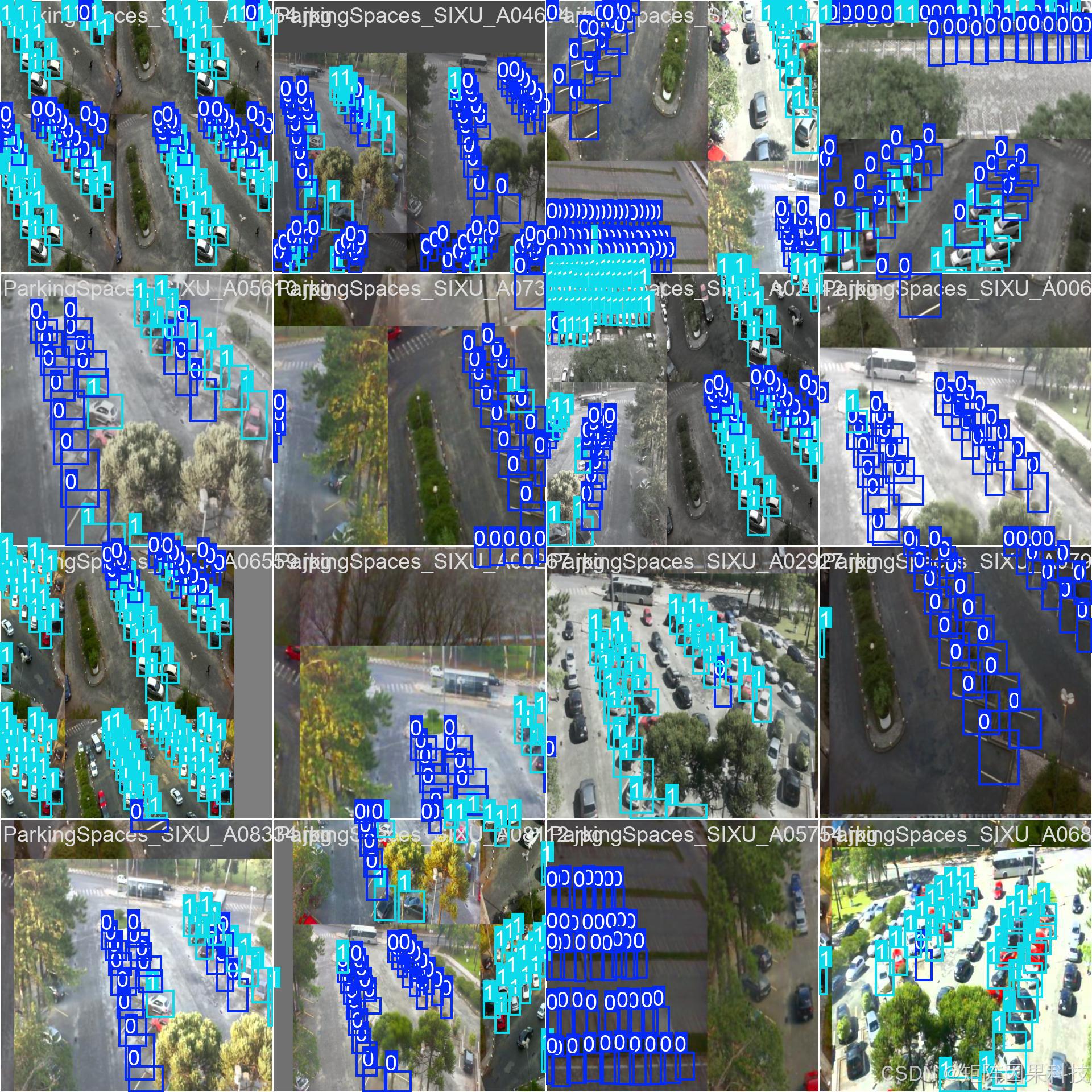 AI Visual Insight: This image shows a typical annotated sample from the parking space dataset. The targets are distributed in regular arrays and appear relatively small, indicating that this is a classic dense small object detection problem. The model must learn both local texture cues and global geometric arrangement patterns.
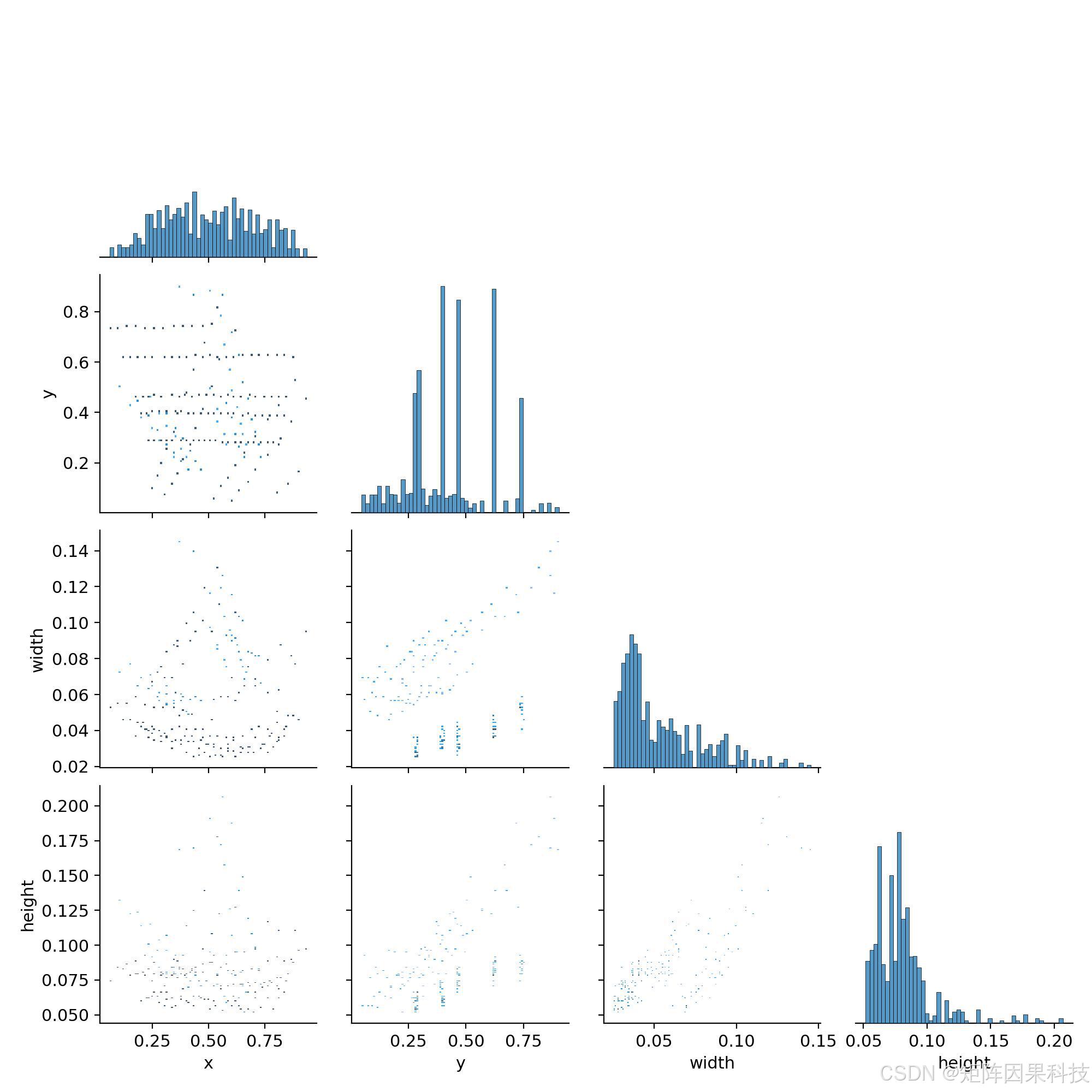 AI Visual Insight: This image reflects the spatial and scale distributions of bounding boxes in the dataset. It helps assess class balance, object size ranges, and scene bias, making it an important reference for selecting input resolution and augmentation strategies.
# Define class mappings to keep training, inference, and export consistent
CHINESE_NAME = {
    "space-empty": "空车位",
    "space-occupied": "已泊车",
}
This code defines the mapping from model labels to business-facing Chinese semantics, helping keep frontend displays and exported reports consistent.
YOLOv12 emphasizes a balance between attention mechanisms and real-time performance in this task
The original article uses YOLOv12 as the main reference model. Its backbone, neck, and detection head still follow the single-stage detector paradigm, but it introduces more engineering-friendly attention mechanisms to strengthen contextual modeling in long-range scenes.
For parking space detection, the deciding factor is not a single mAP50 score. What matters more is localization quality at high IoU thresholds, recall, and end-to-end latency. In densely arranged parking space scenarios, even slight box drift can suppress neighboring targets.
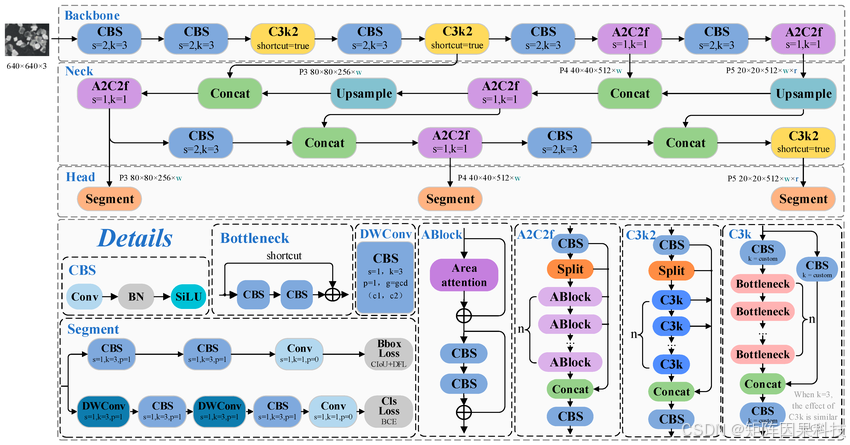 AI Visual Insight: This image shows the key network modules and feature flow inside YOLOv12. It highlights backbone feature extraction, neck-level multi-scale fusion, and detection head prediction paths, showing how the model strengthens representations for small objects and long-range dependencies through attention and aggregation structures.
Multi-model comparisons show that model selection should balance accuracy, recall, and latency
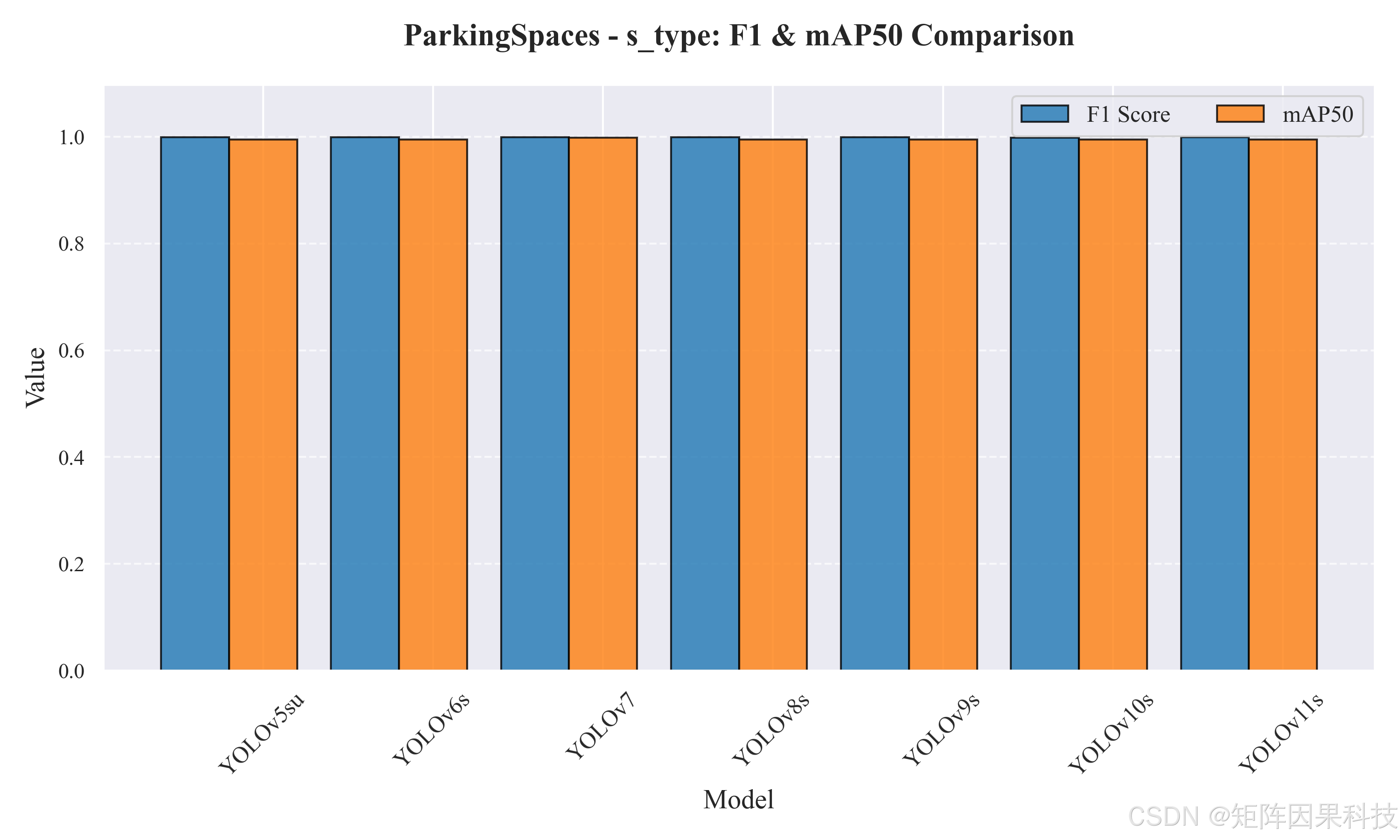
The experiments benchmark lightweight YOLOv5–YOLOv12 models on an RTX 3070 Laptop GPU. The results show that mAP50 is already close to saturation for most models, but clear differences remain in mAP50-95, recall, and end-to-end latency.
From an engineering perspective, YOLOv8s is more balanced and well suited for real-time desktop preview. YOLOv9t and YOLOv10s perform better on high-IoU localization quality, making them better candidates for scenarios with stricter review requirements. Although YOLOv12n benefits from a newer architecture, its recall is slightly conservative on this dataset.
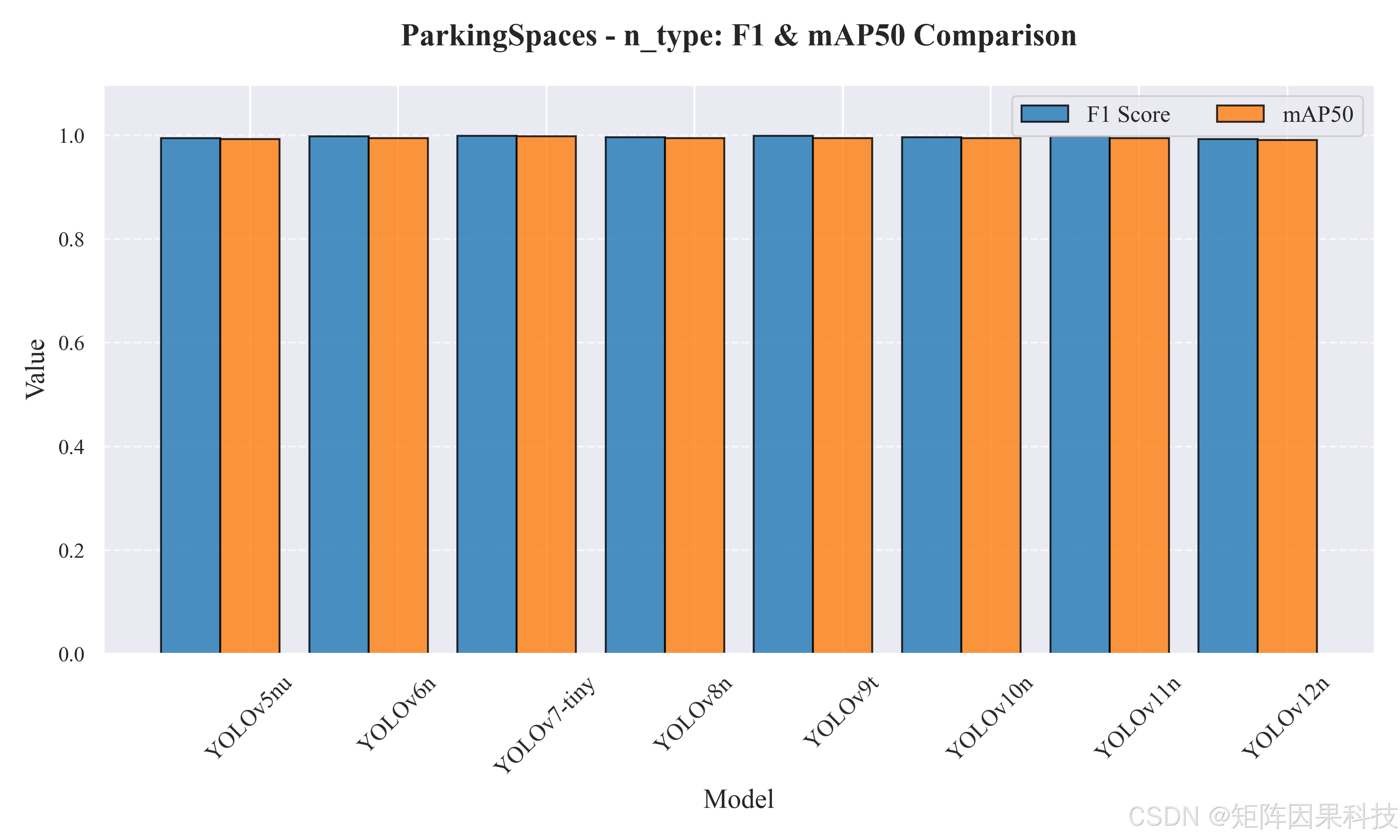 AI Visual Insight: This image shows a quantitative comparison of different YOLO versions across Precision, Recall, F1, mAP, and related metrics. It suggests that this task has already entered a high-accuracy regime, where model differences appear more in strict localization quality and speed cost than in coarse-grained recognition ability.
 AI Visual Insight: This image reflects convergence stability during training and how closely each PR curve approaches the upper-right corner. It helps evaluate model stability in high-recall regions, threshold sensitivity, and overfitting risk.
The desktop architecture turns algorithmic output into an operational capability
The system uses a four-layer structure: Qt handles rendering and interaction, the business layer manages models and sessions, the inference layer organizes preprocessing and postprocessing, and SQLite persists accounts and detection records. This separation allows the algorithm, interface, and data archival logic to evolve independently.
In real-time scenarios, if inference runs on the main thread, the UI will freeze immediately. For that reason, the system emphasizes event-driven frame streams and asynchronous scheduling, keeping progress bars, latency statistics, and image refreshes responsive.
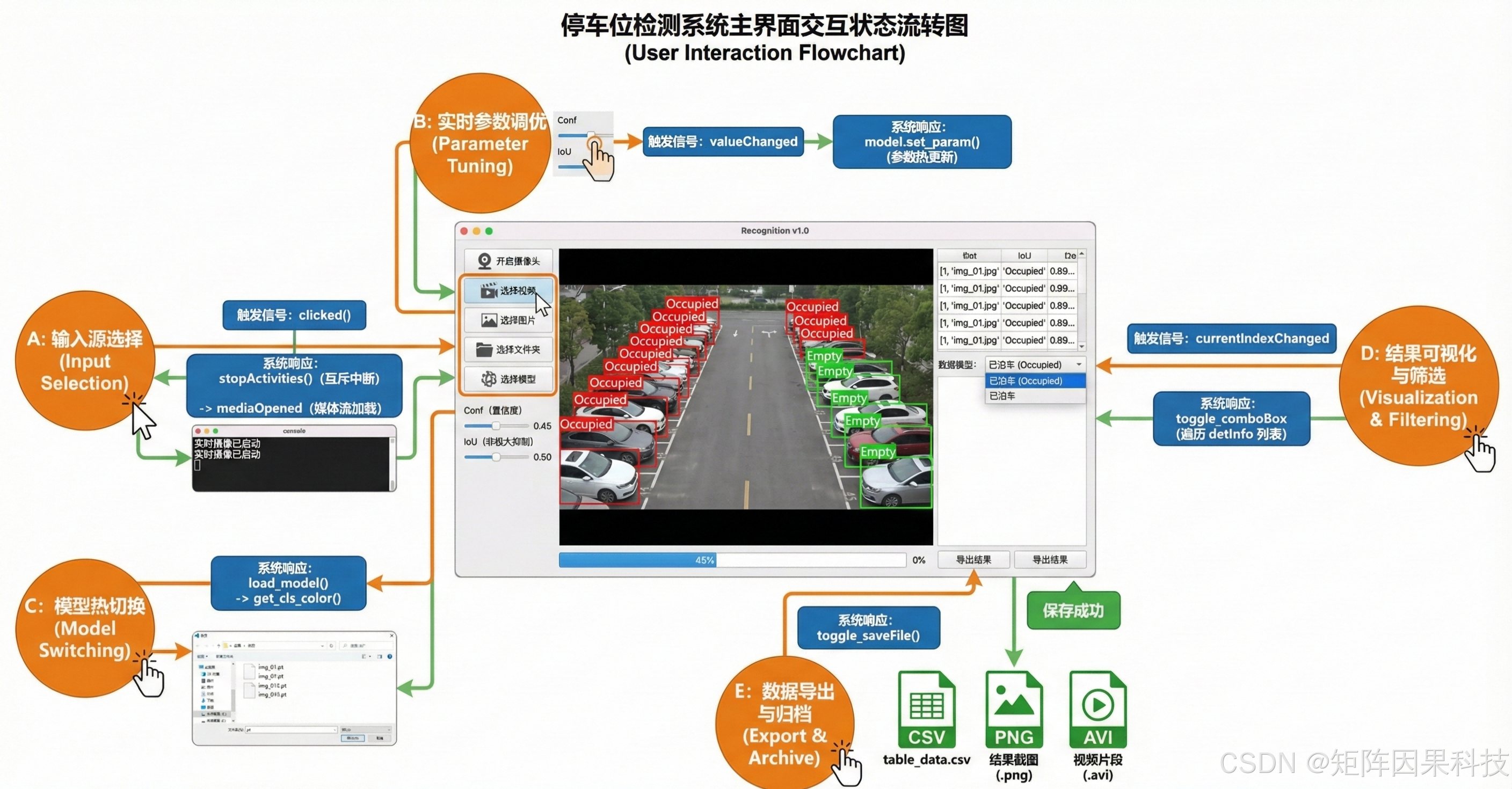 AI Visual Insight: This image shows the full pipeline from input source ingestion to image preprocessing, YOLO inference, postprocessing, UI rendering, and result export. It demonstrates that the system already forms an end-to-end closed loop rather than an isolated model invocation script.
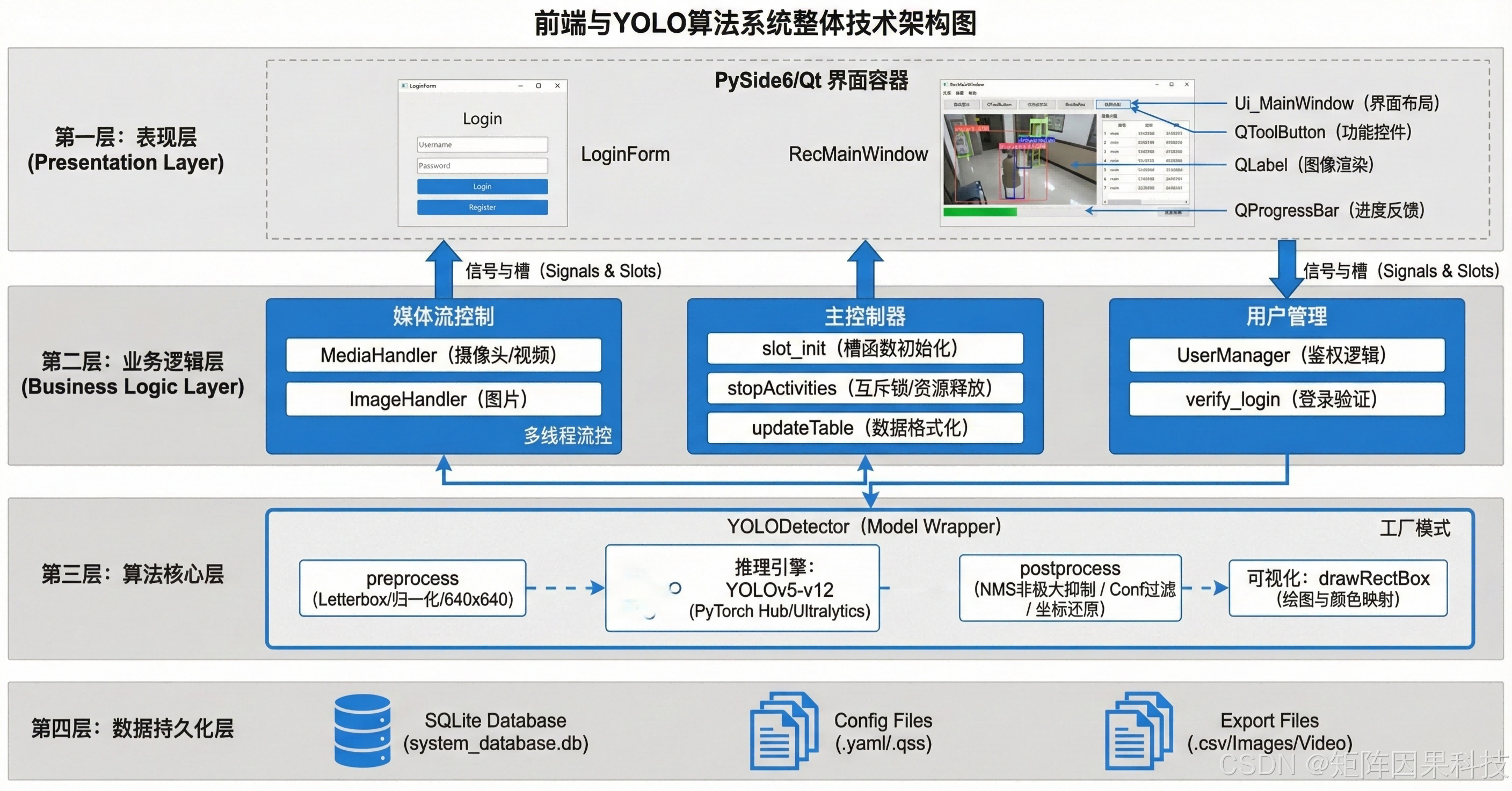 AI Visual Insight: This image presents the boundary relationships among the presentation layer, business layer, inference layer, and data layer. It shows that the project considers module decoupling, clearer interfaces, and future extensibility for logging, remote APIs, or additional models.
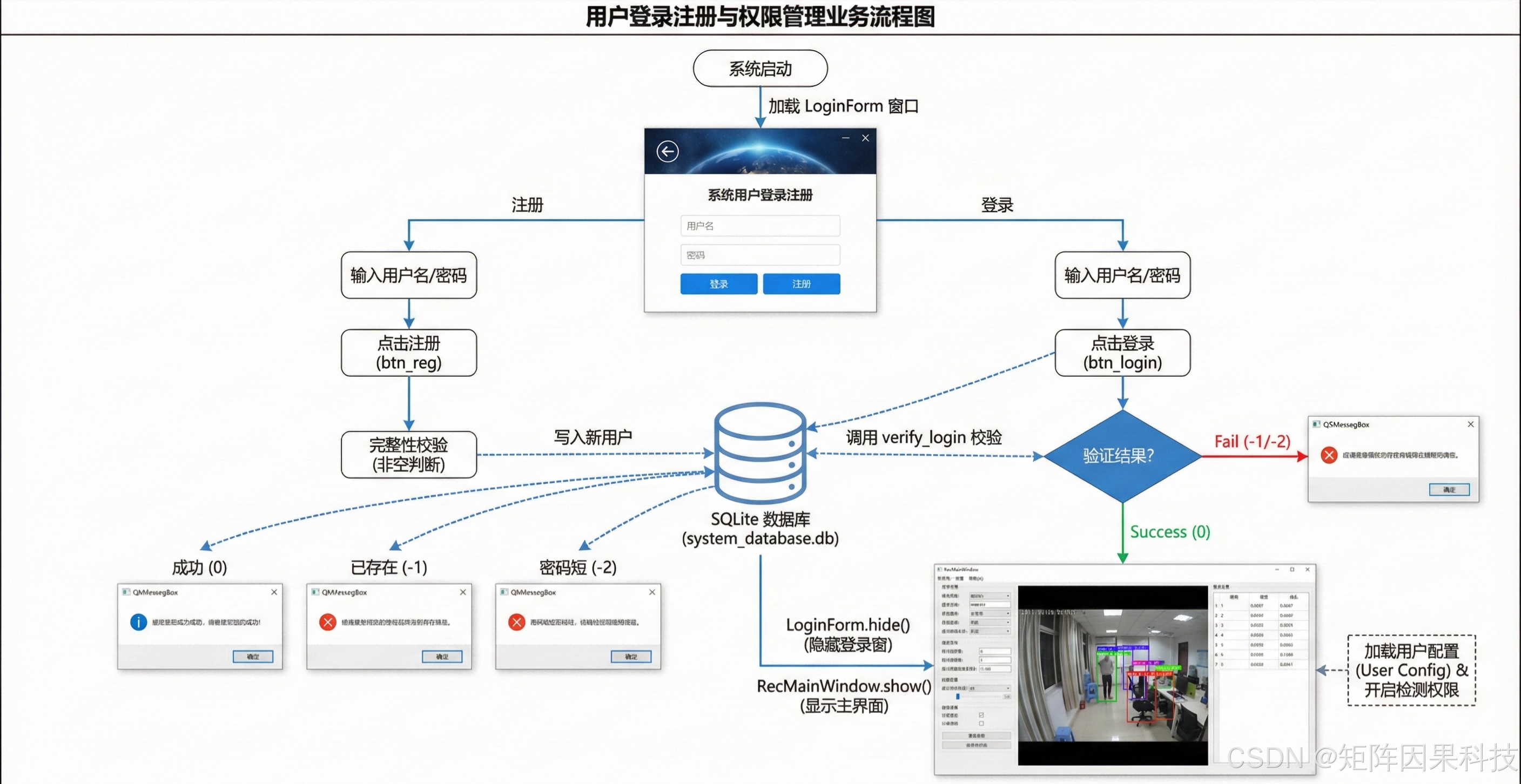 AI Visual Insight: This image shows that login, registration, skip, profile modification, and logout operations are all bound to accounts and detection records in the local database, reflecting session isolation and auditability under a minimized permission model.
import sqlite3

conn = sqlite3.connect("parking.db")
cursor = conn.cursor()

# Create a detection record table to store inference results and export file paths
cursor.execute("""
CREATE TABLE IF NOT EXISTS records (
    id INTEGER PRIMARY KEY AUTOINCREMENT,
    username TEXT,
    source_type TEXT,
    model_name TEXT,
    result_count INTEGER,
    export_path TEXT,
    created_at TEXT
)
""")

conn.commit()
conn.close()
This code demonstrates the minimal implementation of local record persistence, which forms the foundation of result traceability.
The project resources position it closer to a teaching template and deployment starter
The original article provides the complete project, training code, UI files, test samples, and data resource entry points. That means it is suitable not only for paper reproduction, but also as a starting point for coursework, capstone projects, graduation projects, or enterprise PoCs.
For developers, the real value is not that it is “yet another YOLO detection project.” The value lies in how it integrates model benchmarking, desktop interaction, export-based review, and local archiving into one workflow, lowering the cost of moving from experimentation to a demonstrable system.
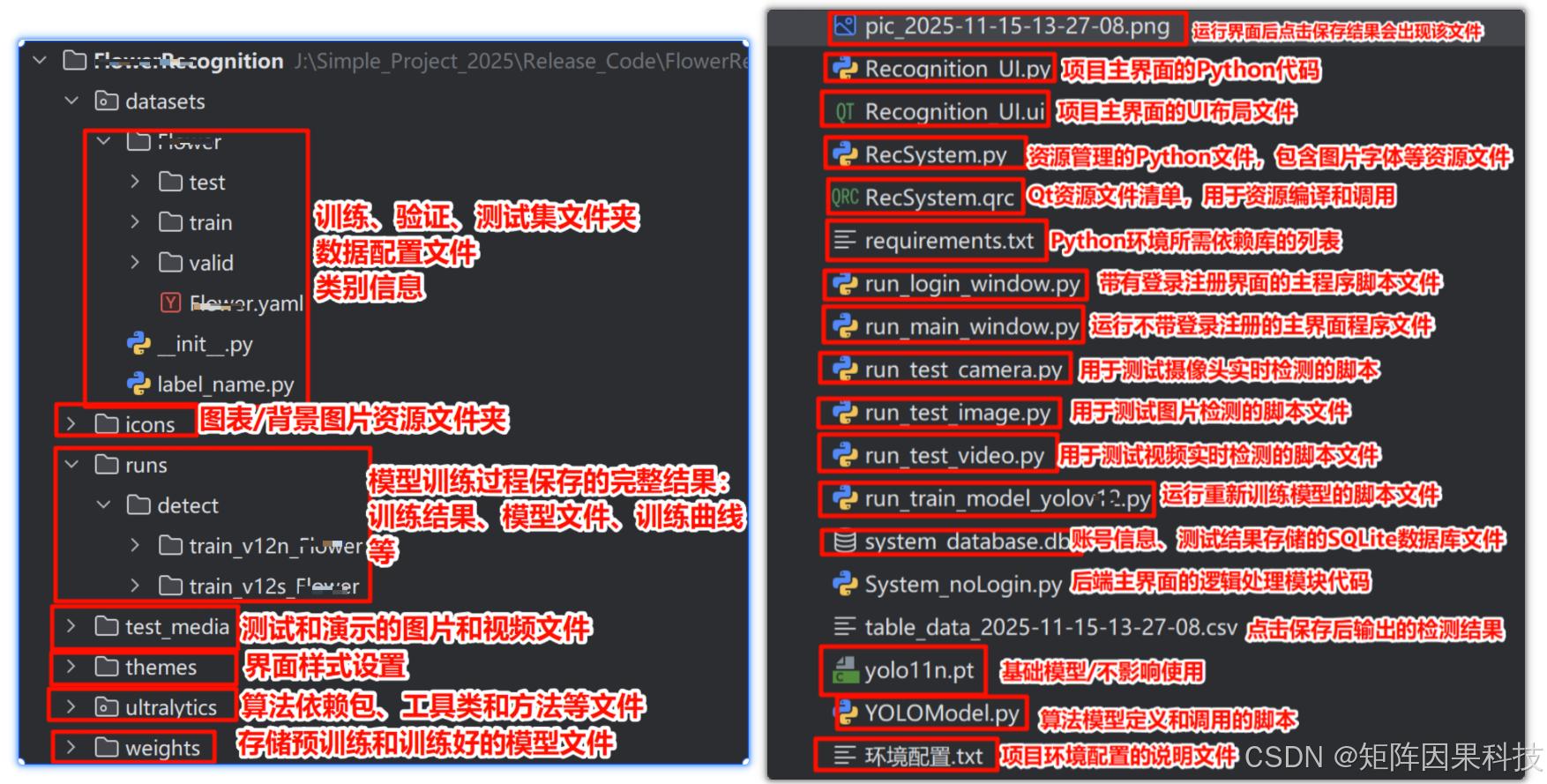 AI Visual Insight: This image shows the packaged resource structure of the project, which typically includes training scripts, inference scripts, UI files, test samples, and configuration documents. It indicates that the project provides fairly complete reproduction and delivery materials for quick startup and secondary development.
FAQ
1. Why is mAP50 alone not enough for long-range parking space detection?
Because this scenario contains densely packed targets with very close boundaries, mAP50 can look strong while still failing to reflect whether boxes align accurately. You should pay more attention to mAP50-95, recall, and end-to-end latency to judge missed detection rates and review reliability in real deployment.
2. Why does the system introduce PySide6 and SQLite instead of providing only an inference script?
An inference script only proves that the model runs. It cannot support a real operational workflow. PySide6 handles visual interaction, threshold tuning, and multi-source input, while SQLite handles record archiving, account isolation, and export indexing. Together, they convert algorithmic capability into operational capability.
3. Is YOLOv12 the best choice for this project?
Not necessarily. If you want to explore a newer architecture and research extensions, YOLOv12 is a strong first option. If you care more about real-time performance and balanced behavior on the current dataset, YOLOv8s, YOLOv9t, and YOLOv10s often provide stronger engineering reference value. The best choice depends on your compute budget, recall requirements, and deployment scenario.
Core takeaway
This article reconstructs a parking space detection solution for long-range surveillance views. It covers YOLOv5–YOLOv12 multi-model comparison, PySide6 desktop interaction, SQLite local records, CSV/PNG/AVI export, and dataset processing strategies, making it a practical reference for smart parking and computer vision deployment.