This article focuses on a traffic sign recognition system built with YOLOv5 through YOLOv12. It covers unified dataset evaluation, multi-model switching, PySide6-based visual deployment, and SQLite-backed persistence to address small object detection, real-time inference, and reproducible engineering. Keywords: YOLOv12, traffic sign recognition, object detection.
The technical specification snapshot defines the project scope
| Parameter | Description |
|---|---|
| Core Language | Python 3.12 |
| Detection Framework | YOLOv5–YOLOv12 |
| UI Framework | PySide6 |
| Data Storage | SQLite |
| Input Protocols | Image / Video / Camera / Folder |
| Dataset Size | 7,444 images, 11 traffic sign classes |
| Data Split | Train 6516 / Val 632 / Test 296 |
| Input Size | 640×640 |
| Core Dependencies | Ultralytics, PyTorch, PySide6, OpenCV, SQLite |
| Popularity Signal | The original article shows about 1.1k reads |
This project is a traffic sign detection pipeline for real road environments
This project is not a single-model demo. It is a complete closed loop for training, evaluation, and deployment. Its core goal is to compare YOLOv5 through YOLOv12 under the same dataset, the same training protocol, and the same UI system, avoiding the common problem of drawing conclusions from mismatched configurations.
The system targets scenarios with small traffic signs, dense distributions, large scale variation, and complex lighting. It balances accuracy, speed, and deployability. From an engineering perspective, it integrates image, video, camera, and folder batch processing, while also supporting result export, history persistence, and user-level parameter management.
The project capabilities can be summarized into four layers
- Data layer: 7,444 images and 11 traffic sign classes using YOLO TXT annotations.
- Model layer: supports switching among YOLOv5–YOLOv12 weights.
- System layer: a PySide6 desktop interface orchestrates the inference workflow.
- Management layer: SQLite stores accounts, configurations, and detection history.
from ultralytics import YOLO

# Load model weights for a specific version
model = YOLO("weights/yolov12n.pt")

# Run inference on a single image
results = model.predict(
    source="demo/test.jpg",   # The input source can be replaced with a video or camera
    imgsz=640,                 # Unified input size
    conf=0.78,                 # Balance false positives and missed detections
    iou=0.45                   # Control the box merging threshold
)
This code snippet shows the system’s unified inference entry point. In practice, model switching only requires replacing the weight path.
The dataset design determines whether the conclusions are trustworthy
The dataset contains 7,444 front-facing road images, covering urban roads, rural roads, intersections, and different weather conditions. It includes 11 classes: Speed Limit 40/50/60/70/80, Give Way, No Entry, Parking, Pedestrian, Roundabout, and Stop.
The main challenge is not the number of classes, but the object characteristics: distant signs occupy very few pixels, nearby signs appear much larger, and scenes include rain, snow, motion blur, and background interference. This means the models should not be evaluated only by [email protected]. You should also pay close attention to the stricter [email protected]:0.95 metric.
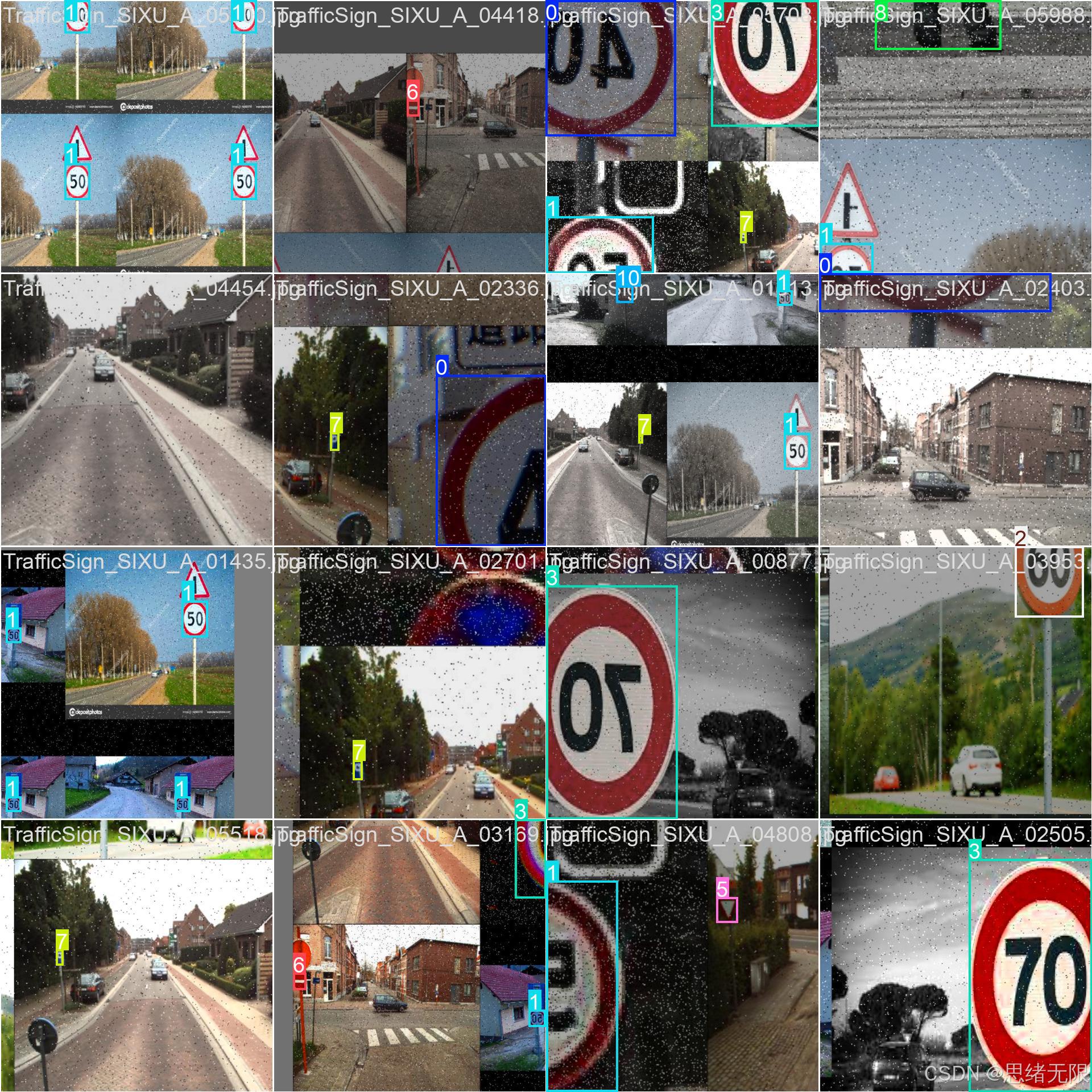 AI Visual Insight: The figure shows annotated traffic sign samples in real road scenes. The target distribution clearly combines small objects and multi-scale objects, and some signs appear near road edges or in distant areas. This indicates that the detector needs strong multi-scale feature fusion and high recall.
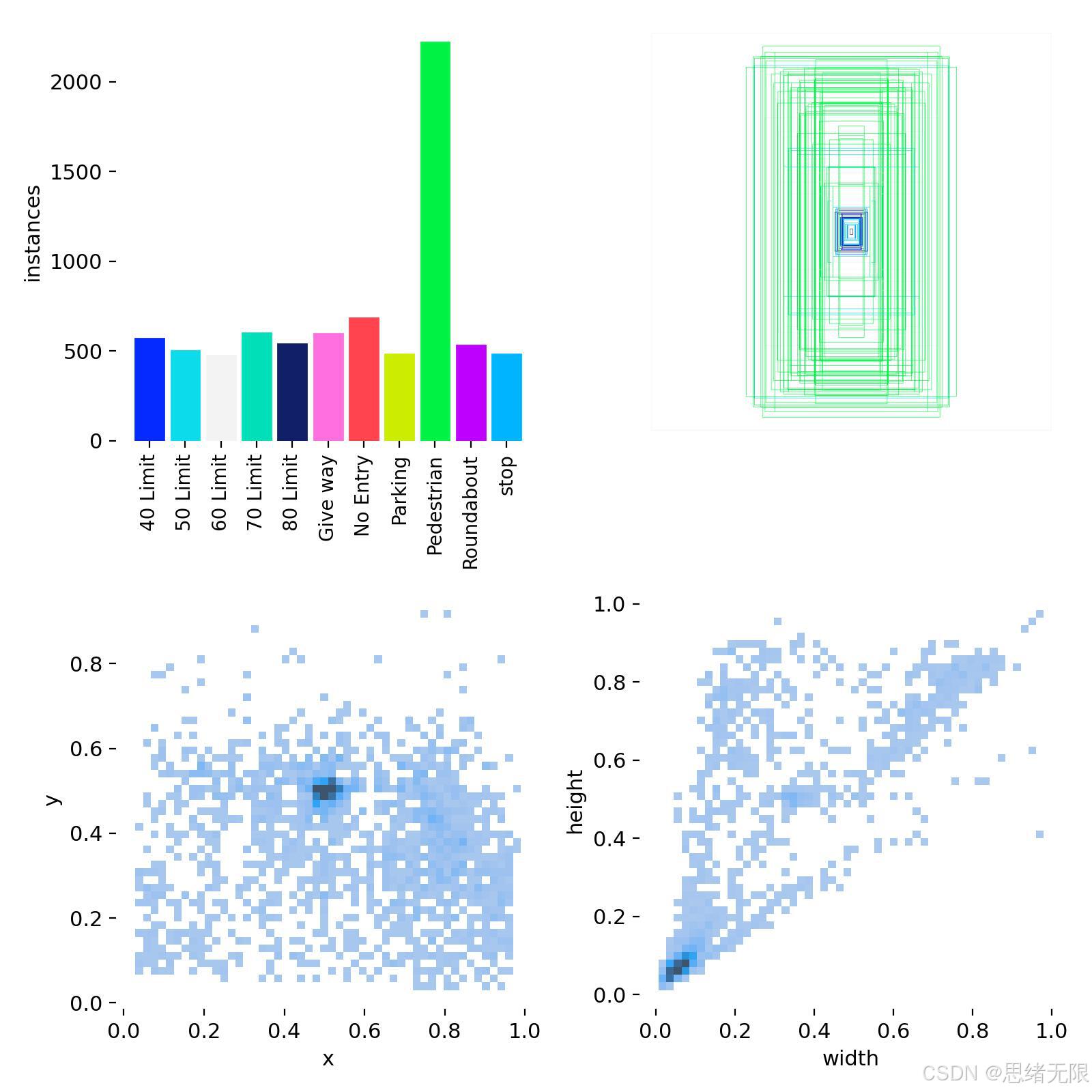 AI Visual Insight: This figure summarizes class distribution, bounding box size, and spatial position statistics. The Pedestrian class has more samples, and many boxes cluster in smaller size ranges, confirming that the task is highly sensitive to small-object detection heads, feature pyramids, and training augmentation strategies.
The annotation format stays compatible with the YOLO ecosystem
# Chinese class mapping used for UI display and result export
CHINESE_NAME = {
    "40 Limit": "限速40",
    "50 Limit": "限速50",
    "60 Limit": "限速60",
    "70 Limit": "限速70",
    "80 Limit": "限速80",
    "Give way": "注意让行",
    "No Entry": "禁止驶入",
    "Parking": "泊车",
    "Pedestrian": "行人",
    "Roundabout": "环形交叉",
    "stop": "停车",
}
This mapping converts the model’s English class output into Chinese labels that are more suitable for UI display.
The core value of model upgrades lies in unified comparison, not chasing the latest release
The project uses the typical Backbone–Neck–Head detection architecture, but different YOLO versions continue to evolve in decoupled heads, label assignment, post-processing, and attention mechanisms. YOLOv8 emphasizes anchor-free design and a unified interface. YOLOv10 emphasizes end-to-end design and lower post-processing latency. YOLOv12 leans more toward attention enhancement.
For traffic sign detection, the value of these upgrades appears mainly in three areas: better small-object recall, more stable high-IoU localization, and latency control that better suits real-time deployment. As a result, the project does not assume that the newest version is always the best. Instead, it provides model selection guidance for different scenarios.
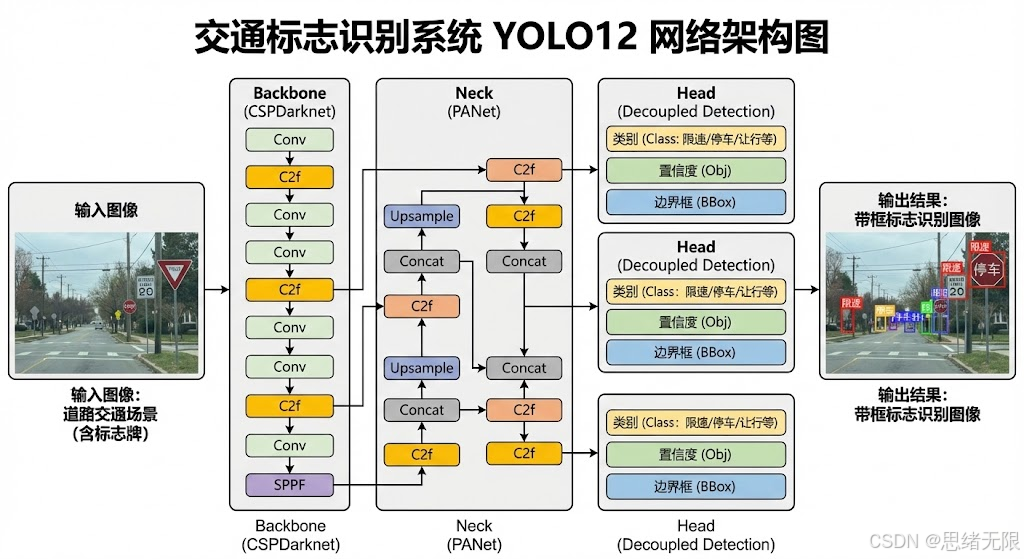 AI Visual Insight: The image illustrates the backbone, feature fusion, and detection head relationships in a newer YOLO architecture. It highlights the synergy between attention modules and multi-scale paths, showing that this version aims to improve feature representation in complex backgrounds without significantly increasing inference complexity.
A unified training strategy is the prerequisite for comparability
During training, the project consistently uses 640×640 input, a maximum of 120 epochs, batch size 16, warmup plus cosine decay, Mosaic augmentation, and disables strong augmentation during the last 10 epochs. The purpose is clear: make the conclusions come from the models themselves rather than from manual hyperparameter bias.
train_args = {
    "imgsz": 640,
    "epochs": 120,
    "batch": 16,
    "patience": 50,
    "close_mosaic": 10,   # Disable strong augmentation later in training to improve validation consistency
    "lr0": 0.01,
    "lrf": 0.01,
    "momentum": 0.937,
    "weight_decay": 5e-4,
}
This parameter set reflects a training strategy that prioritizes reproducibility and fair horizontal comparison.
The experimental results show that accuracy gaps are small, while localization quality and latency matter more
Among the lightweight n-series models, YOLOv8n and YOLOv6n offer lower inference latency and fit real-time camera scenarios well. YOLOv11n delivers a higher F1 score and is better when stable recognition matters more. YOLOv10n performs strongly on [email protected]:0.95, indicating stronger bounding box regression quality.
In the s-series, YOLOv8s provides a well-balanced engineering profile, YOLOv9s performs better on stricter IoU metrics, and YOLOv11s offers a more reliable compromise between accuracy and real-time performance. In other words, most models achieve high [email protected] on traffic sign tasks, so deployment decisions should rely more on [email protected]:0.95, F1, and inference time.
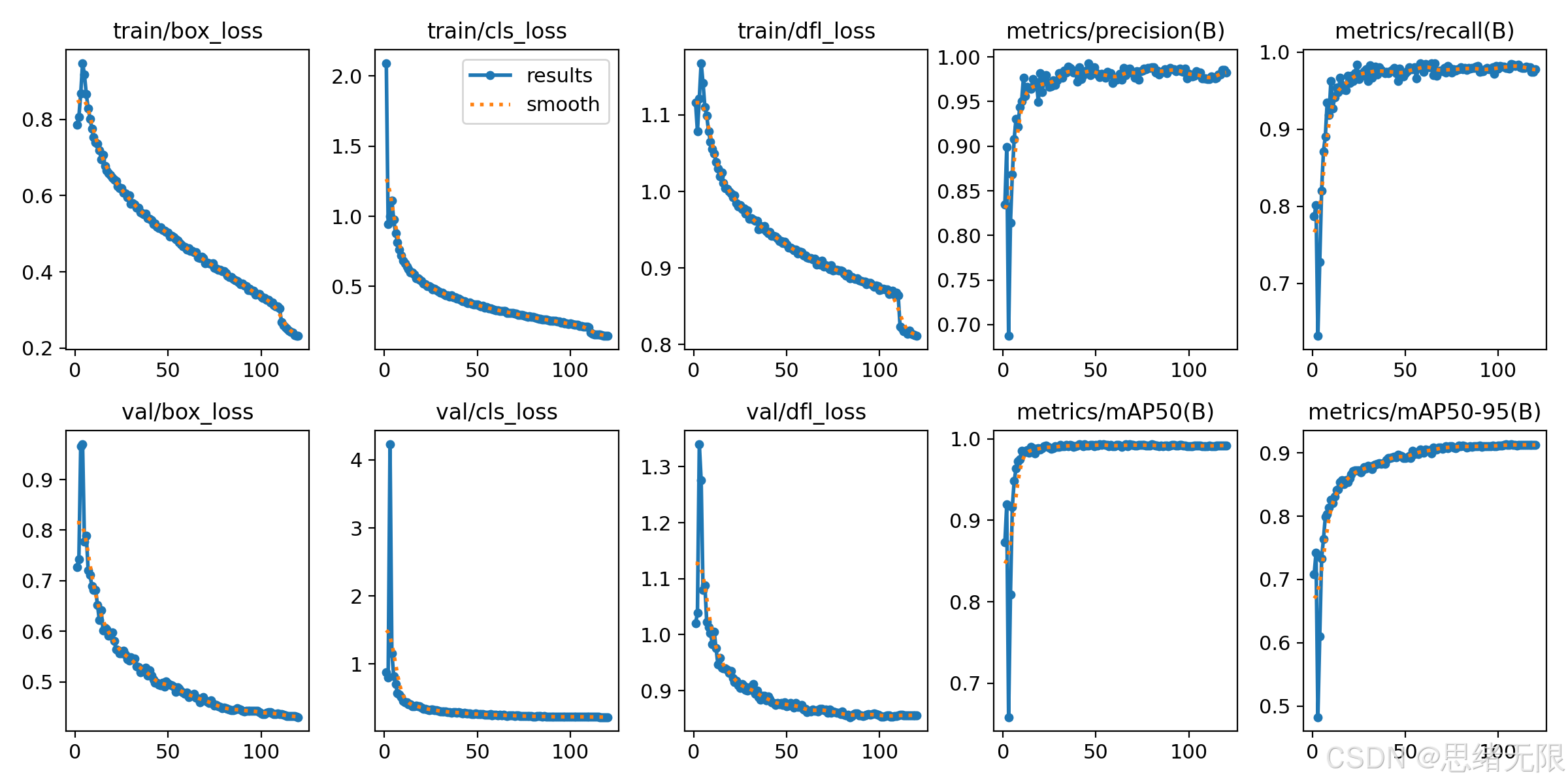 AI Visual Insight: The chart includes training trends for precision, recall, mAP, and loss. It shows fast convergence early on and gradual stabilization later, indicating that the task can reach high detection rates relatively easily under a unified setup, while fine-grained localization metrics need more training time to keep improving.
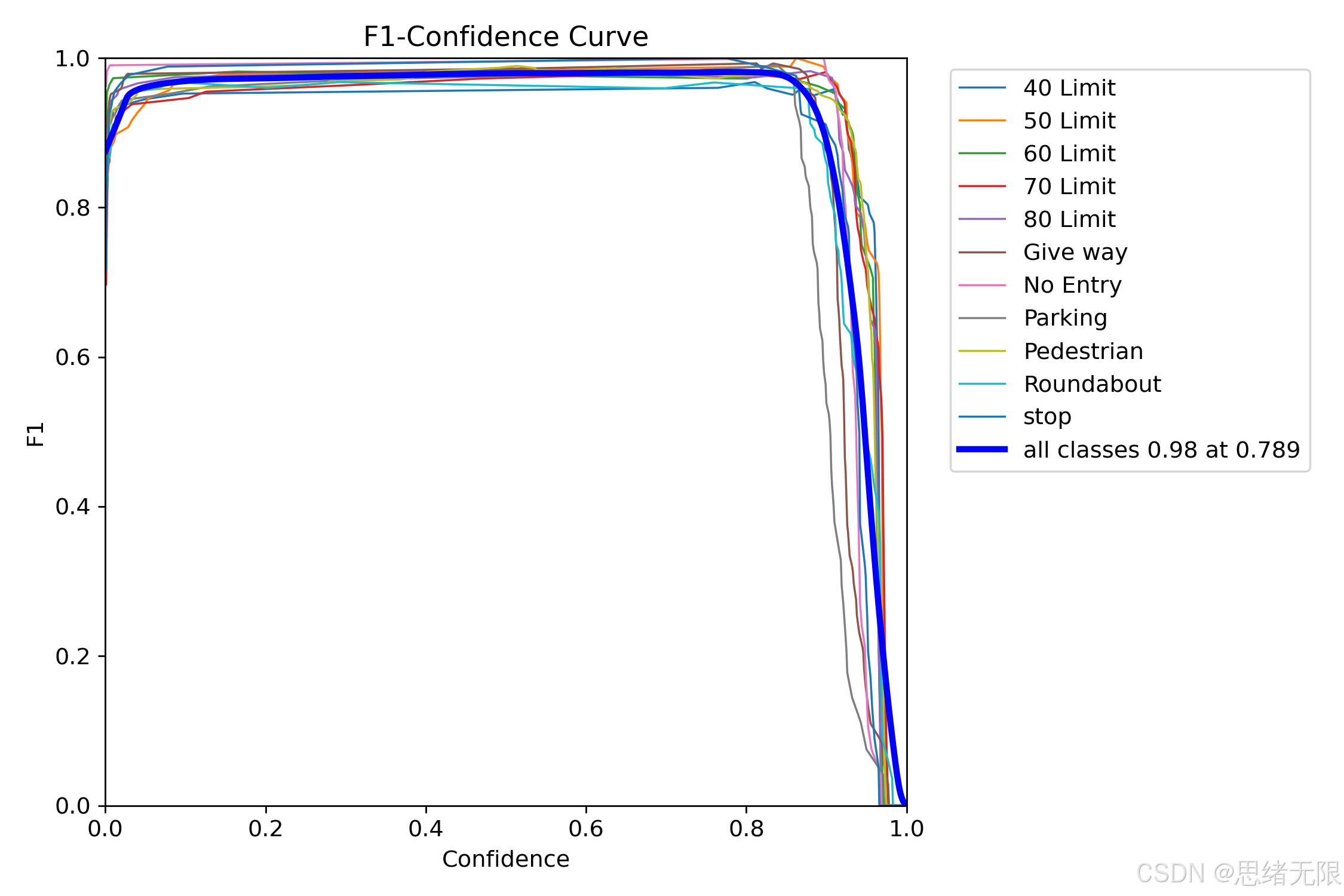 AI Visual Insight: This figure shows how F1 changes across different confidence thresholds. The peak appears around 0.78, suggesting that a default threshold in the 0.75–0.80 range is more reasonable because it suppresses false positives without significantly sacrificing recall for distant small objects.
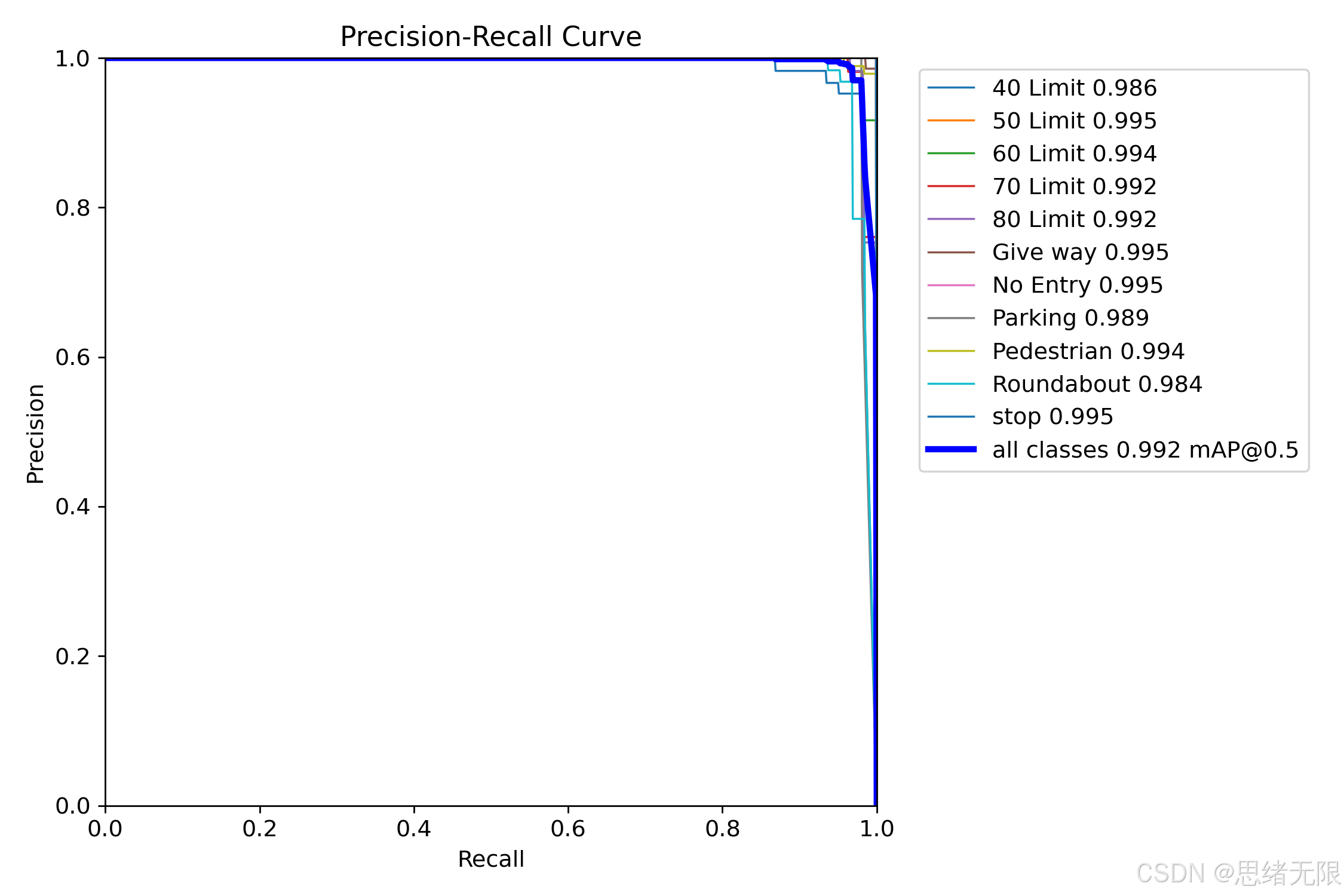 AI Visual Insight: The image presents PR curves and AP levels for all 11 classes. Most classes approach the ideal upper-right corner, while a few speed-limit classes and the roundabout class trail slightly behind, reflecting the combined pressure of fine-grained numeric differences and blurry small objects on both classification and localization.
The system architecture is designed as a reusable inference platform
The implementation consists of three parts: Ui_MainWindow, MainWindow, and Detector. The UI handles layout and interaction. The control layer maintains input sources and inference state. The Detector handles preprocessing, calls the model, performs post-processing, and returns structured results.
Multi-source input is abstracted into a unified frame stream. Images, videos, cameras, and folders all enter the same inference interface. This design allows model switching without breaking UI logic, and it also makes it easier to later add ONNX export, TensorRT deployment, or new business tasks.
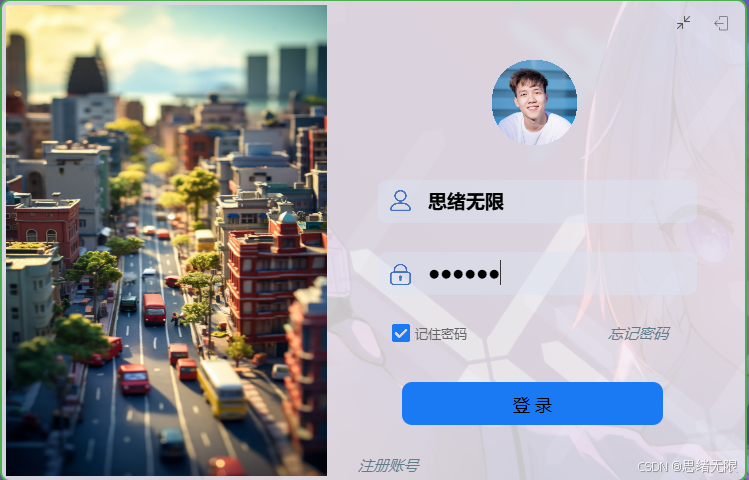 AI Visual Insight: The image shows the system startup and login page. The interface includes account input, theme styling, and functional entry points, which demonstrates that the project is not only an algorithm validation demo but also includes complete user-side interaction and configuration loading.
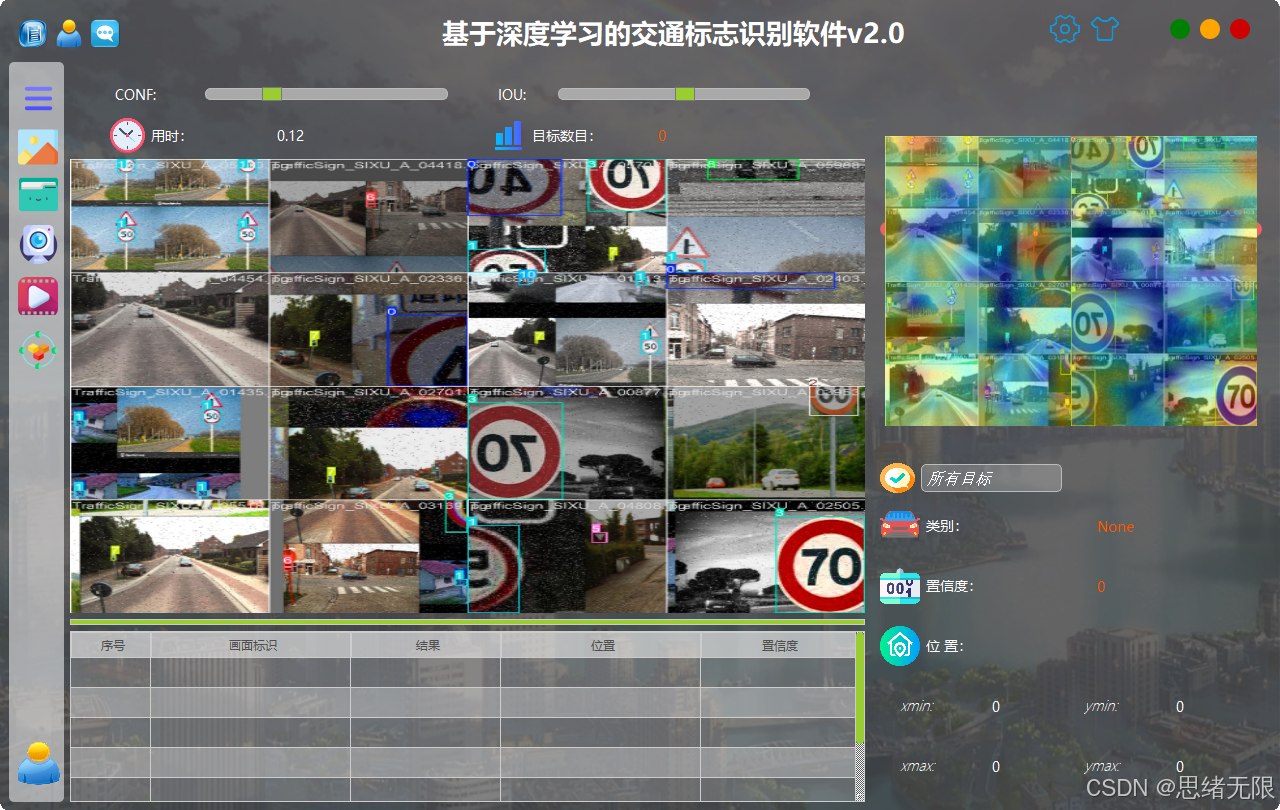 AI Visual Insight: The screenshot shows overlaid detection boxes during video-stream inference, class labels, and a side control panel, indicating that the system already supports real-time stream inference, result visualization, and runtime parameter tuning.
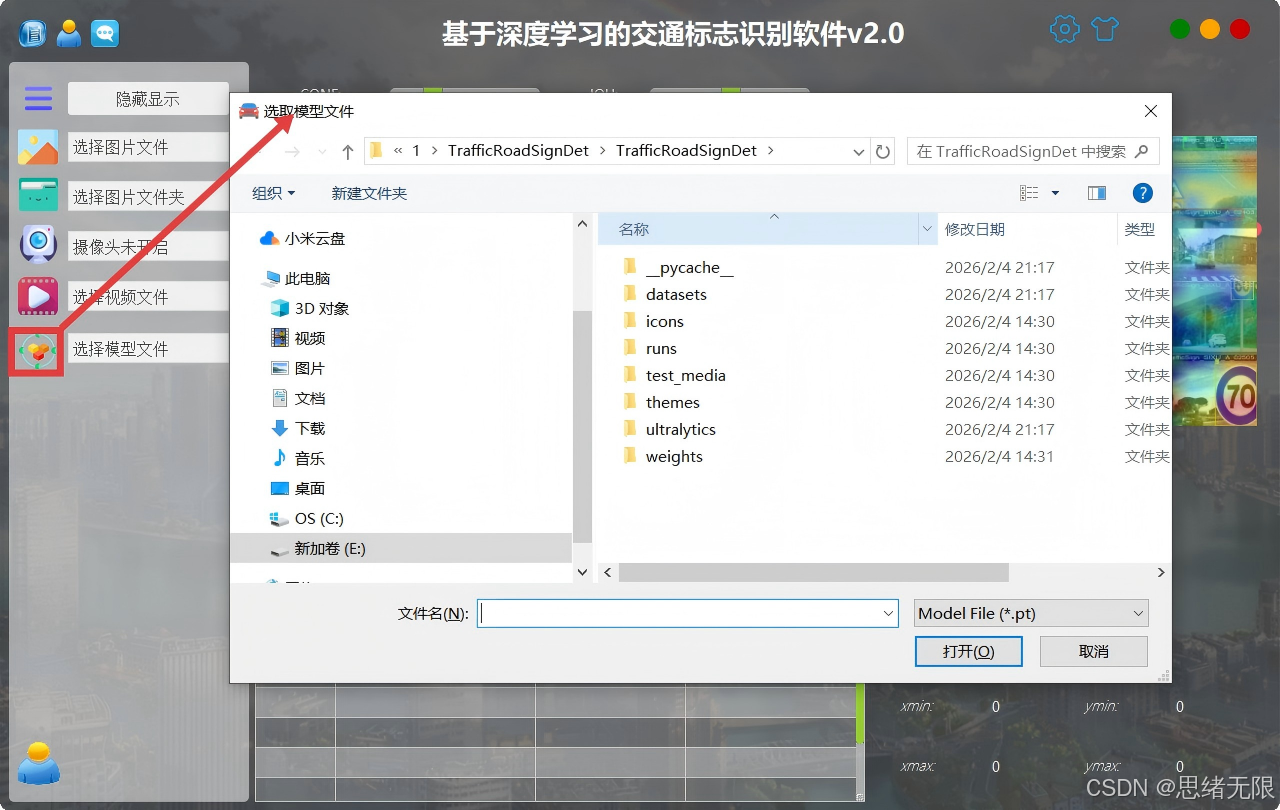 AI Visual Insight: The image shows entry points for switching among different model versions along with a result display area, confirming that the system supports rapid comparison across multiple YOLO generations on the same input for engineering selection and experiment reproduction.
SQLite gives the system experiment tracking capabilities
The system writes user registration and login data, parameter preferences, theme settings, export paths, and detection history into SQLite. As a result, different users on the same device can maintain separate configurations, and model switching, threshold adjustments, and result review all become traceable.
import sqlite3

conn = sqlite3.connect("traffic_sign.db")
cur = conn.cursor()

# Create a user configuration table to store model and threshold preferences
cur.execute("""
CREATE TABLE IF NOT EXISTS user_config (
    username TEXT PRIMARY KEY,
    model_name TEXT,
    conf REAL,
    iou REAL,
    theme TEXT
)
""")

conn.commit()
conn.close()
This snippet shows how the system upgrades from a detection tool into a platform designed for long-term use.
Deployment recommendations should be scenario-driven rather than leaderboard-driven
If your target is real-time camera detection, prioritize YOLOv8n or YOLOv6n. If you care more about overall recognition stability, consider YOLOv11n or YOLOv11s. If you are running offline batch evaluation and want stronger performance under stricter IoU metrics, consider YOLOv9s or YOLOv10n.
From practical engineering experience, larger models are not always better for traffic sign recognition. In many cases, smaller models combined with well-chosen thresholds, standardized preprocessing, and more stable UI management provide stronger overall usability.
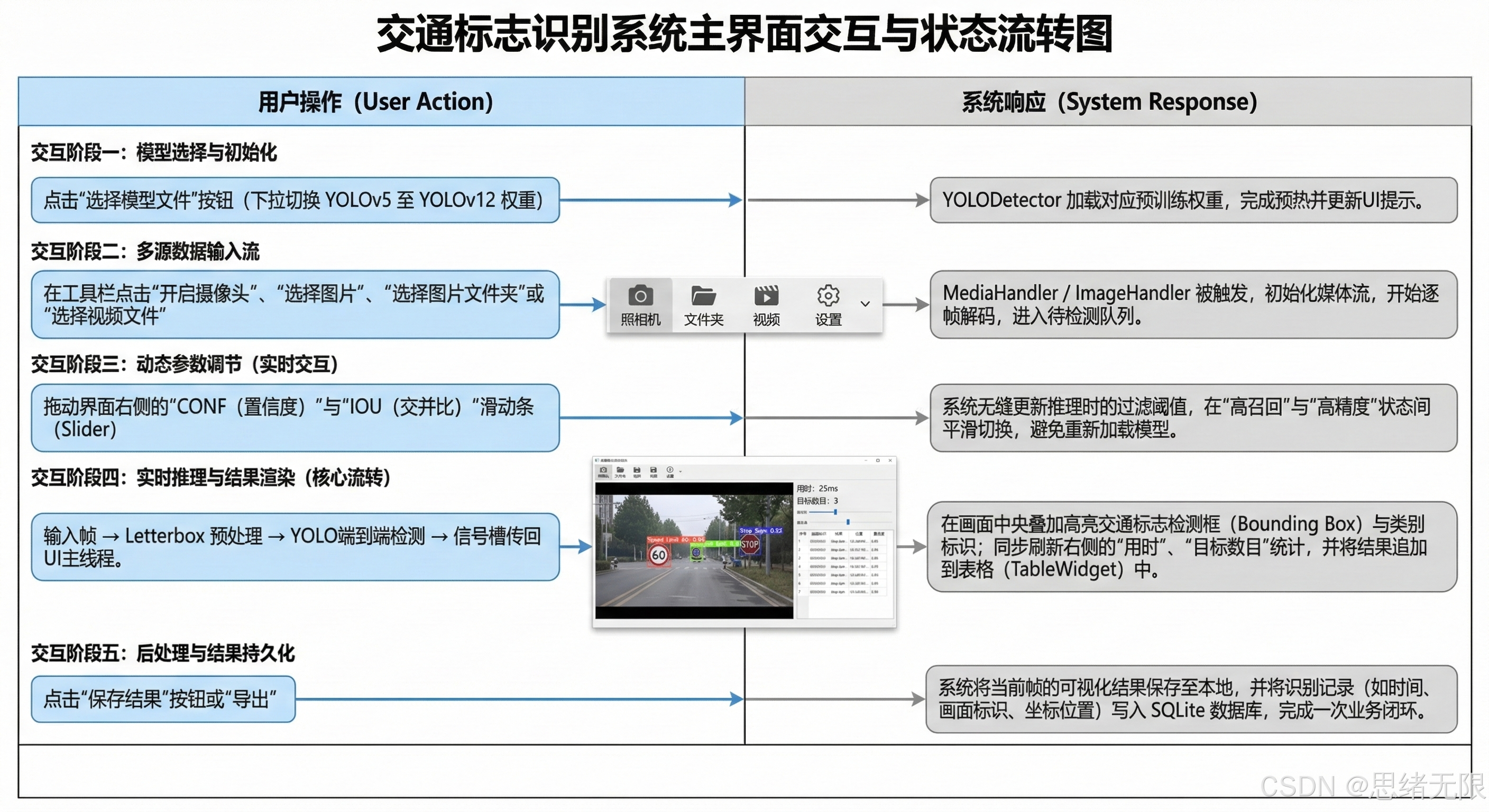 AI Visual Insight: This workflow diagram shows the full pipeline from input acquisition and preprocessing to model inference, result return, visualization, and export. It emphasizes the system’s modular decoupled design, which makes it easy to replace models, extend input sources, and integrate persistence.
The FAQ clarifies the evaluation and deployment logic
1. Why must YOLO versions be compared under a unified training setup?
Because input size, augmentation intensity, and optimizer choice directly affect mAP and latency. Only a unified protocol allows you to attribute the observed differences primarily to the model architecture itself.
2. In traffic sign recognition, should you prioritize [email protected] or [email protected]:0.95?
If you only want to know whether the model can detect the sign, [email protected] is sufficient. If you want to evaluate whether the bounding box fits the object boundary well enough for deployment, [email protected]:0.95 is more discriminative and better reflects small-object localization quality.
3. Why integrate PySide6 and SQLite instead of using only training scripts?
Because real-world deployment requires more than model accuracy. You also need interaction, configuration management, history tracking, and multi-user support. PySide6 provides visualization, and SQLite provides persistence. Together, they complete the engineering loop.
Core Summary: This article reconstructs a traffic sign recognition solution based on YOLOv5–YOLOv12, covering a dataset of 7,444 images across 11 classes, unified multi-generation model training and evaluation, and a visual deployment system built with PySide6 and SQLite. It focuses on accuracy, latency, model switching, and practical deployment strategy.