This article walks through the full Linux storage path: from data centers, servers, and hard disk drive architecture to tracks, sectors, cylinders, CHS and LBA addressing, block and partition abstractions, and the split design of inodes and data blocks. It addresses the core question of how files are written to disk and how the system locates data. Keywords: Linux storage, LBA, inode.
Technical Specification Snapshot
| Parameter | Description |
|---|---|
| Source Language | Chinese |
| Technical Domain | Linux storage and file systems |
| Protocols / Interfaces | SATA, SAS, LBA addressing |
| GitHub Stars | Not provided |
| Core Dependencies | HDD, partition table, Ext2/Ext family file systems |
Linux storage internals are a layered system that spans physical media to logical abstraction
To understand a file system, you cannot look only at open, write, and ls. The real key is how the underlying disk organizes data and how the kernel abstracts complex mechanical structures into a unified logical address space.
In enterprise environments, this chain typically looks like: data center → rack → server → disk → partition → file system → file. Each layer does one thing: hide complexity and provide a more stable interface to the layer above.
Physical infrastructure defines the reliability boundaries of the storage system
A data center provides power, cooling, fire protection, and network connectivity. A rack provides standardized mounting and airflow management. A server provides the CPU, memory, buses, and disk backplane. Storage is not an isolated device; it is part of the broader infrastructure.
 AI Visual Insight: The image shows a data center environment. The key signals are temperature and humidity control, UPS-backed power, network access, and centralized cabling. Together, these conditions determine continuous storage operation and recovery capability.
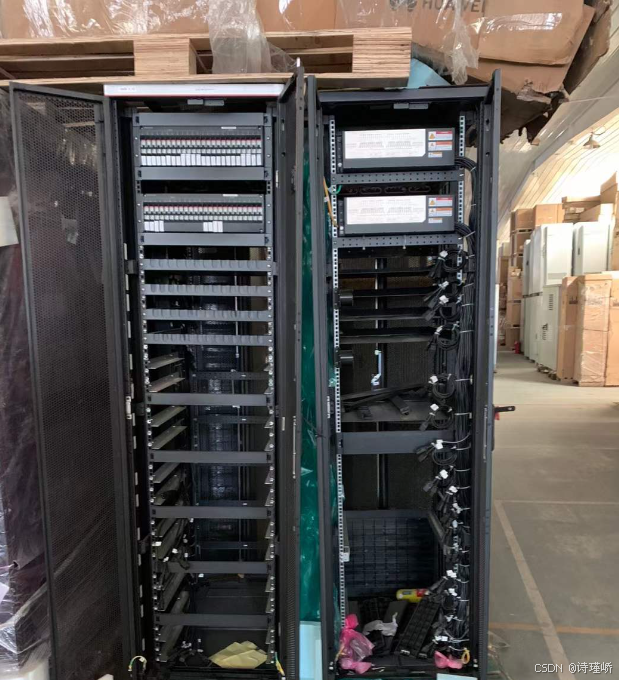 AI Visual Insight: The rack illustrates the 19-inch standard and U-height conventions, showing how servers and storage devices achieve high-density deployment through a unified mounting standard and front-to-back airflow for hot/cold aisle cooling.
 AI Visual Insight: The server image clearly shows front drive bays and the backplane structure, reflecting a typical architecture built around hot-swappable disks, SATA/SAS connectivity, and centralized RAID controller management.
Mechanical motion is the root performance bottleneck of hard disk drives
HDDs offer large capacity and low cost per gigabyte, but seek operations and rotational latency introduce millisecond-level delays. Their core components include platters, the spindle motor, heads, the actuator arm, and the voice coil motor.
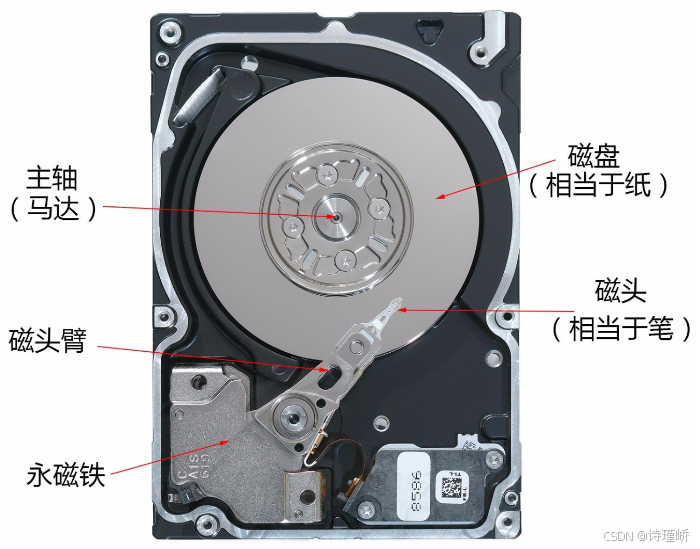 AI Visual Insight: The diagram shows the internal structure of a hard disk drive. Platters store magnetic data, the spindle motor maintains constant rotation, and the heads move radially through the actuator arm, creating the classic access model of seek time plus rotational delay.
# View logical and physical sector information for the disk
lsblk
sudo fdisk -l /dev/vda  # View partition start and end sectors and capacity
These commands help verify disk capacity, sector size, and partition boundaries.
Disk data organization is fundamentally a dual mapping of geometry and linear addressing
Disks were originally described in terms of cylinders, tracks, and sectors. A sector is the smallest physical read/write unit. Its traditional size is typically 512 bytes, although it may also be 4 KB. Tracks at the same radius across multiple platter surfaces together form a cylinder.
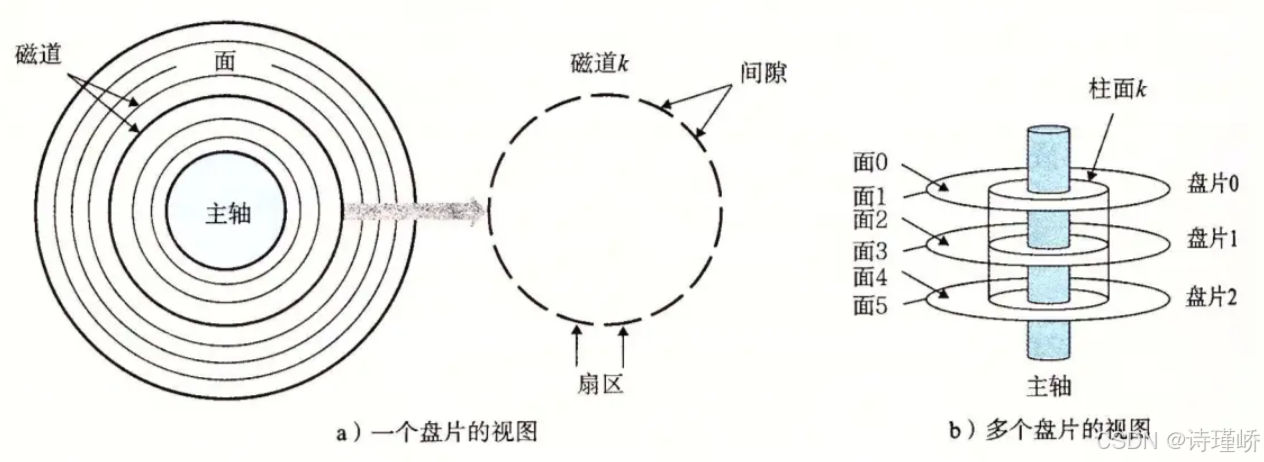 AI Visual Insight: The image highlights the concentric track layout on the platter surface, showing that data is not arranged linearly but organized by radius on rotating media. This is the physical basis that makes the CHS model possible.
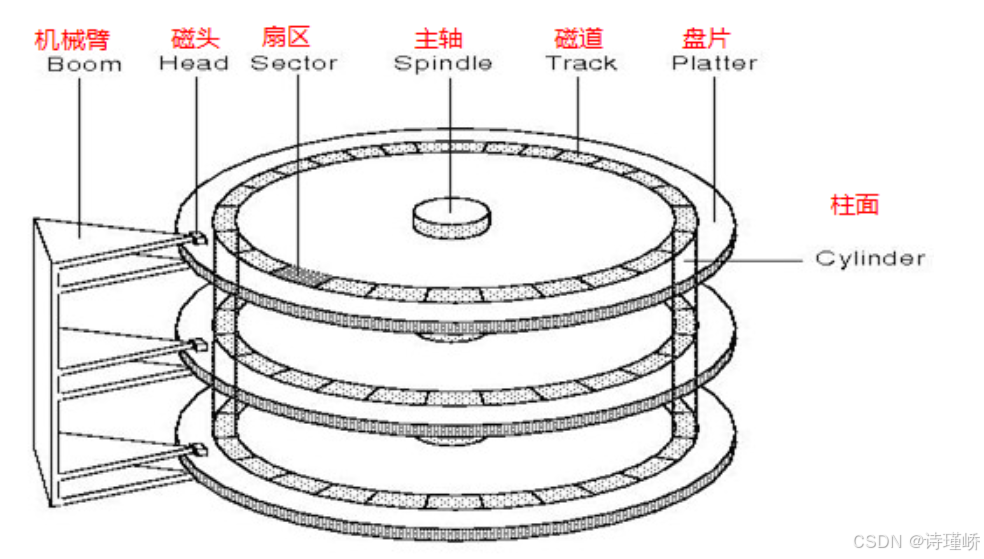 AI Visual Insight: The image emphasizes sectors as arc-shaped slices along a track, illustrating that a sector is the smallest physical unit a controller can read or write directly and the foundation for higher-level block abstraction.
CHS addressing directly encodes the sequence of mechanical operations
CHS stands for Cylinder, Head, and Sector. The drive first moves the head to the target cylinder, then selects the platter head, and finally waits for the target sector to rotate under the head. This model accurately reflects the access flow of early hard disk drives.
But CHS quickly ran into capacity limits and compatibility issues, so modern systems moved to LBA. The operating system no longer cares which head or cylinder is involved; it only submits a linear block address.
LBA = C × (number of heads × sectors per track) + H × sectors per track + S - 1The essence of this formula is to flatten a three-dimensional index into a one-dimensional address.
LBA abstracts a complex disk into a one-dimensional array with sequential access
The significance of LBA is not just that numbering is simpler. It decouples storage access from hardware geometry details. As long as the kernel knows the total sector count, it can access the disk the same way it accesses an array.
 AI Visual Insight: The image explains the core abstraction behind LBA by conceptually unrolling the disk into linear media, mapping the original three-dimensional physical structure into a continuous numbered space for unified I/O scheduling by the operating system.
The relationship between CHS and LBA is easier to understand from a programmer’s perspective
You can imagine an entire disk as a three-dimensional array, while LBA is the flattened linear index of that array. Converting between CHS and LBA is essentially converting between a three-dimensional coordinate and a one-dimensional index.
# Convert CHS to LBA
# heads: number of heads
# sectors: sectors per track

def chs_to_lba(c, h, s, heads, sectors):
    return c * (heads * sectors) + h * sectors + s - 1  # Sector numbering starts at 1

# Example: cylinder 2, head 1, sector 5
print(chs_to_lba(2, 1, 5, 16, 63))
This code demonstrates the standard conversion logic from CHS to a linear address.
File systems introduce block abstraction to reduce management overhead and improve I/O efficiency
Managing files directly at sector granularity would cause metadata to grow dramatically and make allocation and reclamation unnecessarily complex. To solve this, file systems group several contiguous sectors into a block, with 4 KB being a common block size.
A block is the smallest logical unit of data exchange at the file system level. If the sector is the hardware unit, then the block is the standard I/O unit from the operating system’s perspective.
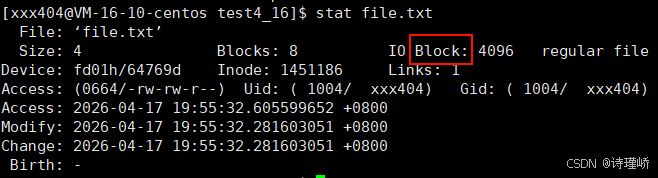 AI Visual Insight: The diagram shows that a block consists of multiple contiguous sectors, illustrating how file systems reduce I/O operations by increasing the basic unit of work and how this creates a more stable granularity for caching, read-ahead, and space management.
# View the file system block size
sudo dumpe2fs -h /dev/vda1 | grep -i "Block size"
This command confirms the block size defined when the partition was formatted.
A partition is a logical slice of a continuous LBA address space
A partition is not new hardware. It is simply a defined range within the disk address space. MBR is more aligned with a traditional geometry-oriented view, while GPT aligns more naturally with a modern linear-address view, but both fundamentally assign a name to a range of LBAs.
After partitioning, each region can be formatted independently as Ext4, XFS, or Swap, and mounted at different directories to provide system isolation and operational control.
The inode is the most important metadata container in a Linux file system
The classic file system design separates file attributes from file contents. The content lives in data blocks, while metadata lives in the inode. One file maps to one inode, but the inode does not store the file name.
A typical inode contains permissions, UID/GID, file size, timestamps, hard link count, and most importantly an array of block pointers. These block pointers map a logical file to its physical data blocks.
 AI Visual Insight: The image shows the separation between the inode and data blocks. The inode serves as the metadata entry point, recording file attributes and block addresses, while the actual file content resides in separate blocks, forming an indexed storage model.
The file name is stored in the directory entry, not in the inode
This is one of the most common points of confusion for beginners. A directory is also a file, and its data blocks store mappings of file name → inode number. When the system accesses a file, it first resolves the directory entry to the inode, and then uses the inode to locate the data blocks.
struct ext2_inode {
    __le16 i_mode;        // File type and permissions
    __le16 i_uid;         // Owner UID
    __le32 i_size;        // File size
    __le32 i_atime;       // Access time
    __le32 i_ctime;       // Status change time
    __le32 i_mtime;       // Modification time
    __le16 i_gid;         // Group GID
    __le16 i_links_count; // Hard link count
    __le32 i_block[15];   // Data block pointer array
};
This structure reveals the inode’s core responsibility: store metadata and point to content blocks.
You can only fully understand Linux file I/O after understanding the relationship between inodes and blocks
A file access is not a direct jump from name to content. The system resolves the directory entry to the inode, then the inode resolves direct blocks, single-indirect blocks, and double-indirect blocks before finally reaching the actual data.
The value of this design lies in its scalability, compatibility, and stable metadata management. That is also why it has remained the foundation of the Ext2/3/4 family for so long.
FAQ
Why does Linux not manage files directly by sector?
Because sector granularity is too small. Managing files directly at the sector level would create substantial metadata overhead. By aggregating multiple sectors into blocks, the file system significantly improves read/write efficiency and space management.
Why does the inode not store the file name?
Because the file name belongs to the directory structure, not to the file’s content attributes. The directory entry maintains the mapping from name to inode, which also allows a single inode to support multiple hard link names.
What is the main advantage of LBA over CHS?
LBA hides differences in platter surfaces, tracks, and heads, and abstracts the disk into a linear address space. That means the operating system only needs to handle continuous numbering, which is much better suited for large-capacity disks and modern controllers.
AI Readability Summary: This article systematically reconstructs the Linux storage path from the data center and server layer down to HDD platters and heads, CHS-to-LBA addressing, partition and block abstraction, and the separation of inode metadata from data blocks, helping developers build a complete mental model from physical disks to file systems.