This article shows how to implement Function Calling locally with Spring Boot, LangChain4j, and Ollama to build an intelligent customer service assistant that can query weather, time, orders, logistics, and coupons. The core challenge is upgrading an LLM from simply “talking” to actually “calling real tools.” Keywords: Function Calling, LangChain4j, Ollama.
The technical spec snapshot defines the implementation baseline
| Parameter | Details |
|---|---|
| Language | Java 17 |
| Framework | Spring Boot 3.2.5 |
| LLM Integration | LangChain4j 1.0.0-beta4 |
| Model Runtime | Ollama |
| Recommended Model | qwen2:7b |
| Protocol | HTTP / REST |
| Response Mode | Synchronous text, extensible to streaming |
| Core Dependencies | langchain4j-spring-boot-starter, langchain4j-ollama-spring-boot-starter, langchain4j-reactor |
| GitHub Stars | Not provided in the source content |
The core value of Function Calling is connecting model responses to real systems
Function Calling essentially allows the model to first determine whether it needs to call a tool, then organize the parameters into a structured request, let the application code execute the real method, and finally feed the result back to the model to generate the final response.
This solves three common problems: the model cannot access real-time data, purely generative answers are prone to hallucination, and business actions cannot complete a closed loop. In an intelligent customer service scenario, this means order, logistics, and coupon queries can all return results based on real tools.
A typical invocation flow can be abstracted into four steps
User question -> Model decides a tool is needed -> Spring executes the @Tool method -> Model integrates the result and returns the final answerThis flow shows that the key to Function Calling is not “text generation,” but “orchestration capability.”
The model and runtime environment must both satisfy tool-calling requirements
Not all local models support tools. Valid choices in this article include qwen2:7b, llama3.1:8b, and mistral:7b-v0.3, among which qwen2:7b is better suited for Chinese customer service scenarios.
On the engineering side, the recommended stack is Spring Boot 3.x, JDK 17, and LangChain4j 1.0.0-beta4 or later. Version alignment matters. Otherwise, API incompatibilities can easily appear.
The Ollama base configuration should first verify model availability
{
  "registry": {
    "mirrors": {
      "registry.ollama.ai": "https://registry.ollama.ai"
    }
  }
}
This configuration defines the Ollama registry mirror, which helps pull official tool-capable models in mainland China network environments.
Then download the model:
ollama pull qwen2:7b # Pull a model that supports Function CallingThis command prepares the local model runtime required for executable tool calling.
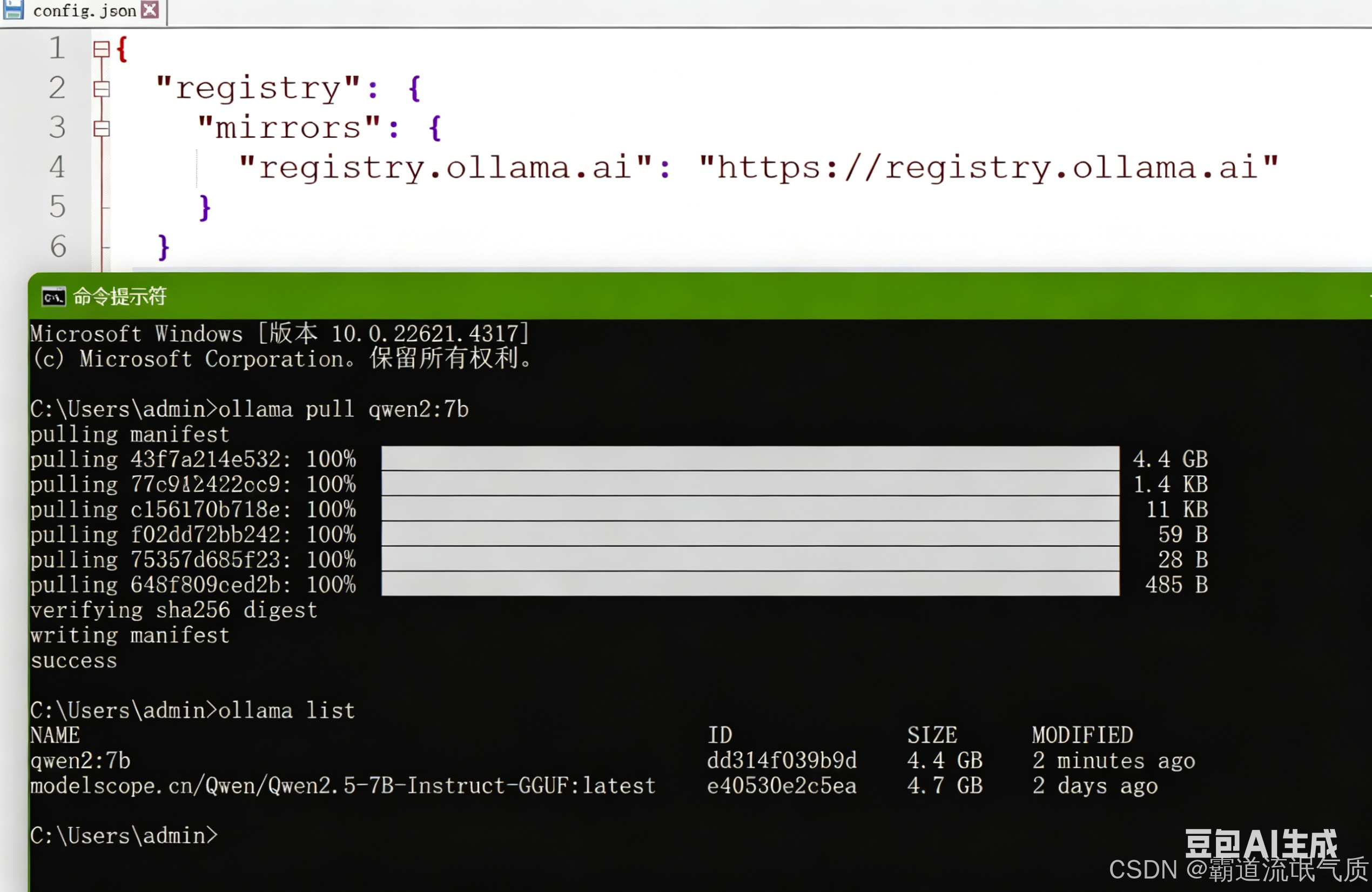 AI Visual Insight: The image shows the model pull result in the Ollama terminal, indicating that the local runtime has successfully fetched a model version that can be used for Function Calling. This usually means the registry mirror, network connectivity, and model tag are all configured correctly, which serves as a prerequisite validation step before Spring integration.
The project dependency configuration determines whether declarative AI services can be wired reliably
The recommended dependency strategy is to use a BOM for version alignment, then combine Web, WebFlux, LangChain4j, and the Ollama starter. This avoids runtime conflicts caused by version drift across beta, RC, or mixed module versions.
Maven dependencies should use a BOM to unify versions
<properties>
    <java.version>17</java.version>
    <langchain4j.version>1.0.0-beta4</langchain4j.version>
</properties>

<dependencyManagement>

<dependencies>

<dependency>

<groupId>dev.langchain4j</groupId>

<artifactId>langchain4j-bom</artifactId>

<version>${langchain4j.version}</version>

<type>pom</type>

<scope>import</scope>
        </dependency>
    </dependencies>
</dependencyManagement>
This configuration locks the versions of LangChain4j-related components and reduces the risk of dependency conflicts.
In the Spring configuration file, you need to declare the Ollama service URL, model name, and timeout settings. For local inference, the read timeout should be large enough.
langchain4j:
  ollama:
    chat-model:
      base-url: http://localhost:11434
      model-name: qwen2:7b
      temperature: 0.7
      timeout: PT120S
      connect-timeout: PT10S
      read-timeout: PT120S
      log-requests: true
      log-responses: true
This YAML binds the Spring application to the local Ollama ChatModel and enables request logging for easier troubleshooting.
Tool definitions should use clear semantic descriptions to drive model decisions
LangChain4j exposes methods through @Tool and describes parameter meaning through @P. The method name itself is not the most important factor. What actually affects tool-calling accuracy is whether the tool description and parameter documentation are clear enough.
Weather and time tools are the smallest runnable example, while order, logistics, and coupon tools are much closer to a real customer service workflow.
A weather tool is ideal for validating the smallest end-to-end loop
@Component
public class WeatherTool {

    @Tool("Get the current weather conditions for the specified city")
    public String getWeather(@P("City name, for example: Beijing") String city) {
        if ("Beijing".equalsIgnoreCase(city)) {
            return "It is sunny in Beijing now, with a temperature of 25°C."; // Return mock weather for the sample city
        }
        return "Unable to retrieve weather information for " + city + "."; // Return a fallback result when there is no match
    }
}
This code defines a weather query tool that the model can automatically choose.
Intelligent customer service tools can directly map business capability boundaries
@Component
public class CustomerServiceTools {

    @Tool("Query order status. Get the current status based on the order number")
    public String getOrderStatus(@P("Order number, for example 123456") String orderId) {
        return "Order " + orderId + " current status: Shipped"; // Mock order status lookup
    }

    @Tool("Query order logistics information. Get the carrier, tracking number, and latest tracking event based on the order number")
    public String getLogistics(@P("Order number, for example 123456") String orderId) {
        return "Order " + orderId + " logistics info: STO Express: 777888999, package picked up"; // Mock logistics lookup
    }
}
This code shows that an AI customer service assistant does not need to “know everything.” Instead, it connects to existing business systems through tools.
Manually building the AiServices bean is better for production-grade control
Compared with direct annotation-based auto-scanning, manual wiring with AiServices.builder() gives you more control. You can explicitly specify the ChatModel, tool instances, and named beans, which helps avoid conflicts caused by duplicate scanning.
At the interface layer, @SystemMessage defines the model’s role boundaries. At the bean layer, the interface, model, and tools are assembled into an invokable service. This layered approach is clear and easier to maintain.
The recommended assembly pattern combines interface declaration with explicit bean construction
@Bean(name = "customAssistant")
public CustomerServiceAssistant customerServiceAssistant(
        ChatModel chatModel,
        CustomerServiceTools customerServiceTools) {
    return AiServices.builder(CustomerServiceAssistant.class)
            .chatModel(chatModel) // Bind the local Ollama chat model
            .tools(customerServiceTools) // Inject the tool instance rather than the Class
            .build();
}
This code explicitly creates an AI service with tool capabilities and avoids ambiguity during auto-wiring.
Controller testing verifies whether the model actually triggers tools
For real validation, do not stop at successful compilation. You must confirm through an API call that the model correctly chooses the tool based on the user request. The simplest approach is to expose a GET endpoint and test it directly with curl.
@GetMapping("/chat")
public String chat(@RequestParam("message") String message) {
    return assistant.chat(message); // Forward the user request to the AI service wired with tools
}
This code shows that the controller only handles request forwarding at the integration layer, while LangChain4j and the model collaborate to complete tool orchestration.
Test example:
curl "http://localhost:885/customer/chat?message=What is the current status of my order 123456" # Verify whether the order status tool is invokedThis command is used to quickly check whether the customer service tool chain is connected correctly.
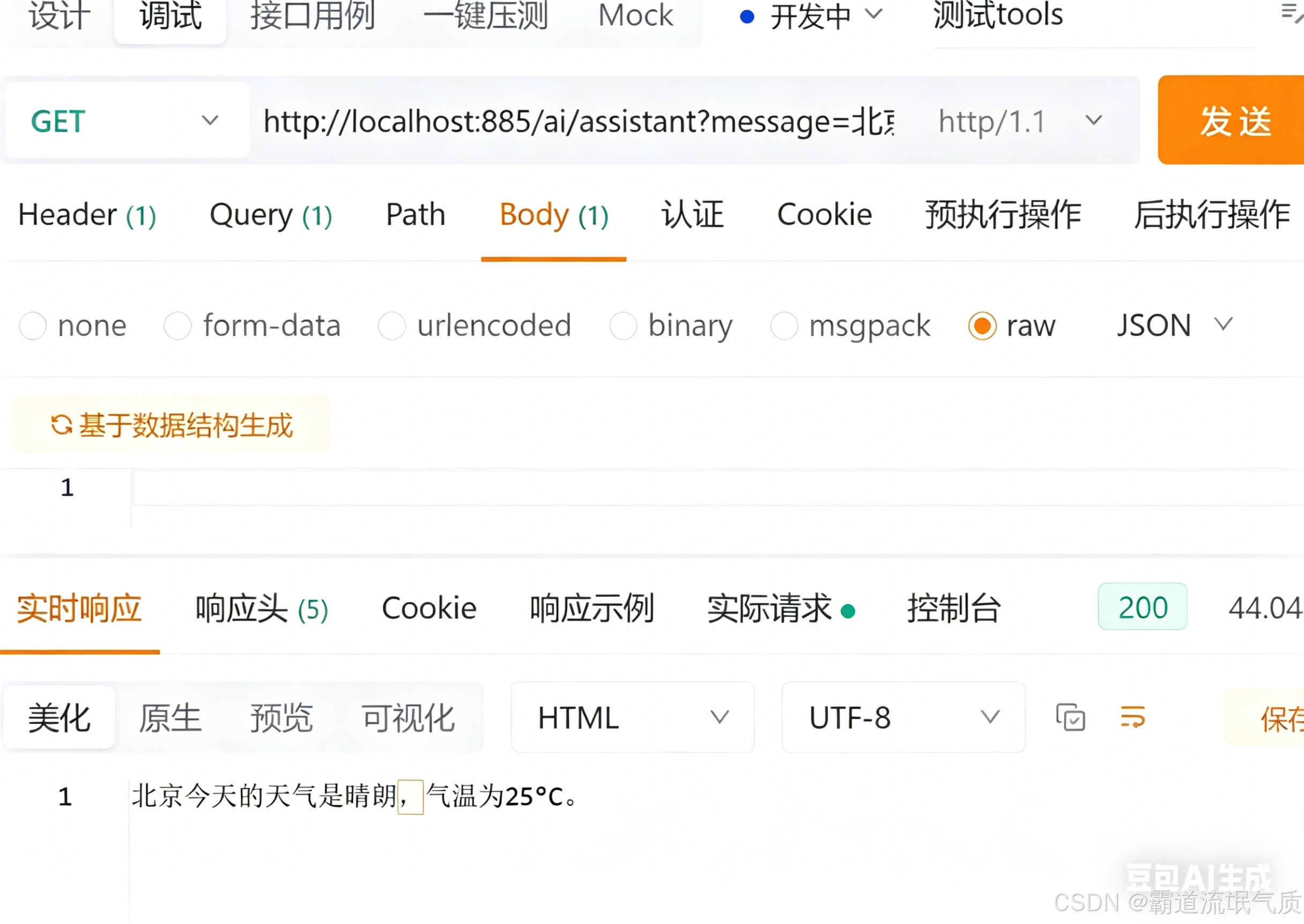 AI Visual Insight: The image shows the API response for a weather question, which usually means the model recognized the “weather” intent, invoked the corresponding tool, and then rewrote the tool output into a natural language reply. This confirms that the local model, Spring endpoint, and tool registration flow are successfully connected.
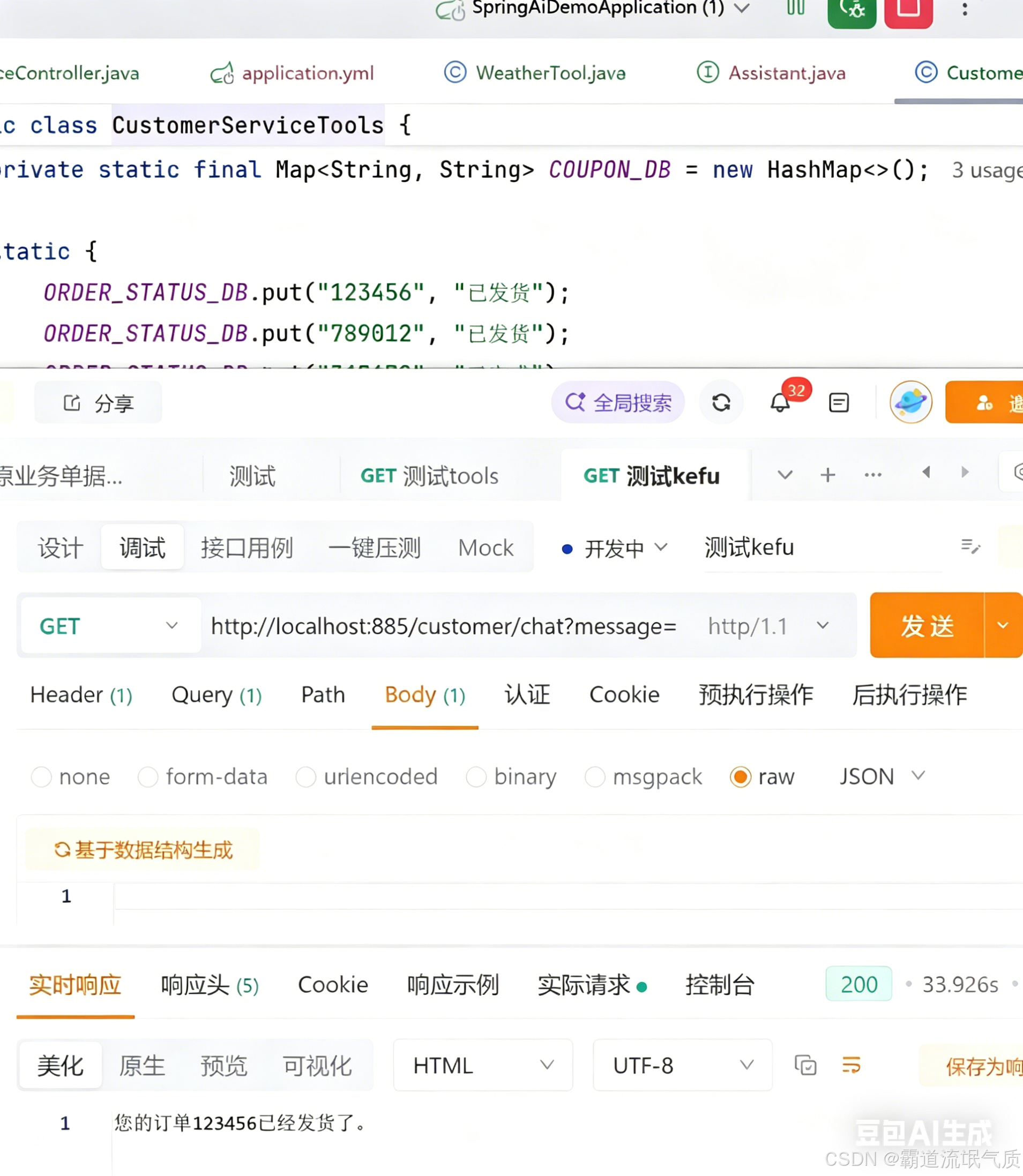 AI Visual Insight: The image shows an intelligent customer service query result, where the key point is that the order number was parsed and triggered a specific business tool. If the response includes order status or logistics text, that indicates the model did not fabricate the answer directly. Instead, it executed the backend-defined method before generating the reply.
Most common failures are concentrated in model capability and bean wiring
The first type of error is does not support tools, which is usually caused by pulling a model that does not support Function Calling. The second is ConflictingBeanDefinitionException, which commonly appears when @AiService and manual @Bean registration are used at the same time.
The third is Cannot resolve method 'systemMessage' in 'AiServices'. This is not a model issue, but an API usage error. When building services manually, the system prompt should be placed on the interface method with @SystemMessage.
During troubleshooting, start with these three checks
1. Use an Ollama model officially documented to support tools, such as qwen2:7b
2. Keep only one bean registration strategy, preferably manual @Bean
3. Put the system prompt on the interface method with @SystemMessage
These three steps cover most Function Calling integration failures.
This solution works well as a minimal production skeleton for local AI customer service
Its core advantage is not simply that it “connects to an LLM,” but that it turns Java business methods into model-orchestrated capabilities. For scenarios such as order lookup, logistics tracking, coupon issuance, and ticket routing, this architecture is more controllable and auditable than a pure chat experience.
If you continue expanding it, you can integrate a real database, HTTP APIs, permission checks, and conversation memory to build a more complete enterprise-grade agent service.
FAQ
Q1: Why can my local model chat but not call tools?
A: Because chat capability does not automatically mean support for Function Calling. Make sure you are using an Ollama model that officially supports tools, such as qwen2:7b or llama3.1:8b.
Q2: Why is manually creating the AiServices bean recommended?
A: Because the manual approach is more controllable. You can explicitly specify the model, tool instances, and bean name, which avoids naming conflicts and wiring ambiguity caused by auto-scanning.
Q3: What capabilities should I add before putting intelligent customer service tools into production?
A: Prioritize these three: real data source integration, authentication and audit logging, and robust fallback strategies for errors. Otherwise, even if the tools can be invoked, the system will still fall short of production requirements.
Core Summary: This article reconstructs a practical Function Calling solution based on Spring Boot, LangChain4j, and Ollama. It covers model selection, dependency setup, @Tool definitions, AiServices bean wiring, controller testing, and common error handling to help Java developers quickly implement a local intelligent customer service assistant.