This article focuses on getting MyBatis running quickly in Spring Boot: implementing CRUD, parameter binding, result mapping, and logging with both annotations and XML, while addressing common JDBC pain points such as excessive boilerplate, inconsistent field names, and auto-increment key backfilling. Keywords: MyBatis, Spring Boot, CRUD.
The technical specification snapshot is straightforward
| Parameter | Description |
|---|---|
| Language | Java |
| Framework | Spring Boot + MyBatis |
| Database Protocol | JDBC / MySQL |
| Persistence Style | Annotation-based Mapper, XML Mapper |
| Core Dependencies | mybatis-spring-boot-starter, mysql-connector-j |
| Typical Layers | Controller, Service, Mapper, Model |
| Original Popularity | 509 views, 13 likes, 7 bookmarks |
MyBatis reduces the burden of JDBC boilerplate code
The core value of MyBatis is not that it “writes SQL for you,” but that it “lets you focus on SQL.” It pushes repetitive work such as connection management, parameter binding, and result set mapping into the framework layer, so developers only maintain interfaces and mapping rules.
In Spring Boot projects, MyBatis is commonly used in scenarios that require precise control over SQL. Compared with fully automatic ORMs, it is better suited for internal business systems, reporting queries, complex conditional retrieval, and gradual refactoring of legacy systems.
A minimal runnable dependency setup looks like this
<dependencies>

<dependency>

<groupId>org.mybatis.spring.boot</groupId>

<artifactId>mybatis-spring-boot-starter</artifactId>

<version>3.0.3</version>
    </dependency>

<dependency>

<groupId>com.mysql</groupId>

<artifactId>mysql-connector-j</artifactId>

<scope>runtime</scope>
    </dependency>
</dependencies>
This configuration introduces the MyBatis starter and the MySQL driver to provide the required runtime dependencies.
The project structure should clearly reflect the responsibility boundaries of each layer
A clean starter project typically includes four layers: controller, service, mapper, and model. Even if the business logic is still thin, keeping the Service layer is recommended so you do not need to refactor later when you add transactions, caching, or orchestration logic.
The model package usually stores entity classes such as UserInfo; mapper handles SQL access; service aggregates business actions; and controller exposes HTTP endpoints. This layered structure is friendlier for both testing and maintenance.
Naming differences between entities and table fields are the first common pitfall
public class UserInfo {
    private Integer id;
    private String username;
    private Integer deleteFlag; // Java uses camelCase naming
}
This code shows the typical naming style of a Java entity, which later creates mapping issues with database fields such as delete_flag.
The annotation-based approach is ideal for quick onboarding and simple CRUD scenarios
The core of annotation-based MyBatis is straightforward: declare SQL directly on interface methods, and let the framework generate proxy objects to execute it. @Mapper tells Spring to register the interface, while @Select, @Insert, @Update, and @Delete bind the corresponding SQL operations.
The simplest query interface looks like this
@Mapper
public interface UserInfoMapper {

    @Select("select id, username, delete_flag from user_info")
    List
<UserInfo> getList(); // Query the user list
}
This code demonstrates the smallest possible annotation-based Mapper implementation for a list query.
Data source and logging configuration must be completed first or the application will not start
Many startup failures are not caused by incorrect SQL, but by missing data source configuration. Spring Boot needs to know which MySQL instance to connect to, which driver to use, and how MyBatis should output logs.
The recommended baseline yml configuration looks like this
spring:
  datasource:
    url: jdbc:mysql://localhost:3306/mybatis_test?useUnicode=true&characterEncoding=utf8&serverTimezone=Asia/Shanghai
    username: root
    password: 123456
    driver-class-name: com.mysql.cj.jdbc.Driver

mybatis:
  configuration:
    map-underscore-to-camel-case: true # Enable automatic underscore-to-camel-case mapping
    log-impl: org.apache.ibatis.logging.stdout.StdOutImpl # Output executed SQL logs
This configuration simultaneously addresses three frequent issues: database connectivity, SQL log output, and camel-case field mapping.
Parameter binding rules directly determine whether queries and updates succeed
In single-parameter scenarios, the name inside #{} is often flexible. In multi-parameter scenarios, however, you should explicitly use @Param to avoid ambiguous runtime binding. The original example already shows that when updating with multiple parameters, inconsistent naming can easily cause placeholder resolution failures.
The recommended pattern for multi-parameter updates looks like this
@Mapper
public interface UserInfoMapper {

    @Update("update user_info set username = #{user.username} where id = #{user.id}")
    Integer updateUser(@Param("user") UserInfo user); // Name the object parameter and access values with user.xxx
}
This example shows that once an object parameter is renamed with @Param, the SQL should use the path form #{alias.property}.
Auto-increment key backfilling can be completed in a single insert operation
If you query the primary key again after insertion, you add an extra database round trip and unnecessary code complexity. MyBatis provides @Options or XML attributes to backfill generated keys directly.
The annotation-based generated key example looks like this
@Insert("insert into user_info(username, delete_flag) values(#{username}, #{deleteFlag})")
@Options(useGeneratedKeys = true, keyProperty = "id")
Integer insert(UserInfo userInfo); // Automatically write the generated id back to the object after insertion
This code writes the database-generated primary key back to userInfo.id immediately after insertion.
You should choose a consistent strategy when field names and property names do not match
When delete_flag does not automatically map to deleteFlag, there are three common solutions: use a SQL alias, define explicit result mapping, or enable camel-case mapping globally. For new projects, enabling camel-case mapping globally is usually the best choice. For isolated complex queries, resultMap or @Results is usually the better option.
The annotation-based result mapping example looks like this
@Results(id = "BaseMap", value = {
    @Result(column = "delete_flag", property = "deleteFlag") // Map the table column to the entity property
})
@Select("select id, username, delete_flag from user_info where id = #{id}")
@ResultMap("BaseMap")
UserInfo selectById(Integer id);
This code reuses BaseMap to resolve the mismatch between field names and property names.
The XML approach is better suited for complex SQL and collaborative maintenance
When SQL grows longer, dynamic conditions increase, or reusable fragments become necessary, XML is clearer than annotations. It separates interface definitions from SQL implementations, which makes collaboration easier for DBAs, backend engineers, and code review workflows.
First, create the XML file under resources/mapper, and specify the scan path through mapper-locations. The namespace must match the fully qualified interface name, and the id of each select, insert, update, and delete statement must correspond to the interface method name.
The XML Mapper configuration example looks like this
<mapper namespace="com.example.mybatis.mapper.UserInfoMapperXML">
    <select id="getUserInfoById" resultType="com.example.mybatis.model.UserInfo">
        select id, username, delete_flag
        from user_info
        where id = #{id}
    </select>
</mapper>
This XML maps the interface method getUserInfoById to a query statement.
Result mapping templates in XML are better for reusing complex field rules
For field mappings that appear repeatedly, XML resultMap is more centralized and maintainable than annotations. This is especially useful when one entity corresponds to multiple query views.
It is recommended to define a base mapping template
<resultMap id="BaseResultMap" type="com.example.mybatis.model.UserInfo">
    <id column="id" property="id" />
    <result column="username" property="username" />
    <result column="delete_flag" property="deleteFlag" />
</resultMap>

<select id="getList" resultMap="BaseResultMap">
    select id, username, delete_flag from user_info
</select>
This configuration uses resultMap to centrally manage the mapping relationship between table fields and entity properties.
Testing should prioritize validating three categories of behavior
First, verify that the SQL actually executes. Second, verify that parameters are bound as expected. Third, verify that query results are fully mapped. In the original material, Spring Boot test cases were used to validate interfaces, which is more suitable for DAO-layer and Service-layer debugging than manually assembling URLs.
It is recommended that every Mapper cover at least the following cases: single-parameter queries, multi-parameter queries, affected row counts for insert/update/delete operations, generated key backfilling, and field mapping correctness. This lets you quickly determine whether the issue is in SQL, configuration, or mapping.
The image content is highly redundant and should preserve facts rather than stack screenshots during refactoring
The original Markdown contains many IDE screenshots, startup screenshots, test screenshots, and configuration screenshots. The essential information can be abstracted as follows: dependencies were imported successfully, the table structure exists, the interface runs correctly, logs can be printed, and the mapping issue has been resolved. For this type of tutorial document, a structured rewrite is more useful for AI retrieval and citation than describing each screenshot one by one.
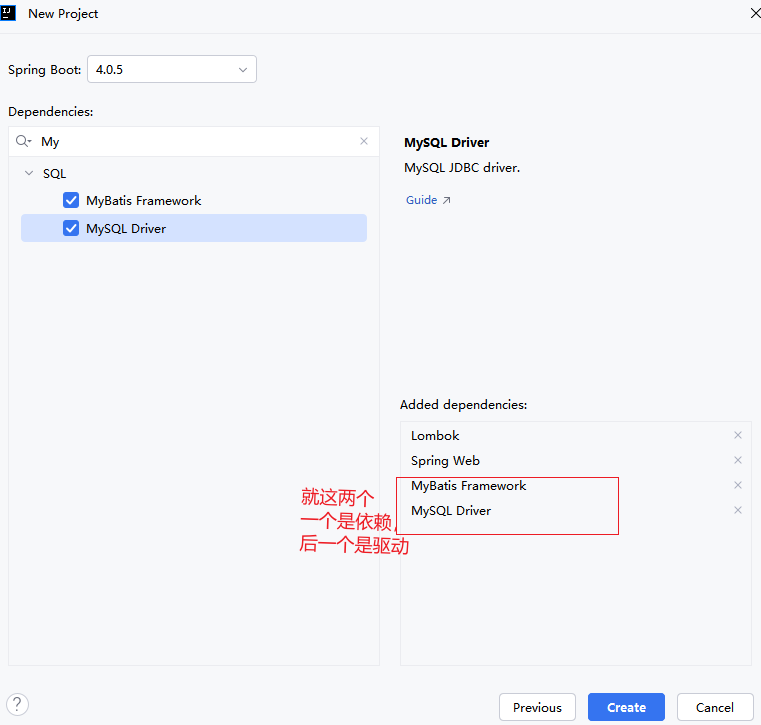 AI Visual Insight: This image set mainly shows dependency resolution after creating a Spring Boot project, successful activation of MyBatis and the MySQL driver, layered project directories in IntelliJ IDEA, and the configuration file editing process. It reflects the complete engineering path from project initialization to data source integration.
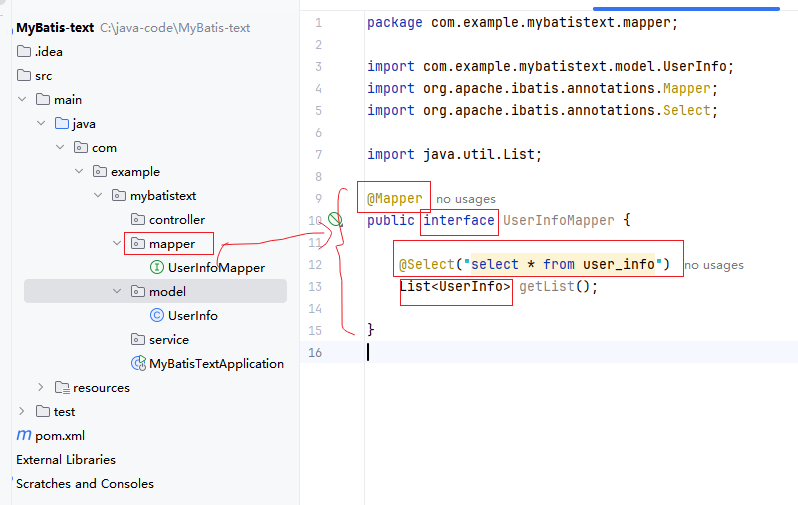 AI Visual Insight: This image set highlights annotation-based Mapper implementation, interface test generation, SQL log output, and HTTP/test return results. It shows that the MyBatis proxy object has been managed by Spring and that the query flow from Controller to Mapper is fully connected.
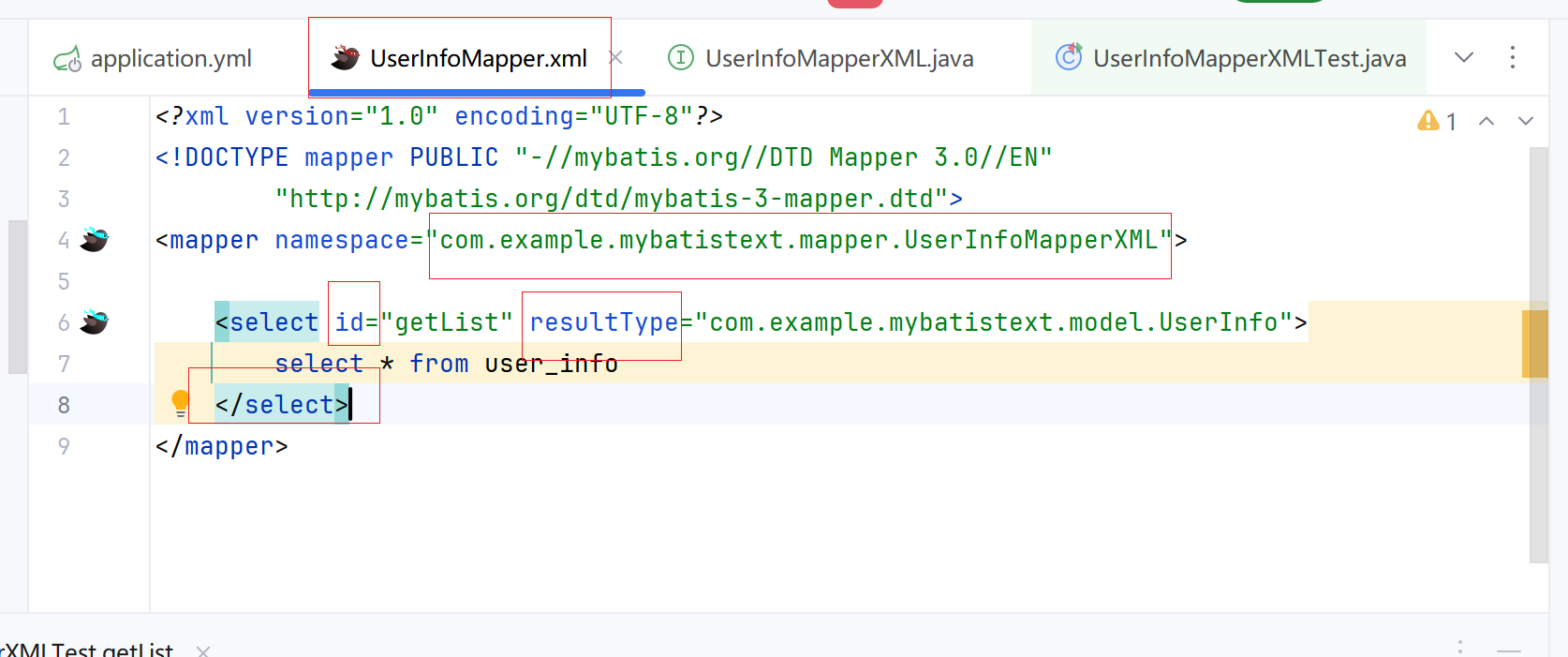 AI Visual Insight: This image set shows the relationship between
 namespace, statement id, resultType, and resultMap in XML files. The technical focus is the one-to-one binding between interface methods and XML nodes, along with the use of mapping templates to resolve inconsistencies between database fields and Java properties.
This MyBatis learning path works well as a practical baseline
If you only need to implement CRUD quickly, start with annotations. If you already have complex queries, dynamic SQL, or reusable mapping templates, switch to XML immediately. These two approaches are not opposites; they are optimal choices for different stages of engineering complexity.
What is truly worth mastering is not just “how to write a few annotations,” but how MyBatis handles three things: how parameters are bound, how results are mapped, and how configuration affects runtime behavior. Once you understand these three points, you can quickly diagnose most beginner-level issues.
FAQ provides structured answers to common questions
1. Why are some fields in the query result always null?
Usually, the database field name does not match the Java property name. For example, delete_flag maps to deleteFlag. You can solve this by using a SQL alias, @Results/resultMap, or enabling camel-case mapping.
2. How should I choose between annotations and XML?
Annotations are suitable for simple CRUD, rapid prototyping, and low-complexity queries. XML is better for complex queries, dynamic SQL, team collaboration, and reusable mappings. A mixed approach is also very common in real projects.
3. Why did my original #{id} stop working after I added @Param?
Because the parameter binding name was explicitly rewritten. If an object parameter uses @Param("user"), then the SQL should reference #{user.id} and #{user.username}. Otherwise, MyBatis cannot find the corresponding value.
Core Summary: This article restructures the original MyBatis study notes into a practical technical document that clearly explains Spring Boot and MyBatis integration, CRUD implementation with both annotations and XML, parameter binding, generated key backfilling, field mapping, and camel-case configuration.