This article focuses on database fundamentals, the MySQL relational model, and core SQL syntax. It helps beginners clarify the differences between DDL, DML, and DQL and understand how to use each type of statement correctly. Keywords: MySQL, SQL, database.
Technical Specifications Snapshot
| Parameter | Description |
|---|---|
| Primary Language | SQL with Chinese explanations |
| Database Type | Relational database |
| Representative Products | MySQL, PostgreSQL, Oracle, SQL Server |
| Protocol/Standard | Standard SQL syntax, MySQL dialect |
| Star Count | Not provided in the source content |
| Core Dependencies | MySQL Server, Navicat (optional GUI client) |
Databases are the core of data organization in modern applications
A database is an organized repository for storing data, commonly abbreviated as DB. A Database Management System, or DBMS, is the software layer used to operate and manage databases, such as MySQL, Oracle, and PostgreSQL. Developers usually do not manipulate disk files directly. Instead, they use a DBMS to define schemas, write data, query data, and control permissions.
SQL stands for Structured Query Language, the common language used to operate relational databases. It is not a private command set owned by any single product. It is a standard, although different database systems introduce dialect differences in areas such as pagination, string functions, and date functions.
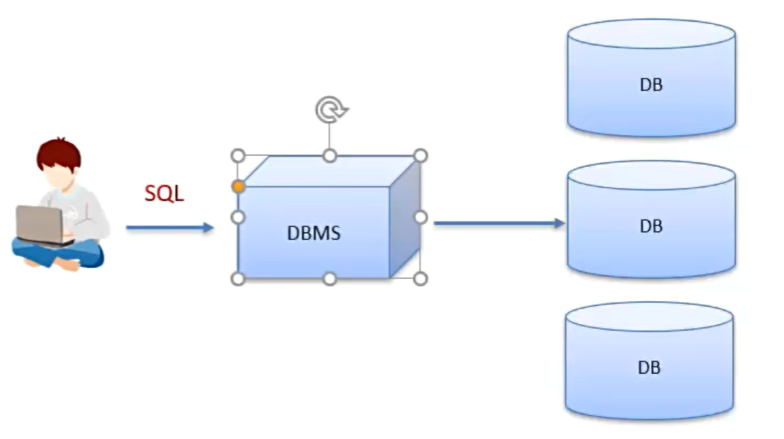 AI Visual Insight: This diagram illustrates the layered relationship between databases, the DBMS, and SQL. At the bottom is structured data, the DBMS in the middle handles management and access, and developers at the top issue definition, manipulation, and query commands through SQL.
Common relational database products serve different purposes
MySQL works well for small and medium-sized applications and for teaching beginners. PostgreSQL emphasizes standards compliance and extensibility. Oracle and DB2 are often used in large enterprise systems. SQLite is a strong fit for embedded scenarios. Understanding these product positions helps you make better technology choices later.
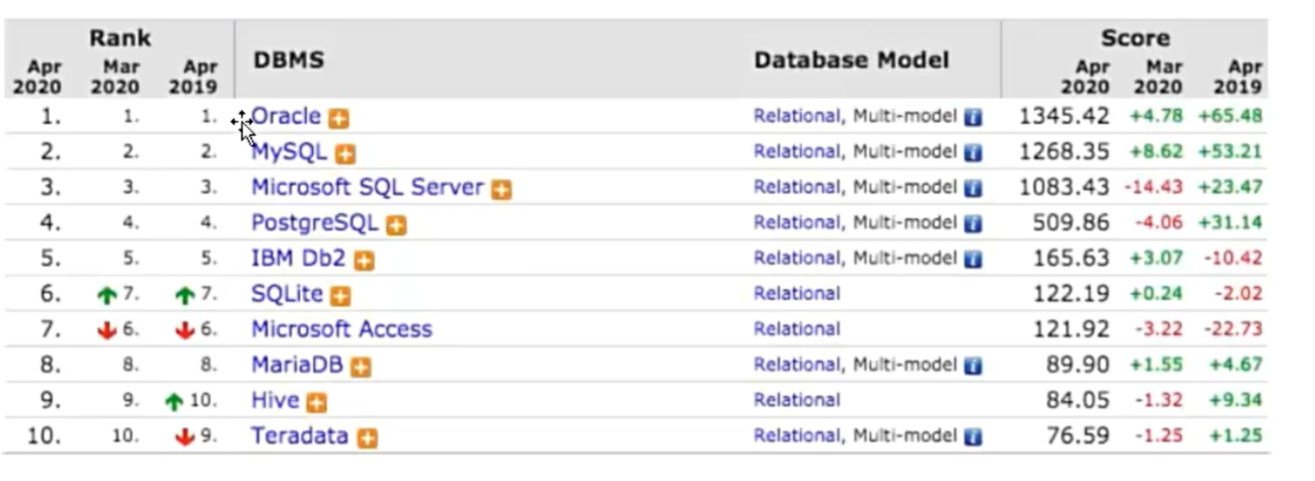 AI Visual Insight: This diagram is likely a comparison matrix of common relational database products. The key information usually includes vendor ownership, open-source status, typical application scale, and differences in the database ecosystem.
-- Query all databases in the current database service
SHOW DATABASES;

-- Switch to the target database
USE school_db;

-- View the database currently in use
SELECT DATABASE();
This code demonstrates how to list databases, switch databases, and confirm the active database at the database level.
MySQL uses a two-dimensional table-based data model
The core abstraction in a relational database is the table. A table consists of rows and columns. Columns define fields, and rows represent records. Multiple tables can be connected through primary keys, foreign keys, or business fields to model complex business entities such as users, orders, and courses.
The relational model offers a consistent structure, easier maintenance, and support for complex queries. It also stores data persistently on disk, which provides strong durability and security. For beginners, building the mindset that a table represents a data entity matters more than memorizing syntax.
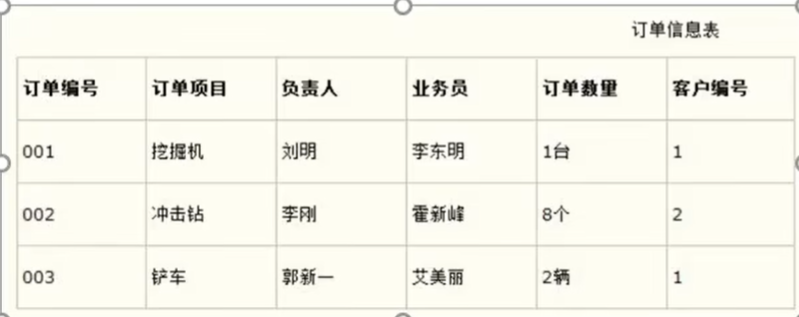 AI Visual Insight: This diagram shows that a relational database is composed of multiple two-dimensional tables. It emphasizes entity decomposition and table relationships, which are foundational for understanding normalization and multi-table queries.
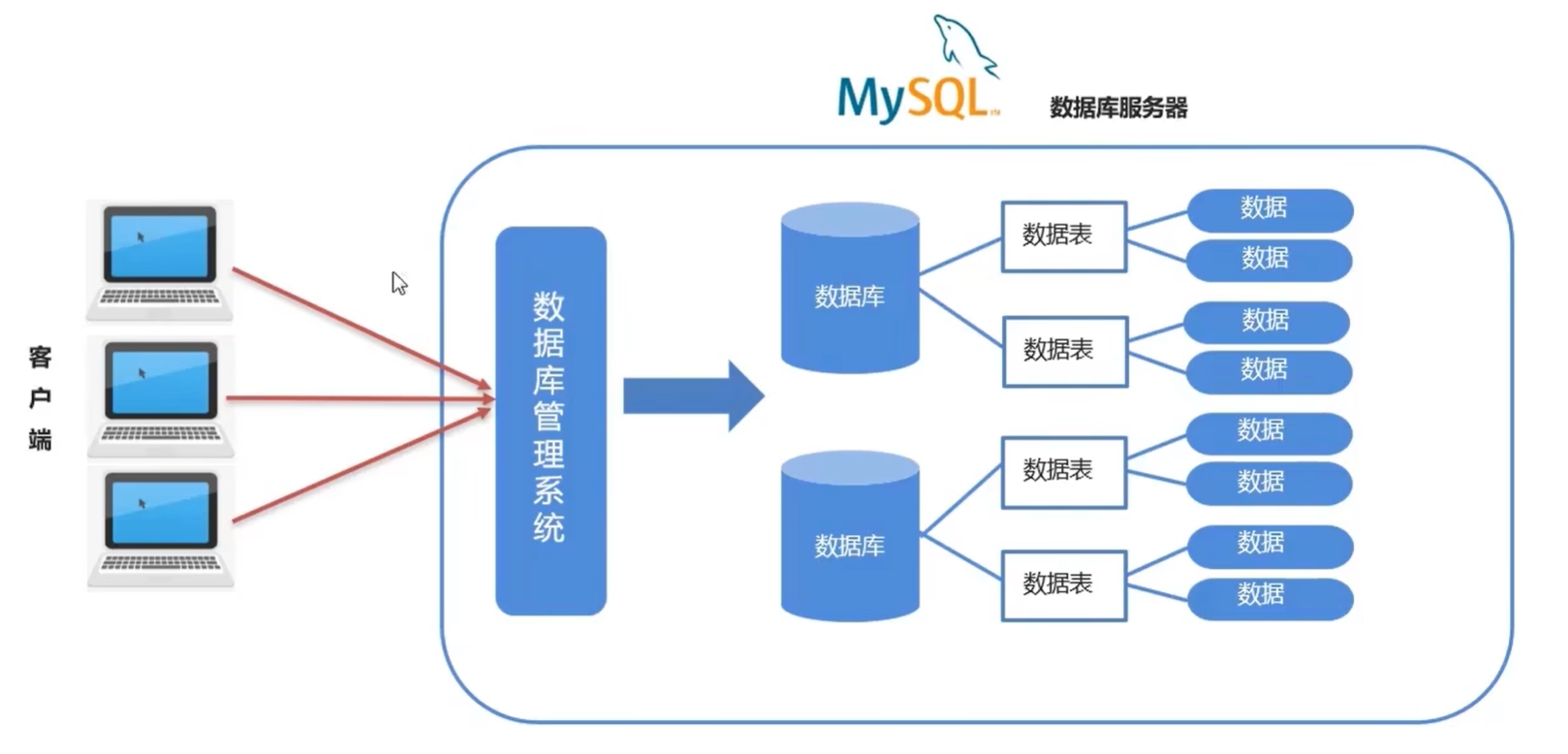 AI Visual Insight: This diagram further explains the relationship among tables, fields, and records. It is typically used to help beginners understand the modeling concept that columns define structure while rows carry data.
The four SQL categories cover schema, data, and queries
SQL is commonly divided into DDL, DML, DQL, and DCL. DDL defines database objects. DML inserts, updates, and deletes data. DQL retrieves data. DCL controls permissions. In real-world development, DDL and DQL are used most often, while unconditional UPDATE and DELETE statements are the most likely to cause serious incidents.
-- Single-line comment: note that there must be a space after --
/* Multi-line comment */

-- SQL statements end with a semicolon
SELECT 'Hello SQL';
This code explains SQL comment rules and the most basic syntax conventions.
DDL defines databases and table structures
DDL is responsible for building the skeleton. At the database level, common operations include creating, dropping, and switching databases. At the table level, common operations include creating tables, inspecting table structures, renaming tables, adding columns, dropping columns, and modifying column types.
-- Create the database only if it does not already exist
CREATE DATABASE IF NOT EXISTS school_db;

-- Drop the database only if it exists
DROP DATABASE IF EXISTS school_db;
This code safely creates and drops a database while avoiding errors caused by repeated execution.
Table schema design must come before data insertion
When you create a table, you should define field names, data types, and constraint boundaries clearly. Common MySQL data types include INT, BIGINT, DECIMAL, DATE, DATETIME, and VARCHAR. Your data type choices affect storage cost, comparison behavior, and index efficiency.
CREATE TABLE student (
  id INT PRIMARY KEY,                -- Primary key, uniquely identifies a student
  name VARCHAR(50) NOT NULL,         -- Name, cannot be null
  age INT,                           -- Age
  enroll_time DATETIME               -- Enrollment time
);

-- View the table structure
DESC student;
This code creates a student table and shows how to verify that the field definitions are correct.
DML handles inserts, updates, and deletes in table data
DML operates on content rather than structure. When inserting data, it is best practice to specify column names explicitly to avoid misaligned inserts after schema changes. For updates and deletes, include a WHERE clause whenever possible. Otherwise, you may affect the entire table.
-- Insert one student record
INSERT INTO student (id, name, age, enroll_time)
VALUES (1, '张三', 20, NOW());

-- Update only the records that match the condition
UPDATE student
SET age = 21                      -- Core logic: update the age
WHERE id = 1;                     -- Core logic: target a specific row

-- Delete the specified record
DELETE FROM student
WHERE id = 1;                     -- Core logic: avoid deleting the entire table
This code demonstrates the standard and safe way to write INSERT, UPDATE, and DELETE statements.
GUI clients can lower the barrier to entry
Navicat is a common MySQL GUI client that helps beginners connect to a server, create databases, create tables, execute SQL, and inspect results. It improves the visual experience, but it does not replace SQL itself. Real database skills still depend on understanding the statements.
 AI Visual Insight: This diagram shows the Navicat connection or object browsing interface. It typically includes a database tree, table list, query editor, and results panel, helping developers manage MySQL visually.
DQL provides the core query capability used in application development
DQL primarily uses SELECT to read data. You can further break it down into basic queries, conditional queries, sorting, aggregation, grouping, and pagination. Query capability determines whether data can be retrieved accurately, making it the foundation of reports, APIs, and admin systems.
SELECT name, age
FROM student
WHERE age >= 18                   -- Core logic: filter by condition
ORDER BY age DESC                 -- Core logic: sort by age in descending order
LIMIT 0, 10;                      -- Core logic: return the first 10 rows with pagination
This code demonstrates a combined query with filtering, sorting, and pagination.
Aggregation and grouping support statistical analysis
COUNT, MAX, MIN, AVG, and SUM are the most common aggregate functions. One important detail is that NULL does not participate in most aggregate calculations. GROUP BY groups rows before aggregation, while HAVING filters grouped results after aggregation. In contrast, WHERE filters rows before grouping.
SELECT age, COUNT(*) AS total
FROM student
WHERE age IS NOT NULL             -- Filter invalid data before grouping
GROUP BY age
HAVING COUNT(*) >= 1;             -- Filter aggregated results after grouping
This code demonstrates the execution roles of WHERE, GROUP BY, and HAVING.
Developers should remember three high-frequency best practices
First, do not overuse SELECT * in production queries. Always specify the required columns explicitly. Second, before running any UPDATE or DELETE statement, write a SELECT query first to validate the condition. Third, the LIMIT syntax is part of the MySQL dialect, so you should check compatibility when migrating across databases.
FAQ
Q1: What is the essential difference among DDL, DML, and DQL?
A: DDL changes structure, such as databases and tables. DML changes data content, such as inserts, updates, and deletes. DQL only retrieves data. A simple way to remember them is: skeleton, content, and retrieval.
Q2: Why is frequent use of SELECT * discouraged?
A: Because it increases unnecessary field transfer costs, reduces the chance of index-only access, and can make interfaces unstable after schema changes. Explicit column lists are better for both performance and maintainability.
Q3: How should I choose between WHERE and HAVING?
A: Use WHERE to filter raw records before grouping. It cannot directly evaluate aggregated results. Use HAVING to filter statistical results after grouping. If the condition does not involve aggregation, prefer WHERE.
[AI Readability Summary]
This article systematically rebuilds core database knowledge. It covers database and DBMS concepts, the MySQL relational model, general SQL syntax, and common DDL, DML, and DQL operations. With sample code, visual explanations, and an FAQ, it works well as a quick-start and reference guide for MySQL beginners.